
Overview

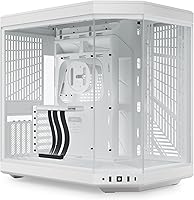
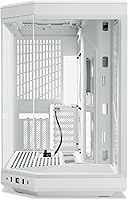
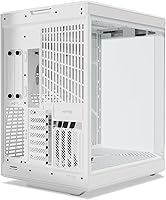
The HYTE Y70 Mid-Tower ATX Gaming Case arrived in early 2024 as a serious contender in the premium case market, built for builders who treat their rig as much as a display object as a computing tool. The visual anchor is a 3-piece panoramic glass shroud that wraps the front and side, giving an almost gallery-like view of your components. The Snow White colorway is one of four available options, and it suits minimalist builds particularly well. This is not a case that dresses up mediocre engineering — the dual-chamber layout and cooling capacity suggest HYTE put real thought into what sits behind the glass.

Features & Benefits

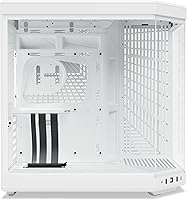
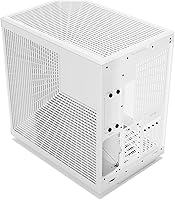
The dual-chamber interior is probably the most practical thing about the Y70. Your PSU, drives, and cable bulk get tucked into the rear chamber, leaving the main compartment looking clean without heroic cable-management effort. Vertical GPU mounting is standard here, and the included PCIe 4.0 x16 riser cable is a genuine perk — most cases at this tier make you buy one separately. On cooling, the side accommodates a 360mm radiator up to 125mm thick, and the floor fits three 120mm or two 140mm fans; that is serious potential, though actual temps depend on your specific setup. Tool-less panels and labeled front-panel headers round out a build experience that feels unusually considered.

Best For

The Y70 is squarely aimed at builders for whom the rig is part of the room's aesthetic, not just hidden under a desk. If you are planning a custom water-cooling loop, the 360mm side radiator support plus the floor fan positions give you real flexibility without compromising how the build looks through the glass. It is also an obvious fit if you own a large flagship GPU and want it displayed vertically rather than buried sideways. Streamers and creators who keep their PC on camera will appreciate the Snow White variant in particular. One note: at over 24 pounds, this showcase mid-tower is not built for portability, so plan accordingly.

User Feedback

Buyers consistently rate this dual-chamber case near the top, and the feedback reflects that. The most common praise centers on build quality and fit — people note the glass panels feel substantial, the tolerances are tight, and nothing rattles or flexes. The included PCIe riser gets called out repeatedly as a welcome inclusion that most competitors skip. On the constructive side, some buyers flag the weight and footprint as larger than expected, which can matter on smaller desks. A handful of reviewers mention that real-world thermal performance depends heavily on fan configuration — the capacity is there, but you have to use it intentionally. Overall, the rating reflects genuine satisfaction rather than marketing momentum.

Pros

  • Included PCIe 4.0 x16 riser cable is a genuine cost offset that most competing cases skip entirely.
  • The 3-piece panoramic glass creates an architectural, gallery-style view of your components.
  • Dual-chamber layout keeps PSU cabling and storage completely hidden from the display side.
  • 360mm side radiator support gives water-cooling builders serious loop flexibility without visual compromise.
  • Tool-less panels and labeled front-panel headers make the build process noticeably less frustrating.
  • Steel chassis and tempered glass construction feel premium and structurally solid throughout.
  • Four colorway options, including Snow White, support coherent light-themed or monochromatic builds.
  • Floating storage sleds and Velcro straps in the rear chamber make cable organization genuinely manageable.
  • Vertical four-slot GPU bracket puts flagship graphics cards exactly where you want them displayed.
  • The tactile clicky power switch is a small but satisfying detail that reflects overall build attention.

Cons

  • No fans are included, so reaching the case's cooling potential requires additional spend out of the box.
  • Front I/O lacks a USB-C port, which is an increasingly noticeable omission at this price tier.
  • At over 24 pounds, transporting the Y70 to LAN events or moving setups is genuinely cumbersome.
  • White finish and large glass panels require consistent cleaning to stay display-worthy over time.
  • Very thick triple-fan GPUs may sit uncomfortably close to the glass in vertical mounting position.
  • Limited 3.5-inch drive mounting makes this a poor fit for builders with large spinning-drive storage needs.
  • Real-world thermal performance depends heavily on fan configuration — the capacity is there, but it requires planning.
  • Replacement glass panels are not universally stocked, raising concerns for long-term ownership if breakage occurs.
  • The large glass panel size can feel awkward to handle solo during repeated removal and reinstallation.
  • No acoustic dampening material is included, so loud fans or mechanical drives project noise freely.

Ratings

The HYTE Y70 Mid-Tower ATX Gaming Case earns its high standing through consistent real-world praise from builders across skill levels, and the scores below reflect AI analysis of verified global buyer reviews with spam, bot-driven, and incentivized submissions actively filtered out. Ratings capture both what this showcase mid-tower genuinely excels at and where it asks for compromise, so you get an honest picture before committing.

Build Quality
93%
Reviewers across the board describe the steel chassis and tempered glass panels as feeling genuinely premium — not just visually but structurally. The tight manufacturing tolerances come up repeatedly; people note that panels align cleanly, nothing flexes unexpectedly, and the overall assembly feels closer to boutique case territory than mass-market mid-tower.
A small number of buyers reported minor imperfections on glass edges or paint finish upon unboxing, suggesting quality control is strong but not perfectly consistent across every unit. At this weight and price, any cosmetic flaw stings more than it would on a budget alternative.
Aesthetic Design
96%
This is the category the Y70 was built to win. The 3-piece panoramic glass wraps the build in a way that genuinely looks architectural rather than utilitarian, and the Snow White colorway in particular photographs and streams exceptionally well. Builders consistently say the case makes their components look more expensive than they are.
The bold visual identity is also a commitment — the Y70 has a very specific look, and it does not suit every build style or room aesthetic. Buyers who prefer a more subdued, blacked-out appearance will find the panoramic glass and design language polarizing rather than universally appealing.
Cooling Potential
78%
22%
The radiator real estate here is among the most generous in its class — a 360mm side mount at 125mm depth plus floor fan slots for three 120mm units gives water-cooling builders serious flexibility without having to compromise the display-facing side of the build. Enthusiasts planning custom loops consistently highlight this as a deciding factor.
Real-world thermal results vary considerably depending on fan selection, loop configuration, and how aggressively the rear chamber is managed. Several reviewers note the case delivers on cooling capacity only when you invest in proper airflow setup — out of the box with no fans included, it requires additional spend and planning to reach its potential.
Vertical GPU Mounting
91%
The four-slot vertical GPU bracket paired with an included PCIe 4.0 x16 riser cable is one of the Y70s most tangible practical advantages. Most competing cases at this tier either omit the riser entirely or include a slower-gen version, making this a meaningful included value for anyone running a high-end card who wants it front and center.
The vertical mount works best with GPUs of a specific thickness range — very thick three-fan cards can sit close to the glass, which some builders find visually tight and potentially raises questions about long-term airflow to the GPU cooler. Users with particularly large cards should verify clearance before committing.
Cable Management
88%
The dedicated rear chamber is genuinely well thought-out, with reusable Velcro straps, floating storage sleds, and enough depth to hide a realistic amount of cabling without forcing it. Builders who have wrestled with cramped rear compartments in other cases describe the Y70 experience as noticeably less frustrating.
The rear chamber does have spatial limits when paired with modular PSU cables on larger power supplies, and a handful of reviewers note that achieving a truly clean front-facing result still takes meaningful effort. The tools are there, but cable management mastery still depends on the builder.
Build Experience
89%
Tool-less panel removal and labeled front-panel headers make the actual assembly process more accessible than you would expect from a case this visually complex. Experienced builders appreciate the labeled connectors specifically, since they reduce the small frustrations that add up over a long build session.
Despite the tool-less design, removing and repositioning the large glass panels repeatedly during a build can feel slightly awkward given their size and weight. First-time builders may also find the dual-chamber layout requires more planning upfront to route cables cleanly between chambers.
Value for Money
74%
26%
The included PCIe 4.0 riser cable is a legitimate offset against the premium price — that component alone typically costs a meaningful amount when purchased separately, and getting a color-matched version bundled in adds to the perceived value. For builders already planning vertical GPU display, the math improves noticeably.
At its price point, this dual-chamber case sits at the upper edge of what many builders consider reasonable for a chassis alone, and the absence of included fans means the actual cost of a complete, cooling-capable build is substantially higher than the sticker price suggests. Price-sensitive buyers consistently flag this as a sticking point.
Size & Footprint
67%
33%
The dimensions are generous enough to accommodate E-ATX-adjacent builds with large coolers and lengthy GPUs without the usual clearance compromises. Builders planning ambitious water-cooling configurations appreciate having room to work rather than fighting geometry at every step.
At 18.5 x 12.5 x 18.5 inches and over 24 pounds, this showcase mid-tower demands desk or floor real estate that not everyone has. Several reviewers mention it was larger and heavier than anticipated, which matters both for permanent placement and for anyone who transports their rig to LAN events.
Front I/O & Connectivity
72%
28%
Having both USB 2.0 and USB 3.0 ports on the front panel covers most day-to-day peripheral needs without requiring trips to the back of the case. The placement feels logical and is easy to reach in typical desk setups.
The absence of a USB-C front port is a genuine omission at this price tier, and it is mentioned with some regularity in reviews from builders running newer peripherals or wanting to charge devices quickly. For a 2024 premium release, this stands out as a spec gap that competitors are increasingly closing.
Panel & Glass Durability
82%
18%
The tempered glass panels feel substantial and well-secured during normal use, and buyers who have owned the case for several months report no issues with the mounting hardware loosening or the glass developing visible marks under typical handling. The metal framework around the glass adds meaningful protection.
Large tempered glass panels are inherently vulnerable to cracking if the case is dropped or knocked during a move, and replacement panels for a case this specific are not universally stocked. A few reviewers raise concern about long-term availability of replacement parts given the unique 3-piece configuration.
Noise Dampening
61%
39%
The solid steel side walls on the rear chamber do absorb some mechanical noise from drives and PSU fans, and the overall dense construction means the case does not resonate as a amplifier the way thinner-gauge alternatives can.
There is no dedicated acoustic foam or noise-dampening material included, which is increasingly common at this price point in cases that prioritize thermals. Builders running loud fans or older mechanical drives will notice the Y70 does not do much to contain that noise, which is a trade-off for the open panoramic glass design.
Storage Options
69%
31%
The floating storage sled system in the rear chamber keeps drives organized and accessible, and the modular approach means you are not locked into a fixed configuration if your storage setup changes over time.
For builders with large NAS-style storage arrays or multiple 3.5-inch drives, the available mounting positions are limited compared to full-tower alternatives. The Y70 was clearly designed with NVMe-primary builds in mind, so traditional spinning drive users may find themselves working around its storage layout.
Colorway & Finish Consistency
80%
20%
The Snow White colorway is one of the more cohesive light-themed finishes available in a mid-tower at this level — the painted steel, glass framing, and included riser canopy all share a consistent tone that holds up well against white CPU coolers, RAM, and GPU shrouds.
White finishes are notoriously prone to showing dust, fingerprints, and yellowing over time, and some long-term owners note that regular cleaning is non-negotiable to maintain the look. The glass surfaces in particular require consistent upkeep to stay display-worthy.

Suitable for:

The HYTE Y70 Mid-Tower ATX Gaming Case is purpose-built for enthusiast builders who treat their PC as a centerpiece rather than a utility box tucked under a desk. If you are planning a custom water-cooling loop, the side-mounted 360mm radiator support combined with the floor fan positions gives you genuine flexibility to build a high-performance thermal setup without sacrificing the visual presentation. Streamers, YouTubers, and content creators who keep their rig in frame will find the panoramic glass and cohesive Snow White finish genuinely camera-ready in a way that most cases simply are not. Builders pairing a flagship GPU with a vertical mount will also get the most out of the included PCIe 4.0 riser, which removes a meaningful extra cost that competing cases quietly pass on to you. In short, this dual-chamber case rewards builders who are investing seriously in both components and presentation.

Not suitable for:

The HYTE Y70 Mid-Tower ATX Gaming Case is a harder sell for anyone working with a tight total-build budget, since the chassis price alone sits at the upper end of the mid-tower market and no fans are included, meaning cooling costs stack on top. At over 24 pounds and with a footprint of 18.5 x 18.5 inches on the base, this showcase mid-tower is not a practical choice for small desks, dorm setups, or anyone who regularly transports their rig to LAN events. Builders with large collections of 3.5-inch mechanical drives will also find the storage options somewhat limited, as the Y70 was clearly designed around NVMe-first configurations. If you prefer a traditional horizontal GPU orientation or simply do not care about vertical display, the premium you pay for the riser and vertical bracket does not translate into value for your specific build. Finally, buyers who expect front-panel USB-C connectivity at this price tier will be disappointed, as the Y70 ships without it.

Specifications

  • Case Type: Mid-Tower ATX form factor designed to accommodate ATX, Micro-ATX, and Mini-ITX motherboards.
  • Dimensions: The case measures 18.5″ x 12.5″ x 18.5″ (Length x Width x Height), making it a substantial footprint on any desk or floor mount.
  • Weight: Fully unloaded, the chassis weighs 24.3 pounds, reflecting its dense steel and multi-panel tempered glass construction.
  • Materials: Primary structure is steel with a painted finish, complemented by three separate tempered glass panels forming the panoramic viewing enclosure.
  • Glass Configuration: A 3-piece panoramic tempered glass arrangement wraps the front and main side of the case for an unobstructed interior view.
  • GPU Mounting: Supports vertical GPU installation in a 4-slot configuration with a color-matched PCIe 4.0 x16 riser cable included in the box.
  • Side Radiator: The side panel supports radiators up to 360mm in length with a maximum thickness of 125mm for the radiator and fan stack combined.
  • Top Radiator: The top mount is adjustable and accommodates radiators with a maximum combined thickness of 68mm.
  • Floor Fan Support: The bottom of the case supports either three 120mm fans or two 140mm fans, each up to 32mm thick.
  • Front I/O Ports: Front panel connectivity includes two USB 2.0 ports and two USB 3.0 ports; no USB-C port is present.
  • Power Switch: A tactile, clicky blue power button is mounted on the front panel, providing clear physical feedback on activation.
  • PSU Mounting: Power supply unit mounts at the bottom of the chassis in a standard bottom-mount orientation, isolated within the rear chamber.
  • Chamber Layout: Dual-chamber design separates the primary motherboard and GPU area from the PSU, storage, and cable routing zone in the rear.
  • Cable Management: The rear chamber features dedicated cable routing space with pre-installed reusable Velcro straps for organized cable bundling.
  • Storage: Floating storage sleds are housed in the rear chamber, supporting standard 2.5″ and 3.5″ drive form factors.
  • Colorways: Available in four colorways: Snow White, Midnight Black, and two additional variants, allowing coordination with themed builds.
  • Panel Removal: All primary panels are tool-less, designed to be removed and reattached without a screwdriver for easier access during and after builds.
  • Motherboard Support: Compatible with ATX, Micro-ATX, and Mini-ITX motherboard standards; no E-ATX support is officially listed.
  • Release Date: The Y70 was first made available in February 2024, positioning it as a current-generation premium mid-tower release.
  • Fans Included: No case fans are included in the box; all fan slots require separately purchased fans to achieve the case's maximum cooling potential.

Related Reviews
HYTE Y40 Mid-Tower ATX Case
85%
89%
Design & Aesthetics
86%
Cooling Performance
91%
Cable Management
93%
Build Quality
72%
GPU Compatibility
More
SZSKYING ATX Mid-Tower PC Gaming Case
85%
92%
Cooling Performance
85%
Build Quality
88%
Aesthetic Design
74%
Cable Management
78%
Ease of Setup
More
MOROVOL P5 Mid Tower ATX PC Case
75%
83%
Airflow Performance
88%
Value for Money
71%
Build Quality
58%
Noise Levels
84%
Ease of Assembly
More
Montech X5 ATX Mid-Tower Gaming PC Case
86%
88%
Build Quality
93%
Airflow & Cooling
87%
Aesthetics & Design
84%
Installation Ease
90%
GPU Compatibility
More
darkFlash DRX70 ATX Mid-Tower PC Case
74%
83%
Value for Money
78%
Airflow Performance
89%
Ease of Assembly
67%
RGB Lighting
71%
Build Quality & Materials
More
FOIFKIN F1 ATX Mid-Tower Gaming PC Case
84%
92%
Cooling Performance
88%
Ease of Assembly
90%
Aesthetics/Design
85%
Internal Space and Compatibility
89%
Airflow Efficiency
More
MUSETEX K2
MUSETEX K2
80%
93%
Aesthetic Design
74%
Build Quality & Materials
78%
Cooling Performance
61%
Fan Noise Levels
91%
Hardware Compatibility & Clearance
More
KEDIERS C570 Pink ATX Mid Tower Gaming Case
83%
88%
Cooling Performance
83%
Build Quality
90%
Ease of Assembly
85%
RGB Lighting
87%
Design Aesthetics
More
Zalman Chronix Mid Tower ATX PC Case
78%
88%
Aesthetic Design
74%
Build Quality
83%
Included ARGB Fans
86%
Cooling Potential
84%
Internal Clearance
More
Zalman i3 NEO ATX Mid Tower PC Case
80%
72%
Build Quality
88%
Value for Money
68%
Airflow Performance
91%
Aesthetics & Design
83%
Ease of Assembly
More

FAQ

It is a genuine PCIe 4.0 x16 riser, not a rebranded older cable. That matters if you are running a current-generation GPU, since a PCIe 3.0 riser can introduce a measurable bandwidth bottleneck in some workloads. The included cable is also color-matched to the case, which is a small but appreciated detail.

The Y70 is designed with vertical GPU display as its primary orientation, and the layout heavily favors that setup. Horizontal mounting is technically possible, but the case architecture and visual design make the vertical position the intended and better-supported option. If you have a strong preference for horizontal GPU mounting, this case may not be the best fit.

No fans are included. The HYTE Y70 Mid-Tower ATX Gaming Case ships as a chassis only, so you will need to budget for fans separately to actually use the cooling capacity the case supports. Given the number of fan and radiator positions available, that additional spend can add up quickly if you plan to populate all the slots.

The tool-less panels and labeled front-panel headers genuinely help, and most builders find the process manageable. The dual-chamber layout does require a bit more planning than a traditional single-chamber case, since you need to think about routing cables between chambers early in the build. Overall it is not a beginner trap, but it rewards some upfront planning.

Most triple-fan cards fit, but clearance between the GPU shroud and the glass panel can be tight depending on the card's specific thickness and cooler design. Some users with particularly thick flagship cards report the GPU sitting quite close to the glass, which may affect airflow to the GPU cooler in enclosed conditions. It is worth checking your specific GPU dimensions against HYTE's published clearance specs before buying.

White painted steel and large glass panels both show dust and fingerprints readily, so regular maintenance is essentially non-negotiable if you want it looking sharp. A soft microfiber cloth handles the glass well, and compressed air helps with fan grilles and edges. If you are not willing to clean your case every week or two, a darker colorway might be a more forgiving choice.

No, E-ATX is not officially supported. The Y70 accommodates ATX, Micro-ATX, and Mini-ITX boards, but if you are running a larger workstation-class motherboard, you will need to look at a full-tower alternative.

Both work well. All-in-one 360mm coolers fit cleanly in the side mount, and the 125mm total thickness allowance is enough to clear most thick radiator and fan combinations. Custom loop builders will appreciate the added depth for thicker radiators, but AIO users are well-served too.

The rear chamber is generous compared to most mid-towers, but a large modular PSU with many thick cables will test its limits. The Velcro straps and routing channels help significantly, but achieving a truly flat, clean result requires patience and some cable organization discipline. Expect to spend real time back there if you want it tidy.

It depends on what you value. The dual-chamber layout, included PCIe 4.0 riser, and panoramic glass are all worthwhile features even in an air-cooled build, but the price is easier to justify when you are using the full radiator capacity. If you are building a straightforward air-cooled system and aesthetics are not a priority, there are more cost-efficient mid-towers that will serve you just as well functionally.

Where to Buy