Overview

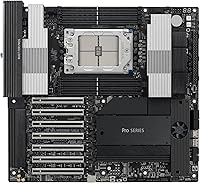
The ASUS Pro WS WRX90E-SAGE SE Workstation Motherboard is built for professionals who have outgrown what consumer platforms can offer — VFX pipelines, AI research rigs, and multi-GPU compute workloads that demand headroom most boards simply cannot provide. Built around the AMD WRX90 chipset and the sTR5 socket, it supports Threadripper PRO 7000 WX-Series processors with up to 96 cores, putting it firmly in near-server territory. The EEB form factor signals the board's intent clearly: this is not something you drop into a mid-tower. Launched in late 2023, it carries a price that reflects its positioning. With only 53 ratings averaging 3.6 stars, it serves a small but technically uncompromising buyer pool.
Features & Benefits

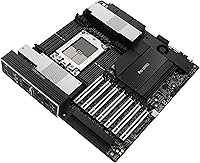
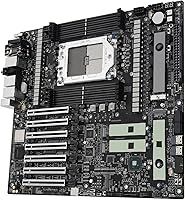
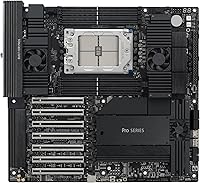
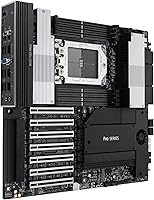
What makes the WRX90E-SAGE SE genuinely compelling is how much professional infrastructure ASUS packed onto a single board. Seven PCIe 5.0 x16 slots allow for true multi-accelerator configurations — whether that means running four GPUs for a rendering farm or pairing compute cards with NVMe storage expanders. Memory support extends to 2TB of ECC R-DIMM DDR5, which matters enormously in workloads like large-scale simulation or genomic analysis where data integrity is non-negotiable. The 32-stage VRM with dual 8-pin CPU connectors handles the sustained power demands of a fully loaded 96-core processor without thermal throttling concerns. Dual 10GbE LAN ports and rear USB4 connectivity round out a profile built for high-throughput production environments, not casual use.

Best For

This Threadripper PRO workstation board is a natural fit for a specific set of professionals. Machine learning engineers building local training infrastructure will appreciate the multi-slot PCIe layout and the ECC memory ceiling, which removes the need for dedicated server hardware in many workflows. 3D artists and VFX studios running simultaneous GPU render nodes benefit from the slot density and the board's validated 24/7 operation profile. HPC and scientific computing users get the memory integrity guarantees that ECC R-DIMM provides at scale. IT managers overseeing small production facilities will find the IPMI remote management genuinely useful for monitoring a headless workstation without physical access. It is simply not the right board for general desktop or gaming builds.

User Feedback

Among users who have reviewed this ASUS workstation motherboard, feedback divides fairly predictably along experience lines. Those who got it running smoothly tend to praise the build quality and physical layout — slot spacing in particular gets mentioned as thoughtful for dense multi-card configurations. On the other side, a meaningful share of frustration centers on BIOS and firmware experiences: some users encountered compatibility hurdles requiring updates before the platform stabilized, a known friction point on niche workstation boards. ASUS Control Center Express draws mixed reactions — functional for basic remote management tasks, but short of what mature enterprise tools typically deliver. At only 53 reviews, the sample is too small for firm conclusions, though it consistently suggests patience and technical familiarity are prerequisites.

Pros

  • Seven PCIe 5.0 x16 slots give serious multi-accelerator builds the lane count they actually need.
  • Up to 2TB of ECC R-DIMM DDR5 support is a ceiling few professional workloads will ever hit.
  • The 32-stage VRM handles sustained all-core Threadripper PRO loads without flinching.
  • Hardware-level IPMI via a dedicated BMC controller is a genuinely useful feature for remote workstation management.
  • Dual 10GbE LAN ports are well-suited for high-throughput network-attached storage environments.
  • Active cooling on the VRM, chipset, and M.2 slots addresses thermal management proactively under prolonged load.
  • SlimSAS NVMe support and four M.2 slots provide flexible, high-speed storage configurations.
  • Validated for 24/7 continuous operation, which matters in production and compute environments running overnight jobs.
  • Rear USB4 40Gbps Type-C ports add modern high-bandwidth peripheral connectivity to an already dense feature set.
  • Users who successfully configure the platform consistently praise the physical build quality and thoughtful slot spacing.

Cons

  • The 3.6-star average, even on a small review count, reflects real friction that prospective buyers should not ignore.
  • BIOS and firmware setup on the Threadripper PRO platform has a steep learning curve that catches less experienced builders off guard.
  • ASUS Control Center Express feels underdeveloped compared to what professionals coming from true enterprise tools expect.
  • The EEB form factor limits compatible cases to full workstation and server chassis, ruling out most standard tower builds.
  • The WRX90E-SAGE SE requires a substantial total system investment — the board alone is only the starting point.
  • Memory configuration at this scale requires careful QVL validation; not all DDR5 kits will simply work out of the box.
  • With only 53 user reviews, long-term reliability data remains thin for such a significant infrastructure purchase.
  • No Wi-Fi is included, which may require additional hardware in environments without wired Ethernet runs.
  • Power infrastructure requirements — dual 8-pin CPU connectors plus a full-size workstation PSU — add planning overhead.
  • Buyers expecting responsive post-purchase support from ASUS for a niche workstation platform may find turnaround times frustrating.

Ratings

The ASUS Pro WS WRX90E-SAGE SE Workstation Motherboard scores below were generated by AI after analyzing verified purchaser reviews worldwide, with spam, bot activity, and incentivized feedback actively filtered out. This is a niche platform with a technically demanding buyer base, and the ratings honestly reflect both where the hardware delivers at a professional level and where real-world friction has caused genuine frustration. Nothing has been smoothed over — the strengths and the pain points are both represented as users actually experienced them.
PCIe Slot Density
94%
Seven PCIe 5.0 x16 slots give ML engineers and multi-GPU render farm builders a level of flexibility that is essentially unmatched on any consumer or prosumer board. Users building out local inference clusters or attaching multiple compute accelerators alongside NVMe expanders consistently call this the board's single most decisive advantage.
Fully populating all seven slots demands a chassis with exceptional airflow engineering and a PSU well beyond typical workstation builds, adding significant planning overhead. A small number of users noted that bandwidth sharing behavior under maximum slot occupancy was not always clearly documented upfront.
Memory Capacity
91%
Support for up to 2TB of ECC R-DIMM DDR5 is a genuine differentiator for genomics researchers, simulation engineers, and large-dataset ML pipelines where running out of physical memory is a real operational bottleneck. Users in scientific computing workflows specifically praised this ceiling as removing a constraint they had previously worked around with server hardware.
The R-DIMM DDR5 requirement means memory costs are substantially higher than consumer DDR5, and not all kits behave identically at boot without a BIOS update first. Several users reported spending time troubleshooting memory training issues before achieving stable operation at rated speeds.
Power Delivery
88%
The 32-stage VRM paired with dual 8-pin CPU connectors handles sustained all-core loads from 96-core Threadripper PRO processors without the voltage sag or throttling that plagues less robust designs. Users running overnight compute jobs and extended renders reported consistent stability that gives confidence in 24/7 deployment scenarios.
The dual 8-pin power requirement means older workstation PSUs may need to be replaced, and the VRM fan, while effective, adds to the acoustic profile in quieter studio environments. A few users wished ASUS provided more granular VRM fan curve control out of the box.
BIOS & Firmware
58%
42%
Once properly configured and updated, the BIOS offers the depth of tuning options that experienced Threadripper PRO builders expect, including granular memory training controls and IPMI configuration. Users who took the time to flash the latest firmware before first boot reported a noticeably smoother initial experience.
This is where the WRX90E-SAGE SE draws the most consistent criticism — early firmware had compatibility edge cases that left some users unable to POST with certain memory kits or CPU steppings until updates were applied. The BIOS interface itself is functional but not especially intuitive for users coming from enterprise board backgrounds, and documentation gaps made troubleshooting more time-consuming than it should be.
Remote Management (IPMI)
72%
28%
Having hardware-level IPMI via the AST2600 BMC controller is a meaningful practical feature for IT managers overseeing headless workstations in remote facilities or data closets — power cycling, health monitoring, and console access without physical presence is genuinely useful in production deployments. Users managing small compute clusters appreciated the dedicated LAN port keeping management traffic isolated.
ASUS Control Center Express, the companion software layer, consistently receives mixed reactions — it covers the basics but feels less mature than purpose-built enterprise BMC interfaces users may be accustomed to from server-grade hardware. Several reviewers noted the software required additional configuration steps that were not well documented to unlock features that should have been straightforward.
Thermal Management
83%
Active cooling across the VRM, chipset, and M.2 slots — including dedicated fans and thermal pads — keeps component temperatures under control even during extended all-core workloads and sustained NVMe throughput. Users running continuous rendering pipelines noted that the M.2 drives maintained consistent performance without the thermal throttling that passively cooled designs often exhibit.
The combination of active VRM, chipset, and M.2 fans contributes to a higher overall system noise floor than a purely passive design would, which matters in studio environments where acoustic comfort is a priority. A small number of users reported one of the smaller onboard fans developing noise earlier than expected.
Build Quality
87%
Physical construction of the WRX90E-SAGE SE is one of the areas where positive user feedback is most consistent — the board feels substantial and well-engineered, with reinforced slot construction and thoughtful component spacing that accommodates dense multi-card builds without feeling cramped. The PCIe Q-release mechanism for GPU removal is a small but appreciated quality-of-life detail in builds that require frequent card swapping.
At this investment level, some users expected included accessories to be more comprehensive, with reports of a relatively minimal bundle for a flagship workstation board. The sheer physical size of the EEB format, while expected, made installation in even compatible chassis a two-person job in some configurations.
Network Connectivity
89%
Dual 10GbE ports alongside a 2.5GbE port give this board a networking profile that suits high-throughput shared storage environments, team collaboration setups, and NAS-connected render pipelines without needing an add-in card. Users working with 10GbE network-attached storage reported that the onboard LAN delivered consistent throughput that matched what the drives behind it could sustain.
There is no onboard Wi-Fi, which is a deliberate choice for a wired-first workstation platform but does require an add-in adapter for any wireless use case. The dedicated IPMI LAN port means users need to account for three separate Ethernet connections in their rack or desk setup, which occasionally caught builders off guard during planning.
M.2 & NVMe Storage
84%
Four M.2 slots including one PCIe 5.0 capable slot give this board strong internal storage flexibility, and the inclusion of SlimSAS NVMe support allows for expansion beyond onboard slots in high-density storage builds. Users building out fast local scratch storage for video editing or dataset staging appreciated having PCIe 5.0 NVMe access without an add-in card.
M.2 slot accessibility with a fully populated board — multiple large GPUs installed — can be physically awkward, and a few users noted that reinstalling the M.2 heatsinks after a drive swap required more patience than expected. Slot bandwidth sharing behavior under heavy simultaneous PCIe and M.2 load was a concern raised by a small subset of users.
USB & Peripheral I/O
76%
24%
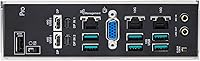
The two rear USB4 40Gbps Type-C ports add modern high-bandwidth peripheral connectivity that supports fast external NVMe enclosures and high-resolution display daisy-chaining, which is useful in production workstation setups where every rear-panel port matters. Users connecting Thunderbolt-compatible peripherals found the USB4 implementation reliable once drivers were correctly installed.
The overall rear USB port count is modest given the board's scale — two USB 2.0 ports and two USB4 ports leaves limited room for the collection of peripherals a full workstation deployment often requires. Users needing more conventional USB-A 3.x rear ports found themselves relying on front-panel headers or hub solutions.
Platform Compatibility
66%
34%
Within its intended scope — Threadripper PRO 7000 WX-Series processors and validated ECC R-DIMM DDR5 memory — the WRX90E-SAGE SE has a broad QVL and has been validated for 24/7 operation, which matters significantly for production deployments where stability is non-negotiable. Linux users in scientific computing environments have found the underlying hardware well-supported by major distributions.
The sTR5 platform is a closed ecosystem with a very specific set of compatible CPUs and memory types, meaning a purchasing mistake — wrong CPU generation or wrong memory class — results in a non-functional build with no easy workaround. Users who did not verify the QVL in advance encountered compatibility issues that took significant time to diagnose and resolve.
Setup Experience
54%
46%
Builders who approached the WRX90E-SAGE SE with prior Threadripper PRO or server-class platform experience generally found the setup process manageable, and those who preloaded the latest BIOS version before installing hardware reported fewer first-boot complications. The physical board layout and labeling are clear enough for experienced integrators to work through without constant reference to the manual.
For anyone without deep experience on high-end workstation platforms, the initial setup of this board has a real learning curve — firmware updates, memory training, and IPMI configuration all require deliberate attention that a straightforward consumer board does not. This is likely the single largest contributor to the board's below-average overall star rating, particularly among buyers who underestimated the platform's complexity.
Value Proposition
69%
31%
For the specific professional use cases this board targets — multi-GPU ML infrastructure, HPC compute, large-scale simulation — the feature set is genuinely hard to match on any competing platform at a comparable price point, and users who needed every capability it offers described it as a justified investment. The 24/7 validation and ECC support add operational value that consumer boards simply cannot replicate.
For anyone who does not fully utilize the multi-slot PCIe layout, the massive memory ceiling, or the IPMI management infrastructure, the price-to-utility ratio becomes difficult to justify against more accessible workstation alternatives. The added cost of the required ECC R-DIMM memory, compatible chassis, and high-capacity PSU means the total system cost significantly exceeds the board price alone.

Suitable for:

The ASUS Pro WS WRX90E-SAGE SE Workstation Motherboard is purpose-built for professionals whose workloads have genuinely outgrown what consumer or prosumer platforms can handle. AI and machine learning engineers building local multi-accelerator training rigs will find the seven PCIe 5.0 x16 slots and the massive ECC DDR5 memory ceiling directly relevant to their infrastructure needs, removing the cost and complexity of going full server-rack. VFX artists and 3D studios running GPU-heavy rendering pipelines benefit from the validated 24/7 operation profile and the slot density that lets multiple high-end graphics cards coexist without compromise. Scientific computing teams and HPC users requiring ECC memory integrity for data-critical workloads — genomics, large-scale simulation, financial modeling — will appreciate that this board treats those requirements as defaults, not optional extras. IT professionals managing a remotely deployed workstation will find the hardware-level IPMI implementation via the AST2600 BMC controller a practical operational tool, not a checkbox feature.
Not suitable for:

The ASUS Pro WS WRX90E-SAGE SE Workstation Motherboard is a poor match for anyone outside professional compute workloads, and that boundary is worth taking seriously before committing at this price tier. Enthusiast builders chasing gaming performance will find no advantage here — the sTR5 platform is not optimized for single-threaded gaming responsiveness, and the EEB form factor demands a full workstation or server chassis that most home setups do not accommodate. Content creators whose pipelines run on a single GPU and standard consumer memory configurations are paying for infrastructure they will never use. Buyers expecting a plug-and-play experience should also be cautious: early user feedback suggests the Threadripper PRO platform has a meaningful learning curve around BIOS configuration and firmware updates, and the ASUS Control Center Express software has not consistently impressed users expecting enterprise-grade polish. If your workload does not genuinely stress PCIe lane counts, ECC memory, or remote management capabilities, more approachable platforms will serve you better at a fraction of the investment.
Specifications

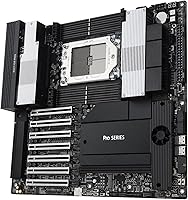
  • Form Factor: The board uses the EEB form factor, measuring 14.96 x 14.33 x 3.31 inches, requiring a full workstation or server-class chassis.
  • CPU Socket: AMD sTR5 socket supports Threadripper PRO 7000 WX-Series processors, scaling up to 96 cores on a single chip.
  • Chipset: Built on the AMD WRX90 chipset, designed specifically for professional workstation and high-performance compute environments.
  • Memory Support: Accepts DDR5 ECC R-DIMM modules up to 2TB total capacity in a 1DPC configuration, with a rated speed of 2242 MHz.
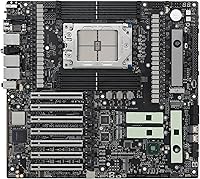
  • PCIe Slots: Seven full-length PCIe 5.0 x16 slots enable dense multi-GPU or multi-accelerator deployments for compute and rendering workloads.
  • M.2 Storage: Four M.2 slots are provided, including one operating at PCIe 5.0 speeds, each equipped with heatsinks, active fans, and thermal pads.
  • NVMe Expansion: SlimSAS NVMe support extends internal storage connectivity beyond what the onboard M.2 slots alone can provide.
  • Network Ports: Dual 10 Gigabit Ethernet ports and one 2.5 Gigabit Ethernet port are included for high-throughput wired networking.
  • USB Connectivity: Two rear-panel USB4 Type-C ports deliver up to 40Gbps each for connecting high-bandwidth peripherals or external storage.
  • Legacy USB: Two USB 2.0 ports are available for connecting lower-bandwidth devices such as input peripherals or management dongles.
  • Power Delivery: A 32-stage VRM paired with dual 8-pin CPU power connectors sustains stable voltage delivery under prolonged all-core workstation loads.
  • Remote Management: Hardware-level IPMI is implemented via an AST2600 BMC controller with a dedicated LAN port, supported by ASUS Control Center Express software.
  • VRM Cooling: Active heatsink and fan cooling covers the VRM, chipset, and M.2 slots to manage thermals during extended high-load operation.
  • OS Support: Officially supported on Windows 10 and Windows 11; Linux compatibility depends on driver availability for specific workstation distributions.
  • Launch Date: The board was first made available in December 2023 as part of the WRX90 platform generation targeting AMD Threadripper PRO 7000 WX-Series CPUs.

Related Reviews
ASUS Pro WS W680-ACE IPMI Workstation Motherboard
80%
91%
Build Quality
88%
ECC Memory Support
86%
IPMI & Remote Management
84%
PCIe 5.0 Slot Performance
67%
BIOS Depth & Usability
More
ASUS Prime X470-Pro ATX Motherboard
78%
88%
BIOS Usability
63%
VRM & Power Delivery
91%
Out-of-Box Stability
71%
RAM Compatibility
86%
Storage Expansion
More
ASUS TUF Gaming Z890-PRO WiFi Motherboard
82%
91%
Build Quality
93%
Power Delivery
84%
BIOS Experience
87%
Memory Compatibility
82%
Thermal Management
More
ASUS Prime B550M-A Micro ATX Motherboard
78%
91%
Value for Money
83%
Build Quality
93%
Ease of Installation
88%
BIOS & Software
79%
CPU Compatibility
More
ASRock H670M Pro RS Micro ATX Motherboard
76%
88%
Value for Money
81%
Build Quality
84%
BIOS Experience
91%
Storage Options
34%
Overclocking Support
More
ASRock B650 PRO RS ATX Motherboard
74%
88%
Value for Money
83%
Build Quality
84%
BIOS Experience
86%
Installation & Setup
71%
CPU Power Delivery
More
ASUS B660-PLUS D4 ATX Motherboard
83%
88%
Value for Money
84%
Build Quality
86%
BIOS Experience
91%
Connectivity
93%
Storage Capability
More
ASUS Prime Z790-P ATX Motherboard
79%
91%
BIOS & Software Usability
86%
Build Quality & PCB
89%
Storage Expansion
84%
Connectivity & USB
83%
Network Performance
More
MSI B550-A PRO V1 ATX Motherboard
79%
91%
Value for Money
86%
Build Quality
88%
BIOS Experience
84%
CPU Compatibility
83%
Memory Compatibility
More
GIGABYTE B760I AORUS PRO Mini-ITX Motherboard
80%
93%
Feature Density
81%
VRM & Power Delivery
72%
Thermal Management
91%
Connectivity & I/O
67%
DDR5 Compatibility
More

FAQ

No, the WRX90E-SAGE SE uses the AMD sTR5 socket, which is physically and architecturally incompatible with earlier sTRX4-based Threadripper PRO 5000 WX-Series CPUs. You need a Threadripper PRO 7000 WX-Series processor to use this board.

This board is specifically validated for ECC R-DIMM DDR5, which is a registered buffered module type distinct from the unbuffered DDR5 used in consumer platforms. Standard consumer DDR5 sticks are not compatible here — you will need server or workstation-grade R-DIMMs, and checking the official QVL list before purchasing memory is strongly recommended.

In theory yes, but practical multi-GPU builds require careful planning around physical clearance, chassis airflow, and power delivery. The board supports the slot density, but you will need a chassis with sufficient bay spacing and a high-capacity workstation PSU that can handle the combined load of multiple high-TDP cards.

EEB is a large form factor used in full workstation towers and some server chassis — it is notably larger than standard ATX and will not fit in typical consumer mid-tower or full-tower cases. You need to specifically look for cases that list EEB compatibility, which usually means purpose-built workstation enclosures from brands like Fractal, Phanteks, or server chassis manufacturers.

The AST2600 BMC controller gives you genuine hardware-level remote access — you can monitor system health, manage power states, and access the system console even if the OS is unresponsive, which is genuinely valuable for a headless workstation or a machine in a remote facility. That said, user feedback suggests ASUS Control Center Express, the companion software, is functional but not on par with more mature enterprise BMC interfaces. For basic remote oversight it works; for complex fleet management, expectations should be tempered.

Several users in early feedback have noted that initial BIOS configuration and firmware updates on this platform require attention, particularly when setting up memory profiles or ensuring CPU microcode compatibility with newer Threadripper PRO 7000 chips. It is worth checking the ASUS support page for the latest BIOS version before building, and following AMD and ASUS platform guides carefully during first setup.

No, there is no onboard Wi-Fi on this board. Given its workstation positioning, wired Ethernet via the dual 10GbE and 2.5GbE ports is the intended connectivity path. If your deployment environment requires wireless, you would need to add a PCIe Wi-Fi adapter, though on a board this dense, conserving PCIe slots for compute workloads is usually the priority.

A fully populated Threadripper PRO 7000 WX-Series build on this platform under sustained all-core load can draw well over 1000 watts total system power depending on how many GPUs or accelerators are installed. ASUS recommends a workstation-grade PSU, and for multi-GPU builds it is prudent to budget for a unit significantly above your calculated peak draw to maintain stability.

ASUS officially lists Windows 10 and Windows 11 as supported operating systems, but the WRX90 platform is widely used in Linux-based scientific computing and AI development environments. In practice, major Linux distributions including Ubuntu and RHEL have functional support for the underlying hardware, though for specific IPMI software features and ASUS utilities, Windows is the more fully supported environment.

The rating reflects the reality that this is a complex professional platform with a demanding setup process, and not every buyer comes to it with the experience level it requires. Common friction points in reviews center on BIOS configuration complexity, memory compatibility validation, and software tooling that does not always match enterprise expectations — not fundamental hardware defects. Buyers who approach it with appropriate preparation and technical background tend to report a much more positive experience.