Overview

The ASUS Prime B760M-A AX sits squarely in the mid-range of Intel's B760 ecosystem, aimed at builders who want a capable, modern platform without stretching their budget toward premium Z790 territory. Launched in early 2023, it remains a solid choice for 12th, 13th, and even 14th Gen Intel processors. What makes this microATX board stand out at its price point is the pairing of Wi-Fi 6 and 2.5Gb Ethernet — connectivity features you'd normally expect to pay more for. It's not an overclocking powerhouse, and it never claimed to be. Its #12 bestseller rank in Computer Motherboards reflects how well it actually fits real builders' needs.
Features & Benefits

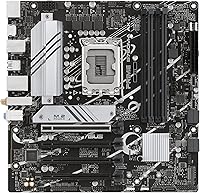
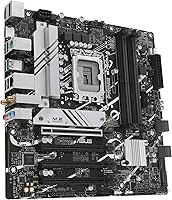
The Prime B760M-A AX packs a lot into a compact frame. DDR5 memory support tops out at 7000 MHz on paper, though real-world XMP stability depends heavily on your specific kit — temper expectations accordingly. Both M.2 slots come with individual heatsinks, keeping NVMe drives cooler under sustained read/write loads without any extra effort on your part. The networking story is genuinely strong: Wi-Fi 6 handles wireless while the Realtek 2.5Gb port gives wired users a meaningful jump over standard gigabit. VRM and PCH heatsinks, combined with Fan Xpert 2+ software, provide reasonable thermal headroom for non-K processors. USB coverage rounds out nicely with USB 3.2 Gen 2 on the rear and a front-panel Type-C header.

Best For

This ASUS build platform is a natural fit for anyone assembling a mid-range Intel machine in a smaller case. Gamers on a budget will appreciate a stable, feature-complete foundation without paying for Z790 overclocking headroom they'd realistically never use. It also works well for remote workers and creators who want a compact, connectivity-rich workstation — fast LAN and Wi-Fi 6 have real day-to-day value, not just spec sheet appeal. First-time builders will find the BIOS approachable and well-documented. One honest caveat: the microATX format means only two RAM slots and fewer PCIe expansion options than a full ATX board, so think through your build requirements before committing.

User Feedback

With a 4.5-star average across over 840 reviews, this microATX board has earned clear buyer confidence. Recurring praise focuses on how approachable the BIOS is, particularly for first-time DDR5 builders, and how straightforward the physical installation process tends to be. On the critical side, some users report that sustained loads on power-hungry non-K processors push VRM temperatures higher than comfortable — case airflow matters more here than on a beefier board. A handful of reviewers also flagged slower memory training times at aggressive XMP profiles. Wi-Fi signal quality draws occasional mixed comments, with antenna placement being the main variable. For the intended audience, though, overall satisfaction runs consistently high.

Pros

  • Wi-Fi 6 and 2.5Gb Ethernet together at this price point is genuinely rare and practical.
  • Both M.2 slots include heatsinks, keeping NVMe drives cooler with zero extra cost.
  • The BIOS is consistently praised as one of the most approachable in its class for new builders.
  • Supports 12th, 13th, and 14th Gen Intel CPUs, giving the platform solid longevity.
  • MicroATX size fits a wide range of cases without sacrificing meaningful connectivity.
  • DDR5 support with OptiMem II trace routing provides stable daily performance at mainstream XMP profiles.
  • Fan Xpert 2+ software gives hands-on fan curve control without needing third-party tools.
  • Strong brand reliability and widespread community support make troubleshooting straightforward.
  • USB 3.2 Gen 2 on the rear and a front-panel Type-C header cover most modern peripheral needs.
  • A 4.5-star average across hundreds of verified builds reflects consistent real-world satisfaction.

Cons

  • VRM thermals become a concern under sustained heavy loads with higher-TDP processors.
  • DDR5 memory training at aggressive XMP speeds above 6000 MHz can be slow and inconsistent.
  • Wi-Fi antenna placement on the rear I/O can limit signal strength in certain case or desk configurations.
  • Armoury Crate software installs background processes many users find unnecessary and prefer to skip.
  • Only two DIMM slots means no upgrade path beyond the initial memory configuration.
  • PCIe 5.0 M.2 support is absent, which will matter as next-gen NVMe drives become mainstream.
  • Single full-length PCIe slot restricts builders who want multiple expansion cards.
  • LGA 1700 is at the end of its roadmap, limiting future CPU upgrade options beyond 14th Gen.
  • The onboard RGB is minimal — it provides headers for other components but little visual impact on its own.
  • Realtek 2.5Gb LAN carries slightly higher CPU overhead than Intel-based controllers in latency-sensitive workloads.

Ratings

The ASUS Prime B760M-A AX has been evaluated using AI-driven analysis of verified global buyer reviews, with spam, bot-generated, and incentivized feedback actively filtered out to ensure the scores reflect genuine ownership experiences. Across hundreds of real builds — from budget gaming rigs to compact home workstations — both the strengths and the frustrations of this microATX board are transparently captured below. The ratings cover everything from daily usability to long-term reliability, so you get an honest picture before committing to a platform.
Value for Money
91%
Buyers consistently point out that landing Wi-Fi 6, 2.5Gb Ethernet, and dual M.2 slots at this price bracket is genuinely unusual. For builders assembling a capable mid-range Intel machine on a tight budget, the feature-to-cost ratio is hard to argue with.
A small number of reviewers feel that if you strip out the networking extras and only need a basic DDR5 board, cheaper alternatives exist. The value calculus shifts depending on how much you actually use the wireless and high-speed LAN features.
Connectivity & I/O
88%
The combination of rear USB 3.2 Gen 2, a front-panel USB 3.2 Gen 1 Type-C header, and four USB 2.0 ports covers most real-world peripheral setups without adapters. Builders working from home especially appreciate having fast rear ports for external drives and hubs.
A few users building content creation workstations noted the absence of USB4 or Thunderbolt support, which limits high-bandwidth peripheral options. Those coming from older platforms with more rear USB-A ports also found the total port count tighter than expected.
Wireless Performance
79%
21%
Wi-Fi 6 performs reliably for everyday tasks like video calls, streaming, and online gaming when the antenna is positioned correctly. Most buyers in apartments or smaller offices report stable connections without needing a wired fallback.
Antenna placement is a recurring complaint — the rear antenna connectors sit low on the I/O panel, and in tighter cases or desk setups the signal can degrade noticeably. A handful of reviewers in larger homes or multi-floor setups found the range underwhelming compared to dedicated Wi-Fi 6 cards.
DDR5 Memory Compatibility
74%
26%
For builders using mainstream DDR5 kits at standard XMP profiles up to around 5600–6000 MHz, the Prime B760M-A AX handles training reliably. The OptiMem II trace routing does appear to contribute to stable daily operation once settings are dialed in.
Pushing kits toward the advertised 7000 MHz ceiling is where things get inconsistent — some users report extended boot times during memory training, and not all high-frequency kits post successfully on the first attempt. It is a B760 chipset limitation as much as a board-specific issue, but buyers should verify QVL compatibility before purchasing aggressive DDR5 kits.
BIOS & Setup Experience
93%
This is one of the most frequently praised aspects across user reviews. First-time builders in particular highlight how intuitive ASUS's UEFI interface is, with clear labeling and a well-structured EZ Mode for quick setup. Experienced builders appreciate the depth available in Advanced Mode without needing to dig through obscure menus.
Occasional reports of BIOS updates introducing minor fan curve glitches exist, though these were typically resolved in follow-up firmware releases. A small group of users found the initial Resizable BAR and XMP toggle locations unintuitive without consulting the manual.
VRM & Thermal Performance
67%
33%
For non-K Intel processors running at stock or mildly tuned settings, the VRM heatsink handles thermals without breaking a sweat. Builders pairing this board with a Core i5-13400 or i5-12400 in a well-ventilated case report no thermal warnings during regular workloads.
Running power-hungry chips like an i7-13700 or i9-13900 under sustained loads pushes VRM temperatures into ranges that make enthusiasts uncomfortable. Several reviewers noted throttling during extended Cinebench or video encoding sessions, and the board was not designed to be a heavy workstation platform for high-TDP chips.
Build Quality & PCB Construction
83%
The physical construction feels solid for the price point — reinforced PCIe slot, sturdy M.2 heatsink retention, and a clean black PCB that holds up well during installation. Builders handling the board during assembly describe it as rigid with no flex concerns.
The rear I/O shield integration, while convenient, has drawn minor criticism for tolerances that feel slightly loose on some units. A few users also noted that the VRM heatsink mounting could benefit from more contact pressure for better heat dissipation at higher loads.
M.2 Storage Support
89%
Two M.2 slots with dedicated heatsinks is a practical win for builders wanting both an OS drive and a secondary storage drive without extra purchases. NVMe drives running sustained workloads showed noticeably lower temperatures compared to boards without heatsink coverage.
Both slots support PCIe 4.0, which is appropriate for the platform, but builders hoping for PCIe 5.0 M.2 support will need to step up to a Z790 board. Slot access also requires removing the heatsink screws, which some users found fiddly during drive swaps.
Wired Networking
92%
The Realtek 2.5Gb Ethernet port is a genuine highlight for wired users — content creators transferring large files across a local NAS and gamers on a wired connection both benefit from the headroom over standard gigabit. Driver stability on Windows 11 has been consistently reported as solid.
Realtek's 2.5Gb controller historically carries a minor reputation for higher CPU overhead compared to Intel-based LAN controllers, though in practice this rarely affects real-world performance. Users running extremely latency-sensitive professional applications sometimes prefer Intel LAN, but for the vast majority of buyers this is a non-issue.
Fan & Cooling Control
81%
19%
Fan Xpert 2+ gives builders meaningful control over fan curves without requiring third-party software, which is appreciated by users who want a quiet machine during light tasks. The hybrid fan headers accommodate both PWM and DC fans, reducing compatibility headaches.
Fan Xpert 2+ is functional but lags behind the more capable thermal tuning software found on ASUS's higher-end ROG and TUF boards. Some users building quieter systems found the default auto fan curves ran fans higher than necessary until manually adjusted.
RGB & Aesthetics
77%
23%
For builders who want RGB integration, the onboard Aura Sync support with a Gen 2 addressable header and standard RGB header keeps everything in one ecosystem without dongles or separate controllers. The clean black PCB complements most mid-tower builds.
The onboard RGB lighting itself is minimal — it is primarily a header provider rather than a visually bold board on its own. Builders expecting striking out-of-the-box lighting will be underwhelmed; the appeal here is ecosystem compatibility, not standalone aesthetics.
Form Factor Practicality
84%
The microATX footprint makes it an excellent fit for mid-tower and compact cases without requiring a full ATX layout. Builders putting together living room PCs or small desk setups consistently appreciate the size-to-feature balance this board strikes.
The two-DIMM limitation is the most commonly cited trade-off of the microATX format. Builders who want four RAM slots for future capacity upgrades or quad-channel aesthetics will need to look at ATX alternatives. The single full-length PCIe slot also restricts multi-GPU or multi-card expansion scenarios.
CPU Compatibility & Platform Longevity
86%
Supporting 12th, 13th, and 14th Gen Intel processors on a single socket makes this ASUS build platform a practical long-term investment for buyers who might upgrade their CPU down the road without replacing the board. The LGA 1700 socket covers a wide range of budget to high-performance chips.
Intel's platform transition means LGA 1700 is unlikely to extend beyond 14th Gen, which caps the long-term upgrade ceiling. Buyers planning to stay on Intel's newer Arrow Lake and beyond will eventually need a new board and socket, which tempers the longevity argument somewhat.
Documentation & Software Support
82%
18%
ASUS provides a well-structured manual and active community forum support, which first-time builders found helpful when navigating DDR5 XMP settings or troubleshooting POST issues. The Armoury Crate software suite covers most use cases in one place.
Armoury Crate continues to attract criticism for being a bloated software package that installs additional background processes many users do not need. Some reviewers opt to skip it entirely and manage fan curves through the BIOS alone, which is workable but requires more hands-on configuration.

Suitable for:

The ASUS Prime B760M-A AX is built for the kind of builder who wants a capable, modern Intel platform without spending on features they will never actually use. If you are putting together a home or office PC around a 12th or 13th Gen Intel Core i5 or i7 non-K processor, this microATX board gives you everything you realistically need — DDR5 memory, fast NVMe storage across two M.2 slots, and networking that most competing boards at this price tier simply do not offer. Remote workers and content creators who rely on a stable wired connection will find the 2.5Gb Ethernet a meaningful daily upgrade over standard gigabit, while Wi-Fi 6 handles wireless setups without compromise. First-time builders benefit from ASUS's well-documented BIOS and an active support community that makes DDR5 configuration far less intimidating than it used to be. Gamers building a budget-to-mid-range rig who want a stable, no-fuss foundation will also find this board hits the right balance, especially inside a compact mid-tower case.
Not suitable for:

If your build revolves around squeezing maximum performance from an unlocked K-series processor, the ASUS Prime B760M-A AX will leave you frustrated — the B760 chipset does not support CPU overclocking, and no amount of BIOS tuning will change that. Enthusiasts planning a high-TDP workstation build around chips like the i9-13900K should look at a Z790 board with beefier VRM hardware, as sustained heavy workloads can push this board's power delivery into uncomfortable thermal territory. Builders who want four RAM slots for future capacity expansion or dual-channel flexibility will hit a hard wall here — the microATX format means two DIMM slots only, full stop. If you need a rich rear I/O with USB4, Thunderbolt, or multiple full-length PCIe slots for professional expansion cards, this ASUS build platform simply was not designed for that use case. Finally, anyone planning to chase DDR5 memory frequencies above 6000 MHz should verify kit compatibility carefully before buying, as results at the upper XMP range can be inconsistent.
Specifications

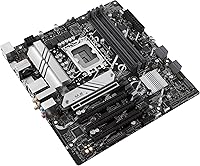
  • Form Factor: MicroATX layout measuring 10.83 x 10.35 inches, compatible with microATX and full ATX cases.
  • CPU Socket: Intel LGA 1700 socket supporting 12th, 13th, and 14th Gen Intel Core processors.
  • Chipset: Intel B760 chipset, which supports memory overclocking but does not allow CPU core frequency overclocking.
  • Memory Support: Two DDR5 DIMM slots supporting up to 64 GB of RAM with XMP profiles up to 7000 MHz.
  • Storage Slots: Two M.2 slots (both PCIe 4.0) with individual heatsinks included for thermal management of NVMe drives.
  • Wired Networking: Realtek 2.5 Gigabit Ethernet controller providing up to 2.5 Gbps wired network throughput.
  • Wireless: Integrated Wi-Fi 6 (802.11a/b/g/n/ac/ax) with Bluetooth, requiring the included external antenna for optimal signal.
  • Rear USB: Rear I/O includes USB 3.2 Gen 2 ports (10 Gbps) alongside four USB 2.0 ports for legacy peripherals.
  • Front Panel USB: Onboard header for USB 3.2 Gen 1 Type-C (5 Gbps) front-panel connectivity on compatible cases.
  • Display Output: One DisplayPort output on the rear I/O for connecting a monitor directly when using Intel integrated graphics.
  • PCIe Slots: One full-length PCIe 4.0 x16 slot for a discrete graphics card, plus additional lower-bandwidth expansion slots.
  • RGB Headers: One Addressable Gen 2 (ARGB) header and one standard Aura RGB header for connecting compatible LED strips and accessories.
  • Fan Headers: Multiple hybrid fan headers supporting both PWM and DC fans, managed through Fan Xpert 2+ software or the BIOS.
  • VRM Cooling: Dedicated VRM heatsink and PCH heatsink installed at the factory to manage power delivery and chipset temperatures.
  • Dimensions: Board measures 10.83 x 10.35 x 2.58 inches and weighs approximately 2 pounds.
  • Color & Finish: Matte black PCB with a clean, understated aesthetic designed to complement most build color schemes.
  • BIOS Features: UEFI BIOS with EZ Mode for quick setup and Advanced Mode for granular control over memory, fan, and power settings.
  • Memory Tuning: ASUS OptiMem II technology uses optimized PCB trace routing to improve DDR5 signal integrity and XMP stability.

Related Reviews

ASUS Prime B550M-A Motherboard
84%
91%
Value for Money
89%
Build Quality
85%
Performance (Gaming)
93%
Ease of Installation
88%
Compatibility with AMD Ryzen Processors
More
ASUS Prime A520M-K Motherboard
84%
94%
Value for Money
88%
Performance with Ryzen CPUs
91%
Ease of Setup
79%
Expansion Capabilities
90%
Compatibility with Ryzen Processors
More
ASUS Prime Z390-P Motherboard
84%
88%
Performance
91%
Build Quality & Durability
85%
Overclocking Capabilities
84%
PCIe Expansion Slots
87%
Cooling & Fan Control
More
ASUS Prime Z790-P Motherboard
86%
88%
Performance
92%
Build Quality
95%
Compatibility with Intel 12th/13th Gen Processors
89%
Expansion Slot Variety
85%
Networking Speed (2.5G LAN)
More
ASUS Prime X470-Pro Motherboard
86%
89%
Overall Performance
91%
Build Quality
85%
Ease of Setup
88%
Cooling Efficiency
83%
RGB Customization
More
ASUS Prime H610M-A D4-CSM Motherboard
86%
89%
Value for Money
91%
Performance for Business Tasks
88%
Ease of Use/Setup
85%
Reliability
84%
PCIe 4.0 Speed
More
Asus Prime X299-A II ATX Motherboard
86%
91%
Power Delivery Stability
89%
Cooling Performance
75%
RGB Lighting Customization
86%
Ease of Installation
94%
Connectivity & Expansion
More
ASUS PRIME Z890-P WIFI Motherboard
87%
93%
Performance
89%
Build Quality
90%
Power Delivery Stability
91%
Connectivity (Wi-Fi 7, Thunderbolt 4)
68%
BIOS Interface Usability
More
ASUS Prime A520M-A II/CSM Motherboard
85%
91%
Value for Money
88%
Build Quality
85%
Ease of Installation
87%
Performance in Entry-Level Builds
83%
Cooling Efficiency
More
ASUS Prime AP201 Micro ATX Case
86%
91%
Cooling Performance
89%
Ease of Assembly
88%
Cable Management
86%
Build Quality
87%
Thermal Management
More

FAQ

Yes, the ASUS Prime B760M-A AX ships with BIOS support for 12th and 13th Gen Intel processors already in place, so in most cases you can drop in a 13th Gen CPU and boot without a prior BIOS update. If you are using a 14th Gen chip, you may need to flash a newer BIOS first, so it is worth checking the ASUS support page for your specific CPU before building.
Not in the traditional sense. The B760 chipset does not support CPU core frequency overclocking, so even if you install an unlocked K-series processor, you will not be able to push it beyond base and boost clocks. Memory overclocking via XMP profiles is fully supported, though, so DDR5 kits with XMP specs can be enabled through the BIOS.

The board has two DDR5 DIMM slots, supporting a maximum of 64 GB using two 32 GB modules. There is no option for four slots on this microATX layout, so if you anticipate needing more memory capacity down the line, factor that into your planning now.

For most mainstream DDR5 kits rated at 5600–6000 MHz, XMP activation tends to be reliable on this ASUS build platform once you enable the profile in the BIOS. Pushing beyond 6400 MHz becomes more variable — memory training times can get longer, and not every kit will post cleanly on the first attempt. Checking the ASUS QVL (Qualified Vendor List) for your specific kit is genuinely worth the few minutes it takes.

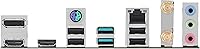
ASUS includes the Wi-Fi antennas in the box, so you do not need to purchase them separately. They connect to the two antenna ports on the rear I/O panel. Positioning matters though — placing the antennas upright and away from the case panel gives you noticeably better signal than leaving them flat or tucked against a metal surface.

Just remove the heatsink screws, seat your M.2 drive, and reattach the heatsink. The thermal pads are pre-applied on some units, but it is worth confirming this when you open the box. Both slots support PCIe 4.0 NVMe drives, and the heatsinks are effective enough that most users see no throttling under sustained workloads.

Honestly, ASUS's UEFI BIOS is one of the better experiences for first-time builders. The EZ Mode gives you a clean overview of temperatures, fan speeds, and basic settings without requiring any technical knowledge to navigate. If you want to dig deeper into memory settings or fan curves, the Advanced Mode is there, and ASUS's online documentation covers most scenarios clearly.

Yes, the board includes SATA ports for connecting 2.5-inch or 3.5-inch drives, so existing hard drives and SATA SSDs are fully compatible alongside the M.2 NVMe slots.

The rear DisplayPort connects to Intel integrated graphics, not the discrete GPU. Once a dedicated graphics card is installed in the PCIe slot, you should connect your monitor directly to the outputs on the GPU rather than the motherboard's rear I/O. Some configurations allow simultaneous use for multi-monitor setups, but this requires enabling iGPU Multi-Monitor in the BIOS.

For everyday workloads, gaming, and even moderate content creation, the VRM heatsink manages thermals without major issues when paired with decent case airflow. Where things get trickier is during sustained, high-TDP scenarios — long Cinebench runs or extended video encoding sessions. The Prime B760M-A AX was designed around non-K processors running close to stock settings, so pairing it with a high-TDP chip and expecting it to hold indefinitely under full load is pushing it beyond its intended design envelope.