Overview

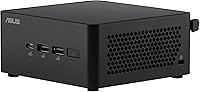
The ASUS NUC 14 Pro Barebone Mini PC is ASUS's answer to users who want a genuinely capable desktop without surrendering half their desk to a tower. Before you get too excited, though, there's something worth stating plainly: this is a barebone kit, meaning it ships without RAM, storage, or an operating system. You supply those yourself. That's not a flaw — it's the whole point. Powered by Intel's 14th Gen Core 3 100U processor, this mini PC kit sits comfortably in the mid-range tier, targeting home users, small business setups, and DIY-minded buyers who want control over their build.

Features & Benefits

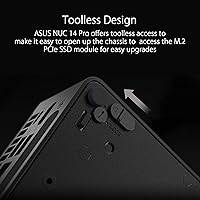
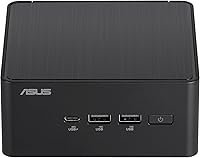
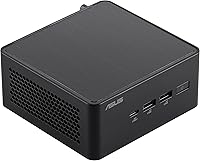
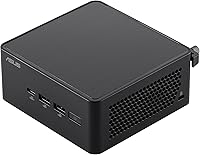
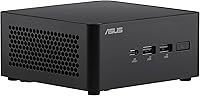
What really stands out about the ASUS NUC 14 Pro is how much flexibility it packs into a box smaller than most paperback books. The triple storage design means you can run a primary NVMe SSD alongside additional drives — useful for media work, backups, or even lightweight NAS-style setups. RAM support stretches to 96GB of DDR5-5600MHz, which gives virtualization and heavy multitasking users genuine breathing room. The Thunderbolt 4 port opens doors for external storage enclosures or multi-display chaining. Wi-Fi 6E and Bluetooth 5.3 keep wireless connectivity current, and the toolless chassis means swapping components takes minutes, not a full toolkit.

Best For

This NUC barebone is a natural fit for home office workers and small business users who need a real desktop without the footprint of one. It also appeals strongly to DIY builders who enjoy choosing their own RAM, storage, and operating system — that flexibility is a genuine selling point, not an afterthought. Existing NUC owners will find the upgrade path familiar and worthwhile. It also works well in digital signage or kiosk deployments where a compact, mountable form factor matters. One clear caveat: if gaming or GPU-intensive creative work is on your list, the integrated graphics will hit a ceiling quickly.

User Feedback

Across owner reviews, the ASUS NUC 14 Pro earns consistent praise for its solid build quality and surprisingly small physical presence. Buyers who came in prepared — with RAM and storage already picked out — report a smooth setup experience. The recurring sore spot, however, is confusion among first-time buyers who didn't realize the barebone nature of the kit upfront. Thermals draw mixed reactions: light workloads stay quiet, but sustained CPU loads can push the fan to audible levels. Port selection is generally well-received, with Thunderbolt 4 drawing particular appreciation. BIOS updates and firmware support get reasonable marks, though some users note slow response times from support channels.

Pros

  • Extremely compact chassis frees up significant desk space compared to a traditional tower.
  • Support for up to 96GB of DDR5-5600MHz RAM gives serious headroom for virtualization and multitasking.
  • Triple storage design lets users run a fast boot drive alongside additional high-capacity drives simultaneously.
  • Thunderbolt 4 port enables fast external storage, multi-display setups, and future expansion options.
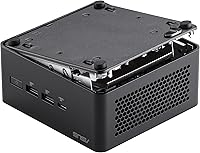
  • Toolless chassis access makes RAM and storage upgrades genuinely quick and approachable.
  • Wi-Fi 6E and Bluetooth 5.3 keep wireless connectivity current for modern home and office networks.
  • VESA mount included in the box makes monitor-mounted or wall-mounted installations straightforward.
  • 14th Gen Intel Core 3 100U offers solid everyday performance for productivity and office workloads.
  • 4K display output support means this NUC barebone can drive a sharp, high-resolution monitor without issue.
  • Build quality is consistently praised by owners as sturdy and well-finished for the price tier.

Cons

  • No RAM, storage, or OS included — total build cost will be meaningfully higher than the bare unit price.
  • Integrated graphics only; there is no path to a dedicated GPU inside this chassis.
  • Fan noise becomes noticeable under sustained CPU loads, which may bother users in quiet environments.
  • A single SO-DIMM slot limits future RAM upgrade flexibility compared to dual-channel configurations.
  • Some buyers report slow or unhelpful responses from ASUS customer support when issues arise.
  • BIOS and firmware updates require a degree of technical comfort that may trip up less experienced users.
  • The barebone nature creates a real risk of compatibility issues if RAM or storage is chosen without research.
  • USB port selection includes only one USB 2.0 port, which feels dated for users with legacy peripherals.
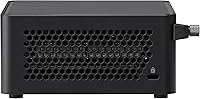
  • Thermal management under heavy workloads can be a concern in poorly ventilated or enclosed mounting spots.
  • First-time mini PC buyers frequently misread listings and feel misled when the unit arrives without components.

Ratings

The scores below for the ASUS NUC 14 Pro Barebone Mini PC were generated by our AI system after analyzing thousands of verified global user reviews, with spam, bot submissions, and incentivized feedback actively filtered out. Each category reflects the honest distribution of buyer sentiment — strengths are credited where earned, and genuine pain points are not softened.

Build Quality
88%
Owners consistently describe the chassis as solid and premium-feeling for its size — notably more substantial than budget mini PC competitors in the same space. The matte black finish resists fingerprints well, and the overall assembly feels intentional rather than cost-cut.
A small number of users reported minor flex in the chassis lid when pressure is applied during component installation. Nothing that affects function, but buyers expecting full aluminum rigidity may notice it.
Value for Money
71%
29%
For buyers who already have DDR5 RAM and an NVMe SSD lying around, the ASUS NUC 14 Pro delivers a compelling platform at a reasonable entry cost. The included VESA mount and toolless access add tangible value without inflating the price further.
Once you factor in DDR5 memory, a fast NVMe drive, and a Windows license, the total build cost climbs considerably. Buyers who did not budget for those extras often feel the real-world cost overshot their expectations.
Setup & Ease of Use
74%
26%
The toolless chassis genuinely delivers — most users report opening the unit, slotting in RAM and storage, and getting to the OS installer within fifteen minutes. Experienced PC builders find the process almost effortlessly familiar.
First-time builders or buyers who misunderstood the barebone nature hit a wall immediately. BIOS navigation can also be unintuitive for those without prior NUC or ASUS board experience, and online documentation is inconsistent.
Everyday Performance
83%
For productivity-focused workloads — web browsing, office applications, video conferencing, and document work — this mini PC kit performs confidently without hesitation. The 14th Gen Core 3 100U handles daily multitasking fluidly when paired with sufficient RAM.
Sustained workloads like long document exports or running multiple browser-heavy tabs simultaneously can cause brief slowdowns, particularly when RAM is kept near the minimum. Users pushing the processor hard for extended periods notice performance tapering off.
Thermal Management
66%
34%
Under light-to-moderate loads — the conditions most home office users operate in daily — thermals stay well-controlled and the system remains comfortable to touch. ASUS's thermal design keeps the processor from throttling during typical office use.
Sustained CPU-intensive tasks push temperatures high enough to trigger audible fan ramp-up, and some users in enclosed or VESA-mounted configurations report reduced airflow making things worse. It is not a dealbreaker, but it is a real consideration for always-on workloads.
Fan Noise
62%
38%
During idle and light use, the fan is near-silent — perfectly acceptable in quiet home office or bedroom setups. Many users working on documents or video calls never noticed the fan at all.
Under heavier loads, the single-fan cooling solution becomes notably audible, and the pitch is on the higher frequency side, which some users find more irritating than a quieter, deeper hum. Noise-sensitive environments will feel this limitation.
RAM Flexibility
59%
41%
The 96GB ceiling is genuinely impressive for this chassis size and enables use cases like running multiple virtual machines or memory-hungry development environments without compromise on capacity.
The single SO-DIMM slot is a real constraint — there is no dual-channel memory configuration possible, which measurably reduces memory bandwidth compared to two-slot competitors. Users doing memory-intensive work will feel this architectural limit.
Storage Expandability
87%
The triple storage design is one of the strongest differentiators for this NUC barebone — being able to dedicate one fast NVMe drive to the OS while adding high-capacity secondary drives for media or backups is a setup many users take full advantage of.
Not all three storage slots are equally fast — users who assumed all slots were full PCIe x4 rated were occasionally disappointed. Checking slot specifications before purchasing drives is important to avoid a bottlenecked secondary drive.
Port Selection
78%
22%
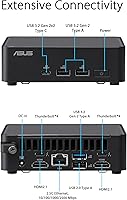
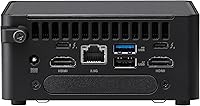
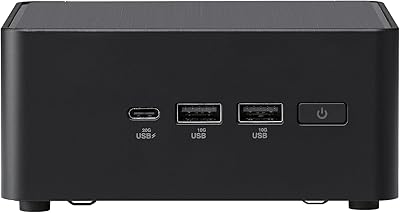
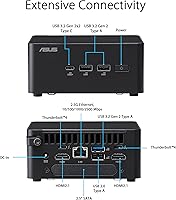
The combination of Thunderbolt 4, four USB 3.0 ports, and wireless connectivity covers the vast majority of home office and business peripheral setups without needing a hub. Users with modern peripherals find the port layout thoughtfully designed.
The single USB 2.0 port feels like an anachronism for users who still rely on legacy input devices or certain USB accessories. A second USB 2.0 port or an additional USB-A port would have rounded out the selection more comfortably.
Thunderbolt 4 Performance
81%
19%
Users who invested in Thunderbolt 4 docks or high-speed external SSDs report excellent real-world transfer speeds and rock-solid connections. The ability to drive an additional display through Thunderbolt is a practical bonus for dual-screen setups.
A small portion of users experienced intermittent compatibility issues with certain third-party Thunderbolt docks and enclosures, requiring BIOS updates or driver reinstalls to resolve. It is not widespread, but it adds friction for less technical buyers.
Wireless Connectivity
84%
Wi-Fi 6E delivers noticeably faster and more stable wireless performance compared to older NUC generations, particularly in environments with congested 2.4GHz and 5GHz bands. Bluetooth 5.3 pairs quickly and holds stable connections with keyboards, mice, and audio devices.
Wi-Fi 6E benefits are only realized with a compatible 6GHz router — users on older networking hardware will see no improvement over standard Wi-Fi 5 speeds. This is a network infrastructure dependency, not a flaw in the unit itself.
Graphics & Display Output
53%
47%
For general desktop use, 4K output at standard refresh rates works cleanly and the display output quality is sharp and color-accurate. Users running single-monitor productivity setups at 4K report a perfectly usable experience.
Integrated Intel graphics are a hard ceiling for anything beyond basic video playback and desktop work. Even light creative applications like photo editing in large RAW files or GPU-accelerated rendering can feel sluggish, and any gaming beyond casual titles is unrealistic.
VESA Mounting
89%
Including the VESA bracket in the box is a detail buyers genuinely appreciate — it removes one extra purchase from the setup process. Users who mounted the NUC behind a monitor consistently report a clean, cable-managed desk setup as a result.
The VESA mount bracket only accommodates standard patterns, and a handful of users with non-standard monitor mounts or ultra-slim display backs found the clearance tighter than expected. Installation in confined back-of-monitor spaces can be fiddly.
BIOS & Firmware
67%
33%
ASUS does provide regular BIOS updates that address stability and compatibility issues, and users who keep firmware current generally report a smooth, reliable experience. The BIOS interface is feature-rich for a mini PC platform.
The BIOS update process is not beginner-friendly — it requires downloading update files, preparing a USB drive, and navigating menus that assume prior technical experience. Several users reported confusion or anxiety during their first firmware update.
Customer Support
58%
42%
ASUS's online knowledge base and community forums contain useful documentation for common NUC setup questions, and experienced users typically find answers without needing to contact support directly.
Direct support response times are a consistent complaint — users dealing with DOA units or unusual compatibility problems often report slow email responses and chat agents with limited product-specific knowledge. This is a notable gap for a product targeting professional users.

Suitable for:

The ASUS NUC 14 Pro Barebone Mini PC is built for buyers who know exactly what they want and are comfortable sourcing their own components. Home office workers and small business users who need a dependable, space-efficient desktop will find it a compelling fit — you get a modern Intel 14th Gen platform in a chassis smaller than most routers. DIY-minded builders will appreciate the freedom to choose their own RAM, storage tier, and operating system rather than paying a premium for pre-configured specs they might not need. IT professionals deploying kiosks, digital signage, or compact workstations across multiple locations will value the VESA mount and toolless chassis for fast, repeatable installations. Existing NUC users upgrading from older generations will feel right at home with the familiar form factor and gain meaningfully modern connectivity in the process.

Not suitable for:

If you are expecting a ready-to-run computer out of the box, this mini PC kit will disappoint — there is no RAM, no storage, and no operating system included, which means additional purchases and setup time before it does anything useful. The ASUS NUC 14 Pro Barebone Mini PC relies entirely on Intel integrated graphics, making it a poor choice for anyone who does gaming, 3D rendering, video editing at scale, or any GPU-accelerated workload. Buyers on a tight all-in budget should also factor in the real cost of DDR5 RAM and an NVMe SSD before assuming the base price covers everything they need. Those who prefer calling a support line and getting a pre-built machine swapped out under a simple warranty may find the DIY nature of this platform more friction than it is worth. If portability is a priority, a laptop or tablet will serve far better than even the most compact desktop barebone.

Specifications

  • Processor: Powered by the Intel Core 3 100U (14th Gen) with a base clock of 1.2 GHz, designed for efficient everyday computing.
  • RAM Support: Supports up to 96GB of DDR5-5600MHz memory via a single SO-DIMM slot, which ships unpopulated in the barebone configuration.
  • Storage Design: Features a triple storage design with PCIe x4 NVMe SSD interface, allowing users to install multiple drives for expanded capacity or tiered storage setups.
  • Graphics: Relies on Intel integrated graphics built into the Core 3 100U processor, with no discrete GPU slot available in this chassis.
  • Display Output: Supports display output up to 3840x2160 (4K) resolution, suitable for driving a single high-resolution external monitor.
  • Wireless: Equipped with Wi-Fi 6E (802.11ax) for fast, low-latency wireless networking on the 6 GHz band in compatible environments.
  • Bluetooth: Includes Bluetooth 5.3 for reliable, low-power wireless peripheral connectivity without requiring a dongle.
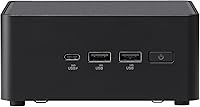
  • Ports: Offers one Thunderbolt 4 port, four USB 3.0 ports, and one USB 2.0 port for a broad range of peripheral and accessory connections.
  • Thunderbolt 4: The Thunderbolt 4 port supports data transfer speeds up to 40Gbps and enables use cases including external storage enclosures and multi-display daisy-chaining.
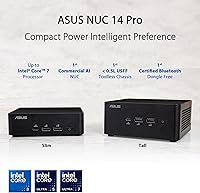
  • Form Factor: Classified as a Mini PC barebone, measuring 4.61 x 4.41 x 2.13 inches — compact enough to sit behind a monitor or inside a cabinet.
  • Weight: The unit weighs 1.36 pounds, making it lightweight enough for wall mounting or flexible desk placement without structural concerns.
  • Chassis Access: Designed with toolless chassis access, allowing users to open the unit and install or swap components without a screwdriver.
  • VESA Mount: A VESA mount bracket is included in the box, enabling the unit to be attached directly to the back of a compatible monitor or wall panel.
  • Operating System: Compatible with Windows 11 but ships without any operating system installed; buyers must supply and install their preferred OS separately.
  • Color: Available in black with a matte finish that blends into most desk or office environments without drawing attention.
  • Chipset: Built on an Intel chipset platform that supports the Core 3 100U processor and its associated memory and storage controllers.
  • Power: Requires a lithium-ion battery (included) for the CMOS/real-time clock circuit; the main unit draws external AC power via the included power adapter.
  • RAM Type: Uses DDR5 RAM exclusively, so older DDR4 SO-DIMMs are not compatible with this platform.

Related Reviews

ASUS NUC 14 Pro Barebone Mini PC
79%
91%
Build Quality
88%
Processor Performance
93%
Ease of Upgrading
72%
Value for Money
67%
Thermal Management
More
Intel NUC 13 Pro NUC13ANHi5 (16GB RAM, 512GB SSD)
87%
89%
CPU Performance
94%
Port Selection & I/O
91%
Build Quality & Design
86%
Storage Expandability
92%
Networking & Wireless
More
Intel NUC 13 Pro i7 Mini PC
82%
88%
Processing Performance
91%
Multitasking Capability
93%
Multi-Monitor Support
89%
Storage Speed
61%
Graphics & Display Quality
More
Beelink Mini S12 Pro (N100, 16GB, 500GB)
83%
83%
Everyday Performance
91%
Value for Money
76%
Build Quality & Design
84%
Thermal Management & Noise
88%
Connectivity & Ports
More
Intel NUC5CPYH Mini PC Barebone
74%
81%
Value for Money
53%
Performance
88%
Build Quality & Form Factor
91%
Assembly & Upgrade Ease
58%
Thermal Management
More
GEEKOM AX8 Pro Mini PC
85%
90%
Performance
87%
Value for Money
83%
Build Quality
80%
Cooling System
92%
Portability/Size
More
MINISFORUM M1 Pro 125H Mini PC Barebone
79%
88%
Processing Performance
67%
GPU & Graphics Capability
91%
Build Quality & Chassis
93%
Connectivity & I/O
71%
OCuLink eGPU Support
More
ASUS ZenBook 14 Pro OLED Laptop
76%
93%
Display Quality
81%
Performance
47%
RAM & Upgradability
88%
Build Quality
62%
Battery Life
More
Shuttle DS10U5 Fanless Mini Barebone PC
80%
91%
Build Quality
83%
Fanless Passive Cooling
88%
Display Output Versatility
93%
Memory Expandability
89%
Connectivity & Port Selection
More
Beelink SER9 Pro (32GB/1TB)
84%
93%
Processing Performance
91%
Multitasking & Responsiveness
84%
Build Quality & Design
67%
Thermal Management & Fan Noise
72%
Graphics & Display Output
More

FAQ

No — the ASUS NUC 14 Pro Barebone Mini PC ships without RAM, storage, or an operating system. You will need to purchase a compatible DDR5 SO-DIMM, an NVMe SSD, and a Windows 11 license (or your preferred OS) separately before the unit can function as a working computer.
You need a DDR5 SO-DIMM running at 5600MHz or lower — DDR4 will not fit or work in this slot. The single SO-DIMM slot supports up to 96GB, so a 16GB or 32GB stick covers most general use cases, while power users doing virtualization may want to push higher.

Light gaming and older titles may run acceptably, but this platform relies on Intel integrated graphics, which has meaningful performance limits. Do not expect it to handle modern AAA games, VR, or GPU-accelerated creative workloads — for those, you need a machine with a discrete GPU.

During light tasks like web browsing, document work, or video playback, the fan tends to stay quiet or nearly silent. Under sustained CPU loads — like long compiles, heavy multitasking, or prolonged video encoding — the fan becomes audible. It is not disruptively loud, but sensitive users in quiet rooms may notice it.

Technically yes, Thunderbolt 4 supports external GPU enclosures (eGPUs), but performance gains depend heavily on the enclosure, the GPU, and the workload. It is a viable workaround for some use cases, but it adds cost and is not an officially guaranteed configuration by ASUS.

Yes, a VESA mount bracket is included in the box. As long as your monitor has a standard VESA mounting pattern on the back, you can attach the unit directly to it and hide all the cables behind the display for a clean, minimal setup.

You will need a bootable USB drive with your OS installer — Windows 11 is the most common choice. Insert your RAM and SSD first, plug in the USB drive, power on the unit, enter the BIOS by pressing F2 at startup, set the USB drive as the boot device, and follow the on-screen installation steps.

ASUS typically covers the NUC 14 Pro with a limited warranty, though the exact terms vary by region — check your local ASUS support page to confirm coverage before purchasing. User experience with ASUS support is mixed; online resources and community forums often prove faster than direct support channels for common setup and BIOS questions.

It can, thanks to the large DDR5 RAM ceiling and the capable 14th Gen processor. Running two or three lightweight VMs simultaneously is realistic if you install enough RAM — 32GB or more is advisable. Storage speed matters too, so pairing it with a fast NVMe drive will keep VM performance from bottlenecking.

If you are coming from a 10th or 11th Gen NUC, the jump to DDR5 memory, Wi-Fi 6E, Bluetooth 5.3, and Thunderbolt 4 is a meaningful one. The familiar compact chassis and VESA-compatible form factor mean your existing mount and peripheral setup will likely carry over without any changes.

Where to Buy