Overview

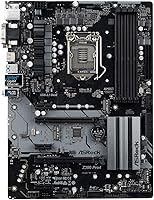
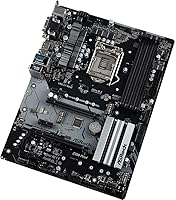
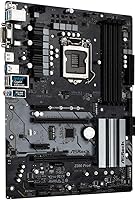
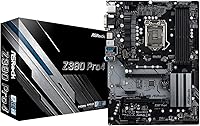
The ASRock Z390 PRO4 ATX Motherboard sits in a practical sweet spot — enough chipset capability to satisfy serious builders without the price tag of a high-end board. When Intel's 8th and 9th Gen Core processors were the go-to choice for gaming and productivity builds, the Z390 platform offered meaningful advantages over locked-down chipsets like B360. This mid-range motherboard uses a standard ATX form factor, which means it drops into virtually any mid-tower or full-tower case without clearance headaches. ASRock has always carved out space in the market by delivering solid, no-nonsense boards at accessible prices, and the PRO4 fits that philosophy well. Don't expect flagship trimmings — expect a reliable workhorse.
Features & Benefits

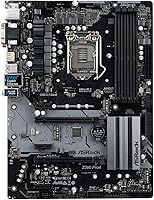
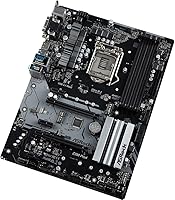
The Z390 chipset is what sets this board apart from budget alternatives — it unlocks CPU overclocking, something B360 and H370 simply don't allow. The LGA1151 socket handles both 8th and 9th Gen Intel Core chips, including K-series processors, which is the key reason to buy into Z390 in the first place. Four DDR4 DIMM slots in dual-channel configuration support up to 64GB of RAM, which is more than enough for gaming or home workstation use. The dual PCIe 3.0 x16 slots open the door to CrossFireX dual-GPU builds, and the three additional PCIe x1 slots give you room for network cards, sound cards, or other add-ins. The ATX layout keeps everything accessible.

Best For

This Z390 board makes the most sense for builders who want genuine overclocking access without spending on a premium Z390 offering. If you're pairing a 9th Gen Core i5 or i7 with a mid-range GPU for a solid gaming rig, this board gives you exactly the platform headroom you need. It's also a decent pick for a home or small office desktop where stability matters more than cutting-edge specs — the Z390 platform is mature at this point, meaning well-documented BIOS behavior, strong driver support, and a large community base to draw from. First-time builders tend to appreciate the straightforward ATX layout, and dual-GPU CrossFireX users on a budget will find the expansion slots useful without needing to justify a higher price.

User Feedback

Owners of the ASRock PRO4 consistently point to value for money as the board's strongest quality — most report stable performance right out of the box with minimal fuss. That said, a recurring gripe involves the BIOS update process, which some first-timers find less intuitive than competing boards in the same tier. VRM performance holds up well under moderate loads, but builders pushing overclocked 9th Gen CPUs hard for extended periods have noted that thermal headroom can become a concern — the heatsinks are functional rather than generous. Build quality is generally well-regarded given the price point, though slot reinforcement and plastics feel expected for this tier. Long-term owners mostly report no major reliability issues, with rare negatives tracing back to compatibility edge cases rather than fundamental board problems.

Pros

  • Z390 chipset enables full CPU overclocking, a major advantage over locked chipsets at a similar price point.
  • Supports both 8th and 9th Gen Intel Core processors, including K-series unlocked chips, giving solid CPU flexibility.
  • Four DDR4 slots with up to 64GB capacity handles gaming, multitasking, and light workstation workloads comfortably.
  • Standard ATX form factor fits virtually any mid-tower or full-tower case without compatibility concerns.
  • The Z390 platform is mature, meaning stable drivers, thorough community documentation, and predictable BIOS behavior.
  • Dual PCIe 3.0 x16 slots make CrossFireX dual-GPU configurations accessible without paying flagship board prices.
  • Out-of-box stability is consistently praised by owners — most builders report a smooth first-boot experience.
  • Three additional PCIe x1 slots leave room for sound cards, network adapters, or other expansion needs.
  • Long-term owners generally report no major reliability issues after two or more years of regular use.
  • Windows 11 compatibility ensures the platform remains usable without an immediate forced upgrade.

Cons

  • VRM headroom is limited — sustained overclocking on high-TDP processors can cause thermal strain over time.
  • The BIOS update process has a steeper learning curve than some competing boards in the same price bracket.
  • No onboard Wi-Fi means wireless users must purchase and install a separate adapter as an added cost.
  • Heatsink coverage is minimal for the price tier — adequate for stock use, but not confidence-inspiring under load.
  • Slot reinforcement and overall plastics feel budget-grade, which may concern builders handling the board repeatedly.
  • No M.2 slot thermal shielding, which can be a drawback for sustained NVMe read-write workloads.
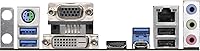
  • USB port count on the rear IO is modest and may require a hub for users with many peripherals.
  • Rare but documented compatibility edge cases with certain RAM kits can require manual XMP profile adjustments.

Ratings

The ASRock Z390 PRO4 ATX Motherboard scores below reflect AI-synthesized analysis of verified global buyer reviews, with spam, bot activity, and incentivized feedback actively filtered out before scoring. Ratings cover everything from out-of-box stability to long-term VRM behavior, giving prospective builders a transparent, unvarnished picture of where this board genuinely delivers and where it falls short.
Value for Money
91%
Buyers consistently point to this as one of the strongest arguments for choosing the ASRock PRO4 over competing Z390 options. For the price, you get chipset-level overclocking access, four RAM slots, and dual PCIe x16 support — features that cost noticeably more on rival boards. Most owners feel the balance of capability to cost is hard to beat in this segment.
A handful of buyers feel the gap between this board and slightly pricier Z390 options has narrowed enough that the value edge is less obvious than it once was. If you catch a sale on a competing mid-range board with better VRM cooling, the price-to-performance story shifts somewhat.
Out-of-Box Stability
88%
The large majority of builders report a clean, problem-free first boot without needing to adjust settings or troubleshoot compatibility issues. For first-time builders especially, this kind of predictable behavior builds confidence fast. Stock-speed operation on 8th and 9th Gen Intel chips runs without drama in typical home or office environments.
A small but consistent subset of users encountered issues with RAM not posting at XMP speeds initially, requiring manual BIOS intervention. These are edge cases rather than systemic problems, but they do suggest the board is less forgiving than some competitors when pairing with less common memory kits.
Overclocking Capability
72%
28%
Having Z390 overclocking access on a board at this price point is genuinely useful — builders pairing it with a Core i5-9600K or i7-9700K can push modest, stable overclocks without spending on a premium board. For light to moderate overclockers, the experience is positive and the performance gains are real.
The VRM configuration on this mid-range motherboard has clear limits under sustained load, particularly with higher-TDP chips like the i9-9900K running at aggressive clocks over long gaming or rendering sessions. Enthusiasts expecting serious overclocking headroom will find themselves hitting a ceiling faster than they would on a more thermally capable board.
BIOS Experience
67%
33%
The BIOS itself is feature-complete for what the board offers — overclocking controls, XMP profile loading, and fan curve adjustments are all accessible. Builders familiar with ASRock's interface find it logical and responsive, and the Instant Flash USB update utility works reliably once you understand the process.
New builders frequently flag the BIOS update workflow as the most frustrating part of setup, noting the interface is less intuitive than what ASUS or MSI offer at comparable price points. A few users also reported confusion around which BIOS version to apply when enabling support for certain 9th Gen CPUs on a board that shipped with older firmware.
Build Quality
74%
26%
The physical construction is appropriate for a mid-range board — PCIe slots have reasonable retention, and the board layout is clean and logical for installation. Builders handling the board for assembly generally describe it as solid enough, with no flexing or concerning weak points during the build process.
Compared to higher-end Z390 boards, the heatsinks feel thin and the plastics are noticeably economy-grade, which is a fair reflection of the price point but still worth knowing upfront. A few long-term users noted that heatsink retention can loosen slightly after years of use, though this has not translated into reported performance issues.
Memory Compatibility
71%
29%
For standard DDR4 kits from major brands running at 2133 to 2666 MHz, compatibility is solid and well-documented. The four-slot layout gives builders the flexibility to start with two sticks and expand later, which is a practical advantage for budget-phased builds.
Higher-speed kits — particularly DDR4-3200 and above — have generated compatibility reports that are more mixed, with some users needing to manually select XMP profiles or even drop to a lower speed to maintain stability. The QVL list covers most popular kits, but checking it before purchasing RAM is genuinely necessary rather than optional.
Expansion & Connectivity
83%
Five PCIe slots total — two x16 and three x1 — give builders a lot of flexibility for add-in cards without the board feeling crowded. Builders running a GPU plus a dedicated sound card or capture card have plenty of room, and the CrossFireX support is a bonus for dual-GPU configurations on a tighter budget.
The rear IO USB port count is modest, and the absence of onboard Wi-Fi means wireless users must occupy one of the expansion slots or add a USB dongle. For desktop users with wired setups this is not an issue, but it is a tangible limitation for anyone building in a space without easy Ethernet access.
Thermal Management
63%
37%
Under everyday workloads — gaming, web browsing, office productivity — the board's thermal behavior is entirely unremarkable in a good way. Chipset temperatures stay reasonable, and the layout keeps hot components sensibly spaced for adequate airflow in a well-ventilated case.
The minimal heatsink coverage on both the VRM and M.2 zones becomes a real concern under sustained heavy loads. Users running NVMe SSDs at peak throughput for extended periods or overclocking aggressively in poorly ventilated cases have reported noticeably higher component temperatures than they expected from the spec sheet.
Long-Term Reliability
82%
18%
Owners who have run this Z390 board for two or more years as daily drivers — whether for gaming rigs, home servers, or light workstations — predominantly report continued stable operation without component failures. The maturity of the Z390 platform works in the board's favor, with well-tested firmware and a stable ecosystem.
The long-term sample pool for this board skews toward light to moderate usage scenarios, so reliability data for sustained heavy workloads over multi-year periods is thinner. A small number of users have reported capacitor or VRM degradation on units pushed hard continuously, though this is not widespread.
Installation & Setup
79%
21%
The standard ATX layout follows conventions that any experienced builder will recognize instantly, and even first-timers benefit from the enormous volume of community guides and YouTube walkthroughs specifically covering Z390 builds. Standoff placement, I/O shield fit, and connector labeling are all handled competently.
The included manual, while technically complete, is laid out in a way that buries important steps — particularly around BIOS preparation for 9th Gen CPUs. Builders who skip the manual and assume the board is plug-and-play with a 9th Gen chip on older firmware have occasionally hit a no-post scenario that required a different CPU to resolve.
Audio Performance
61%
39%
For casual gaming and general media consumption, the onboard audio output is adequate and functions without driver issues on both Windows 10 and Windows 11. Users who are not audiophiles or streamers rarely raise audio as a concern after setup.
The onboard audio codec is noticeably entry-level compared to what mid-range ASUS or Gigabyte Z390 boards offer at a similar price. Content creators, streamers, and anyone with quality headphones or studio monitors will likely find the output thin and noisy enough to justify a discrete sound card.
Software & Driver Support
81%
19%
Being a mature platform, the Z390 PRO4 benefits from fully stable, well-tested driver packages and consistent BIOS update history from ASRock. Windows 11 compatibility is confirmed, and most users experience no driver conflicts during OS installation or after major Windows updates.
ASRock's companion software suite is functional but lags behind the polish of ASUS Armoury Crate or MSI Dragon Center in terms of interface design and feature depth. Users who rely on software-based fan control or RGB management may find the ASRock tools feel dated compared to the competition.
PCIe & Storage Layout
77%
23%
The distribution of PCIe bandwidth is logical for a mid-range board — the primary GPU slot gets full x16 lanes, and the additional slots handle expansion duties without obvious bottlenecks for typical use cases. M.2 NVMe support adds modern storage flexibility that keeps the platform relevant for current-gen SSDs.
When both x16 slots are populated for CrossFireX, the secondary slot drops to x4 bandwidth, which can introduce a measurable performance ceiling in GPU-intensive workloads. The M.2 slot placement also puts it partially underneath a long GPU on some builds, making post-installation access inconvenient.
Case & Cooler Compatibility
86%
The standard ATX footprint means this board slots into an enormous range of available cases without any fitment surprises. CPU socket clearance for large tower coolers is generous, and the four RAM slots are positioned far enough from the socket to avoid clearance conflicts with most 120mm and 140mm tower heatsinks.
Builders using very large D15-style or dual-tower air coolers should verify RAM slot clearance specifically, as the first DIMM slot sits closer to the socket than on some competing boards. This is not a dealbreaker but does occasionally force builders into lower-profile RAM kits they had not originally budgeted for.

Suitable for:

The ASRock Z390 PRO4 ATX Motherboard is a strong fit for budget-conscious PC builders who want access to Intel Z390 overclocking features without committing to a premium-tier board. If you're building around a 9th Gen Core i5 or i7 — particularly an unlocked K-series chip — this board gives you the chipset headroom to push performance without overspending on the foundation. Gamers putting together a capable mid-range rig will find the dual PCIe x16 slots and generous RAM ceiling more than adequate for their needs. It also works well as a home office or small business workstation base, where long-term stability and a mature, well-documented platform matter more than bleeding-edge specs. First-time builders especially benefit here — the standard ATX layout is widely supported, community resources are plentiful, and the board behaves predictably from day one.
Not suitable for:

The ASRock Z390 PRO4 ATX Motherboard is not the right call for enthusiasts planning aggressive, sustained CPU overclocking — the VRM setup is functional but not built for extended heavy loads, and pushing a high-core-count chip like a Core i9 hard over long sessions may expose those limits. Builders who prioritize a premium aesthetic, extensive RGB lighting, or robust onboard audio will likely find this board underwhelming, as it trims those extras to keep costs down. If you need onboard Wi-Fi, you'll need to add a separate adapter, since wireless connectivity isn't included. Anyone building on a newer Intel platform — such as 12th Gen or later — should look elsewhere entirely, as LGA1151 is a closed ecosystem. Power users who require top-tier VRM cooling, reinforced M.2 slots, or advanced fan control features will outgrow this board quickly.
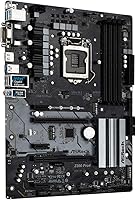
Specifications

  • CPU Socket: Uses the LGA1151 socket, compatible with Intel 8th and 9th Gen Core processors including unlocked K-series chips.
  • Chipset: Powered by the Intel Z390 chipset, which enables CPU overclocking and advanced platform features unavailable on B360 or H370 boards.
  • Form Factor: Standard ATX form factor measuring 13 x 10 x 2 inches, compatible with mid-tower and full-tower cases.
  • Memory Slots: Four DDR4 DIMM slots arranged in dual-channel configuration, supporting non-ECC unbuffered RAM up to a total of 64GB.
  • Base Memory Speed: Native memory speed starts at 2133 MHz, with higher XMP profile speeds supported depending on installed RAM kit.
  • PCIe x16 Slots: Two PCIe 3.0 x16 slots that run a single card at full x16 bandwidth or dual cards in x16 and x4 configuration.
  • PCIe x1 Slots: Three flexible PCIe 3.0 x1 slots available for add-in cards such as network adapters, sound cards, or capture cards.
  • Multi-GPU Support: Supports AMD CrossFireX and Quad CrossFireX multi-GPU configurations via the dual PCIe x16 slot layout.
  • USB 2.0 Ports: Includes 2 USB 2.0 ports on the rear IO panel for legacy peripheral compatibility.
  • Operating System: Officially supports Microsoft Windows 10 64-bit and Windows 11 64-bit operating systems.
  • Weight: The board weighs approximately 2.2 pounds, typical for a fully populated ATX motherboard with standard heatsink coverage.
  • RAM Type: Accepts only non-ECC, unbuffered DDR4 memory modules; ECC and registered DIMM modules are not supported.
  • Wireless: No onboard Wi-Fi or Bluetooth is included; wireless connectivity requires a separately purchased adapter card or USB dongle.
  • Model Number: Official model designation is Z390 PRO4, manufactured and sold under the ASRock brand.
  • Manufacturer: Produced by ASRock Rack, a brand known for delivering feature-complete motherboards at competitive price points.
  • First Available: This board was first made available to consumers in October 2018, making it a mature and well-documented platform.
  • Platform Support: Designed exclusively for Intel LGA1151 processors; not compatible with AMD CPUs or Intel 10th Gen and newer socket types.
  • Power Requirement: Requires standard ATX 24-pin main power and an 8-pin CPU power connector from a compatible ATX power supply.

Related Reviews

ASRock A520M Pro4 Micro ATX Motherboard
83%
92%
Value for Money
89%
Processor Compatibility
86%
Performance Stability
84%
Build Quality
88%
Ease of Setup
More
ASRock B450M PRO4 R2.0 Micro ATX Motherboard
74%
88%
Value for Money
79%
CPU Compatibility
86%
Ease of Installation
74%
BIOS & Software
83%
Long-term Reliability
More
ASRock B550 PRO4 Motherboard
85%
88%
Performance
84%
Build Quality
90%
Ease of Setup
91%
Compatibility with AMD Ryzen 3rd Gen
85%
PCIe 4.0 Performance
More
ASRock Z390 Phantom Gaming 4 Motherboard
63%
67%
Value for Money
54%
Build Quality
83%
CPU Compatibility
51%
Memory Compatibility
71%
BIOS Experience
More
ASRock 970M Pro3 Micro ATX Motherboard
74%
88%
Value for Money
91%
Compatibility & CPU Support
86%
Ease of Installation
61%
BIOS Usability
54%
Overclocking Headroom
More
ASRock H470M-HVS Micro-ATX Motherboard
69%
83%
Value for Money
91%
CPU Compatibility
78%
BIOS Experience
47%
Storage Options
53%
Connectivity & USB
More
ASRock B550M-HDV Micro-ATX Motherboard
76%
91%
Value for Money
88%
CPU Compatibility
86%
Ease of Setup
89%
Stability & Reliability
58%
VRM & Power Delivery
More
ASRock B760 Pro RS ATX Motherboard
80%
83%
Value for Money
88%
Feature Set
91%
CPU Compatibility
74%
Memory Performance
76%
VRM & Power Delivery
More
ASRock B550 Phantom Gaming 4 ATX Motherboard
79%
93%
Value for Money
91%
CPU Compatibility
84%
Storage Flexibility
89%
BIOS Experience
78%
Power Delivery
More
ASRock B650 Steel Legend WiFi 6E ATX Motherboard
87%
91%
Performance
89%
Stability
88%
Overclocking Capability
92%
WiFi 6E Connectivity
85%
Ease of Installation
More

FAQ

Yes, the LGA1151 socket and Z390 chipset both support the i9-9900K. That said, keep in mind that the VRM on this mid-range board is not as robust as what you'd find on a premium Z390 offering, so if you plan to push the i9-9900K hard with aggressive overclocking for extended periods, you may want to monitor temperatures and keep expectations realistic.

You can install DDR4-3200 kits, but you'll need to enable the XMP profile manually in the BIOS to run at that rated speed. Out of the box, the board defaults to 2133 MHz. Most quality DDR4 kits work fine, though occasional compatibility quirks with certain modules have been reported — checking the QVL list on ASRock's support page before buying RAM is worth the few minutes it takes.

Yes, the ASRock Z390 PRO4 ATX Motherboard includes M.2 slots that support NVMe SSDs over PCIe. Just be aware there is no thermal shield over the M.2 slots, so if you're running a high-performance NVMe drive under heavy sustained loads, you may want to consider a third-party heatsink.
It's actually a solid choice for beginners. The standard ATX layout is well-documented online, the community around Z390 builds is large, and the board behaves predictably on first boot. The main area where new builders sometimes struggle is the BIOS update process, but there are plenty of step-by-step guides available for this specific board.

Yes, the dual PCIe 3.0 x16 slots support AMD CrossFireX configurations. The second slot runs at x4 bandwidth when both are populated, which is enough for CrossFireX to function, though it is worth noting that multi-GPU setups have become less common as game engine support for them has declined over the years.

No, neither Wi-Fi nor Bluetooth is built into this board. If you need wireless connectivity, you'll need to add a PCIe Wi-Fi card or a USB adapter separately — both are inexpensive and easy to install.

The BIOS update process works fine once you know the steps, but it has a slight learning curve compared to some competing boards. ASRock provides a utility called Instant Flash that lets you update from a USB drive without needing a running OS. Reading through the official instructions once before starting saves a lot of headaches.

Yes, the standard ATX form factor means it will fit in any case that lists ATX motherboard support, which covers the vast majority of mid-tower and full-tower options on the market. Compact mini-ITX or Micro-ATX cases will not accommodate it.

If you already have an 8th or 9th Gen Intel CPU or can source one affordably, then yes — the Z390 platform is mature, stable, and well-supported by drivers and community resources. It won't win any performance crowns against newer Intel generations, but for a secondary rig, a budget gaming build, or a home office machine, the value proposition holds up.

You'll need a standard 24-pin ATX main power connector and an 8-pin EPS CPU power connector from your power supply. Both are included on any modern ATX power supply, so compatibility is rarely an issue. Just make sure your PSU has adequate wattage for your chosen CPU and GPU combination.

Where to Buy