Overview

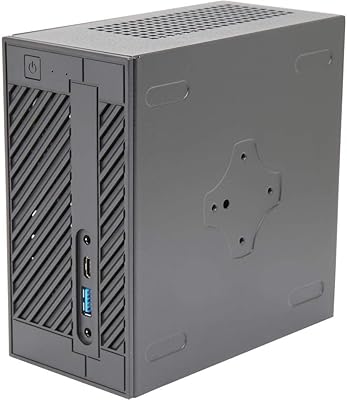
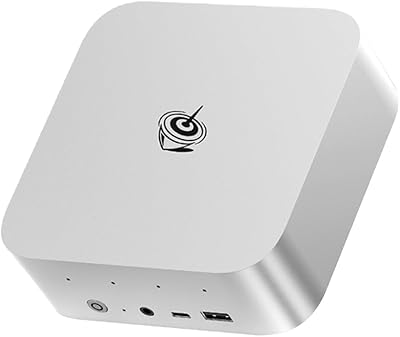
The ASRock DESKMINI X300W Barebone Mini Desktop is a compact AMD AM4 platform built for builders who want serious capability without sacrificing desk space. One thing to know upfront: this is a barebone kit, meaning no CPU, RAM, or storage is included — you supply those yourself. That flexibility is the whole point. The white mini-ITX chassis is clean and unobtrusive, fitting naturally into a tidy home office or classroom setup. Launched in late 2020, this compact AMD build platform has aged well, remaining a credible option for anyone building around current AMD Ryzen APUs at a mid-range price point.
Features & Benefits

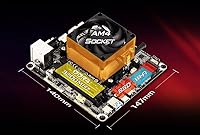
The DESKMINI X300W supports the AMD AM4 socket, covering Renoir, Picasso, and Raven Ridge APUs — which means it is built for integrated graphics work rather than discrete GPU gaming. Two SO-DIMM slots handle up to 64GB DDR4 RAM at 2666MHz, more than enough for everyday multitasking, light content work, or running a school lab machine. Connectivity is solid for the size: four USB 3.0 ports and one USB 2.0 cover the usual peripherals without issue. The bottom-mount PSU and air cooling layout help manage thermals in the tight enclosure, and the five expansion slots add flexibility you would not necessarily expect from something this small.

Best For

This mini barebone kit is a natural fit for home office workers or business users who need a functional desktop without the bulk. Schools and smaller organizations will appreciate the ability to customize each unit around available hardware, keeping costs down. DIY-minded builders who already have an AM4 CPU sitting around will find this one of the more cost-effective ways to put it to use. It also works well as an HTPC or living room media machine, where a quiet, compact footprint matters more than raw power. If you are starting from scratch, budget for a compatible AMD APU, SO-DIMM RAM, and an M.2 or 2.5-inch drive alongside it.

User Feedback

With a 4.6-star average across nearly 150 ratings, the reception for this compact AMD build platform has been consistently positive. Buyers frequently call out the build quality and how well the chassis handles its compact layout without feeling cheap. That said, a few recurring themes are worth flagging: first-time barebone buyers sometimes feel blindsided by the assembly process, and anyone expecting to drop in a discrete GPU will be disappointed — this simply is not that kind of build. A handful of users have noted that airflow can run warm under sustained load, so pairing it with a quality APU cooler genuinely matters for long-term stability.

Pros

  • Supports a wide range of AMD AM4 APUs, making it easy to reuse an existing Ryzen processor.
  • Fits comfortably on a small desk, under a monitor, or inside a TV cabinet without drawing attention.
  • Up to 64GB DDR4 RAM capacity is genuinely generous for a machine this compact.
  • Four USB 3.0 ports cover everyday peripheral needs without requiring a hub.
  • Windows 11 compatibility keeps this platform relevant for current and near-future deployments.
  • Build quality feels solid and deliberate — the chassis does not rattle or flex under normal handling.
  • The white finish is a nice change from the all-black aesthetic that dominates small form factor builds.
  • Highly rated by verified buyers, with consistent praise for component fit and overall reliability.
  • Five expansion slots offer more internal flexibility than most competing barebones at this size.

Cons

  • No CPU, RAM, or storage included — total system cost adds up quickly if starting from scratch.
  • Assembly inside the compact chassis can be fiddly, especially for first-time builders.
  • Limited to APU-integrated graphics with no option to add a discrete GPU later.
  • Sustained workloads can push thermals noticeably; cooler selection genuinely affects long-term stability.
  • The AM4 platform, while still capable, is a previous-generation socket with no upgrade path to newer AMD architectures.
  • Memory speed is capped at 2666MHz, which slightly limits APU graphics performance compared to faster RAM configs.
  • Only one USB 2.0 port available, which can be limiting for users with legacy peripherals.
  • Barebone nature confuses first-time buyers who expect a functional computer ready to power on.
  • Relatively few independent repair or upgrade options given the proprietary mini-ITX layout.

Ratings

The ASRock DESKMINI X300W Barebone Mini Desktop earns its 4.6-star standing through consistent real-world performance across home offices, education deployments, and DIY builds worldwide. Our AI-generated scores below are derived from analyzing verified global buyer reviews, with spam, incentivized, and bot-flagged submissions actively filtered out. Both the genuine strengths and the recurring frustrations of this compact AMD build platform are reflected transparently across each category.
Build Quality
88%
Buyers consistently describe the chassis as feeling more substantial than its compact size suggests, with tight panel fitment and no flex under normal handling. For a barebone at this price tier, the white finish holds up well and does not scuff or discolor easily in office environments.
A small number of users noted that the internal cable management options feel limited, making the interior feel cramped once all components are installed. The plastic front panel, while clean-looking, does attract fingerprints noticeably.
Component Compatibility
84%
The AM4 socket covers a wide range of AMD Renoir, Picasso, and Raven Ridge APUs, giving builders genuine flexibility when sourcing a processor. Users who already owned a compatible chip — say, a Ryzen 5 4600G pulled from an older build — reported a smooth installation experience with no BIOS surprises.
Compatibility is strictly limited to APUs with integrated graphics; any buyer who purchases a non-APU Ryzen CPU without integrated graphics will end up with no display output at all. A few users also noted that not all SO-DIMM kits run at their advertised XMP speeds without manual BIOS adjustment.
Value for Money
78%
22%
For buyers who already own a compatible AMD APU and some spare SO-DIMM RAM, this mini barebone kit represents a cost-effective way to build a capable, permanent desktop without buying redundant components. Schools deploying multiple low-cost workstations consistently cite the customizable nature as a meaningful budget advantage.
Buyers starting completely from scratch — needing to purchase a CPU, RAM, storage, and an operating system on top of this chassis — may find the total build cost uncomfortably close to pre-built alternatives that include a warranty on the full system. The value proposition weakens significantly without existing parts to reuse.
Thermal Management
71%
29%
Under typical office workloads like web browsing, document editing, and light multitasking, the bottom-mount PSU layout and air cooling design keep temperatures stable and acoustics low. Users running the system as an HTPC or home office node generally report no thermal concerns during day-to-day use.
Sustained CPU-intensive tasks — video encoding, large spreadsheet processing, or prolonged multitasking — can push temperatures higher than expected in such a tight enclosure. Several verified buyers stressed that cooler selection matters more than it might seem; an underpowered or poorly seated cooler leads to throttling during heavier workloads.
Assembly Experience
66%
34%
Builders with prior PC assembly experience find the process straightforward enough, and the overall layout is logical once you understand the compact chassis design. The board labeling and port placement are clear, reducing the guesswork during the first build.
First-time builders consistently flag this as the steepest part of the experience — routing cables, fitting the CPU cooler, and accessing the SO-DIMM slots in a confined space requires patience and occasionally a second pair of hands. Several users wished for a more detailed official assembly guide, as the included documentation is minimal.
Connectivity
82%
18%
Four USB 3.0 ports cover the practical needs of most home office setups — keyboard, mouse, external drive, and a dongle all have a home without requiring a hub. For a chassis this small, the rear I/O panel is genuinely well-equipped.
Only one USB 2.0 port is available, which can create a bottleneck for users with multiple legacy peripherals like older printers or input devices. There is no USB-C port on the standard I/O, which some users flagged as a notable omission given the platform's age.
Memory Capacity
86%
Supporting up to 64GB of DDR4 across two SO-DIMM slots is a genuine differentiator at this form factor and price point, giving the DESKMINI X300W headroom well beyond what most light desktop use cases will ever demand. Running dual-channel also provides a measurable uplift in integrated GPU performance for media and light creative tasks.
The 2666MHz memory ceiling is modest by current standards and slightly holds back APU graphics performance compared to platforms that support faster RAM. Users who purchased 3200MHz SO-DIMM kits expecting automatic speed gains were sometimes disappointed to find the platform defaulting to slower speeds without BIOS tuning.
Form Factor & Footprint
91%
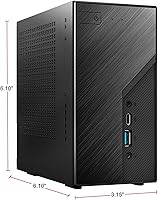
At 9 x 8.5 x 7.5 inches, this compact AMD build platform disappears neatly behind a monitor, inside a TV cabinet, or on a small desk shelf. The white colorway specifically earned praise for blending into home and office environments where a black tower would look out of place.
The chassis size that makes it so appealing for space-saving setups also means there is essentially no room to expand or reconfigure the internal layout later. Users who wanted to add even a slim optical drive or an additional internal storage bay found the options effectively nonexistent.
Software & OS Support
83%
Windows 11 64-bit compatibility keeps this platform current and removes concerns about long-term OS support for business or education deployments. Driver availability for the AMD chipset and integrated graphics is well-established, with no significant setup headaches reported by the majority of buyers.
The platform ships with no operating system, which is expected for a barebone but still catches some buyers off guard. A handful of users noted minor driver installation friction on fresh Windows installs, particularly around chipset utilities, though this was not a widespread issue.
Noise Levels
76%
24%
Under low to moderate loads, the system operates quietly enough for open office environments and living room media setups, especially when paired with a quality low-profile cooler. HTPC users specifically praised how unobtrusive the system is during movie playback or casual streaming.
Noise levels are heavily dependent on the cooler the builder installs, making it difficult to offer a universal assessment. A few users who opted for budget coolers reported fan spin-up noise under any sustained load, which underscores the importance of cooler selection that is not always obvious at purchase time.
GPU Performance
58%
42%
For everyday integrated graphics tasks — dual-monitor office work, light photo editing, 4K video playback, and casual older titles — the AMD Radeon integrated graphics in compatible APUs handle the workload without complaint. Running dual-channel RAM meaningfully improves graphics responsiveness for these use cases.
There is a hard ceiling on graphics capability because no discrete GPU can be added, ever. Users who purchased this platform hoping to run modern games or GPU-accelerated creative software at useful settings will find the integrated graphics fall short, and there is no upgrade path available within this chassis to address that.
Upgrade Potential
53%
47%
Within the constraints of the AM4 platform, there is some flexibility to swap in a more powerful APU later, and the 64GB RAM ceiling gives breathing room for memory upgrades. Storage can be swapped or added within the available bays without major difficulty.
The AM4 socket is AMD's previous generation, meaning there is no path to newer Ryzen 7000 series architecture without changing the entire platform. Combined with the absence of GPU expandability, long-term upgrade headroom is genuinely limited for users who anticipate growing compute needs over several years.
Documentation & Setup Support
62%
38%
ASRock provides basic documentation and BIOS update resources through their support portal, and the active community around AM4 builds means most assembly questions have answers available online. Experienced builders will find the setup largely self-explanatory.
The included printed manual is minimal and does not adequately prepare first-time barebone builders for the assembly process. Several users specifically recommended consulting third-party teardown videos before starting, which suggests the official documentation leaves a meaningful gap for less experienced buyers.
Buyer Expectation Alignment
67%
33%
Buyers who understood the barebone concept before purchasing universally rated their experience positively, citing the exactly-as-described chassis quality and component fit. The platform delivers precisely what it promises for the right audience.
A recurring theme in lower-rated reviews is misaligned expectations — buyers who assumed RAM, storage, or a CPU were included felt misled, even when the product listing is technically clear. This pattern suggests the barebone category still needs better consumer education at the point of purchase.

Suitable for:

The ASRock DESKMINI X300W Barebone Mini Desktop is a strong choice for anyone who wants to build a capable, space-saving desktop without paying for components they already own or do not need. DIY enthusiasts with a spare AMD AM4 APU — particularly Ryzen 4000 or 3000 series with integrated graphics — will find this one of the most cost-effective ways to put that chip to work in a tidy, permanent form factor. Home office workers and remote employees who want a proper desktop experience without the bulk of a mid-tower will appreciate how discreetly it fits on or under a desk. Schools and small businesses deploying multiple workstations on a tight budget can customize each unit independently, choosing only the RAM and storage each machine actually needs. It also works genuinely well as a media center or HTPC, where low noise, a small footprint, and Windows 11 compatibility matter more than peak performance.
Not suitable for:

The ASRock DESKMINI X300W Barebone Mini Desktop is not the right starting point for buyers expecting a ready-to-use computer out of the box — there is no CPU, RAM, or storage included, and assembling the system requires at least basic familiarity with PC building. Anyone hoping to run a dedicated graphics card will need to look elsewhere entirely, as this platform is built around AMD APUs with integrated graphics and offers no discrete GPU support. Gamers or creators running GPU-heavy workloads like video rendering, 3D modeling, or high-refresh gaming will quickly outgrow what any APU-based build can deliver. If you have no existing AM4 components to reuse, the total cost of building a complete system around this barebone may not justify the investment compared to buying a pre-built mini PC at a similar price. Buyers who want a simple plug-and-play experience or are new to PC building without any technical guidance nearby should probably consider a fully assembled alternative instead.
Specifications

  • CPU Socket: Uses the AMD AM4 socket, supporting Renoir, Picasso, and Raven Ridge APU families.
  • Form Factor: Mini-ITX desktop chassis designed for compact, low-footprint installations.
  • Dimensions: The chassis measures 9 x 8.5 x 7.5 inches, keeping the overall footprint genuinely small.
  • Weight: The unit weighs 4.44 pounds without installed components.
  • RAM Slots: Two SO-DIMM slots support dual-channel DDR4 memory configurations.
  • Max RAM: Supports up to 64GB of DDR4 RAM across both slots.
  • Memory Speed: DDR4 memory is supported at up to 2666MHz under standard operation.
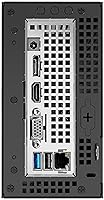
  • USB Ports: Includes four USB 3.0 ports and one USB 2.0 port for peripheral connectivity.
  • Expansion Slots: Offers five expansion slots, providing above-average internal flexibility for a mini-ITX platform.
  • Cooling Method: Uses air cooling; a compatible CPU cooler must be sourced and installed separately by the builder.
  • PSU Mount: The power supply is mounted at the bottom of the chassis to aid thermal separation.
  • OS Support: Fully compatible with Microsoft Windows 10 64-bit and Windows 11 64-bit operating systems.
  • Color: Available in a clean white finish, distinguishing it from the standard black mini desktop aesthetic.
  • Chipset: Built around the AMD X300 chipset, which underpins AM4 APU platform support.
  • Storage Interface: Supports storage devices via USB 3.2, with internal M.2 and 2.5-inch drive options typical of this platform.
  • Manufacturer: Designed and manufactured by ASRock, a Taiwan-based motherboard and systems company.
  • Origin: Produced in Taiwan and first made available in October 2020.
  • GPU Support: Relies entirely on AMD APU integrated graphics; no discrete GPU slot is available.
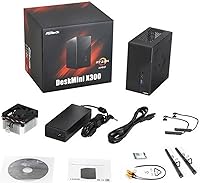
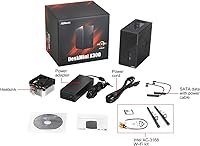
  • Included Items: Ships as a barebone unit only — no CPU, RAM, storage, or operating system is included in the box.

Related Reviews

ASRock DeskMini 310W Mini PC Barebone
77%
88%
Build Quality
83%
Value for Money
74%
Component Compatibility
67%
Thermal Performance
86%
Ease of Assembly
More
Skytech Gaming Chronos Mini Gaming Desktop PC
72%
73%
Gaming Performance
91%
Out-of-Box Setup
69%
Value for Money
48%
Storage Adequacy
57%
RAM Performance
More
ASRock B850i Lightning WiFi Mini ITX Motherboard
85%
91%
Performance
88%
Build Quality
93%
Overclocking Stability
89%
Connectivity
75%
Ease of Setup
More
ASRock A520M-ITX/AC Mini ITX Motherboard
87%
87%
Performance
91%
Build Quality
90%
Setup & Installation
85%
Wi-Fi and Bluetooth Connectivity
93%
Processor Compatibility
More
Audioengine N22 100W Mini Desktop Power Amplifier
86%
88%
Sound Quality
77%
Bluetooth Performance
92%
Ease of Setup
85%
Connectivity Options
89%
Build Quality
More
ASRock B650E PG-ITX WiFi Mini-ITX Motherboard
84%
88%
Performance
84%
Build Quality
91%
Wi-Fi Connectivity
72%
Overclocking Stability
89%
Compatibility
More
Apple Mac mini M2 Desktop 16GB 256GB SSD
88%
91%
Performance
93%
Build Quality
89%
Energy Efficiency
90%
Design & Size
88%
Connectivity
More
Shuttle DS10U5 Fanless Mini Barebone PC
80%
91%
Build Quality
83%
Fanless Passive Cooling
88%
Display Output Versatility
93%
Memory Expandability
89%
Connectivity & Port Selection
More
Beelink SER9 Pro (32GB/1TB)
84%
93%
Processing Performance
91%
Multitasking & Responsiveness
84%
Build Quality & Design
67%
Thermal Management & Fan Noise
72%
Graphics & Display Output
More
Lenovo ThinkCentre M625 Mini PC (16GB RAM, 512GB SSD)
76%
71%
Everyday Performance
83%
RAM & Multitasking
86%
Storage Speed
88%
Dual Monitor Support
78%
Build Quality & Chassis
More

FAQ

No, the ASRock DESKMINI X300W Barebone Mini Desktop ships as a chassis and motherboard only. You need to supply a compatible AMD AM4 APU, SO-DIMM DDR4 RAM, and your own storage drive separately. This is what barebone means — you are buying the platform, not a complete computer.
It supports AMD AM4 socket APUs from the Renoir, Picasso, and Raven Ridge families — so chips like the Ryzen 5 4600G, Ryzen 3 3200G, or Ryzen 5 3400G are solid choices. Make sure you pick an APU with integrated Radeon graphics, since there is no slot for a discrete GPU.

No, this platform does not support discrete GPUs. The entire graphics output depends on the integrated Radeon graphics built into whichever AMD APU you install. If you need dedicated GPU power, this is the wrong chassis for that use case.

It is manageable if you have done basic PC building before, but the tight interior makes things a bit fiddly compared to a standard tower. First-timers can absolutely do it, but expect to take your time, especially when routing cables or seating the CPU cooler. Watching a teardown video before you start is genuinely helpful.

You need SO-DIMM DDR4 modules — the same type used in laptops, not standard desktop DIMMs. The board supports speeds up to 2666MHz and can handle up to 32GB per slot for a total of 64GB. Two sticks running in dual-channel mode will also give your APU a noticeable graphics performance boost over a single stick.

That largely depends on the CPU cooler you pair with it. Under light workloads like web browsing, document editing, or video playback, the system tends to stay quiet and cool. Under sustained heavier loads, some users have noted that thermals can climb, so picking a quality low-profile cooler appropriate for the TDP of your chosen APU is worth the extra attention.

Yes, the platform supports Windows 11 64-bit. Just keep in mind that Windows 11 compatibility also depends on the specific CPU you install meeting Microsoft's TPM 2.0 and other requirements, so check your chosen APU against Microsoft's official supported CPU list before purchasing.

The DESKMINI X300W typically supports both M.2 NVMe or SATA SSDs and 2.5-inch SATA drives, which is standard for this platform. An M.2 NVMe SSD is the most popular choice for a fast, clean build, but a 2.5-inch SATA SSD works fine if that is what you already have on hand.

Yes, display output ports are provided on the rear I/O panel, with options depending on the APU installed. AMD Renoir APUs, for example, support HDMI and DisplayPort outputs through the integrated Radeon graphics, making it straightforward to connect a monitor or TV.

The main trade-off is flexibility versus convenience. A pre-built gives you a working system out of the box, while this mini barebone kit lets you choose your own components, reuse hardware you already own, and potentially get better overall specs for a similar or lower total cost. If you enjoy building and want control over every part, this approach often wins. If you just want to plug something in and get to work, a pre-built will save you time.

Where to Buy