Overview

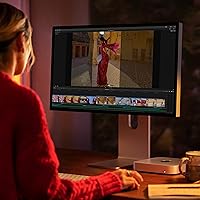
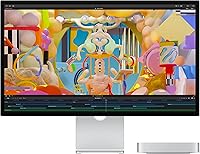
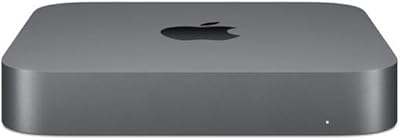
The Apple Mac mini M2 Desktop 16GB 256GB SSD is a powerful and compact computer designed to deliver reliable performance in a small form factor. With the Apple M2 chip at its core, it offers fast processing speeds that make it ideal for both professional and everyday use. Running macOS Ventura, it integrates seamlessly with other Apple products, providing a smooth, unified experience. The desktop can support dual 4K displays, making it a versatile choice for users who need expansive visual setups, whether for work or leisure.

Features & Benefits

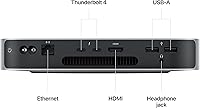
Powered by an 8-core CPU and 10-core GPU, this Mac mini delivers exceptional performance, handling demanding tasks like multitasking, media editing, and complex applications without hesitation. The inclusion of 16GB of RAM and a 256GB SSD ensures quick load times and responsive operation, while the energy-efficient design keeps noise and power consumption to a minimum. Connectivity is versatile with Thunderbolt 4, HDMI, and USB-A ports, allowing easy integration with a wide range of peripherals and displays.

Best For

This Mac mini is best suited for professionals who need a compact, yet powerful, desktop for multitasking and everyday productivity. It’s ideal for content creators requiring smooth video encoding and decoding, as well as anyone seeking a reliable Mac desktop for home or office use. The seamless integration with macOS also makes it an excellent choice for those invested in the Apple ecosystem, while its quiet, space-saving design makes it an attractive option for users with limited desk space.

User Feedback

Users generally appreciate the speed and efficiency of the M2 chip, noting that it handles most tasks with ease, from web browsing to media editing. The compact size and quiet operation are particularly favored in office settings. However, some users have pointed out that the 256GB storage may feel limiting for those with large media files or extensive software needs. Overall, the build quality and macOS stability are praised, although occasional users wish for more storage options.

Pros

  • The M2 chip delivers fast processing power for multitasking and productivity applications.
  • Compact design makes it ideal for users with limited desk space or for office environments.
  • Energy-efficient operation keeps energy bills low, with a quiet fan for minimal noise.
  • Seamless macOS integration enhances the user experience for those already within the Apple ecosystem.
  • Supports dual 4K displays, providing versatility for professionals who need multiple monitors.
  • The 16GB RAM ensures smooth performance for everyday computing and light content creation.

Cons

  • The 256GB SSD storage may be insufficient for users with large media files or extensive software libraries.
  • Some users report that the limited number of USB-A ports can be inconvenient for older peripherals.
  • Not suitable for demanding tasks like high-end gaming or intensive video rendering.
  • The built-in GPU may not meet the needs of users working with advanced 3D graphics or complex video editing.
  • Despite its compact size, it may not be powerful enough for power users with extensive professional workloads.
  • The price may be a barrier for users seeking a budget-friendly desktop alternative.

Ratings

After analyzing verified user feedback from a variety of global platforms, the ratings for the Apple Mac mini M2 Desktop 16GB 256GB SSD reflect a balanced mix of strengths and challenges. The scores are based on authentic reviews from different countries and languages, with spam, bot-generated, or incentivized content filtered out to ensure quality. Both the device's impressive performance and its limitations, such as storage concerns, are well-represented in the ratings provided below.
Performance
91%
Many users are impressed by the speed and efficiency of the M2 chip, which delivers fast processing for both everyday tasks and demanding applications. Whether multitasking or running resource-heavy software, this device handles it with ease, making it a reliable choice for professionals and everyday users alike.
Some buyers note that while the performance is outstanding for most tasks, it may not be powerful enough for extremely demanding tasks like high-end gaming or intensive 3D rendering. A few also mentioned that for its price, some competitors may offer more raw power in certain niches.
Build Quality
93%
Users consistently praise the solid build and sleek, compact design. The aluminum housing feels premium, and the size is perfect for both home and office use. The overall craftsmanship contributes to a visually appealing and durable product, ideal for both workspaces and casual environments.
While most feedback is positive, some users have reported that the device's small footprint may limit airflow, which could lead to thermal throttling during extended high-performance tasks. Additionally, a few have mentioned that it can feel a bit too minimalistic for users who prefer more connectivity options.
Energy Efficiency
89%
The low power consumption is one of the standout features, especially for users looking to reduce their energy bills. Thanks to its energy-efficient design, the device runs quietly and remains cool, even during extended use, making it ideal for both personal and office settings.
Some users mentioned that the device could benefit from even more performance headroom, as some programs still occasionally push the limits of its power, especially in multi-threaded workloads. However, this is generally seen as a minor issue given the overall energy efficiency of the system.
Design & Size
90%
The compact size of this Mac mini is perfect for users with limited desk space. Its minimalist design blends seamlessly into any environment, and it can be placed discreetly next to monitors or other peripherals. The overall footprint is a huge plus for users who value a clean, uncluttered workspace.
While the size is generally appreciated, some users feel that the smaller design limits the potential for upgrades or expansion in the future. The lack of options for customization may deter those who prefer more flexibility in terms of internal storage or memory upgrades.
Connectivity
88%
With Thunderbolt 4 ports, USB-A, HDMI, and Ethernet, the device offers solid connectivity options for most users. The ability to connect dual 4K displays is a major plus for users working with high-resolution graphics or video editing software. The variety of ports makes it versatile for office setups or creative workflows.
While the ports are generally well-received, some users expressed frustration with the limited number of USB-A ports, especially in a professional environment that requires multiple peripherals. Others noted that the lack of an SD card slot may be inconvenient for those working with media-heavy content.
Storage Capacity
72%
28%
The 256GB SSD provides fast read and write speeds, which significantly improves boot times and overall system performance. For users with moderate storage needs, this capacity is more than sufficient, ensuring quick access to files and applications.
Several users complained about the storage being too small for their needs, especially those dealing with large video files or extensive creative projects. While the device offers fast performance, the lack of expandable storage options is a key limitation for those requiring higher capacity.
Ease of Setup
94%
Users find the setup process extremely straightforward, especially for those already familiar with the Apple ecosystem. The device runs macOS Ventura out of the box, providing a seamless experience for users who value ease of use and minimal configuration. It is ready to go with minimal effort.
Some users noted that although the setup process is easy, there is a learning curve for those new to macOS or coming from a Windows environment. A few expressed a desire for more detailed setup guidance or instructions for advanced configurations.
Software Experience
95%
The integration with macOS Ventura is seamless, offering a smooth and stable experience for a variety of tasks, from everyday use to content creation. Many users appreciate the software's stability and the advanced media engine for editing and encoding tasks, making it an excellent choice for content creators.
While the software experience is generally praised, a small number of users mentioned occasional compatibility issues with specific third-party software. This is especially true for certain legacy applications or software designed primarily for Intel-based Macs.
Graphics Performance
87%
The M2 chip's integrated 10-core GPU delivers solid performance for most users, handling everyday graphics tasks and moderate video editing with ease. It performs particularly well in creative workflows, including photo and video editing, and offers smooth playback for 4K video content.
However, some users noted that the GPU may struggle with high-end gaming or intensive graphics work, such as 3D rendering. While it’s fine for most tasks, those in need of serious graphics horsepower might find the GPU lacking in certain specialized applications.
Thermals & Noise
92%
The device operates quietly, with minimal fan noise, even under load. Many users appreciate the low-noise performance, making it suitable for quiet office or home environments. The thermal management is also effective, keeping the device cool during extended use.
A few users did report occasional warmth during long, intensive tasks, though the device generally stays within acceptable temperature ranges. For the most part, these thermal issues are minor, but users working in hot environments may find them more noticeable.
Value for Money
84%
Many users feel that the combination of performance, energy efficiency, and design justifies the price. The Apple Mac mini offers good value for those seeking a compact desktop with reliable performance for everyday use or professional tasks. It’s seen as an affordable option for a quality Apple desktop.
Some buyers feel that the price could be more competitive compared to similarly-priced Windows alternatives, which may offer more powerful specifications. The storage limitations also mean that users may need to spend more on external storage solutions, adding to the overall cost.
Customer Support
82%
18%
Apple’s customer support is generally well-regarded, with many users noting their positive experiences with technical support and warranty services. The service is seen as responsive and helpful, ensuring that any issues are addressed in a timely manner.
However, some users have reported mixed experiences with Apple support, citing longer wait times and less helpful responses when dealing with more complex technical issues. Some feel that the support process could be more streamlined and customer-friendly.

Suitable for:

The Apple Mac mini M2 Desktop 16GB 256GB SSD is ideal for professionals and everyday users who need a compact, efficient desktop that can handle a variety of tasks. Its powerful M2 chip, combined with 16GB of RAM and a 256GB SSD, provides smooth performance for multitasking, productivity applications, and light content creation. This makes it a great choice for office workers, students, and content creators who require a reliable machine without taking up too much space. Additionally, the seamless integration with macOS Ventura makes it especially attractive to users who are already invested in the Apple ecosystem. For anyone needing dual 4K display support for work or entertainment, this compact computer delivers excellent versatility.
Not suitable for:

However, this Mac mini may not be the best fit for users who require more demanding performance, such as gamers or professionals working with heavy video editing, 3D rendering, or large-scale data processing. Despite its impressive specs, the integrated GPU and limited storage capacity of 256GB could prove restrictive for those with more intensive needs or those who require extensive file storage. Power users, particularly in fields like high-end design or game development, might find the Mac mini lacking the raw processing power and expandability that they require. Additionally, those who rely heavily on USB-A ports or other legacy connections may find the selection of ports somewhat limiting for their setups.

Specifications

  • Processor: Powered by the Apple M2 chip with an 8-core CPU for fast and efficient performance.
  • Graphics: Includes a 10-core GPU for powerful graphics rendering and smooth video output.
  • Memory: Equipped with 16GB of unified memory to handle multitasking and demanding applications.
  • Storage: Features a 256GB SSD for fast boot times and quick access to files and applications.
  • Operating System: Runs macOS Ventura, offering enhanced productivity features and Apple ecosystem integration.
  • Ports: Includes 2x Thunderbolt 4, 2x USB-A, HDMI, and Ethernet ports for versatile connectivity.
  • Video Output: Supports dual 4K display output through HDMI and Thunderbolt for enhanced visual experience.
  • Audio: Comes with a built-in speaker and a 3.5mm headphone jack for audio output.
  • Dimensions: Measures 10 x 9.75 x 4.75 inches, offering a compact form factor for tight spaces.
  • Weight: Weighs 4.34 pounds, making it lightweight and portable for easy placement.
  • Media Engine: Features a hardware-accelerated media engine supporting H.264, HEVC, and ProRes formats.
  • Power Efficiency: Energy-efficient operation thanks to the low-power architecture of the M2 chip.
  • Wireless Connectivity: Supports Wi-Fi 6 and Bluetooth 5.0 for fast, reliable wireless connections.
  • Networking: Includes a Gigabit Ethernet port for stable wired network connections.
  • External Storage: Supports external storage expansion via Thunderbolt 4 or USB-A for additional capacity.
  • Security: Includes hardware-based security features like the Apple T2 Security Chip for data protection.
  • Build Quality: Durable and compact, made with a sleek aluminum enclosure designed for longevity.
  • Warranty: Comes with a 1-year limited warranty and 90 days of complimentary technical support.

FAQ

The Apple Mac mini M2 is a compact desktop powered by Apple's M2 chip, featuring 16GB of RAM and a 256GB SSD. It's designed for users looking for fast processing power in a small form factor. It supports dual 4K displays and runs macOS Ventura, offering seamless integration with the Apple ecosystem.

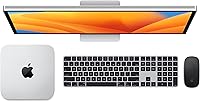
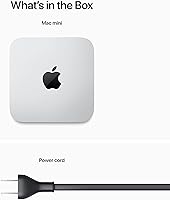
Setting up this Mac mini is simple. Just connect it to a monitor, keyboard, and mouse, then plug in the power. After turning it on, follow the on-screen instructions to select your language, set up Wi-Fi, and sign in with your Apple ID to start using it right away.

Yes, the Apple Mac mini M2 is well-suited for video editing, thanks to its 10-core GPU and built-in media engine that accelerates tasks like video encoding and decoding. It can handle programs like Final Cut Pro and Adobe Premiere Pro for most light-to-moderate video editing tasks.

The 256GB SSD offers a good amount of storage for general use and moderate file storage, but it may be limiting for users with large video files or extensive libraries. The storage is not user-upgradable, but you can add external drives via the Thunderbolt or USB-A ports for extra space.

The Mac mini M2 has two Thunderbolt 4 ports, two USB-A ports, an HDMI port, and an Ethernet port. This allows you to connect a variety of devices, including monitors, external storage, printers, and more. The Thunderbolt ports also support high-speed data transfer and dual 4K display output.

Yes, the Mac mini M2 integrates seamlessly with other Apple products. If you use iPhones, iPads, or other Macs, the Apple ecosystem allows for easy file sharing, AirDrop, and Handoff, which means you can pick up tasks across your devices with minimal effort.

The Mac mini M2 is designed to be energy-efficient, using Apple's M2 chip's low-power architecture. It's quieter than traditional desktops due to its efficient cooling system, and it consumes less power, making it an ideal option for users looking to reduce energy consumption.

macOS Ventura offers a range of productivity features, such as Stage Manager for multitasking, a new Focus mode, and improved compatibility with iCloud. It also provides security enhancements and features like Live Text and Continuity Camera, allowing you to use your iPhone as a webcam.

16GB of RAM is generally sufficient for most office work, media consumption, and light to moderate content creation. However, it may not be enough for heavy multitasking with many resource-intensive applications or high-end gaming, as this device is not designed for extreme gaming performance.

One downside of the Mac mini M2 is its limited 256GB SSD, which might not be enough for power users dealing with large files or needing extensive storage. Additionally, while it's great for everyday tasks and light video editing, it may struggle with more intensive workloads like high-end gaming or 3D rendering.