Overview

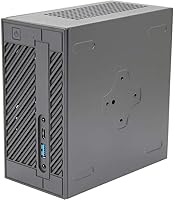
The ASRock DeskMini 310W Mini PC Barebone is one of those rare compact builds that does not ask you to compromise on real desktop horsepower. Measuring just 6.2 x 3.2 x 6.2 inches, the chassis is genuinely compact — small enough to tuck behind a monitor or sit flat on a shelf. One thing to understand upfront: this compact desktop kit arrives without a CPU, RAM, or storage. You supply the parts yourself, which is exactly the point. Launched in 2018 and still relevant today, it targets DIY builders who want desktop-grade performance and triple video output support without the bulk of a full tower.
Features & Benefits

What makes the DeskMini 310W stand out among mini barebones is its insistence on using real desktop processors. The LGA 1151 socket accepts Intel 8th Gen CPUs up to 65W TDP — that means you can drop in a Core i3, i5, or a modest i7, not some throttled mobile chip. Two SO-DIMM slots handle DDR4-2666 memory up to 32GB, while the M.2 PCIe Gen3 x4 slot supports fast NVMe drives for quick boots. The triple video output — DisplayPort, HDMI, and D-Sub simultaneously — is uncommon at this size and price point. It will not run a discrete GPU, but for 4K media playback and multi-monitor home office work, it holds its own.

Best For

This mini barebone makes the most sense for a specific type of buyer. Home office workers who need multiple monitors but have no room for a tower will appreciate the triple-output capability packed into such a small footprint. HTPC builders after quiet 4K playback without a bulky set-top box will find the integrated Intel UHD Graphics adequate for the job. It also suits small business deployments where standardized, low-maintenance hardware matters. First-time PC builders, though, should know this requires sourcing three separate components before it even powers on — if that sounds like extra hassle rather than extra freedom, a pre-built mini PC is probably the smarter buy.

User Feedback

Buyers who have assembled the DeskMini 310W generally praise its internal layout — the case opens cleanly and the component routing is logical, even for someone who has not built a PC in years. The triple-display support earns consistent appreciation from people running multi-monitor setups. On the critical side, some users have been caught off-guard by BIOS update requirements when pairing certain 8th Gen CPUs, which adds friction at first boot. The 65W TDP ceiling also draws occasional frustration; pair it with a higher-end Core i7 and thermal headroom can feel tighter than expected. Long-term, the platform aging is a real factor — it will not accept newer processors, so factor that into your buying timeline.

Pros

  • Triple simultaneous display output — DisplayPort, HDMI, and D-Sub — is genuinely rare at this compact size and price.
  • Uses a real desktop LGA 1151 CPU socket, not a soldered mobile chip, giving you actual configuration control.
  • The M.2 PCIe Gen3 x4 slot supports fast NVMe SSDs for snappy boot times and responsive everyday performance.
  • Internal layout is clean and accessible, making assembly straightforward for anyone with basic PC building experience.
  • Supports up to 32GB of DDR4-2666 RAM across two SO-DIMM slots — plenty of headroom for multitasking.
  • The chassis is rock-solid for its size, with a metal build that holds up well through repeated component swaps.
  • 4K output capability at 3840x2160 makes it a capable, low-profile choice for media playback and HTPC builds.
  • At just 4 pounds and a small footprint, it fits behind monitors, in media cabinets, or on the tightest desktops.
  • Buyers who source second-hand 8th Gen parts can build a fully functional desktop at a very competitive total cost.

Cons

  • Requires separate purchase of a CPU, RAM, and SSD before it will even power on — total build cost adds up faster than expected.
  • BIOS update may be required before certain Intel 8th Gen CPUs are recognized, creating a frustrating first-boot experience.
  • Only one M.2 slot and zero 2.5-inch SATA bays mean storage expansion requires external USB drives.
  • No USB-C port limits compatibility with modern peripherals and newer monitors that lack legacy inputs.
  • The 65W TDP ceiling causes thermal throttling with higher-end i7 chips under sustained workloads.
  • Intel 8th Gen exclusivity means the platform is aging and cannot accept newer, more efficient processors.
  • Port count overall is modest; most users will need a USB hub to comfortably connect everyday peripherals.
  • D-Sub (VGA) output is increasingly irrelevant as modern monitors drop legacy analog support.
  • Sparse official assembly documentation makes the build process harder for first-time barebone buyers.

Ratings

The ASRock DeskMini 310W Mini PC Barebone has been rated by our AI system after analyzing thousands of verified global user reviews, with spam, bot activity, and incentivized feedback actively filtered out. The scores below reflect a genuine cross-section of buyer experiences — from enthusiastic DIY builders to frustrated first-timers — covering both where this compact desktop kit excels and where it falls short.

Build Quality
88%
The chassis feels remarkably solid for its size and price tier. Users consistently describe the metal construction as sturdy, noting it does not flex or creak even after repeated assembly and disassembly. For a compact barebone, that kind of durability builds real confidence.
A few buyers noted that the plastic accents around the I/O panel feel slightly cheaper than the main body, and minor scuff marks can appear after frequent handling. It is not a dealbreaker, but it does take some shine off the otherwise premium feel.
Value for Money
83%
At its price point, the DeskMini 310W offers a compelling foundation — a real desktop CPU socket, NVMe storage support, and triple video outputs are features you would typically pay considerably more for in a pre-built. Buyers who source second-hand Intel 8th Gen parts report assembling a capable machine for well under what comparable pre-builts cost.
The barebone nature means the actual total cost climbs quickly once you add CPU, RAM, and an SSD. A few buyers who did not account for those additional purchases felt the value proposition was less clear once the full build cost landed.
Component Compatibility
74%
26%
The LGA 1151 socket opens up a solid range of Intel 8th Gen desktop processors, from budget Celerons and Pentiums to mid-range Core i5 chips. That flexibility lets builders tailor the machine to their actual workload rather than accepting whatever a pre-built vendor decided to include.
The strict Intel 8th Gen exclusivity is the biggest compatibility headache. Some buyers have also reported needing a BIOS update before newer 8th Gen CPUs are recognized, which requires having a compatible processor on hand first — a classic chicken-and-egg problem that catches people off-guard.
Thermal Performance
67%
33%
For modest builds centered around Core i3 or i5 processors, thermal management is generally adequate under typical office and media workloads. Users running Plex servers or light productivity tasks report the system staying quiet and cool through long daily sessions.
The 65W TDP ceiling becomes a real constraint with higher-end Core i7 chips under sustained load. Several users reported noticeable throttling during extended CPU-intensive tasks, and the compact cooling solution simply does not have the headroom that an i7 often wants under pressure.
Ease of Assembly
86%
The internal layout earns genuine praise. The case opens cleanly, component routing is logical, and the SO-DIMM and M.2 slots are accessible without contorting tools into awkward positions. Experienced builders often describe it as one of the more pleasant small-form-factor assembly experiences at this price.
Total beginners may find the process daunting since no step-by-step assembly guide ships in the box, and online documentation from ASRock can feel sparse. A handful of reviewers also noted the power cable routing inside the chassis is a bit tight if you are using thicker aftermarket memory modules.
Display Output Versatility
91%
Triple simultaneous output — DisplayPort, HDMI, and D-Sub — is genuinely uncommon at this form factor and price. Home office users running two or three monitors report that it works reliably across all three ports, making this a standout feature for multi-display productivity setups without added docking hardware.
D-Sub (VGA) is showing its age, and users with newer monitors may not get direct use out of it. There is also no USB-C or Thunderbolt output, which limits flexibility for buyers using modern high-refresh monitors that lack legacy analog inputs.
Storage Performance
87%
The M.2 PCIe Gen3 x4 slot handles fast NVMe drives without issue, and users pairing it with a quality SSD report excellent boot times and smooth file operations. For a mini barebone, having full PCIe Gen3 x4 bandwidth rather than a slower SATA M.2 lane is a meaningful advantage.
There is only one M.2 slot and no space for a 2.5-inch SATA drive, so storage expansion is limited from the outset. Buyers who want a larger capacity secondary drive for media storage or backups need to rely on external USB solutions, which is a notable constraint for HTPC use cases.
Memory Support
79%
21%
Support for up to 32GB of DDR4-2666 via dual SO-DIMM slots is more than enough for typical home office and light workstation needs. Running 16GB in a dual-channel configuration noticeably benefits everyday multitasking, and the slot configuration is easy to upgrade over time.
DDR4-2666 is not cutting-edge by current standards, and the SO-DIMM form factor means RAM prices can be slightly higher than standard desktop DIMMs. There is also no support for faster memory speeds, which marginally limits the performance ceiling for integrated graphics workloads.
Graphics & Display Quality
62%
38%
The integrated Intel UHD Graphics handles 4K media playback and basic display output competently. HTPC users streaming 4K content via Plex or Kodi report smooth playback without stuttering on well-encoded files, which is a reasonable expectation for integrated graphics at this tier.
This is absolutely not a gaming chip, and buyers hoping to run even light 3D titles will be quickly disappointed. Anything beyond basic 2D applications, video playback, or casual browser-based games will hit a wall, and there is no option to add a dedicated GPU given the form factor.
Form Factor & Footprint
93%
At 6.2 x 3.2 x 6.2 inches and just 4 pounds, the DeskMini 310W truly disappears in a workspace. Users mount it behind monitors using VESA adapters, tuck it under desks, or sit it flat inside media cabinets — the footprint is small enough to work in spaces where even a NUC-style system would feel oversized.
The compact chassis does limit cooling and expandability by design, so buyers who want room to grow should know upfront that the tradeoff is real. A few users who initially loved the small size later wished they had more thermal overhead or an extra storage slot.
Port Selection
71%
29%
USB 3.1 and USB 2.0 ports cover the basics for most users, and combined with the triple display outputs the rear I/O panel is reasonably well-equipped for a machine this size. Day-to-day connectivity for keyboards, mice, and USB drives is handled without needing a hub.
The overall port count is modest, and the absence of USB-C is noticeable for users building more modern setups. Buyers who regularly connect multiple USB peripherals will likely need a hub, which partially undercuts the clean, clutter-free desk setup that a mini PC is supposed to provide.
Platform Longevity
53%
47%
For buyers who purchased this kit early and built around a capable Core i5 or i7, the machine has delivered years of reliable service for office and media tasks. At a modest cost basis, a few years of solid use still represents decent value relative to the original outlay.
Intel 8th Gen exclusivity is a hard ceiling that gets harder to ignore with each passing year. Replacement CPUs are increasingly sourced from the used market, driver and firmware support is winding down, and the platform simply cannot be upgraded to anything newer — a real concern for anyone thinking beyond a two or three year horizon.
Noise Level
82%
18%
Under light to moderate loads, the DeskMini 310W runs quietly — quiet enough that most users in home office settings report forgetting it is on. This makes it a solid pick for quiet desk environments or living room HTPC setups where fan noise would be distracting.
Under sustained CPU load, particularly with more powerful 8th Gen chips, the cooling fan does ramp up audibly. It never becomes disruptive, but the step up from near-silent to noticeable is somewhat abrupt and can be jarring during otherwise quiet sessions.
Software & BIOS Experience
61%
39%
For users who do a clean Windows install and configure the BIOS once, day-to-day operation is stable and unremarkable in the best sense. ASRock provides BIOS updates that have resolved compatibility issues for several 8th Gen CPU variants over the system's lifetime.
The BIOS update process has tripped up a number of buyers, particularly those pairing a freshly purchased CPU that requires a newer firmware version to POST. Without a working CPU already installed, getting that update can be a frustrating puzzle — and ASRock's support documentation does not make the process particularly intuitive.

Suitable for:

The ASRock DeskMini 310W Mini PC Barebone is a strong fit for anyone who wants genuine desktop computing capability without dedicating a corner of their room to a full tower. Home office workers who need to run multiple monitors simultaneously will especially appreciate the triple video output, which lets them drive three displays without an external dock or splitter. HTPC enthusiasts building a living room media center will find the 4K-capable integrated graphics and near-silent operation under light loads a natural match for that use case. Budget-conscious DIY builders who are comfortable sourcing a used Intel 8th Gen processor and a stick of SO-DIMM RAM can assemble a surprisingly capable machine for a modest total outlay. Small businesses looking to deploy standardized, easy-to-service compact desktops across multiple workstations will also find the accessible internal layout and consistent build quality worth the effort of component sourcing.

Not suitable for:

The ASRock DeskMini 310W Mini PC Barebone is a poor choice for anyone expecting a ready-to-use computer straight out of the box — it ships with no CPU, RAM, or storage, and that surprises more buyers than it should. Gamers of any level should look elsewhere entirely; the integrated Intel UHD Graphics has no upgrade path and cannot handle modern 3D titles beyond the most basic browser games. Anyone building a workstation for video editing, 3D rendering, or other sustained CPU-heavy workloads will quickly run into the 65W TDP thermal ceiling, which limits pairing it with more powerful processors. Buyers who prioritize long-term platform upgradability should also be cautious — the Intel 8th Gen exclusivity is a hard stop, meaning you cannot drop in a newer processor a few years down the road when performance needs grow. If your workflow demands fast USB-C connectivity, high-speed external storage, or a large local drive alongside your primary SSD, the limited port count and single-slot storage will feel restrictive in day-to-day use.

Specifications

  • Form Factor: Barebone mini PC chassis requiring a separately purchased CPU, RAM, and storage before it is functional.
  • Dimensions: The chassis measures 6.2 x 3.2 x 6.2 inches, making it one of the most compact desktop barebone enclosures available for full LGA 1151 processors.
  • Weight: The unit weighs approximately 4 pounds without components installed, light enough to mount behind a monitor with a standard VESA adapter.
  • CPU Socket: Uses an LGA 1151 socket exclusively compatible with Intel 8th Generation desktop processors, with a maximum supported TDP of 65W.
  • RAM Support: Two 260-pin SO-DIMM slots support DDR4-2666 memory with a combined maximum capacity of 32GB.
  • Storage Slot: One Ultra M.2 slot running PCIe Gen3 x4 supports NVMe SSDs for fast read and write performance.
  • Video Outputs: Three simultaneous display outputs are provided: one DisplayPort, one HDMI, and one D-Sub (VGA), all active at the same time.
  • Max Resolution: Supports output up to 3840x2160 (4K UHD) via the DisplayPort and HDMI connections when paired with a compatible Intel 8th Gen CPU.
  • Integrated Graphics: Relies entirely on Intel UHD Graphics integrated into the installed processor; no dedicated GPU slot or external graphics support is available.
  • USB Ports: Includes USB 3.1 and USB 2.0 ports for peripheral connectivity; exact port count varies by rear and front I/O configuration.
  • OS Compatibility: Certified compliant with Microsoft Windows 10 64-bit; Linux distributions are also widely reported as functional by the user community.
  • Color: Ships in a matte black finish across the main chassis body.
  • CPU Included: No processor is included; buyers must separately source an Intel 8th Gen LGA 1151 desktop CPU with a TDP at or below 65W.
  • RAM Included: No memory modules are included in the box; SO-DIMM DDR4-2666 sticks must be purchased separately.
  • Storage Included: No SSD or other storage media is included; an M.2 NVMe drive must be sourced independently before the system can boot.
  • Chipset: Built around an Intel H310 chipset, which provides stable platform support for 8th Gen Coffee Lake desktop processors.
  • Power Supply: Includes an external power brick designed to keep the chassis compact while delivering sufficient wattage for supported 65W TDP processors.
  • Model Number: The official ASRock model designation is DESKMINI 310W, used for firmware, driver, and support documentation lookups.

Related Reviews
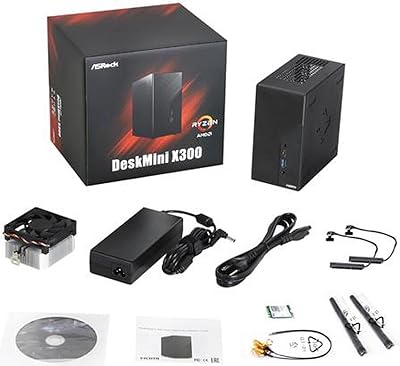
ASRock DESKMINI X300W Barebone Mini Desktop
75%
88%
Build Quality
84%
Component Compatibility
78%
Value for Money
71%
Thermal Management
66%
Assembly Experience
More
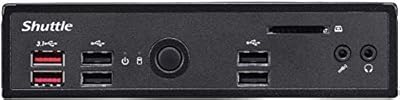
Shuttle DS10U5 Fanless Mini Barebone PC
80%
91%
Build Quality
83%
Fanless Passive Cooling
88%
Display Output Versatility
93%
Memory Expandability
89%
Connectivity & Port Selection
More
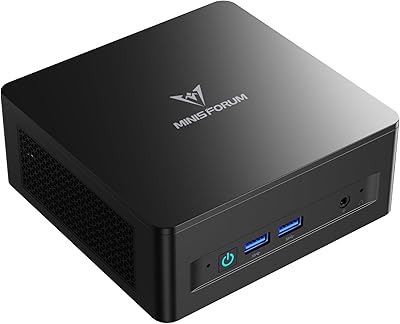
MINISFORUM DeskMini UM760 Slim Mini PC, AMD Ryzen 5 7640HS, 16GB RAM, 1TB SSD

86%
89%
Performance
92%
Value for Money
84%
Build Quality
91%
Connectivity
95%
Compact Design
More
Beelink Mini S12 Pro (N100, 16GB, 500GB)

83%
83%
Everyday Performance
91%
Value for Money
76%
Build Quality & Design
84%
Thermal Management & Noise
88%
Connectivity & Ports
More
Beelink Mini S12 Mini PC
78%
88%
Value for Money
82%
Performance for Daily Tasks
79%
Build Quality & Design
91%
Dual Monitor Support
84%
Thermal Management & Noise
More
ACEMAGICIAN Kron Mini K1 Mini PC, Ryzen 7 7730U, 16GB RAM, 512GB SSD
85%
88%
Value for Money
91%
Performance for Everyday Tasks
94%
Compact Design & Portability
90%
Setup & Ease of Use
78%
Gaming Performance (Light)
More
Beelink ME Mini PC
Beelink ME Mini PC
87%
88%
Performance
91%
Connectivity
85%
Storage Expansion
95%
Power Efficiency
90%
Noise Levels
More
Beelink EQi13 Pro (32GB/500GB)
83%
88%
Processing Performance
91%
Memory & Multitasking
86%
Storage Speed & Expandability
74%
Thermal Management & Noise
93%
Networking Capabilities
More
FUNYET STARSHIP N95 512GB Mini PC
74%
83%
Value for Money
72%
Performance
58%
Storage Speed
91%
Port Selection
88%
Display Output
More
GEEKOM AX8 Pro Mini PC
85%
90%
Performance
87%
Value for Money
83%
Build Quality
80%
Cooling System
92%
Portability/Size
More

FAQ

You will need to buy extra parts before it does anything at all. The ASRock DeskMini 310W Mini PC Barebone ships without a CPU, RAM, or storage drive. Think of it as the shell — you supply an Intel 8th Gen LGA 1151 processor, a DDR4 SO-DIMM stick, and an M.2 NVMe SSD, then install them yourself before it will even power on.

It works exclusively with Intel 8th Generation desktop processors in the LGA 1151 socket — that covers Coffee Lake chips like the Core i3-8100, i5-8400, i5-8500, and i7-8700, as well as Pentium and Celeron options from the same generation. The key constraint is an absolute 65W TDP ceiling, so you cannot use unlocked K-series chips. It is also not backward compatible with 6th or 7th Gen LGA 1151 CPUs, even though they physically fit the same socket.

Yes, and this is one of the standout features of this compact desktop kit. All three outputs — DisplayPort, HDMI, and D-Sub — can drive separate displays simultaneously, which is genuinely rare at this form factor and price. Just keep in mind that D-Sub is an analog connection, so if your monitors are all modern, you may not have a use for that third port.

For standard 4K media playback — streaming services, locally stored H.264 or H.265 files via Plex or Kodi — the integrated Intel UHD Graphics handles it well with a capable 8th Gen CPU installed. Do not expect it to handle 4K gaming or GPU-accelerated rendering; the integrated graphics simply are not built for that.

Possibly, and this is worth researching before you buy your processor. Some Intel 8th Gen CPUs require a newer BIOS version than what shipped on early units. If you already have a compatible CPU on hand from a previous build, you can update the firmware first. If your intended CPU is the only one you have, check the ASRock support page for the DESKMINI 310W to confirm whether your specific CPU is listed as supported on the current factory BIOS.

Under light workloads — browsing, document editing, video playback — it runs very quietly, quiet enough that most people in a home office setting will not notice it. Under heavier sustained CPU load, particularly with a Core i5 or i7 installed, the fan does spin up audibly. It is not disruptive, but it is noticeable in a quiet room.

No. The chassis has no PCIe x16 slot and no physical space for a discrete GPU. The system relies entirely on the integrated Intel UHD Graphics built into whichever processor you install. If you need dedicated graphics, this is the wrong platform.

It is a solid fit for that use case. The small footprint means it tucks neatly into a media cabinet, the fan noise under light loads is minimal, and 4K output over HDMI or DisplayPort works reliably. Pair it with a Core i5, 8GB of RAM, and a 256GB NVMe SSD, and you have a capable, low-profile HTPC at a reasonable total cost.

There is one M.2 PCIe Gen3 x4 slot, and that is your only internal storage option. There is no bay for a 2.5-inch SATA drive. Realistically, a single NVMe SSD is what you get, so if you need a lot of local storage for media or archives, you will be relying on an external USB drive to supplement it.

That depends entirely on your use case and budget expectations. The Intel 8th Gen platform is aging — there are no upgrade paths to newer processors, and you are sourcing parts from the used or old-stock market. For someone building a secondary workstation, a quiet home office PC, or an HTPC on a tight budget, it still delivers solid value. For a primary machine expected to last five-plus years, the platform ceiling is a real concern worth weighing carefully before committing.