Overview

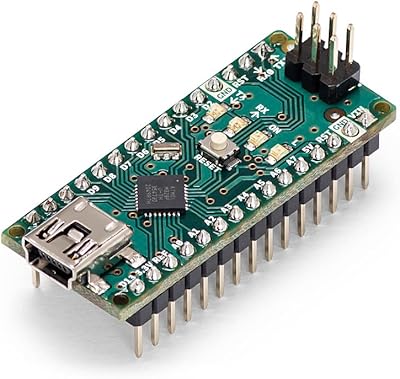
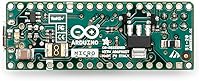
The Arduino Micro A000093 Microcontroller Board is a compact, headerless board built around Microchip's ATmega32U4 chip, and it occupies a clear niche in the Arduino lineup. Unlike the Uno or Mega, this compact microcontroller is purpose-built for projects where size and native USB communication matter more than raw pin count. Its breadboard-friendly footprint — roughly 1.8″ x 0.7″ — makes it a natural fit for wearables, embedded enclosures, and anything that needs to squeeze into a tight space. That said, this is not a beginner board. If you have never soldered a header or navigated the Arduino IDE with confidence, you will want to start somewhere else.
Features & Benefits

The ATmega32U4 runs at 16MHz with 32KB of flash — enough headroom for most embedded sketches, but tight enough to keep your code focused. What really sets the Arduino Micro apart from similarly sized boards is its native USB HID support: the chip handles USB communication directly, so you can program it to act as a keyboard, mouse, or gamepad without extra hardware. You also get 20 digital I/O pins, seven of which support PWM, plus 12 analog inputs — solid coverage for sensor-driven and actuator-heavy builds. And because headers arrive not pre-soldered, you have full control over how and where connections are made.

Best For

This headerless board shines brightest in custom USB peripheral builds — think macro keyboards, MIDI controllers, or accessibility input devices where the board communicates directly with a host computer without a driver. It also performs well in wearable electronics and compact robotics, where its tiny footprint lets you tuck it into enclosures that would reject anything larger. Developers already comfortable with the Arduino IDE who want to explore USB communication projects will find it a logical next step. It is not the right pick for beginners or anyone who does not own a soldering iron and know how to use it.

User Feedback

Rated 4.7 out of 5 stars across more than 650 reviews, this compact microcontroller has earned genuine respect from the maker community. USB HID reliability draws the most praise — buyers report keyboard and mouse emulation working right out of the box. The compact size earns consistent approval from wearable and robotics builders. On the downside, the absence of pre-soldered headers surprises some buyers, and a few users have struggled with ATmega32U4 bootloader behavior during initial setup. Memory constraints also come up occasionally for more complex sketches. For those who go in with realistic expectations, overall satisfaction is high.

Pros

  • Native USB HID support lets the board emulate keyboards, mice, and gamepads with no extra hardware required.
  • The 1.8″ x 0.7″ footprint is genuinely tiny, making it one of the most space-efficient official Arduino boards available.
  • Breadboard-compatible layout means you can prototype quickly once headers are soldered into place.
  • Full Arduino IDE compatibility gives you access to a massive library ecosystem and active community support.
  • With 20 digital I/O pins, 7 PWM outputs, and 12 analog inputs, the board handles complex sensor and actuator setups well.
  • USB HID functionality is consistently praised by buyers as reliable and easy to configure with standard Arduino libraries.
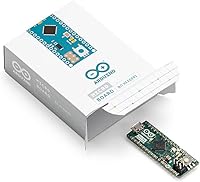
  • The headerless design gives builders the freedom to solder exactly the connections their project requires, nothing more.
  • At its price point, you are getting genuine Arduino hardware with the quality control that entails, not a clone.
  • Wearable and robotics builders consistently report that the compact form factor performs exactly as expected in tight builds.

Cons

  • Headers are not included or pre-soldered, so you must own and know how to use a soldering iron before the board is usable.
  • 32KB of flash memory fills up quickly on sketches that import multiple libraries, which limits project complexity.
  • The ATmega32U4 bootloader behaves differently from the Uno, and first-time setup can trip up even experienced Arduino users.
  • 2.5KB of SRAM is tight for any project that buffers data, handles strings heavily, or uses memory-hungry libraries.
  • No wireless connectivity of any kind — Wi-Fi or Bluetooth requires additional external modules and wiring.
  • The lack of onboard voltage regulation detail in documentation can create confusion when powering from non-USB sources.
  • Replacement or repair is harder than with larger boards because the compact layout leaves little room for rework.
  • Users expecting a ready-to-use prototyping experience out of the box will be frustrated by the assembly required.

Ratings

The Arduino Micro A000093 Microcontroller Board earns its strong reputation across a highly engaged maker community, and the scores below reflect what real buyers actually experienced — not marketing claims. Our AI rating engine analyzed verified global reviews, actively filtering out incentivized, duplicate, and bot-generated submissions, then weighted feedback by verified purchase status and project context. Both the standout strengths and the friction points that frustrated some buyers are transparently represented here.
USB HID Performance
93%
Buyers who built custom keyboards, MIDI controllers, and accessibility devices consistently reported that USB HID functionality worked exactly as documented with no driver installation required. The ability to emulate a keyboard or mouse out of the box — using just the standard Arduino Keyboard and Mouse libraries — genuinely impressed experienced developers who expected more setup friction.
A small but vocal group of users encountered timing issues when their HID sketch conflicted with the bootloader's USB handshake, causing the board to become temporarily unresponsive to the IDE. Recovery requires manually triggering bootloader mode, which is not intuitive the first time it happens.
Form Factor & Size
91%
Wearable builders and robotics engineers consistently called out the compact 1.8″ x 0.7″ footprint as a genuine differentiator. Multiple buyers mentioned fitting the Arduino Micro into enclosures, wristbands, and robot chassis where every millimeter of clearance mattered, with several noting it was the only official Arduino board that physically fit their design.
The very small size that makes this board so appealing also makes it harder to handle during soldering, especially for pins near the board edges. A few users with larger hands or less soldering experience reported accidentally bridging pads due to the tight pin spacing.
Build Quality
88%
As an official Arduino product manufactured in partnership with Microchip Technology, the hardware quality is noticeably consistent across units. Buyers who had previously used third-party clones specifically mentioned the difference in solder joint quality, silkscreen clarity, and overall board rigidity when switching to this compact microcontroller.
A small number of buyers received units with micro-USB ports that felt slightly loose out of the box, which became a connectivity issue in projects where the cable was subject to any movement or vibration. This appears to be an isolated quality control issue rather than a systematic defect.
Arduino IDE Compatibility
89%
The board integrates cleanly with the Arduino IDE on Windows, macOS, and Linux without requiring manual board manager additions or driver installations on most systems. Developers appreciated that existing sketches written for other AVR-based Arduino boards could often be ported over with minimal modification, saving meaningful development time.
The ATmega32U4's bootloader behaves differently from the more familiar Uno bootloader, and new users frequently reported confusion when the serial port disappeared after a problematic sketch upload. This is a known chip-level behavior rather than a defect, but the Arduino IDE provides little guidance when it happens.
Memory & Processing Headroom
67%
33%
For focused, single-purpose applications — a USB macro keyboard, a compact sensor node, or a simple wearable — the 32KB of flash and 2.5KB of SRAM are more than adequate. Developers who write lean, well-optimized code rarely hit the ceiling and appreciated the efficiency discipline the constraints encouraged.
Projects that rely on multiple simultaneous libraries, string manipulation, or buffered data streams run into memory limits quickly. Several users specifically noted that adding a display library or a network module alongside HID libraries left them with uncomfortably little headroom, and a handful abandoned the board for this reason.
Pin Flexibility
82%
18%
Twenty digital I/O pins with 7 PWM outputs and 12 analog inputs give this headerless board a surprisingly capable signal interface for its size. Robotics builders running multiple servos alongside analog sensors found the pin count sufficient for moderately complex builds without needing an external expander.
Because the board is so compact, accessing all pins simultaneously in a breadboard setup requires careful planning — some pin groups sit close enough together that crowding becomes a real issue when multiple components are wired up. Users accustomed to the more spread-out layout of the Uno found the tight grouping an adjustment.
Ease of Setup
58%
42%
For developers who already have soldering experience and familiarity with the Arduino IDE, initial setup is straightforward and takes only a few minutes. The board is immediately recognized by modern operating systems, and the learning curve for someone who has used any other ATmega-based Arduino board is minimal.
The absence of pre-soldered headers is a significant barrier for anyone who does not own or know how to use a soldering iron. This single requirement accounts for a disproportionate number of the negative reviews left by buyers who did not realize the board required assembly before any breadboard or wired use was possible.
Value for Money
78%
22%
Given that this is genuine Arduino hardware with native USB HID capability — a feature that typically requires workarounds on cheaper boards — the price is reasonable for the niche it fills. Buyers who specifically needed HID emulation consistently felt the cost was justified compared to alternatives that required additional components or custom firmware.
Buyers who compared it to lower-cost ATmega32U4 clones noted that the price gap is meaningful, particularly when buying in multiples for a batch project. For prototype runs where five or ten units are needed, some makers opted for clone boards and accepted the associated compatibility risk to keep costs down.
Documentation & Community Support
84%
The Arduino Micro benefits from the broader Arduino ecosystem's extensive documentation, active forums, and thousands of community-contributed library examples. Finding HID-specific tutorials, bootloader troubleshooting guides, and wearable project walkthroughs is straightforward for anyone willing to spend time on the official Arduino forum or GitHub repositories.
Documentation specific to the ATmega32U4's quirks — particularly around the dual serial port behavior and bootloader recovery — can be scattered and inconsistent in quality across different sources. Beginners who hit a setup snag often found themselves bouncing between conflicting forum threads before landing on a reliable fix.
Breadboard Compatibility
76%
24%
Once headers are soldered, the board drops cleanly into a standard breadboard with pin spacing that aligns correctly with 0.1″ pitch rails. Developers who used it for iterative prototyping before final PCB integration found the breadboard workflow reliable and dimensionally consistent across multiple units.
The board's narrow width means it occupies only the innermost rows of a standard breadboard, which leaves limited room on either side for component placement on the same rail. For complex prototypes with many peripheral components, this layout constraint forces builders to use a second breadboard or extension wiring.
Headerless Design Utility
72%
28%
For projects destined for permanent embedding — custom PCBs, sewn wearables, or enclosed product prototypes — the headerless design is genuinely practical. It allows builders to solder only the pins they need, keeping the profile minimal and avoiding the weight and height added by full header strips.
The lack of included headers means an additional purchase is needed for breadboard prototyping use, which adds a small but annoying friction step. Several buyers mentioned that realizing headers were not included only after the package arrived caused an unnecessary delay in starting their project.
Reliability Over Time
86%
Long-term users who had been running the Arduino Micro in embedded installations for months or years reported consistent and stable performance. The quality of the ATmega32U4 chip itself is well-established, and the official Arduino manufacturing standards appear to translate into reliable longevity under normal operating conditions.
The micro-USB port is the most commonly cited failure point over extended use, particularly in projects where cables are frequently connected and disconnected. A small number of buyers reported port wear after several months of regular use, suggesting that applications requiring repeated cable cycling should consider a more robust power delivery setup.

Suitable for:

The Arduino Micro A000093 Microcontroller Board is the right pick for makers and developers who already know their way around the Arduino ecosystem and want a board purpose-built for USB communication and compact deployment. If you are building a custom macro keyboard, a DIY MIDI controller, or an accessibility input device that needs to talk to a computer as a native HID peripheral, this compact microcontroller handles that without any additional hardware or drivers. Wearable electronics designers and robotics hobbyists will appreciate just how small and light this board is — it fits into enclosures and form factors that most other development boards simply cannot. Engineers who plan to permanently embed a board into a finished product will also benefit from the headerless design, which keeps the vertical profile as low as possible. Essentially, if your project has a defined size constraint or requires direct USB device emulation, this is one of the most capable tools in its class at this scale.
Not suitable for:

The Arduino Micro A000093 Microcontroller Board is a poor match for anyone who is new to microcontrollers or electronics in general. Because headers are not pre-soldered, you need soldering skills before you can even get started — this is not a plug-and-play experience, and that catches more buyers off guard than it should. The ATmega32U4 also has its own bootloader quirks that differ subtly from other Arduino chips, and troubleshooting those issues assumes a level of familiarity that true beginners often lack. On the memory side, 32KB of flash and 2.5KB of SRAM will feel constraining if your sketch relies on heavy libraries or processes large data structures — this headerless board is not a replacement for an Arduino Mega or even an Uno when raw program space matters. Anyone shopping for a general-purpose prototyping board to learn Arduino basics should look at the Uno or Nano first and come back to this one once they have a specific USB-focused project in mind.
Specifications

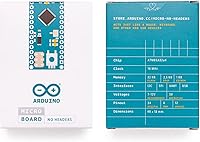
  • Microcontroller: Powered by the Microchip ATmega32U4, an 8-bit AVR microcontroller with native USB support built directly into the chip.
  • Clock Speed: Operates at 16MHz, providing sufficient processing speed for the vast majority of embedded and USB HID applications.
  • Flash Memory: Includes 32KB of flash memory, of which approximately 4KB is reserved for the bootloader, leaving around 28KB available for user sketches.
  • SRAM: Provides 2.5KB of SRAM for runtime data storage, which is adequate for moderate sketches but can constrain projects using memory-heavy libraries.
  • EEPROM: Offers 1KB of EEPROM for persistent non-volatile storage, useful for saving settings or calibration values between power cycles.
  • Digital I/O Pins: Features 20 digital input/output pins, each capable of operating at 5V logic for interfacing with standard sensors, actuators, and modules.
  • PWM Outputs: Seven of the 20 digital pins support PWM output, enabling analog-like control of motors, LEDs, and other variable-output components.
  • Analog Inputs: Includes 12 analog input channels connected to the ATmega32U4's onboard ADC, supporting 10-bit resolution for sensor reading tasks.
  • USB HID Support: Natively supports USB Human Interface Device protocols, allowing the board to emulate a keyboard, mouse, or gamepad without additional hardware or drivers.
  • Board Dimensions: Measures 1.8″ x 0.7″ (approximately 48mm x 18mm), making it one of the smallest form factors in the official Arduino lineup.
  • Weight: Weighs just 0.352 ounces (approximately 10 grams), contributing to its suitability for lightweight wearable and portable applications.
  • Headers: Ships without pre-soldered headers, giving builders the flexibility to attach only the connections their specific project requires.
  • Form Factor: Designed to be breadboard-compatible, with pin spacing that fits standard 0.1″ pitch breadboards once appropriate headers are soldered on.
  • IDE Compatibility: Fully supported by the Arduino IDE across Windows, macOS, and Linux, with no additional board manager installation required for basic use.
  • Operating Voltage: Runs at 5V operating voltage with an input voltage range of 7V to 12V when powered via the VIN pin rather than USB.
  • USB Connector: Uses a Micro-USB connector for both programming and power delivery, which is the same port used for HID device emulation during operation.
  • Manufacturer: Designed and manufactured by Arduino (in partnership with Microchip Technology), ensuring adherence to official hardware quality and compatibility standards.
  • Model Number: Officially designated as model A000093, which distinguishes this headerless variant from any header-equipped versions of the Micro board.

Related Reviews

Arduino MKR Zero ABX00012
80%
88%
Processing Performance
91%
Built-in SD Card Integration
79%
Audio Capability
86%
Portability & Power Options
63%
3.3V Logic Compatibility
More
Boogie Board Scribble n' Play Drawing Board
82%
91%
Visual Appeal
88%
Ease of Use
86%
Build Quality
93%
Portability
74%
Value for Money
More
Arduino Leonardo A000057
78%
93%
USB HID Functionality
81%
Ease of Setup
78%
Arduino IDE Compatibility
88%
Build Quality
58%
Flash Memory & Storage
More
Arduino Due A000062
Arduino Due A000062
77%
93%
Processing Performance
88%
I/O Versatility
86%
Memory & Storage
84%
USB Host Capability
47%
Shield & Peripheral Compatibility
More
Arduino Nano A000005
84%
86%
Build Quality
93%
Chip Authenticity
91%
Ease of Setup
94%
Arduino IDE Compatibility
88%
I/O Versatility
More
Arduino UNO WiFi REV2 Microcontroller Board
76%
82%
WiFi Connectivity
74%
Bluetooth & BLE
88%
Sketch Compatibility
79%
Onboard IMU
83%
Security (ECC608)
More
Arduino Uno REV3 Microcontroller Board
82%
93%
Ease of Setup
82%
Build Quality
97%
Community & Documentation
54%
Memory & Processing
91%
IDE Compatibility
More
Arduino Mega 2560 REV3
83%
91%
Build Quality
94%
Pin & I/O Versatility
89%
Memory Capacity
93%
IDE & Software Compatibility
67%
Value for Money
More
SVS 3000 Micro Sealed Subwoofer
84%
93%
Bass Accuracy
88%
Low-Frequency Extension
91%
App & Control Experience
89%
Build Quality
67%
Value for Money
More
Bluripp Sleepals Micro Sleep Earbuds
78%
88%
Sleep Comfort
74%
Passive Noise Isolation
79%
Fit & Stability
61%
Audio Quality
72%
Battery Life
More

FAQ

Yes, the Arduino Micro A000093 Microcontroller Board is fully supported by the Arduino IDE without needing any extra board manager packages. Just select the Micro from the board list, choose the correct port, and you are ready to upload sketches. One thing to note: the ATmega32U4 uses a slightly different upload process than the Uno, so if a sketch crashes and the port disappears, you may need to manually trigger the bootloader by double-pressing the reset button.
That is genuinely one of its best features. Because the ATmega32U4 handles USB communication natively, the Arduino Micro can present itself to your computer as a keyboard, mouse, or gamepad without any special drivers. You just use the built-in Keyboard and Mouse libraries in the Arduino IDE. It works on Windows, macOS, and Linux.

Yes, and this is the most common source of frustration for buyers who do not read carefully before purchasing. The board ships without any headers attached, so you will need to solder them on yourself before plugging it into a breadboard or making wired connections. If you do not own a soldering iron or have never soldered before, this board will not be usable for you without getting some practice or help first.

The Arduino Micro and the Leonardo are actually based on the same ATmega32U4 chip and share the same native USB HID capabilities. The key difference is size: the Micro is significantly smaller, which makes it better suited for compact and embedded projects. The Leonardo has more physical pin headers and is easier for beginners to work with on a breadboard right away, while this compact microcontroller is aimed at projects where space is a real constraint.

For a large range of typical Arduino projects — sensor reading, USB HID emulation, motor control, simple data logging — 32KB is workable. Where it gets tight is when you start importing multiple libraries at once, especially larger ones like display drivers or communication stacks. If your project depends on several heavy libraries running simultaneously, you may find yourself hitting the memory ceiling and need to optimize your code carefully.

Yes, you can power the Arduino Micro through its VIN pin using a voltage source between 7V and 12V, which makes battery operation practical. A 9V battery with the right connector works fine for basic testing, though for long-term portable use you would want a LiPo with appropriate circuitry given that a standard 9V alkaline drains quickly. When powered via VIN, you obviously lose the USB HID functionality unless you separately connect the USB port to a host.

It is actually one of the better official Arduino options for wearables, primarily because of its small footprint and low weight. At under half an inch wide, it can be sewn into garments or tucked into wristbands and enclosures that would not fit a full-sized board. You will still need to think carefully about power delivery and strain relief on any soldered connections, but the hardware itself is well-suited to the physical demands of wearable builds.

This is a known quirk of the ATmega32U4 and something a few buyers have run into. If a bad sketch causes the board to stop appearing as a USB device, you can usually recover it by double-clicking the reset button rapidly to force the board into bootloader mode — the port will reappear briefly, and that is your window to upload a corrected sketch. It takes a bit of practice to get the timing right, but it does work reliably once you know the trick.

This is an official Arduino board manufactured by Arduino in collaboration with Microchip Technology, not a clone. The model number A000093 corresponds to the genuine product. That matters for reliability, quality control, and ongoing IDE compatibility, since official boards are always kept in sync with Arduino IDE updates. Clones can be cheaper but may introduce subtle compatibility issues, especially with something as timing-sensitive as USB HID emulation.

Absolutely — this headerless board handles robotics applications well within its pin and memory limits. You have 20 digital I/O pins, 7 of which support PWM, so driving motor controllers, reading encoders, and managing servo signals is all within reach. The small size is a genuine asset for mobile robots where every gram and millimeter counts. Just keep your sketch lean if you are also running other libraries alongside motor control code, since the memory headroom is finite.