
Overview

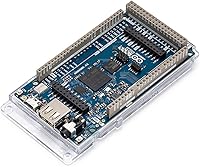
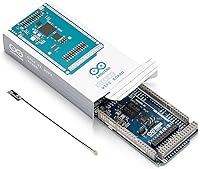
The Arduino Giga R1 WiFi Microcontroller Board represents Arduino's most ambitious step yet — a board designed to bridge the gap between rapid prototyping and production-grade hardware. Where most Arduino boards offer a single core and modest clock speeds, this high-performance Arduino board runs a dual-core STM32H747XI with both processors operating simultaneously, which fundamentally changes how you approach complex embedded projects. It targets intermediate-to-advanced makers, engineers, and IoT developers who have outgrown the Uno or Nano and need real processing headroom. Not a beginner board by any stretch, it does retain Arduino IDE familiarity and shield compatibility, making the learning curve shorter than competing platforms at this performance tier.

Features & Benefits

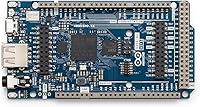
The Giga R1 WiFi's processing setup is its defining characteristic: the Cortex-M7 runs at 480 MHz while the Cortex-M4 handles background tasks at 240 MHz, letting you run sensor fusion and communication protocols without one interfering with the other. Memory is generous — 16MB of Flash gives you room for substantial codebases or TinyML models, while 1MB of SRAM handles fast in-memory operations. Wireless connectivity comes via a Murata module covering Wi-Fi and Bluetooth 5.0, solid for IoT deployments that need stable, low-latency links. A USB-C port speeds up firmware uploads considerably, and onboard camera and display connectors open up vision-based or HMI-heavy projects without requiring additional breakout boards.

Best For

This dual-core microcontroller is most at home in projects that need to do several demanding things at once. Edge AI and TinyML workloads benefit most — you can run inference locally on sensor data without routing everything through a cloud API, which matters in latency-sensitive or bandwidth-constrained environments. Robotics builders will appreciate the ability to run motor control loops on one core while handling wireless telemetry on the other. It is also a strong choice for IoT prototypes that need to scale, since the hardware is robust enough to survive a transition from bench to small-scale production. If you already work in the Arduino ecosystem, the jump from an Uno or Mega is far less painful than switching platforms entirely.

User Feedback

With a 4.6 out of 5 rating across 162 reviews, the Giga R1 WiFi earns its reputation among experienced makers. The most common praise centers on processing headroom — users report that even complex sketches involving multiple sensor streams run without the stuttering they experienced on less capable boards. Existing Arduino libraries work reliably, which removes a major friction point when migrating existing projects. The honest criticisms are worth noting: core-to-core communication via RPC has a real learning curve, and a handful of reviewers mention the board generates noticeable heat under sustained heavy loads. Neither issue is a dealbreaker for an experienced developer, but both deserve consideration if you plan to run it at full capacity inside a sealed enclosure.

Pros

  • The dual-core processor handles parallel workloads that would stall or bottleneck any standard Arduino board.
  • 16MB of Flash gives you enough room for complex codebases, ML model weights, and large data buffers.
  • Bluetooth 5.0 and Wi-Fi connectivity are reliable and well-suited to production IoT deployments, not just bench testing.
  • Onboard camera and display connectors reduce the need for additional breakout hardware in vision or HMI projects.
  • Full compatibility with existing Arduino libraries means most of your existing code migrates without painful rewrites.
  • USB-C makes firmware uploads noticeably faster compared to older micro-USB boards.
  • Shield compatibility with MKR and standard Arduino shields preserves a large existing hardware ecosystem.
  • A 4.6 out of 5 rating from real buyers signals strong satisfaction among the experienced developers this board targets.
  • The Arduino IDE and Arduino Cloud support lower the barrier compared to fully custom embedded toolchains.
  • At its performance tier, the Giga R1 WiFi competes well against alternatives that require steeper platform learning curves.

Cons

  • Core-to-core communication via RPC has a meaningful learning curve that documentation does not always make easy.
  • The board generates noticeable heat under sustained heavy loads, which requires thermal planning for enclosed builds.
  • The price point is hard to justify for projects that do not actually need dual-core processing power.
  • TinyML capabilities, while real, are constrained compared to platforms running full embedded Linux with ML frameworks.
  • Community resources specifically covering advanced dual-core workflows on this board are still relatively limited.
  • No onboard display or camera included — the connectors are there, but peripherals add cost and complexity separately.
  • 3.3V operating voltage requires level-shifting care when integrating legacy 5V sensors or modules.
  • Occasional reports of inconsistent behavior when pushing both cores hard simultaneously suggest thermal throttling may be a factor.

Ratings

The Arduino Giga R1 WiFi Microcontroller Board earns its reputation as one of the most capable boards in the Arduino lineup, and these scores reflect that — but also its real limitations. Our AI analyzed verified buyer reviews from global sources, actively filtering out incentivized, bot-generated, and unverified feedback to surface what experienced makers and engineers actually think. Both the genuine strengths and the friction points are reflected here without sugarcoating.

Processing Performance
93%
Buyers working on robotics, sensor fusion, and real-time data pipelines consistently report that the dual-core setup handles workloads that would stall or crash lesser boards without breaking a sweat. The Cortex-M7 at 480 MHz delivers headroom that experienced developers genuinely notice, especially when running complex interrupt-driven tasks alongside wireless communication.
Getting the most out of both cores requires deliberate architecture decisions up front. Users who treat it like a single-core board and ignore the M4 entirely are leaving significant performance on the table, which is a waste at this price point.
Wireless Reliability
88%
The Murata Wi-Fi and Bluetooth 5.0 module holds connections well in typical IoT deployments, and developers transitioning prototypes to small production runs report stable performance across extended uptime. Bluetooth 5.0 range is a real upgrade over older BLE implementations on earlier Arduino boards.
A small number of users report occasional reconnection issues under high interference environments, and the wireless library documentation is not always current with the latest firmware. For mission-critical deployments, additional connection-resilience logic in code is advisable.
Memory & Storage
91%
16MB of Flash is genuinely roomy by microcontroller standards, giving developers the freedom to include TinyML model weights, large lookup tables, and substantial application logic in a single binary. Users running edge inference workloads specifically call out this headroom as a key reason they chose this board over alternatives.
The 1MB SRAM split across two cores means each core has 512KB to work with, which can feel tight when handling large real-time data buffers on both cores simultaneously. Developers coming from Linux-based single-board computers may need to recalibrate memory management habits.
Ease of Setup
74%
26%
For anyone already familiar with the Arduino IDE, getting a basic sketch running on the primary core takes minutes. The board installs cleanly through the Arduino Board Manager, and most existing libraries load without modification, which removes a major onboarding barrier compared to custom embedded toolchains.
Setting up dual-core operation with inter-core RPC communication is a notably steeper climb, and the official documentation does not always cover edge cases clearly. Several buyers reported spending hours debugging core communication issues that better-written guides would have resolved in minutes.
Build Quality
86%
The board feels solid and well-manufactured, consistent with what you expect from official Arduino hardware. Connector placement is thoughtful, the USB-C port is robust under repeated plug cycles, and the onboard camera and display connectors are firmly seated.
Under sustained heavy dual-core load, the board runs warm enough that thermal management becomes a real concern in enclosed builds. A minority of users noted inconsistent behavior under prolonged high-load conditions, which points to heat as a contributing factor.
I/O Flexibility
89%
The breadth of interface options — analog, digital, PWM, SPI, I2C, UART — means most sensor and actuator integration projects work without additional breakout hardware. Shield compatibility with both MKR and standard Arduino form factors is a practical benefit that saves time and component costs on complex builds.
The 3.3V logic level is a legitimate friction point when working with legacy 5V sensors and modules, requiring level shifters that add cost and board real estate. This is not a flaw unique to this board, but it catches buyers who are used to 5V-tolerant Arduino boards off guard.
TinyML & Edge AI
77%
23%
This dual-core microcontroller handles TinyML workloads — keyword spotting, simple classification, and sensor anomaly detection — better than most boards in its class. The processing margin on the M7 core lets you run inference without completely starving other application logic, which matters in real deployed systems.
Expectations need to be calibrated carefully here. This is not a replacement for a Linux-capable board running full TensorFlow Lite with hardware ML acceleration. Model size and complexity are meaningfully constrained, and users expecting Raspberry Pi-class AI performance will be disappointed.
Value for Money
78%
22%
For developers who actually need dual-core processing, onboard wireless, and the full I/O spread, the pricing sits in a reasonable range relative to comparable high-performance microcontroller boards. The Arduino ecosystem backing — IDE, libraries, community — adds genuine long-term value that bare-chip alternatives cannot match.
For anyone whose project does not require the dual-core architecture or the full wireless stack, the cost is harder to justify when capable single-core boards are available at a fraction of the price. The value proposition is real but narrowly targeted at the right use case.
Documentation & Support
69%
31%
Arduino's official documentation covers the basics competently, and the broader Arduino community is large enough that most common questions have existing forum threads. The IDE integration is polished, and getting started on the M7 core specifically is well-documented.
Advanced topics — particularly dual-core inter-communication, RTOS integration, and camera module configuration — are inconsistently documented, with some official guides lagging behind actual firmware behavior. Users report needing to piece together answers from multiple sources for anything beyond introductory use.
Thermal Management
63%
37%
Under light to moderate workloads the board runs at an acceptable temperature, and for open-bench development the heat dissipation is manageable without any additional cooling hardware.
Sustained heavy loads on both cores push temperatures high enough to affect stability in sealed or poorly ventilated enclosures. Unlike some competing boards at this performance tier, there is no onboard heatsink mounting provision or thermal throttling indicator, leaving developers to discover heat limits through trial and error.
Ecosystem Compatibility
92%
Compatibility with the existing Arduino shield ecosystem is one of this board's strongest practical advantages. Experienced makers report migrating substantial portions of existing hardware stacks without modification, which dramatically reduces development time on complex projects.
A small number of shields that rely on 5V logic or specific timing assumptions from older AVR-based boards do not transfer cleanly. Compatibility is broad but not universal, and verifying each shield individually before committing to a design is still advisable.
Wireless Setup Experience
71%
29%
Basic Wi-Fi connectivity using the Arduino WiFi library works straightforwardly, and for standard IoT use cases like MQTT publishing or HTTP requests the setup is approachable for intermediate users. Bluetooth pairing for device-to-device communication is equally accessible.
Advanced wireless configurations — persistent socket handling, simultaneous BLE peripheral and Wi-Fi client operation, or low-power wireless modes — require digging into lower-level APIs that are not well-covered by current official examples. Users building complex networked systems often hit undocumented edge cases.
Form Factor
84%
At 3.54 x 1.18 inches the board strikes a reasonable balance between packing in onboard connectors, a full I/O header, and wireless hardware without becoming unwieldy. For a board with this feature density, the physical footprint is well-managed.
It is notably larger than the Arduino Portenta H7, which carries the same core processor in a much smaller package. For space-constrained builds, the size difference matters, and the Giga R1 WiFi is not the right choice when miniaturization is a hard requirement.

Suitable for:

The Arduino Giga R1 WiFi Microcontroller Board is the right tool for engineers, advanced hobbyists, and professional makers who have hit the ceiling of conventional Arduino hardware and need substantially more processing power without abandoning a familiar development environment. If you are building edge AI or TinyML applications that require local inference — think anomaly detection on industrial sensors, gesture recognition, or predictive maintenance — the dual-core architecture gives you the compute margin to actually run those models without offloading everything to the cloud. Robotics developers who need to manage real-time motor control loops alongside wireless telemetry will find the ability to split workloads across two cores genuinely useful rather than just a spec sheet talking point. It also suits IoT prototype builders who want a platform capable of surviving the journey from bench testing to small-scale deployment, since the hardware is robust and the wireless stack is production-worthy. Anyone already comfortable with the Arduino IDE and ecosystem will find the transition far less painful than jumping to an entirely different platform.

Not suitable for:

The Arduino Giga R1 WiFi Microcontroller Board is not the right starting point for beginners or casual hobbyists who are still learning embedded programming fundamentals. The dual-core setup is genuinely powerful, but unlocking that power requires understanding inter-core communication via RPC, which adds real complexity that can frustrate anyone without a solid programming foundation. If your project is a simple sensor readout, a basic LED controller, or anything a standard Uno handles comfortably, spending this much on this board is overkill and the extra capability will go entirely unused. Budget-conscious buyers should also weigh this carefully — there are capable single-core boards at a fraction of the price that handle most intermediate projects without issue. Finally, if you need a full Linux environment with package management and high-level scripting, this board runs RTOS or lightweight embedded Linux at best; for that use case, a Raspberry Pi or similar single-board computer is a more practical choice.

Specifications

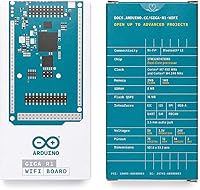
  • Primary Core: The main processor is an ARM Cortex-M7 running at 480 MHz, handling compute-intensive tasks such as signal processing and ML inference.
  • Secondary Core: A second ARM Cortex-M4 core runs at 240 MHz in parallel, dedicated to background tasks like communication handling or peripheral management.
  • Processor Chip: Both cores are integrated into a single STMicroelectronics STM32H747XI microcontroller package.
  • Flash Memory: The board provides 16MB of onboard Flash storage, sufficient for large application binaries, TinyML model weights, and data logging.
  • SRAM: Total SRAM is 1MB, split as 512KB accessible per core, enabling fast in-memory data operations without Flash read bottlenecks.
  • Wireless: Wireless connectivity is handled by a Murata module supporting Wi-Fi 802.11 b/g/n and Bluetooth 5.0 for stable IoT and device-to-device communication.
  • USB Interface: A high-speed USB-C port handles both firmware uploads and power delivery, replacing the older micro-USB standard found on previous Arduino boards.
  • I/O Interfaces: The board exposes digital and analog I/O pins alongside PWM, SPI, I2C, and UART interfaces for broad peripheral and sensor integration.
  • Shield Support: Both Arduino MKR-format and standard Arduino shields are physically and electrically compatible, preserving access to a wide existing hardware ecosystem.
  • Camera Connector: An onboard camera connector allows direct integration of compatible camera modules for machine vision and image capture applications.
  • Display Connector: A dedicated onboard display connector supports external screens for HMI or data visualization without requiring additional driver boards.
  • Operating Voltage: Logic and I/O operate at 3.3V, which requires level-shifting precautions when connecting legacy 5V sensors or modules.
  • Dimensions: The board measures 3.54 x 1.18 inches (approximately 90 x 30mm), keeping it compact relative to its feature set.
  • Weight: The board weighs 0.317 ounces (approximately 9 grams), making it light enough for weight-sensitive embedded or wearable installations.
  • IDE Support: Programming is supported natively through the Arduino IDE and Arduino Cloud, with no requirement for third-party toolchains to get started.
  • Operating System: The board can run RTOS-based firmware or a lightweight embedded Linux distribution depending on the application requirements.
  • Market Rank: As of available data, the board holds a top-100 ranking in the Single Board Computers category on Amazon, reflecting strong adoption among experienced users.

Related Reviews
Arduino UNO WiFi REV2 Microcontroller Board

76%
82%
WiFi Connectivity
74%
Bluetooth & BLE
88%
Sketch Compatibility
79%
Onboard IMU
83%
Security (ECC608)
More
Arduino UNO R4 WiFi
Arduino UNO R4 WiFi
83%
88%
Wireless Connectivity
76%
Ease of Setup
91%
Build Quality
93%
On-Board LED Matrix
84%
Analog Output Quality
More
Arduino MKR Zero ABX00012
80%
88%
Processing Performance
91%
Built-in SD Card Integration
79%
Audio Capability
86%
Portability & Power Options
63%
3.3V Logic Compatibility
More
Z-Edge R1 WiFi Dual Dash Cam
74%
84%
Daytime Video Quality
71%
Night Vision Performance
62%
Wi-Fi & App Experience
81%
Installation Ease
78%
G-Sensor Reliability
More
WAVLINK WN588HX3 WiFi 6 Outdoor Access Point
75%
83%
Outdoor Signal Range
91%
Build Quality & Weatherproofing
78%
Installation & Mounting
61%
Setup & Configuration Experience
86%
WiFi 6 Performance
More
OKN AX210 WiFi 6E PCIe Card
78%
91%
Value for Money
83%
Wireless Performance
74%
Installation Ease
61%
6GHz Band Access
71%
Bluetooth Performance
More
Google Nest Wifi Router 1-Pack
79%
93%
Setup & Onboarding
84%
Signal Consistency & Stability
88%
App & Network Management
79%
Parental Controls
74%
Wireless Performance (Speed)
More
Boogie Board Scribble n' Play Drawing Board
82%
91%
Visual Appeal
88%
Ease of Use
86%
Build Quality
93%
Portability
74%
Value for Money
More
Cudy WE9300 WiFi 7 PCIe Card
75%
88%
Value for Money
91%
Installation Ease
79%
Wireless Performance
86%
Driver Stability
77%
Bluetooth Performance
More
Arduino Micro A000093 Microcontroller Board
80%
93%
USB HID Performance
91%
Form Factor & Size
88%
Build Quality
89%
Arduino IDE Compatibility
67%
Memory & Processing Headroom
More

FAQ

Honestly, it is not the best starting point. The dual-core setup and the additional complexity around memory management and inter-core communication assume you already understand embedded programming basics. If you are new to Arduino, starting with an Uno or Nano and working your way up is a much less frustrating path.

Yes, that is one of the key advantages of the Giga R1 WiFi. You can upload separate sketches to each core and have them run concurrently. Communication between cores is handled via a Remote Procedure Call mechanism, which works well once you understand the setup, though the learning curve on that part is real.

Most standard Arduino shields and MKR-format shields are compatible, which is a genuine practical benefit when migrating existing projects. That said, always check voltage compatibility first — this board runs at 3.3V logic, so 5V-only shields may need a level shifter to avoid damaging the board.

The Arduino Giga R1 WiFi Microcontroller Board can handle TinyML workloads reasonably well — think keyword spotting, simple image classification, or anomaly detection on sensor streams. It is not a replacement for a full embedded Linux board running TensorFlow Lite with hardware acceleration, but for constrained edge inference it performs better than most microcontroller-class boards at this form factor.

Under typical workloads it runs warm but manageable. Where heat becomes a concern is when both cores are pushed hard simultaneously for extended periods. A small number of users have flagged this in enclosed builds, so if you are installing it in a sealed enclosure at full load, plan for some passive airflow or thermal management.

The connector is designed to work with the Arduino Camera module and other compatible OV series sensors. Check the official Arduino documentation for a current compatibility list, as third-party module support can vary depending on firmware version.

It is genuinely capable of both. The hardware is robust enough to move from prototype to small-scale production, and the wireless stack is stable enough for deployed IoT use. It is not a fully ruggedized industrial module, but for maker-grade production runs or professional prototypes it holds up well.

Both boards use the same STM32H747 dual-core chip, so raw processing power is similar. The Giga R1 WiFi is larger, offers more accessible I/O pins, shield compatibility, and a lower price point, making it friendlier for hardware-heavy projects. The Portenta H7 is more compact and targets industrial and highly integrated deployments where board size and modular carrier boards matter more.

It handles both — you can power the board through the USB-C port and use it for high-speed firmware uploads simultaneously. This is a practical improvement over older Arduino boards that used separate connectors or slower USB standards.

No, the Arduino IDE works fully offline. You only need a connection if you want to use Arduino Cloud features like over-the-air updates or cloud-based compilation. For standard wired programming via USB-C, everything works locally without any cloud dependency.