
Overview

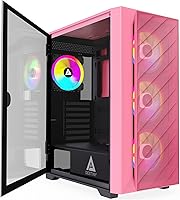
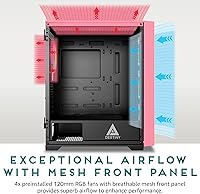
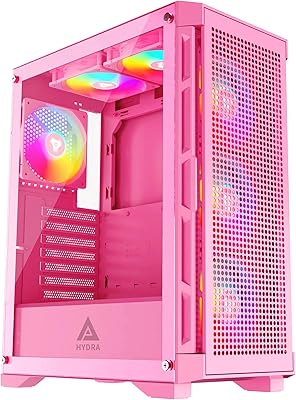
The Apevia Destiny Mesh Mid Tower PC Case enters a crowded budget segment with something most competitors skip: a pink finish that doesn't feel like an afterthought. The metal mesh front panel allows real airflow rather than just looking the part, which matters when you're pairing this chassis with a GPU that runs warm. Four ARGB fans come pre-installed, so you're not immediately shopping for replacements out of the box. With a swivel magnetic panel on the side and a 4.5-star average from nearly 800 buyers, this Apevia case earns its place as a solid entry point for style-conscious builders watching their budget.

Features & Benefits

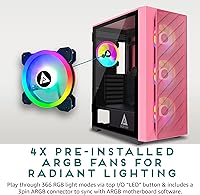
The swivel magnetic side panel is one of the more practical design choices at this price point — swing it open, do your work, and close it without fumbling with clips or screws. Inside, four pre-installed ARGB fans cycle through 366 lighting modes or sync to your motherboard via a 3-pin connector if you want a unified look. GPU support stretches to 360mm, covering most modern cards comfortably. The screw-in PCIe slots are worth noting too; knock-out slots are a known frustration, and avoiding them here is a quiet but real quality-of-life improvement. Water cooling is supported across front, top, and rear positions for future upgrades.

Best For

This mid-tower chassis suits anyone building their first PC who doesn't want to start with a forgettable black box. The pink finish appeals to a broader audience than you might expect — aesthetic-focused builds are increasingly common, and this Apevia case keeps up without asking for a premium. ATX, Micro-ATX, and Mini-ITX boards all fit, keeping your options open. One caveat worth flagging: the CPU cooler clearance maxes out at 6.5 inches, which rules out some popular tall tower coolers, so verify compatibility before buying. Streamers and content creators who want their rig to photograph or film well will appreciate the glass and RGB combo.

User Feedback

Buyers consistently highlight the swivel glass panel as a standout convenience — it's one of those features that earns appreciation over repeated use. The pink color reportedly holds up well in person, matching product photos more faithfully than skeptics might expect. That said, some users find the included fans run audibly at higher speeds, which matters if you're noise-sensitive. Cable management can feel tighter than the rear-routing space suggests, and ARGB sync reliability varies depending on your motherboard brand. A few buyers mention minor panel flex, though this appears limited to isolated cases. Overall, the Destiny Mesh earns its strong average rating — small frustrations exist, but verified buyer satisfaction remains consistently high.

Pros

  • Four ARGB fans come pre-installed, saving you an immediate follow-up purchase after the build.
  • The swivel magnetic side panel makes opening and closing the case noticeably easier than clip-on alternatives.
  • Mesh front panel provides genuine airflow improvement over solid-front competitors in this price bracket.
  • Screw-in PCIe slots eliminate the frustration of damaged knock-out tabs during GPU installation.
  • Supports GPUs up to 360mm long, covering the vast majority of current graphics cards.
  • The pink finish reportedly matches product photos accurately, which is not always the case with budget options.
  • Radiator mounts on three panels give you a clear path to water cooling upgrades without buying a new case.
  • Wide motherboard compatibility means ATX, Micro-ATX, and Mini-ITX boards all fit in one chassis.
  • The magnetic top dust filter is easy to remove and clean, reducing long-term maintenance friction.
  • Nearly 800 buyer ratings at a 4.5-star average suggests consistent satisfaction across a large sample.

Cons

  • Included fans can run audibly loud at full speed, which matters if your workspace demands quiet operation.
  • The 6.5-inch CPU cooler height limit rules out several well-regarded air coolers right out of the box.
  • Cable management space behind the motherboard tray is tighter in practice than the spec sheet implies.
  • ARGB sync reliability varies by motherboard brand, and some users report inconsistent behavior outside common platforms.
  • The magnetic side panel may not stay fully secure during transport, making it a concern for anyone who moves their PC regularly.
  • Some buyers note minor flex in the side panels, hinting at thinner steel gauge than premium cases in higher price ranges.
  • Only two USB 3.0 ports on the front panel may feel limiting if you regularly plug in drives or peripherals.
  • No USB-C front port, which is increasingly expected even on mid-range cases in 2024 and beyond.

Ratings

The Apevia Destiny Mesh Mid Tower PC Case scores were determined by our AI system after analyzing verified global buyer reviews, actively filtering out incentivized, duplicate, and bot-generated submissions to surface genuine purchase experiences. Ratings reflect both where this mid-tower chassis genuinely delivers and where real buyers have run into frustrations — nothing is glossed over. The result is a transparent, category-by-category breakdown to help you make a confident, informed decision.

Airflow Performance
83%
The metal mesh front panel makes a real difference compared to solid-front cases at this price point — buyers consistently note lower idle temperatures when paired with the three front intake fans. Having four ARGB fans pre-installed means airflow is functional from day one without any additional spending.
The front mesh, while effective, has a relatively coarse pattern that does little to filter fine dust, meaning buildup inside can accelerate over time. Users running the fans at higher speeds to maximize airflow report increased noise levels that some find distracting in quieter environments.
Build Quality
71%
29%
The steel frame feels sturdy enough for everyday stationary use, and the tempered glass panel adds a premium visual impression that buyers don't always expect at this price tier. Screw-in PCIe slots are a thoughtful inclusion that signals above-average attention to builder-friendly design details.
Several buyers flagged noticeable flex in the side and top panels when pressure is applied, suggesting the steel gauge is on the thinner side. A small number of users also reported interior edges that weren't fully deburred, which is worth keeping in mind during a bare-handed build.
Value for Money
88%
Bundling four ARGB fans with a mesh-front mid-tower at this price point is genuinely competitive — purchasing equivalent fans separately would add meaningful cost to a comparable barebones case. Buyers repeatedly cite the included fan count as the primary reason this chassis feels like a smart purchase.
The value equation tilts slightly if you end up replacing the included fans due to noise concerns, since you've essentially paid for components you won't use. Buyers expecting premium materials at this price will find the build quality adequate but not exceptional by any objective measure.
Cable Management
62%
38%
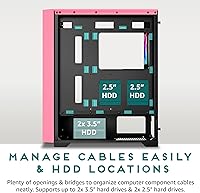
There is dedicated space behind the motherboard tray for routing cables, and the case does include routing cutouts that help keep the visible interior tidy when care is taken during the build. Experienced builders who plan their cable runs beforehand generally report a cleaner result than those who improvise.
The actual depth of the cable management channel is tighter than the product description implies, making it genuinely difficult to stuff thicker cable bundles out of sight. First-time builders in particular tend to find the rear space restrictive, with some reporting difficulty closing the back panel after routing a full ATX cable set.
Ease of Assembly
79%
21%
The swivel magnetic side panel is one of the most praised usability features — it removes the friction of clip-based or screw-fastened panels during repeated component access. Screw-in PCIe slots and clearly positioned standoffs make the initial build process straightforward for most users.
The CPU cooler height limit of 6.5 inches catches some builders off guard, particularly those who purchase tall tower coolers before checking clearance specs. A few users noted that the manual lacks detail on radiator mounting configurations, requiring some trial and error during more complex liquid cooling setups.
Lighting & ARGB
81%
19%
With 366 selectable lighting modes accessible via the top-panel button, the case offers more variety than most competing options in this price bracket, and the out-of-box effect is immediately striking. Motherboard sync via the 3-pin ARGB connector works reliably on most mainstream platforms for unified lighting control.
ARGB sync compatibility is not universal — buyers with older or less common motherboard brands have reported inconsistent behavior or an inability to sync at all. The lighting controller itself offers no software integration, so fine-grained customization beyond preset modes requires motherboard software support.
Side Panel Design
86%
The door-swivel magnetic glass panel is a standout practical feature that makes accessing the interior genuinely more convenient during builds or upgrades compared to sliding or clip-on alternatives. Buyers who have worked with both styles consistently prefer the swivel mechanism for its ease and feel.
The magnetic hold, while comfortable for home use, is not rated for transport — several buyers who moved their systems reported the panel shifting or coming loose in transit. Those who take their PC to LAN events or move it between rooms frequently may want a more secure fastening solution.
Noise Levels
64%
36%
At low to medium fan speeds the case operates at an acceptable noise floor for most home office or gaming room environments, especially when fan curves are configured conservatively through the motherboard BIOS. Buyers who prioritize thermals over acoustics find the performance-to-noise ratio reasonable.
At full fan speed the included 120mm ARGB fans are noticeably audible, and multiple buyers describe the sound as a persistent mid-pitched hum rather than a low-frequency rumble, which some find more intrusive. Noise-sensitive users almost universally recommend swapping at least the rear exhaust fan for a quieter aftermarket option.
Dust Filtration
74%
26%
The magnetic top dust filter is easy to remove, rinse under water, and reinstall — a genuinely practical maintenance feature that many cases in this range omit entirely. Buyers with pets or dusty environments specifically call it out as a useful addition to the case design.
Filtration coverage is limited to the top panel only; the mesh front panel has no secondary dust filter layer, meaning fine particles enter freely through the main intake. Over time this leads to visible fan blade and radiator dust accumulation that requires more frequent interior cleaning than a fully filtered case would need.
GPU Compatibility
87%
A 360mm GPU length limit comfortably fits virtually every consumer graphics card currently on the market, including high-end triple-fan models from Nvidia and AMD. Builders pairing this case with modern GPUs report no fitment issues and adequate clearance with room to spare.
While GPU length is well-covered, the chassis width could feel tight for very thick triple-slot cards when combined with a thick CPU cooler and dense cable routing in the same build. This is an edge case but worth measuring carefully if you're installing an especially bulky graphics card.
Aesthetic Appeal
89%
The pink finish is consistent and well-applied, and buyers report that the color matches product photography closely — a detail that matters when building a themed system. The combination of the lit ARGB fans behind a glass panel creates a visually cohesive look that reads as intentional rather than budget.
Pink is a polarizing finish and limits resale flexibility compared to neutral black or white options if your aesthetic preferences change. The color options for this model are also limited, so buyers who want a similar feature set in a different colorway may need to look at other SKUs in the Destiny lineup.
Storage Options
69%
31%
Support for two 3.5-inch and two 2.5-inch drives covers the storage needs of most typical gaming or workstation builds, and the hidden bay placement keeps the interior looking clean through the glass panel. Both bay types are tucked behind the motherboard tray, which contributes to a tidy visible build.
Four total drive bays is on the lower end for a mid-tower, and builders who run multiple HDDs for media storage or NAS-adjacent setups may find themselves constrained quickly. There is no tool-free drive mounting mechanism, which adds minor friction during storage installations compared to more premium alternatives.
Front I/O Ports
58%
42%
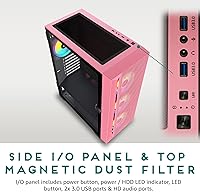
Two USB 3.0 ports on the top panel provide fast transfer speeds for external drives and peripherals, and the included HD Audio jack functions reliably for headset connectivity during gaming sessions. Port placement on the top panel is practical for most desk configurations.
The complete absence of a USB-C port is a genuine gap at this point in the market, where front-panel USB-C is increasingly standard even on sub-100-dollar cases. Builders who regularly connect modern smartphones, fast SSDs, or recent peripherals via USB-C will need to route cables to the rear I/O instead, which is a daily inconvenience.
Water Cooling Readiness
76%
24%
Radiator support across three panels — including a 360mm option at the front — means this chassis has a clear upgrade path to a full AIO cooler without requiring a case swap down the line. The front mounting position in particular gives a 240mm or 360mm AIO room to breathe effectively.
The top radiator clearance of 240mm limits options if you prefer top-mounted cooling with a larger rad, and tall memory modules combined with a top radiator can create clearance conflicts on some ATX boards. Water cooling compatibility details in the included manual are sparse, which adds setup time for builders less familiar with the configuration.

Suitable for:

The Apevia Destiny Mesh Mid Tower PC Case is a strong fit for first-time builders who want a complete, visually appealing starting point without the hassle of sourcing fans separately. If you're putting together a pink or pastel-themed setup, this chassis gives you a cohesive aesthetic foundation without paying a style premium. Budget-minded builders who still care about airflow will appreciate the mesh front panel, which genuinely moves air better than the solid-front designs common in this price range. The broad motherboard compatibility — ATX, Micro-ATX, and Mini-ITX — means you're not locked into a specific platform, giving you flexibility if your build plans shift. Streamers or content creators who want their rig to look polished on camera will also find the glass panel and ARGB lighting combination practical rather than purely decorative.

Not suitable for:

The Apevia Destiny Mesh Mid Tower PC Case is not the right choice for builders running large air coolers, as the 6.5-inch CPU cooler height limit disqualifies several popular tower coolers like the Noctua NH-D15 or DeepCool AK620 — check your cooler's specs carefully before committing. Enthusiasts who demand near-silent operation may find the included fans louder than expected at higher speeds, and replacing all four immediately defeats some of the cost-saving appeal. If you haul your PC to LAN events regularly, the magnetic side panel — while convenient at home — raises legitimate questions about how reliably it stays closed during transport. Builders who need extensive front-panel connectivity beyond two USB 3.0 ports will feel the limitations quickly. This mid-tower chassis is also not aimed at high-end custom water-cooling loops where interior real estate and premium build materials matter more than price.

Specifications

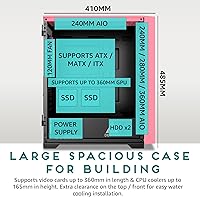
  • Case Type: Mid-tower form factor designed to accommodate standard ATX, Micro-ATX, and Mini-ITX motherboards.
  • Dimensions: The chassis measures 16.25″ long by 8.25″ wide by 18.5″ tall, making it a standard mid-tower footprint.
  • Weight: The case weighs 11 pounds unloaded, typical for a steel-and-glass mid-tower build.
  • Material: The main structure is steel with a full-size tempered glass side panel on a swivel magnetic hinge.
  • Front Panel: A metal mesh front panel promotes active airflow by allowing direct air intake from the three front-mounted fans.
  • Side Panel: The left side panel is full-size tempered glass mounted on a door-swivel magnetic hinge for tool-free access.
  • Included Fans: Four 120mm ARGB fans come pre-installed: three in the front intake position and one at the rear exhaust.
  • Fan Lighting: Included fans support 366 RGB lighting modes controlled via a top-panel LED button, with optional 3-pin ARGB motherboard sync.
  • GPU Clearance: The chassis supports graphics cards up to 360mm in length without requiring removal of drive cages.
  • CPU Clearance: CPU air coolers up to 6.5 inches tall are supported; taller coolers will not fit without modification.
  • Radiator Support: Radiators up to 360mm fit in the front, up to 240mm on top, and a single 120mm at the rear.
  • PCIe Slots: Seven screw-in PCIe expansion slots are included, eliminating the need to punch out breakaway tabs during GPU installation.
  • Drive Bays: Storage support includes two hidden 3.5-inch bays and two hidden 2.5-inch bays for SSDs or HDDs.
  • Front I/O: The top panel provides two USB 3.0 ports and one HD Audio jack for headset and microphone connectivity.
  • Dust Filter: A magnetic dust filter sits on the top panel and can be removed and washed without tools.
  • Power Supply: The power supply mounts at the rear-bottom of the chassis using a standard rear-mount configuration.
  • Fan Capacity: The case supports up to six fans total: three 120mm front, two 120mm top optional, and one 120mm rear included.
  • Color: Available in pink with matching interior accents; the exterior finish is consistent across the steel panels.

Related Reviews
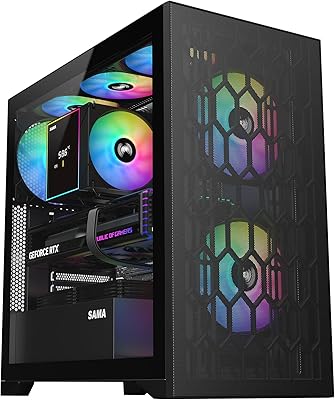
SAMA V Mesh Mid Tower PC Case
86%
94%
Cooling Performance
88%
Build Quality
91%
Airflow Efficiency
89%
Ease of Maintenance
87%
Compatibility with Components
More
Apevia Hydra-PK Mid Tower Gaming PC Case

87%
92%
Cooling Performance
89%
Aesthetics & Design
87%
Build Quality
88%
Cable Management
75%
Fan Noise Level
More
SAMA V60 Mid Tower PC Case
80%
93%
Out-of-Box Cooling Value
78%
Airflow Performance
91%
AIO & Radiator Flexibility
88%
Tempered Glass & Aesthetics
71%
Build Quality & Materials
More
Zalman S3 ATX Mid-Tower PC Case
74%
83%
Value for Money
71%
Build Quality
58%
Airflow & Cooling Performance
86%
Ease of Assembly
67%
Acrylic Side Panel
More
Vetroo AL800 Mid Tower ATX PC Case
76%
78%
Build Quality
84%
Tempered Glass Panel
76%
Airflow Performance
61%
Fan Included & Expandability
69%
Cable Management
More
Corsair FRAME 4000D RS Mid-Tower Case
82%
91%
Airflow Performance
88%
Build Quality
86%
Modularity & Upgradability
83%
Fan Mounting System
78%
GPU Compatibility
More
Corsair 3000D Airflow Mid-Tower PC Case
81%
93%
Airflow Performance
88%
Build Quality & Materials
91%
Thermal Management Design
84%
Cable Management
61%
Included Fans Quality
More
darkFlash DS900 ATX Mid-Tower PC Case
84%
89%
Cooling Performance
88%
Build Quality
91%
Ease of Installation
85%
Design & Aesthetics
92%
Value for Money
More
Zalman S2 ATX Mid-Tower PC Case

83%
88%
Cooling Performance
80%
Build Quality
85%
Ease of Setup
70%
Cable Management
92%
Value for Money
More
ANSAITE W9 Mid-Tower Gaming PC Case
84%
89%
Cooling Performance
92%
Build Quality
85%
Cable Management
90%
Aesthetics
75%
Size/Space
More

FAQ

Yes, the Apevia Destiny Mesh Mid Tower PC Case supports standard ATX boards up to 11 by 12 inches, along with Micro-ATX and Mini-ITX. Most mainstream consumer boards fall well within those limits.

Unfortunately, no. The CPU cooler height limit is 6.5 inches, and the NH-D15 stands around 6.6 to 6.7 inches tall, which puts it just over the threshold. You'll want to check your specific cooler's height before buying — something like a 120mm or 240mm AIO or a low-profile tower cooler would be a safer fit.

The fans include a 3-pin ARGB connector that plugs directly into a compatible ARGB header on your motherboard. Keep in mind this only works with motherboards that have a dedicated ARGB header — if yours doesn't, you can still control the lighting manually using the LED button on the top panel.

Most buyers report that the pink finish looks true-to-photo in person, which is genuinely not always the case with budget cases. It's a solid mid-tone pink rather than a pastel or hot pink, so it pairs well with white or black builds aiming for a themed aesthetic.

It holds well during normal use, but the magnetic closure isn't designed for frequent movement or travel. If you're taking the PC to a LAN party or moving it around regularly, it's worth adding a strip of tape or a panel brace during transport just to be safe.

Yes, the front panel accommodates radiators up to 360mm, which opens the door to a full triple-fan AIO cooler. The top supports up to 240mm and the rear fits a single 120mm, giving you real flexibility if you plan to go custom cooling later.

At lower speeds they're reasonably quiet, but several buyers note that spinning them up to full speed is audibly noticeable in a quiet room. If you're sensitive to noise, consider adjusting fan curves in your motherboard's BIOS or replacing them with quieter aftermarket options over time.

These are screw-in slots, not punch-outs — which is a genuine advantage. You can remove and reinstall your GPU or expansion cards without worrying about permanently destroying a slot cover, which comes in handy if you ever swap cards or reconfigure your build.

There's a dedicated area behind the motherboard tray for routing cables, but the space is somewhat tighter than the specs suggest. It's manageable with some planning and zip ties, but don't expect the generous routing channels you'd find on pricier cases. Taking your time during the build pays off here.

The case ships with standard rubber-tipped feet on the bottom panel to keep it stable and protect your desk. They're nothing fancy, but they do the job of preventing scratching and minor vibration transfer.