Overview

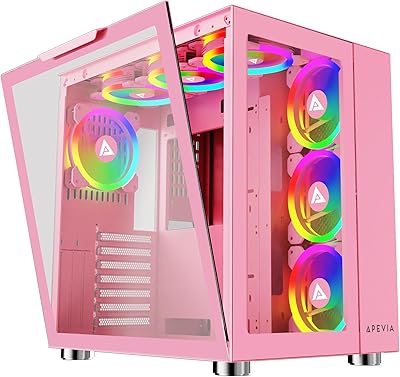
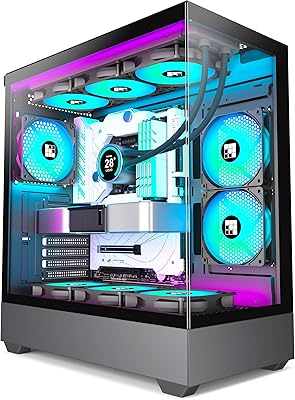
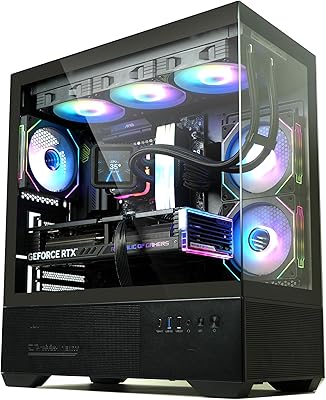
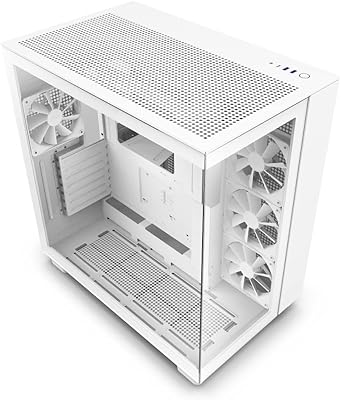
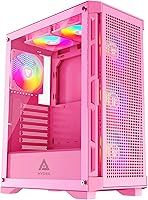
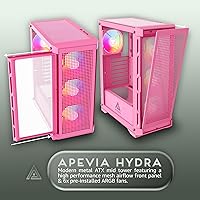
The Apevia Hydra-PK Mid Tower Gaming PC Case is Apevia's answer to builders who want a head-turning pink rig without spending a fortune or wrestling with fan installations. It ships with six 120mm ARGB fans already in place, which is genuinely unusual at this price point — most competing cases make you buy fans separately. A mesh front panel keeps air moving through the chassis, and the full tempered glass side panel means your build is always on display. It supports ATX, Micro-ATX, and ITX boards, so it fits neatly into a wide range of build plans. For a first build, the out-of-box setup is hard to argue with.
Features & Benefits

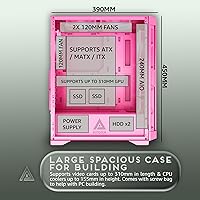
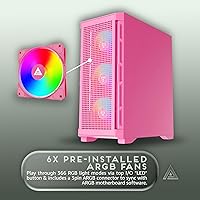
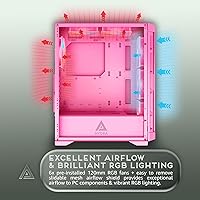
Six pre-installed fans is the headline here — three pulling air in through the front, one exhausting out the rear, and all six running ARGB lighting across 366 distinct modes. You cycle through them with a button on the top panel, no software required. If your motherboard has an ARGB header, you can sync the lighting directly; otherwise, the standalone modes work just fine. The mesh front genuinely helps airflow compared to solid-panel alternatives, though this is still an entry-level chassis rather than a purpose-built thermal powerhouse. GPU clearance stretches to 310mm and CPU cooler height tops out at 155mm, which covers nearly every mainstream component pairing.

Best For

This ARGB gaming chassis was clearly designed with the first-time builder in mind. If you are putting together your first gaming rig, the factory-installed fans alone save you time, money, and the headache of figuring out fan headers. Builders chasing a pink or pastel aesthetic will appreciate that the finish is consistent and actually matches product photos — that is not always a given. It is a solid fit for mid-range component setups where your GPU stays under 310mm, and those who prefer to control lighting with a physical button rather than software will find the standalone RGB modes a convenient bonus.

User Feedback

Owners are largely positive, with the fan count and value drawing the most consistent praise — getting six ARGB fans included at this price genuinely surprises people in a good way. The pink finish earns specific compliments for being vibrant and accurate rather than washed out. On the downside, the single USB 3.0 port on the top panel feels limited by current standards, and a few builders with larger power supplies found cable routing tighter than expected. One practical heads-up worth flagging: ARGB motherboard sync only works if your board has a compatible header, so newer builders should confirm that before assuming full sync is ready to go.

Pros

  • Six 120mm ARGB fans are included out of the box, saving time and money compared to cases that ship empty.
  • The pink finish is vibrant and consistent with product photos, which is not always something you can rely on.
  • Supports ATX, Micro-ATX, and ITX motherboards, making it adaptable to a wide range of builds.
  • The mesh front panel provides noticeably better air intake than solid-front alternatives in the same price range.
  • 366 lighting modes are controlled with a single top-panel button — no software or drivers needed.
  • Full-sized tempered glass side panel lets you actually see and enjoy the interior lighting without obstruction.
  • The magnetic top dust filter and removable front mesh shield make routine cleaning quick and painless.
  • ARGB motherboard sync is supported for those with a compatible header, adding flexibility for more advanced setups.
  • Fits GPUs up to 310mm and CPU coolers up to 155mm, covering most popular mainstream component combinations.
  • Front-panel water cooling support for a 240mm radiator gives budget builders a path toward liquid cooling later.

Cons

  • A single USB 3.0 port on the top panel feels outdated and limiting for everyday desktop use.
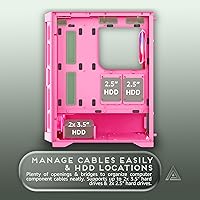
  • Cable management behind the motherboard tray gets cramped when using larger or fully modular power supplies.
  • ARGB motherboard sync requires a dedicated 3-pin ARGB header, which not all budget boards include — easy to overlook.
  • Cooling performance, while decent, cannot match purpose-built high-airflow cases if thermals are a top priority.
  • The case only supports front-panel water cooling up to 240mm, ruling out larger radiator configurations entirely.
  • Build quality on smaller brackets and clips is adequate but reflects the entry-level price point in feel.
  • Only two drive bays for 3.5-inch drives limits storage expansion for users who rely on multiple hard drives.
  • No USB-C port on the front panel, which is increasingly expected on modern builds.
  • Fan controller options are limited to the onboard button — no hub or PWM header support for independent fan speed control.

Ratings

The scores below for the Apevia Hydra-PK Mid Tower Gaming PC Case were generated by our AI system after analyzing verified purchase reviews from buyers worldwide, with spam, bot-submitted, and incentivized feedback actively filtered out before scoring. Each category reflects the honest balance of what real builders praised and what frustrated them — nothing is glossed over. Strengths are recognized where they are earned, and recurring pain points are scored accordingly.
Value for Money
88%
Buyers repeatedly call out the six pre-installed ARGB fans as the single biggest value driver — getting a fully populated case at this price point is something most competing chassis simply do not offer. For first-time builders trying to keep costs controlled, that alone changes the math significantly.
A handful of reviewers feel the single USB 3.0 port and lack of USB-C slightly undercut the overall value proposition, particularly as front-panel connectivity expectations have shifted in recent years. It does not ruin the deal, but it is a noticeable gap.
Included Fan Quality
83%
The six 120mm ARGB fans work well out of the box and produce vibrant lighting that buyers consistently describe as better than expected for the price tier. The fact that they are ready to run without any additional purchases removes a common friction point for new builders.
Experienced builders note that the fans are functional but not performance-grade — noise levels at higher speeds are audible, and airflow throughput does not match what premium fan sets deliver. For casual gaming use they are perfectly acceptable, but thermal-focused builds may eventually want to swap them out.
Aesthetic & Finish
91%
The pink finish earns unusually specific praise from buyers, who note it matches product photos accurately — a consistency that is easy to take for granted but is not always delivered. The combination of vibrant color and the tempered glass panel creates a visually striking build that genuinely stands out on a desk.
The pink is bold and specific, which means buyers who want a softer pastel or a more muted rose tone may find it slightly more intense than anticipated. There are no color variant options within this model line if the shade is not quite right for your setup.
Airflow Performance
72%
28%
The mesh front panel makes a real difference compared to the solid-front cases common at this price point, allowing the three front intake fans to pull in air without significant restriction. For mid-range component loads, temperatures stay reasonable during typical gaming sessions.
This is still a budget chassis and should not be evaluated against purpose-built airflow-optimized cases. Users running higher-end components under sustained load may find temperatures creeping up, and the limited top fan support means upgrading the cooling path has a ceiling.
Build Quality
74%
26%
The steel chassis feels solid for the price, and the tempered glass panel in particular draws positive remarks — buyers are pleasantly surprised by its thickness and clarity relative to expectations. Panel fitment is generally consistent with few reports of major alignment issues on arrival.
Smaller plastic clips, thumb screws, and internal brackets reflect the entry-level cost in feel and tactile feedback. A few users report minor flexing in the side panels when applying pressure during builds, which is not unusual at this price but worth knowing going in.
Ease of Assembly
81%
19%
Pre-installed fans remove one of the most time-consuming steps in a first build, and the overall interior layout is straightforward enough that beginners can follow a standard build guide without any case-specific confusion. Standoff placement and panel removal both work cleanly.
Builders using larger or fully modular power supplies have flagged that the cable routing channels behind the motherboard tray get genuinely cramped. It is workable, but it requires patience and some advance planning rather than being effortless.
RGB Lighting Control
79%
21%
Having 366 lighting modes accessible through a single physical button is a practical solution that does not require any software, drivers, or app setup — a real convenience for builders who just want lighting to work immediately. The ARGB motherboard sync option adds meaningful flexibility for those with compatible boards.
The ARGB sync requirement catches some buyers off guard — it only functions with a 3-pin ARGB header on the motherboard, and not all budget boards include one. There is also no dedicated fan controller or hub, so independent speed management per fan is not possible.
Front Panel Connectivity
57%
43%
Two USB 2.0 ports cover basic peripheral needs like mice, keyboards, and USB drives without issue, and the HD audio jack works reliably for headsets. For a secondary build or a setup with minimal daily peripheral plugging, the port selection is just about adequate.
A single USB 3.0 port is the most consistently cited frustration among buyers, and the complete absence of a USB-C port makes this panel feel out of step with modern usage habits. Users who regularly connect fast storage drives or charge newer devices at the front will feel this limitation regularly.
Dust Management
78%
22%
The magnetic top dust filter is genuinely convenient — it lifts off without tools for quick cleaning, which is the kind of small design decision that pays off over months of use. The removable front mesh shield also makes periodic deep cleaning straightforward rather than a disassembly chore.
There is no bottom dust filter included, which leaves the power supply intake area open to accumulation over time. Buyers in dustier environments will want to add an aftermarket solution or plan for more frequent internal cleaning.
Component Compatibility
82%
18%
Support for ATX, Micro-ATX, and Mini-ITX motherboards gives this case flexibility across a wide range of build configurations, and the 310mm GPU clearance comfortably covers most popular discrete graphics cards available in the mainstream market. The 155mm CPU cooler height limit accommodates the majority of tower air coolers as well.
Builders running longer flagship GPUs above 310mm will hit a hard limit, and the 240mm front radiator cap rules out larger all-in-one liquid coolers. It is a case designed around mainstream parts, and anything outside that range requires checking measurements carefully.
Cable Management
64%
36%
The rear routing space and included tie-down points are sufficient for a clean build when using a standard non-modular or semi-modular power supply. First-time builders working with a typical budget PSU generally manage a respectable result without too much frustration.
Fully modular power supplies with thicker cable sets push the rear channel to its limit, and some users describe the side panel as noticeably harder to close cleanly after routing. If your PSU has a lot of cables, plan on spending extra time persuading everything to sit flush.
Cooling Upgrade Potential
66%
34%
The front panel's 240mm radiator support gives builders a reasonable upgrade path to liquid cooling without replacing the case entirely, which is a useful feature to have at this price point. Fan mounting positions front and rear also allow for some reconfiguration of the included fans as needs change.
Top fan support is limited and there is no side panel ventilation or mounting, which constrains how far the thermal configuration can be pushed. Builders who anticipate significant hardware upgrades over time may eventually outgrow the case's cooling headroom.
Packaging & Delivery
76%
24%
Most buyers report the case arriving well-protected with foam inserts that adequately cushion the tempered glass panel during shipping. The packaging is efficient for the size and damage-on-arrival reports are relatively uncommon for this model.
A small number of reviews mention cosmetic scuffs or minor finish marks on the exterior panels upon unboxing, suggesting quality control on the finishing stage is not perfectly consistent across all units. It is not a widespread pattern but worth inspecting carefully on arrival.

Suitable for:

The Apevia Hydra-PK Mid Tower Gaming PC Case is a strong pick for anyone building their first gaming PC on a modest budget, particularly if aesthetics matter as much as functionality. If you have been hunting for a pink or pastel-themed chassis that does not require sourcing fans separately, this case solves that problem right out of the box — six ARGB fans ready to run on day one is a genuine convenience. It suits builders pairing mainstream mid-range components, especially those with GPUs under 310mm in length and air coolers within the 155mm height limit, which covers the vast majority of popular builds in this price bracket. People who prefer a physical button for cycling through lighting modes rather than relying on software will find the standalone RGB control refreshingly simple. It also works well for those on ATX, Micro-ATX, or ITX motherboards, giving it flexibility across a range of build configurations.
Not suitable for:

The Apevia Hydra-PK Mid Tower Gaming PC Case is not the right call for experienced builders who prioritize maximum thermal performance, as the mesh front improves airflow over solid panels but this chassis is not engineered to compete with purpose-built high-airflow cases. If your GPU exceeds 310mm or your CPU cooler pushes past 155mm, you will hit clearance walls before you finish the build. Power users who regularly connect multiple USB devices will likely find a single USB 3.0 port frustrating over time — it is a practical shortcoming that adds up in daily use. Builders with larger modular power supplies may also struggle with rear cable routing, which real users describe as functional but tight rather than genuinely spacious. Finally, if you are planning to run full ARGB motherboard sync, you need to confirm your board has a compatible 3-pin ARGB header first, otherwise that feature simply will not be available to you.
Specifications

  • Case Type: Mid-tower form factor designed to fit standard ATX, Micro-ATX, and Mini-ITX motherboards.
  • Dimensions: The chassis measures 15.35″ deep, 7.87″ wide, and 17.72″ tall, offering a compact footprint for a mid-tower.
  • Weight: The case weighs 11.3 pounds without components installed, which is typical for a metal mid-tower at this size.
  • Material: The main chassis is constructed from steel with a full-sized tempered glass side panel for interior visibility.
  • Included Fans: Six 120mm ARGB fans come pre-installed: three mounted at the front as intake and one at the rear as exhaust.
  • Fan Lighting: All six fans support 366 standalone RGB lighting modes, cycled via a dedicated button on the top panel.
  • ARGB Sync: Fans connect via a 3-pin ARGB connector and are compatible with ARGB-capable motherboards for synchronized lighting control.
  • Front Panel: The front panel features a high-airflow mesh design that improves passive air intake compared to solid-panel alternatives.
  • GPU Clearance: The case accommodates graphics cards up to 310mm in length, covering the vast majority of mainstream consumer GPUs.
  • CPU Clearance: CPU air coolers up to 155mm in height fit within the chassis without modification.
  • Drive Bays: Storage support includes two 3.5-inch hard drive bays and two 2.5-inch SSD bays, all routed behind the motherboard tray.
  • Expansion Slots: Seven expansion slots are available along the rear panel for graphics cards, capture cards, and other PCIe add-in boards.
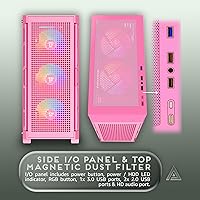
  • Front Ports: The top I/O panel provides one USB 3.0 port, two USB 2.0 ports, and one HD audio combo jack.
  • Water Cooling: The front panel supports a 240mm radiator, enabling basic liquid cooling configurations for builders who want to upgrade later.
  • Dust Filters: A magnetic dust filter sits on the top panel, and a removable mesh shield on the front panel simplifies routine cleaning.
  • Power Supply: The power supply mounts at the bottom of the case and is compatible with standard ATX PSU form factors.
  • Color: The case is finished in pink, with the exterior color consistent across the metal panels and front mesh.
  • Top Panel Ports: The top panel also functions as the main I/O and RGB control hub, centralizing access and fan lighting adjustments in one location.

Related Reviews

SZSKYING CMSVB-1 Mid-Tower PC Gaming Case
74%
91%
Value for Money
88%
Included Fans
86%
Aesthetics & RGB
61%
Build Quality
74%
Airflow Performance
More
ANSAITE W9 Mid-Tower ATX PC Case
77%
88%
Value for Money
91%
RGB & Lighting Performance
74%
Airflow & Cooling Capacity
63%
Build Quality & Materials
84%
Cable Management
More
Apevia Prism-Elite-PK Gaming PC Case
84%
88%
Cooling Performance
85%
Build Quality
92%
Aesthetics & Design
80%
Ease of Setup
90%
Compatibility with Components
More
Zalman Chronix Mid Tower ATX PC Case
78%
88%
Aesthetic Design
74%
Build Quality
83%
Included ARGB Fans
86%
Cooling Potential
84%
Internal Clearance
More
Montech X5 ATX Mid-Tower PC Case
81%
88%
Airflow Performance
91%
Value for Money
79%
Build Quality & Materials
93%
GPU Compatibility & Support
84%
Cable Management
More
MOROVOL P5 Mid Tower ATX PC Case
75%
83%
Airflow Performance
88%
Value for Money
71%
Build Quality
58%
Noise Levels
84%
Ease of Assembly
More
darkFlash DRX70 ATX Mid-Tower PC Case
74%
83%
Value for Money
78%
Airflow Performance
89%
Ease of Assembly
67%
RGB Lighting
71%
Build Quality & Materials
More
FOIFKIN F1 Mid-Tower Gaming PC Case
74%
83%
Cooling Performance
74%
Build Quality
61%
Cable Management
88%
Tempered Glass Panel
86%
ARGB Lighting
More
MUSETEX K2
MUSETEX K2
80%
93%
Aesthetic Design
74%
Build Quality & Materials
78%
Cooling Performance
61%
Fan Noise Levels
91%
Hardware Compatibility & Clearance
More
MSI MPG SEKIRA 100R Mid Tower Gaming PC Case
86%
94%
Cooling Performance
89%
Build Quality
91%
Ease of Installation
88%
Aesthetics & RGB Lighting
90%
Airflow & Ventilation
More

FAQ

You get six 120mm ARGB fans included right out of the box — three at the front and one at the rear, all pre-mounted. For most standard builds, that coverage is genuinely sufficient without adding anything extra.

The Apevia Hydra-PK Mid Tower Gaming PC Case supports standard ATX, Micro-ATX, and Mini-ITX motherboards, so compatibility is broad. If your board fits any of those form factors, you should be fine.
Yes, but only if your motherboard has a dedicated 3-pin ARGB header. If it does, you can plug in and sync directly. If not, the fans still work great in standalone mode — you just cycle through the 366 lighting modes using the button on the top panel instead.

The case clears graphics cards up to 310mm in length, which covers most popular mid-range and even some higher-end cards. If your GPU is longer than 310mm, you will want to measure carefully or consider a larger chassis.

It is manageable for most builds, but some users with larger or fully modular power supplies have found the rear routing space tighter than ideal. If you are using a compact PSU, you should be fine. Plan your cable runs before you start, and it will go smoothly.

There is a dedicated LED button on the top panel — just press it to cycle through the available modes. If you want to switch to motherboard ARGB sync mode, hold the button down for about five seconds and it will toggle over.

Multiple buyers have specifically noted that the pink finish in real life matches the product photos well — it is a vibrant, consistent pink rather than a washed-out or orange-tinted shade. That kind of color accuracy is not always guaranteed, so it is a genuine plus here.

Yes, the front panel supports a 240mm radiator, so a standard 240mm all-in-one liquid cooler will fit. Just note that larger 360mm AIO coolers are not supported due to space constraints at the front.

Pretty straightforward. The top panel has a magnetic dust filter you can lift off without tools, and the front mesh shield is removable for washing. Regular light maintenance will keep dust from building up inside.

No, there is no USB-C port on this chassis. The front I/O gives you one USB 3.0 and two USB 2.0 ports, which covers basic connectivity but falls short of what some modern builds expect. If USB-C access at the front is important to your workflow, that is worth factoring into your decision.