Overview

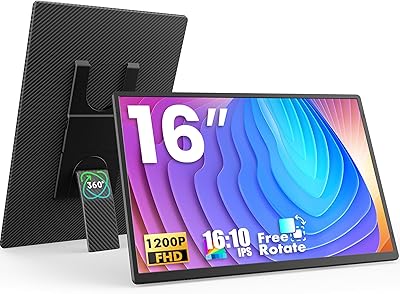
The AOKER 16″ 1200P Portable Laptop Monitor enters a crowded market of travel displays with a genuinely practical pitch: a 16-inch, 1920×1200 panel built for people who work from wherever they land. The 16:10 aspect ratio is the real differentiator here — that taller format gives you noticeably more vertical space than a standard widescreen, which matters when you're scrolling through code, long documents, or spreadsheets. AOKER isn't a household name, and at this mid-range price point, you're trading brand recognition for solid specs. Think of this travel display as a capable productivity companion, not a color-critical studio tool.
Features & Benefits

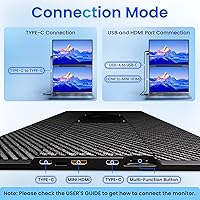
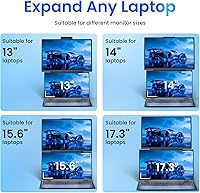
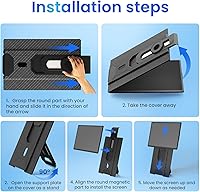
At 1920×1200 with HDR optimization, the image is crisp for everyday tasks — though the 300-nit brightness means you'll want to avoid direct sunlight; indoors and in most office environments it holds up just fine. The magnetic stand is genuinely clever: it rotates a full 360°, adjusts height to fit laptops from 13 to 17.5 inches, and detaches for VESA wall mounting. Connectivity is refreshingly simple — plug in via USB-C, HDMI, or USB-A and it just works, no driver installation needed. The included cable kit covers most scenarios, and reverse charging through the USB-C port is a thoughtful bonus for keeping other devices topped up.

Best For

This portable monitor makes the most sense for remote workers and travelers who regularly pack a laptop and wish they had more screen without hauling a full-size display. Students working out of dorms or coffee shops will appreciate the extra vertical real estate — especially for research-heavy or writing-focused workflows. The 16:10 format benefits analysts and developers too; that added height means fewer frustrating scrolling interruptions. Console players heading on a trip can connect the AOKER screen extender to a Switch or PS5, which is a legitimately useful perk. It's less suited to anyone prioritizing color accuracy or peak brightness for creative work.

User Feedback

Since this listing only went live in May 2025, the buyer review pool is still thin — so treat early impressions with appropriate skepticism. That said, initial users tend to highlight how fast setup is, the convenience of the magnetic stand, and display sharpness relative to the price. Concerns center on color accuracy for visual work, and questions about long-term hinge durability are worth watching as more units ship. A handful of buyers have flagged USB-C compatibility issues with certain laptop models, so checking your port specs beforehand is wise. The 365-day warranty is a reassuring backstop for a newer brand entering this competitive space.

Pros

  • The 16:10 aspect ratio delivers noticeably more vertical workspace than a standard widescreen monitor, a genuine productivity boost.
  • Plug-and-play setup via USB-C, HDMI, or USB-A means you are up and running in under a minute with zero driver hassle.
  • The magnetic 360° rotating stand adjusts height and orientation quickly, making it easy to reconfigure for any desk or lap situation.
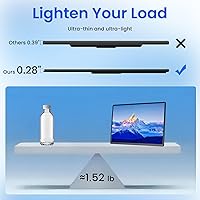
  • At roughly 1.68 lbs for the panel alone, this portable monitor is light enough to justify tossing in a laptop bag every day.
  • All necessary cables are included in the box, so there are no surprise accessory purchases on day one.
  • Reverse charging through the USB-C port lets you keep a phone or other device topped up without hunting for an extra outlet.
  • Matte anti-glare coating reduces reflections in typical indoor office and cafe environments.
  • Compatible with an unusually wide range of devices, including Windows, macOS, iOS, Android, PS5, Switch, and Xbox.
  • The 365-day warranty offers solid peace of mind for a mid-range purchase from a newer brand.
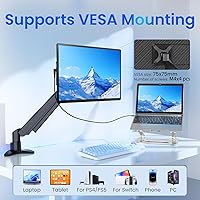
  • VESA 75×75mm support means the stand is optional — you can mount this screen on a wall or arm if your setup calls for it.

Cons

  • At 300 nits, brightness is underwhelming in well-lit rooms and practically unusable in direct sunlight.
  • Color accuracy is not calibrated for professional creative work, limiting its appeal for designers or photo editors.
  • The total weight of 4.84 lbs with the stand is notably heavier than the panel-only figure suggests — worth factoring into bag weight.
  • Long-term hinge and stand durability is unproven, as the product only launched in mid-2025 with limited real-world mileage.
  • USB-C compatibility is not universal; certain laptop models or non-standard USB-C ports may cause connection issues.
  • The review pool is very small given the recent launch date, making it difficult to assess reliability over time.
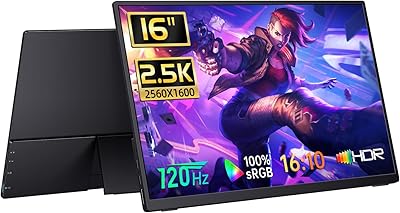
  • No high refresh rate option is available, ruling this screen out for fast-paced or competitive gaming.
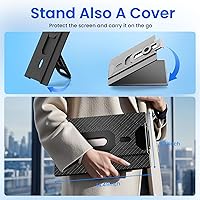
  • The integrated folio case provides basic screen protection but is not a substitute for a dedicated padded sleeve during travel.
  • AOKER is a lesser-known brand, and post-warranty support infrastructure is harder to evaluate than with established monitor makers.

Ratings

Our AI rating engine analyzed verified global buyer reviews for the AOKER 16″ 1200P Portable Laptop Monitor, actively filtering out incentivized, bot-generated, and unverified submissions to surface what real users actually experience. Because this product launched in May 2025, the review pool is still growing — scores reflect early adopter feedback weighted against known specifications and category benchmarks. Both the standout strengths and the honest pain points are factored in, so the scores below represent a clear-eyed picture rather than a marketing summary.

Display Clarity
83%
Users working on spreadsheets, documents, and coding consistently note how sharp the 1920×1200 panel looks compared to budget portable monitors in the same size range. The 16:10 format adds real vertical breathing room, and text rendering at native resolution is crisp enough for long work sessions without fatigue.
Color accuracy falls short of anything approaching professional-grade output — saturation and white balance can appear slightly off out of the box. Users doing light photo editing or design work have flagged that colors do not translate reliably compared to calibrated displays.
Brightness & Visibility
61%
39%
In typical indoor settings — home offices, hotel rooms, dim cafes — the 300-nit panel handles everyday productivity tasks without issue. The matte anti-glare coating helps reduce reflections from overhead lighting, which softens the impact of the modest brightness ceiling in controlled environments.
Step outside or sit near a bright window and the limitations become obvious quickly. At 300 nits, the screen washes out in direct sunlight, and even indirect outdoor light makes prolonged use uncomfortable, which is a real drawback for a monitor marketed specifically at travelers.
Portability & Form Factor
86%
The panel itself is genuinely slim at 0.3 inches thick, and users regularly comment on how easily it slides into a laptop bag alongside their computer. For professionals who move between client sites, coworking spaces, and home setups, the slim profile makes it a realistic daily carry item.
The total weight of 4.84 lbs with the stand attached surprises users who bought based on the panel-only figure of 1.68 lbs — the gap is significant. Travelers who pack light and plan to carry the full stand assembly every day may find the combined load heavier than expected.
Stand Design
78%
22%
The 360° rotating magnetic stand genuinely impresses users who frequently switch between landscape and portrait orientations during the day. Height adjustment to fit laptops from 13″ to 17.5″ covers the vast majority of machines people are actually traveling with, and the magnetic attachment makes repositioning feel intuitive rather than fiddly.
The magnetic connection, while convenient, introduces some wobble under heavy typing — a few users note that the monitor can shift slightly on harder desk surfaces. Long-term durability of the magnetic mechanism is still an open question given the product's recent launch date.
Connectivity & Compatibility
81%
19%
Supporting USB-C with Thunderbolt 3/4 and DisplayPort Alt Mode, full-size HDMI, and USB-A covers an unusually broad range of devices for this price tier. Users with MacBooks, Windows laptops, Chromebooks, and even consoles like the Switch and PS5 report successful connections without any driver installation.
A subset of users with non-standard or older USB-C implementations report compatibility hiccups — particularly with laptops that support USB-C charging but not video output. Confirming your specific laptop port capabilities before purchasing is worth the extra few minutes to avoid frustration.
Setup Experience
91%
Nearly every positive review mentions how fast the initial setup is — connect the cable, snap on the stand, select your display mode, and you are working within two minutes. No software downloads, no driver conflicts, and no instruction manual needed for most users, which is exactly what a travel tool should offer.
The only friction users report is occasional confusion around which cable to use for which laptop — the included cable kit covers three connection types but the quick-start documentation could be clearer about which combination delivers the best performance for each scenario.
Image Brightness (HDR)
67%
33%
HDR optimization adds a noticeable improvement to contrast in HDR-compatible content — streaming video and some games show richer shadow detail compared to non-HDR portable panels in this category. For casual media consumption in an evening hotel room, the HDR mode is a meaningful upgrade over standard display modes.
HDR performance is constrained by the 300-nit ceiling, which limits the contrast impact compared to proper HDR-certified displays. Users expecting the kind of HDR experience found on premium laptop screens will find this implementation closer to HDR-enhanced than HDR-capable in any meaningful technical sense.
Build Quality
72%
28%
The chassis feels solid for the price, and the matte finish resists fingerprints reasonably well during daily handling. Early buyers report no obvious flex in the display panel itself, and the folio case provides enough protection that most users feel comfortable slipping it into a bag without an additional sleeve.
The bezel edges and stand components have a plastic feel that reads as mid-range rather than premium. A few users note that the folio case hinge shows early signs of wear after repeated daily folding, raising questions about how well the materials hold up after a year of consistent travel use.
Eye Comfort
82%
18%
The low-blue-light mode is one of the more appreciated features among users who spend six or more hours daily in front of screens — writers and developers mention noticeably reduced eye fatigue during evening work sessions compared to monitors without this feature. The matte surface also cuts down on the micro-reflections that contribute to eye strain.
The low-blue-light mode shifts color temperature toward warm tones, which some users find too yellow for accurate work. It is an either/or situation — you can have reduced eye strain or accurate colors, but not both simultaneously with this display.
Value for Money
77%
23%
For a mid-range portable monitor with a 16:10 panel, a full cable kit, a rotating stand, and a one-year warranty, buyers generally feel the price reflects a fair exchange. The 16:10 format and 1200P resolution are not common at this price point, and users who need those specific specifications see clear value relative to alternatives.
Buyers who compare this travel display to slightly pricier options from more established brands note that the brightness, color accuracy, and long-term reliability gaps start to close the value argument. If display quality matters more than the 16:10 format specifically, spending a bit more may be worthwhile.
Cable & Accessory Kit
84%
Including three cables in the box — USB-C to C, HDMI to Mini-HDMI, and USB-A to C — removes a common frustration with portable monitors that ship with minimal accessories. Users frequently call this out positively, especially travelers who do not want to hunt down a specific cable in an unfamiliar city.
The included cables are functional but not particularly premium — a couple of users note that the USB-C cable feels thinner than they would prefer for a connection they plan to plug and unplug multiple times daily. A longer cable option would also be welcomed by users who like more desk flexibility.
Portrait Mode Performance
76%
24%
For developers and writers who use portrait orientation daily, the combination of 1200P vertical resolution and the 16:10 ratio creates a tall, detailed canvas that works well for reading long codebases or documents without constant scrolling. The stand rotation makes switching orientations a one-second task.
The OS-level rotation required to activate portrait mode adds a minor friction point each time, and some users report that the stand is less stable in portrait orientation than in landscape — the magnetic attachment point is optimized for the horizontal position, and vertical use introduces slightly more wobble.
Warranty & Support
73%
27%
A 365-day warranty is meaningfully longer than the 90-day coverage common among budget portable monitor brands, and early buyers report that the seller responds to support queries through Amazon messaging within a reasonable timeframe. For a newer brand, this is a stronger safety net than most competitors offer.
Support is entirely seller-dependent rather than backed by a dedicated brand service network, which means the experience can vary. Users outside the US or those with complex compatibility issues report that resolution sometimes requires several back-and-forth exchanges before reaching a satisfactory outcome.

Suitable for:

The AOKER 16″ 1200P Portable Laptop Monitor is a strong fit for anyone whose work or study life regularly takes them away from a fixed desk. Remote workers, digital nomads, and frequent travelers will appreciate having a capable second screen that fits in a bag without dominating it. The 16:10 panel format is particularly useful for data-heavy roles — analysts, developers, and writers gain meaningful vertical screen space that reduces constant scrolling through long files or spreadsheets. Students working out of dorms, libraries, or cafes will find the plug-and-play setup refreshingly low-friction, with no software installs or fiddling required. The broad device compatibility also makes this travel display a reasonable pick for console gamers who want a decent screen for a Switch or PS5 while traveling.
Not suitable for:

The AOKER 16″ 1200P Portable Laptop Monitor is not the right tool for buyers who need accurate, calibrated color reproduction — photographers, video editors, and graphic designers will find 300 nits and an uncalibrated HDR panel insufficient for professional color work. Anyone expecting to use this screen regularly in bright outdoor environments should also think twice; 300 nits of brightness simply does not cut through direct sunlight or strong ambient glare. If long-term build durability is a top priority, the honest answer is that this is a newer product from a smaller brand with a limited track record, and hinge wear over months of heavy use remains an open question. Buyers who require a guaranteed, well-tested USB-C implementation across all laptop models may also run into compatibility friction with specific devices. Finally, this is not a gaming-first display — there is no mention of high refresh rates, so competitive or fast-paced gaming use is better served elsewhere.
Specifications

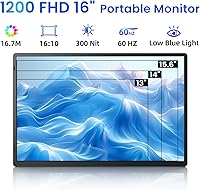
  • Screen Size: The display measures 16″ diagonally with an ultra-narrow bezel design.
  • Resolution: Native resolution is 1920×1200 pixels (1200P FHD), delivering sharper vertical detail than standard 1080P panels.
  • Aspect Ratio: The 16:10 aspect ratio provides 11% more vertical screen space compared to a conventional 16:9 widescreen display.
  • Brightness: Peak panel brightness is 300 cd/m², suitable for indoor and low-ambient-light environments.
  • HDR Support: HDR optimization is enabled to improve contrast and color depth on compatible content sources.
  • Screen Surface: The matte anti-glare coating reduces reflections from overhead lighting and nearby windows.
  • Viewing Angle: The panel supports up to 178° horizontal and vertical viewing angles for consistent clarity off-axis.
  • Connectivity: Input options include USB-C (Thunderbolt 3/4 and DisplayPort Alt Mode), full-size HDMI, and USB-A.
  • Cables Included: The package includes a USB-C to USB-C cable, an HDMI to Mini-HDMI cable, and a USB-A to USB-C cable.
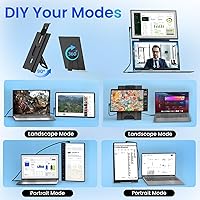
  • Stand Rotation: The detachable magnetic stand supports full 360° rotation, enabling both landscape and portrait orientations.
  • Stand Compatibility: The adjustable stand accommodates laptops with screen sizes ranging from 13″ to 17.5″.
  • VESA Mount: A VESA 75×75mm mounting pattern is supported for use with compatible monitor arms or wall mounts.
  • Reverse Charging: The USB-C port supports reverse charging, allowing the monitor to passively charge a connected device.
  • Low-Blue-Light: A built-in low-blue-light mode is available to reduce eye strain during extended viewing sessions.
  • OS Compatibility: Compatible with Windows, macOS, ChromeOS, iOS (Desktop Mode), Android (Desktop Mode), PS5, Nintendo Switch, and Xbox.
  • Dimensions: The unit measures 0.59×26.37×14 inches, keeping the profile slim enough for most laptop bags.
  • Weight: Total weight including the stand assembly is 4.84 lbs; the panel alone is significantly lighter at approximately 1.68 lbs.
  • Warranty: AOKER covers this product with a 365-day limited warranty backed by direct seller support.
  • Brand & Model: Manufactured by AOKER under model number 1206, first listed in May 2025.
  • Folio Case: An integrated folio case is included, providing basic screen protection and functioning as a secondary stand option.

Related Reviews

FLYTOCCA N3 16-Inch Portable Monitor
77%
91%
Portability & Form Factor
78%
Display Quality
63%
Brightness & Outdoor Usability
83%
Matte Screen & Glare Resistance
74%
Stand & Orientation Flexibility
More
Upperizon U16LS 16″ 2K Portable Monitor
74%
91%
Display Sharpness
83%
Color Accuracy
89%
Portability
78%
Refresh Rate Performance
86%
Setup & Ease of Use
More
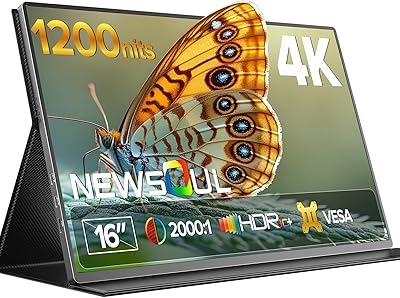
Newsoul M1620 16″ 4K Portable Monitor
81%
91%
Display Clarity
74%
Real-World Brightness
83%
Color Accuracy
88%
Build Quality
67%
Stand and Portability
More
CAPERAVE BQ16H 16″ Portable Monitor
76%
91%
Display Clarity
86%
Refresh Rate & Gaming
78%
Connectivity & Setup
83%
Build Quality
74%
Color Accuracy
More
Veout V1 16″ Portable Monitor
76%
84%
Display Quality
91%
Portability & Form Factor
82%
Color Accuracy
88%
Setup & Compatibility
67%
Kickstand Stability
More
MAGICRAVEN M1603 16″ 4K Portable Monitor
75%
91%
Image Sharpness
88%
Portability
86%
Connectivity
89%
Setup Experience
63%
Brightness
More
domyfan F1 14″ Portable Monitor
72%
83%
Display Clarity
71%
Portability
88%
Stand Design
79%
Setup & Compatibility
52%
Screen Glare
More
ARZOPA Z1C 16.1″ Portable Monitor
76%
91%
Value for Money
83%
Display Quality
89%
Portability
81%
Build Quality
79%
Connectivity
More
UPERFECT 16006DD 16″ 4K Portable Monitor
77%
83%
Brightness Performance
91%
Display Sharpness
74%
Color Accuracy
88%
Build Quality
76%
Portability
More
Laptomo S3 14-inch Triple Portable Monitor
72%
88%
Setup & Ease of Use
84%
Productivity Value
53%
Brightness & Glare
67%
Compatibility
61%
Portability & Weight
More

FAQ

It depends on your MacBook model. If your MacBook supports DisplayPort Alt Mode over USB-C or Thunderbolt 3/4, you can connect with a single USB-C cable and get both video and power delivery in one go. Older MacBooks or those with limited USB-C implementations may require the HDMI cable plus a separate power source. Checking your specific port spec before buying is a smart move.

The panel itself weighs around 1.68 lbs, which is genuinely portable. However, the full package including the magnetic stand brings the total to 4.84 lbs, so factor that into your bag weight if you plan to carry the stand daily. Many travelers leave the stand at home and prop the monitor using the folio case instead, which keeps things lighter.

Yes, both are listed as compatible. For the Switch, you would connect via the dock using the HDMI to Mini-HDMI cable. The PS5 connects similarly via HDMI. Just keep in mind that 300 nits is not the brightest panel, so gaming in a dark room is a better experience than trying to use it in a bright hotel lobby.

No software or drivers are needed. The AOKER 16″ 1200P Portable Laptop Monitor is plug-and-play across Windows, macOS, and ChromeOS — just connect the cable, select your display mode in your operating system settings, and you are ready to go. iOS and Android desktop mode also work without additional apps.
Yes, the magnetic stand rotates a full 360°, so flipping to portrait is straightforward. You will also need to rotate the display output in your OS settings, which takes about ten seconds on any modern system. Portrait mode works particularly well for reading long documents or browsing vertical content.

In a typical indoor office or cafe with controlled lighting, 300 nits is adequate. Sitting directly next to a bright window or working outdoors is where it starts to struggle — glare and washed-out colors become noticeable even with the matte coating. If most of your work happens outside or in very bright spaces, you may want a display rated closer to 400–450 nits.

AOKER offers a 365-day warranty, which is longer than many competitors in this price range. Support is handled directly through the seller via Amazon messaging. Since this is a smaller brand without a large retail support network, response times can vary, but the extended warranty window does provide a reasonable safety net if something goes wrong in the first year.

The magnetic attachment system is generally reported as convenient for quick setup and repositioning. That said, magnetic stands tend to be less rigid than traditional hinged ones, so some minor wobble when typing is possible depending on the surface. For stationary desk use it should be fine; on an uneven surface like a couch or bed it may feel less stable.

Yes, as long as your tablet supports DisplayPort Alt Mode or USB-C video output and you have desktop mode enabled. Not all Android tablets or iPads support this — it is specific to certain models and iOS/Android versions, so check your device specifications first. When compatible, it functions as an extended or mirrored display.

For casual video streaming, the 1920×1200 resolution and HDR optimization produce a pleasant picture with solid detail. For photo editing or color-sensitive design work, this travel display is not the right choice — color accuracy is not calibrated to a professional standard, and 300 nits limits shadow and highlight visibility for critical editing tasks. Treat it as a productivity and entertainment screen rather than a color-grading tool.