
Overview

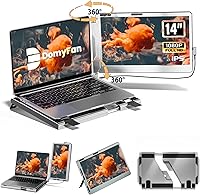
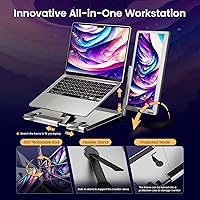
The domyfan F1 14″ Portable Monitor enters a crowded mid-range market with one design choice that actually makes sense: a freestanding aluminum stand that rotates a full 360 degrees, so you never have to clip anything onto your laptop. That alone separates it from most portable extenders at this price. Setup requires no drivers — just plug in a cable and it works across Windows, Mac, Android, and major consoles. It is a practical pick for remote workers, students, and frequent travelers who want a genuine second screen without hauling around a full-size display. That said, if you work mostly outdoors or in bright rooms, the glossy panel will give you pause.

Features & Benefits

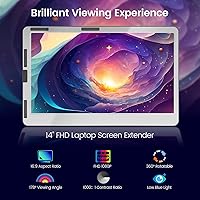
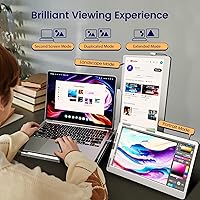
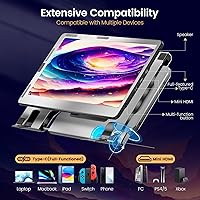
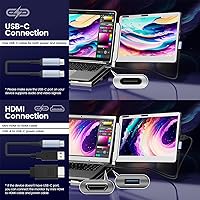
The display itself is a 14-inch IPS panel running at 1920x1080 with a 60Hz refresh rate — sharp enough for documents, spreadsheets, and video calls, and perfectly adequate for casual gaming. The rotatable aluminum stand lifts the screen about 4 centimeters and swings into portrait mode if you need it, which is genuinely useful for reading long documents or coding. Connectivity is well-covered: you get USB-A, Type-C, and HDMI options in the box, so plugging into most modern laptops or consoles takes seconds. There are also built-in dual speakers with a volume dial, a nice touch when you do not have headphones handy. A carry bag rounds out an otherwise thoughtful package.

Best For

This travel monitor is a natural fit for remote workers and freelancers who spend time in cafes, co-working spaces, or client offices and need a reliable second screen without checking a bag. Students will appreciate a real dual-screen setup in a dorm or library without committing to a permanent desk monitor. Console gamers traveling with a Switch or PS5 will find it a capable companion. It also works well for professionals who need to share their screen quickly in meetings. One honest caveat: if you are running an M1 or M2 Mac, compatibility issues are possible and a powered USB-C hub may be required to get a stable signal.

User Feedback

With over 2,100 reviews and a 4.4-star average, buyer sentiment leans clearly positive. Most people highlight how straightforward setup is and how good the image looks for the price tier. Portability gets consistent praise, though a fair number of buyers note that the total package — display, stand, cables, and bag — lands closer to 4 pounds, notably heavier than the headline 1.5-pound figure suggests. The glossy screen draws real complaints from anyone working near a window. A handful of M1 and M2 Mac users report needing extra adapters. On the upside, after-sales support gets mentioned frequently as responsive, which counts for something when buying from a smaller brand.

Pros

  • Plug-and-play setup works across Windows, Mac, Android, and major consoles with zero driver installation.
  • The freestanding aluminum stand rotates a full 360 degrees, eliminating the risk of clip-on extenders damaging your laptop lid.
  • Three cable types included in the box means you can connect to almost any laptop or console right away.
  • IPS panel delivers solid color consistency and wide viewing angles for a monitor at this price point.
  • Portrait mode support makes it genuinely useful for reading long documents or reviewing code.
  • Built-in dual speakers with a physical volume dial remove the need for external audio when traveling.
  • The carry bag is a practical inclusion that keeps cables and the display organized in a single pouch.
  • After-sales support is frequently praised by buyers, which is reassuring for a smaller brand.
  • Works with Nintendo Switch, PS4/5, and Xbox, making it a flexible option for traveling gamers.
  • No-driver requirement means setup takes under a minute on most devices.

Cons

  • The glossy screen surface creates significant glare near windows or in brightly lit rooms.
  • Total carry weight with stand and accessories is nearly 4 lbs, despite the lightweight display headline figure.
  • M1 and M2 Mac users may need a powered USB-C hub for a stable connection, adding extra cost.
  • The 60Hz refresh rate and glossy panel make it a weak fit for competitive gaming or fast-motion content.
  • Stand stability can be inconsistent on uneven surfaces like cafe tables or soft desk pads.
  • No built-in brightness or color calibration controls limit usefulness for professional creative work.
  • The 4cm stand height lift offers limited ergonomic adjustment compared to more premium portable stands.
  • HDMI cable included is Mini HDMI on the monitor side, which some users find fiddly to seat securely.

Ratings

The scores below reflect an AI-driven analysis of thousands of verified global buyer reviews for the domyfan F1 14″ Portable Monitor, with spam, bot activity, and incentivized feedback actively filtered out before any score was calculated. Every category captures both what real users genuinely praised and the frustrations they could not overlook. The result is an honest, balanced picture of where this travel monitor earns its keep — and where it falls short.

Display Clarity
83%
Most buyers working from hotels, co-working spaces, or dorm rooms found the 1080p IPS panel sharp enough for spreadsheets, documents, and video calls without eye strain. Colors look vibrant and consistent across a wide viewing angle, which matters when collaborating side-by-side with a colleague.
Users doing any color-sensitive work — photo editing, design reviews — quickly noticed the lack of calibration options and the slightly cool default color temperature. The 60Hz cap also becomes apparent during faster-moving content like action video or scrolling heavy web pages.
Portability
71%
29%
The panel itself is genuinely slim and the included carry bag keeps everything organized in one place, which frequent travelers appreciated when packing for short business trips or commutes. Students especially liked being able to drop the whole kit into a backpack without a dedicated case.
The advertised 1.5 lb figure refers only to the bare display — once you add the aluminum stand, cables, and bag, the real carry weight is closer to 4 lbs, which surprised a meaningful number of buyers who expected something closer to an ultralight tablet. That gap between marketed weight and practical weight generated consistent frustration.
Stand Design
88%
The 360-degree rotating aluminum stand is the single feature buyers mention most positively, and for good reason — it eliminates the clip-on mechanism that damages laptop lids on competing models. Being able to swing between landscape and portrait without tools, and adjust height slightly, made desk setups feel considerably more flexible.
On soft desk mats or slightly uneven cafe tables, the stand loses some of its confidence and can wobble when you tap the screen to adjust cables. A few buyers with larger, heavier laptops also noted the 4cm height lift is too modest to bring the secondary screen level with the primary display.
Setup & Compatibility
79%
21%
The no-driver plug-and-play experience worked exactly as advertised for the majority of Windows and Intel Mac users, with the screen detected automatically within a few seconds of plugging in. Console users connecting a Switch or PS5 via HDMI similarly reported a smooth, frustration-free first connection.
Apple Silicon Mac users — particularly M1 and M2 owners — ran into real compatibility friction, with several needing a powered USB-C hub before the monitor would display stably. This caveat is not clearly flagged upfront, and it caught enough buyers off guard to pull the overall compatibility score down noticeably.
Screen Glare
52%
48%
In dim or controlled indoor lighting — a home office with blinds drawn, a meeting room, or an evening hotel desk session — the glossy panel actually looks great, with colors appearing richer and more saturated than a comparable matte screen would deliver.
Bright environments are a genuine problem. Buyers working near windows or in cafes with overhead lighting consistently flagged mirror-like reflections that made extended use uncomfortable or impractical. This is arguably the most common single complaint across the review pool and a real limitation for anyone without control over their ambient light.
Build Quality
77%
23%
The aluminum stand feels solid and premium for the price bracket, and the display bezel has a clean, professional look that does not feel cheap on a conference table. Several buyers noted the unit arrived well-packaged with no damage, which suggests consistent manufacturing quality control.
The display panel itself — separate from the stand — has a slightly plastic-forward feel that does not fully match the aluminum stand in perceived quality. A handful of long-term users also reported minor bezel flex when the screen is handled frequently during packing and unpacking cycles.
Connectivity Options
84%
Having USB-A, USB-C, and HDMI inputs in a single portable monitor is genuinely useful and rarely a given at this price point. Buyers frequently highlighted that the three-cable bundle in the box meant they could connect immediately to virtually any device without hunting for adapters.
The HDMI connection uses a Mini HDMI port on the monitor side, which some users found fiddly to connect securely, and the included cable is on the short side for certain desk arrangements. USB-A video output also depends on the host port supporting DisplayLink or alternate mode, which is not universal on older machines.
Audio Quality
58%
42%
Having any built-in audio at all is a plus in this category — buyers appreciated being able to join a video call or watch a quick clip without hunting for headphones or a Bluetooth speaker. The physical volume dial was specifically called out as more convenient than software-only audio controls.
The speakers are thin and tinny, with essentially no low-end response and limited volume ceiling before distortion creeps in. Anyone expecting to watch movies or listen to music through them will be disappointed — these are functional in a pinch, not a feature to rely on regularly.
Value for Money
76%
24%
For buyers who primarily needed a clean plug-and-play second screen for productivity tasks, the overall package — display, stand, carry bag, and three cables — felt like fair value for what is delivered. Students and remote workers on a budget particularly felt the cost-to-utility ratio worked in their favor.
Buyers who encountered M1/M2 Mac compatibility issues and had to purchase a powered hub on top of the monitor cost found the effective price harder to justify. A few users also noted that slightly pricier competitors offer matte panels or better ergonomic stands, making the value proposition feel narrower than it first appears.
Gaming Performance
63%
37%
For casual gaming on a Switch, PS4/5, or Xbox — retro titles, RPGs, slower-paced adventures — the screen performs well enough and the HDMI connection is stable. Travelers who wanted a dedicated gaming screen for hotel stays found it a practical solution that takes up far less space than an actual TV.
The 60Hz refresh rate and glossy panel are genuine constraints for anyone playing fast-paced competitive games, where motion clarity and input lag become noticeable. The screen is simply not tuned for gaming performance, and buyers who approached it with that expectation came away underwhelmed.
Portrait Mode Usability
81%
19%
The ability to rotate into portrait orientation without any tools or clips is one of the stand’s genuine practical wins, and developers, writers, and readers mentioned using this mode daily. Switching between landscape and portrait takes only seconds and works reliably every time.
Stand stability in portrait mode is slightly reduced compared to landscape, particularly on softer surfaces, because the center of gravity shifts with the taller orientation. Some users also noted the 4cm base height is less useful in portrait mode, as the screen sits lower than feels ergonomically ideal.
After-Sales Support
74%
26%
A notable number of buyers who experienced connection issues or received a defective unit mentioned that the support team responded quickly and offered practical troubleshooting steps before pushing a replacement. For a smaller brand, this responsiveness added a layer of confidence for hesitant buyers.
Support quality appears inconsistent — some users with persistent M1 Mac compatibility problems reported feeling passed around without a clear resolution. The warranty terms are also not prominently documented, which left some buyers uncertain about their coverage after the return window closed.
Cable Management
61%
39%
The carry bag consolidates the monitor, stand, and all three cables into one organized pouch, which busy travelers genuinely appreciated for keeping their bag from turning into a tangled mess. The bag quality is functional and protects the display from minor scratches during transport.
There is no cable routing channel in the stand itself, so cables hang freely from the monitor during use and can clutter an otherwise clean desk setup. On a busy work surface, the dangling cables from the monitor to the laptop became a minor but recurring annoyance for users working in tight spaces.
Ergonomics
66%
34%
The 360-degree rotation and portrait mode flexibility give users more positioning options than most fixed-stand competitors at this price, and the ability to work without clipping anything to the laptop reduces physical stress on the primary device over time.
The 4cm fixed height lift offers limited ergonomic customization — users who preferred raising the secondary screen to eye level found the stand too short and had to improvise with books or risers. There is also no tilt adjustment beyond what the rotating stand provides, which is an oversight for long-session comfort.

Suitable for:

The domyfan F1 14″ Portable Monitor is a genuinely practical choice for remote workers and freelancers who regularly work from cafes, hotels, or client sites and find a single laptop screen too limiting for multitasking. Students living in dorms or shared spaces will appreciate getting a real dual-screen setup without committing to a bulky desk monitor. Travelers who carry a Switch, PS5, or Xbox and want a dedicated screen on the road will find the HDMI connection and included carry bag a convenient combo. The freestanding rotatable stand is a meaningful advantage for anyone who has struggled with clip-on extenders scratching or stressing their laptop lid. Professionals who do a lot of in-person presenting or screen-sharing will also find the plug-and-play setup genuinely fast and reliable across most operating systems.

Not suitable for:

The domyfan F1 14″ Portable Monitor is a harder sell for anyone who works primarily in bright environments or near windows, since the glossy panel reflects glare aggressively and can make prolonged use genuinely uncomfortable. Buyers expecting a truly ultralight travel companion should also know upfront that while the display panel alone weighs around 1.5 lbs, the full kit with stand, cables, and bag pushes close to 4 lbs — that matters if you are already watching bag weight. Users on Apple Silicon Macs, particularly M1 and M2 machines, may run into compatibility friction and could need a powered USB-C hub to get a stable connection, which adds cost and complexity. Color-critical professionals — photographers, designers, or video editors — will find a glossy IPS panel at 60Hz with no color calibration options simply too limiting for serious work. Finally, anyone expecting a large-format display will find 14 inches constraining for side-by-side application layouts over extended sessions.

Specifications

  • Screen Size: The display measures 14 inches diagonally, offering a practical balance between screen real estate and portability.
  • Resolution: Native resolution is 1920x1080 pixels (Full HD), delivering sharp text and clear images for everyday productivity tasks.
  • Panel Type: Uses an IPS panel, which provides consistent color reproduction and wide viewing angles compared to TN alternatives.
  • Refresh Rate: Runs at a standard 60Hz refresh rate, suitable for general use, video playback, and casual gaming.
  • Contrast Ratio: Rated at 1000:1 contrast ratio, producing reasonably defined blacks and whites for an entry-level IPS display.
  • Screen Surface: The panel has a glossy finish, which enhances color vibrancy indoors but reflects glare in brightly lit or outdoor environments.
  • Aspect Ratio: Standard 16:9 widescreen aspect ratio, compatible with virtually all modern video content and operating system interfaces.
  • Dimensions: The full unit measures 15.16 x 9.76 x 0.81 inches, keeping the footprint compact enough to sit beside most 13-inch to 17-inch laptops.
  • Display Weight: The panel alone weighs approximately 1.5 lbs, though the complete kit including stand, cables, and bag totals close to 3.98 lbs.
  • Stand Design: The included aluminum stand rotates a full 360 degrees and lifts the screen approximately 4cm, supporting both landscape and portrait orientations.
  • Connectivity: Offers three input options — USB-A, USB-C (Type-C), and HDMI — covering a wide range of laptops, desktops, and gaming consoles.
  • Audio Output: Features built-in dual speakers with a physical volume control dial, eliminating the need for separate speakers during casual use.
  • Driver Required: No driver or software installation is required; the display is fully plug-and-play across all supported operating systems.
  • Voltage: Operates at 5V, powered directly through the connected USB or USB-C cable without needing a separate power adapter in most setups.
  • Compatible Systems: Works with Windows, macOS (with caveats for M1/M2 chips), Android, Linux, PS4/5, Xbox, and Nintendo Switch.
  • Carry Bag: Includes a soft carry bag designed to hold the display, stand, and cables together for organized transport.
  • Included Cables: The package comes with a Type-C to Type-C cable, a USB-A to Type-C cable, and an HDMI to Mini HDMI cable.
  • Model Number: The official model identifier is F1, which is the dual-monitor variant in the domyfan portable display lineup.

Related Reviews

Dell P1424H 14-inch Portable Monitor
79%
93%
Portability
91%
Setup & Ease of Use
88%
Display Clarity
61%
Brightness & Visibility
58%
Stand & Adjustability
More
Asani 14″ Portable Monitor
83%
91%
Portability & Design
85%
Display Quality
88%
Ease of Setup
76%
Brightness & Visibility
90%
Connectivity Options
More
WGK W140F1 14-inch Portable Monitor
76%
91%
Portability
83%
Display Clarity
88%
Value for Money
79%
Connectivity
71%
Screen Brightness
More
Magedok 14-Inch 4K Portable Monitor
85%
93%
Display Quality
88%
Portability
90%
Ease of Setup
91%
Color Accuracy
58%
Sound Quality
More
UPERFECT U27 14.5″ 4K Portable Monitor
79%
93%
Display Sharpness
81%
Color Accuracy
62%
Brightness & Outdoor Usability
78%
Portability
67%
Built-in Stand
More
Lrtzcbi 14-inch Portable Touchscreen Monitor
74%
88%
Value for Money
79%
Image Quality
72%
Touch Responsiveness
91%
Portability
58%
Kickstand Stability
More
MAGICRAVEN 14.5″ 4K Portable Monitor
84%
91%
Display Quality
88%
Portability
90%
Ease of Setup
85%
Build Quality
87%
Connectivity
More
SOTSU FlipAction Go 14″ Portable Monitor
76%
91%
Portability
84%
Build Quality
78%
Display Quality
88%
Pivot Hinge Versatility
54%
Glare & Reflections
More
KEEPTIME P142 14-inch Portable Monitor
75%
88%
Display Sharpness
83%
Color Accuracy
93%
Portability
86%
Connectivity
61%
Brightness & Glare
More
Magedok MG140-FT02 14-Inch Portable Touchscreen Monitor
74%
91%
Portability
74%
Display Quality
77%
Color Accuracy
63%
Touchscreen Responsiveness
79%
Connectivity & Compatibility
More

FAQ

It depends on which MacBook you have. The domyfan F1 14″ Portable Monitor works reliably with Intel-based Macs over USB-C or HDMI. If you are on an M1 or M2 MacBook, some users report needing a powered USB-C hub to get a stable connection — a direct cable connection does not always work out of the box on Apple Silicon machines. Worth testing with your specific setup before assuming it will just work.

No, there is nothing to install. You plug in the cable and the screen comes on. Windows, Android, and most Linux systems detect it automatically. The only exception where you might need to adjust display settings is if your laptop does not extend the screen by default — in that case, you just toggle the display mode in your operating system settings, which takes about ten seconds.

Yes, the stand rotates all the way around, so flipping it to portrait mode is straightforward. Once it is physically rotated, you just change the display orientation in your system settings to match. It is a genuinely useful feature if you spend a lot of time reading long documents, reviewing code, or browsing tall web pages.

It is noticeable. If you are working in a room with strong overhead lighting or near a window, you will see reflections. Indoors with controlled lighting it is mostly fine, but this is not an anti-glare matte display and it does not pretend to be. If you work outdoors or in bright cafes regularly, you would be better served by a matte-panel portable monitor.

The screen panel itself is around 1.5 lbs, which is light. The catch is that the full kit — stand, cables, and carry bag — brings the total to about 4 lbs. That is manageable but not featherlight. If you are already carrying a laptop and other gear, it adds up. The carry bag keeps everything tidy, but go in with realistic expectations about the combined weight.

Yes, and it works well for both. The Switch connects via HDMI using the dock, and the PS5 also connects through HDMI. Just use the included HDMI to Mini HDMI cable. The 60Hz refresh rate is fine for console gaming at this screen size, though competitive or fast-action games will feel the limits of a 60Hz panel more obviously.

For USB-C connections, the monitor draws power directly from the host device — no separate charger needed. For HDMI connections, you will need to power it through the USB-A cable simultaneously. The monitor runs at 5V, so most modern USB ports supply enough power, but weaker USB-A ports on older laptops might struggle to drive it stably.

On a flat, hard surface it holds position well. On softer surfaces like certain desk mats or uneven cafe tables, a few users have reported some wobble, particularly in landscape orientation with the monitor raised. It is not a dealbreaker, but something to be aware of if your workspace is not perfectly flat.

They are fine for video calls, YouTube, or background music — about what you would expect from a portable monitor this size. Do not expect anything approaching good audio quality; the speakers are thin and lack bass. But for a quick meeting or watching a video without headphones, they do the job without being embarrassing.

The brand has a customer support team specifically for connection problems, and multiple buyer reviews mention them being responsive. Before reaching out, try swapping cables, checking that your laptop port can output video signal (not all USB-A ports can), and confirming your display settings are set to extended or duplicate mode. Most reported issues have turned out to be cable or port compatibility problems rather than defective units.