Overview

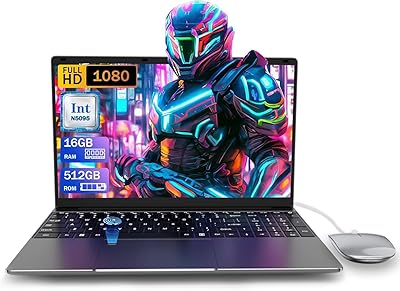
The AKCHART P1 17.6″ Laptop (16GB, 384GB) enters a crowded budget segment with one clear advantage: a screen size most competitors at this price simply don't offer. Released in October 2025, it's built around Intel's Celeron N5095 Jasper Lake chip — a quad-core processor that handles everyday tasks like web browsing, document editing, and video streaming without drama, but won't impress anyone running demanding software. AKCHART isn't a household name, so expectations should be anchored to the specs rather than brand legacy. Think of this as a capable daily driver for light computing needs, not a machine you'd push with heavy creative or technical workloads.

Features & Benefits

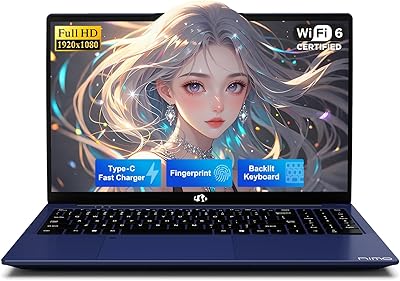
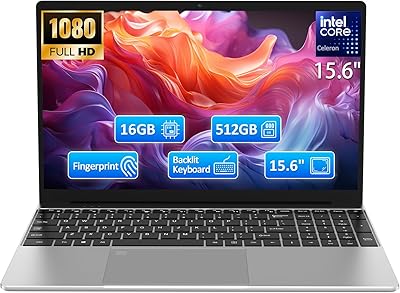
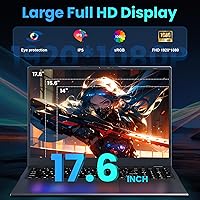
The 17.6-inch FHD IPS anti-glare display is where this machine earns real attention — a screen this size at this price tier is rare, and it works well for side-by-side windows, streaming, or reading lengthy documents. Pairing that with 16GB of RAM puts the AKCHART P1 ahead of most budget rivals that still ship with 8GB. The 384GB SSD is a non-standard capacity — somewhere between a 256GB and 512GB drive — but it's enough for a typical student's files and apps. Add Wi-Fi 6 and Bluetooth 5.2, three USB 3.0 ports, HDMI, and a full-featured USB-C, and the port selection is well-rounded. A backlit keyboard and a bundled Office 365 subscription round things out nicely.

Best For

This large-screen budget laptop makes the most sense for buyers whose priorities are screen real estate and everyday usability over raw speed. High school and college students writing papers, attending virtual classes, or juggling multiple browser tabs will find it more than adequate. It also suits remote workers handling emails, spreadsheets, and video calls — particularly those who find smaller screens tiring over long sessions. Seniors and comfort-focused users will appreciate the larger keyboard and display. If you're replacing a slow, aging machine used mainly for Office work and light browsing, this 17.6-inch student laptop covers that use case well without requiring a significant financial stretch.

User Feedback

Early buyers tend to highlight the display size as a genuine surprise — most weren't expecting a screen that feels this spacious at this price. Build quality draws mixed reactions: acceptable for the cost, but the chassis feels noticeably plastic rather than premium. The Celeron N5095 performs fine for its intended workload, though some users notice slowdowns when too many tabs stack up or multiple apps run simultaneously. Real-world battery life appears to hover around four to five hours — shorter than the manufacturer's optimistic figures. A handful of buyers also reported minor friction when redeeming the Office 365 code, though nothing that a quick setup step didn't resolve.

Pros

  • A 17.6-inch FHD anti-glare display at this price tier is genuinely rare and noticeably comfortable for long study sessions.
  • 16GB of RAM is well above average for budget laptops, keeping everyday multitasking smooth and responsive.
  • Wi-Fi 6 and Bluetooth 5.2 bring modern wireless connectivity that most competing machines at this price still lack.
  • Three USB 3.0 ports plus HDMI and USB-C mean you rarely need an external hub for typical student or home setups.
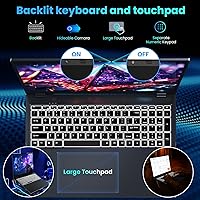
  • The backlit keyboard is a practical inclusion often skipped on budget rivals — useful for late-night work or dim environments.
  • A bundled one-year Office 365 subscription adds immediate, real-world value right out of the box.
  • The AKCHART P1 charges fully in around 2.5 to 3 hours, which is genuinely fast for a laptop in this class.
  • At under an inch thick and 4.85 pounds, this large-screen budget laptop is more manageable to carry than its screen size implies.
  • The non-standard 384GB SSD comfortably holds a typical student workload — OS, apps, documents, and media — without constant space juggling.

Cons

  • The Celeron N5095 processor slows noticeably when workloads exceed basic browsing, documents, and video streaming.
  • Real-world battery life sits around four to five hours — significantly below the manufacturer's stated figures.
  • The plastic chassis flexes under moderate keyboard pressure, raising durability concerns over months of daily use.
  • Touchpad multi-gesture accuracy is inconsistent, and cursor drift during typing has been reported by multiple buyers.
  • Built-in speakers distort at higher volumes and lack bass, making them inadequate for movies or group calls without headphones.
  • The 384GB SSD is a non-standard capacity that can complicate sourcing compatible upgrade or replacement drives later.
  • Several buyers encountered driver issues and Windows activation friction that required troubleshooting before the machine was fully ready to use.
  • HDMI 1.4 limits external display flexibility, and integrated graphics cap practical output quality for anything beyond standard desktop mirroring.
  • AKCHART has minimal brand history and customer support infrastructure, which adds uncertainty around warranty claims or post-purchase assistance.

Ratings

The AKCHART P1 17.6″ Laptop (16GB, 384GB) has been evaluated using AI-assisted analysis of verified global buyer reviews, with spam, incentivized, and bot-generated feedback actively filtered out. The scores below reflect a balanced picture — the genuine strengths that make this large-screen budget laptop worth considering alongside the real frustrations that repeat across independent user accounts. Nothing has been softened or inflated.
Display Quality
78%
22%
For the price, the 17.6-inch FHD IPS panel consistently surprises buyers — colors look natural enough for streaming and document work, and the anti-glare coating holds up well in bright rooms or near windows. Students using it for long reading or research sessions particularly appreciate the reduced eye strain compared to glossy screens at similar price points.
Color accuracy won't satisfy anyone doing photo editing or design work — the panel covers a limited color gamut and brightness tops out at a level that can feel underwhelming in direct sunlight. A few buyers also noted mild backlight bleed in the corners, which shows up during dark-scene video playback.
Performance & Speed
54%
46%
For the tasks this machine is actually built for — typing essays, joining Zoom calls, browsing with 10 to 15 tabs open, streaming video — the N5095 Celeron handles the load without constant hesitation. The 16GB of RAM is genuinely helpful here, giving the processor more breathing room than the 8GB configurations common in competing budget models.
Push it beyond light multitasking and the cracks show quickly. Users who tried running a handful of browser tabs alongside a video call and a local application reported noticeable slowdowns and occasional UI stuttering. Anyone considering this for anything beyond basic productivity or media should look elsewhere — the chip simply has a low performance ceiling.
RAM & Multitasking
81%
19%
16GB of DDR4 is the most buyer-friendly spec on this machine, sitting well above what most competitors offer at this tier. Real-world users report comfortable day-to-day multitasking — switching between a document, a spreadsheet, and a browser with multiple tabs open stays responsive without the constant swap-file sluggishness that plagues 8GB budget laptops.
The RAM amount is strong, but its impact is partially capped by the Celeron processor underneath it. You won't hit memory-related bottlenecks often, but processor bottlenecks will still appear in heavier workloads, meaning the full benefit of 16GB is limited to lighter use cases.
Storage
67%
33%
384GB of SSD storage is enough for a student's typical load — OS, Office suite, a course library, media files, and a few apps — without constantly micromanaging space. SSD read and write speeds are acceptable for the budget class, and boot times are reasonable rather than agonizing.
The 384GB capacity is a non-standard size that confuses some buyers expecting a round 256GB or 512GB number — it matters mainly if you're shopping for replacement or upgrade drives later. Expansion tops out at 512GB, which limits long-term storage growth for users who accumulate large media libraries or project files.
Build Quality & Design
58%
42%
The AKCHART P1 is slim at under an inch thick and light enough at 4.85 pounds to be carried between classes or rooms without complaint. The overall footprint is tidy for a 17.6-inch machine, and the black finish looks clean rather than cheap on a desk or in a bag.
The chassis is primarily plastic and it feels like it. There is noticeable flex in the keyboard deck when typing with any real pressure, and the lid lacks the rigidity buyers would expect even from mid-range machines. Long-term durability is an open question given the limited time this model has been on the market.
Keyboard & Typing Experience
72%
28%
The backlit keyboard is a legitimate perk that budget-focused competitors often skip entirely, and it works well enough for late-night studying or dim home offices. Key spacing is generous on the larger chassis, which gives the keyboard a more comfortable feel than the cramped layouts found on smaller budget machines.
Key travel is shallow and the tactile feedback is soft — experienced typists who prefer a clicky, definitive keystroke will find it underwhelming for sustained writing sessions. The backlight has limited brightness levels and some users noted uneven illumination across the key rows.
Touchpad Responsiveness
63%
37%
The touchpad is larger than what you typically find on budget laptops this size, which helps with general navigation and two-finger scrolling. For casual use — browsing, clicking through slides, light document work — it gets the job done without requiring an external mouse.
Multi-touch gesture accuracy is inconsistent, and a handful of buyers reported occasional cursor drift or unintended palm detection during typing. Users doing anything more precise, like navigating design tools or editing dense spreadsheets, will want to keep a USB mouse on hand.
Battery Life
51%
49%
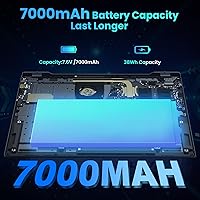
The 7000mAh battery charges fully in roughly 2.5 to 3 hours, which is genuinely fast for this class of machine. For short sessions — a two-hour lecture, a coffee shop work sprint, or a movie on the couch — the battery is adequate without needing to bring the charger.
Real-world battery life consistently falls short of manufacturer claims. Most users report four to five hours of mixed use at moderate screen brightness, not the extended mobility implied in the product description. Anyone planning a full school or work day away from an outlet will likely need the charger with them.
Wireless Connectivity
84%
Wi-Fi 6 support is a standout inclusion for a laptop at this price, delivering faster, more stable connections in congested environments like apartment buildings, dorms, or shared office spaces. Bluetooth 5.2 pairs quickly with accessories and holds connections reliably during typical use.
Wi-Fi 6 is only useful if your router supports it — buyers still on older networking hardware won't notice any difference. A small number of users reported needing to update wireless drivers out of the box before connections fully stabilized, which added unexpected setup friction.
Port Selection
82%
18%
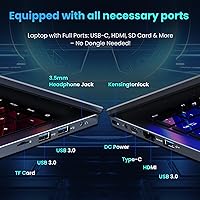
Three USB 3.0 ports, an HDMI output, a full-featured USB-C port, and a TF card reader give this machine a well-rounded physical connection setup that many budget competitors lack. Students plugging in a mouse, external drive, and monitor simultaneously will rarely need a hub.
HDMI is version 1.4 rather than 2.0, so 4K output at 60Hz requires the right cable and display combination to work correctly — and integrated graphics further limit what you can realistically push through it. USB-C does not appear to support video output or charging in all tested configurations.
Software & Out-of-Box Setup
61%
39%
Windows comes pre-installed and the machine is generally ready to use without significant configuration. The included one-year Office 365 subscription delivers immediate practical value — students get Word, Excel, and PowerPoint without any additional cost, which meaningfully offsets the purchase price.
Several buyers reported friction during initial setup — Windows activation issues, driver updates required before hardware worked correctly, and occasional confusion around redeeming the Office 365 code. None of these are dealbreakers, but they create an underwhelming first-impression experience for less tech-savvy users.
Value for Money
76%
24%
Taken as a bundle — a 17.6-inch FHD display, 16GB RAM, Wi-Fi 6, a backlit keyboard, and a year of Office 365 — the AKCHART P1 offers a spec sheet that looks competitive on paper against most budget rivals. For a student or casual home user, it covers the essentials without forcing painful trade-offs in screen size or memory.
The value calculation depends entirely on your expectations. If you factor in the Celeron processor's performance ceiling, the plastic build, and real-world battery life shorter than advertised, the perceived value narrows for buyers who want longevity or occasional heavier use from a single machine.
Portability
69%
31%
At under an inch thick, this 17.6-inch student laptop packs into a standard backpack more easily than its screen size would suggest. The weight is manageable for occasional transport between home and class, especially compared to older large-screen laptops that were considerably heavier.
It is still a 17.6-inch machine — larger backpacks will fit it, but slim laptop sleeves and smaller bags won't. Buyers who commute daily on public transit or walk long distances between classes will feel the size and weight more acutely than those using it primarily at a desk.
Audio Quality
47%
53%
The built-in speakers are adequate for casual video calls and background music at low to moderate volumes. For a machine primarily used in quiet study environments, they cover the minimum without forcing headphone use for every interaction.
At higher volumes the speakers distort noticeably, and bass is virtually absent — a consistent complaint from buyers who tried using this large-screen budget laptop for movie nights or group video calls without external audio. Headphones or an external speaker make a meaningful improvement.

Suitable for:

The AKCHART P1 17.6″ Laptop (16GB, 384GB) is a strong fit for students — high school or college — who spend most of their time writing papers, attending online classes, researching across multiple browser tabs, and working through Office applications. The oversized display is a genuine advantage for anyone who reads or edits documents for hours at a stretch, reducing the eye fatigue that comes with smaller screens. Seniors or users who simply want a comfortable, no-fuss machine for email, video calls, and light browsing will find the large keyboard and screen size genuinely easier to use day-to-day. It also works well as a household shared laptop for families who need a reliable, affordable device for general home use without demanding workloads. Remote workers replacing a slow or dying machine primarily used for email, spreadsheets, and virtual meetings will find this 17.6-inch student laptop covers those bases without requiring a significant investment.

Not suitable for:

The AKCHART P1 17.6″ Laptop (16GB, 384GB) is the wrong choice for anyone who needs real computing power — the Intel Celeron N5095 has a hard performance ceiling that makes it poorly suited for video editing, software development, gaming, running local AI tools, or any application that demands sustained processing muscle. Buyers hoping to use this as their only machine through a demanding technical degree program or a creative professional workflow will hit frustrating limits quickly. The plastic build also raises questions about long-term durability for users who commute daily, travel frequently, or handle their equipment roughly. Battery life in real-world use falls meaningfully short of manufacturer estimates, so anyone who regularly works away from power outlets for a full day will find themselves tethered to a charger more often than expected. Finally, if a large, thin laptop is important for your daily bag — think a slim commuter backpack or a carry-on lifestyle — a 17.6-inch footprint may simply be too unwieldy for truly portable use.
Specifications

  • Processor: Intel Celeron N5095 Jasper Lake quad-core CPU running at up to 2.9GHz, built on a 10nm architecture suited for light productivity workloads.
  • RAM: 16GB DDR4 SDRAM installed, which is above average for budget-tier laptops and supports comfortable everyday multitasking.
  • Storage: 384GB SSD internal storage, expandable up to 512GB, offering faster boot and file access than a traditional hard drive.
  • Display: 17.6″ FHD IPS panel with a 1920x1080 resolution and anti-glare coating designed to reduce reflections in bright environments.
  • Graphics: Intel integrated graphics are included with no dedicated GPU, making this suitable for video playback and basic visual tasks only.
  • Operating System: Windows comes pre-installed on the device, ready to use out of the box without requiring a separate OS purchase.
  • Wireless: Wi-Fi 6 (802.11ax) and Bluetooth 5.2 provide modern, fast wireless connectivity for both internet access and peripheral pairing.
  • Ports: Connectivity includes 3x USB 3.0, one HDMI 1.4 port, a full-featured USB-C port, and a TF (microSD) card reader.
  • Battery: A 7000mAh battery powers the machine and reaches a full charge in approximately 2.5 to 3 hours via intelligent power management.
  • Keyboard: Full-size backlit keyboard with multi-level illumination for low-light use, paired with a large multi-touch precision touchpad.
  • Dimensions: The chassis measures 15 x 11 x 0.78 inches, keeping the profile under an inch thin despite the large screen size.
  • Weight: The laptop weighs 4.85 pounds, which is manageable for occasional transport but not optimized for all-day commuting.
  • Audio: Built-in stereo speakers are included for casual media playback, with a standard 3.5mm headphone jack for private listening.
  • Webcam: An integrated webcam is built into the display bezel to support video calls and online conferencing without external hardware.
  • Office Suite: A one-year Microsoft Office 365 subscription is bundled in the box, covering Word, Excel, PowerPoint, and other core applications.
  • Memory Type: DDR4 SDRAM is the memory standard used, which is a current-generation, energy-efficient format compatible with the N5095 platform.
  • Release Date: This model became available in October 2025, making it a recent release with a still-developing user review base.
  • Brand & Model: Manufactured by AKCHART under the P1 model line, a budget-focused brand with a limited but growing product catalog.
  • Color & Finish: Available in black with a matte plastic finish across the lid, keyboard deck, and base of the chassis.
  • Power Supply: Powered by a 12V battery system with an included adapter, using USB-C or the dedicated charging port depending on configuration.

Related Reviews

HP Laptop 17-cp2199nr
70%
83%
Value for Money
61%
Display Quality
78%
Performance & Speed
87%
Storage Performance
84%
RAM & Multitasking
More
Blackview Acebook 6 Laptop, 16GB RAM, 512GB SSD
81%
91%
Value for Money
83%
Performance
88%
Battery Life
80%
Build Quality
85%
Portability
More
KurieTim N95 15.6″ Laptop, 16GB RAM, 512GB SSD
82%
85%
Performance
80%
Battery Life
92%
Value for Money
78%
Build Quality
87%
Display Quality
More
UOWAMOU BTC501 15.6″ Laptop 512GB
71%
88%
Value for Money
67%
Performance & Speed
79%
Display Quality
91%
RAM & Storage
58%
Wi-Fi & Connectivity
More
Molegar 2025 15.6″ Laptop, 16GB RAM, 512GB SSD, Intel N5095
80%
86%
Performance
78%
Battery Life
92%
Portability
81%
Display Quality
89%
Value for Money
More
NIMO N157B 15.6″ Laptop, 16GB RAM, 1TB SSD, Intel N150
85%
88%
Performance
85%
Display Quality
90%
Battery Life
82%
Build Quality
87%
Portability
More
HP 15 Intel N100 16GB/256GB
77%
88%
Value for Money
83%
Everyday Performance
91%
RAM & Multitasking
67%
Display Quality
72%
Build Quality & Portability
More
HP TPN-Q286 15.6″ Laptop (N200, 16GB, 128GB)
69%
83%
Value for Money
76%
Performance & Speed
51%
Display Quality
88%
RAM & Multitasking
44%
Storage Capacity
More
HP 14″ HD Laptop, Intel Celeron N150, 16GB RAM, 384GB Storage
82%
90%
Value for Money
94%
Portability & Weight
87%
Performance for Everyday Tasks
89%
Battery Life
75%
Build Quality
More
SAINTDISE ANL5-N5095 Laptop 15.6-inch, 16GB RAM, 512GB SSD
82%
89%
Value for Money
85%
Performance for Everyday Tasks
67%
Battery Life
91%
Display Quality
87%
Fingerprint Reader Convenience
More

FAQ

For most standard college tasks — writing papers, attending video lectures, researching online, and using Office applications — the AKCHART P1 17.6″ Laptop (16GB, 384GB) handles things comfortably. The 16GB of RAM helps keep multiple tabs and apps open without constant slowdowns. Just keep in mind it is not built for engineering software, 3D modeling, or any application that demands serious processing power.

Realistically, expect around four to five hours of mixed use at moderate screen brightness — not the extended figures sometimes implied by the 7000mAh capacity rating. If you have a full day of classes or meetings ahead without guaranteed access to an outlet, bringing the charger is a smart habit. The good news is it charges back up quickly, typically in under three hours.

Yes, video calls work fine on this machine. The Celeron N5095 handles a single video call alongside a few browser tabs without noticeable trouble. Where things can get sluggish is if you are running a call, screen sharing, playing background audio, and juggling other apps simultaneously — so keep active background tasks lean during important meetings.

It fits in most standard student backpacks, but you will notice the size. At 15 x 11 inches, it will not slip into a slim sleeve or a smaller daypack. If you walk long distances between buildings or use public transit daily, the 4.85-pound weight adds up over time. For students who mostly move between home and a single classroom or library, it is very manageable.

For most students, 384GB covers the essentials comfortably — your OS, Office suite, downloaded course materials, and personal files will fit without constant cleanup. It is a non-standard capacity, so keep that in mind if you plan to swap or upgrade the drive later, as compatible options may be less straightforward to source than standard 256GB or 512GB drives. Expansion is supported up to 512GB.

It comes as a redemption code rather than being pre-activated, so you will need to follow the included instructions to claim your subscription. A handful of buyers reported minor confusion during this step, but it is a standard Microsoft activation process once you locate the code. After setup, you get a full year of Word, Excel, PowerPoint, and the rest of the Office suite at no extra cost.

For casual streaming, the 17.6-inch anti-glare IPS panel does a solid job — the image is clear, colors are natural, and the larger size makes for a comfortable viewing experience on a couch or desk. It is not a color-accurate panel for professional video work, and brightness can feel limited if you are in a very brightly lit room, but for Netflix, YouTube, or Disney+ it works well.

The 16GB of RAM is the main reason this laptop handles multi-tab browsing better than most competitors at this price. Opening 15 to 20 tabs in Chrome or Edge stays manageable in most cases. The Celeron processor is the limiting factor — if tabs are all running heavy scripts or media simultaneously, you may notice some lag, but everyday research and browsing stays responsive.

It is genuinely useful, especially for anyone who types in dim environments — a dimly lit bedroom, a lecture hall, or a late-night study session. The illumination is not the brightest available, and a few users noted it is slightly uneven across keys, but it comfortably serves its purpose. Budget laptops at this price often skip this feature entirely, so its inclusion here is a real practical plus.

AKCHART is a relatively newer brand without the established support infrastructure of larger laptop manufacturers, so it is worth setting expectations accordingly. Check the listing and any documentation in the box for current warranty terms, as these can vary. For post-purchase issues, Amazon's own buyer protection and return policies offer an important safety net — make sure to test the device thoroughly within the return window.