Overview

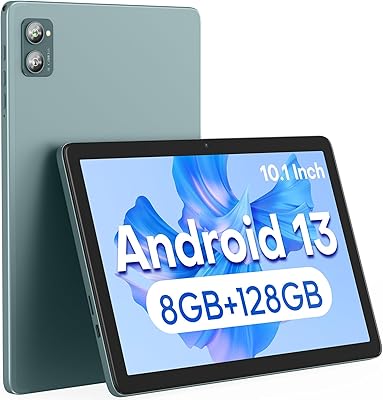
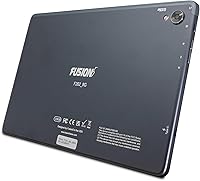
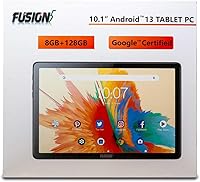
The Fusion5 F202 8GB 10.1″ Android Tablet is Fusion5's most capable entry in their line of accessible Android devices, aimed squarely at casual users and light productivity tasks. Fusion5 has quietly built a niche supplying functional tablets at wallet-friendly prices, and this model follows that same philosophy. The headline here is the MediaTek MT8183 octa-core chip paired with 8GB of true hardware RAM — not inflated virtual memory — which is genuinely uncommon at this price tier. A slim metal rear casing and compact 10-inch footprint round out a physical package that looks better than the price tag suggests. That said, be clear going in: this is a solid everyday performer, not a device competing with premium Android flagships.

Features & Benefits

The 10.1-inch IPS display delivers a 1920x1200 resolution that holds up well for reading, streaming, and video calls — colors are vibrant without oversaturation, and the G+G 2.5D glass adds scratch resistance you don't always get at this price. The octa-core CPU handles browsing, light document editing, and media playback without noticeable lag. Storage is a genuine strength: 128GB onboard means you won't be juggling files on day one, and microSD expansion up to 512GB keeps things flexible long-term. USB Type-C handles both charging and data transfers, and Wi-Fi 6 support keeps the connection quick on modern networks. The 13MP rear camera is functional — fine for scanning documents or quick snapshots, but not a photography tool by any stretch.

Best For

This Fusion5 tablet makes the most practical sense for users who need a reliable everyday device without spending flagship money. Students will appreciate the generous storage for notes, PDFs, and apps, while the slim form factor fits easily into a backpack. Families shopping for a shared streaming or casual gaming tablet will find it more than capable. Remote workers using it as a secondary display for video calls or light document review should have no complaints. It also works well as an introduction to Android for older adults or younger children — the Android 13 interface is clean and approachable. If you're chasing raw processing power or serious gaming performance, though, look elsewhere.

User Feedback

Across over 3,300 verified reviews, the F202 8GB holds a 3.8-star average — a score reflecting genuine value mixed with a few real frustrations. Buyers frequently highlight the screen quality and build, noting the display looks better than expected and the metal casing feels surprisingly solid. The out-of-box storage also draws consistent praise. On the downside, battery life is the most repeated complaint: roughly five hours of active use leaves all-day users reaching for a charger mid-afternoon. Some tech-savvy buyers have flagged that DDR3 memory is an older standard compared to current competitors — fair criticism, though it rarely ruins the day-to-day experience. Satisfaction tends to track closely with how realistically buyers set expectations before purchasing.

Pros

  • True 8GB hardware RAM keeps everyday multitasking smooth without virtual memory shortcuts.
  • 128GB of built-in storage is genuinely generous for a tablet in this price range.
  • The Full HD IPS display produces sharp, bright visuals that hold up well for streaming and reading.
  • Wi-Fi 6 support means faster, more stable wireless on modern routers.
  • USB Type-C makes charging and data transfers more convenient than older micro-USB alternatives.
  • At 1.19 lbs with a slim 0.35-inch profile, the F202 8GB is easy to hold and carry for extended periods.
  • MicroSD expansion up to 512GB gives room to grow without buying a new device.
  • Android 13 delivers a clean, current interface with solid security and app compatibility.
  • The metal rear casing feels noticeably more durable than the plastic backs common at this price tier.
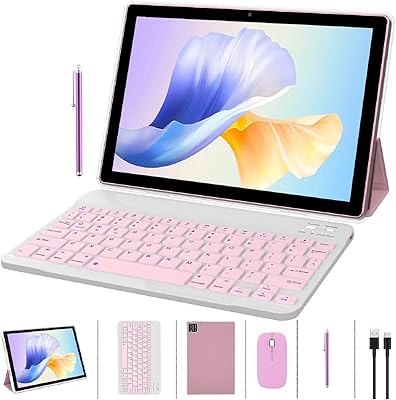
  • Keyboard dock compatibility adds a path to light productivity without needing a separate laptop.

Cons

  • Battery life of roughly five hours falls short for full-day use without access to a charger.
  • DDR3 RAM is an older memory standard that lags behind what similarly priced competitors now offer.
  • The camera is strictly utilitarian — acceptable for document scanning, disappointing for actual photos.
  • The MediaTek MT8183 chip can struggle when multiple demanding apps run simultaneously.
  • No mention of guaranteed OS update support, which raises long-term software longevity concerns.
  • Five hours of screen-on time makes it a poor choice for long flights or extended outdoor use.
  • Fusion5 is a lesser-known brand, which may create hesitation around after-sale support reliability.
  • The display, while sharp, lacks any brightness or color accuracy specs suited for outdoor visibility.

Ratings

The Fusion5 F202 8GB 10.1″ Android Tablet scores below are generated by our AI system after analyzing thousands of verified global buyer reviews, with spam, bot activity, and incentivized feedback actively filtered out. The results reflect a balanced picture — real strengths get recognized, and genuine frustrations are not glossed over. Where this 10-inch Android slate wins, it earns it; where it falls short, buyers deserve to know.

Value for Money
83%
Most buyers feel they got more than expected for the price, particularly given the 8GB of real hardware RAM and 128GB storage — specs that typically cost more elsewhere. For students, families, or first-time tablet owners on a budget, the overall package is difficult to argue with.
A small but vocal portion of reviewers feel the DDR3 memory and modest GPU hold the device back from feeling truly competitive with newer budget alternatives. If a buyer stretches only slightly further, they can find devices with more future-proof internals.
Display Quality
78%
22%
The Full HD IPS panel draws consistent praise for its sharpness and color reproduction during everyday use — streaming a show, reading an ebook, or following a recipe on the kitchen counter all feel comfortable. Wide viewing angles mean multiple people can watch at once without color shift.
Outdoor visibility is a recurring complaint; the panel struggles in direct sunlight or bright environments, limiting its usefulness as a truly portable on-the-go device. A few buyers also noted the brightness ceiling feels modest compared to similarly priced competitors.
Performance
71%
29%
For the tasks this tablet is designed for — browsing, video calls, streaming, and light document work — the MT8183 octa-core chip keeps things moving without frustrating pauses. Users running Google Classroom, YouTube, and a few background apps simultaneously report a smooth enough experience.
Heavier multitasking and graphically demanding apps expose the chip's limits fairly quickly, with noticeable slowdowns when too many processes compete for resources. The older DDR3 memory contributes to this ceiling, and users migrating from a mid-range device may feel the step down.
Battery Life
47%
53%
For short, focused sessions — a study block, a commute, or an hour of streaming before bed — the battery gets the job done without drama. Fast charging via USB Type-C at least means recovery time from a low battery is relatively quick.
Five hours of screen-on time is the most consistently criticized aspect across all buyer feedback, and it is hard to defend for an all-day device. Users who need the tablet away from home for extended periods — on a long flight, a full school day, or a day out — will find themselves rationing usage.
Build Quality
81%
19%
The metal rear casing genuinely surprises buyers at this price point — it feels solid in hand, does not flex under light pressure, and resists the plasticky creaking that plagues many budget tablets. Several reviewers noted it holds up well after months of daily family use.
The front bezel is noticeably thicker than what buyers see on pricier devices, which some find visually dated. A few users reported minor finish wear on the edges after several months, suggesting the metallic coating is more cosmetic than deeply durable.
Storage & Expandability
88%
128GB out of the box is a practical, generous starting point that means most users will not need to think about storage management from day one. The ability to add a microSD card up to 512GB gives the F202 8GB a long runway for media-heavy households.
A small number of buyers noted that app performance from microSD-stored content can be slower than from internal storage, which is a general Android limitation rather than a flaw unique to this device. Internal storage write speeds are also not officially rated, leaving some power users in the dark.
Camera
54%
46%
For document scanning, whiteboard capture in a classroom, or a quick snapshot of a receipt, the 13MP rear camera gets the job done adequately. Using a dedicated scanning app alongside it notably improves output quality for practical tasks.
Beyond utilitarian use, the camera underdelivers consistently — low-light shots are soft and noisy, color accuracy is unreliable outdoors, and the processing behind the sensor does not do the megapixel count many favors. Buyers expecting a capable photography tool will be disappointed.
Connectivity
82%
18%
Wi-Fi 6 support stands out as a forward-thinking inclusion at this price, with users on modern routers reporting stable, fast connections even when multiple household devices are active simultaneously. Streaming and video calls rarely suffer from buffering-related interruptions.
There is no cellular or LTE option available, so the tablet is entirely dependent on available Wi-Fi — a real limitation for buyers who assumed mobile data capability. Bluetooth connectivity works reliably but lacks any standout specification detail.
Software & OS Experience
74%
26%
Android 13 provides a clean, current starting point with solid app compatibility across the Google Play ecosystem. Older adults and younger users picking up a tablet for the first time tend to find the interface intuitive with minimal setup friction.
Fusion5 does not clearly communicate its long-term software update policy, which creates uncertainty around future Android versions and security patches. A handful of reviewers flagged minor pre-installed bloatware that required manual removal out of the box.
Portability
85%
At 1.19 lbs and just 0.35 inches thin, the F202 8GB is easy to slip into a bag and forget it is there until needed. Students and commuters specifically praise how unobtrusive it is to carry compared to bulkier 10-inch alternatives.
The 10.1-inch footprint, while manageable, is slightly awkward for true one-handed use over extended periods — most users end up resting it on a surface or using both hands. There is no official case included in the box, which feels like a missed opportunity at the price.
Productivity Features
68%
32%
Keyboard dock compatibility genuinely expands what this tablet can do for light work sessions — drafting emails, filling in spreadsheets, or taking lecture notes all become significantly more comfortable. USB Type-C also allows peripheral connections via adapter for added flexibility.
The keyboard dock is a separate purchase, and without it the on-screen keyboard experience in landscape mode feels cramped for extended typing. Heavy productivity users will eventually hit the performance ceiling when juggling office apps alongside background processes.
Setup & Ease of Use
86%
Reviewers consistently note the out-of-box experience is straightforward — a standard Android 13 setup flow with no unusual hoops to jump through. Older first-time users and kids especially appreciate how quickly they were up and running without needing technical help.
A minority of buyers encountered app compatibility quirks with certain games and streaming platforms that required manual workarounds. Initial software updates on first boot can also take longer than expected before the device settles into normal performance.
Audio
61%
39%
For solo casual listening — a podcast, a YouTube video, or background music — the built-in speakers are adequate and clear at mid-volume levels. Using headphones or a Bluetooth speaker via the USB-C adapter delivers a noticeably better experience.
At higher volumes the speakers distort, and bass response is essentially absent, which makes media consumption feel flat compared to devices with stereo speaker setups. There is no 3.5mm headphone jack, which forces users to rely on adapters or wireless audio.
Touchscreen Responsiveness
77%
23%
Day-to-day touch input — tapping, scrolling, and swiping — feels fluid and accurate for typical browsing and app use. The G+G 2.5D glass adds a tactile quality to touch interactions that feels better than flat plastic-screen alternatives at the same price.
Fast gesture navigation and multi-touch inputs in demanding apps occasionally show minor lag, particularly when the device is under load. A small number of users reported touch registration issues near the screen edges, though this was not a widespread complaint.

Suitable for:

The Fusion5 F202 8GB 10.1″ Android Tablet is a strong fit for buyers who need a dependable, no-fuss Android device for everyday tasks without a premium price tag. Students will find it particularly practical — 128GB of built-in storage handles apps, notes, PDFs, and media comfortably, and the slim form factor slips easily into a bag. Families wanting a shared device for streaming, light browsing, or casual games on the couch will get solid mileage out of it. It also suits remote workers looking for a compact secondary screen to handle video calls or read through documents without tying up their main machine. First-time Android tablet buyers and older adults who want a clean, approachable Android 13 experience without a steep learning curve will find this 10-inch slate easy to pick up and use from day one.

Not suitable for:

The Fusion5 F202 8GB 10.1″ Android Tablet is not the right call for buyers who need all-day battery endurance — roughly five hours of active use is a real constraint for commuters or anyone away from an outlet for extended stretches. Gamers chasing smooth performance in graphically demanding titles will quickly hit the limits of the Mali-G72 GPU, and the DDR3 memory standard, while functional, lags behind what newer mid-range competitors offer. Mobile photographers should look elsewhere entirely, as the 13MP rear camera is adequate for casual snaps but falls short for anything requiring image quality. Anyone expecting a productivity workhorse that can replace a laptop will likely find the processing headroom too narrow for heavy multitasking. If your priority is raw speed, a longer-lasting battery, or a more future-proofed memory architecture, the budget should stretch toward a more capable device.

Specifications

  • Screen Size: The tablet features a 10.1-inch IPS display with a 1920x1200 Full HD resolution and wide viewing angles.
  • Display Glass: G+G 2.5D capacitive touchscreen glass provides enhanced scratch resistance and a smooth touch surface.
  • Processor: Powered by a MediaTek MT8183 octa-core CPU running at 2GHz for general multitasking and media playback.
  • GPU: The Mali-G72 MP3 graphics processor handles everyday visual tasks and casual gaming at moderate settings.
  • RAM: 8GB of DDR3 SDRAM is installed as true hardware memory, with no virtual memory inflation.
  • Storage: 128GB of onboard flash storage is included, expandable via microSD card up to 512GB.
  • Operating System: Ships with Android 13 out of the box, offering a current interface with up-to-date security and app support.
  • Battery Life: The built-in lithium polymer battery provides approximately 5 hours of active screen-on use per charge.
  • Connectivity: Dual-band Wi-Fi 6 (802.11ax) is supported for faster and more reliable wireless performance on compatible routers.
  • Ports: A single USB Type-C port handles both fast charging and data transfers.
  • Rear Camera: A 13MP rear-facing camera is included, suited for document scanning and casual photography.
  • Dimensions: The tablet measures 9.45 x 6.3 x 0.35 inches, making it notably slim for a 10-inch device.
  • Weight: At 1.19 lbs, the F202 8GB is light enough for comfortable one-handed reading and extended holding.
  • Rear Casing: The back panel is constructed from metal, providing a more durable and premium feel than typical plastic-bodied budget tablets.
  • Keyboard Dock: The tablet is compatible with a docking keyboard accessory, enabling a laptop-style productivity setup.
  • Chipset Brand: The processor is manufactured by MediaTek, a widely used chipset supplier in the mid-range and budget Android segment.
  • Memory Type: DDR3 SDRAM is used, which is an older memory standard compared to the DDR4 found in some competing devices.
  • Battery Type: One lithium polymer battery is included in the box and is not user-replaceable.

Related Reviews

YACXBTK J10 10.1-inch Kids Tablet

70%
84%
Battery Life
81%
Value for Money
78%
Parental Controls
62%
Performance
67%
Display Quality
More
ITMEIPC T-10 10.1-inch Android Tablet
69%
83%
Value for Money
67%
Display Quality
62%
Performance
71%
Battery Life
58%
Build Quality
More
FEONAL K118 10.1-inch Android Tablet
68%
83%
Display Quality
67%
Performance & Speed
78%
Battery Life
44%
Camera Quality
81%
Value for Money
More
XINHENGTAI M10 Android 13 Tablet, 128GB, 10.1-inch
83%
92%
Value for Money
88%
Performance
91%
Battery Life
84%
Camera Quality
72%
Display Quality
More
Fusion5 FWIN232+ 10.1″ Windows 11 Professional Tablet PC
85%
84%
Performance
88%
Display Quality
65%
Battery Life
80%
Build Quality
91%
Portability
More
ANTEMPER D116 10-Inch Android Tablet
71%
84%
Value for Money
88%
Accessories Bundle
83%
Battery Life
57%
Performance
62%
Display Quality
More
URAO C107 10.1″ Android Tablet 128GB
69%
83%
Value for Money
71%
Performance & Speed
74%
Display Quality
69%
Battery Life
58%
Build Quality & Design
More
CONSUNG N101B 10-inch Android Tablet
71%
84%
Value for Money
81%
Battery Life
83%
Streaming Performance
79%
Build Quality
67%
Display Quality
More
Xiskt A5505 Android 13 Tablet 10.1-inch 128GB Storage
80%
83%
Performance
88%
Value for Money
72%
Battery Life
80%
Display Quality
65%
Camera Quality
More
ZZB CP20 10-inch Android Tablet
68%
83%
Value for Money
76%
Bundled Accessories
78%
Battery Life
61%
Display Quality
54%
Performance & Speed
More

FAQ

Yes, for most school-age needs it holds up well. Browsing, Google Classroom, note-taking apps, and document editing all run without trouble. The 128GB of storage means there is plenty of room for apps and files, and the clean Android 13 interface is easy for younger users to navigate.

The 10.1-inch Full HD IPS panel is genuinely well-suited for streaming. Colors are vibrant and text stays sharp, so standard HD and even some 1080p content looks great. It is not an OLED screen, so do not expect deep blacks, but for casual streaming it is more than capable.

About five hours of active use is the honest expectation. If you are streaming video, browsing, or running apps consistently, plan to charge it once during the day. It is not an all-day tablet on a single charge, so if you are frequently away from outlets, that is worth factoring into your decision.

It supports both bands as a dual-band Wi-Fi 6 device, so you can connect to either 2.4GHz or 5GHz networks. The 5GHz band will give you faster speeds and less interference, which is useful if you are streaming or video calling in a congested Wi-Fi environment.

DDR3 is an older memory standard that offers lower bandwidth than DDR4. In everyday use — browsing, streaming, reading — most people will not notice the difference. Where it can matter is in more demanding tasks like heavy multitasking or graphics-intensive apps, where DDR4 would give a modest edge. It is a real limitation, but not a dealbreaker for the typical user this tablet is designed for.

Yes, the F202 8GB is compatible with a docking keyboard accessory. You can also connect most Bluetooth keyboards independently. The USB Type-C port additionally allows for wired peripherals with a compatible adapter, making light document work or email drafting much more comfortable.

It works well as a video calling device. The screen size is comfortable for calls, Wi-Fi 6 keeps the connection stable, and the front camera handles typical video chat quality fine. It is a solid secondary device for Zoom, Google Meet, or similar apps.

With 128GB onboard, you will typically have around 110 to 115GB free after the Android operating system and pre-installed apps take their share. That is still a generous amount for most users, and you can always slot in a microSD card if you need more room for media or downloads.

For document scanning and whiteboard capture, the 13MP rear camera does a reasonable job in decent lighting. Dedicated scanning apps like Microsoft Lens or Adobe Scan can help improve results further. For anything beyond that — portraits, outdoor shots, detailed photography — the camera will disappoint, which is typical for tablets at this price point.

It ships with Android 13, but Fusion5 has not publicly committed to a specific update schedule or guaranteed OS upgrade timeline. Budget Android tablets from smaller brands often receive limited long-term software support compared to major players like Samsung or Google. This is worth keeping in mind if ongoing security patches and OS upgrades are important to you.