Overview

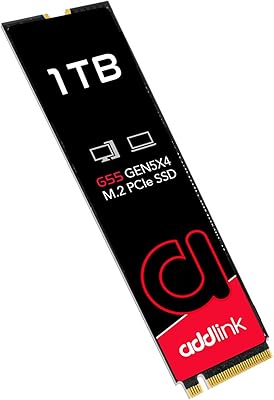
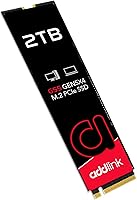
The Addlink G55 2TB NVMe SSD sits at an interesting crossroads: fast enough to compete with the best consumer storage available today, yet priced more accessibly than most Gen5 rivals. PCIe 5.0 adoption is still maturing — not every platform supports it yet — which makes timing your upgrade worth thinking about. Addlink is a Taiwanese storage company that doesn't get the same press as Samsung or Western Digital, but has been quietly building a solid track record. At 2TB, there's genuine headroom for large game libraries, RAW photo shoots, or ongoing video project files without constantly juggling storage.
Features & Benefits

The headline numbers are hard to ignore: sequential reads up to 10,300 MB/s and writes up to 9,000 MB/s put this Gen5 NVMe drive among the fastest storage options a consumer can buy right now. Under the hood, a TSMC 7nm controller teams up with 3D TLC NAND and Host Memory Buffer technology to keep sustained performance honest — not just flashy in short bursts. The drive's 2.3mm single-sided design makes it genuinely useful in compact ITX builds or slim laptops where thicker double-sided drives simply don't fit. One practical note: no heatsink is in the box, and Gen5 drives generate real heat under load, so plan accordingly.

Best For

This PCIe 5.0 SSD makes the most sense for builders running an Intel 13th or 14th Gen system with a Z790 board, or an AMD Ryzen 7000 setup on X670E — platforms that can actually unlock Gen5 bandwidth. Video editors and photographers working with large sequential workloads — exporting 4K timelines, ingesting RAW files in bulk — will feel the difference in a way that casual users simply won't. The single-sided form factor is a genuine plus for compact or slim machines. That said, if your current rig is on PCIe 4.0 or older, this drive will still work, but you'll be paying for headroom you can't use yet.

User Feedback

With a 4.7-star rating across nearly 2,800 reviews, the Addlink G55 clearly lands well with buyers. Installation gets consistent praise — most people report it as straightforward, with noticeable load time improvements in games immediately after switching from a Gen4 drive. The five-year warranty and SSD Toolbox also earn positive mentions as confidence builders. On the flip side, a recurring concern involves thermal throttling in cases without airflow or a dedicated heatsink — worth taking seriously before you buy. A handful of buyers note the drive works on older PCIe boards but with capped speeds. Most reviews skew toward early adopters, so long-term reliability data is still limited.

Pros

  • Sequential read speeds up to 10,300 MB/s place this Gen5 NVMe drive at the top of the consumer storage tier.
  • The 2TB capacity handles large game libraries, RAW photo archives, and 4K project files without constant storage management.
  • A 2.3mm single-sided design fits slim laptops and compact ITX builds where thicker drives cannot go.
  • Backward compatibility with PCIe 4.0 and 3.0 slots gives buyers flexibility across different platforms.
  • The five-year warranty provides meaningful long-term peace of mind for a storage investment.
  • Bundled SSD Toolbox lets users monitor drive health and push firmware updates without third-party software.
  • A TSMC 7nm controller with Host Memory Buffer helps sustain performance during extended sequential workloads.
  • Near 4,700 ratings with a 4.7-star average reflects a broad and satisfied buyer base.
  • Competitively priced relative to other Gen5 drives, making it one of the more accessible entry points into this performance tier.
  • Installation is straightforward, with most buyers reporting a smooth out-of-the-box experience.

Cons

  • No heatsink is included, and Gen5 drives generate significant heat — thermal throttling in enclosed cases is a genuine risk.
  • Full Gen5 speeds are only available on compatible motherboards; older platforms will see substantially capped performance.
  • Addlink lacks the brand recognition of Samsung or WD, which may concern buyers prioritizing long-term support confidence.
  • Long-term reliability data is limited since the drive is relatively new to market, and most reviews reflect early ownership.
  • The SSD Toolbox software is functional but less polished than the ecosystem tools offered by larger storage brands.
  • Buyers on PCIe 4.0 boards pay a Gen5 premium for performance they cannot unlock.
  • Heat management requires extra planning — either a motherboard with a built-in heatsink cover or a separately purchased cooler.
  • Not available in smaller capacities that might suit buyers who only need light storage at a lower price point.

Ratings

The scores below reflect an AI-driven analysis of verified global buyer reviews for the Addlink G55 2TB NVMe SSD, with spam, bot activity, and incentivized feedback actively filtered out before scoring. Each category captures both what users genuinely praised and where real frustrations surfaced, giving you an honest picture of what this Gen5 NVMe drive delivers in practice.

Sequential Read Performance
93%
Users running Z790 and X670E platforms consistently reported outstanding sequential read performance, with game asset loading and large file transfers feeling noticeably faster than their previous Gen4 drives. Video editors moving multi-gigabyte project files described the experience as the most tangible upgrade they had made to their workstation in years.
A handful of reviewers noted that real-world sequential reads, while impressive, fell slightly short of the advertised 10,300 MB/s ceiling in everyday use — which is expected, but still worth flagging for buyers who benchmark obsessively. The gap between marketing figures and actual throughput under mixed workloads is wider than some anticipated.
Sequential Write Performance
88%
Write speeds held up well during sustained exports and backup operations, with users working in Premiere Pro and DaVinci Resolve pointing to noticeably faster render-to-drive times compared to Gen4 alternatives. The TSMC 7nm controller helped maintain consistent throughput even during prolonged write sessions rather than dropping off sharply after the initial burst.
Under very long continuous write workloads — think bulk RAW photo ingestion or cloning a full drive — some users observed a modest dip in write speed once the buffer was fully saturated. This is a characteristic of TLC NAND rather than a flaw unique to this drive, but buyers doing heavy overnight transfers should be aware.
Thermal Management
61%
39%
On motherboards equipped with built-in M.2 heatsink covers — common on Z790 and X670E boards — users reported stable temperatures and no signs of throttling during gaming sessions or moderate creative work. The slim single-sided design actually helped dissipate heat more evenly compared to thicker double-sided alternatives in the same use cases.
Without a dedicated heatsink, temperatures climbed quickly in enclosed cases during sustained workloads, and several users reported noticeable throttling that dragged write speeds down significantly. This is the most common pain point in the review pool, and it is a real concern for anyone installing this PCIe 5.0 SSD in a compact or poorly ventilated build without a motherboard heatsink cover.
Compatibility & Platform Flexibility
79%
21%
Backward compatibility with PCIe 4.0 and 3.0 slots gave buyers on slightly older platforms an easy installation path, and most reported no issues getting the drive recognized and running out of the box. The standard M.2 2280 form factor meant it dropped into a wide range of desktops and laptops without any adapter or bracket needed.
Buyers who installed this Gen5 NVMe drive on a PCIe 4.0 board later expressed frustration that they were effectively paying a Gen5 premium for Gen4 speeds — a compatibility limitation that the product page does not make prominently clear enough. A few users on older AMD platforms also reported needing a BIOS update before the drive was fully recognized.
Value for Money
83%
Relative to other Gen5 NVMe drives available at launch, the Addlink G55 was consistently cited as one of the more competitively priced options in its performance class, making it an appealing entry point for builders who wanted Gen5 without paying flagship-brand premiums. The five-year warranty added meaningful perceived value, reducing hesitation around choosing a less well-known brand.
Buyers on Gen4 or older platforms found the value proposition weak once they realized their system could not unlock Gen5 bandwidth, making the price delta over a quality Gen4 drive difficult to justify. For everyday users without demanding workloads, the cost feels high for performance that simply will not be utilized.
Installation Experience
91%
The straightforward M.2 slot installation was praised widely, with even first-time builders reporting a smooth experience. The drive was detected immediately by BIOS on compatible Gen5 platforms without any manual configuration, and Windows recognized it without needing additional drivers.
A small number of users encountered BIOS detection issues on specific board and CPU combinations, requiring firmware updates before the system acknowledged the drive. These cases were in the minority but were specific enough — mostly on certain B650 variants — to be worth checking compatibility lists before purchasing.
Random Read & Write (IOPS)
74%
26%
For tasks involving lots of small file operations — booting the OS, loading game shader caches, or switching between active applications — the drive performed admirably, with users noting snappy responsiveness in day-to-day desktop use. The Host Memory Buffer implementation kept random read performance competitive despite the absence of dedicated onboard DRAM.
Under simultaneous heavy random read and write loads, such as running a game while a background file sync or antivirus scan was active, some users observed a responsiveness dip compared to DRAM-equipped alternatives in the same price range. HMB is effective but has a ceiling that dedicated cache chips do not.
Form Factor & Physical Design
89%
The 2.3mm single-sided profile was a genuine differentiator for buyers building into slim laptops or compact ITX cases where clearance is tight, and several users specifically cited this as the deciding factor over competing drives. The lightweight build and standard 2280 length made physical handling and installation clean and hassle-free.
The drive ships bare with no heatsink, thermal pad, or even installation hardware, which feels spartan given the performance tier. Buyers coming from boxed drives with included accessories noted the unboxing experience felt less premium than the price point suggested.
Software & Toolbox Utility
67%
33%
Users who took the time to install the SSD Toolbox appreciated having a dedicated interface for checking drive health and S.M.A.R.T. data, particularly for peace of mind over the long term. The firmware update functionality was flagged as useful by buyers who received drives that had a day-one update available.
The Toolbox software was described as functional but dated in its interface design, and a few users reported it not launching correctly on certain Windows 11 configurations without admin privileges. Compared to Samsung Magician or WD Dashboard, it lacks polish and some deeper diagnostic features that enthusiast users expect.
Brand Trust & Support
72%
28%
Buyers who had prior experience with Addlink products expressed solid confidence in the brand, and the five-year warranty helped reassure first-time Addlink customers who were hesitant about choosing outside the tier-one storage names. Customer service interactions, while less frequently mentioned, were generally described as responsive when contacted.
Addlink's lower brand visibility compared to Samsung, WD, or Seagate meant that some buyers felt uncertain about long-term support availability and RMA ease, particularly those purchasing from regions where Addlink's retail presence is thin. The relative scarcity of independent long-term reliability data on this specific drive model also tempered buyer confidence.
Sustained Load Stability
69%
31%
In well-cooled systems with adequate airflow or a motherboard heatsink, the drive maintained consistent performance through sustained workloads like hour-long 4K video exports or large game installations without significant throttling. Users in open-frame test bench setups reported particularly clean sustained performance figures.
In real-world enclosed cases without active cooling over the M.2 slot, sustained performance degraded more noticeably than buyers expected, with some reporting speed drops during back-to-back large file operations. This is a Gen5 category-wide challenge, but it is felt more sharply here due to the absence of any bundled thermal solution.
Gaming Load Times
86%
Gamers switching from Gen4 SSDs to the Addlink G55 on a compatible Gen5 platform reported measurable reductions in open-world game load times and noticeably faster level transitions in shader-heavy titles. The improvement was most apparent in games with large uncompressed asset files, where the sequential read advantage translates most directly.
For competitive multiplayer games or titles with smaller, well-optimized asset loads, the practical difference over a fast Gen4 SSD was minimal to imperceptible in normal play. Buyers who expected every game to feel dramatically faster were sometimes underwhelmed when the gains were only visible in specific titles or loading scenarios.
Warranty & Long-Term Confidence
81%
19%
The five-year warranty coverage was consistently highlighted as a strong selling point, giving buyers confidence in a brand they may not have used before. The warranty duration matches or exceeds what many more established brands offer at this performance tier, which helped tip purchasing decisions for skeptical buyers.
Because the drive launched in late 2024, independent long-term reliability data is still sparse, and the warranty is only as good as the support process behind it. Buyers in markets where Addlink has limited distribution expressed uncertainty about how straightforward a warranty claim would actually be if needed two or three years down the road.

Suitable for:

The Addlink G55 2TB NVMe SSD is built for a specific kind of buyer: someone who has the platform to back it up and the workload to justify it. If you're running a modern Intel 13th or 14th Gen system on a Z790 board, or an AMD Ryzen 7000 build on X670E, this Gen5 NVMe drive slots in and delivers the kind of sequential throughput that genuinely shifts your workflow — faster game loads, quicker 4K timeline exports, and noticeably snappier large file transfers. Photographers shooting in RAW and video editors juggling heavy project files will find 2TB of fast storage removes a real bottleneck. The slim single-sided design also makes it a strong pick for compact ITX builds or slim laptops where space and clearance are tight. Enthusiast builders putting together a new rig and wanting to avoid upgrading storage again in two years will find this PCIe 5.0 SSD a well-reasoned choice.

Not suitable for:

If your current system runs a PCIe 4.0 or older motherboard, the Addlink G55 2TB NVMe SSD will still work — but you will only get Gen4-level speeds at best, making the purchase hard to justify on value alone. Everyday users doing web browsing, document editing, or light media consumption will never come close to saturating Gen5 bandwidth, and a quality Gen4 drive would serve them just as well for less money. Buyers with poorly ventilated cases should also think twice: this PCIe 5.0 SSD runs hot under sustained loads, and without a heatsink in the box, thermal throttling in enclosed environments is a real possibility. Anyone expecting a plug-and-play experience without any thermal planning may run into frustrating performance dips. Budget-focused buyers who don't specifically need Gen5 speeds will likely find better value elsewhere in the NVMe market.

Specifications

  • Capacity: The drive offers 2TB of usable storage, suitable for large game libraries, RAW photo archives, and 4K video project files.
  • Interface: Connects via PCIe 5.0 Gen5 x4 NVMe, delivering the highest bandwidth tier currently available in consumer M.2 storage.
  • Form Factor: Follows the standard M.2 2280 form factor, measuring 80mm in length and fitting the vast majority of desktop and laptop M.2 slots.
  • Sequential Read: Rated for sequential read speeds up to 10,300 MB/s under optimal conditions on a Gen5-capable platform.
  • Sequential Write: Rated for sequential write speeds up to 9,000 MB/s, among the highest sustained write figures in the consumer SSD market.
  • NAND Type: Uses 3D TLC (Triple-Level Cell) NAND flash, balancing high density storage with reasonable write endurance for the capacity class.
  • Controller: Powered by a TSMC 7nm process controller, which contributes to power efficiency and thermal management relative to older node designs.
  • Cache Type: Employs Host Memory Buffer (HMB) technology, using a portion of system RAM to accelerate random access performance without a dedicated DRAM chip.
  • Drive Thickness: Measures just 2.3mm in height with a single-sided component layout, making it compatible with slim laptops and space-constrained ITX cases.
  • Weight: Weighs approximately 1.13 ounces (32g), which is typical for a bare M.2 2280 drive without an attached heatsink.
  • Heatsink: No heatsink is included in the package; users should plan for thermal management, especially in enclosed or low-airflow environments.
  • Warranty: Backed by a 5-year manufacturer warranty, providing coverage against defects and offering above-average assurance for this product category.
  • Software: Compatible with Addlink's SSD Toolbox, which supports drive health monitoring, S.M.A.R.T. data review, and firmware update management.
  • Platform Support: Optimized for Intel 13th/14th Gen and AMD Ryzen 7000 Gen5 platforms, and backward compatible with PCIe 4.0 and PCIe 3.0 motherboards at reduced speeds.
  • Compatible Devices: Designed for use in desktops and laptops with an available M.2 2280 slot; not compatible with PlayStation 5 due to the absence of PS5 speed certification.

Related Reviews

Addlink S91 2TB M.2 2230 NVMe SSD
81%
88%
Read Performance
76%
Write Performance
94%
Form Factor Fit
73%
Thermal Management
83%
Value for Money
More
Addlink A93 2TB NVMe SSD with Heatsink
81%
88%
Read Speed Performance
71%
Write Speed & Sustained Throughput
93%
PS5 Compatibility & Installation
86%
Heatsink Quality & Thermal Management
84%
Value for Money
More
Addlink G55 1TB PCIe 5.0 NVMe M.2 SSD
88%
94%
Performance
96%
Read Speed
90%
Write Speed
88%
Ease of Installation
92%
Compatibility
More
SanDisk 2TB SSD Plus M.2 NVMe SSD
86%
89%
Performance
92%
Ease of Installation
88%
Reliability
91%
Value for Money
90%
Capacity
More
WD_BLACK SN7100 2TB NVMe SSD
85%
93%
Read & Write Performance
88%
Gaming Load Times
86%
Power Efficiency
84%
Thermal Management
91%
Value for Money
More
WD_BLACK SN770 2TB NVMe SSD
85%
91%
Read & Write Performance
93%
Value for Money
94%
Installation & Compatibility
88%
Long-Term Reliability
92%
Gaming Load Times
More
KingSpec XG7000 2TB NVMe M.2 SSD
81%
88%
Sequential Read Speed
84%
Sequential Write Speed
93%
Value for Money
91%
PS5 Compatibility
74%
Thermal Management
More
TEAMGROUP MP33 2TB NVMe M.2 SSD
78%
93%
Value for Money
86%
Read Performance
67%
Write Performance
94%
Installation Ease
91%
Compatibility
More
GiGimundo G7400 2TB NVMe SSD
76%
88%
Read Speed Performance
54%
Sustained Write Speed
91%
Gaming Load Times
83%
Value for Money
67%
Thermal Management
More
Fikwot FN955 2TB M.2 NVMe SSD
81%
88%
Read Performance
74%
Write Performance
92%
Value for Money
93%
PS5 Compatibility
67%
Thermal Management
More

FAQ

Yes, the Addlink G55 is backward compatible with PCIe 4.0 and even PCIe 3.0 slots. The catch is that you will only get speeds in line with whatever generation your board supports — so on a PCIe 4.0 board, you are looking at Gen4-level throughput, not the full Gen5 performance. It will still function perfectly well, but you are paying for headroom you cannot use until you upgrade your platform.

It depends on your setup. Gen5 drives run noticeably hotter than their Gen4 counterparts, especially during sustained sequential workloads like large file transfers or game installations. If your motherboard has a built-in M.2 heatsink cover — which most modern Z790 and X670E boards do — you are likely fine. If not, picking up an aftermarket M.2 heatsink is a smart move to prevent thermal throttling in enclosed or poorly ventilated cases.

For most everyday tasks like web browsing, booting Windows, or opening applications, the honest answer is probably not in any dramatic way. Where you will feel the difference is in workloads that push large sequential data: exporting a 4K video timeline, copying hundreds of gigabytes of RAW photos, or loading open-world games with massive asset files. If those are your regular use cases and you have a Gen5 platform, the jump is real and measurable.

No. The Addlink G55 2TB NVMe SSD is not certified for PS5 use. Sony requires M.2 NVMe drives to meet specific read speed thresholds and recommends drives that have been validated for the console's unique thermal and firmware environment. This drive is designed and optimized for PC platforms.

Addlink is a Taiwanese storage company that has been around for years but tends to fly under the radar compared to Samsung or Western Digital. Their drives have generally performed well in independent testing, and the five-year warranty on this Gen5 NVMe drive reflects a level of confidence in the product. The strong rating across thousands of buyers adds further reassurance, though it is fair to note that long-term reliability data on this specific model is still accumulating given its 2024 release.

To get full PCIe 5.0 speeds, you need a motherboard with a PCIe 5.0 M.2 slot. On the Intel side, that means Z790 boards paired with 12th Gen or newer CPUs (13th and 14th Gen are the sweet spot). For AMD, you need an X670E or B650E board with a Ryzen 7000 series CPU. Always check your specific motherboard's M.2 slot specifications, since not all slots on a board run at the same generation.

HMB is a technology that lets the SSD borrow a small amount of your system RAM to use as a translation cache, which helps speed up random read and write operations. Since this drive does not have a dedicated onboard DRAM chip, HMB is how it maintains competitive random performance without the added cost and thickness of a standalone cache chip. In practical terms, it means the drive handles mixed workloads — not just big sequential transfers — more capably than a pure DRAM-less design.

The Addlink SSD Toolbox is a companion software utility that lets you check drive health, view S.M.A.R.T. diagnostic data, and install firmware updates when they become available. It is a useful tool for keeping tabs on your drive over time, particularly for monitoring wear indicators. It is not as full-featured as the software ecosystems offered by Samsung or WD, but it covers the essentials and is worth running periodically.

Very likely yes. The single-sided 2.3mm profile is specifically an advantage here — most slim laptops and compact ITX cases that support M.2 2280 drives have clearance restrictions that rule out thicker double-sided drives. Just confirm your device has an M.2 2280 slot rather than a shorter M.2 2242 slot, and check whether your board or chassis has a heatsink cover that accommodates the drive thickness.

Addlink covers this Gen5 NVMe drive for five years from the date of purchase against manufacturing defects. For warranty claims, you would typically go through Addlink's official support channels, which handle RMA requests by region. It is worth registering the drive after purchase if the brand offers that option, as it can simplify the claims process down the line. Five years is a solid coverage period and puts this drive on par with the warranties offered by more established storage brands.