





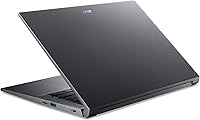
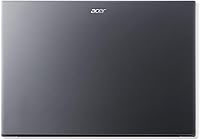
Overview

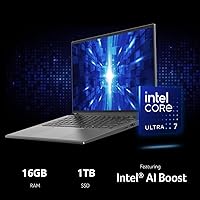
The Acer Swift X 14 RTX 4060 Laptop arrived in mid-2024 as Acer's answer to a specific question: can a laptop thin enough to toss in a shoulder bag actually run serious creative workloads? At 3.31 lbs, it sits firmly in ultrabook territory, yet it carries a discrete RTX 4060 GPU — a combination you rarely find without significant compromise. The 14.5″ OLED display at 2880x1800 makes competing machines at this price tier look flat by comparison. This is Acer's upper-mid-range creator offering, aimed at professionals and students who refuse to choose between portability and real performance.

Features & Benefits

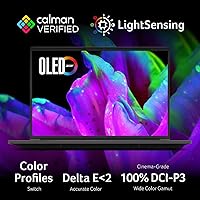
The Intel Core Ultra 7 155H brings a dedicated neural processing unit, which matters most when running local AI image generation tools like Stable Diffusion — tasks that would otherwise crawl on a CPU-only machine. Paired with the RTX 4060 and its MUX switch, you can bypass the integrated GPU entirely for rendering work, squeezing out noticeably more throughput when plugged in. The OLED panel is Calman Verified, meaning color accuracy is independently tested — a real advantage when grading footage or retouching photos. The Killer Wi-Fi 6E handles congested networks better than standard adapters. One honest caveat: the 16GB RAM is soldered to the board, so there is no upgrade path down the road.

Best For

This OLED creator laptop hits a sweet spot for video editors and graphic designers who move between client sites, coffee shops, and a home desk. Local AI workflows — running diffusion models, AI upscaling, or GPU-accelerated exports — are genuinely practical here without a desktop in the picture. Students in design or media production will appreciate getting a color-accurate workstation that still fits in a backpack. It handles casual gaming too, though sustained sessions push the fans harder than some users prefer. It falls short for anyone expecting to upgrade RAM in two years or relying on all-day battery life with the discrete GPU active — that pairing demands careful expectation-setting.

User Feedback

Buyers consistently single out the display as exceptional — the OLED quality draws praise even from users who were not originally shopping for a premium panel. Build quality also earns frequent compliments, with the chassis feeling solid relative to its slim profile. The recurring criticisms, though, are worth taking seriously: fan noise under load is noticeable, and thermal throttling can creep in during extended GPU-heavy sessions in warm environments. Battery life is another common sticking point — with the MUX switch routing through the discrete GPU, real-world hours drop faster than marketing figures suggest. A handful of buyers flagged pre-installed software bloat as an early annoyance, though driver and OS stability generally earn positive marks once the system is cleaned up.

Pros

  • The Calman Verified OLED display delivers independently tested color accuracy that genuinely matters for photo and video work.
  • At 3.31 lbs, the Swift X 14 is remarkably light for a laptop carrying a discrete RTX 4060 GPU.
  • The MUX switch lets you bypass integrated graphics entirely, unlocking noticeably better GPU performance when plugged in.
  • Local AI workloads like Stable Diffusion run at practical speeds thanks to the NPU and dedicated GPU working together.
  • The 120Hz refresh rate makes the OLED panel feel responsive for both creative work and everyday browsing.
  • Killer Wi-Fi 6E handles congested office and public networks better than standard Wi-Fi adapters.
  • The 1TB PCIe Gen 4 SSD offers fast read and write speeds that keep creative workflows from bottlenecking on storage.
  • The 1080p AI webcam with noise and background processing works well out of the box without extra software.
  • Build quality feels solid and premium relative to the chassis thickness, with minimal flex on the keyboard deck.

Cons

  • The 16GB RAM is soldered and cannot be upgraded, which is a meaningful limitation for a machine at this price.
  • Fan noise under sustained GPU load is noticeable and can be disruptive in quiet settings like libraries or open offices.
  • Battery life drops significantly when the discrete GPU is active, making true all-day unplugged use unrealistic for heavy workloads.
  • Thermal throttling can emerge during extended rendering or gaming sessions, reducing the performance advantage over time.
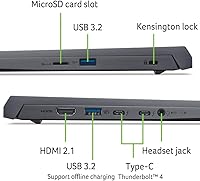
  • The port selection is limited, with no Thunderbolt or full-size SD card slot for professionals who rely on those connections.
  • Pre-installed bloatware requires time to remove before the system feels clean and optimized for daily use.
  • The onboard memory ceiling means this OLED creator laptop may feel constrained as AI and creative software requirements grow over the next few years.
  • Acer does not disclose battery capacity publicly, making it difficult to compare endurance against competitors before buying.

Ratings

The scores below for the Acer Swift X 14 RTX 4060 Laptop were generated by our AI engine after analyzing verified buyer reviews from global markets, with spam, bot-submitted, and incentivized feedback actively filtered out before scoring. Every category reflects the honest distribution of real user sentiment — including the frustrations — so you get a transparent picture of where this machine genuinely excels and where it falls short.

Display Quality
93%
The OLED panel consistently draws the strongest praise across all verified feedback — photographers and video editors specifically mention how accurate skin tones and gradient rendering look compared to their previous IPS machines. The deep blacks and wide color volume make HDR footage genuinely pop, not just look brighter.
A small number of users raised concerns about long-term OLED burn-in risk, particularly those who keep a static taskbar visible for extended hours. Reflectivity under direct sunlight is also noted as a limitation for outdoor use.
GPU Performance
88%
Creative users running GPU-accelerated exports in Premiere Pro or rendering in Blender report noticeably faster completion times compared to integrated-graphics thin-and-lights they previously owned. With the MUX switch enabled, performance gets a further real-world bump that many users describe as meaningful rather than marginal.
Sustained GPU performance does taper off during very long rendering sessions as thermals climb, which is a recurring observation from users pushing the machine for 30-plus minutes of continuous GPU load. The laptop GPU variant of the RTX 4060 also operates at lower power limits than its desktop counterpart, which some buyers discovered only after purchase.
Portability
91%
At 3.31 lbs, users frequently express genuine surprise at how little the machine weighs given what is inside it — commuters and students who carry it daily in a backpack consistently single this out as a standout quality. The slim 0.70-inch profile slides into most laptop sleeves without any fitting issues.
The power adapter adds bulk to the overall carry weight, and a few users noted it is on the larger side for a machine marketed toward portability. Those who also carry a mouse, cables, and accessories find the total bag weight adds up faster than expected.
Thermal Management
61%
39%
Under light to moderate workloads — browsing, document editing, light coding — the system runs quietly and surface temperatures remain comfortable. The thermal design handles typical office and classroom usage without complaint from the majority of buyers.
Under sustained GPU load, fan noise becomes a consistent pain point in verified feedback, with several users describing it as intrusive in quiet shared spaces. Thermal throttling during prolonged rendering or gaming sessions is mentioned often enough that it cannot be dismissed as isolated, and the bottom chassis gets noticeably warm when working on a lap.
Battery Life
58%
42%
Users who primarily use the laptop for note-taking, web browsing, and streaming with the discrete GPU switched off report acceptable endurance for a half-day of light work. The MUX switch at least gives buyers a way to consciously trade battery life for performance depending on context.
Battery life is among the most frequently criticized aspects in user reviews — real-world figures with the RTX 4060 active fall well short of what buyers anticipated based on marketing materials. Several verified reviewers specifically flagged the disconnect between advertised estimates and what they measured during typical creative workday usage.
Build Quality
84%
The chassis earns consistent praise for feeling solid and premium relative to its weight class, with minimal keyboard deck flex that users appreciated when typing for extended periods. Several buyers noted the machine does not feel like a budget product despite the slim construction.
The all-gray plastic and metal finish is considered understated by some buyers who expected more premium material differentiation at this price point. A small number of users reported slight lid flex when opening the machine single-handed, though structural integrity under normal use was not questioned.
RAM & Upgradability
44%
56%
16GB of LPDDR5X is a fast memory specification that handles most creative and AI workloads competently at the time of purchase, and buyers running Stable Diffusion or light video editing reported no immediate bottlenecking from memory alone.
The soldered RAM is the single most consistently flagged concern in critical reviews — buyers who research before purchasing feel the lack of an upgrade path is a significant long-term compromise at this price tier. Users who plan to keep laptops for four or more years express the strongest frustration, as there is simply no remediation available once 16GB becomes a constraint.
CPU Performance
86%
The Core Ultra 7 155H handles multitasking across creative applications without noticeable hesitation during day-to-day use, and buyers running AI-assisted tools within apps like Adobe Firefly or local LLM frontends noted that the NPU offloads those tasks in a way that keeps the main cores available for other work.
A handful of power users noted that CPU performance under sustained all-core loads can be constrained by the thermal envelope of the thin chassis, particularly in warm ambient environments. Those coming from desktop workstations will notice the difference in prolonged compute-heavy tasks.
Webcam & Microphone
79%
21%
The 1080p camera with AI background processing received genuinely positive feedback from remote workers and hybrid professionals, who noted that video call quality was consistently better than previous 720p laptop cameras they had used. The microphone noise reduction handles keyboard and ambient room noise well enough that most users do not bother with an external microphone for calls.
Low-light webcam performance is described as acceptable but not impressive — users in dimly lit home offices noted a visible drop in image quality compared to daylight conditions. The AI background blur occasionally produces artifact edges around hair and clothing, which some users on video calls find distracting.
Keyboard & Trackpad
76%
24%
Buyers who type extensively — writers, coders, students — generally find the keyboard comfortable for long sessions, with the backlight appreciated for low-light environments. Key travel is described as adequate and the layout does not present any unusual quirks that require relearning.
Trackpad feedback is more mixed, with some users describing the click feel as less satisfying compared to premium competitors. A few buyers noted that palm rejection occasionally triggers unintended cursor movement during fast typing sessions.
Connectivity & Ports
67%
33%
The four USB 3.0 ports cover basic peripheral needs, and the Killer Wi-Fi 6E connection is consistently praised by users working in dense office or campus networks where lesser adapters struggle. Bluetooth 5.3 pairing with headphones and peripherals is reported as reliable.
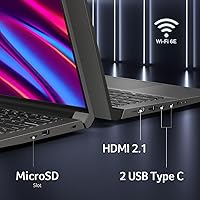
The absence of Thunderbolt, a full-size SD card slot, and HDMI limits desk setup flexibility, and creative professionals who expected a more comprehensive port array at this price point express clear frustration. Users who work with camera SD cards regularly find the microSD-only slot an inconvenient workaround.
Software & Bloatware
63%
37%
Core Windows 11 stability and NVIDIA driver performance receive positive marks from buyers once the system is set up — driver updates are described as smooth, and the Copilot integration works as expected for users who adopt it.
Pre-installed third-party trial software and Acer utility apps are a recurring early complaint, with multiple verified buyers mentioning that the out-of-box experience required a cleanup session before the machine felt ready for serious use. The volume of pre-installed apps feels inconsistent with the premium positioning of the product.
AI Workload Capability
83%
Users experimenting with local AI tools — particularly image generation via Stable Diffusion and AI-assisted video upscaling — report that the combination of the NPU and RTX 4060 VRAM makes the Swift X 14 meaningfully faster than mid-range machines lacking a discrete GPU. It handles most popular SDXL models within its VRAM budget without excessive compromise.
Very large language models or multi-billion parameter inference tasks will push the 8GB VRAM limit and require offloading to system RAM, slowing performance noticeably. Buyers expecting to run bleeding-edge AI workloads that desktop RTX 4090 systems handle comfortably will find this machine is a capable but bounded tool.
Value for Money
74%
26%
Buyers who prioritized the display and discrete GPU combination in a sub-4-pound chassis generally consider the value proposition strong, especially those coming from machines with no dedicated GPU at all. The OLED panel quality alone is cited by several users as something they would have paid extra for separately.
The soldered RAM, unspecified battery capacity, limited port selection, and thermal constraints collectively give some buyers pause when comparing this machine against similarly priced competitors that offer more upgradeability or longer battery endurance. Those who discover the RAM limitation post-purchase tend to rate value lower than those who researched it beforehand.

Suitable for:

The Acer Swift X 14 RTX 4060 Laptop is built for creative professionals and serious students who need genuine GPU horsepower without lugging around a 5-pound gaming machine. Video editors working in DaVinci Resolve, graphic designers handling large Photoshop or Illustrator files, and motion graphics artists who need GPU-accelerated rendering will find the combination of a color-accurate OLED panel and a discrete RTX 4060 genuinely practical for daily work. AI enthusiasts who want to experiment with local image generation tools like Stable Diffusion will benefit from both the NPU in the Core Ultra 7 and the dedicated GPU, making on-device AI work far more responsive than on integrated-graphics machines. Hybrid workers who spend time on video calls in noisy environments will also appreciate the AI-powered webcam and microphone system, which handles background noise and framing without third-party software. For anyone who commutes, travels frequently, or simply values a machine that fits neatly into a bag without announcing itself as a gaming rig, the Swift X 14 strikes a rare balance.

Not suitable for:

The Acer Swift X 14 RTX 4060 Laptop is a harder sell for buyers who plan to keep a laptop for five or more years and expect to expand memory as their workloads grow — the RAM is soldered to the board at 16GB with no upgrade path whatsoever, which is a real long-term constraint at this price point. Power users who run sustained rendering jobs, 3D simulation, or AAA gaming sessions for hours at a time will likely run into thermal throttling and fan noise that becomes difficult to ignore in quiet environments. Anyone prioritizing all-day battery life should look elsewhere, particularly if they intend to keep the MUX switch routing through the discrete GPU — real-world battery life under those conditions will fall well short of expectations. Buyers who prefer a laptop with a full suite of ports — including Thunderbolt, HDMI, or SD card slots beyond microSD — may find the connectivity options limiting for a studio or desk setup. Finally, users sensitive to pre-installed software will want to budget time for a cleanup before the machine feels truly ready to use.

Specifications

  • Processor: Intel Core Ultra 7 155H with 16 cores and a dedicated Neural Processing Unit (NPU) for accelerated AI workloads.
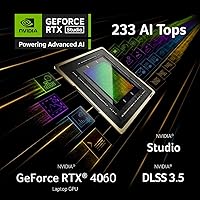
  • Graphics: NVIDIA GeForce RTX 4060 Laptop GPU with 8GB GDDR6 memory, supporting DLSS 3.5 and a MUX switch for direct GPU output.
  • Display: 14.5″ OLED panel at 2880x1800 resolution, 120Hz refresh rate, Calman Verified color accuracy, and True Black HDR500 certification.
  • Memory: 16GB LPDDR5X RAM soldered directly to the motherboard with no user-accessible upgrade slots.
  • Storage: 1TB PCIe Gen 4 SSD providing fast sequential read and write speeds suited for large creative project files.
  • Operating System: Windows 11 Home comes pre-installed with Copilot integration and a dedicated Copilot keyboard key.
  • Webcam: 1080p FHD front-facing camera with Acer PurifiedView AI background processing and PurifiedVoice 2.0 noise reduction.
  • Audio Input: Triple microphone array with AI-driven noise cancellation for clearer voice capture in video calls and recordings.
  • Wireless: Killer Wi-Fi 6E AX1675 supporting 2.4GHz, 5GHz, and 6GHz bands with 2x2 MU-MIMO, plus Bluetooth 5.3 with LE Audio support.
  • Ports: Four USB 3.0 ports and a microSD card reader; no full-size SD slot or Thunderbolt port is included.
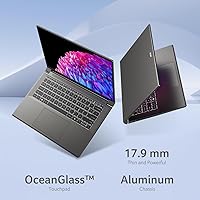
  • Dimensions: The chassis measures 12.71 x 8.98 x 0.70 inches, keeping the footprint compact for a 14.5″ class machine.
  • Weight: The laptop weighs 3.31 lbs (approximately 1.5 kg), which is notably light given the discrete GPU inside.
  • Battery: A built-in Lithium Ion battery powers the system; Acer does not publicly disclose the exact capacity in watt-hours.
  • Color & Build: The chassis is finished in gray and uses a slim, rigid design intended to minimize flex without adding significant thickness.
  • Aspect Ratio: The 16:10 display aspect ratio provides roughly 12.8% more vertical screen area compared to a standard 14″ 16:9 laptop panel.
  • Security: A fingerprint reader is built into the device for Windows Hello biometric login without a separate peripheral.
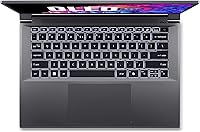
  • Keyboard: The backlit keyboard supports standard typing use in low-light environments with no mention of per-key RGB lighting.
  • Voltage: The system operates at 12 Volts DC input, supplied via the included power adapter.

Related Reviews
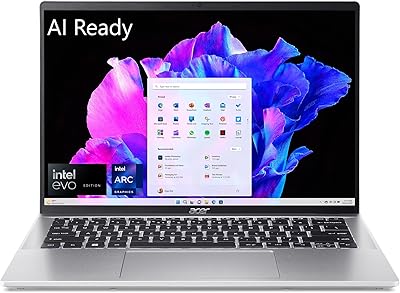
Acer Swift Go 14 Intel Evo Laptop
86%
89%
Performance
94%
Display Quality
92%
Portability
75%
Battery Life
88%
Build Quality
More
Acer Nitro 16 Gaming Laptop, AMD Ryzen 7 7840HS, 32GB RAM, 1TB SSD, NVIDIA RTX 4060
86%
92%
Performance
91%
Display Quality
87%
Cooling Efficiency
94%
Graphics Performance
72%
Battery Life
More
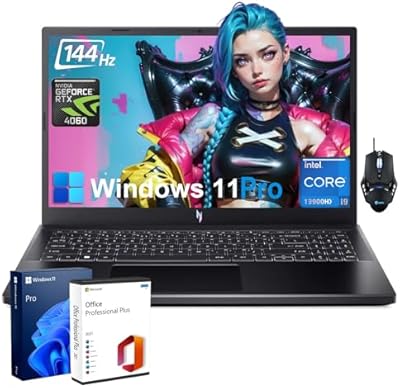
Acer Nitro V Gaming Laptop - Intel i9-13900H, NVIDIA GeForce RTX 4060, 64GB RAM, 2TB SSD
85%
94%
Performance
92%
Gaming Experience
89%
Display Quality
75%
Thermal Management
80%
Portability
More
Acer Swift 3 SF316-51-740H Laptop
86%
91%
Performance
89%
Display Quality
94%
Portability
88%
Build Quality
72%
Battery Life
More
Acer Swift 3 14″ i5 512GB Laptop
76%
86%
Display Quality
81%
Performance
74%
Battery Life
89%
Build & Portability
51%
RAM & Upgradeability
More
Acer Swift 3 Ryzen 7 5700U Laptop
73%
86%
Performance
91%
Display Quality
93%
Portability
52%
Battery Life
74%
Build Quality
More
Acer Aspire 3 Spin 14 (A3SP14-31PT)
74%
88%
Display Quality
83%
Convertible Versatility
91%
Value for Money
47%
Storage Capacity
74%
Performance (Daily Tasks)
More
Acer Swift 3 SF313-53-78UG Laptop
85%
94%
Portability
91%
Battery Life
88%
Display Quality
90%
Build Quality
89%
Performance (Intel Core i7)
More
Acer Predator Helios Neo 14 Gaming Laptop
72%
91%
Gaming Performance
93%
Display Quality
74%
Thermal Management
43%
Battery Life
84%
Build Quality
More
Acer Swift Go 14 – Intel Core i7-1355U, 16GB RAM, 512GB SSD
84%
91%
Portability
88%
Display Quality
89%
Battery Life
84%
Build Quality
85%
Performance (General Use)
More

FAQ

Unfortunately, no. The memory on the Swift X 14 is soldered directly to the motherboard, which means 16GB is what you get for the lifetime of the machine. If you anticipate needing more than 16GB for heavy multitasking or large AI model inference, that is worth factoring into your decision before purchasing.

Under sustained GPU load — rendering a timeline in DaVinci Resolve or running a game for an extended session — the fans do spin up audibly. In a quiet room, you will notice them. Most users find it manageable with headphones on, but if you frequently work in silent environments like libraries or shared offices, it is something to be aware of.

This depends heavily on how you use the laptop. With the MUX switch routing through the discrete GPU, battery life will be shorter — expect somewhere in the range of 3 to 5 hours under moderate load. Switching to integrated graphics mode for lighter tasks like web browsing or document work will extend that considerably. The marketing battery estimates typically reflect lighter usage scenarios, so plan accordingly if you need full-day unplugged performance.

Yes, and this is actually one of its better use cases. The combination of the RTX 4060 with 8GB of VRAM and the Intel NPU means local image generation runs at practical speeds — far faster than relying on a CPU or integrated graphics. Most common Stable Diffusion models fit comfortably within the VRAM budget.

Under light to moderate workloads, bottom surface temperatures are generally manageable. During extended rendering or GPU-intensive tasks, the underside does get warm, and using it directly on your lap for long periods can become uncomfortable. A laptop stand or cooling pad makes a noticeable practical difference if you plan to push it hard regularly.

The MUX switch lets the laptop route display output directly through the NVIDIA GPU, bypassing the integrated Intel graphics entirely. This improves GPU performance in creative apps and games, but it also draws more power. For plugged-in performance work, turn it on. For everyday tasks on battery, turning it off and letting the system use integrated graphics will give you better endurance.

OLED burn-in is a real long-term consideration, particularly if you display static elements like a taskbar or desktop widgets for many hours daily. In practice, modern OLED panels used in laptops include pixel-shift and refresh routines that significantly reduce the risk under normal usage patterns. Avoiding maximum brightness for extended periods and using a screensaver or sleep timer helps further.

The 1080p camera is a step up from the 720p webcams still found on many competing machines. The AI background blurring and noise reduction work reliably without needing a separate app. In decent lighting conditions, video call quality is genuinely good. Low-light performance is acceptable but not exceptional — it handles a dimly lit home office but struggles in very dark environments.

Like most consumer Windows laptops from major manufacturers, this OLED creator laptop ships with a handful of pre-installed Acer utilities and some third-party trial software. It is not excessive, but it is not a clean Windows install either. Setting aside 30 to 60 minutes after first boot to uninstall what you do not need is a worthwhile investment before using the machine for serious work.

The RTX 4060 is capable of running most current games at solid frame rates, particularly at the native resolution with DLSS enabled to handle the rendering workload efficiently. Think of gaming as a genuine secondary use case rather than a compromise — it handles titles like Cyberpunk 2077 or Elden Ring well in performance mode. Just keep in mind that sustained gaming sessions will push thermals and fan noise more than office tasks do.