


Overview

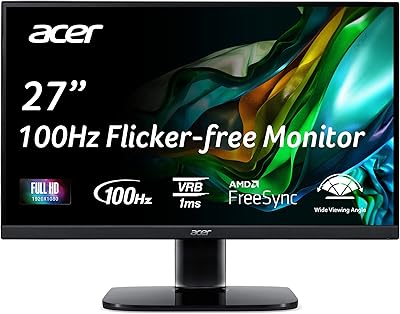
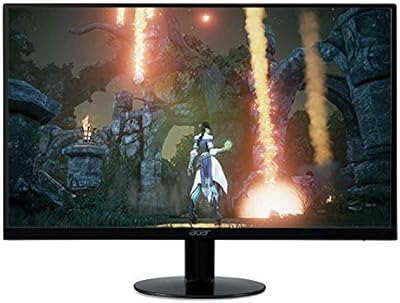
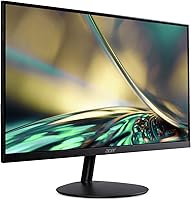
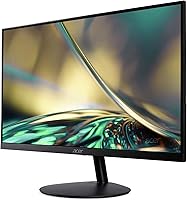
The Acer SB242Y EBI 23.8″ IPS Monitor sits squarely in the budget tier, but it punches above its weight in a few meaningful ways. The zero-frame design gives it a cleaner, more modern look than you'd expect at this price — it doesn't feel cheap sitting on a desk. IPS panel technology is the real differentiator here; competing monitors at similar prices often use TN panels that wash out colors and narrow your viewing angles considerably. This isn't a professional display or a serious gaming rig, but nearly 1,000 buyers averaging 4.5 stars suggests it consistently delivers on what it promises. Set your expectations correctly, and it's a genuinely solid pick.

Features & Benefits

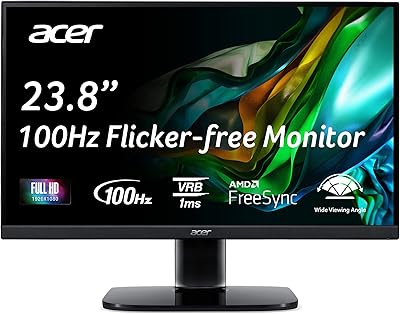
Running at 100Hz over HDMI, this Acer monitor offers a noticeably smoother picture than the standard 60Hz panels that dominated budget displays for years. The 1ms VRB response time is worth understanding: it refers to a backlight strobing technique that reduces perceived motion blur — it's not the same as native gray-to-gray response, so don't expect it to rival a dedicated gaming panel. AMD FreeSync handles screen tearing well for users with compatible graphics cards, at no extra cost. The IPS panel brings accurate color reproduction and wide viewing angles, and the built-in low blue light filter makes longer work or study sessions noticeably more comfortable on the eyes.

Best For

The SB242Y EBI makes the most sense for students and remote workers who need a dependable everyday display without stretching a tight budget. If you're upgrading from an older 60Hz screen or a washed-out TN panel, the color and smoothness difference alone will feel like a genuine step forward. Casual gamers will appreciate the 100Hz refresh and FreeSync support for smoother play in less demanding titles. It also works well as a secondary monitor in a dual-screen productivity setup, where the slim bezels keep the visual gap between displays minimal. Anyone chasing high frame rates in competitive gaming should look higher up the price range, though.

User Feedback

Most buyers are satisfied with this 23.8-inch IPS display, frequently pointing to sharp image quality and vibrant colors as highlights, along with how easy it is to assemble straight out of the box. The thin-bezel aesthetic earns consistent praise too. On the downside, ergonomic flexibility is limited — tilt adjustment only, with no height or swivel options, which bothers users who prioritize proper desk posture. The 250-nit brightness draws fair criticism as well; in a sun-facing room it can feel underwhelming. A handful of reviewers find the VGA port outdated, though most appreciate that an HDMI cable ships in the box. Overall, complaints stay minor relative to what buyers paid.

Pros

  • IPS panel delivers noticeably better color and wider viewing angles than similarly priced TN alternatives.
  • 100Hz refresh rate provides a smoother, more comfortable picture than standard 60Hz budget displays.
  • AMD FreeSync eliminates screen tearing for users with compatible graphics cards at no added cost.
  • The zero-frame design looks clean and modern, well above average for this price tier.
  • VESA 75x75mm compatibility makes it easy to mount on a third-party arm and reclaim desk space.
  • Built-in low blue light filter reduces eye fatigue during long work or study sessions.
  • Assembly is straightforward and quick, with minimal frustration reported by buyers.
  • An HDMI cable is included in the box, so you can get started without an extra purchase.
  • Nearly 1,000 buyers have rated it 4.5 stars, reflecting consistent real-world satisfaction.
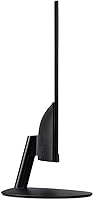
  • The slim profile fits naturally into compact desk setups without dominating the space.

Cons

  • Stand offers tilt adjustment only — no height, swivel, or pivot, which limits ergonomic customization.
  • 250-nit brightness is underwhelming in bright or sun-facing rooms and may cause eye strain.
  • 1ms VRB is a backlight strobing spec, not a native gray-to-gray figure — motion performance is less impressive than it sounds.
  • Only one HDMI port and one VGA port limits connectivity for users with multiple modern devices.
  • Not a viable choice for photo or video professionals who need accurate, calibrated color reproduction.
  • 100Hz refresh rate falls short for competitive gamers who benefit from 144Hz or higher panels.
  • No USB hub or built-in audio output, meaning peripheral management stays entirely on the user.
  • VGA port, while useful for legacy hardware, signals a connectivity spec that feels behind current standards.

Ratings

The scores below for the Acer SB242Y EBI 23.8″ IPS Monitor were produced by our AI rating engine after systematically analyzing verified global buyer reviews, actively filtering out incentivized, bot-generated, and outlier feedback to surface what real everyday users actually experience. Each category reflects both the genuine strengths and the honest frustrations reported across thousands of interactions with this display. Nothing has been softened — where the monitor falls short, the scores say so plainly.

Value for Money
91%
For buyers on a tight budget, the gap between what this monitor costs and what it delivers is genuinely hard to argue with. Getting an IPS panel, 100Hz refresh, and AMD FreeSync in a single affordable package is exactly the kind of combination that makes buyers feel they got more than they paid for.
Buyers stepping in with higher expectations — wanting color calibration, height adjustment, or professional-grade brightness — will quickly find the value proposition thinner than it first appears. The price is right, but only if your expectations are calibrated to match it.
Image Quality
86%
The IPS panel earns consistent praise for color vibrancy and clarity at this price tier, with buyers frequently noting how much better skin tones and gradients look compared to the TN screens they replaced. For streaming video, document work, and general browsing, the picture holds up confidently.
Color accuracy is solid for an entry-level IPS but falls short of what any creative professional would need. The glossy screen surface also picks up reflections in brighter rooms, which can undercut the otherwise decent picture quality in less-than-ideal lighting conditions.
Refresh Rate & Smoothness
83%
The 100Hz refresh rate makes a real, tangible difference in day-to-day use — whether you are scrolling through long documents or playing a moderately paced game, the motion feels noticeably cleaner than a standard 60Hz panel. Buyers upgrading from older monitors tend to comment on this immediately.
One hundred hertz is the floor of what serious gamers now consider acceptable, not a feature worth celebrating on its own. Competitive players who regularly hit higher frame rates will feel constrained here, and the refresh rate is only accessible through the HDMI port, not VGA.
Design & Aesthetics
88%
The zero-frame, thin-bezel construction genuinely looks more expensive than the price suggests, and buyers frequently call it out as a pleasant surprise. It pairs cleanly with modern desk setups and works especially well in dual-monitor arrangements where bezel width directly affects visual continuity.
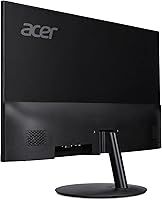
While the front face looks clean, the stand and rear plastic feel less premium up close and do not quite match the sleek front impression. The overall build is solid enough for everyday use but does not inspire the same confidence as the visual design does.
Ergonomics & Adjustability
41%
59%
The tilt range of -5° to 15° covers the basic adjustment most users need to angle the screen away from overhead lighting or toward a more comfortable eye level. For users who plan to pair it with a VESA arm anyway, the stand limitations become irrelevant quickly.
Tilt-only adjustment is a genuine daily frustration for anyone who needs precise ergonomic positioning. There is no height control, no swivel, and no pivot to portrait mode — and at a price point where some competitors offer at least height adjustment, this stand feels like a meaningful compromise.
Gaming Performance
67%
33%
AMD FreeSync keeps gameplay visually clean by eliminating tearing, and the 100Hz refresh adds a layer of smoothness that makes casual titles feel more responsive than they would on a 60Hz display. For slower-paced games, RPGs, or single-player adventures, it handles the load without complaint.
The 1ms VRB spec is a backlight strobing figure, not a native pixel response measurement, so fast-moving scenes in competitive shooters or racing games can still exhibit blur that a true fast-IPS or TN panel would handle better. This is not a monitor built to keep up with serious gaming demands.
Brightness
54%
46%
In a controlled office environment or a room where lighting can be managed, 250 nits is workable and does not cause eye strain during normal daytime use. For evening or dim-room use, the brightness level is more than sufficient and easy on the eyes.
Two hundred fifty nits is visibly limiting in any workspace with significant ambient light or sunlight exposure — the image can look washed out and loses punch quickly. Buyers who work near windows or in brightly lit open offices specifically call this out as a persistent frustration rather than a minor inconvenience.
Eye Comfort
82%
18%
The combination of a flicker-free backlight and a built-in low blue light filter makes extended sessions in front of this display noticeably more comfortable than many unfiltered budget monitors. Students and remote workers logging long hours report less end-of-day fatigue compared to their previous screens.
The glossy panel surface somewhat undermines the eye comfort story, since reflections in brighter settings add visual noise that forces the eye to work harder to stay focused. Users in sun-facing rooms may find the glare more fatiguing than the blue light filter is able to compensate for.
Connectivity
58%
42%
Having both an HDMI 1.4 port and a VGA port covers a reasonable range of hardware combinations, and the inclusion of an HDMI cable in the box is a small but genuinely appreciated detail that removes one extra purchase from setup day.
Two ports total — one of which is VGA — is a tight connectivity spec for modern use, especially for buyers running multiple devices or using a laptop that outputs via USB-C. There is no DisplayPort, no USB hub, and no audio jack, which means this monitor works around you rather than with you in complex setups.
Setup & Assembly
93%
The out-of-box experience is one of the most consistently praised aspects across buyer feedback — the stand attaches quickly, no tools are required, and the included HDMI cable means most buyers are up and running in under five minutes. It is a stress-free first impression for a budget display.
The instruction materials are minimal, which is fine for most adults but can leave less experienced buyers guessing on a few steps. Cable management options behind the stand are also essentially nonexistent, so wire tidiness on the desk requires some personal effort.
VESA & Mounting Flexibility
84%
VESA 75x75mm compatibility opens up the monitor to a wide ecosystem of affordable monitor arms and wall mounts, which is particularly valuable given how limited the built-in stand is. Buyers who make the switch to an arm typically report a dramatically improved ergonomic setup overall.
The 75x75mm VESA pattern is on the smaller side compared to the 100x100mm standard that many arms are optimized for, so buyers should confirm adapter compatibility before purchasing a mount. Removing the stock stand to access the VESA holes requires some care to avoid scratching the panel.
Color Viewing Angles
79%
21%
The IPS panel maintains color consistency and contrast across a wide horizontal and vertical arc, which makes a noticeable difference when sharing the screen with someone sitting beside you or viewing from a slightly off-axis position at the desk. Side-by-side viewing for video content holds up well.
While far better than TN in this regard, the panel does show some color shift at more extreme angles, particularly vertically. For a single-user desk setup this rarely causes problems, but it is worth noting for anyone using it in a shared or public-facing environment.
Build Durability
73%
27%
The overall construction feels solid and stable on the desk, with no wobble under normal typing conditions and a chassis that does not creak or flex noticeably during adjustments. For an entry-level display, the structural integrity is reassuring enough for daily use over multiple years.
The plastic casing, particularly at the rear and around the stand joint, feels noticeably budget-grade to the touch and does not inspire much confidence under heavier handling. Buyers who move or reposition their monitor frequently may notice wear on contact points faster than they would on a more robustly built display.

Suitable for:

The Acer SB242Y EBI 23.8″ IPS Monitor is a strong fit for anyone who needs a dependable everyday display without spending a lot. Students setting up their first desk, remote workers handling documents and video calls, and anyone multitasking across productivity apps will find the IPS panel's color accuracy and wide viewing angles genuinely useful for long sessions. If you're currently using an aging 60Hz TN monitor, the jump to 100Hz and proper IPS color will feel like a real upgrade. Casual gamers who play less demanding titles at moderate frame rates will also appreciate the AMD FreeSync support keeping the picture tear-free. The slim bezels and clean aesthetic make it a natural fit in compact or minimal desk setups, and VESA compatibility means it's easy to mount if you prefer freeing up desk space.

Not suitable for:

Buyers expecting a serious gaming display should look elsewhere — the Acer SB242Y EBI 23.8″ IPS Monitor is entry-level hardware, and the 100Hz refresh rate and 1ms VRB response time are not substitutes for the high-refresh panels purpose-built for competitive play. The 250-nit peak brightness is another real limitation; if your workspace gets strong direct sunlight, the screen can look washed out and fatiguing to use. Creative professionals who need precise color accuracy for photo editing, video grading, or graphic design will also find this display insufficient, as it lacks the color coverage and calibration standards those workflows demand. The ergonomic stand offers only tilt adjustment, so users who need height, pivot, or swivel control to dial in a comfortable posture will either need a separate monitor arm or should choose a different model from the start. Finally, anyone relying on modern connectivity beyond HDMI should note that the secondary port is VGA — useful for older hardware, but limiting in a contemporary setup.

Specifications

  • Screen Size: The display measures 23.8 inches diagonally, offering a comfortable viewing area for both desk work and casual gaming without overwhelming a standard workspace.
  • Panel Type: An IPS (In-Plane Switching) panel provides wider viewing angles and more consistent color reproduction compared to TN alternatives at a similar price point.
  • Resolution: The screen renders at 1920x1080 Full HD, delivering a clear and sharp image suitable for everyday productivity, streaming, and entry-level gaming.
  • Refresh Rate: When connected via HDMI, the monitor runs at 100Hz, offering noticeably smoother motion than the 60Hz panels common in this price bracket.
  • Response Time: The 1ms VRB (Visual Response Boost) rating refers to a backlight strobing technique that reduces perceived motion blur, distinct from a native gray-to-gray measurement.
  • Brightness: Peak brightness is rated at 250 nits, which is adequate for controlled indoor lighting but may appear dim in rooms with strong ambient or direct sunlight.
  • Aspect Ratio: The panel uses a standard 16:9 widescreen aspect ratio, compatible with virtually all modern video, gaming, and productivity content.
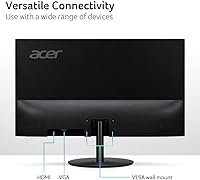
  • Connectivity: The monitor includes one HDMI 1.4 port and one VGA port, with an HDMI cable provided in the box for immediate setup.
  • AMD FreeSync: AMD FreeSync support dynamically syncs the monitor's refresh rate with a compatible GPU's output, reducing screen tearing during gaming without requiring a premium display tier.
  • Tilt Adjustment: The stand supports a tilt range of -5° to 15°, allowing basic forward and backward angle adjustment but no height, swivel, or pivot movement.
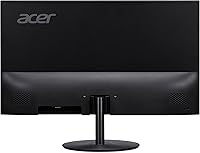
  • VESA Mounting: The rear of the monitor is VESA-compatible at a 75x75mm pattern, making it straightforward to attach to most third-party monitor arms or wall mounts.
  • Low Blue Light: A built-in low blue light filter and flicker-free backlight technology help reduce eye fatigue during extended work or study sessions.
  • Pixel Pitch: The pixel pitch measures 0.274mm, contributing to a clean and detailed image at standard desktop viewing distances.
  • Weight: The monitor weighs approximately 5.82 pounds, making it lightweight enough to reposition or remount with minimal effort.
  • Dimensions: Overall product dimensions are 21.22 inches wide, 15.67 inches tall, and 7.44 inches deep, fitting comfortably on most standard desks.
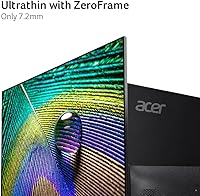
  • Bezel Design: A zero-frame thin-bezel construction surrounds the panel on three sides, giving the monitor a modern, minimal look well above average for this price range.
  • Surface Finish: The screen uses a glossy surface treatment, which can enhance color vibrancy but may also increase reflections in bright environments.
  • Power Input: The monitor is rated for 220V power input; buyers in regions with different standard voltages should verify compatibility before purchasing.

Related Reviews
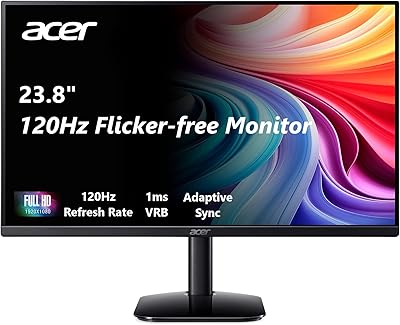
Acer KB242Y 23.8-inch IPS Monitor
75%
83%
Image Quality
88%
Refresh Rate & Smoothness
71%
Response Time
81%
Color Accuracy
58%
Brightness
More
Futuzen 23.8-inch 1080p 100Hz IPS Monitor
85%
92%
Value for Money
88%
Display Quality
89%
Ease of Setup
84%
Build Quality
80%
Performance for Gaming
More
Acer SB230 23-inch Full HD IPS Monitor
72%
83%
Image Quality
71%
Color Accuracy
58%
Brightness & Glare
76%
Refresh Rate & Smoothness
63%
Gaming Performance
More
Acer KB272 EBI 27-inch IPS Monitor
77%
83%
Image Quality
61%
Brightness & Contrast
84%
Refresh Rate & Smoothness
81%
AMD FreeSync Performance
76%
Response Time
More
Acer Nitro XFA243Y 23.8-inch Gaming Monitor
75%
88%
Value for Money
91%
Refresh Rate Performance
76%
Panel & Image Quality
89%
Ergonomics & Stand
83%
Gaming Performance
More
BenQ GW2491 24-Inch IPS Monitor
82%
93%
Eye Comfort
88%
Color Accuracy
91%
Value for Money
71%
Image Sharpness
82%
Refresh Rate & Smoothness
More
Acer R240HY 23.8-inch Full HD VA Monitor
70%
88%
Value for Money
79%
Image Quality
83%
Contrast & Blacks
44%
Ergonomics & Stand
91%
Connectivity
More
Acer KC242Y Hbi 23.8″ FHD Monitor
71%
88%
Value for Money
83%
Image Clarity
86%
Refresh Rate Performance
71%
Response Time
74%
Build Quality
More
ASUS VA24ECPSN 24-inch Docking Monitor
81%
93%
USB-C Docking Performance
91%
Connectivity & Port Selection
74%
Image Quality & Color Accuracy
67%
Resolution & Sharpness
88%
Eye Comfort & Flicker-Free Performance
More
ASUS VY249HF-W 23.8-inch 1080p IPS Monitor
77%
83%
Image Quality
91%
Eye Comfort
78%
Color Accuracy
81%
Refresh Rate & Smoothness
46%
Connectivity
More

FAQ

It does run at 100Hz, but only when connected through the HDMI port. If you use the VGA connection, you will be limited to 60Hz, so make sure you are using the right cable. The good news is an HDMI cable comes included in the box.

Not exactly. VRB stands for Visual Response Boost, which is a backlight strobing technique designed to reduce the appearance of motion blur rather than a true measurement of how fast pixels physically change color. Native gray-to-gray response on IPS panels at this price tier is typically higher than 1ms. For casual gaming and everyday use it performs fine, but it is worth understanding the distinction if you are comparing it to gaming monitors marketed on true pixel response specs.

Yes, the thin bezels make it a particularly good candidate for a dual-monitor arrangement, since the gap between screens stays minimal. Just keep in mind you will need an available HDMI or VGA port on your PC or adapter setup for the second connection.

That depends on how much direct light hits your desk. At 250 nits, it performs well in typical indoor conditions with controlled lighting. In a room with strong sunlight hitting the screen directly, though, glare and washout can become a real issue, especially given the glossy panel surface. If your desk faces a bright window, it is worth considering whether you can add a blind or reposition the monitor before buying.

Yes, the back of the monitor has a 75x75mm VESA mounting pattern, which is compatible with the vast majority of aftermarket monitor arms and wall mounts. Removing the stock stand and attaching an arm is a straightforward process and a popular upgrade given how limited the built-in stand is ergonomically.

Assembly is minimal. Most buyers report having it up and running within a few minutes without needing any tools. The stand attaches simply, and since an HDMI cable is already included, you can plug straight in and start using it right away.

AMD FreeSync is natively supported on AMD GPUs. Many Nvidia GTX 10-series and newer cards also support FreeSync displays through Nvidia's adaptive sync compatibility, though results can vary by specific card and driver version. If you are running an Nvidia GPU, it is worth checking Nvidia's compatibility list or testing it yourself, as it is not officially guaranteed on every card.

No, this monitor does not include built-in speakers or a headphone jack. If audio is important to your setup, you will need external speakers or a separate audio output from your PC.

The included stand only supports tilt adjustment, ranging from -5° to 15°. There is no option to change the height, rotate the screen into portrait mode, or swivel it side to side. If ergonomic flexibility matters to you, pairing this monitor with a separate VESA arm is the most practical solution.

It is usable for casual editing work, and the IPS panel does offer better color consistency than TN screens. That said, it is not color-calibrated or factory-profiled for professional creative work, and the color gamut coverage is not specified to a professional standard. For hobby editing or general creative work it can get the job done, but professionals with serious color accuracy requirements should look at monitors specifically designed for that purpose.

Where to Buy