Overview

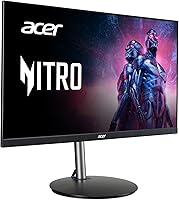
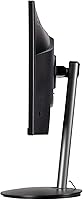
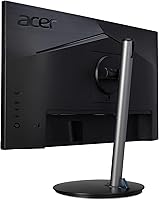
The Acer Nitro XFA243Y 23.8-inch Gaming Monitor sits in a competitive spot where most buyers are weighing whether to spend more for IPS or settle for something that actually delivers on the specs that matter. The VA panel here is a deliberate choice — you get noticeably deeper blacks and richer contrast than comparable IPS options at this price, which makes a real difference in darker game environments. What genuinely stands out, though, is the ergonomic stand: height adjustment, full swivel, and pivot capability are features you would normally expect to pay significantly more for. This is aimed squarely at first-time high-refresh upgraders and budget-conscious gamers who do not want to compromise on usability.
Features & Benefits

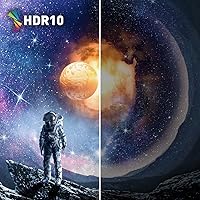
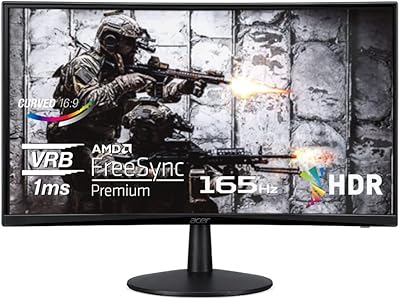
At 165Hz with FreeSync Premium, this 23.8-inch gaming display keeps motion sharp and tear-free — particularly valuable for AMD GPU users, though Nvidia owners on recent cards will find it compatible too. The 1ms spec is VRB, not GtG: it is achieved through backlight strobing rather than a measured pixel transition time, so real-world ghosting is minimal but not entirely absent in slow-panning scenes. HDR 10 is on the spec sheet, but be realistic — at this brightness level, the impact is subtle at best. Two HDMI 2.0 ports, one DisplayPort 1.2, and an included HDMI cable round out a well-considered connectivity package. VESA 100x100mm support is there if you want to ditch the stand for an arm.

Best For

The XFA243Y makes most sense for someone making their first jump from a 60Hz display — that leap to 165Hz is immediately noticeable, not just in fast games but in everyday desktop use too. AMD GPU owners get the full advantage of FreeSync Premium without any tweaking, making this a logical match for a mid-range Radeon build. It also doubles effectively as an all-day work monitor; the height adjustment, full swivel, and pivot mean you can dial in a comfortable position for long desk sessions, not just gaming posture. Throw in the zero-frame bezel and VESA mount support, and it fits cleanly into a dual-monitor setup or a wall-mounted configuration.

User Feedback

With over 500 ratings averaging 4.4 stars, the consensus around this Acer Nitro monitor is genuinely positive. Buyers consistently highlight the stand ergonomics and the smoothness of 165Hz as the two biggest wins, especially given what you would normally spend to get both in the same display. The most common criticism is out-of-box color accuracy — several owners recommend a short calibration session in the OSD before committing to the default picture settings. Backlight bleed comes up in a small number of reviews but does not appear to be a widespread production issue. The OSD navigation is generally described as straightforward, if not particularly elegant. Build quality holds up well for the price bracket, with the plastic chassis drawing little complaint.

Pros

  • 165Hz refresh rate produces noticeably smooth motion in both fast games and everyday desktop navigation.
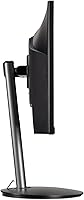
  • The fully ergonomic stand — with height adjustment, swivel, tilt, and pivot — is genuinely uncommon at this price tier.
  • AMD FreeSync Premium works natively with Radeon GPUs straight out of the box, no setup required.
  • VA panel contrast delivers deeper blacks and richer shadow detail than IPS alternatives in the same price range.
  • Two HDMI 2.0 ports plus a DisplayPort 1.2 input make it easy to connect a PC, console, and secondary device simultaneously.
  • An included HDMI cable means most buyers can get up and running without a separate accessory purchase.
  • VESA 100x100mm compatibility allows wall mounting or third-party arm use, adding long-term desk flexibility.
  • Zero-frame bezel sits cleanly in side-by-side dual-monitor configurations without visual gap distraction.
  • Over 500 real-world buyers rate it 4.4 stars, consistently pointing to stand quality and smoothness as standout values for the spend.

Cons

  • The 1ms response spec is VRB, not GtG — a meaningful distinction that panel comparison shoppers often misread.
  • HDR 10 support has negligible real-world impact at this brightness level and should not factor into a buying decision.
  • Out-of-box color accuracy typically needs manual OSD calibration before the image reaches its potential.
  • Backlight bleed appears in a portion of units, a known risk inherent to VA panel production tolerances.
  • The OSD menu navigation is functional but slow to learn, and adjusting settings mid-session is not intuitive.
  • The all-plastic construction feels adequate rather than solid, which may disappoint buyers upgrading from a sturdier display.
  • At 23.8 inches with a 1080p resolution, pixel density is modest and fine text can look softer than on a higher-resolution panel.
  • Nvidia GPU owners will not get the full benefit of FreeSync Premium, as the display lacks official G-Sync certification.

Ratings

The scores below were produced by AI after analyzing hundreds of verified buyer reviews for the Acer Nitro XFA243Y 23.8-inch Gaming Monitor, with spam, incentivized feedback, and bot activity actively filtered out to ensure only genuine purchase experiences shaped each result. Drawing on a global pool of real-world users — from first-time high-refresh upgraders to hybrid work-and-gaming setups — this analysis surfaces both where this display consistently delivers and where buyers have run into real frustrations. No score has been softened: the ratings reflect an honest, category-by-category breakdown of what this monitor actually is in daily use.

Value for Money
88%
Value for money is the single most consistently praised aspect across the entire review pool. Buyers regularly highlight that the combination of 165Hz, a fully ergonomic stand, and FreeSync Premium would typically command a significantly higher price on competing displays. For first-time high-refresh upgraders, the overall package is hard to argue with.
A recurring frustration is that the plastic build quality can undercut the perceived value once the monitor arrives in person, particularly for buyers upgrading from sturdier previous displays. Factor in the need to purchase a DisplayPort cable separately and some OSD calibration time, and the out-of-box experience is slightly less complete than the price implies.
Refresh Rate Performance
91%
The step up to 165Hz is the upgrade buyers most frequently describe as transformative — not just in fast-paced shooters, but in everyday browser scrolling and desktop navigation. The smoothness is immediately apparent and, according to dozens of reviews, genuinely difficult to go back from after a few days of use.
Buyers migrating from high-end 240Hz IPS displays occasionally notice subtle trailing behind fast-moving objects, a consequence of VA panel GtG response rather than the refresh rate itself. This ghosting becomes more visible at 165Hz than it would at lower speeds, and it is an inherent characteristic of the panel technology rather than a defect.
Panel & Image Quality
76%
24%
The VA panel produces contrast depth and black levels that IPS alternatives at the same price simply cannot replicate, and buyers notice it most in dark-scene-heavy games and cinematic titles. Several reviewers specifically call out how much richer shadowed environments look compared to their previous IPS display, even before manual calibration.
Viewing angles are noticeably narrower than IPS — color and brightness shift meaningfully when viewed from wide off-axis positions, which affects shared-viewing scenarios or wide desk configurations. The default factory image also skews cooler and over-contrasted, meaning the panel's true potential requires a calibration session before it shows itself.
Ergonomics & Stand
89%
The stand earns consistent and enthusiastic praise across the review pool — height adjustment, 360-degree swivel, tilt, and portrait pivot together form a package most monitors at this price tier simply omit. Buyers using this as a dual-purpose work and gaming display particularly appreciate the ability to set a genuinely comfortable seated posture rather than making do with a fixed-height panel.
A small number of buyers note the height adjustment column feels slightly loose after extended daily use, and the stand base occupies more desk depth than some compact workspaces can comfortably absorb. Neither issue is widespread, but buyers with shallow desks should measure the assembled footprint before assuming it will fit without compromise.
Gaming Performance
83%
In real gaming sessions, the combination of 165Hz and FreeSync Premium eliminates tearing effectively on Radeon GPUs and keeps frame delivery feeling smooth across both competitive and atmospheric titles. The VA panel's contrast adds visual weight to dark environments that flat IPS monitors at this price cannot reproduce, making games with strong art direction look noticeably more immersive.
The VRB response mode — which drives the 1ms spec — activates backlight strobing that some users find causes visible brightness reduction or flickering at high settings, leading many to disable it entirely. Turning VRB off does reduce perceived ghosting control, and buyers sensitive to motion artifacts will feel the tension between these two trade-offs more acutely in fast-action sequences.
Build Quality
72%
28%
The monitor does not feel flimsy or poorly assembled — the panel does not flex noticeably under normal handling, and the OSD buttons have a solid, deliberate click. Most buyers agree the construction feels appropriate and holds up reliably after months of daily desk use without developing creaks or alignment issues.
The all-plastic chassis is the most consistent build-related complaint, and buyers handling it alongside metal-framed competitors will feel the difference immediately. A handful of reviewers also mention slight stand wobble when typing forcefully on a nearby keyboard, which can be distracting in quiet work environments where any movement draws the eye.
Out-of-Box Color Accuracy
61%
39%
After a manual calibration session in the OSD — typically adjusting contrast, color temperature, and brightness — the panel produces colors that are genuinely pleasant for both gaming and general use. Buyers who invest the time report a meaningful improvement in image quality that makes the effort worthwhile, particularly for skin tone rendering in games and film.
The factory default settings are a reliable pain point: contrast is frequently pushed too high and color temperature skews noticeably cold, making warmer tones look unnatural straight out of the box. Buyers who are not comfortable adjusting display settings may never unlock the panel's actual capability, and there is no included calibration guide to help bridge that gap.
HDR Performance
43%
57%
HDR 10 is technically present and functional, and buyers who have no prior reference for high-performance HDR may notice a faint improvement in contrast depth on compatible content when the mode is enabled. For those expectations, the feature delivers something, even if that something is modest.
This is the display's most significant weakness relative to its spec sheet. Peak brightness is insufficient to produce the expanded highlights and deep shadow separation that make HDR meaningful, and the majority of buyers who enable it report no perceptible improvement over SDR content. Buyers for whom HDR is a genuine priority should look at displays specifically built for it.
Adaptive Sync
84%
FreeSync Premium performs exactly as intended when paired with an AMD Radeon GPU — screen tearing disappears and frame delivery feels smooth across the display's full variable refresh range. Nvidia users on RTX 20-series and later cards also report functional G-Sync Compatible behavior, making adaptive sync broadly usable across both major GPU ecosystems.
Nvidia users accustomed to certified G-Sync hardware occasionally notice minor artifacts near the edges of the variable refresh range that would not occur on a validated G-Sync display. Consistent adaptive sync performance also depends on maintaining a frame rate within the display's optimal VRR window, which requires a GPU capable of keeping pace with the panel's range.
Connectivity
82%
18%
Two HDMI 2.0 ports alongside a DisplayPort 1.2 input make it straightforward to keep a PC, a console, and a secondary source all connected simultaneously without swapping cables. The included HDMI cable is a small but genuine convenience that a surprising number of competing monitors in this price range choose to omit.
There is no USB hub of any kind, which buyers who route peripherals through their display will miss immediately. A DisplayPort cable is also absent from the box despite being the preferred connection for achieving the full 165Hz refresh rate on a PC, which means most users face an additional accessory purchase at setup.
OSD Navigation
58%
42%
The OSD covers all the controls that matter — refresh rate confirmation, adaptive sync toggle, response time modes, color presets, and brightness — giving users enough depth to meaningfully improve the image with patience. Most buyers do eventually find the settings they are looking for after a couple of exploratory sessions.
The physical button layout and the menu hierarchy frustrate a notable share of buyers, who describe navigation as slow and counterintuitive compared to the joystick-based OSD designs found on many competing monitors. Switching between a calibrated work profile and a gaming picture mode mid-session requires more button presses than the task should demand.
Backlight Uniformity
64%
36%
The majority of buyers report no significant uniformity problems during normal gaming and desktop use — in adequately lit rooms and during fast-paced gaming sessions, the panel performs consistently across most of its screen area. Units with good uniformity generate almost no complaints on this front.
Backlight bleed in one or more corners appears with enough regularity in the review pool to represent a real risk, most visible during dark loading screens, black bars in cinematic content, or low-light desktop use. The inconsistency between units suggests production-level variance rather than a universal design flaw, but it is frequent enough to check the return policy before committing.
Setup & Installation
79%
21%
Physical assembly is tool-free and quick — most buyers have the stand attached and the panel connected within ten minutes of opening the box. Input source detection is reliable on first boot, and the included HDMI cable means most setups require no immediate trip to find extra accessories.
Buyers who want the full 165Hz output need to manually verify the refresh rate in their operating system display settings, as many systems default to 60Hz even when connected via DisplayPort. First-time monitor upgraders regularly overlook this step and spend time troubleshooting performance that was never actually enabled.
Multi-Monitor Suitability
77%
23%
The zero-frame bezel reduces the visual gap between panels in side-by-side configurations, which buyers running dual setups consistently appreciate as a cleaner result than traditional bezeled monitors produce. VESA 100x100mm compatibility gives arm-mount users full positional control across both displays without any bracket compatibility concerns.
Matching a second unit for color consistency can be inconsistent given the panel's out-of-box calibration variance, and pairing this display with a different monitor model often reveals a visible color temperature mismatch between screens. The stand base also occupies meaningful desk depth, making a monitor arm a better investment for buyers with limited surface area.
Productivity & Office Use
81%
19%
The full ergonomic stand — height, tilt, swivel, and portrait pivot — makes this a genuinely capable all-day work monitor, and the 23.8-inch footprint keeps desk space usage manageable. Buyers who work in documents and spreadsheets during the day and switch to gaming in the evening find the transition between picture modes quick and the overall setup surprisingly versatile.
At 1080p across 23.8 inches, pixel density is modest, and buyers doing fine-detail productivity work — dense spreadsheets, small-type design, or multi-column data — may find the image softer than a 1440p alternative at the same size. The default cool color temperature can also contribute to eye fatigue during long office sessions if not corrected through OSD adjustment.

Suitable for:

The Acer Nitro XFA243Y 23.8-inch Gaming Monitor is a strong choice for anyone making their first move away from a 60Hz display — the step up to 165Hz is immediately perceptible not just in games but in daily desktop use, and you get there at a price that leaves room in the budget for other upgrades. AMD GPU owners are particularly well-served, since FreeSync Premium works natively without any configuration friction, making this a logical pairing for mid-range Radeon builds. The VA panel suits buyers who prioritize deep contrast and rich blacks over ultra-fast IPS pixel response, which is most relevant in story-driven or cinematic games where dark scenes carry visual weight. Hybrid users who work at a desk during the day and game in the evenings will genuinely benefit from the full ergonomic stand — height adjustment, swivel, tilt, and pivot let you set a proper working position, not just a gaming posture. Those planning a multi-monitor arrangement or a clean arm-mounted desk setup will also find the zero-frame bezel and VESA compatibility make integration straightforward.

Not suitable for:

Serious competitive FPS players who prioritize the fastest possible pixel response should be aware that the 1ms figure on the Acer Nitro XFA243Y 23.8-inch Gaming Monitor is VRB — a backlight strobing technique — rather than a true GtG panel transition measurement, and it does not perform on par with a genuine 1ms GtG IPS panel in back-to-back testing. Buyers who consider HDR a meaningful feature should also temper expectations: HDR 10 is listed in the specs, but at this panel's brightness output the real-world effect is subtle enough that most users will not notice a meaningful difference from SDR content. Color-critical work such as photo editing or video grading is another poor fit; out-of-box accuracy typically requires manual calibration, and a VA panel at this tier is not built for professional color workflows. Those who want the largest possible screen for the price may also find 23.8 inches restrictive, as some competing panels at a similar spend offer 27-inch options. Nvidia users should note that while the monitor works compatibly with recent GeForce cards, it is not G-Sync certified, so the adaptive sync experience may be less consistent than on a validated display.
Specifications

  • Screen Size: The panel measures 23.8″ diagonally, offering a compact footprint well-suited to single-monitor desk setups.
  • Resolution: Native resolution is 1920x1080 Full HD at a 16:9 aspect ratio, compatible with virtually all modern games and media formats.
  • Panel Type: Uses a VA (Vertical Alignment) panel, which produces stronger contrast ratios and deeper blacks than IPS alternatives at this price tier.
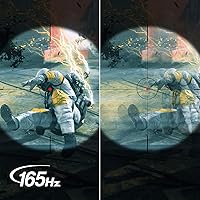
  • Refresh Rate: Supports a maximum refresh rate of 165Hz, delivering noticeably smoother motion than standard 60Hz or 75Hz displays.
  • Response Time: Rated at 1ms VRB (Visual Response Boost), a backlight-strobing technique that reduces perceived blur rather than measuring actual pixel-to-pixel transition time.
  • Adaptive Sync: Supports AMD FreeSync Premium, synchronizing the display refresh rate with a compatible GPU to eliminate screen tearing and reduce stutter during gameplay.
  • HDR Support: Certified for HDR 10, though peak brightness limitations mean real-world HDR impact is modest compared to higher-brightness HDR-capable panels.
  • Pixel Pitch: Pixel pitch is 0.275mm, consistent with a 1080p resolution at this screen size and typical for general-purpose gaming displays.
  • Connectivity: Equipped with one DisplayPort 1.2 and two HDMI 2.0 ports, allowing a primary PC connection alongside one or two additional devices simultaneously.
  • Included Cable: Ships with one HDMI cable in the box, reducing the need for an immediate accessory purchase during initial setup.
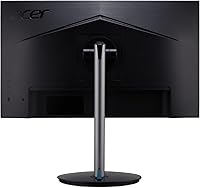
  • VESA Mount: Compatible with the 100x100mm VESA standard, enabling straightforward use with most third-party monitor arms or wall-mount brackets.
  • Height Adjustment: The stand provides up to 4.7″ of vertical travel, accommodating a range of seated desk heights and posture preferences.
  • Tilt Range: Tilts from -5° forward to 15° backward to suit varying viewing angles and desk configurations.
  • Swivel: The stand base rotates a full 360°, making it easy to angle the screen toward different seating positions without moving the whole unit.
  • Pivot: Supports 90° pivot rotation into portrait orientation, useful for coding, long-document editing, or vertical content workflows.
  • Bezel Design: Features a zero-frame (borderless) design on three sides, minimizing the visual gap between panels in dual-monitor setups.
  • Weight: Assembled unit weighs approximately 11.56 lbs (5.24kg), manageable for solo repositioning on a standard desk surface.
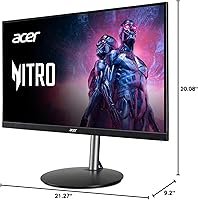
  • Dimensions: Overall assembled dimensions measure approximately 21.27″ wide by 20.08″ tall by 9.2″ deep, including the stand.

Related Reviews
Acer Nitro KG241Y 23.8″ Full HD Gaming Monitor
85%
89%
Value for Money
91%
Display Quality
93%
Gaming Performance
82%
Build Quality
80%
Color Accuracy
More
Acer Nitro KG273 27-inch Gaming Monitor

85%
88%
Display Quality
91%
Performance in Fast-Paced Games
85%
Ergonomics and Adjustability
83%
Build Quality
92%
Value for Money
More
Acer Nitro KG251Q 24.5-inch Gaming Monitor
77%
93%
Refresh Rate Performance
91%
Value for Money
86%
Motion Clarity
82%
Image Contrast & Blacks
61%
Color Accuracy
More
Acer Nitro XZ342CU 34″ Curved Gaming Monitor
78%
86%
Image Quality
88%
Refresh Rate Performance
91%
Ultrawide Immersion
54%
HDR Performance
83%
Build Quality
More
Acer KC242Y Hbi 23.8″ FHD Monitor
71%
88%
Value for Money
83%
Image Clarity
86%
Refresh Rate Performance
71%
Response Time
74%
Build Quality
More
Acer Nitro KG271U 27-inch IPS Gaming Monitor
74%
88%
Image Quality
91%
Refresh Rate Performance
83%
Response Time
82%
Color Accuracy
86%
Adaptive Sync
More
Acer Nitro EDA320Q 31.5″ Curved Gaming Monitor
71%
91%
Value for Money
74%
Image Quality
78%
Gaming Performance
84%
Curvature & Immersion
43%
Ergonomics & Adjustability
More
Acer Nitro EDA323QU 31.5-inch Curved Gaming Monitor
74%
89%
Value for Money
87%
Image Sharpness
84%
Refresh Rate Performance
82%
AMD FreeSync
41%
Stand Ergonomics
More
ASUS VG249Q1A 23.8-inch Gaming Monitor
71%
88%
Refresh Rate Performance
83%
Image & Color Quality
79%
Motion Clarity
76%
Connectivity
84%
Adaptive Sync (FreeSync / G-Sync)
More
Acer Nitro ED240Q Sbiip 23.6″ Curved Gaming Monitor
80%
88%
Display Quality
91%
Performance in Fast-Paced Games
70%
Build Quality
80%
Ease of Setup
94%
Price-to-Performance Ratio
More

FAQ

It works as a standard display with any Nvidia card. FreeSync Premium is natively optimized for AMD Radeon GPUs, but RTX 20-series and later Nvidia cards support G-Sync Compatible mode, which allows adaptive sync to function on FreeSync monitors. Performance is generally good, though it is not the same as a G-Sync certified panel.

It is accurate in a technical sense, but it needs context. The 1ms figure refers to VRB (Visual Response Boost), which works by strobing the backlight to reduce perceived motion blur — it is not a measurement of how quickly a pixel physically transitions between colors. True GtG response on VA panels typically lands between 4ms and 8ms. For most gaming scenarios this is not a problem, but do not compare it directly to a genuine 1ms GtG IPS panel — they are measuring different things.

Realistically, no — not in a dramatic way. HDR 10 is supported, but the panel's peak brightness is not high enough to deliver the expanded highlights and shadow depth that make HDR worthwhile on premium displays. You can switch it on, and some content looks marginally more vivid, but if strong HDR performance is important to you, this monitor is not built for that use case.

Yes — one HDMI cable is included, which is a practical touch since many monitors at this price point ship with nothing. A DisplayPort cable is not included, so if you plan to use that connection for the full 165Hz output on a PC, you will need to pick one up separately.

Yes. The stand removes and the rear of the panel exposes a standard 100x100mm VESA pattern, which is compatible with the vast majority of aftermarket arms and wall mounts. It is a straightforward swap and a popular choice for buyers building cleaner desk setups or multi-monitor configurations.

It is a solid option for console gaming — the two HDMI 2.0 ports let you connect both consoles at once. Keep in mind that current-gen consoles cannot output at 1080p 165Hz, so you will be running at 60Hz or 120Hz depending on the title and console settings. The VA panel's contrast makes console games look punchy and cinematic, which is a genuine plus for single-player titles.

It varies by unit, as is common with VA panels generally. Some buyers report no visible bleed at all; others notice faint glow in the corners during dark scenes or loading screens. It does come up with enough regularity in reviews to be worth knowing about before you buy. If you are particularly sensitive to backlight bleed, confirm the return policy so you have an exit option if your unit has a noticeable case.

The default picture profile is workable but not calibrated for accuracy — contrast tends to be set too high and the color temperature often runs cooler than most people prefer. Spending a few minutes in the OSD to dial down contrast, adjust brightness, and warm the color temperature makes a meaningful difference. Monitor enthusiast communities have shared good calibration starting points online that are worth looking up for this specific model.

Yes — the stand supports a full 90° pivot into portrait orientation. It is a genuinely useful feature for coding, long-form document work, or reading feeds where vertical space matters. Just make sure to also rotate the display output in your operating system settings, otherwise the image will appear sideways.

This use case suits the XFA243Y well. The ergonomic stand — covering height, tilt, swivel, and pivot — lets you dial in a proper working posture during the day rather than using a fixed-height panel. Switching to a gaming picture mode in the OSD for the evening session is quick and easy. The 23.8-inch footprint is compact enough for a single desk space without sacrificing too much screen real estate for productivity tasks.