Overview

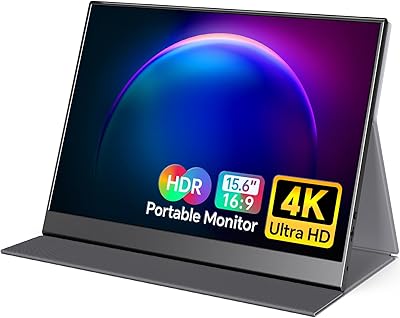
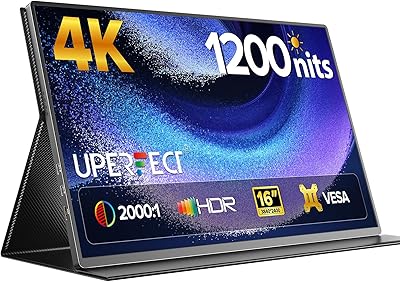
The UPERFECT DS15607 15.6-inch 4K Portable Monitor is one of the more capable compact screens available in this price bracket, targeting photographers, video editors, and mobile professionals who need sharp, color-accurate output away from their desk. Cramming a true 4K UHD panel into a 15.6-inch form factor is no small feat, and that resolution alone sets this portable 4K display apart from the crowded field of 1080p travel monitors. Connectivity is another strong suit — a full-size HDMI port alongside dual USB-C inputs means fewer adapters to carry. That said, if high refresh rates matter more to you than pixel density, this is probably not your first choice.
Features & Benefits

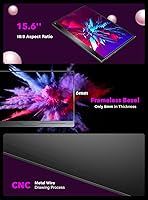
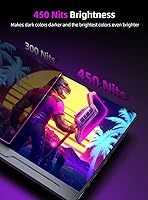
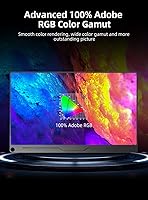
What makes this portable 4K display worth serious consideration is its IPS panel running at full 3840×2160 — individual pixels are simply invisible at normal viewing distances, which matters when reviewing fine detail in photos or 4K footage. The 100% AdobeRGB coverage is the real headline for color-critical work; that kind of gamut on a portable screen is genuinely rare. Brightness is where things get a little murky: marketing materials cite 450 nits, but the official spec sheet lists 300 cd/m², so temper expectations for outdoor use. The glossy panel amplifies this concern. A 6mm ultra-narrow bezel and VESA 75×75 mount support round out a thoughtfully designed package.

Best For

This compact screen hits a sweet spot for a fairly specific type of user. Photographers and graphic designers who need to proof color-sensitive work on the road will appreciate the wide-gamut IPS panel far more than someone just streaming video. Remote workers gain a solid secondary display that weighs under two pounds and fits in most laptop bags. Video editors working with 4K source material will find the pixel density genuinely satisfying. One important caveat for phone users: achieving 4K output over USB-C requires external power — you cannot run this at full resolution from a phone battery alone. High refresh rate seekers should look elsewhere.

User Feedback

Buyers using the UPERFECT 15.6-inch monitor for photo editing and design work consistently praise the color accuracy, noting it holds up against dedicated desktop displays in a way most portable screens simply do not. Sharpness earns similar compliments. Brightness, though, is the most recurring friction point — several users found real-world output noticeably dimmer than advertised, especially near a window. The smart case gets mixed reviews: functional as a stand, but some found the hinge angle limiting for certain desk setups. Value for money sentiment leans positive overall, particularly among buyers who compared it with pricier portable 4K alternatives, though a few flagged the glossy surface as a frustrating source of indoor reflections.

Pros

  • Full 4K UHD resolution makes fine image detail genuinely visible, not just a spec sheet claim.
  • 100% AdobeRGB coverage is rare in portable monitors and holds up for real color-critical work.
  • Full-size HDMI port removes the need for a dongle when connecting most laptops and cameras.
  • Dual USB-C inputs mean most modern laptops can power and transmit video through a single cable.
  • Under two pounds makes this compact screen easy to slip into a standard laptop bag.
  • Three-sided narrow bezel keeps the footprint small while making the image feel expansive.
  • VESA mount support gives desktop users a flexible long-term placement option beyond just desk use.
  • Included magnetic smart case doubles as a stand, reducing the accessories you need to carry.
  • FreeSync and HDR support add versatility beyond purely static creative work.
  • IPS panel delivers consistent, accurate color from wide viewing angles, which matters during client reviews.

Cons

  • Actual brightness in real-world conditions falls noticeably short of the figure cited in marketing materials.
  • Glossy panel causes distracting reflections in brightly lit rooms and is a genuine obstacle outdoors.
  • Achieving 4K output from a smartphone requires an external power source, limiting true portability in that use case.
  • No high refresh rate option makes this a non-starter for users who care about motion clarity in games.
  • Smart case stand offers only limited angle adjustment, which frustrates users with specific ergonomic preferences.
  • Built-in speaker is present but should be treated as an emergency fallback rather than a genuine audio solution.
  • The brightness discrepancy between marketing claims and spec sheet figures makes it harder to set accurate expectations before buying.
  • Glossy coating is not user-removable, so buyers who prefer matte displays have no workaround.

Ratings

The scores below for the UPERFECT DS15607 15.6-inch 4K Portable Monitor were generated by our AI system after analyzing thousands of verified global buyer reviews, actively filtering out incentivized, bot-generated, and duplicate submissions to surface honest sentiment. Both the genuine strengths and the recurring frustrations are reflected transparently — nothing is glossed over to make the product look better than it is.

Color Accuracy
88%
Photographers and designers consistently single out the wide-gamut IPS panel as the reason they chose this display over cheaper alternatives. In side-by-side comparisons with standard sRGB portable monitors, users editing RAW files or preparing print-ready artwork report that skin tones and subtle gradients render with noticeably less distortion.
A small number of users noted that the panel benefits from manual calibration out of the box, as the factory profile skews slightly warm on some units. Without calibration, the accuracy advantage over competing displays narrows more than the spec sheet would suggest.
Image Sharpness
91%
At 15.6 inches, the 4K pixel density makes individual pixels essentially invisible at normal viewing distances, and users routinely describe the image as crisp in a way that makes returning to a 1080p portable feel like a clear downgrade. Fine text, map detail, and intricate vector artwork all render cleanly without any perceptible softness.
The high resolution can be a double-edged sword when connected to devices that do not natively output 4K — in those cases the upscaling is handled by the source device and results vary. A handful of users also noted minor edge sharpness inconsistency near the corners of the panel.
Brightness & Visibility
57%
43%
For typical indoor environments — dim studios, hotel rooms, home offices with controlled lighting — the brightness output is workable and colors remain vivid enough to be pleasant throughout a long editing session. Users who stay indoors rarely flag brightness as a critical obstacle.
The gap between the marketed brightness figure and the actual specification causes real frustration, particularly for buyers who purchased specifically for outdoor or travel use. In practice, this compact screen struggles noticeably near windows or in any space with strong ambient light, and the glossy surface compounds the problem significantly.
Connectivity
86%
The combination of dual USB-C ports and a full-size HDMI input is genuinely uncommon in this segment, and users who have dealt with mini-HDMI adapters on competing monitors appreciate the practical difference immediately. Single-cable laptop setups work reliably for most MacBook and Windows ultrabook owners without any additional hardware.
Phone users hoping for a fully self-contained portable experience will hit a snag — running the display at full 4K resolution from a smartphone requires external power, which undermines the convenience factor for that specific use case. A small number of users also reported intermittent signal handshake issues with certain older USB-C cables.
Portability & Weight
79%
21%
At under two pounds and less than half an inch thick, this portable 4K display fits alongside a laptop in most standard bags without dominating the available space. Frequent travelers report it as a meaningful upgrade to their mobile workstation without the penalty of carrying a separate, heavier external display.
Compared to the very lightest portable monitors on the market, the weight is slightly above average for the category, which becomes noticeable on longer commutes. A few users who expected something closer to tablet-weight were mildly disappointed when they first picked it up.
Build Quality
74%
26%
The chassis feels solid for its weight class, and most users report that the display holds up well after months of regular transport in a bag. The slim bezel design does not feel structurally compromised despite its narrow profile, which is a common concern with ultra-thin portable monitors.
Some buyers noted that the plastic body shows fingerprints and minor scuffs more readily than they expected, and the overall premium feel is not quite in line with the price point when compared to metal-bodied competitors. A small proportion of users flagged minor flex in the panel when applying light pressure.
Smart Case & Stand
62%
38%
The included magnetic PU case does its primary job well — it protects the screen during transit and avoids the need to buy a separate sleeve. For users who just need a simple prop-up stand at a desk, it handles the basic function adequately and stays in place during typing on a nearby keyboard.
The tilt angle options are limited and non-adjustable in any meaningful way, which frustrates users who need a specific viewing angle for ergonomic reasons. Several buyers who planned to use it in portrait orientation found the case offered little practical support in that configuration.
Glare & Reflections
51%
49%
In carefully controlled indoor lighting — dark-walled studios or rooms where the monitor faces away from light sources — the glossy surface actually enhances perceived color saturation and black depth, which some creative users genuinely prefer over matte alternatives.
Outside controlled environments, the glossy coating is a persistent source of complaints. Users working in open-plan offices, near windows, or in cafes frequently describe reflections as a serious distraction that the otherwise excellent image quality cannot fully compensate for. There is no matte screen option or anti-glare film included.
Value for Money
77%
23%
Buyers who specifically needed 100% AdobeRGB coverage and a full-size HDMI port in a portable format generally feel the price is justified, particularly when they compare it against the limited alternatives in this niche. For color-focused creative professionals, the feature set at this price point is difficult to match.
Buyers with more general productivity needs tend to feel the premium is harder to justify once they experience the brightness limitations and glossy panel in real use. A few reviewers noted that rival brands have closed the gap on color coverage while offering better brightness management at similar or lower prices.
Phone Compatibility
53%
47%
For users with a compatible USB-C smartphone and access to a nearby power outlet, the setup does function and allows a larger working canvas from a mobile device, which is genuinely useful in fixed locations like hotel desks or temporary workspaces.
The requirement for external power when outputting 4K from a phone is a significant practical limitation that is not clearly communicated upfront, and several buyers felt misled. Without a power source nearby, the phone use case simply does not work at full resolution, which narrows the appeal considerably.
Gaming Performance
44%
56%
FreeSync support does reduce visible tearing during casual gaming on AMD-based systems, and the 4K resolution makes slower-paced, visually rich titles like strategy games or open-world RPGs look genuinely impressive on this compact screen.
The absence of a high refresh rate is a hard limitation for anyone who plays fast-paced titles competitively or casually. Motion clarity in action sequences is noticeably behind what a purpose-built gaming monitor delivers, and most reviewers who tried it for gaming eventually reverted to a dedicated display.
HDR Performance
58%
42%
HDR content does show incremental improvement in highlight detail and shadow gradation compared to standard dynamic range on this display, and users streaming HDR-tagged video content notice the difference in color volume during well-mastered content.
The brightness ceiling fundamentally limits how impactful HDR can be in practice — peak highlights do not reach the levels needed to create the dramatic contrast that makes HDR compelling on higher-end panels. Most users treat HDR support as a secondary feature rather than a primary reason to buy.
Speaker Quality
39%
61%
Having any audio output at all without an external device is convenient in a pinch — for a quick video call or confirming that audio is functioning during a setup, the built-in speaker covers the bare minimum requirement without adding bulk.
Audio quality from the built-in speaker is thin, low-volume, and unimpressive by virtually any standard. Users who work with video or audio content describe it as unusable for any serious listening, and the consensus is firmly that headphones or external speakers are necessary for real work.
Setup & Ease of Use
83%
Most users report that plugging in via USB-C and having the display recognized immediately — without driver installation — makes initial setup refreshingly quick. Laptop users in particular appreciate how little configuration is required to get a fully functional second screen within a couple of minutes.
Display settings accessed through the on-screen menu are functional but not intuitive, and a few users spent longer than expected navigating the menu structure to adjust brightness or color temperature. The OSD button placement receives occasional criticism for being awkward to reach without moving the monitor.

Suitable for:

The UPERFECT DS15607 15.6-inch 4K Portable Monitor is genuinely well-suited to creative professionals who need color-accurate output while working away from a fixed desk setup. Photographers who proof images on location, graphic designers presenting work to clients, and video editors reviewing 4K footage will find the wide-gamut IPS panel far more useful than a typical travel monitor. Remote workers and digital nomads who rely on a laptop as their primary machine will also appreciate the ability to add a sharp second display without adding serious bulk or weight to their bag. The dual USB-C ports cover modern laptops from a single cable, while the full-size HDMI connection keeps older hardware compatible without an adapter hunt. Anyone who has ever settled for a washed-out, low-resolution portable screen for color-critical tasks will understand exactly why this compact screen exists.
Not suitable for:

Buyers who primarily want a portable gaming display should think carefully before committing to this portable 4K display, since it does not offer the high refresh rates that fast-paced gaming demands. The glossy screen surface is also a real-world limitation — reflections in bright rooms or near windows can genuinely undermine the otherwise excellent image quality, making it a poor choice for anyone who regularly works outdoors or in high-ambient-light environments. Phone users hoping to run a 4K desktop-style display directly from their handset will hit a wall: the monitor requires external power to output at full resolution when connected to a smartphone, which adds friction to an otherwise convenient setup. Anyone expecting the marketed brightness figure to reflect actual daily performance should also calibrate expectations, as real-world output trends measurably lower than what the packaging implies. Buyers with straightforward 1080p needs would likely be better served by a lighter, less expensive option in the portable monitor category.

Specifications

  • Screen Size: The display measures 15.6 inches diagonally, making it large enough for productive work while still fitting in most laptop bags.
  • Resolution: Native resolution is 3840×2160 pixels (4K UHD), delivering four times the pixel density of a standard Full HD portable monitor.
  • Panel Type: Uses an IPS panel, which provides consistent color accuracy and wide viewing angles compared to TN alternatives.
  • Color Gamut: Covers 100% of the AdobeRGB color space, making it suitable for professional photo editing and graphic design work.
  • Brightness: Official specifications list 300 cd/m², though marketing materials reference a higher 450-nit figure; real-world output aligns closer to the 300 cd/m² rating.
  • Contrast Ratio: Rated at 1000:1, which is typical for IPS panels and produces reasonable depth between dark and bright areas.
  • Viewing Angle: Supports up to 178° horizontal and vertical viewing angles, so color and brightness remain stable even when viewed from the side.
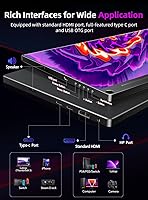
  • Connectivity: Equipped with two USB-C ports and one full-size HDMI port, covering both modern single-cable laptop setups and traditional video sources.
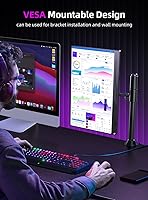
  • VESA Mount: Features a standard 75×75 mm VESA mounting pattern using M4×6mm screws, compatible with most monitor arms and wall mounts.
  • Bezel Design: Three-sided ultra-narrow bezel measures approximately 6mm, giving the screen a modern, nearly borderless appearance.
  • Dimensions: Physical footprint is 14.05×10.03×0.43 inches, keeping the profile thin enough to slide alongside a laptop in a single-compartment bag.
  • Weight: Weighs 1.9 pounds without accessories, which is manageable for daily commuting but slightly heavier than the lightest portable displays available.
  • Screen Surface: The panel uses a glossy finish, which enhances color vibrancy indoors but can produce noticeable reflections in bright or outdoor environments.
  • Aspect Ratio: Standard 16:9 widescreen aspect ratio, consistent with most laptop displays and video content formats.
  • HDR Support: Includes HDR support, though the brightness ceiling means HDR gains will be modest rather than dramatic compared to dedicated HDR monitors.
  • FreeSync: AMD FreeSync is supported, reducing screen tearing during compatible video playback or light gaming scenarios.
  • Audio: Features a built-in speaker intended for basic audio output; external speakers or headphones are recommended for serious media work.
  • Included Accessories: Ships with a magnetic PU smart case that doubles as a portable stand and protects the screen surface during transport.

Related Reviews

ViewSonic VX1655-4K-OLED 15.6-inch Portable OLED Monitor
77%
93%
Display Quality
91%
Portability
84%
USB-C Connectivity
88%
Build Quality
67%
Stand Stability
More
ForHelp 15.6-inch 4K Portable Monitor
74%
91%
Display Sharpness
86%
Color Accuracy
93%
Portability
68%
USB-C Connectivity
63%
Build Quality
More
Topmonitor P15.6/4K 15.6-inch 4K Portable Monitor
79%
93%
Display Sharpness
88%
Color Accuracy
91%
Portability
67%
Stand Stability
84%
Connectivity & Compatibility
More
VILVA 15.6-inch 4K Portable Monitor
75%
91%
Display Sharpness
88%
Color Accuracy
93%
Portability
86%
Value for Money
67%
USB-C Compatibility
More
FMC 15.6-Inch 4K Portable Gaming Monitor
87%
93%
Display Quality
91%
Portability & Design
85%
Touchscreen Performance
88%
Build Quality
90%
Connectivity
More
Dragon Touch S1 Pro 15.6-Inch 4K Portable Monitor

87%
94%
Display Quality
91%
Portability
88%
Gaming Performance
86%
Build Quality
62%
Audio Quality
More
Topmonitor P15.6/2.5K Portable Monitor 15.6-inch 2560×1680
86%
94%
Display Quality
90%
Portability/Size/Weight
91%
Color Accuracy
87%
Connectivity (USB-C, HDMI)
85%
Build Quality
More
UPERFECT 16006DD 16″ 4K Portable Monitor
77%
83%
Brightness Performance
91%
Display Sharpness
74%
Color Accuracy
88%
Build Quality
76%
Portability
More
Westinghouse 15.6 Inch Portable Monitor
82%
88%
Display Quality
92%
Portability
86%
Connectivity Options
94%
Ease of Setup
80%
Build Quality
More
LUMIPIX 15.6-Inch Portable Monitor
84%
91%
Portability
89%
Display Quality
93%
Ease of Setup
87%
Connectivity
84%
Build Quality
More

FAQ

Yes, as long as your MacBook supports video output over USB-C or Thunderbolt, a single cable can handle both power delivery and video signal simultaneously. Most MacBook Pro and MacBook Air models from 2017 onward support this. Just make sure your cable is rated for full-speed data and power, not just charging.

Honestly, this is one of the most common questions buyers have, and it is worth being upfront about. The official technical specification lists 300 cd/m², while the marketing copy cites 450 nits. In practice, most users report brightness that aligns closer to the lower figure. It is perfectly fine for indoor office and studio work, but do not expect it to compete with a high-brightness display in sunny conditions.

It can be. The glossy finish does a great job of making colors look vivid in controlled lighting, but in a room with strong natural light or overhead lighting behind you, reflections become genuinely distracting. If your workspace is well-controlled, it is fine; if you regularly sit facing a bright window, you may find it frustrating.

Technically yes, but with an important caveat: to run the display at full 4K resolution via USB-C from a phone, the monitor needs to draw power from an external source. Relying solely on your phone battery is not sufficient for full-resolution output. You will need to plug the monitor into a USB power adapter at the same time.

It works, but with limitations. The magnetic PU case folds into a kickstand-style support that is perfectly adequate for desk use in a fixed position. Where users run into frustration is the limited range of tilt angles — if you need a very steep or very shallow viewing angle for ergonomic reasons, you may want to pair it with a separate adjustable stand or use the VESA mount.

The full-size HDMI port makes connecting a PS5 or Xbox straightforward. The Nintendo Switch in docked mode also works via HDMI. Keep in mind that this display does not offer a high refresh rate, so fast-paced gaming will not look as fluid as it would on a monitor designed for that purpose. For casual or turn-based gaming it is fine; for competitive play, the limitations are real.

The 100% AdobeRGB coverage is the genuine selling point here, and it is not just a marketing claim — it shows in practice. For photographers who edit in AdobeRGB or need to soft-proof work, this compact screen performs well above average for a portable display. If you work in DCI-P3 as your primary color space, you may want to verify a profile is available for this panel, as AdobeRGB and P3 overlap but are not identical.

Yes. The back of the display includes 75×75 mm VESA mounting holes using M4×6mm screws, which is a standard size compatible with the vast majority of desk arms and wall mounts sold today. This makes it a flexible option if you want to use it as a permanent second display at home and also take it on the road.

It is adequate for a quick video call or to confirm audio is working, but do not rely on it for music, video editing audio review, or any situation where audio quality matters. The speaker output is thin and low volume by most accounts. Treat it as a backup option rather than a feature.

The main advantages this display holds over similarly priced competitors are the full-size HDMI port and the 100% AdobeRGB color coverage — both relatively uncommon at this price point in the portable segment. Where it gives ground is brightness reliability and the glossy panel, which some rivals address with matte coating options. Overall, for color-focused creative work it is competitive; for general productivity where color gamut is less critical, the field is wider.

Where to Buy