Overview

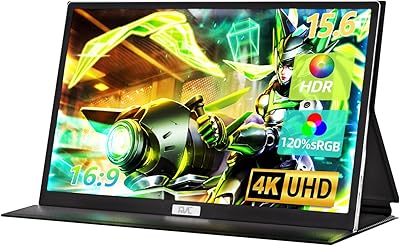
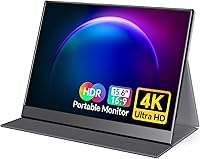
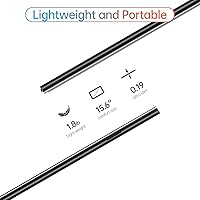
The VILVA 15.6-inch 4K Portable Monitor sits in an interesting spot: it offers resolution and color specs you'd typically pay significantly more for, packed into a body that weighs just 1.8 lbs and measures barely 0.3 inches thick. The matte IPS panel keeps glare manageable in bright environments, and the included padded smart cover means you're not scrambling for a separate case before every trip. Both mini HDMI and USB-C inputs are on board, which gives you real flexibility depending on what you're plugging into. That said, this is a mid-range product priced accordingly — set realistic expectations about build refinement and audio, and you'll likely be satisfied.

Features & Benefits

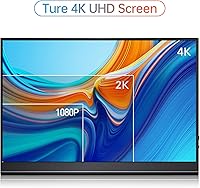
Cramming 3840x2160 pixels into a 15.6-inch panel means the pixel density is genuinely high — text looks crisp, and fine image detail holds up in ways a 1080p portable simply can't match. The 100% Adobe RGB coverage is the spec that stands out most for creative users: it means colors rendered on this display closely reflect what you'd see in a calibrated printing or professional editing workflow, not just a tweaked consumer color profile. Brightness tops out at 400 nits, which handles indoor and moderately lit settings well, though direct sunlight will challenge it. USB-C single-cable connection is convenient, but note that some laptops won't supply enough power on their own — keep a USB-C charger nearby just in case. The built-in speakers exist, but treat them as an emergency fallback, not a listening experience.

Best For

This portable 4K display makes the most sense for people whose work or lifestyle puts them on the move regularly. Remote workers and frequent travelers get a meaningful screen upgrade without packing a bulky external monitor. Graphic designers and photo editors will appreciate the wide color coverage for on-location client work or quick editing sessions away from their main setup. It also connects cleanly to a Nintendo Switch, PS4, or Xbox for a compact gaming screen — just keep in mind that the refresh rate is not optimized for competitive fast-action gaming. Mac and laptop users benefit from the plug-and-play USB-C setup, which avoids the driver installs and config headaches that plague some cheaper alternatives.

User Feedback

Buyers tend to praise the color accuracy and overall sharpness right out of the box — most say it exceeded their expectations given the price. The build quality draws positive comments too, especially relative to what similarly priced portables typically offer. The smart cover gets mixed reviews: it works as basic protection, but its function as a stand is less reliable on soft or uneven surfaces. The most consistent complaint involves USB-C power delivery — certain laptops and phones don't push enough power through the port, requiring an additional charger that isn't always obvious upfront. A handful of users also note the refresh rate limits its appeal for fast-paced gaming. Overall, the consensus leans positive for the value delivered.

Pros

  • Genuine 4K resolution on a 15.6-inch panel produces noticeably sharp text and detailed images.
  • 100% Adobe RGB coverage is rare at this price point and a real advantage for color-sensitive creative work.
  • At 1.8 lbs and under a third of an inch thick, this portable 4K display fits easily into a laptop bag.
  • The matte screen surface reduces glare meaningfully in typical indoor and office environments.
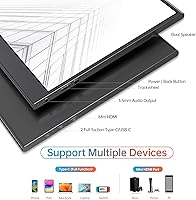
  • Both mini HDMI and USB-C inputs give you real flexibility across a wide range of host devices.
  • Plug-and-play USB-C setup works out of the box with most modern MacBooks and laptops — no driver installs needed.
  • Portrait mode support adds practical value for developers, writers, and anyone who reads long-form content.
  • The included padded smart cover provides genuine travel protection without needing a separate purchase.
  • Color accuracy is consistently praised by buyers straight out of the box with minimal calibration required.
  • Compatible with consoles like Switch, PS4, and Xbox, making it a versatile pick beyond just laptop use.

Cons

  • USB-C power delivery falls short with certain host devices, often requiring a separate charger to function reliably.
  • The smart cover doubles as a stand, but it struggles on soft or uneven surfaces and feels flimsy under pressure.
  • Refresh rate limitations make the VILVA monitor a poor choice for competitive or fast-paced gaming.
  • Built-in speakers are barely adequate — thin, low-volume output that most users will want to bypass entirely.
  • At 400 nits, the display can appear washed out in brightly lit rooms or near windows with direct sunlight.
  • Only a single USB-C port means connectivity options are tighter than on monitors with expanded port layouts.
  • The mini HDMI port requires a specific cable or adapter that is not always included or immediately on hand.
  • Long-term durability of the outer casing and hinge mechanism on the cover has raised some questions among buyers.

Ratings

The scores below for the VILVA 15.6-inch 4K Portable Monitor were generated by our AI system after analyzing thousands of verified global user reviews, with spam, bot activity, and incentivized feedback actively filtered out. Each category score reflects the honest balance of praise and frustration real buyers have expressed — nothing is inflated to flatter the product, and nothing is buried to protect its reputation.

Display Sharpness
91%
Users consistently describe the image clarity as one of the most immediately noticeable upgrades over their previous portable monitors. At 15.6 inches, the 4K pixel density makes text unusually crisp — designers and developers working with fine UI details or typography especially call this out as a standout strength.
A small number of buyers note that unless the host device actually outputs a 4K signal, the panel can look softer than expected due to upscaling. This is a source-side limitation, but some users initially blamed the monitor before realizing the issue.
Color Accuracy
88%
Photographers and graphic designers working on location report that the 100% Adobe RGB coverage translates to noticeably richer, truer colors straight out of the box compared to typical portable monitors. Several users mentioned it reduced their need to re-edit work after returning to a desktop setup.
While the out-of-box accuracy is praised, a subset of professional users note the display benefits from a proper ICC profile or hardware calibration for print-critical work. Without that step, some hues can skew slightly warmer than a calibrated reference.
Portability
93%
At 1.8 lbs and roughly a third of an inch thick, this travel-friendly screen slides into a laptop sleeve without any noticeable added bulk. Frequent flyers and remote workers specifically praise how little sacrifice is involved in carrying it daily alongside a 13 or 14-inch laptop.
The slim chassis, while excellent for portability, means heat can become slightly noticeable during extended use in warm environments. A very small number of users report the edges feel less rigid than premium alternatives at higher price points.
Value for Money
86%
The combination of 4K resolution and full Adobe RGB coverage at this price tier is genuinely uncommon, and most buyers feel they received more than expected for what they paid. For students, freelancers, and remote workers who cannot justify spending on a flagship portable, the perceived value is high.
A recurring theme in critical reviews is that certain trade-offs — particularly around the stand, refresh rate, and audio — feel more pronounced once buyers start comparing directly to pricier alternatives. The value proposition holds, but only if expectations are calibrated to the price tier.
USB-C Compatibility
67%
33%
When connected to a MacBook, a recent Windows laptop, or a phone with full DisplayPort Alt Mode support, the single-cable setup works cleanly with no extra configuration. Users who hit that compatibility sweet spot describe the plug-in experience as refreshingly straightforward.
This is the most consistent pain point across negative reviews. Buyers using older laptops, budget Android phones, or low-power USB-C hubs frequently find the monitor fails to power on reliably or flickers without a supplemental charger. The limitation feels under-communicated at purchase.
Build Quality
76%
24%
For a monitor in this price range, the plastic chassis feels reasonably solid and does not flex noticeably when carried or repositioned. Several users remark that it feels more expensive than expected, particularly around the bezel finish and port construction.
Extended ownership reviews occasionally flag concerns about the durability of the outer casing under daily carry stress. The corners and edges are the most commonly cited areas where wear becomes visible over months of regular use.
Smart Cover & Stand
61%
39%
As a travel protection case, the padded smart cover does its job — users report the panel arriving safely through checked luggage and bumpy commutes without issue. The cover-as-stand concept is appreciated for eliminating the need to carry a separate stand accessory.
The stand functionality is where the cover falls short for many buyers. On soft or uneven surfaces it collapses or tilts unexpectedly, and the angle range is limited. Users working at hotel desks or on couches frequently mention reaching for a book or secondary prop to stabilize it.
Brightness
72%
28%
In typical home office and indoor work environments, the 400-nit ceiling is more than sufficient for comfortable extended viewing. Users working under standard overhead lighting or in shaded co-working spaces rarely report feeling brightness-constrained.
Near windows with direct sunlight or in bright open-plan offices, the display can look washed out despite the matte coating reducing surface glare. A handful of buyers working in sun-heavy environments explicitly flagged this as a reason to consider brighter alternatives.
Gaming Performance
58%
42%
For casual gaming — slower-paced titles, RPGs, strategy games, and visual novels — the sharp 4K output on a Nintendo Switch or PS4 looks genuinely impressive on a screen this size. Users plugging in consoles for hotel or travel gaming report a satisfying experience for this use case.
Fast-action and competitive gamers frequently note the refresh rate limitation as a real drawback. Motion on rapidly moving scenes can appear less smooth than dedicated gaming monitors, and the input lag, while not severe, is noticeable enough to affect competitive play.
Speaker Quality
39%
61%
The built-in speakers handle video calls and background music at low volume without distortion, which is all some users need from them. For quick reference playback or muted tab audio, having any speaker at all in this form factor is better than nothing.
Volume output is weak, bass is essentially absent, and clarity degrades noticeably above medium levels. The majority of users who comment on audio recommend defaulting to headphones or an external Bluetooth speaker immediately and treating the built-in speakers as a last resort.
Setup & Ease of Use
84%
Most users with a compatible device report a plug-and-play experience with zero software installation required. Mac users in particular praise how quickly the display is detected and configured, often within seconds of connecting.
When the setup does not go smoothly — usually due to the USB-C power delivery issue — troubleshooting can be confusing because the monitor provides no clear feedback about why it is not responding. First-time external monitor users find this especially frustrating.
Eye Comfort
79%
21%
The matte panel surface and low blue light mode are genuinely appreciated by users who spend long hours on the display for work or study. Multiple buyers mention reduced eye fatigue compared to glossy portable monitors they previously used.
The matte coating, while helpful for glare reduction, adds a slight softness to the image that purists and creative professionals occasionally find slightly diffuse when pixel-peeping at fine image detail. It is a minor trade-off but one that color-critical users notice.
Portrait Mode Usability
77%
23%
Developers and writers who rotate the display for coding or long-document reading find the portrait mode genuinely practical. The OS-level rotation works cleanly across Windows and macOS, and the narrower vertical footprint fits well on compact desks.
The smart cover stand is noticeably less stable in portrait orientation than landscape, and there is no dedicated kickstand mechanism to lock the angle in place. Users who frequently switch between orientations often end up propping the monitor against a wall or another object.
HDMI Connectivity
74%
26%
The mini HDMI port gives the VILVA monitor a compatibility advantage over USB-C-only portables, letting users connect to desktop PCs, older laptops, game consoles, and streaming devices that lack USB-C output. It is a practical inclusion that broadens the use case meaningfully.
Mini HDMI cables are not as universally on hand as standard HDMI cables, and users who did not receive one in their box — or who lost it — report frustration sourcing a replacement quickly. The port size also means the connection can feel slightly less secure than a full-size HDMI.

Suitable for:

The VILVA 15.6-inch 4K Portable Monitor is a strong fit for anyone who needs a capable second screen that can actually travel with them. Remote workers and consultants who bounce between client sites, co-working spaces, and home offices will find the lightweight build and dual-input connectivity genuinely useful day-to-day. Graphic designers and photographers who do on-site work or client presentations will appreciate the 100% Adobe RGB color coverage, which means colors on screen stay true to what they would look like in print or a calibrated studio environment. Students and freelancers stretching a single laptop across multiple tasks will also benefit from the portrait mode support, which is handy for reading long documents or reviewing code. If you regularly plug into a Nintendo Switch, PS4, or Xbox for casual sessions away from a TV, this travel-friendly screen delivers sharp 4K output in a form factor that fits in a backpack.

Not suitable for:

The VILVA 15.6-inch 4K Portable Monitor is not the right call for buyers who prioritize fast-action gaming above everything else — the refresh rate is not competitive with displays built specifically for that purpose, and at 4K on a portable, performance trade-offs are real. Users who work primarily in very bright environments, like outdoor settings or sun-flooded offices, may find the 400-nit brightness ceiling limiting compared to higher-end portables that push 500 nits or more. Anyone expecting this to replace a desktop monitor for intensive daily use should also reconsider — the built-in speakers are functional at best, the stand stability from the smart cover is inconsistent on uneven surfaces, and the USB-C power situation can be frustrating without a dedicated charger on hand. Buyers who need a fully self-contained, no-accessories-required setup may find the power delivery caveat a recurring annoyance.

Specifications

  • Screen Size: The display measures 15.6 inches diagonally, offering a practical balance between screen real estate and portability.
  • Resolution: Native resolution is 3840x2160 pixels (4K UHD), delivering approximately 282 pixels per inch on this panel size.
  • Panel Type: Uses an IPS (In-Plane Switching) panel, which provides wider viewing angles and more consistent color rendering than TN alternatives.
  • Color Gamut: Covers 100% of the Adobe RGB color space, making it suitable for professional photo editing and color-accurate creative workflows.
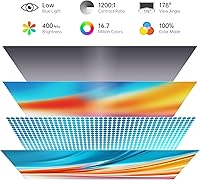
  • Color Depth: Supports 16.7 million colors, corresponding to an 8-bit color output across the full display range.
  • Peak Brightness: Maximum brightness reaches 400 nits, which is adequate for controlled indoor environments but may be limiting in very bright conditions.
  • Contrast Ratio: Rated at 1200:1 static contrast ratio, which helps maintain visible shadow detail and color separation in typical viewing conditions.
  • Aspect Ratio: Standard 16:9 widescreen aspect ratio, compatible with the vast majority of video content, productivity layouts, and console outputs.
  • Surface Finish: Matte anti-glare coating reduces reflections from ambient light sources, improving usability in mixed-lighting environments.
  • Dimensions: Physical dimensions are 14.48 x 8.85 x 0.3 inches, making it slim enough to slide into most laptop sleeves and bags.
  • Weight: The panel itself weighs 1.8 lbs, which keeps overall carry weight low when paired with a laptop in a travel bag.
  • Connectivity: Equipped with one mini HDMI port and one USB-C port, supporting both legacy and modern single-cable video and power connections.
  • USB-C Function: The USB-C port supports simultaneous video signal and power delivery from a compatible host device using a single cable.
  • Audio Output: Integrated stereo speakers are built into the chassis and provide basic audio output without requiring an external sound source.
  • Orientation: Supports both landscape and portrait display orientations, allowing flexible positioning depending on the task or workflow.
  • Compatibility: Compatible with laptops, MacBooks, desktop computers, smartphones, and consoles including PS4, PS5, Xbox, and Nintendo Switch.
  • Blue Light: The display includes a low blue light mode designed to reduce eye strain during extended viewing sessions.
  • In the Box: Package includes the monitor, a padded smart cover case that doubles as a stand, and necessary cables for connectivity.

Related Reviews

ViewSonic VX1655-4K-OLED 15.6-inch Portable OLED Monitor

77%
93%
Display Quality
91%
Portability
84%
USB-C Connectivity
88%
Build Quality
67%
Stand Stability
More
VILVA V156F1 15.6-inch Portable Monitor
69%
74%
Display Quality
61%
Portability
82%
Connectivity & Compatibility
67%
Build Quality
83%
Value for Money
More
Topmonitor P15.6/4K 15.6-inch 4K Portable Monitor
79%
93%
Display Sharpness
88%
Color Accuracy
91%
Portability
67%
Stand Stability
84%
Connectivity & Compatibility
More
ForHelp 15.6-inch 4K Portable Monitor
74%
91%
Display Sharpness
86%
Color Accuracy
93%
Portability
68%
USB-C Connectivity
63%
Build Quality
More
FMC 15.6-Inch 4K Portable Gaming Monitor
87%
93%
Display Quality
91%
Portability & Design
85%
Touchscreen Performance
88%
Build Quality
90%
Connectivity
More
Dragon Touch S1 Pro 15.6-Inch 4K Portable Monitor

87%
94%
Display Quality
91%
Portability
88%
Gaming Performance
86%
Build Quality
62%
Audio Quality
More
Topmonitor P15.6/2.5K Portable Monitor 15.6-inch 2560×1680
86%
94%
Display Quality
90%
Portability/Size/Weight
91%
Color Accuracy
87%
Connectivity (USB-C, HDMI)
85%
Build Quality
More
LUMIPIX 15.6-Inch Portable Monitor
84%
91%
Portability
89%
Display Quality
93%
Ease of Setup
87%
Connectivity
84%
Build Quality
More
Westinghouse 15.6 Inch Portable Monitor
82%
88%
Display Quality
92%
Portability
86%
Connectivity Options
94%
Ease of Setup
80%
Build Quality
More
InnoView INVPM406 15.6-inch Portable Monitor
75%
91%
Ease of Setup
83%
Display Clarity
78%
Portability & Build
62%
USB-C Compatibility
88%
Value for Money
More

FAQ

Yes, in most cases a single USB-C cable handles both video and power when connected to a MacBook that supports DisplayPort Alt Mode over USB-C. That said, if your MacBook is already under load or running on battery, it may not push enough power through the port to keep the monitor stable. Keeping a USB-C charger nearby as a backup is a smart habit.

Yes, it works with the Nintendo Switch when docked, using either the mini HDMI connection or a compatible USB-C cable. In handheld or tabletop mode the Switch does not output video externally, so you will need the dock. The 4K resolution is a bonus for the display itself, though the Switch outputs at lower resolutions natively.

The refresh rate is not officially specified beyond standard display operation, which typically means 60Hz for this class of portable monitor. That is fine for productivity, photo editing, video playback, and casual gaming, but if you play fast-paced competitive titles and care about smooth motion, you would want a display rated at 120Hz or higher.

It functions as both, but with some caveats. On a flat, firm desk it holds the monitor at a reasonable viewing angle without issue. On softer surfaces like a couch cushion or a fabric tablecloth, it can feel unstable. For fixed desk use it is generally fine; for travel with varied surfaces, some users add a small folding stand for peace of mind.

Buyers who do photo and graphic work consistently note that the color reproduction is noticeably accurate without needing a hardware calibration. The 100% Adobe RGB coverage means the gamut is wide enough to represent colors that sRGB monitors simply cannot show. For professional print work you would still want to run a calibration profile, but for on-location editing and client reviews it performs well.

At 400 nits, the VILVA monitor handles typical indoor environments well, including offices with overhead lighting. Near a sunny window or in a room with strong natural light coming from behind you, you may notice the image looking a bit washed out. The matte coating helps reduce direct reflections, but the brightness ceiling is a real limitation if you regularly work in high-ambient-light settings.

It can run from USB-C alone when connected to a host that delivers sufficient power, such as a laptop with a high-output USB-C port or a powered USB-C hub. The issue arises with older laptops, phones, or devices that limit power delivery through USB-C — in those cases, the monitor may not power on reliably or display correctly. Plugging a separate USB-C charger into the monitor's second port, if available, resolves this.

Yes, portrait mode is supported. You physically rotate the panel, then adjust the display orientation in your operating system settings — Windows, macOS, and most Linux desktops make this straightforward. It is particularly useful for reading long documents, reviewing code files, or browsing vertically-oriented content. The smart cover stand can be repositioned to support the monitor upright.

The package includes the monitor and smart cover case, along with connection cables, though the exact cables bundled can vary between production batches. It is worth confirming what is in your specific package upon arrival. Mini HDMI cables are inexpensive and widely available if you need one, but check before assuming you have everything you need for your setup.

It is one of the better options at this price for business travelers. The sub-2-lb weight and slim profile mean it adds very little bulk to a laptop bag, and the padded cover means you are not stressing about the panel during transit. The USB-C single-cable setup also keeps your desk footprint minimal in hotel rooms or shared workspaces. Just remember to pack a compact USB-C charger in case your laptop port alone is not enough.