Overview

The Topmonitor P15.6/4K 15.6-inch 4K Portable Monitor is a compact travel display that arrived in late 2024, targeting remote workers, frequent travelers, and content creators who need a capable second screen without the bulk. What sets it apart immediately is the 3:2 aspect ratio — a taller canvas than the standard 16:9 found on most portable monitors, which genuinely helps when scrolling through documents or working in spreadsheets. Topmonitor is a relatively new brand, so long-term reliability data is still thin. At its mid-range price, it punches above expectations for sharpness and build, though it isn't quite competing with more established names in the portable display space.
Features & Benefits

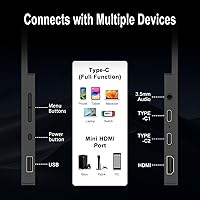
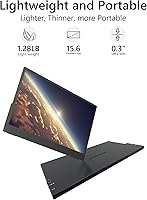
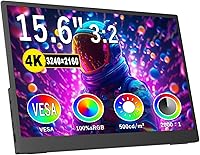
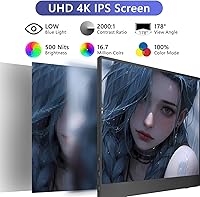
Squeezing a 3240×2160 resolution onto a 15.6-inch IPS panel produces pixel density that most portable displays simply don't offer — text stays crisp and images hold detail even up close. The matte anti-glare surface earns its place here; working near a window or under harsh café lighting is far less of a battle than it would be on a glossy screen. Color accuracy sits at 100% sRGB with a 2000:1 contrast ratio, genuinely useful for photo review and video work. Connectivity is well thought out: two USB-C ports handle power and video via a single cable, while HDMI 2.0 covers legacy devices. The adjustable stand tilts from 0° to 45°, and the whole unit weighs just 1.28 lbs.

Best For

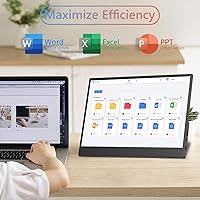
This screen extender makes the most sense for laptop users who travel regularly and want a second screen that fits in a backpack without compromise. MacBook Pro and iPad users will appreciate the single-cable USB-C setup — no adapters, no fuss. The taller 3:2 format gives it an edge for productivity tasks compared to widescreen alternatives, so professionals who live in documents and spreadsheets will feel that difference right away. It also handles mobile gaming well; connecting a Switch or PS5 in a hotel room is straightforward via HDMI. That said, phone users should note that Topmonitor explicitly warns smartphones may need supplemental power to drive the display at full 4K output.

User Feedback

Buyers consistently highlight the sharpness and color accuracy of this portable 4K display, frequently comparing it favorably to pricier alternatives given what they paid. Plug-and-play performance earns strong marks too — most reviewers confirm that USB-C connection on MacBooks and Windows laptops requires zero driver installation. On the downside, stand stability draws mixed responses; some find it solid for desk work, while others report slight wobble on uneven surfaces. FreeSync support is acknowledged but rarely tested rigorously in buyer reviews. The phone compatibility issue surfaces regularly in feedback, confirming the brand's own caveat. Overall, satisfaction runs positive, with buyers generally feeling the experience aligns well with their expectations at this price tier.

Pros

  • Exceptionally sharp 4K IPS panel on a 15.6-inch screen — pixel density is rare at this price tier.
  • The 3:2 aspect ratio gives noticeably more vertical screen space, making document and spreadsheet work more comfortable.
  • Matte anti-glare coating handles bright environments like cafés and offices without constant repositioning.
  • Single USB-C cable carries both power and video, keeping cable management simple for laptop users.
  • At 1.28 lbs and 0.3 inches thin, this portable 4K display genuinely fits in a standard backpack sleeve.
  • 100% sRGB color coverage is a meaningful spec for photographers and video editors working away from their studio.
  • HDMI 2.0 port ensures compatibility with gaming consoles and older laptops that lack USB-C video output.
  • No driver installation required — plug in and the screen works on most modern laptops immediately.
  • VESA mount support adds flexibility for users who want to attach it to a monitor arm at a home base.
  • 500 nits brightness is solid for a display in this category, usable even in moderately lit outdoor settings.

Cons

  • Brand is new to market with limited long-term ownership data, making durability hard to verify.
  • Smartphone users will likely need supplemental power to run the screen at full resolution — not truly plug-and-play for phones.
  • Stand stability on uneven or soft surfaces draws mixed real-world feedback from buyers.
  • No built-in speakers are confirmed, meaning audio relies entirely on the 3.5mm jack or the connected device.
  • FreeSync support exists on paper but has not been consistently validated by user reviews for gaming scenarios.
  • As a first-generation product from a lesser-known brand, warranty support and after-sales service remain unproven.
  • The 3:2 format, while great for productivity, feels less natural for watching widescreen video content.
  • Heavier multitasking or 4K gaming from a phone source may require a powered hub, adding cost and bulk.

Ratings

The scores below reflect an AI-driven analysis of verified global user reviews for the Topmonitor P15.6/4K 15.6-inch 4K Portable Monitor, with spam, bot-generated, and incentivized feedback actively filtered out to ensure reliability. Every category is scored based on what real buyers consistently praised or complained about — nothing is glossed over. Both the genuine strengths and the friction points you should know before buying are represented transparently.

Display Sharpness
93%
Users frequently describe the image quality as striking for a portable display, with text appearing crisp enough for extended document work and fine photo detail holding up well at close viewing distances. Remote workers editing images on a hotel desk or reviewing design files on the road consistently highlight this as the screen extender's standout trait.
A small number of buyers note that at native 4K resolution on a 15.6-inch panel, some interface elements can appear very small without scaling adjustments, requiring extra setup time on first use. This is less a flaw than a calibration step, but first-time 4K portable monitor users are sometimes caught off guard.
Color Accuracy
88%
The 100% sRGB coverage earns consistent praise from photographers and video editors who need reliable color reproduction away from their primary workstations. Several reviewers specifically mention that the colors look natural and punchy without appearing oversaturated, which is a real differentiator in this price bracket.
Users working in wider color spaces like DCI-P3 or Adobe RGB will find the coverage insufficient for professional-grade color grading work. The display performs well for sRGB workflows but is not a replacement for a calibrated studio monitor when color precision really matters.
Portability
91%
At 1.28 lbs and just 0.3 inches thick, the travel monitor fits cleanly into laptop sleeves and backpack side pockets without taking up meaningful space. Frequent flyers and commuters repeatedly note that it no longer feels like a compromise to bring a second screen on a trip.
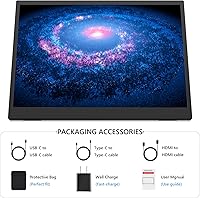
The included stand, while functional, adds a small amount of bulk when packed, and a handful of users wish a slim protective sleeve were included in the box. Without a case, the matte screen surface can pick up minor scratches during transit if not stored carefully.
Stand Stability
67%
33%
On solid, flat desk surfaces the stand holds its position reliably through the full 0°–45° tilt range, and most office and hotel desk users report no issues during normal productivity sessions. The non-slip rubber base does help on smooth surfaces like glass or polished wood.
On softer or uneven surfaces — airline tray tables, fabric-covered desks, or outdoor café furniture — multiple buyers report noticeable wobble that requires repositioning. The stand is adequate for stationary desk use but falls short of the rigidity some users expect given how often the word portable appears in the product description.
Connectivity & Compatibility
84%
The combination of dual USB-C ports and HDMI 2.0 covers a wide range of devices without adapters, and MacBook, iPad, and Windows laptop users consistently confirm single-cable video-plus-power worked without fuss. Console users connecting a Switch or PS5 via HDMI in a hotel room also find the setup refreshingly straightforward.
Smartphone compatibility is where the experience stumbles — Topmonitor itself warns that phones may not deliver enough power to drive the screen at full resolution, and real user experiences confirm this inconsistency. Without a powered USB-C hub, phone-to-monitor use is unreliable rather than truly plug-and-play.
Plug & Play Setup
86%
The vast majority of laptop and desktop users confirm the no-driver claim holds up well in practice, with Windows and macOS detecting the display within seconds of connection. For non-technical users who dread software installation, this is a meaningful quality-of-life detail that reduces friction considerably.
A smaller but vocal group of users encountered display mode confusion on first use — switching between extended, duplicate, and second-screen modes was not immediately obvious without consulting the manual. The onscreen menu controls could also be more intuitive for new users.
Brightness
79%
21%
At 500 nits, this portable 4K display is bright enough for well-lit offices, hotel rooms, and indoor café environments without straining the eyes or washing out colors. Most users working indoors during the day find the brightness more than adequate, especially paired with the matte coating.
Outdoor use in direct sunlight remains a challenge, as 500 nits is not enough to overcome strong ambient light. Users who frequently work on terraces or near large sunny windows note that they need to find shade or adjust positioning for comfortable viewing.
Anti-Glare Performance
82%
18%
The matte coating consistently draws praise from users who work near windows or under overhead lighting, noting that they can actually see the screen without constantly repositioning. This detail matters more than many buyers expect until they have used a glossy portable monitor in a bright environment.
Some color enthusiasts feel the matte finish very slightly softens the perceived contrast compared to glossy IPS panels, which can make deep blacks look marginally less punchy in side-by-side comparisons. It is a minor trade-off but worth knowing if visual punch matters more to you than glare control.
Build Quality
71%
29%
For a mid-range portable monitor from a newer brand, the overall construction feels reasonably solid, with a slim chassis that does not flex excessively when handled. The finish is clean and professional-looking enough that it does not appear out of place in a business meeting or co-working space.
Several buyers mention that the plastic feel of the housing does not inspire the same confidence as displays from more established brands at a similar or slightly higher price point. Given that Topmonitor only launched this product in late 2024, there is simply not enough long-term field data to assess how the build ages with regular travel use.
3:2 Aspect Ratio Usability
87%
For productivity-focused buyers, the taller 3:2 canvas is a practical upgrade over the 16:9 format dominating most portable monitors — seeing more of a spreadsheet, email thread, or code file without scrolling is a genuine daily workflow improvement that users notice quickly.
For media consumption, the 3:2 ratio means widescreen video content plays with horizontal black bars, which can feel wasteful on a 15.6-inch screen. Buyers who primarily want a gaming or movie display will feel the aspect ratio works against them more than it helps.
Value for Money
81%
19%
Buyers comparing this screen extender against competitors in the same price range consistently note that the 4K resolution and 100% sRGB coverage are difficult to find together at this price point. Most users feel the purchase met or exceeded what they expected to get for the money.
Those who prioritize brand heritage, warranty confidence, or proven long-term durability may feel that spending a bit more on an established brand offers better peace of mind. The value equation is strong on paper but requires some trust in a brand without a deep market track record.
FreeSync Gaming Performance
63%
37%
FreeSync support is a genuine addition that helps reduce visible tearing when connected to compatible laptops or consoles, and casual gamers running titles at moderate frame rates report a smoother experience than on non-adaptive displays in this category.
Competitive or frame-rate-sensitive gamers find the monitor underwhelming — the refresh rate is not publicly specified as high, and real-world gaming reviews rarely confirm buttery smooth high-frame-rate play. FreeSync helps, but the display is clearly optimized for resolution and color rather than gaming responsiveness.
Audio Output
54%
46%
The 3.5mm audio jack at least provides a reliable wired option for connecting headphones or external speakers, which works cleanly and without latency issues when passing audio through from a connected laptop or console.
The absence of built-in speakers is a recurring complaint from users who expected at least basic audio without an extra accessory. In a hotel room or café without headphones handy, the lack of onboard audio is a noticeable gap that forces buyers to plan around it.
VESA Mount Flexibility
78%
22%
Having dual VESA mount holes built into a portable monitor is an underappreciated feature that lets buyers convert this travel screen into a more permanent home office display on a monitor arm, giving it a useful second life beyond travel scenarios.
Some buyers note that the VESA hole positioning is not widely documented, and a few had to experiment with arm compatibility before finding a reliable fit. The feature works, but clearer guidance from the manufacturer on compatible arm specifications would save setup time.

Suitable for:

The Topmonitor P15.6/4K 15.6-inch 4K Portable Monitor is a strong fit for remote professionals who regularly work from hotels, co-working spaces, or cafés and need a capable second screen without hauling extra weight. The 3:2 aspect ratio makes it particularly well-suited to document-heavy workflows — lawyers, writers, analysts, and consultants who spend most of their day in spreadsheets or long-form text will appreciate the taller canvas over a standard widescreen format. MacBook Pro and iPad users benefit especially from the single-cable USB-C setup, which keeps desk clutter minimal while still delivering a sharp, color-accurate extended display. Content creators who need reliable 100% sRGB coverage outside a studio — think travel photographers reviewing shots on the road — will find the color fidelity genuinely workable at this price point. Mobile gamers who want to connect a Switch, PS5, or Xbox in a temporary space via HDMI also have a practical, lightweight option here.
Not suitable for:

Buyers expecting the build quality and long-term reliability assurances of an established brand like ASUS or Lenovo should temper expectations — the Topmonitor P15.6/4K 15.6-inch 4K Portable Monitor only entered the market in late 2024, and there is simply not enough ownership history to confirm how it holds up after a year of regular travel use. Anyone hoping to use this display with a smartphone as the primary source should read the fine print carefully: the brand itself acknowledges that phones may not supply enough power to drive the screen at full 4K output, meaning you will likely need a separate power source, which defeats some of the plug-and-play convenience. Users who prioritize ultra-stable stand performance on uneven surfaces — think airplane tray tables or wobbly café counters — may find the 0°–45° stand less rigid than they would like. Hardcore competitive gamers chasing high refresh rates should also look elsewhere, as this screen is built around resolution and color accuracy rather than fast-motion performance.

Specifications

  • Screen Size: The display measures 15.6 inches diagonally, offering a practical working area without being too large to carry.
  • Resolution: Native resolution is 3240×2160 pixels (4K UHD), delivering unusually high pixel density for a portable IPS panel.
  • Aspect Ratio: The panel uses a 3:2 aspect ratio, which provides more vertical space than standard 16:9 portable monitors.
  • Panel Type: IPS technology ensures consistent color accuracy and a wide 178° viewing angle both horizontally and vertically.
  • Brightness: Peak brightness reaches 500 nits, making the screen usable in moderately lit indoor and outdoor environments.
  • Color Gamut: The display covers 100% of the sRGB color space, suitable for color-sensitive work such as photo editing and video review.
  • Contrast Ratio: A 2000:1 contrast ratio helps maintain visible detail in both shadow and highlight areas of an image.
  • Screen Surface: The matte anti-glare coating reduces reflections from ambient light sources, improving comfort during extended use.
  • HDR Support: HDR content playback is supported, allowing compatible sources to output expanded dynamic range visuals.
  • Adaptive Sync: FreeSync adaptive sync technology is built in to reduce screen tearing when connected to compatible graphics sources.
  • Connectivity: The monitor includes two USB-C 3.1/3.2 ports, one HDMI 2.0 port, and one 3.5mm audio output jack.
  • Power & Video: A single USB-C cable can carry both display signal and power simultaneously, eliminating the need for a separate power adapter in most laptop setups.
  • Plug & Play: No driver installation is required for most modern laptops and computers running current operating systems.
  • Dimensions: The unit measures 13.1 × 9.4 inches in footprint with a depth of just 0.59 inches at its thickest point.
  • Weight: Total weight is 1.28 lbs, keeping the travel monitor well within comfortable backpack-carry territory.
  • Stand Angle: The integrated stand adjusts from 0° to 45°, allowing the user to find a comfortable viewing angle on most flat surfaces.
  • VESA Mount: Dual VESA mounting holes are included, enabling attachment to a compatible monitor arm for more permanent desk installations.
  • Compatibility: The screen extender is compatible with MacBook, Windows laptops, iPad, iPhone, PS4, PS5, Xbox, and Nintendo Switch, though phone use may require supplemental power.

Related Reviews

Topmonitor P15.6/2.5K Portable Monitor 15.6-inch 2560×1680
86%
94%
Display Quality
90%
Portability/Size/Weight
91%
Color Accuracy
87%
Connectivity (USB-C, HDMI)
85%
Build Quality
More
ViewSonic VX1655-4K-OLED 15.6-inch Portable OLED Monitor
77%
93%
Display Quality
91%
Portability
84%
USB-C Connectivity
88%
Build Quality
67%
Stand Stability
More
VILVA 15.6-inch 4K Portable Monitor
75%
91%
Display Sharpness
88%
Color Accuracy
93%
Portability
86%
Value for Money
67%
USB-C Compatibility
More
ForHelp 15.6-inch 4K Portable Monitor
74%
91%
Display Sharpness
86%
Color Accuracy
93%
Portability
68%
USB-C Connectivity
63%
Build Quality
More
FMC 15.6-Inch 4K Portable Gaming Monitor
87%
93%
Display Quality
91%
Portability & Design
85%
Touchscreen Performance
88%
Build Quality
90%
Connectivity
More
Dragon Touch S1 Pro 15.6-Inch 4K Portable Monitor

87%
94%
Display Quality
91%
Portability
88%
Gaming Performance
86%
Build Quality
62%
Audio Quality
More
VILVA V156F1 15.6-inch Portable Monitor
69%
74%
Display Quality
61%
Portability
82%
Connectivity & Compatibility
67%
Build Quality
83%
Value for Money
More
HotYeah 15.6-inch Portable Monitor
86%
91%
Display Quality
95%
Portability & Weight
88%
Compatibility & Connectivity
89%
Ease of Use & Setup
60%
Speaker Quality
More
ZSCMALLS 15.6″ 4K Portable Monitor
87%
91%
Display Quality
95%
Portability & Weight
89%
Color Accuracy
84%
HDR Performance
93%
Ease of Setup
More
InnoView INVPM406 15.6-inch Portable Monitor
75%
91%
Ease of Setup
83%
Display Clarity
78%
Portability & Build
62%
USB-C Compatibility
88%
Value for Money
More

FAQ

No, you do not. The display is plug-and-play on most modern Windows and macOS laptops — just connect the USB-C or HDMI cable and your system should detect it within seconds. No software download is needed.

Technically yes, but with an important caveat: the manufacturer explicitly states that smartphones may not supply enough power through their USB-C port to drive the screen at full 4K output. You will likely need a powered USB-C hub or a separate power source to use it reliably with a phone.

Yes, as long as your laptop or tablet supports USB-C video output (also called DisplayPort Alt Mode) and can deliver enough power through the same port. Most modern MacBooks, iPad Pros, and recent Windows ultrabooks handle this without any issue.

The stand works well on solid, level surfaces and adjusts smoothly between 0° and 45°. On softer or slightly uneven surfaces like an airplane tray table, some users report minor wobble. It is a built-in folding stand rather than a premium kickstand, so it does the job without being rock-solid in every scenario.

A 3:2 panel is noticeably taller than the standard 16:9 format most portable monitors use. In practice, this means you see more of a webpage, document, or spreadsheet without scrolling. For productivity work it is genuinely useful, though widescreen video content will show black bars at the top and bottom since most video is produced in 16:9 or wider.

Yes, via the HDMI 2.0 port when the Switch is docked. You would need a standard HDMI cable and a way to power the monitor separately in that setup. It works well as a portable gaming screen in a hotel room or temporary space.

No built-in speakers are listed in the specifications. Audio output is handled through the 3.5mm headphone jack, so you would need wired headphones, external speakers, or to rely on your connected device for sound.

The monitor does not publish a high refresh rate spec, and it appears tuned primarily for resolution and color accuracy rather than fast-motion gaming. FreeSync support helps reduce tearing, but competitive gamers who need 120Hz or higher will want to look at monitors specifically built for that purpose.

Yes, dual VESA mount holes are built into the unit, so you can attach it to a compatible monitor arm or wall mount for a more permanent desk setup. This makes it more versatile than portable displays that only work with their own stand.

Better than a glossy display would. The anti-glare matte coating does a solid job of diffusing reflections so you are not constantly battling your own face staring back at you. At 500 nits of brightness, the image stays readable in most indoor lighting situations, though direct sunlight outdoors will still be a challenge for any display in this category.