Overview

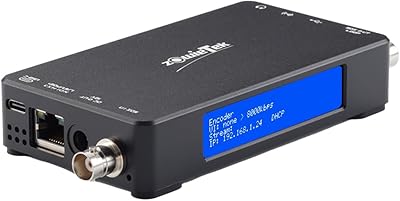
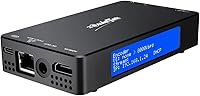
The Zowietek ZowieBox NDI HX3 4K HDMI Encoder/Decoder is a surprisingly compact device — roughly the size of a smartphone — that punches well above its physical weight in live streaming and video production workflows. Built from black aluminum and tipping the scales at just 166g, the streaming box operates fully standalone, meaning your gaming console or camera source can stream without touching your main PC. A built-in LCD screen and tally light keep you informed at a glance during live sessions. Critically, it switches between encoder and decoder modes, but not simultaneously — a detail that trips up many buyers who assume dual-mode operation runs concurrently. For indie creators, the price point makes certified NDI workflows genuinely accessible.
Features & Benefits

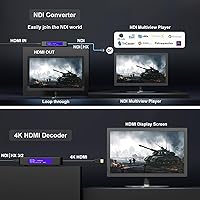
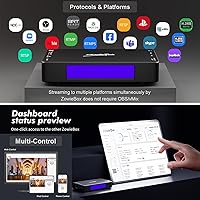
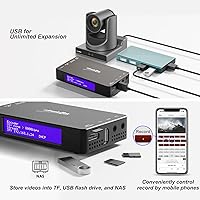
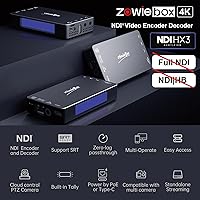
At the core of what makes this NDI encoder stand out is its certified NDI HX3 support — encoding in HX3, HX2, and HX formats and decoding HX3 and HX2, all compatible with OBS and vMix out of the box. The HDMI passthrough runs at up to 4K60 with no added latency, while the actual stream outputs at 1080p60 or 4K30 depending on your source. Protocol support is broad: SRT, RTMP/RTMPS, RTSP, RTP, and UDP cover virtually every major platform. A web UI lets you manage PTZ cameras, OSD overlays, and network settings from your phone. Local recording to TF card, USB drive, or NAS in MP4, MOV, or TS formats adds a practical backup layer for any production.

Best For

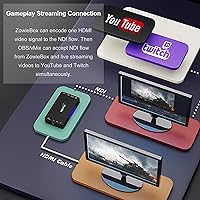
The ZowieBox hits its stride for console gamers who want to broadcast to YouTube or Twitch without a PC in the loop — plug in, configure once, and you are live. Small production teams running NDI-based workflows in OBS or vMix will appreciate how the box slots into a multi-camera setup at a fraction of the cost of dedicated hardware. AV integrators can pair two units to extend HDMI signals over a LAN, which is a practical option for fixed installations. PTZ camera operators get remote tally and full control through the web UI. Corporate presenters and educators who need reliable standalone streaming without a rack full of gear will find it straightforward once the initial configuration is sorted.

User Feedback

Buyers consistently praise the ease of initial setup and the compact, solid feel of the aluminum housing — for a device this small, it holds up well in travel and event scenarios. The PC-free streaming experience draws particular appreciation from console users. On the flip side, navigating the web UI carries a real learning curve, especially when toggling between modes; some users initially expected to run both encoder and decoder simultaneously. NDI HX3 latency holds up well against pricier alternatives according to most, though demanding broadcast professionals may still prefer dedicated hardware. One recurring frustration: the missing USB capture card function catches buyers off guard despite being noted in the specs. PoE+ powering earns quiet but consistent praise from integrators managing clean cable runs.

Pros

  • Certified NDI HX3 support works reliably with OBS and vMix at a price well below dedicated NDI hardware.
  • Standalone PC-free streaming is genuinely plug-and-play for console gamers once initial setup is complete.
  • 4K60 passthrough runs with zero perceptible lag, keeping the gaming or presentation experience fully intact.
  • Solid black aluminum build feels far more premium than the price suggests and holds up well in travel scenarios.
  • PoE+ support over CAT5e simplifies fixed installations by eliminating a separate power adapter entirely.
  • Broad protocol support — SRT, RTMP/RTMPS, RTSP, RTP, UDP — covers virtually every major streaming destination.
  • Two units paired over LAN create a cost-effective HDMI extender without dedicated extender hardware.
  • Local recording to TF card, USB drive, or NAS provides a reliable backup without an extra capture device.
  • The built-in LCD screen and tally light give live status feedback at a glance during active sessions.
  • Web UI gives full device control — PTZ, OSD, tally, network — from any phone or tablet browser.

Cons

  • The web UI has a real learning curve; navigating mode switches without documentation frustrates new users.
  • Encoder and decoder modes are mutually exclusive — simultaneous dual-mode operation is not possible.
  • Full NDI and NDI HB are unsupported, which is a hard blocker for certain professional broadcast workflows.
  • USB capture card functionality is absent despite UVC branding that leads many buyers to assume otherwise.
  • SRT is caller-only, meaning listener-mode server configurations require frustrating manual workarounds.
  • The unit runs noticeably warm during extended sessions, raising concerns in enclosed or poorly ventilated rack installs.
  • Streaming at 4K input resolution caps the actual stream output at 1080p60, not native 4K.
  • OSD customization options are limited in flexibility compared to what software overlays in OBS can achieve.
  • PoE+ requires an 802.3at-compatible switch or injector — an extra cost that catches some buyers off guard.
  • Audio sync drift can occur without manual delay compensation, and there is no headphone output for live monitoring.

Ratings

The scores below reflect an AI-driven analysis of verified global buyer reviews for the Zowietek ZowieBox NDI HX3 4K HDMI Encoder/Decoder, with spam, bot-generated, and incentivized submissions actively filtered out before scoring. Every category captures what real users — from indie streamers to AV integrators — actually experienced, not what the spec sheet promises. Both the standout strengths and the friction points that caused frustration or returns are transparently represented.

Ease of Setup
83%
Most buyers report getting the ZowieBox up and running within minutes, particularly for straightforward console-to-stream workflows. The plug-and-play nature for standalone streaming genuinely delivers, and users without deep networking knowledge found the initial configuration surprisingly manageable.
Once users move beyond basic streaming into mode-switching or web UI configuration, the learning curve steepens noticeably. Several reviewers mentioned needing to consult documentation or community forums before successfully toggling between encoder and decoder modes.
NDI Performance
88%
Certified NDI HX3 support earns consistent praise from OBS and vMix users who compare it favorably against hardware costing significantly more. Low-latency delivery over a standard LAN holds up reliably in multi-camera event setups where timing matters.
Professionals who need full NDI or NDI HB will hit a hard wall — those formats are simply not supported, and no firmware update is expected to change that. For broadcast-grade productions requiring the highest NDI bandwidth, this NDI encoder falls short of purpose-built alternatives.
Build Quality
91%
The black aluminum enclosure feels punching above its price class — dense, well-finished, and reassuringly solid when handled repeatedly at events or packed into a carry bag. At 166g, it does not rattle or creak, and the overall fit gives it a professional appearance on a desk or rack shelf.
The unit runs noticeably warm during extended encoding sessions, which concerns some users running it in enclosed AV racks. A small number of buyers also noted that the LCD screen, while useful, sits behind a somewhat recessed bezel that limits viewing angles at a distance.
Streaming Reliability
82%
18%
For SRT and RTMP-based streams to YouTube and Twitch, the streaming box holds a stable connection over long sessions without dropouts under normal network conditions. PoE+ powered installations in particular benefit from one fewer potential point of failure compared to USB-C setups.
A subset of users reported intermittent instability when pushing streams at or near the 50 Mbps ceiling on congested networks. SRT caller-only mode also means certain server configurations require workarounds that less experienced users found frustrating to implement.
Web UI Usability
63%
37%
The web UI does cover a genuinely wide range of controls — PTZ management, OSD customization, tally mode, network settings, and live preview all accessible from a phone browser without installing any app. For integrators managing remote deployments, this flexibility has real value.
The interface itself feels utilitarian at best, with layout choices that confuse new users and require trial and error to navigate confidently. Multiple reviewers flagged that switching working modes through the UI is not intuitive and the labels lack clear explanatory context for non-technical users.
4K Passthrough Quality
86%
The zero-lag 4K60 passthrough performs exactly as advertised, with console gamers confirming no perceptible input delay on their displays while streaming runs in parallel. This is the feature that converts skeptical buyers into satisfied repeat customers most consistently.
The passthrough handles 4K60 input cleanly, but the stream itself drops to 1080p60 at that input resolution — a trade-off not always clearly understood before purchase. Buyers expecting to simultaneously stream and record in native 4K at 60fps will find the actual output ceiling disappointing.
Protocol Versatility
89%
Supporting SRT, RTMP/RTMPS, RTSP, RTP, and UDP in a single compact device is a genuine differentiator at this price tier. Production teams switching between platforms — a corporate webcast one week, a live event stream the next — benefit from not needing separate hardware per destination.
SRT is limited to caller mode only, meaning the box cannot act as an SRT listener, which creates setup complications for certain workflows. RTSP output configuration also requires more manual input than competing devices with guided setup wizards.
PC-Free Operation
87%
For console gamers and educators especially, the ability to stream live without touching a PC is the single most praised aspect of the ZowieBox. Once configured, it operates independently and does not interfere with the host device at all — a consistent highlight in user reviews.
PC-free is accurate for streaming, but initial configuration still requires a browser-connected device to set up properly, which some buyers interpreted as fully hands-off out of the box. Edge cases involving network changes or mode resets often pull users back to a laptop to sort things out.
UVC to HDMI Conversion
71%
29%
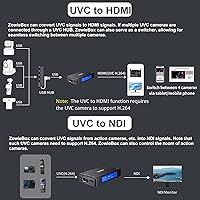
The ability to take a USB webcam signal and push it out as an HDMI feed opens up interesting options for users who want to put a webcam on a monitor or feed it into an HDMI switcher without a PC in between. In classroom and corporate AV contexts, this is a practical bonus.
USB capture card functionality — taking HDMI in and presenting it as a UVC source to a computer — is explicitly not supported, and this distinction trips up a meaningful number of buyers who conflate the two. The UVC conversion path is one-directional and narrower in scope than many expect.
Local Recording
74%
26%
Recording to a TF card, USB drive, or NAS in MP4, MOV, or TS gives event videographers a local safety net without needing a separate capture device. The format options are practical and cover the most common post-production workflows without conversion overhead.
Recording performance depends heavily on the speed and quality of the storage media used, and the streaming box provides little feedback when slower media causes frame drops. Some users also noted that managing recordings through the web UI is clunkier than expected for a device marketed partly around recording capability.
Audio Handling
77%
23%
The combination of HDMI embedded audio and a 3.5mm TRS line in/out gives the streaming box genuine flexibility for both desktop and field setups. Presenters running a lapel mic through the line input alongside HDMI video reported clean, synchronized audio in their streams.
Audio delay compensation controls are present but require careful calibration — users who skipped this step reported noticeable sync drift, especially in longer streams. There is no dedicated headphone monitoring output, which limits on-the-fly audio checking during live sessions.
OSD and Overlay Options
78%
22%
Text, logo, timestamp, scoreboard, and picture overlays cover the core needs of educators, esports streamers, and corporate broadcasters without requiring a separate graphics tool. The scoreboard overlay in particular is a standout for gaming event use cases.
OSD customization is functional but not flexible — font choices, sizing options, and positioning controls are limited compared to what software overlays in OBS can achieve. Users expecting broadcast-grade graphic control will find the built-in options a starting point rather than a complete solution.
PoE+ Power Convenience
84%
PoE+ support over CAT5e or better is quietly one of the most appreciated features among integrators and semi-permanent install users. Running a single cable for both data and power simplifies rack and wall-mount installations considerably and eliminates one more power adapter from the equation.
PoE+ requires an 802.3at-compatible switch or injector, which is an additional cost some buyers overlook when budgeting. Users relying on basic unmanaged switches found themselves needing to upgrade their network infrastructure before the ZowieBox could be powered this way.
Value for Money
81%
19%
At its price point, this NDI encoder undercuts dedicated NDI hardware from brands that charge a premium for similar certified HX3 functionality. For indie creators and small teams who cannot justify enterprise-grade investment, the cost-to-capability ratio is genuinely competitive.
The value proposition weakens if buyers discover post-purchase that USB capture card support or full NDI is missing from their workflow requirements. Those expecting a Swiss Army knife of video I/O may feel the actual supported feature set is narrower than the product listing implies.
Tally Light Functionality
76%
24%
The on-device tally light in both auto and manual modes gives the streaming box a professional workflow touch that similarly priced devices often omit entirely. Camera operators in small studio setups find it useful for knowing at a glance when a feed is live.
The tally light is small and not especially bright, limiting its usefulness in well-lit environments where it can easily be overlooked. Integration with third-party tally systems is limited, so users expecting it to tie into broader production tally infrastructure will need workarounds.

Suitable for:

The Zowietek ZowieBox NDI HX3 4K HDMI Encoder/Decoder is a strong fit for console gamers who want to broadcast on YouTube or Twitch without dedicating a PC to the task — plug it in, configure once, and the game experience stays completely untouched. Small production teams running OBS or vMix in NDI-based multi-camera setups will find that certified HX3 support at this price tier is genuinely hard to beat without spending significantly more. AV integrators handling fixed installations benefit from PoE+ powering and the ability to pair two units as a point-to-point HDMI extender over LAN, which simplifies cable management in conference rooms or event venues. PTZ camera operators who need remote tally control and full device management from a phone or tablet will appreciate the breadth of the web UI, even if it takes some getting used to. Educators and corporate presenters who want a reliable, standalone streaming solution without building a full production stack will find it hits a practical sweet spot between simplicity and capability.
Not suitable for:

The Zowietek ZowieBox NDI HX3 4K HDMI Encoder/Decoder is not the right tool for broadcasters who depend on full NDI or NDI HB — those formats are unsupported, and no workaround changes that reality. If your workflow requires the device to act as an encoder and decoder at the same time, this streaming box will disappoint; it switches between modes, it does not run both concurrently, and buyers who miss this distinction tend to return it. Anyone expecting USB capture card functionality — feeding HDMI into a PC as a UVC source — should look elsewhere, because that specific use case is explicitly not supported despite the UVC labeling causing genuine confusion. Professionals working in high-stakes broadcast environments who need a polished, intuitive management interface will likely find the web UI too rough around the edges for daily production use. Finally, buyers on congested or underpowered networks should be cautious, as streaming stability near the maximum bitrate ceiling is not guaranteed and SRT listener mode is absent entirely.
Specifications

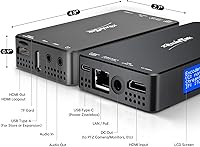
  • Dimensions: The unit measures 123 x 68 x 22mm (4.8″ x 2.7″ x 0.9″), making it roughly the footprint of a large smartphone.
  • Weight: At 166g (5.9oz), the device is light enough to mount, pocket, or pack into a gear bag without adding meaningful bulk.
  • Body Material: The enclosure is machined black aluminum, which contributes to both heat dissipation during extended operation and a solid, professional feel.
  • Video Input/Output: A single HDMI port handles input with full 4K60 passthrough loop-out, supporting resolutions from 720p50/60 up to 4K2160p30/25.
  • Encoding Formats: Video encoding uses H.265 Main Profile and H.264 High/Main/Base Profiles, with a maximum adjustable bitrate of 50 Mbps.
  • NDI Support: Encoding covers NDI HX3, HX2, and HX formats; decoding supports NDI HX3 and HX2 only — full NDI and NDI HB are not supported.
  • Streaming Protocols: Outbound streaming supports RTMP, RTMPS, SRT (caller only), RTP, UDP, and RTSP; inbound decoding accepts RTSP, RTMP(S), and SRT.
  • Power Options: The device accepts power via USB-C or PoE+ (802.3at standard, 44–57V) over CAT5e cable or better, allowing flexible single-cable deployments.
  • Audio I/O: Audio is handled through HDMI embedded audio or a 3.5mm TRS jack that supports both line-level input and output.
  • UVC Conversion: The streaming box can convert UVC webcam input to an HDMI output signal at up to 4K30fps or 1080p60fps; HDMI-to-UVC (capture card) mode is not supported.
  • Local Recording: Onboard recording is supported to TF card, USB flash drive, or NAS storage in MP4, MOV, and TS container formats.
  • OSD Options: On-screen display overlays include text captions, logo insertion, timestamp, scoreboard graphics, and picture overlays, all configurable through the web UI.
  • Tally Light: A physical tally light on the device body operates in both automatic and manual modes to indicate live stream status at a glance.
  • Web UI Access: The full configuration interface is browser-based and accessible from any PC, tablet, or smartphone on the same network without additional software.
  • PTZ Control: The web UI includes PTZ camera control functionality, allowing pan, tilt, and zoom commands to be sent to connected PTZ cameras remotely.
  • Display: A built-in LCD screen on the device surface shows real-time streaming status, network information, and active working mode at a glance.
  • Color Space: The device supports both RGB and YUV color space inputs over HDMI, ensuring compatibility with a broad range of source devices.
  • Model Number: The official manufacturer model number is 30621-102, produced by Zowietek Electronics under the ZowieBox product line.

Related Reviews

Zowietek ZowieBox SDI NDI Encoder Decoder
76%
88%
Build Quality & Form Factor
91%
SDI-to-NDI Conversion Accuracy
86%
Standalone Streaming Reliability
58%
Encode-Decode Mode Flexibility
74%
UVC-to-SDI Bridge Performance
More
URayCoder UHE265-1S-4K
81%
91%
Encoding Performance
89%
Multi-Stream Output
93%
Protocol Versatility
78%
4K Video Quality
84%
Build Quality
More
Bytebridges 4K HDMI Capture Card (affd05f3)
88%
94%
Ease of Setup
88%
Build Quality
91%
Video Fluidity
87%
Input Latency
83%
Audio Versatility
More
FxyxGyc 4K01 4K HDMI Media Player
82%
88%
4K Playback Performance
92%
File Format Compatibility
86%
External Storage Support
74%
Interface Navigation
91%
Digital Signage Reliability
More
PACOXI Capture Card
PACOXI Capture Card
82%
93%
Ease of Setup
74%
Video Capture Quality
88%
HDMI Passthrough
79%
Audio Functionality
86%
Device Compatibility
More
Anytrox THT-020-8 Wireless HDMI Extender
78%
93%
Ease of Setup
78%
Video Quality
71%
Wireless Stability
82%
Audio-Video Sync
67%
Wireless Range
More
Yinker 4K HDMI Matrix Switch 4x4
83%
82%
Performance and Signal Stability
88%
Ease of Use
85%
Flexibility in Control Options
79%
Build Quality
90%
Setup and Installation
More
DXchip 4KEZH01R01 Wireless HDMI Extender Kit
72%
88%
Ease of Setup
61%
Wireless Range (Real-World)
78%
Video Quality
54%
Latency & Responsiveness
71%
Device Compatibility
More
HeavenBird 4K HDMI Video Capture Card
87%
89%
Video Quality
92%
Ease of Setup
85%
Real-Time Streaming Performance
65%
Audio Sync Accuracy
90%
Build Quality
More
AGPTEK HA0058 4K Media Player
77%
74%
Video Playback Quality
88%
Format Compatibility
91%
Ease of Setup
58%
Remote Control
67%
Build Quality & Design
More

FAQ

No, and this is probably the most important thing to understand before buying. The ZowieBox operates in either encoder mode or decoder mode — you switch between them through the web UI, but you cannot run both simultaneously. If your workflow requires concurrent encode and decode, you would need two separate units.

Yes, and it works well. The Zowietek ZowieBox NDI HX3 4K HDMI Encoder/Decoder is officially certified by NewTek for NDI HX3, HX2, and HX encoding, which means OBS (with the NDI plugin) and vMix both recognize it natively on the same network. Latency performance in this configuration is one of the most consistently praised aspects in user feedback.
No. This is a common point of confusion. The UVC functionality goes in one direction only — it takes a UVC webcam signal and converts it to HDMI output. The reverse path, capturing HDMI as a UVC source into a computer, is not supported. If you need a traditional USB capture card, this is not the right device for that job.

It does not. The streaming box supports NDI HX3, HX2, and HX — which are the bandwidth-efficient compressed variants — but full NDI and NDI HB are explicitly unsupported. Full NDI demands considerably more network bandwidth than HX formats, and the hardware is not designed to handle it. For most LAN-based streaming workflows this is fine, but professional broadcast environments that require full NDI will need a different solution.

Not quite. When the input signal is 4K60, the passthrough loop-out to your display runs at full 4K60 with no lag — your monitor sees the full signal. However, the encoded stream output in that scenario is capped at 1080p60, not 4K60. If your source is 4K30, then the streamed output can also be 4K30. It is a meaningful distinction that trips up some buyers.

You have two options: USB-C power, which is the simpler route for most desktop setups, or PoE+ via an 802.3at-compatible network switch or injector over CAT5e or better cable. The PoE+ option is particularly popular for clean fixed installations where running a single cable for both data and power is preferable. Just note that basic unmanaged switches typically do not supply PoE+, so check your network gear before relying on that method.

For basic console-to-stream workflows it is genuinely close to plug-and-play — connect your source, connect to your network, and you can be streaming in minutes. That said, deeper configuration like adjusting streaming protocols, setting up OSD overlays, or managing PTZ cameras all goes through the web UI, which has a noticeable learning curve. Most users get comfortable with it after a session or two, but going in with the expectation of zero configuration is setting yourself up for frustration.

Yes, and this is one of the more practical use cases the streaming box supports. One unit acts as the encoder/transmitter on the source end, and a second unit acts as the decoder/receiver at the display end, with the video signal traveling over your LAN. It is a cost-effective alternative to dedicated HDMI extender hardware for conference rooms or event venues where running a long HDMI cable is not practical.

The device records in MP4, MOV, and TS formats — all widely compatible with standard editing software. Storage destinations include a TF card inserted directly into the device, a USB flash drive, or a NAS on the same network. Keep in mind that recording quality and reliability depend on the write speed of your storage media; slow cards or drives can cause frame drop issues during high-bitrate captures.

It works from any device with a browser — phone, tablet, or PC — as long as it is on the same network as the streaming box. You get full access to stream settings, PTZ control, OSD configuration, tally management, and a live preview of the video feed. The interface is not the most elegantly designed, but it is fully functional on a phone screen for most common tasks during a live session.