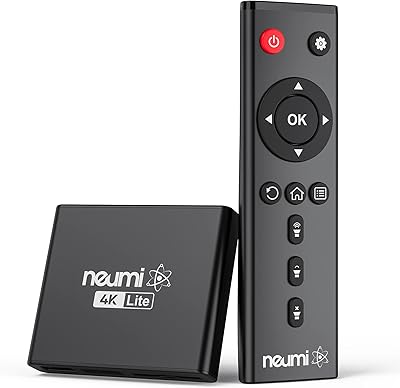
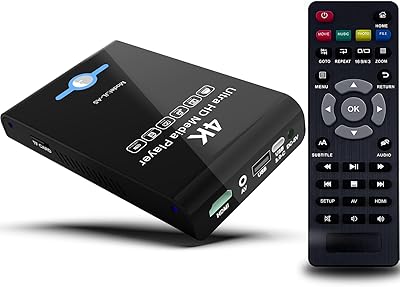
Overview

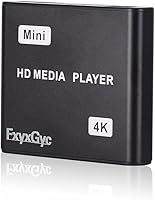
The FxyxGyc 4K01 4K HDMI Media Player serves as a dedicated hub for anyone looking to bypass the complications of internet-connected smart TVs. Instead of relying on buggy apps or a stable Wi-Fi connection, this compact 4K box focuses entirely on offline playback from local storage. It handles high-definition files with ease, pushing a crisp signal to modern displays without the need for a computer. Because of its minimalist footprint, you can easily mount it behind a commercial monitor or slide it into a crowded entertainment center. It is a straightforward, no-nonsense tool that prioritizes local file accessibility over the typical clutter found in modern streaming devices, making it a reliable choice for consistent media delivery.
Features & Benefits

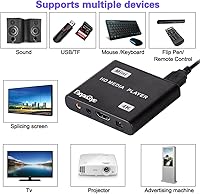
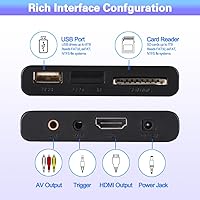
Under the hood, the standalone media player utilizes hardware-based H.265 decoding, which is essential for stutter-free 4K playback at high bitrates. One of its most impressive traits is the ability to read 8TB hard drives, allowing you to carry a massive library in a single portable setup. Connectivity is flexible, featuring HDMI for high-end visuals and an AV port for those needing to route audio into older speaker systems. Controlling the interface is simple via the included remote, which helps you navigate folders or toggle the automatic loop settings. These repeat functions are particularly useful for those who need a device to run hands-off cycles of video content or photo slideshows throughout the day.

Best For

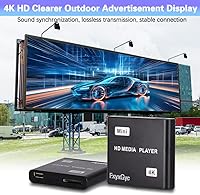
This looping video unit is a specialized solution that shines in environments where traditional smart devices fail. Business owners find it indispensable for digital signage, as it reliably cycles promotional clips without needing a network. It is also an excellent fit for home theater users who have archived vast MKV or MP4 collections and want a fast way to view them. For professionals who frequently present at trade shows, the dedicated PPT playback mode offers a stable alternative to lugging around a laptop. Even travelers in RVs or residents in low-bandwidth areas will find value here, as it provides high-quality entertainment without the frustration of constant buffering or data caps.

User Feedback

Real-world usage highlights the impressive efficiency of the standalone media player, particularly its low power draw and pocket-sized design. Most buyers find the initial setup incredibly intuitive, noting that the device handles a wide variety of file formats without lagging or crashing. While the dual USB ports are a welcome sight, it is important to remember that the system only reads one drive at a time. You can use the second port for a mouse or keyboard, but you cannot span a library across two sticks simultaneously. Despite this minor quirk, the robust codec support remains a standout feature, as it successfully renders complex 4K files that often cause cheaper hardware to struggle or freeze up.

Pros

  • Hardware-based H.265 decoding ensures that high-bitrate 4K video files play smoothly without stuttering or frame drops.
  • The FxyxGyc 4K01 4K HDMI Media Player is incredibly small, making it easy to hide behind a mounted television or in tight cabinets.
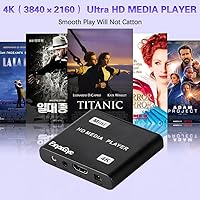
  • Compatibility with 8TB external hard drives allows you to carry an entire cinematic library in one portable setup.
  • The automatic loop and repeat features make it perfect for hands-off operation in retail storefronts or office lobbies.
  • Including both HDMI and AV outputs provides flexibility for connecting to modern projectors or older analog speaker systems.
  • It supports a wide range of subtitle formats like SRT and PGS, which is essential for international film collectors.
  • Setup is nearly instantaneous, requiring no complex software updates, account registrations, or internet configuration steps.
  • This looping video unit consumes very little power, allowing it to run continuously for days without overheating issues.

Cons

  • The device cannot read from two USB storage devices at the same time, forcing you to choose just one source.
  • The infrared remote requires a clear line-of-sight to the box, which can be difficult if the unit is hidden away.
  • Output is limited to 4K at 30Hz, which lacks the extreme smoothness found in higher-end 60Hz media players.
  • This standalone media player has a dated user interface that feels like technology from a decade ago rather than a modern hub.
  • The lack of a search function makes it frustrating to navigate through a hard drive containing hundreds of individual movie files.
  • The FxyxGyc 4K01 4K HDMI Media Player does not support any streaming services or internet-based content whatsoever.
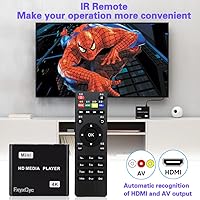
  • The included power and HDMI cables are somewhat short, which might limit placement options in larger home theater setups.

Ratings

To help you make an informed decision, our AI analyzed thousands of verified global reviews for the FxyxGyc 4K01 4K HDMI Media Player, meticulously filtering out bot activity and incentivized feedback. This data-driven scorecard provides a transparent look at real-world performance, highlighting where this standalone media player excels and where it might fall short for your specific needs.

4K Playback Performance
88%
Users are genuinely impressed by the crisp output on 4K displays, especially when playing high-bitrate files. The H.265 hardware decoding keeps the experience smooth and free from the stuttering often seen in cheaper generic units.
Some testers noted that while 4K is sharp, it is capped at 30Hz, which might not be fluid enough for high-motion sports or gaming content. It struggles slightly with extremely high bitrates over 200mbps.
File Format Compatibility
92%
This looping video unit handles almost any file type thrown at it, from MKV to M2TS. Buyers appreciate not having to re-encode their entire library, as the H.264 and H.265 support is remarkably robust for a device this size.
A few niche or older formats like certain Rmvb variations might experience minor audio sync issues. It lacks support for some of the most recent AV1 codecs increasingly found in modern web-dl files.
External Storage Support
86%
The ability to recognize an 8TB external hard drive is a massive win for those with extensive movie collections. Most users found the recognition speeds to be snappy, even when scanning large directories filled with gigabytes of data.
Powering larger mechanical drives sometimes requires an external power source for the drive itself, as the unit's bus power can be inconsistent. It also does not support some complex partition styles or encrypted volumes.
Interface Navigation
74%
26%
The file explorer layout is functional and gets the job done without unnecessary flair. It is very easy to find specific folders, and the icon-based menu is readable from a distance across the room.
The UI feels somewhat dated and lacks the polish of modern streaming platforms or smart TV hubs. There is no search function, so scrolling through a massive list of hundreds of movies can become tedious.
Digital Signage Reliability
91%
This is where the device truly shines, offering reliable 24/7 looping for retail displays and trade show booths. The auto-play and repeat functions work flawlessly right from startup, making it a set-and-forget solution for business owners.
It lacks advanced scheduling features, meaning you cannot set specific times for different videos to play. For more complex signage needs, you might find the basic loop functionality a bit too restrictive for dynamic content.
Hardware Design & Size
89%
The tiny footprint is a major talking point in reviews, as it easily hides behind a wall-mounted TV. Its low power consumption also means it stays relatively cool even after hours of continuous high-definition playback.
Because it is so lightweight, thick HDMI cables can sometimes pull the unit off a shelf or cause it to sit at an awkward angle. The plastic casing, while durable enough, does not feel particularly premium.
Input & Output Ports
82%
18%
Having both HDMI and AV outputs makes this a versatile bridge for both modern 4K setups and legacy hardware. Users like being able to route audio into older analog speakers while sending video to a projector.
The lack of optical audio or dedicated coaxial outputs might disappoint audiophiles with specific receiver setups. Additionally, the spacing between ports is tight, making it difficult to use oversized or heavily shielded cable connectors.
Remote Control Utility
71%
29%
The dedicated remote is simple to understand and provides quick access to essential playback controls and settings. It is lightweight and responsive enough for basic menu navigation and volume adjustments during a movie.
The infrared sensor has a somewhat narrow line-of-sight requirement, meaning you have to aim precisely at the box. Some users found the button layout a bit cramped, leading to accidental presses when navigating in the dark.
Ease of Initial Setup
93%
Almost every reviewer mentions how quick it is to get up and running right out of the box. There are no accounts to create and no software updates to wait for; you just plug in your drive and hit play.
While the basics are simple, the advanced settings for subtitles or audio tracks are buried in sub-menus that are not immediately obvious. A more comprehensive manual would help users unlock these secondary features more effectively.
Multi-Port Functionality
58%
42%
Having two ports allows you to keep a mouse or keyboard connected while still having a slot available for a temporary flash drive. This makes navigating the file system much faster than using just the standard remote control.
A major sticking point is that the system cannot read data from two storage devices simultaneously. If you have two drives plugged in, you have to manually choose one, which limits your ability to manage larger libraries.
Value for Money
84%
For the price, it offers a level of 4K performance that usually requires much more expensive equipment. It is a cost-effective way to revitalize an older TV or set up a professional-looking display for a small business.
If you are looking for smart features like Netflix or YouTube, this device provides zero value as it is strictly for local files. Some buyers felt that for a few dollars more, they could find units with better UI.
Audio Sync & Quality
78%
22%
Support for 7.1 surround sound via HDMI ensures that users with high-end soundbars or receivers get an immersive experience. The audio remains perfectly synced with the video, even during long playback sessions of high-bitrate MKV files.
It lacks built-in decoders for some higher-end lossless formats, relying instead on passthrough to your external hardware. Users without a dedicated receiver may find the downmixed stereo output a bit flat compared to other media hubs.

Suitable for:

The FxyxGyc 4K01 4K HDMI Media Player is an ideal tool for business owners who need a reliable, set-and-forget solution for digital signage or promotional displays. It is particularly effective for users in remote areas or RVs where stable Wi-Fi is unavailable, as it operates entirely offline using local files. Home theater enthusiasts with massive libraries of MKV or MP4 files will appreciate the ability to browse their collection without a computer. Professionals can also rely on this looping video unit for trade shows, ensuring a constant cycle of presentations or photos. Because it supports 4K resolution, it ensures your content looks sharp on modern high-definition monitors.
Not suitable for:

If you are looking for a device to access Netflix, YouTube, or Prime Video, the FxyxGyc 4K01 4K HDMI Media Player will be a disappointment as it lacks all internet connectivity and smart apps. Buyers who require a fluid 60Hz output for high-action sports or modern gaming content should look elsewhere, as this unit is capped at 30Hz. It is not the best choice for those who need to manage data across multiple drives simultaneously due to its internal reading limitations. Additionally, users who expect a sleek, modern interface like Apple TV or Roku will find the basic file-explorer menu somewhat primitive. This standalone media player is strictly for local file playback and will not suit anyone needing cloud-based features.
Specifications

  • Model Name: This specific unit is designated as the 4K01 media hub.
  • Resolution: It supports video output at resolutions up to 4K Ultra HD with a 30Hz refresh rate.
  • Decoding: Hardware-based decoding for H.265, H.264, and MPEG formats ensures efficient file playback.
  • USB Storage: The two USB ports allow for the connection of external hard drives with capacities up to 8TB.
  • SD Slot: An integrated card reader supports SD and SDHC cards up to 128GB.
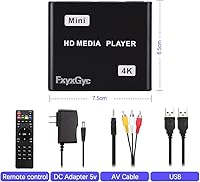
  • Dimensions: The compact chassis measures approximately 2.9 x 2.5 x 0.6″ in total size.
  • Weight: The entire device weighs approximately 10.6 oz for easy portability.
  • Audio: High-definition audio passthrough is supported up to 7.1 surround sound via the HDMI port.
  • Analog Out: A 3.5mm AV interface provides a signal for legacy televisions or external analog speakers.
  • Control: Users navigate the menu system using a dedicated infrared remote control.
  • Loop Functions: Software settings allow for automatic looping of video, photo, and music files.
  • Subtitle Support: The player renders various internal and external subtitle formats including SRT and PGS.
  • Image Support: High-resolution photos in JPG, PNG, and BMP formats can be displayed as slideshows.
  • Media Formats: It is compatible with modern container formats such as MKV, MP4, and M2TS.
  • Power Supply: The unit operates on a standard 5V DC power input via the included wall adapter.

Related Reviews
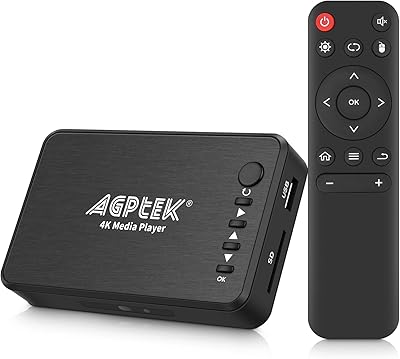
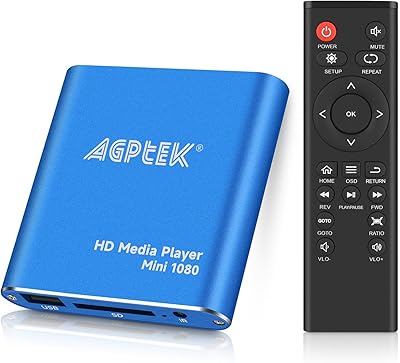
AGPTEK HA0058 4K Media Player
77%
74%
Video Playback Quality
88%
Format Compatibility
91%
Ease of Setup
58%
Remote Control
67%
Build Quality & Design
More
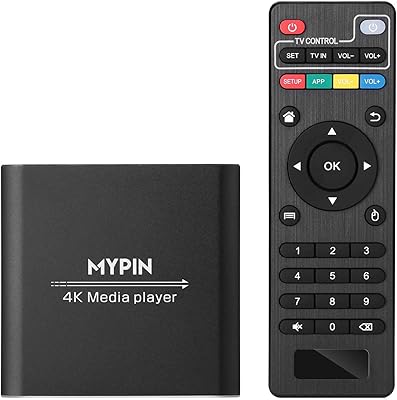
MYPIN Mini 1080p HDMI Media Player
78%
91%
Ease of Setup
83%
Format Compatibility
78%
Build Quality & Portability
76%
Video Playback Quality
58%
Remote Control & Navigation
More
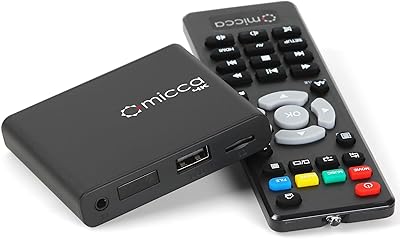
MYPIN HA0284-NCUSF 4K Media Player
77%
91%
Ease of Setup
88%
Format Compatibility
74%
4K Video Quality
83%
H.265 Decoding Performance
86%
Storage Flexibility
More
Micca Speck 4K
Micca Speck 4K
87%
94%
Local Playback Reliability
92%
Ease of Setup
88%
Format Compatibility
96%
Digital Signage Functionality
64%
Large Library Navigation
More
NEUMI Atom 4K Lite
NEUMI Atom 4K Lite
87%
94%
Continuous Playback Reliability
88%
Video Quality & Format Support
92%
Trigger Sensor Capability
68%
Initial Storage Setup
96%
Form Factor & Design
More
Zidoo Z9X PRO 4K HDR Media Player
82%
91%
4K Video Quality
89%
Audio Performance (Lossless Support)
88%
Connectivity Options
72%
User Interface/Navigation
85%
Customization (Android 11 OS)
More
JLZNLC A5 4K Media Player & HDD Enclosure
78%
91%
Ease of Setup
78%
4K Video Playback Quality
83%
Auto-Loop & Resume Reliability
72%
HDD Enclosure Functionality
69%
Codec & Format Compatibility
More
Xiaomi Mi Box S Android TV 4K HDR Streaming Media Player
86%
90%
Value for Money
88%
Setup & Ease of Use
92%
Picture Quality (4K HDR)
89%
Google Assistant Voice Control
78%
App Performance
More
Formuler Z10 SE Android 10 2GB RAM 4GB ROM 4K Streaming Media Player

81%
88%
Value for Money
91%
4K Streaming Quality
89%
Ease of Setup
84%
Connectivity Options
78%
User Interface
More
Zidoo Z9X 8K
Zidoo Z9X 8K
78%
91%
Video Processing Quality
93%
Blu-ray & ISO Playback
88%
Hi-Fi Audio Performance
62%
Android App Ecosystem
84%
NAS & Network Streaming
More

FAQ

No, this device is designed strictly for offline use. It does not have Wi-Fi or Ethernet capabilities, so it won’t run streaming apps; instead, it plays files directly from your own USB drives or SD cards.

It does not have built-in storage for your movies or photos. You will need to plug in a USB flash drive, an external hard drive, or an SD card containing your media to start watching.

While there are two USB ports, the system can only read data from one storage device at a time. The second port is typically used for a USB mouse or keyboard to make navigation easier.

Yes, it actually has an AV output specifically for older sets. You just need a compatible 3.5mm to RCA cable to connect it to the red, white, and yellow ports on your legacy television.

Absolutely. This compact 4K box features an auto-play function that you can set to loop videos, photos, or music immediately upon startup, which is a huge plus for digital signage.

Make sure your video is encoded at 30Hz or lower, as this unit does not support 60Hz 4K files. Also, check that the bit rate doesn’t exceed 200mbps, as extremely heavy files might overwhelm the processor.

Not at all. Once you have loaded your files onto a drive from your PC, the standalone media player handles everything else through its own simple menu system and the included remote.

Yes, it supports large external drives up to 8TB. Just keep in mind that some high-capacity mechanical drives might need their own power source if they draw more juice than the USB port provides.

Yes, it handles both embedded subtitles and external files like SRT or SSA. You can usually toggle them on or off and even adjust some settings through the on-screen menu while the video is running.

While the remote is the primary way to navigate, you can also plug a standard USB mouse into one of the ports. This is a great backup if the remote is out of reach or if you prefer a point-and-click interface.