Overview

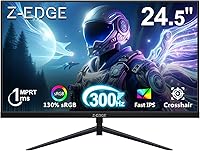
The Z-Edge UG25S 24.5″ 300Hz Gaming Monitor arrived in April 2025 as one of the more compelling budget options in a crowded high-refresh-rate market. Z-Edge isn't a household name the way ASUS or AOC are, but that's partly the point — this 300Hz IPS panel targets competitive gamers who want genuinely fast hardware without the premium brand markup. At 24.5 inches and 1080p, it hits a practical sweet spot: the resolution is light enough that even mid-range GPUs can push triple-digit frame rates consistently. Already sitting inside Amazon's top 300 monitors, it's clearly finding an audience quickly.
Features & Benefits

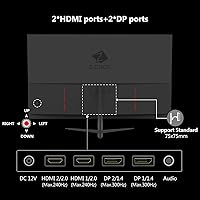
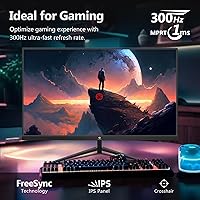
The headline spec is the 300Hz refresh rate, which requires a DisplayPort 1.4 connection to unlock fully — HDMI 2.0 tops out at 240Hz, so PC gamers should plan accordingly. One thing worth clarifying upfront: the 1ms figure is MPRT, not GtG. MPRT measures perceived motion blur via backlight strobing, while GtG measures pixel transition speed. They are not interchangeable, and the UG25S will behave differently than a monitor advertising 1ms GtG. That said, the IPS panel is a genuine differentiator at this price, offering 178-degree viewing angles and accurate colors that TN-based competitors simply cannot match. Dual HDMI and dual DP inputs make switching between a gaming PC and a console surprisingly painless.

Best For

This Z-Edge monitor is an obvious fit for competitive FPS players — anyone grinding ranked in CS2, Valorant, or Apex Legends where frame rate directly influences reaction time and target tracking. It also works well for the increasingly common setup of one PC and one console sharing a single screen, since the four total inputs let you swap sources without unplugging anything. If you are coming from a 60Hz or 144Hz panel, the jump to 300Hz is immediately noticeable in fast-paced scenes. The borderless frame and VESA compatibility also make this a natural candidate for dual-monitor builds where visual continuity between screens matters.

User Feedback

Sitting at 4.5 stars, the UG25S has earned largely positive early reviews, with buyers highlighting the smooth motion handling and color quality relative to what they expected at this price. Several users specifically appreciated having four inputs on a single monitor — a practical detail that doesn't always get enough credit. On the critical side, some reviewers noted the stand feels less sturdy than the slim profile suggests, and a few flagged that out-of-box color accuracy needed adjustment before it looked right. No major complaints about the MPRT distinction appeared in early feedback, though that may shift as more technical buyers weigh in. The lack of speakers caught some buyers off guard at setup.

Pros

  • 300Hz refresh rate over DisplayPort delivers genuinely smoother motion in fast-paced competitive titles compared to 240Hz panels.
  • IPS panel technology provides accurate colors and wide viewing angles rarely found at this price point.
  • Four total inputs — two HDMI and two DP — make multi-device setups unusually convenient.
  • Borderless three-sided frame keeps multi-monitor builds looking clean without gaps or thick bezels.
  • VESA 75x75mm support gives you real flexibility to mount on a wall or upgrade to an aftermarket arm.
  • Flicker-free and Low Blue Light modes make long gaming or work sessions noticeably easier on the eyes.
  • 1080p resolution keeps GPU demands low, meaning mid-range cards can comfortably push 300fps in esports titles.
  • Early buyer ratings sit high, reflecting a solid out-of-box experience for most users.
  • Anti-glare coating handles ambient light reasonably well without washing out the image.
  • Compact and lightweight build makes it easy to reposition or transport if needed.

Cons

  • The 1ms spec is MPRT, not GtG — buyers expecting traditional pixel-response performance may find the feel different from what they anticipated.
  • HDMI ports cap out at 240Hz, so console users and those without a DP cable cannot access the full 300Hz.
  • The included stand has been flagged as wobbly by some buyers, which can be frustrating if you adjust height or tilt often.
  • No built-in speakers means you'll need a separate audio solution — not ideal for minimalist desk setups.
  • Color calibration out of the box may need manual adjustment before it looks as accurate as the specs suggest.
  • 1080p resolution can feel soft for general productivity or content consumption on a nearly 25-inch screen.
  • Z-Edge lacks the long-term brand track record of established monitor makers, which may give some buyers pause on warranty support.
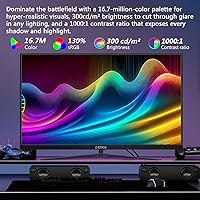
  • Brightness at 300 nits is adequate indoors but won't hold up well in very bright rooms or near windows.

Ratings

The Z-Edge UG25S 24.5″ 300Hz Gaming Monitor scores below are generated by AI after analyzing verified buyer reviews from global markets, with spam, bot-submitted, and incentivized feedback actively filtered out. The result is a realistic snapshot of what real users experience — both the genuine strengths that make this monitor stand out in its price tier and the frustrations that show up repeatedly once buyers have lived with it. Nothing is glossed over.

Refresh Rate Performance
91%
For competitive PC gamers, the 300Hz experience over DisplayPort is immediately noticeable — motion in fast-paced shooters like Valorant or CS2 feels markedly smoother than on 240Hz panels. Users who made the jump from 144Hz consistently describe it as one of the more impactful upgrades they have made to their setup.
The 300Hz cap is strictly a DisplayPort-only feature, which catches some buyers off guard when they plug in via HDMI and see 240Hz in their display settings. It is not a flaw per se, but the gap between what the box implies and what HDMI delivers creates frustration for buyers who did not read the fine print.
Panel Color & Accuracy
74%
26%
The IPS panel is a genuine step up from the TN alternatives that dominate this price bracket, and most users notice the difference in color richness right away — especially in game environments with saturated environments or high-contrast lighting. Wide 178-degree viewing angles mean color stays consistent whether you are sitting squarely in front or slightly off to one side.
Out-of-box calibration is inconsistent enough that a meaningful portion of buyers feel the need to adjust color temperature and saturation before the image looks right. A few reviewers described the default profile as running slightly warm, which is fixable but should not be necessary on a new monitor.
Motion Clarity
78%
22%
In practice, motion during fast camera pans and rapid in-game movement looks clean and controlled, which is exactly what competitive FPS players are paying for. The MPRT-based backlight approach does a solid job keeping perceived blur low during high-speed scenes.
The 1ms spec is MPRT — not GtG pixel transition speed — and buyers who conflate the two often report that the monitor feels different from what they expected based on the marketing language. Users coming from GtG-rated panels may notice the distinction during certain content types outside of pure gaming.
Connectivity & Input Options
88%
Having two HDMI and two DisplayPort inputs on a single budget monitor is genuinely uncommon and one of the features buyers mention most positively. It makes the UG25S unusually practical for mixed setups where a gaming PC and a console share the same screen without any cable management headaches.
The HDMI ports are version 2.0, which caps console and streaming device connections at 240Hz — fine for most use cases, but buyers hoping to run a high-frame-rate PC setup through HDMI will hit that ceiling. A clearer distinction in the product listing between DP and HDMI refresh limits would save a lot of confusion.
Build Quality
67%
33%
The chassis looks noticeably more premium than the price suggests, with a slim profile and a clean three-sided borderless frame that holds up well in person. Most buyers describe the overall fit and finish as acceptable and slightly better than they anticipated for the category.
The included stand is where build quality takes the most criticism — multiple buyers flagged wobble and a lack of height adjustment as real day-to-day annoyances. For a monitor that otherwise invites VESA arm upgrades, the base stand feels like an area Z-Edge cut corners on.
Value for Money
89%
When you weigh 300Hz, an IPS panel, and four input ports together against the asking price, the UG25S lands in a spot that is hard to match from larger brands at the same tier. Buyers upgrading from aging budget monitors routinely describe it as one of the better returns they have seen on a display purchase.
The value equation depends heavily on your expectations going in — buyers who want branded reliability, a polished stand, built-in speakers, or 1440p resolution will find the trade-offs add up quickly. Z-Edge's limited brand history also means long-term durability is still an open question compared to monitors with years of field data.
Eye Comfort
82%
18%
Flicker-free backlighting and the Low Blue Light mode make a real difference during long evening gaming sessions or back-to-back workdays, and users with previous eye fatigue complaints on cheaper monitors notice the improvement fairly quickly. The anti-glare coating handles overhead lighting without introducing noticeable haze.
At 300 nits of peak brightness, the panel is not well-suited to brightly lit rooms or setups near windows during daytime use. Some users found they had to push brightness to near-maximum in normal office lighting, which slightly undermines the eye comfort features.
Setup & Installation
84%
Assembly is straightforward and takes most buyers under ten minutes, with the stand clicking into place without tools. The OSD menu is laid out logically enough that accessing game presets or adjusting color settings does not require consulting a manual.
The included cable selection is basic, and a few buyers noted they had to source a DisplayPort cable separately to unlock 300Hz — something that could reasonably be included in the box at this price point. The OSD button placement on the rear of the panel is also a mild usability annoyance for frequent adjusters.
Multi-Monitor Compatibility
86%
The borderless three-sided frame makes it one of the cleaner options for side-by-side dual-monitor builds, with minimal visible gap between panels when placed next to an identically sized screen. VESA support means you can get both monitors on a single arm for a tidy, cable-managed desk.
Backlight uniformity between two units of the same model can vary slightly, which is a known variable with budget IPS panels and becomes more noticeable when monitors sit directly next to each other. This is more of a category-wide caveat than a specific UG25S flaw, but it is worth keeping in mind.
Gaming Preset Modes
71%
29%
The FPS and RTS presets are genuinely useful as a starting point — particularly the FPS mode, which bumps contrast in ways that help with target visibility in dark game environments like indoor maps or night-based levels. Casual gamers who do not want to calibrate manually will find these modes functional from the start.
Enthusiast-level users tend to find the presets too aggressive and end up creating a custom profile anyway, making the presets more of a convenience feature than a real differentiator. The color temperature in RTS mode in particular skews cooler than most users prefer for extended play.
Resolution Clarity
63%
37%
For fast competitive gaming at 24.5 inches, 1080p is sharp enough that pixel density is not a meaningful concern during gameplay — especially when frame rate and motion clarity are the priority. The panel renders fine text and UI elements acceptably for casual productivity use alongside gaming.
Anyone using this monitor primarily for content consumption, detailed single-player games, or side-by-side productivity work will notice the 1080p ceiling more acutely at this screen size. It is the single specification that most limits the UG25S from being a well-rounded all-purpose display.
Brightness & HDR
61%
39%
Indoor gaming in controlled lighting looks comfortable at mid-to-high brightness settings, and the anti-glare coating helps maintain contrast without washing out colors when overhead lights are on. For nighttime gaming sessions, 300 nits is more than sufficient.
There is no meaningful HDR support here, and 300 nits of peak brightness falls short in sun-lit rooms or creative workflows where brightness range matters. Buyers expecting any HDR-like benefit will find the display underwhelming in that specific regard.
Brand Reliability
59%
41%
Early buyer experiences with Z-Edge's customer support have been generally positive in tone, and the product itself shows no widespread defect patterns in its early sales window. For a newer brand, that is a reasonable starting point.
Z-Edge simply does not have the warranty reputation or service infrastructure of established monitor brands, and buyers who have dealt with dead pixels or panel defects on budget monitors know how important post-sale support can be. The limited track record is a real risk factor that buyers should weigh honestly.

Suitable for:

The Z-Edge UG25S 24.5″ 300Hz Gaming Monitor is squarely built for competitive PC gamers who want every frame-rate advantage they can get without spending big on a name-brand panel. If you spend serious time in fast-paced shooters like CS2, Valorant, or Apex Legends, the jump to 300Hz via DisplayPort is genuinely felt during fast tracking and quick flick shots — it's not a marketing number at this level. The four-input layout (two HDMI, two DP) makes it an unusually practical choice for anyone running a PC and a console side by side, since you can switch sources without fumbling with cables. Buyers upgrading from 60Hz or 144Hz will notice the difference immediately in motion clarity. The VESA compatibility and borderless frame also make it a strong pick for anyone building a dual-monitor workstation on a tighter budget.
Not suitable for:

If you prioritize image quality for content creation, photo editing, or cinematic single-player gaming over raw speed, the Z-Edge UG25S 24.5″ 300Hz Gaming Monitor is probably not the right call. The 1080p resolution, while perfectly adequate for competitive play, will feel limiting on a 24.5-inch panel if you're used to sharper 1440p or 4K displays for detailed work or visually rich games. The 1ms figure advertised is MPRT — a backlight-strobing measurement — not a traditional GtG pixel-transition spec, so buyers expecting the kind of response feel they've read about on higher-end panels may be disappointed. The stand has also drawn some criticism for feeling less stable than buyers expect, which matters if you frequently adjust monitor positioning. And if you rely on built-in speakers to keep your desk clean, this monitor has none — an external solution will be required from day one.
Specifications

  • Screen Size: The panel measures 24.5 inches diagonally, offering a practical display area well-suited to fast-paced gaming at typical desk distances.
  • Resolution: Native resolution is 1920x1080 (Full HD), delivering sharp visuals at 1080p with low GPU overhead for high frame rate gaming.
  • Refresh Rate: Supports up to 300Hz over DisplayPort 1.4 and up to 240Hz over HDMI 2.0 connections.
  • Response Time: Rated at 1ms MPRT (Moving Picture Response Time), which reflects backlight strobe-based motion clarity rather than pixel transition speed.
  • Panel Type: Uses an IPS (In-Plane Switching) panel, providing consistent color reproduction and wide viewing angles compared to TN alternatives at this price tier.
  • Viewing Angles: Horizontal and vertical viewing angles both reach 178 degrees, ensuring minimal color shift when viewed off-axis.
  • Brightness: Peak brightness is rated at 300 cd/m², adequate for typical indoor environments with controlled ambient lighting.
  • Color Depth: Capable of displaying 16.7 million colors, covering the standard sRGB gamut expected from an IPS panel in this category.
  • Aspect Ratio: Standard 16:9 widescreen aspect ratio, compatible with all modern games, streaming content, and productivity applications.
  • Connectivity: Equipped with two HDMI 2.0 ports and two DisplayPort 1.4 inputs, allowing simultaneous connection of up to four devices.
  • VESA Mounting: Supports the 75x75mm VESA pattern, compatible with most standard wall mounts and third-party monitor arms.
  • Screen Surface: Anti-glare matte coating reduces reflections from ambient light sources without significantly degrading image clarity.
  • Frame Design: Three-sided borderless design minimizes visible bezel on the top and both sides, making it well-suited for side-by-side multi-monitor arrangements.
  • Speakers: No built-in speakers are included; an external audio solution such as headphones or desktop speakers is required.
  • Eye Care: Flicker-free backlight technology and a Low Blue Light mode are both included to reduce eye fatigue during extended use.
  • Curved: The panel is flat (non-curved), offering a traditional viewing experience preferred by many competitive gamers for consistent geometry.
  • Dimensions: Physical dimensions measure 22 x 0.3 x 12.8 inches (without stand), reflecting a slim and compact footprint.
  • Weight: The monitor weighs 8.1 pounds, making it lightweight enough to reposition or mount without assistance.
  • Game Modes: Includes preset FPS and RTS display modes that adjust contrast and color settings for specific gaming genres.
  • Release Date: First made available in April 2025, making it a recent entry in the competitive budget gaming monitor segment.

Related Reviews
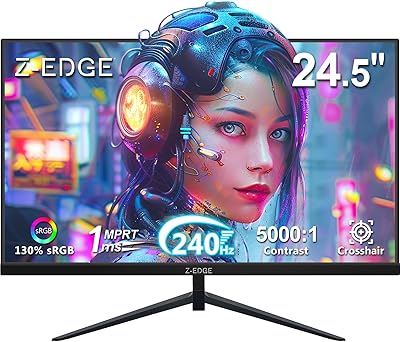
Z-Edge UG25I 24.5-inch 240Hz Gaming Monitor
83%
92%
Value for Money
90%
Gaming Performance
89%
Display Quality
85%
Ergonomics & Design
84%
Connectivity Options
More
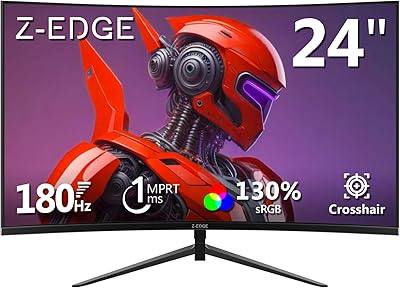
Z-Edge UG24 24-inch Curved Gaming Monitor
85%
88%
Gaming Performance
85%
Display Quality
81%
Build Quality
92%
Value for Money
89%
Ease of Setup
More
SANSUI ES-G25X1 Pro 24.5″ Gaming Monitor
70%
89%
Refresh Rate Performance
91%
Value for Money
82%
Panel & Visual Quality
84%
Motion Clarity
86%
Connectivity & Ports
More
SANSUI ES-G25F6Q Pro 24.5-inch QHD Gaming Monitor

78%
91%
Refresh Rate Performance
88%
Image Sharpness
79%
Color Accuracy
93%
Value for Money
76%
Motion Clarity
More
CRUA CR245ZB 24.5″ Gaming Monitor
78%
83%
Gaming Performance
86%
Refresh Rate & Smoothness
74%
Color Accuracy & Vibrancy
91%
Ergonomics & Adjustability
68%
Build Quality & Materials
More
ASUS TUF Gaming VG259QM 24.5″ Gaming Monitor
76%
93%
Refresh Rate Performance
88%
Response Time & Motion Clarity
81%
Color Accuracy & Image Quality
86%
Adaptive Sync & Compatibility
52%
Stand & Ergonomics
More
Acer KB252Q G0bi 24.5″ IPS Monitor
73%
83%
Image Quality
86%
Color Accuracy
78%
Refresh Rate & Gaming
61%
Response Time
54%
Brightness
More
Dell G2524H Gaming Monitor 24.5-inch
87%
92%
Performance
96%
Refresh Rate
88%
Build Quality
91%
Ergonomics
93%
Display Quality
More
Z-Edge U24I 24-inch IPS Monitor
85%
88%
Display Quality
92%
Value for Money
85%
Build Quality
84%
Gaming Performance
80%
Ergonomics & Design
More
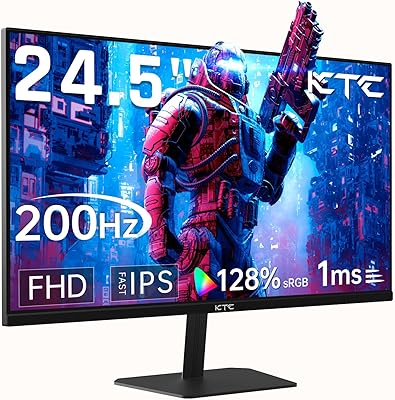
KTC 24.5″ Gaming Monitor 180Hz FHD
87%
89%
Display Quality
91%
Response Time
92%
Refresh Rate
88%
Color Accuracy
85%
Build Quality
More

FAQ

You do need DisplayPort to hit the full 300Hz — HDMI 2.0 on this monitor tops out at 240Hz. Most gaming PCs have at least one DP output, but it is worth double-checking your GPU before you order. If your rig only has HDMI outputs, you will be limited to 240Hz.

No, they are different measurements and it matters. GtG (Gray-to-Gray) measures how fast a pixel physically changes color. MPRT (Moving Picture Response Time) measures perceived motion blur using backlight strobing. The UG25S uses MPRT, which can look smooth in motion but behaves differently from a fast GtG panel. If you have only used GtG-rated monitors before, the feel may be slightly different.

Yes, that is one of the more practical things about this monitor. With two HDMI ports and two DisplayPort inputs, you can have a console and a PC plugged in simultaneously and switch between them using the input selector. No cable swapping needed.

The included stand does not offer height adjustment — it is a fixed-tilt design. If you need precise ergonomic positioning, the VESA 75x75mm mount means you can swap it out for an aftermarket arm fairly easily, which many buyers end up doing anyway.

It holds up well on paper and for most users in practice, particularly because it offers an IPS panel where some competitors at this price tier use TN. The trade-off is that Z-Edge is a newer and less established brand, so long-term reliability data is more limited. Established brands may offer more consistent warranty support and easier returns through retail channels.

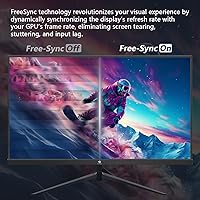
The product listing does not explicitly confirm FreeSync or G-Sync certification. If adaptive sync is important to your setup, it is worth contacting Z-Edge support directly to verify compatibility before purchasing.

At normal desk distances — typically around 50 to 80 cm — 1080p on a 24.5-inch panel looks reasonably sharp for gaming. It is not going to match the crispness of a 1440p display, but for fast competitive play where frame rate matters more than fine detail, most users find it perfectly acceptable.

Some buyers have noted that the default color settings run slightly warm or oversaturated and benefit from a quick calibration pass. It is not a major issue, but if accurate color matters to you — for creative work or just preference — spending five minutes in the OSD adjusting color temperature and brightness is worth it.

Yes. The 75x75mm VESA pattern on the back is compatible with most standard wall mount brackets and desk-mounted monitor arms. Just make sure your mount supports the 8.1-pound weight, which is well within the range of virtually all consumer-grade VESA hardware.

It works fine for everyday tasks like browsing, documents, and light multitasking. The IPS panel means colors and text look consistent from most viewing angles, which is better than a TN alternative. That said, 1080p on a nearly 25-inch screen is not the sharpest experience for reading dense text all day — if productivity is your primary use case, a 1440p panel might serve you better long-term.