Overview

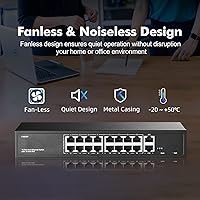
The YuLinca F1602GP 16-Port PoE+ Unmanaged Switch is a straightforward, no-frills option for anyone who needs to power and connect multiple PoE devices without spending serious money or wrestling with management interfaces. You get 16 PoE+ ports and two Gigabit uplinks in a solid all-metal chassis that can be rack-mounted, wall-hung, or set on a desktop. The fanless design is a real advantage at this price point — most competing units in this range use fans that become an annoyance in quieter spaces. The total 200W power budget is shared across all 16 ports, so it pays to add up your device draw before assuming every port can run a high-wattage access point simultaneously. Plug it in, connect your devices, and it works.
Features & Benefits

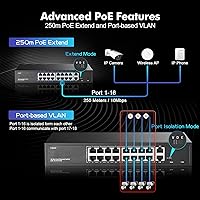
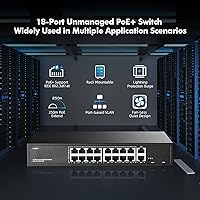
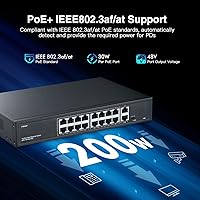
This PoE switch supports the IEEE 802.3af/at standard, meaning it works with the vast majority of mainstream PoE devices — IP cameras, wireless access points, VoIP phones — and can push up to 30W per port when needed. One standout capability is the 250-meter extend mode, activated by a physical DIP switch on the unit itself. That reach is genuinely hard to find in an unmanaged switch. The VLAN mode is worth understanding correctly: it provides port isolation, meaning ports 1–16 cannot communicate with each other and can only reach the two uplinks — useful for basic security, but not a substitute for full managed VLAN tagging. The two Gigabit uplinks handle aggregated downstream traffic without becoming a bottleneck under normal loads.

Best For

The YuLinca 16-port switch hits a practical sweet spot for a few specific use cases. If you are deploying a small camera system — say, eight to twelve IP cameras across a retail space or small office — this covers it without forcing you into a managed switch you do not need. Home lab users will appreciate the complete lack of setup friction. Installers working on sites with long cable runs will find the extend mode genuinely useful rather than just a spec sheet novelty. It also works well in multi-tenant scenarios where basic client isolation matters but full VLAN management would be overkill. Silent operation makes it comfortable in server closets or quiet office environments where fan noise would otherwise be a constant irritant.

User Feedback

Across nearly 440 ratings, this unmanaged switch holds a 4.5-star average, and the pattern in buyer feedback is consistent: people are pleased with how quickly it gets up and running and find the build quality solid for the price tier. PoE delivery is described as reliable for standard cameras and access points. Where complaints surface, they typically center on the shared power ceiling — loading all 16 ports with higher-draw devices pushes the unit to its limit fast. A handful of buyers were also caught off-guard discovering that passive 24V PoE gear simply will not be powered here. Occasional mentions of warmth under sustained full load appear, though nothing at a frequency that suggests a systemic problem.

Pros

  • Sixteen PoE+ ports plus two Gigabit uplinks in one unit covers most small-to-mid deployments without needing a second switch.
  • All-metal construction feels far more substantial than plastic competitors at a comparable price.
  • Completely fanless operation makes it genuinely silent — a real advantage in office or home environments.
  • The 250-meter extend mode works as advertised, giving installers flexibility on challenging long-run sites.
  • Plug-and-play setup means it is operational within minutes of unboxing, with no software or login required.
  • Supports up to 30W per port, covering virtually all standard IEEE 802.3at devices including higher-draw access points.
  • Three DIP switch modes let you adjust behavior at a hardware level without any interface or technical knowledge.
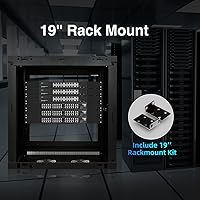
  • Rackmount brackets are included in the box, so there are no hidden add-on costs for proper installation.
  • Wide input voltage range (100–240V) makes it usable internationally without an adapter.
  • Consistently rated well by buyers for reliable PoE delivery across cameras and wireless access points in real deployments.

Cons

  • The 200W total power budget is shared across all 16 ports, so fully loading the switch with high-draw devices is not realistic.
  • Passive 24V PoE devices are not supported — a frustrating surprise if you have older proprietary wireless hardware.
  • Port isolation is basic and not a substitute for proper managed VLAN tagging, which this switch cannot perform.
  • Downstream ports are capped at 100Mbps, which may be a bottleneck for high-resolution camera streams or bandwidth-hungry devices.
  • No management interface means zero visibility into traffic, errors, or per-port power consumption.
  • The extend mode drops link speed to 10Mbps, which limits what you can realistically push over those long cable runs.
  • With only a 2K MAC address table, very large or complex flat networks may run into forwarding limitations.
  • No SFP or fiber uplink option restricts how you can connect this switch to the rest of a larger network.
  • Some users report the unit runs noticeably warm under sustained heavy load, which may warrant attention in poorly ventilated spaces.

Ratings

The scores below were generated by AI after analyzing verified global buyer reviews for the YuLinca F1602GP 16-Port PoE+ Unmanaged Switch, with active filtering applied to remove incentivized, duplicate, and bot-flagged submissions. The result is an honest cross-section of real installer, small business, and home lab experiences — strengths and frustrations weighted equally. Where buyers consistently flagged a limitation, that is reflected in the score, not softened.

Value for Money
91%
Buyers repeatedly call out how much hardware they are getting relative to what they paid — 16 active PoE+ ports, a metal enclosure, and rack-mount brackets in a single affordable package. For installers pricing out a small camera system or access point deployment, the per-port cost is hard to beat at this tier.
A small segment of buyers feel the value proposition weakens if they need more than basic functionality, since the money saved upfront may eventually push them toward a managed switch anyway as their network grows.
PoE Reliability
88%
The vast majority of users report consistent, stable PoE delivery to cameras and access points over extended periods without dropouts. Installers running mixed loads of 8 to 12 devices particularly noted that the switch just keeps working without needing reboots or attention.
A handful of buyers reported one or two ports that behaved inconsistently under sustained high-draw conditions, suggesting some unit-to-unit variance in power delivery at the edges of the 200W budget.
Build Quality
84%
The all-metal enclosure genuinely surprised buyers who expected a flimsy budget product — it feels dense and solid on a desk or in a rack. The panel finish and port labeling are clean enough that it does not look out of place in a professional installation.
It is not enterprise-grade hardware, and a few buyers noted that the rack-mount ears feel slightly lighter than the main chassis. At this price point that is understandable, but it is worth noting for heavy-use rack environments.
Ease of Setup
93%
Reviewers with limited networking experience consistently praised how fast they were up and running — plug in power, connect devices, done. There is no login page, no driver installation, and no app required, which removes a whole category of friction for non-technical buyers.
The DIP switch modes, while simple, are not labeled in an immediately intuitive way for first-time users, and the included manual is thin. A few buyers had to look up what the V, D, and E modes actually do before feeling confident flipping the switch.
Thermal Management
71%
29%
Under moderate loads — say, eight to ten cameras at typical draw — the unit runs warm but not alarmingly so, and the dual-side vents do a reasonable job of passively dissipating heat. Buyers in well-ventilated spaces or open racks report no thermal issues over long run times.
Under sustained full load with high-draw devices across most ports, the chassis gets noticeably hot to the touch. Buyers who installed it in a sealed or poorly ventilated cabinet reported more concern, and a small number flagged this as a long-term reliability question.
Noise Level
97%
Completely silent operation is one of the most consistently praised aspects across all buyer feedback. Users in home offices, quiet server closets, and open-plan workspaces specifically sought this unit out because of the fanless design, and none reported any noise whatsoever.
There is genuinely little to criticize here — the only theoretical concern is that passive cooling means heat must go somewhere, which circles back to ventilation requirements rather than noise itself.
Power Budget Adequacy
63%
37%
For typical mixed deployments — a combination of standard IP cameras at 8 to 12W each and one or two access points — the 200W ceiling is more than sufficient and buyers in these scenarios never bump into the limit.
Buyers who tried to fully populate the switch with high-draw devices discovered the constraint quickly and found it frustrating. The math simply does not support 16 ports all pulling near their 30W maximum, and this catches buyers off guard who do not check the total budget before purchasing.
Extend Mode Performance
79%
21%
Installers working on warehouses, parking structures, or campus-style deployments found the 250-meter extend mode legitimately useful — not a paper spec but a real working feature that saved them from running additional infrastructure or using media converters.
The speed reduction to 10Mbps in extend mode is a real constraint that limits which devices can realistically benefit from it. High-resolution camera streams or anything requiring consistent throughput above a few Mbps will struggle, narrowing the practical use case considerably.
Port Isolation (VLAN Mode)
68%
32%
For the specific use case it covers — stopping PoE clients from reaching each other while allowing all of them to hit the uplink — the isolation mode works exactly as described. Guest Wi-Fi deployments and basic camera network segmentation benefit from this without any software overhead.
The repeated buyer confusion about this not being real VLAN management is a genuine usability issue. Users who needed proper tagged VLANs, inter-VLAN routing control, or numbered VLAN assignment were disappointed to find the feature far more limited than the label implied.
Passive PoE Compatibility
41%
59%
This is not a category where the switch performs well, but buyers who verified their devices use standard 802.3af/at PoE before purchasing had zero compatibility problems and were fully satisfied.
A recurring and genuinely frustrating complaint involves older Ubiquiti and proprietary 24V passive PoE devices that simply receive no power from this switch. Buyers who did not check their device specifications before ordering encountered a hard incompatibility with no workaround available.
Uplink Performance
82%
18%
The two Gigabit uplink ports handle aggregated traffic from downstream ports without becoming a bottleneck in normal deployments. Buyers connecting to a router or core switch over Gigabit reported clean, stable throughput with no complaints about the uplink side of the equation.
There are no SFP or fiber uplink options, which limits how this switch can integrate into larger or more structured networks. For purely copper environments this is fine, but installers who wanted to run fiber to the switch had no path forward.
Indicator Clarity
74%
26%
The front panel LEDs give a clear at-a-glance view of which ports are active, which are passing data, and which DIP mode is currently active. Buyers monitoring a camera installation found it easy to visually confirm port status without any software.
The mode indicator in particular requires knowing what the three states mean before it is useful — new users found themselves checking the manual to interpret whether the Mode LED was indicating VLAN, Extend, or Default, which is a minor but real friction point.
Mounting Flexibility
86%
Shipping with rack-mount brackets already included means installers do not face hidden accessory costs, and the option to wall-mount or desktop-place the same unit makes it genuinely versatile across different installation environments.
The unit is sized for a standard rack bay, which makes it slightly oversized for compact desktop use cases where a smaller footprint would be preferred. Some home lab users found it physically larger than expected for their setup.
Long-Term Reliability
77%
23%
The majority of buyers who have run this switch continuously for six months to over a year report no failures, port degradation, or unexpected reboots. For an unmanaged switch in a stable low-to-moderate load environment, longevity feedback is encouraging.
The long-term track record under sustained heavy PoE load is less established, and thermal stress over time in poorly ventilated installations is a legitimate open question. The brand is also relatively new to the Western market, so historical reliability data is thinner than for established names.

Suitable for:

The YuLinca F1602GP 16-Port PoE+ Unmanaged Switch is a strong fit for anyone who needs to power and connect a double-digit count of standard PoE devices without the cost or complexity of a managed switch. Small business owners setting up IP camera systems across a shop floor, warehouse, or office building will find the port count and 250-meter extend mode particularly practical. Installers who regularly deal with long cable runs — think parking lots, outbuildings, or large open spaces — will appreciate having that range capability baked in at this price. Home lab enthusiasts who want to run several access points or PoE-powered devices from a single neat unit will get exactly what they need with zero configuration overhead. The all-metal, fanless build also makes it a natural fit for rack-mounted setups in quiet environments like server closets or small office IT cabinets where a noisy fan would be disruptive.
Not suitable for:

The YuLinca F1602GP 16-Port PoE+ Unmanaged Switch is not the right tool if your environment demands real network management, traffic shaping, or proper VLAN segmentation. The port isolation mode it offers is not a replacement for managed VLAN tagging — if you need to assign devices to specific VLANs, control broadcast domains, or apply QoS policies, you will need to look at a managed switch instead. The 200W shared power budget also creates a hard ceiling: if you plan to saturate all 16 ports with high-draw devices like dual-radio access points pulling 25W or more each, the math simply does not work out. Anyone running passive 24V PoE equipment — common with some older or proprietary wireless gear — will find this switch incompatible, and that has caught more than a few buyers off guard. Enterprise environments or anyone expecting remote monitoring, SNMP support, or link aggregation should look elsewhere entirely.
Specifications

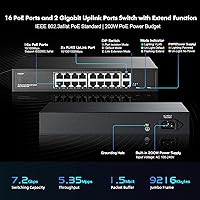
  • PoE Ports: Includes 16 ports running at 10/100Mbps, each fully compliant with IEEE 802.3af (up to 15.4W) and IEEE 802.3at (up to 30W) standards.
  • Uplink Ports: Two dedicated RJ45 uplink ports support auto-negotiation between 100Mbps and 1000Mbps for connection to a router or core switch.
  • Power Budget: Total PoE output across all 16 ports is capped at 200W, shared dynamically based on connected device demand.
  • Extend Range: In Extend mode, PoE power and data can reach up to 250 meters over Cat5e or better cable, though link speed drops to 10Mbps.
  • Switching Bandwidth: The internal switching fabric supports up to 7.2 Gbps of total bandwidth across all ports simultaneously.
  • Forwarding Rate: Packet forwarding capacity is rated at 5.35 Mpps, suitable for the traffic volumes expected in small office or home network deployments.
  • MAC Table: Supports a MAC address table of up to 2,000 entries, adequate for small-to-medium flat network topologies.
  • Jumbo Frames: Jumbo frame support extends up to 9,216 bytes, which can benefit certain NAS or video surveillance traffic patterns.
  • DIP Switch Modes: A physical DIP switch on the unit selects one of three operating modes: Default (normal), VLAN port isolation, or Extend (long-range PoE).
  • Form Factor: The unit ships with rack-mount brackets and also supports wall or desktop placement, measuring 268 x 181 x 44mm.
  • Enclosure: The chassis is constructed entirely from metal with dual-side ventilation slots, relying entirely on passive airflow for cooling with no internal fan.
  • Unit Weight: Net product weight is 1.29 kg; gross packaged weight including accessories is 1.77 kg.
  • Input Power: Accepts universal AC input from 100V to 240V at 50/60Hz, making it compatible with standard outlets worldwide.
  • PoE Voltage: Output PoE voltage ranges from 44V to 57V with a typical operating value of 48V on all active PoE ports.
  • Operating Temp: Rated for continuous operation between -10°C and 50°C, with storage tolerance between -40°C and 70°C.
  • Network Standards: Complies with IEEE 802.3, IEEE 802.3u, IEEE 802.3ab, and IEEE 802.3x pause frame flow control standards.
  • Cable Requirements: 10BASE-T requires Cat3 or better, 100BASE-TX requires Cat5 or better, and Gigabit uplinks require Cat5 UTP or STP, all within 100 meters for full speed.
  • LED Indicators: Front panel LEDs include a power indicator, a mode indicator showing the active DIP switch setting, and individual link and activity lights for all 18 ports.
  • Box Contents: Package includes the switch unit, one power cord, one pair of rack-mount brackets, and a printed user manual.
  • Passive PoE: This switch does not supply power to passive 24V PoE devices or non-PoE equipment connected to ports 1 through 16.

Related Reviews

YuLinca 6-Port Gigabit PoE Switch with 4 PoE+ Ports
87%
95%
Ease of Installation
88%
PoE Functionality
91%
Build Quality
87%
Performance and Speed
94%
Fanless Operation (Noise)
More
NETGEAR GS116LP 16-Port Unmanaged PoE+ Switch
86%
97%
Ease of Setup
93%
PoE Port Coverage
62%
PoE Power Budget
96%
Silent Operation
88%
Build Quality
More
MokerLink POE-F1602G 16-Port PoE Switch
88%
91%
Setup and Installation
93%
Power Output Reliability
88%
Build Quality
87%
Network Stability
90%
Performance for Surveillance Systems
More
YuLinca UMG16 16-Port Gigabit Network Switch
80%
92%
Value for Money
83%
Build Quality
96%
Ease of Setup
88%
Port Performance
97%
Noise Level
More
NICGIGA NIC-AI-FS1621GP 16-Port Unmanaged PoE Switch
76%
88%
Value for Money
93%
Ease of Setup
54%
PoE Port Speed
84%
PoE Power Delivery
79%
AI Watchdog Reliability
More
Sodola SL-S0181P-200W 16-Port PoE Network Switch
78%
94%
Ease of Setup
88%
PoE Power Delivery
82%
Build Quality
61%
Port Speed & Bandwidth
79%
Extend Mode Performance
More
NETGEAR GS116PP 16-Port PoE+ Gigabit Switch
83%
96%
Ease of Setup
93%
PoE Port Coverage
68%
Power Budget Adequacy
88%
Build Quality
97%
Noise Level
More
keepLiNK 16-Port Gigabit PoE Unmanaged Switch
81%
91%
Value for Money
93%
Ease of Setup
78%
PoE Power Delivery
84%
Build Quality
71%
Thermal Performance
More
YuLinca G1002G 8-Port PoE Gigabit Switch
79%
94%
Ease of Setup
89%
Value for Money
82%
PoE Performance
76%
Build Quality
67%
Thermal Management
More
YuLinca 5-Port Mini PoE+ Industrial Switch
86%
90%
Performance in Harsh Environments
94%
Ease of Installation
89%
Build Quality & Durability
82%
Power Redundancy
91%
Value for Money
More

FAQ

No, there is nothing to configure. Plug in the power cord, connect your devices with Ethernet cables, and the switch handles everything automatically. The only manual adjustment you might make is flipping the DIP switch to change operating modes, and even that is optional depending on your setup.

Not quite. The total PoE power budget is 200W shared across all 16 ports, so the average available per port works out to around 12.5W if every port is occupied. In practice, most deployments mix lower-draw devices like cameras with a few higher-draw access points, which balances out fine. Just add up your devices expected wattage before assuming full 30W on every port simultaneously.

Yes, as long as your access points use standard IEEE 802.3af or 802.3at PoE. The vast majority of Ubiquiti UniFi and TP-Link EAP access points fall into this category. Just double-check your specific model's PoE requirement in its spec sheet to confirm it is not a passive 24V device, which this switch does not support.

It is important to understand that this is port isolation, not full managed VLAN tagging. When VLAN mode is active, ports 1 through 16 are blocked from communicating with each other directly and can only send traffic to the two uplink ports. This is useful for isolating clients on a guest network or separating cameras from other devices, but it is not the same as assigning devices to numbered VLANs the way a managed switch would.

Flipping the DIP switch to Extend mode changes how the switch handles signal timing on ports 1 through 16, allowing both data and PoE power to travel reliably up to 250 meters over a single Cat5e or Cat6 cable. The trade-off is speed: the link drops to 10Mbps in this mode. For IP cameras streaming standard definition or even 1080p H.265 footage, 10Mbps is usually sufficient, but it would not suit bandwidth-heavy applications.

No, and this is one of the more common sources of frustration with this unit. The YuLinca F1602GP 16-Port PoE+ Unmanaged Switch only delivers active 802.3af/at PoE at 48V nominal. Passive 24V PoE devices, which are common with some older Ubiquiti and Mikrotik hardware, will not receive power from this switch and could potentially be damaged if forced. Check your device documentation before connecting.
Buyer feedback is consistently positive on the build quality for the price tier. The all-metal enclosure feels solid and does not flex under normal handling. It is not the same grade as enterprise-level hardware, but it is noticeably better than the plastic-shell alternatives competing in this range.

It runs warm under sustained heavy load, which is normal for a fanless metal unit handling PoE duties across many ports. The dual-side vents are designed to allow passive airflow, so you should make sure the cabinet has at least some ventilation gap around the sides. Completely sealing it in an airtight enclosure is not recommended.

No. This is a fully unmanaged switch, which means there is no management interface, no SNMP support, and no way to remotely monitor port status or power draw. What you see is what you get: the front panel LEDs show link status and the active DIP mode, and that is the extent of the visibility.

The mounting brackets ship in the box at no extra cost. You get the switch, a power cord, a pair of rack ears, and a user manual — everything you need to get it installed in a standard rack without sourcing additional hardware.