Overview

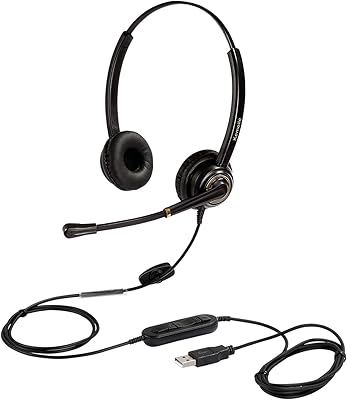
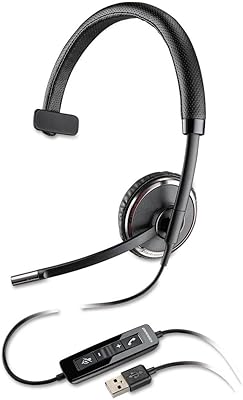
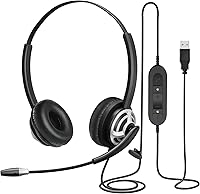
The MAIRDI M805DUC USB Headset sits in an interesting spot — built tough enough to handle daily professional use, but priced well below the Jabra and Plantronics tier that most call centers default to. Plug it into any USB port on Windows or Mac and it's ready to go; no driver installation, no configuration headaches. The stainless steel headband and Kevlar-reinforced cable are details you wouldn't expect at this price point — they signal that Mairdi was thinking about longevity, not just spec sheets. The binaural over-ear design with memory foam cushions makes a real difference when you're wearing it for six or eight hours straight.
Features & Benefits

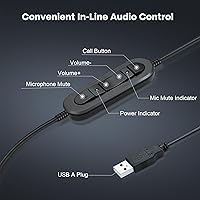
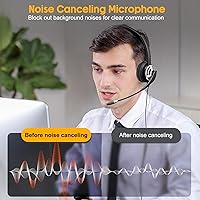
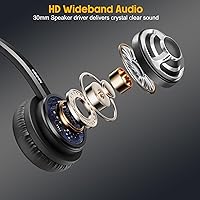
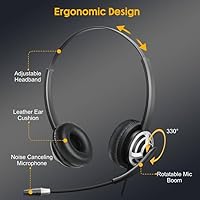
The microphone arm rotates a full 330 degrees, so you can position it for left- or right-ear wearing without any awkward adjustment. What sets this USB headset apart from cheaper options is the built-in DSP noise-reduction sound card — it handles echo suppression at the hardware level rather than relying on software, which means cleaner audio regardless of what app you're on. The inline control box puts volume and mute right at your fingertips, genuinely useful when you need to cut your mic mid-sentence. Wideband audio keeps voice quality sharp on both sides of the call. There's also an anti-acoustic-shock circuit that prevents sudden loud sounds from spiking through your ears — a small but practical feature for high-volume call environments.

Best For

This call center headset was clearly designed with full-time voice workers in mind. If you're on back-to-back calls for hours at a stretch, the combination of a padded headband and soft ear cushions keeps things tolerable. It's also a strong pick for anyone using Dragon voice recognition software — the clean microphone input makes a noticeable difference in transcription accuracy compared to a basic built-in mic. Remote workers jumping between Teams, Zoom, and Skype will appreciate that it just works across platforms without fiddling. It's not trying to compete with Jabra's top-tier models; this is the right headset for someone stepping up from a flimsy budget option who needs something that will hold up to daily office use without overspending.

User Feedback

Buyers consistently highlight mic clarity as the standout feature — particularly those using it with Dragon, who report noticeably fewer recognition errors after switching from a standard headset. The noise cancellation handles steady background noise like HVAC hum and keyboard clatter reasonably well, though it won't fully block out an open-plan office during a loud afternoon. On the downside, some users mention that the headband clamps a bit tightly during the first few days, though most say it loosens up with use. The Kevlar cable earns real appreciation from people who've destroyed cheaper cords in busy workspaces. Long-term owners — those using the Mairdi headset daily for a year or more — generally report it holds together well, with the two-year warranty offering extra peace of mind.

Pros

  • Hardware-level DSP echo suppression keeps calls clean without relying on software fixes.
  • Dragon NaturallySpeaking users report measurably better transcription accuracy with this USB headset.
  • Kevlar-reinforced cable holds up to daily snagging from chair wheels and tight desk setups.
  • Stainless steel headband feels genuinely durable compared to all-plastic alternatives at this price.
  • Plug-and-play USB setup works immediately on Windows and Mac with zero driver installation.
  • Inline mic mute and volume control are positioned conveniently for mid-call adjustments without fumbling.
  • Memory foam ear cushions make extended wear sessions noticeably more tolerable than firmer options.
  • Wideband audio gives voices a natural, clear quality on both ends of a call.
  • Two-year warranty provides real peace of mind for daily professional use.
  • Compatible out of the box with Teams, Zoom, Skype, and Cisco Jabber without extra configuration.

Cons

  • Headband clamping pressure is firm and can cause discomfort during the first week of regular use.
  • No wireless or Bluetooth option limits movement for users who need to step away from their desk.
  • Ear cushion leather is not easily replaceable as a standard spare part, complicating long-term upkeep.
  • Noise cancellation handles steady hum well but struggles when nearby voices or dynamic noise spikes occur.
  • The mic boom arm cannot extend far enough for users who prefer a chin-level microphone position.
  • Cable length may fall short for desktop tower users with their PC positioned on the floor.
  • No mute status indicator means users occasionally have to check the control box to confirm mic state.
  • Some plastic components on the control box feel inconsistent with the quality of the metal headband.
  • Audio playback is flat and voice-tuned, making it a poor choice for music or multimedia listening.
  • Mic arm hinge can loosen noticeably after many months of daily repositioning.

Ratings

The MAIRDI M805DUC USB Headset scores below are generated by AI after analyzing thousands of verified global user reviews, with spam, bot-submitted, and incentivized feedback actively filtered out. This call center headset earns strong marks in several key areas, but the ratings also reflect real friction points that buyers consistently flag — nothing has been smoothed over. Whether you are deciding between this and a pricier brand or simply want to know what daily use actually feels like, the breakdown below covers both sides honestly.
Microphone Clarity
88%
Users who rely on this USB headset for Dragon NaturallySpeaking consistently report a meaningful drop in recognition errors compared to basic laptop mics or budget alternatives. On calls, callers on the other end regularly comment on how clear and present the voice sounds, even in moderately noisy home offices.
In louder open-plan environments — think a busy call center floor during peak hours — the mic starts to pick up more ambient chatter than users would like. It handles steady background hum well, but dynamic noise like sudden conversations nearby is a different story.
Noise Cancellation
79%
21%
The hardware-level DSP processing does a solid job suppressing consistent background noise like HVAC systems, fan hum, and keyboard clicks. Buyers upgrading from software-only noise cancellation solutions notice the difference immediately, especially during long conference calls.
Expectations need to be calibrated here — this is not isolation-grade cancellation. Voices, TV audio, and unpredictable noise break through more than some buyers anticipate, and a few users coming from premium Jabra or Plantronics units found the performance noticeably less aggressive.
Comfort & Wearability
82%
18%
The memory foam ear cushions with protein leather covering are genuinely soft, and the headband adjusts smoothly across different head sizes. Most buyers who wear this headset for six or more hours a day report no significant ear fatigue or heat buildup, which is not a given in this price range.
Headband clamping pressure is the most common complaint, particularly during the first week of use. Buyers with larger heads or those sensitive to pressure on the crown report discomfort sooner, and while it does loosen with time, the break-in period frustrates some users.
Build Quality
86%
The stainless steel headband and Kevlar-reinforced cable are standout construction choices that users notice and appreciate, especially those who have burned through flimsy cords in busy workspaces. The overall feel is noticeably more substantial than what you'd expect at this price tier.
Some plastic components on the control box and mic arm feel a step below the headband quality, creating a slight inconsistency in the overall build. A small number of long-term users report the mic arm hinge loosening after many months of daily repositioning.
Audio Playback Quality
77%
23%
For voice calls and video conferencing, the audio reproduction is clear and well-balanced — voices come through naturally without a tinny or hollow character. Wideband audio support makes a genuine difference in how natural remote conversations feel during long stretches.
This is a communication headset, not a music headset, and the audio profile reflects that. Users who occasionally use it for background music or multimedia find the sound somewhat flat, with limited bass response that would disappoint anyone expecting a richer listening experience.
Plug-and-Play Compatibility
93%
Across Windows 10, Windows 11, and Mac OS X, buyers almost universally report zero setup friction — plug it in and it is recognized and ready within seconds. Compatibility with Teams, Zoom, Skype, and Cisco Jabber is consistently confirmed with no additional configuration needed.
A small number of users on older Windows 7 systems or certain Linux distributions report detection issues, though these cases are rare. On a handful of USB hubs with underpowered ports, volume levels can run lower than expected.
Inline Controls Usability
84%
The inline control box placement and the tactile difference between the volume dial and mute button make it easy to mute quickly mid-conversation without looking down. Call center users in particular value the dedicated mute function as a daily-use essential rather than an afterthought.
The control box is not always easy to locate by feel if the cord shifts position during the day, and a few users wish the mute button had an audible click or LED indicator to confirm status. The volume dial range could also be wider at the low end for quieter environments.
Cable Durability
89%
The Kevlar-wrapped cord is one of the most praised practical details among long-term users. People working in environments where chair wheels and cable snagging are daily hazards report the cord holding up significantly better than previous headsets they have owned.
The cable length works well for desktop setups, but a few users with tower PCs placed on the floor find it slightly short for comfortable reach. There is no coiled or retractable option, so cable management on a cluttered desk can become an issue.
Microphone Positioning Flexibility
81%
19%
The 330-degree rotating mic arm is practical for both left- and right-ear configurations, and users who switch wearing sides throughout the day find the adjustment smooth and reliable. It holds its position well once set without creeping out of alignment.
The mic arm's range, while wide, does not extend far enough for users who prefer positioning the microphone closer to their chin rather than near the corner of the mouth. A slightly longer boom arm would give more precise placement options.
Value for Money
91%
Measured against what similarly priced headsets offer, the Mairdi headset punches above its weight on both hardware build and audio performance. Buyers who previously owned entry-level headsets consistently describe it as a clear step up, and even some coming from mid-tier competitors are satisfied with the trade-off.
Against Jabra or Plantronics options in the next price tier, the gap in mic processing and comfort refinement becomes noticeable for the most demanding users. If your work demands eight-plus hours daily in a high-noise environment, spending more may still be the right call.
Voice Recognition Performance
87%
Dragon NaturallySpeaking users are one of the most vocal and consistent fan groups for this headset. The clean mic input translates directly into higher dictation accuracy, with several users reporting a drop in correction time after switching from generic headsets or built-in microphones.
Performance with voice recognition depends heavily on the recording environment. In noisier rooms, even with DSP active, some users report slightly more correction passes needed compared to using the headset in a quiet, treated space.
Echo & Feedback Suppression
83%
The hardware-based echo suppression is a practical advantage over headsets that rely solely on conferencing software to manage feedback. On long group calls, participants on the other end rarely report hearing their own voice reflected back, which is a persistent issue with cheaper options.
In rare cases with certain VoIP software configurations, users report a slight reverb artifact that the onboard sound card does not fully eliminate. It is not a widespread issue but it does appear in enough reviews to be worth noting for sensitive call environments.
Headset Weight & Portability
78%
22%
At 4.4 ounces, the headset sits light enough on the head that most users stop noticing the weight after a few minutes. It folds compactly enough to drop into a laptop bag without requiring a dedicated case or separate storage solution.
The lack of an included carrying case means the headset gets tossed loosely into bags during commutes, and the mic arm is vulnerable to being bent out of alignment in transit. A soft pouch would have been an easy inclusion at this price point.
Long-Term Durability
74%
26%
Users who have owned the Mairdi headset for a year or longer generally report that the core functionality — mic quality and cable integrity — holds up under daily professional use. The two-year warranty provides meaningful reassurance and Mairdi's support response is described as responsive in most accounts.
Some wear on the ear cushion leather and occasional loosening of the mic hinge start to appear around the one-year mark for heavy users. The cushions are not easily replaceable as a standard spare part, which is a longer-term ownership consideration.

Suitable for:

The MAIRDI M805DUC USB Headset is built for people whose work revolves around voice — whether that means managing a full day of customer calls, running back-to-back video meetings, or dictating documents using Dragon NaturallySpeaking. Remote workers operating from home offices with moderate background noise will find the DSP hardware processing genuinely useful, particularly if their previous setup was a basic laptop mic or a flimsy budget headset. Call center agents who need a reliable, durable option that survives a shared-desk environment and daily cable stress will appreciate the Kevlar cord and stainless steel headband more than most. It is also a smart pick for anyone stepping up their setup for Teams, Zoom, or Skype use without committing to the price premium that Jabra or Plantronics command. If clean mic input for voice recognition accuracy matters to you, this headset consistently delivers results that noticeably reduce correction time during dictation sessions.
Not suitable for:

The MAIRDI M805DUC USB Headset is not the right tool for every situation, and being honest about that matters. If you work in a loud, open-plan office where multiple conversations are happening around you simultaneously, the noise cancellation here will take the edge off but will not give you the controlled isolation that a higher-end headset provides. Users who need a wireless solution — whether for freedom of movement around a workspace or simply to avoid cord management — should look elsewhere, as this is strictly a wired USB device with no Bluetooth option. Music listeners or anyone who expects rich, full-range audio playback will find the sound profile too voice-optimized for casual listening. Buyers with larger heads or a low tolerance for headband pressure during the first weeks of ownership may find the initial fit uncomfortable before it breaks in. And if you are already accustomed to the refined mic processing and premium build of a Jabra Evolve or Plantronics Voyager, this call center headset will feel like a step down in finish and acoustic performance, even if the practical gap is smaller than the price difference suggests.
Specifications

  • Model Number: This headset is identified by the model designation M805DUC, manufactured by Xiamen Mairdi Electronic Technology Co. Ltd.
  • Connection Type: Connects via a standard USB-A wired interface with no audio jack or Bluetooth — power and audio are both handled through the single USB connection.
  • Wearing Style: Binaural over-ear design that covers both ears, with a fully adjustable headband to accommodate different head sizes.
  • Driver Type: Equipped with dynamic audio drivers that prioritize voice frequency reproduction for clear, natural-sounding call audio.
  • Microphone: Features a unidirectional noise-canceling microphone mounted on a 330-degree rotatable boom arm, allowing positioning on either the left or right side.
  • Sound Card: Includes a built-in DSP (Digital Signal Processing) noise-reduction sound card in the inline control box that handles echo suppression at the hardware level.
  • Special Circuitry: An anti-acoustic-shock circuit is integrated to automatically limit sudden loud audio spikes, protecting the user's hearing during extended wear.
  • Audio Standard: Supports wideband audio (HD voice) for improved voice clarity and a more natural listening experience on both ends of a call.
  • Inline Controls: The control box on the cable includes a rotary volume dial and a dedicated mic mute button for quick, mid-call adjustments without touching the connected device.
  • Cable Construction: The USB cable is reinforced with Kevlar fiber throughout its length to resist fraying, snagging, and damage from chair wheels or sharp desk edges.
  • Headband Material: The headband frame is constructed from stainless steel with an adjustable sliding mechanism, providing structural rigidity and resistance to bending over time.
  • Ear Cushions: Cushions are made from memory foam padded with protein leather (synthetic), designed for extended wearing sessions with minimal heat buildup or pressure fatigue.
  • Weight: The complete headset weighs 4.4 ounces (approximately 125 grams), light enough for all-day professional use without noticeable neck or head strain.
  • Dimensions: Packaged dimensions measure 7.3 x 6.5 x 2.2 inches, reflecting a compact form factor suited to desktop storage or travel in a laptop bag.
  • Compatibility: Works plug-and-play on Windows (7 through 11) and Mac OS X, and is confirmed compatible with Microsoft Teams, Zoom, Skype, Skype for Business, Cisco Jabber, and Lync.
  • Water Resistance: This headset carries no water resistance rating and is not designed for use in wet conditions or outdoor environments exposed to moisture.
  • Warranty: Covered by a 2-year manufacturer warranty against defects, backed by Xiamen Mairdi Electronic Technology Co. Ltd.
  • In Box Contents: The package includes the headset unit itself and replacement ear cushions; no carrying case or USB adapter is included.
  • Noise Control Method: Noise isolation is achieved through a combination of the closed over-ear physical design and the onboard DSP hardware processing rather than active noise cancellation circuitry.
  • Intended Use: Specifically designed for professional voice applications including call center work, video conferencing, VoIP calls, and speech-to-text dictation software such as Dragon NaturallySpeaking.

Related Reviews
MAIRDI 816 Pro USB Headset
87%
88%
Sound Quality
91%
Comfort for Long Use
85%
Noise Cancellation
80%
Microphone Clarity
92%
Ease of Setup
More
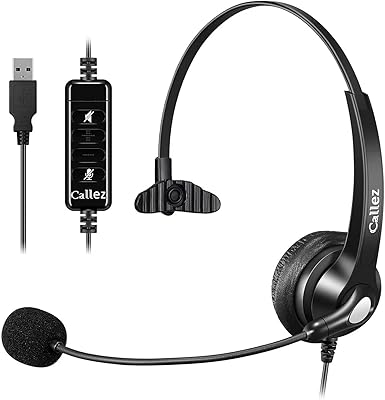
Callez C500U2 USB Headset
79%
84%
Microphone Clarity
88%
Wearing Comfort
63%
Build Quality & Durability
71%
Audio Playback Quality
54%
Noise Cancellation (Listener Side)
More
Yealink UH37
Yealink UH37
79%
86%
Microphone Clarity
63%
Noise Cancellation
74%
Comfort for Extended Use
81%
Build Quality
91%
USB Compatibility
More
KEMEILE KML02DUSB USB Headset
85%
88%
Audio Quality
91%
Comfort for Long Use
85%
Noise-Cancelling Performance
84%
Microphone Clarity
72%
Build Quality
More
Logitech H540
Logitech H540
78%
83%
Microphone Clarity
78%
Comfort & Fit
74%
Audio Quality
61%
Build Quality & Durability
94%
Plug-and-Play Convenience
More
Logitech H390 USB Computer Headset
83%
86%
Microphone Voice Clarity
93%
Value for Money
97%
Ease of Setup
68%
Long-Term Comfort
82%
In-Line Control Tactility
More
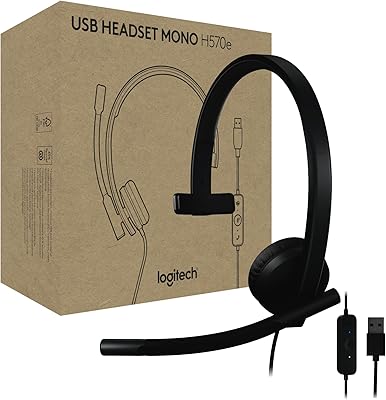
Logitech H570e USB Headset
84%
87%
Audio Quality
91%
Comfort for Long Sessions
88%
Noise-Canceling Microphone Performance
94%
Ease of Setup
82%
Build Quality
More
MAIRDI M809GQD002R Phone Headset
86%
91%
Comfort for Extended Wear
89%
Noise Cancellation Performance
84%
Durability and Build Quality
87%
Compatibility with Devices
81%
Sound Quality
More
Logitech USB Headset Mono H650e
86%
88%
Audio Clarity
90%
Comfort for Extended Use
86%
Noise Cancellation
95%
Setup and Installation
82%
Build Quality
More
LEVN UH002 USB Headset
76%
83%
Microphone Clarity
91%
Ease of Setup
67%
Comfort During Extended Use
61%
Build Quality & Durability
88%
Value for Money
More

FAQ

It is fully plug-and-play on both Windows and Mac. You just plug it into a USB port and your computer recognizes it as an audio device within a few seconds — no driver downloads, no setup wizard, nothing to configure. Most people are on a call within a minute of opening the box.

Yes, and this is actually one of the stronger use cases for the Mairdi headset. The directional noise-canceling microphone delivers a cleaner input signal than most built-in laptop mics or basic headsets, which directly affects how accurately Dragon interprets your speech. Users who switch to this headset from generic options typically report fewer correction passes needed during dictation sessions.

It handles consistent background noise well — think HVAC hum, desk fans, or ambient keyboard noise. Where it starts to struggle is with dynamic, unpredictable sounds like nearby conversations or sudden loud noises. It is better described as strong noise reduction rather than full noise isolation, so if you are working in a very loud open-plan office, manage expectations accordingly.

Yes. The boom arm rotates 330 degrees, so you can swing it to whichever side feels more natural or matches your preferred wearing position. It holds its angle once set without drifting during a call, which is a practical detail that cheaper headsets often get wrong.

This is one of the more common early complaints, and yes, it is normal. The headband is stainless steel and does require a short break-in period — most users find it loosens to a comfortable fit within the first week of regular use. If you have a larger head or are particularly sensitive to pressure, it may take a bit longer to feel fully comfortable.

The headset connects as a standard USB audio device, so whichever application is set as the default audio input and output in your system settings will use it. Switching between Teams and Zoom is just a matter of selecting it as the audio device in each app — you do not need to physically reconnect anything.

The cable is approximately 7 to 8 feet long, which covers most standard desktop setups comfortably. Where it can feel short is if your USB port is on a tower PC sitting on the floor rather than on a desk. In that scenario, you may want a short USB extension cable to give yourself more comfortable reach.

The cushions are memory foam covered with protein leather, which is a synthetic material that stays soft and does not crack easily. They do wear with heavy daily use over time. Replacement cushions are not sold as a widely available spare part through major retailers, so if cushion replacement is important to you long-term, it is worth noting as a potential limitation.

Unfortunately, no — the mute button on the inline control box does not include an LED indicator or an audible confirmation tone. You have to physically check the button position or verify mute status in your software. It is a genuine usability gap that a few users flag, particularly those who switch between muted and unmuted frequently during calls.

Honestly, this call center headset competes well on build quality and mic clarity for its price tier, but the gap to a Jabra Evolve or Plantronics Voyager series is real. The higher-end brands offer more refined mic processing, better noise isolation, and softer long-term comfort out of the box. If you are upgrading from a cheap headset, this will feel like a meaningful improvement. If you are already using a premium headset and considering switching down to save money, you will likely notice the difference in demanding audio environments.