Overview

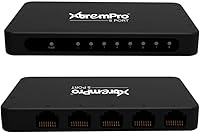
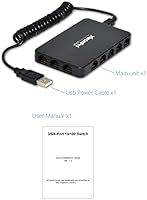
The XtremPro 61026 8-Port Network Switch Hub is a no-fuss wired networking solution built for anyone who has run out of Ethernet ports and just needs more — without spending a lot. At only 3 ounces and roughly the size of a paperback spine, this little switch tucks neatly behind a desk or on a shelf without demanding attention. It draws power directly from a USB port, so there is no wall adapter to hunt for. Supporting 10/100Mbps auto-negotiation across all eight RJ45 ports, it handles everyday wired traffic with minimal setup required.

Features & Benefits

Plug it in and it works — that is genuinely the experience most buyers will have with the 8-port hub. Each port independently auto-detects speed and duplex mode, so you are not manually configuring anything. The hub supports IEEE 802.3 and 802.3u standards, which means broad compatibility with practically any device that has an Ethernet port. Flow control on full-duplex connections and back-pressure on half-duplex help keep traffic moving cleanly under moderate load. The USB-powered design is convenient, though it does depend on your host device supplying enough current — something worth checking on older hardware.

Best For

This USB-powered switch genuinely shines in lower-demand environments. A student running a desktop, a printer, and a streaming stick from a single dorm wall port will find it completely adequate. Home office users sharing a single router port between a PC and a NAS drive will appreciate the instant expansion. Gamers who want stable wired connections for a console and a laptop at the same time will get that here. Where it falls short is in bandwidth-heavy professional settings — if you are pushing large file transfers regularly, a gigabit-capable switch would serve you better.

User Feedback

Buyer opinions on this little switch land at a mixed 3.7 out of 5 across 83 ratings, which is worth taking seriously. Those who like it tend to highlight how effortlessly it set up and how little space it occupies. Critics, however, raise fair concerns — a handful report inconsistent connectivity after extended use, and a few noted the USB power draw was insufficient on certain host ports, causing the hub to behave unpredictably. For the price, many buyers consider it a reasonable short-term fix, but those needing rock-solid long-term reliability may want to weigh their options carefully before committing.

Pros

  • Zero configuration needed — plug it in and all eight ports are live within seconds.
  • USB power means one less wall adapter cluttering your power strip.
  • Compact enough to hide behind a monitor or sit flat under a desk without taking up real estate.
  • Works with a wide range of devices including consoles, cameras, printers, and laptops right out of the box.
  • Solid choice for dorm or rental setups where carrying a lightweight network expander makes sense.
  • For light everyday tasks like browsing and video calls, performance is consistent and reliable.
  • The silent fanless operation makes it a good fit for bedrooms and quiet workspaces.
  • Status LEDs on each port make it easy to confirm a cable connection is live at a glance.
  • At its price tier, it offers a low-risk entry point for anyone new to wired home networking.

Cons

  • The 100Mbps speed limit is a real bottleneck for anyone moving large files or streaming high-bitrate local media.
  • Build quality feels noticeably lightweight — the thin plastic shell does not inspire long-term confidence.
  • USB power delivery failures on older or low-output host ports can cause silent, hard-to-diagnose dropouts.
  • Several buyers reported units becoming unreliable after six to twelve months of daily use.
  • No mounting holes or bracket means keeping it in place with eight cables attached requires some improvisation.
  • The LEDs are dim enough that they are difficult to read under bright desk lighting.
  • Heat can accumulate during extended continuous use due to the compact, ventilation-limited chassis.
  • The tight port spacing makes fitting multiple thick or locking Ethernet connectors side by side awkward.

Ratings

The scores below for the XtremPro 61026 8-Port Network Switch Hub were generated by our AI system after analyzing verified purchase reviews from buyers worldwide, with spam, bot-driven, and incentivized feedback actively filtered out. We looked at real usage patterns — home offices, dorm rooms, small desks — to surface what genuinely works and what frustrates. Both the strengths and the friction points are reflected here without sugarcoating.

Ease of Setup
91%
Buyers consistently note that this little switch requires zero configuration — you plug it in and devices connect within seconds. For non-technical users who just need more ports without reading a manual, that plug-and-play experience is a genuine relief.
A small number of users on older machines reported that their USB host port did not deliver enough power, causing the switch to fail silently on first use. That edge case can feel confusing if you do not know what to look for.
Build Quality
58%
42%
The lightweight plastic shell is compact enough to hide behind a monitor stand or tape under a desk, which several home office users appreciated. For light daily use, the chassis holds up reasonably well in the short term.
The housing feels noticeably thin, and multiple buyers described a flimsy quality that made them skeptical of long-term durability. A few reported the unit stopped responding after several months of continuous use, raising questions about component reliability.
Port Count & Layout
83%
Eight ports is a practical number for most home and small office needs — enough to connect a desktop, laptop, printer, NAS, and console without juggling cables. The layout keeps ports accessible and evenly spaced.
The ports sit close together, which can make fitting multiple thick Ethernet cables slightly awkward. Users with bulkier connectors noted that adjacent cables sometimes created a tight squeeze.
Network Speed Performance
61%
39%
For everyday tasks like web browsing, video calls, and printer sharing, the 100Mbps ceiling is more than sufficient. Users running light home networks reported perfectly acceptable performance for their daily workloads.
Anyone moving large files between network drives or streaming 4K locally will hit the 100Mbps cap quickly — and buyers who upgraded from this hub to a gigabit switch described a noticeable difference. It is a real limitation worth understanding before buying.
USB Power Reliability
64%
36%
The USB-powered design is genuinely convenient for setups where a spare wall outlet is hard to find. Dorm users and those working from small desks particularly valued not needing yet another power brick in the mix.
The dependency on USB host output is a meaningful weak point. Several buyers found that USB ports on older routers or low-power hubs did not supply enough current, leading to intermittent disconnections or devices not being recognized at all.
Value for Money
77%
23%
At its price point, this USB-powered switch delivers a functional solution for anyone who simply needs more wired ports without investing in managed networking gear. For casual home use, the cost-to-utility ratio feels fair.
Buyers who experienced reliability issues within a few months felt the value proposition collapsed quickly. If you factor in potential replacement costs, spending modestly more on a better-built alternative starts to make more financial sense.
Compatibility
86%
The 8-port hub worked with every device buyers threw at it — gaming consoles, IP cameras, smart TVs, laptops, and NAS drives all connected without driver installation or firmware adjustments. The broad compatibility is one of its genuine strengths.
A handful of users noted occasional handshake delays when connecting older 10Mbps legacy devices, though this was an infrequent complaint. Most modern hardware connected cleanly with no issues.
Size & Portability
89%
Weighing just 3 ounces with a footprint smaller than a smartphone, this switch is easy to tuck away or carry in a bag for temporary setups. Students moving between dorm rooms and classrooms found it particularly handy.
The compact size does mean the chassis offers minimal ventilation, and users who ran it continuously in warm environments noted occasional warmth build-up, though no thermal failures were specifically reported.
Cable Management Friendliness
67%
33%
The small body means fewer cables need to converge in one place compared to larger switches, which helps keep a desk tidy when only a few devices are connected. Several buyers paired it with short patch cables for a clean look.
With eight ports active simultaneously, cable clutter can become real fast. The unit has no mounting holes or built-in bracket, so keeping it securely positioned while fully cabled requires some creative desk organization.
Longevity & Durability
53%
47%
For short-term or occasional use — a temporary home office setup, a travel kit, or a student semester — the hub holds up adequately. Buyers using it lightly reported no issues within the first few months.
Long-term durability is where this hub draws the most skepticism. A recurring pattern in negative reviews involves units that worked fine initially but became unreliable after six to twelve months of daily use, suggesting the components are not built for extended heavy-duty operation.
LED Indicators
74%
26%
Each port has a status LED that lights up when a device connects and blinks during traffic, which makes it easy to confirm a cable is live without digging into network settings. Useful for quick troubleshooting.
The LEDs are functional but dim in brighter environments, making them harder to read on a well-lit desk. A few buyers also wished there was a clearer visual distinction between 10Mbps and 100Mbps link speeds.
Noise & Heat
82%
18%
The switch runs completely silent — no fan, no audible hum. For bedroom setups or quiet office environments, that passive operation is a minor but genuine quality-of-life benefit that buyers mentioned positively.
As noted elsewhere, the fanless design in a compact shell means warmth can accumulate during extended use. It never reached alarming temperatures in reported cases, but it is something to keep in mind in poorly ventilated spaces.

Suitable for:

The XtremPro 61026 8-Port Network Switch Hub is a practical pick for anyone whose networking needs are straightforward and whose budget is tight. Students living in dorms with a single Ethernet wall port will find it an easy way to wire up a desktop, laptop, and game console simultaneously without relying on spotty Wi-Fi. Home users who want to keep a printer, NAS drive, and a couple of PCs on a stable wired connection — without buying anything complicated — will get real value out of this little switch. It also suits renters or anyone in a temporary setup who needs a portable, low-footprint solution they can tuck in a bag and take with them. If your daily network activity stays within browsing, streaming standard video, video calls, and basic file sharing, the 100Mbps ceiling will not feel like a constraint in practice.

Not suitable for:

Buyers with demanding or professional networking requirements should think carefully before choosing the XtremPro 61026 8-Port Network Switch Hub. Anyone regularly transferring large files between computers or network-attached storage devices will quickly notice the 100Mbps speed cap — a gigabit switch would be a meaningfully better investment at only a modest price difference. The USB-powered design, while convenient, introduces a real dependency on the host port supplying adequate current; older routers, low-power hubs, or certain laptops may not deliver enough, resulting in intermittent disconnections that are frustrating to diagnose. Users who need a switch that runs continuously and reliably for months or years in a production environment should look at more robustly built alternatives, as long-term durability has been a recurring concern among buyers. This USB-powered switch is simply not engineered for 24/7 mission-critical uptime.

Specifications

  • Brand: Manufactured by XtremPro under model number 61026.
  • Ports: Equipped with 8 individual RJ45 Ethernet ports, each operating independently.
  • Max Speed: Each port supports auto-negotiated speeds of 10Mbps or 100Mbps depending on the connected device.
  • Power Source: Draws power exclusively via a standard USB connection, requiring no dedicated wall adapter.
  • Duplex Mode: Each port automatically detects and configures half or full duplex operation without manual input.
  • Flow Control: Supports IEEE 802.3x flow control on full-duplex connections and back-pressure on half-duplex to reduce packet loss.
  • Standards: Compliant with IEEE 802.3 (10BASE-T) and IEEE 802.3u (100BASE-TX) networking standards.
  • Connector Type: All ports use the RJ45 connector format, compatible with standard Cat5e, Cat6, and Cat7 Ethernet cables.
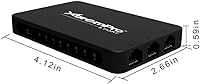
  • Dimensions: The unit measures 4.9 x 1.6 x 3.1 inches, making it compact enough for desk or shelf placement.
  • Weight: Weighs just 3 ounces, making it one of the lightest 8-port switches in its category.
  • Color: Available in black with a matte plastic finish.
  • Operation Mode: Fully automatic — no software installation, drivers, or manual configuration are required.
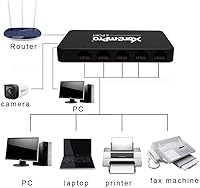
  • Compatible Devices: Works with desktops, laptops, routers, printers, gaming consoles, IP cameras, smartphones, and tablets.
  • Cooling System: Fanless passive design with no moving parts, resulting in completely silent operation.
  • Indicator LEDs: Each port has a dedicated status LED that confirms link activity and data transmission.
  • Item Count: Sold as a single unit accompanied by a user manual.
  • GTIN: Global Trade Identification Number is 04897054363177.
  • Availability: Has been available on the market since August 2017 and is not listed as discontinued by the manufacturer.

Related Reviews
HPE Instant On 1930 8-Port PoE Switch
83%
91%
Ease of Setup
83%
Management App Quality
74%
PoE Performance
88%
Build Quality
72%
Value for Money
More
HPE Instant On 1430 8G Unmanaged Switch
83%
96%
Ease of Setup
93%
Reliability & Uptime
97%
Noise & Acoustic Performance
88%
Port Performance & Speed
84%
Value for Money
More
HPE Instant On 1830 8-Port PoE Switch
82%
91%
Ease of Setup
74%
PoE Performance
88%
Build Quality
77%
Management Software
83%
Value for Money
More
TP-Link TL-SG108-M2 8-Port 2.5G Unmanaged Switch
81%
93%
Network Performance
97%
Ease of Setup
89%
Build Quality
74%
Thermal Management
81%
Value for Money
More
Zyxel GS1200-8 8-Port Gigabit Managed Switch
82%
88%
Ease of Setup
83%
Web Interface Usability
79%
Build Quality
97%
Noise Level
81%
VLAN Performance
More
D-Link DES-1008PA 8-Port PoE Fast Ethernet Switch
82%
94%
Ease of Setup
88%
PoE Port Reliability
91%
Build Quality & Durability
58%
Network Speed & Throughput
97%
Noise Level
More
Reidubo 8-Port 10G Unmanaged Network Switch
76%
83%
Real-World Throughput
91%
Ease of Setup
61%
Fan Noise
78%
Build Quality
86%
SFP+ Port Utility
More
YuanLey 8-Port 10G Unmanaged Ethernet Switch
80%
93%
Setup & Ease of Use
89%
Throughput Performance
86%
Build Quality
88%
Value for Money
71%
Fan Noise & Acoustics
More
YuLinca 8-Port 10G Managed Network Switch
79%
92%
Port Speed & Auto-Negotiation
89%
Throughput & Switching Performance
88%
Build Quality & Chassis
71%
Web Management Interface
86%
L2 Feature Set Depth
More
Cqenpr 8-Port 120W Outdoor Gigabit PoE Switch
80%
93%
Ease of Installation
88%
Weatherproof Durability
84%
PoE Power Delivery
79%
AI Watchdog Reliability
82%
Surge & Lightning Protection
More

FAQ

No, not at all. The XtremPro 61026 8-Port Network Switch Hub is fully plug-and-play. You connect it via USB for power, run your Ethernet cables into the ports, and your devices will detect the network connection automatically. There is nothing to configure.

In theory yes, but it depends on how much current your router's USB port outputs. Some routers provide enough power, while others — especially older models — do not supply sufficient amperage for the hub to run reliably. If you notice dropouts or devices not being recognized, try powering it from a computer or a USB wall charger instead.

For most gaming scenarios — reducing Wi-Fi interference, wiring up a console and a PC at the same time — it performs adequately. The 100Mbps cap is not a problem for online gaming since typical game traffic uses a fraction of that bandwidth. That said, if you experience any instability over time, the USB power source is usually the first thing to investigate.

For everyday tasks like web browsing, video calls, streaming, and light file sharing, 100Mbps is genuinely fine. Where it becomes a real limitation is if you regularly transfer large files between devices on the same network — moving a 10GB file locally will feel noticeably slow. If that sounds like your use case, spending a bit more on a gigabit switch is worth it.

The exact power draw is not officially published, but USB-powered switches in this class typically require around 500mA at 5V. Most modern computers and USB wall chargers handle that comfortably. The issue arises with low-current USB ports on older hardware, which may not supply enough to keep all 8 ports running reliably under load.

Yes, you can daisy-chain it by connecting one port to an existing switch or router. Just keep in mind that all traffic will still be limited to 100Mbps on this hub's side of the connection, so it is best suited for lower-bandwidth devices in that scenario.

It runs warm rather than hot during normal use, which is expected for a fanless design in a small chassis. Most buyers have not reported any heat-related failures, but if you are placing it in an enclosed space or leaving it on continuously, making sure there is some airflow around it is a sensible precaution.

Any standard Cat5e cable or better will work fine, including Cat6 and Cat7. Since the hub maxes out at 100Mbps, you will not see any benefit from higher-spec cables beyond clean signal integrity, but they are all compatible.

It is fully unmanaged, which means there are no VLANs, QoS settings, or admin interfaces to deal with. That is actually a benefit for simple home and small office setups where you just want devices to connect and communicate without any configuration overhead.

This is probably the most honest thing to flag: the short-term experience is generally positive, with most users finding setup easy and early performance acceptable. However, a recurring pattern in buyer reviews points to units becoming less reliable after several months of continuous daily use. If you need something for occasional or temporary use, it tends to hold up well — for permanent always-on deployment, the durability track record is less reassuring.

Where to Buy