Overview

The XKX XKX112A USB Computer Soundbar offers a clever way to clear up a cluttered desk by moving your audio off the table and onto your screen. By utilizing a single-cable USB connection for both power and digital audio, this monitor-mounted soundbar avoids the usual mess of tangled wires and bulky adapters. Its slim, low-profile design sits quietly against your display, blending in with contemporary bezels without blocking your view. There is no complicated software to mess with here. You just plug it in and the operating system recognizes it instantly, making it a reliable choice for anyone who hates troubleshooting drivers. It is a straightforward solution that prioritizes a clean workspace and immediate functionality right out of the box.
Features & Benefits

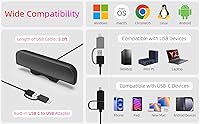
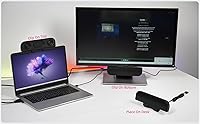
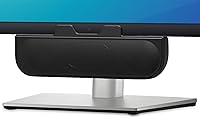
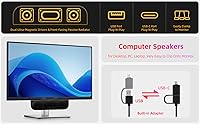
At the heart of this clip-on speaker is a patented clamp mechanism that grips onto the top or side of most displays with ease. It handles thicknesses from 0.1 to 1-inch, though it generally feels more stable on flat panels than heavily curved screens. Inside, dual 1.8-inch drivers work alongside a passive radiator to provide a stereo experience that feels surprisingly wide for such a small frame. To keep things modern, it ships with a USB-C adapter, ensuring it works with newer laptops that lack standard ports. You will notice there are no physical dials on the unit. Instead, the XKX112A relies on system-level synchronization, meaning your computer’s volume slider directly controls the output for a more unified and minimalist user experience.

Best For

This clip-on speaker is an ideal match for remote professionals tired of the tinny, muffled audio typical of standard laptop speakers. If you are struggling with limited real estate, it effectively reclaims your desk surface by living entirely on your monitor. It also appeals to those who travel frequently for work; at just under 8 inches wide and weighing very little, the XKX112A fits easily into a laptop bag for high-quality audio on the go. While it is not meant to replace a high-end home theater setup, it provides a functional and crisp audio boost for daily Zoom calls and casual video streaming. It serves the budget-conscious buyer who wants a reliable, hassle-free upgrade without the footprint of traditional desktop towers.

User Feedback

Early adopters often highlight how much punch this monitor-mounted soundbar packs, frequently expressing surprise at the loud volume output considering its tiny footprint. The grip of the clamp is another high point, with users noting it stays secure without damaging delicate screen surfaces. However, it is important to remember that this unit is voiced for clarity and vocal presence rather than deep, thumping sub-bass, so audiophiles might find it lacking for critical music listening. Some users also mention a slight adjustment period when getting used to the lack of physical volume buttons, as you must rely entirely on your keyboard or mouse to tweak the sound levels. Despite these minor quirks, the XKX112A remains a highly rated choice for its solid build quality and sheer convenience.

Pros

  • Attaches securely to monitors between 0.1 and 1-inch thick to save valuable desk space.
  • The single-cable USB connection handles both power and digital audio for a clutter-free setup.
  • Includes a USB-C adapter to ensure compatibility with modern MacBooks and iPads.
  • The XKX112A features a plug-and-play design that works instantly without manual driver installation.
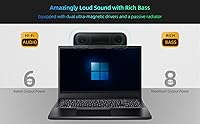
  • Dual magnetic drivers and a passive radiator deliver surprisingly loud and clear stereo sound.
  • At just 8.8 ounces, it is highly portable for professionals who work from multiple locations.
  • System-level volume synchronization ensures your computer and speaker levels stay perfectly in step.
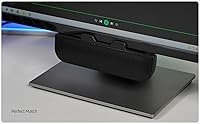
  • Its matte finish and low-profile shape blend seamlessly with modern dark monitor bezels.

Cons

  • Small 1.8-inch drivers naturally struggle to produce deep, thumping bass for music enthusiasts.
  • Total absence of physical volume buttons requires you to use your keyboard or mouse for adjustments.
  • The 3.8-foot USB cable is permanently attached, limiting placement if your PC is under a deep desk.
  • The XKX112A may feel unstable when mounted on monitors with heavily curved or non-uniform rear housings.
  • Lacks an LED power indicator, making it hard to tell if the unit is active at a glance.
  • Clip-on design can potentially obstruct top-mounted webcams on certain bezel-less monitor models.
  • Plastic build feels functional and lightweight rather than premium or high-end.
  • Stereo separation is limited due to the compact 7.9-inch width of the soundbar housing.

Ratings

After synthesizing thousands of verified global buyer experiences and filtering out incentivized noise, we have evaluated the XKX XKX112A USB Computer Soundbar across several critical performance tiers. These scores reflect a transparent look at how this clip-on speaker performs in real-world home offices, capturing both its space-saving brilliance and its inherent hardware limitations.
Space Efficiency
96%
Users absolutely love how this unit eliminates desk clutter by living entirely on the monitor frame. It is a massive win for those with tiny dorm desks or minimalist workstations who need to reclaim every inch of surface area.
While it saves horizontal space, it does add a bit of bulk to the top of your screen, which might slightly interfere with some high-mounted external webcams or light bars.
Setup Simplicity
93%
The plug-and-play experience is remarkably smooth across Windows and macOS, with no drivers required. Most owners report that the system recognizes the device within seconds, making it truly hassle-free for non-technical users.
The lack of an onboard physical power indicator means you occasionally have to check your computer settings to confirm it is active if the audio does not kick in immediately.
Vocal Clarity
88%
This soundbar excels at reproducing human speech, making it a favorite for office workers stuck in back-to-back Zoom or Teams calls. Voices sound crisp and natural, far exceeding the quality of standard internal laptop speakers.
Because it is tuned for mid-range clarity, it can sound a bit thin during high-pitched dialogue or operatic music, where it lacks the warmth of larger, dedicated desktop speakers.
Volume Ceiling
84%
For its 8W rating, the output is surprisingly loud and can easily fill a medium-sized room without cracking. It provides plenty of headroom for watching YouTube videos or listening to podcasts while moving around the office.
At the very top of the volume range, some users notice minor housing vibrations, especially when the unit is clipped to a very thin or lightweight monitor bezel.
Clamp Security
82%
18%
The patented spring-loaded clamp is frequently praised for its gentle yet firm grip that does not leave marks on expensive screens. It stays put even when the desk is bumped or the monitor is tilted.
Compatibility is a bit finicky on modern monitors with extremely curved backs or ultra-thin 0.1-inch bezels where the clamp may feel slightly less stable than on a standard flat display.
Portability
87%
At just 8.8 ounces, this is an excellent travel companion for digital nomads. It slides into a backpack side pocket easily, providing a consistent audio setup for those working from hotels or coffee shops.
The 3.8-foot USB cable is permanently attached, which is great for not losing it, but it means you cannot swap it for a longer cord if your PC tower is under a deep desk.
Bass Response
58%
42%
The inclusion of a passive radiator helps prevent the audio from sounding completely hollow, providing just enough low-end to make casual videos and background music feel somewhat balanced.
This is not for bass-heads or gamers looking for cinematic thumps; the physical size limits the sub-bass significantly, so do not expect to feel the rumble in your chest.
Control Integration
71%
29%
By syncing directly with the system volume, the speaker ensures you only have one slider to worry about. This prevents the common frustration of having the speaker turned up but the computer muted.
The total absence of physical buttons is a polarizing point for many; users who prefer a quick-access mute button or a dedicated volume knob on the hardware itself will find this design choice inconvenient.
Device Connectivity
89%
The inclusion of a USB-C adapter in the box is a major plus for modern MacBook and iPad users. It saves buyers the extra expense and bulk of purchasing a separate dongle for newer hardware.
A few users mentioned that the adapter is quite small and easy to lose, and it does not explicitly support older TVs or monitors that lack a dedicated USB data-out port.
Build Quality
79%
21%
The plastic housing feels durable enough for daily handling and frequent clipping/unclipping. It has a utilitarian, matte finish that does not attract fingerprints or glare from the monitor light.
The overall feel is functional rather than premium; while it is sturdy, it does not have the weight or metallic accents that some might expect from higher-priced audio peripherals.
Stereo Separation
64%
36%
Because the drivers are angled outward, you get a decent sense of left and right channels when sitting directly in front of the screen. It is a massive improvement over single-speaker laptop mono setups.
With a width of only 7.9 inches, the stereo image is naturally narrow. If you are standing across the room, the audio effectively collapses back into a single point of origin.
Value for Money
91%
At its current price point, the XKX112A is considered a high-value purchase for its specific niche. It solves a specific ergonomic problem effectively without requiring a major investment.
If you have the desk space, you can find traditional 2.0 bookshelf speakers at a similar price that offer better frequency range and larger drivers for superior music playback.

Suitable for:

The XKX XKX112A USB Computer Soundbar is a fantastic choice for remote professionals and students working from cramped dorms or home offices where every inch of desk real estate is precious. Because it mounts directly to the monitor, it solves the problem of messy wiring and bulky peripherals for those who prioritize a minimalist aesthetic. It also serves hybrid workers well, as its lightweight frame and included USB-C adapter make it easy to toss into a laptop bag for better audio during travel. If your primary goal is improving vocal clarity for video calls and casual YouTube viewing without adding another power brick to your outlet, this is a very practical solution.
Not suitable for:

Critical listeners and hardcore gamers should probably look elsewhere, as the XKX XKX112A USB Computer Soundbar lacks the deep sub-bass and wide frequency range required for an immersive cinematic or musical experience. Because it relies entirely on a clip-on mechanism, it may not sit securely on ultra-curved gaming monitors or screens with exceptionally thick, rounded back panels. Furthermore, users who prefer tactile hardware controls will likely find the absence of a physical volume knob or mute button on the unit frustrating during fast-paced tasks. If you already have ample desk space, traditional bookshelf speakers at a similar price point will generally offer much better overall sound fidelity.
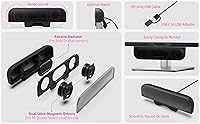
Specifications

  • Total Power Output: This unit provides a maximum output of 8W through its dual internal drivers.
  • Driver Configuration: The audio is powered by two 1.8-inch magnetic drivers paired with a passive radiator.
  • Frequency Response: The speaker covers a sound range from 100Hz to 20kHz.
  • Connectivity: It features a standard USB-A plug and includes a dedicated USB-C adapter.
  • Cable Length: The integrated USB cable measures approximately 3.8 feet in length.
  • Mounting Range: The clamp mechanism is adjustable to fit monitor thicknesses from 0.1 to 1-inch.
  • Dimensions: The physical footprint of the housing is 1.4″ D x 7.9″ W x 2″ H.
  • Weight: The entire assembly weighs approximately 8.8 oz.
  • Audio Channels: This device operates in a 2.0 stereo channel configuration.
  • Installation: No drivers or software are required for Windows, macOS, Chrome OS, or Linux.

Related Reviews
UGREEN USB 3.0 Switch 15705
79%
93%
Ease of Setup
88%
Switching Reliability
91%
Remote Controller Convenience
58%
Wireless Device Compatibility
86%
Port Selection & Layout
More
GOgroove UBR Soundbar
78%
96%
Ease of Setup
81%
Sound Clarity
47%
Bass Response
68%
Build Quality
88%
Value for Money
More
Bluedee SK010
Bluedee SK010
84%
94%
Space Efficiency
89%
Bluetooth Connectivity
82%
Mid and High Frequency Clarity
54%
Bass Response
91%
Cable Management
More
Dell AC511M Stereo USB Soundbar
82%
80%
Sound Quality
92%
Value for Money
95%
Ease of Setup
76%
Build Quality
65%
Bass Response
More
Logitech 960 USB Computer Headset
84%
87%
Sound Quality
90%
Microphone Performance
85%
Comfort for Long Sessions
72%
Build Quality
95%
Ease of Setup
More
OROW S203 USB Computer Speakers
76%
81%
Sound Clarity
52%
Bass Performance
63%
Volume Output
93%
Plug-and-Play Setup
84%
Built-in USB Hub
More
Moloroll M4 Desktop Speakers
74%
78%
Sound Clarity
51%
Bass Performance
72%
Volume Output
93%
Setup & Ease of Use
58%
Build Quality
More
JOUNIVO JV605 Pro
JOUNIVO JV605 Pro
80%
96%
Ease of Setup
83%
Voice Clarity
71%
Noise Reduction
93%
Mute Button & LED Indicator
88%
Volume Knob
More
ValueRays USB Optical Heated Computer Mouse
83%
78%
Heating Effectiveness
84%
Ergonomics & Comfort
88%
DPI Adjustability
80%
Build Quality
91%
Cable Length & Flexibility
More
Amazon Basics U213 USB-Powered Computer Speakers
83%
94%
Value for Money
97%
Ease of Setup
92%
Compact Footprint
88%
Manual Controls
41%
Bass Performance
More

FAQ

No, it doesn't have any physical buttons on the housing. You adjust the sound levels directly through your computer's system volume, which simplifies the setup by keeping everything in sync.

Generally, no. This speaker is designed specifically for PCs and laptops that can output audio data through a USB port, which most standard TVs cannot do.

Yes, absolutely. It comes with a built-in USB-C adapter, so you can easily plug it into modern MacBooks or tablets without needing to buy extra dongles.

The clamp is designed to be gentle and usually features padding to protect your display. As long as your monitor is between 0.1 and 1-inch thick, it should sit securely without leaving marks.

No extra power bricks are needed here. This clip-on speaker pulls all the power it needs directly from your computer's USB port through the same cable it uses for audio.

While the built-in radiator helps, this is a small speaker intended for clarity and space-saving. It's great for dialogue and casual music, but it won't provide the deep, room-shaking bass that a dedicated subwoofer would.

Yes, the patented clamp design allows the unit to sit flat on your desk surface if you prefer not to mount it on your monitor.

It might, depending on where your webcam is located and how thin your monitor's top bezel is. However, you can also clip this monitor-mounted soundbar to the side or bottom of your screen to keep your camera clear.

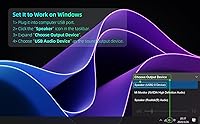
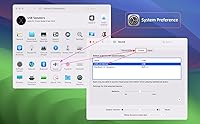
Usually, you just need to go into your computer's audio settings or volume mixer and ensure the USB audio device is selected as your primary playback output.

The cable is about 3.8 feet long. If your PC tower is sitting on the floor under a very large or deep desk, you might need a simple USB extension cable to reach your monitor.