Overview

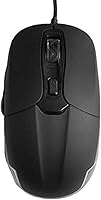
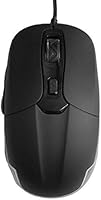
The ValueRays USB Optical Heated Computer Mouse is a unique product designed to provide comfort for users in cold environments. This ergonomic mouse features a USB wired connection, making it easy to set up and use across a variety of devices. Its optical sensor ensures precise tracking, while the heated surface helps to keep your hands warm during long sessions. Ideal for both left- and right-handed users, the ValueRays mouse offers a simple solution to prevent discomfort during extended computer use in chilly conditions.
Features & Benefits

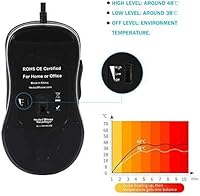
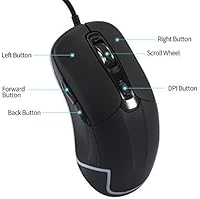
This heated mouse offers several key features for enhanced performance and comfort. The adjustable DPI settings (800-2400) allow for customizable cursor sensitivity, whether you're working on simple tasks or need precise control for more detailed work. The heat function can be toggled between high, low, and off to suit your needs, providing a warm grip for your palm and fingers. Additionally, its long 6.5 ft USB cord gives you the flexibility to position the mouse however you prefer for comfortable use.

Best For

The ValueRays mouse is best suited for individuals who work in cold environments or those who frequently experience hand discomfort. If you’re someone who spends long hours at the computer, this mouse can help reduce fatigue with its ergonomic design and warm grip. Whether you’re working from home, gaming, or engaging in extended sessions of office work, this mouse offers comfort and reliability. It’s also great for anyone who seeks a warm mouse to help enhance productivity in colder conditions.

User Feedback

Users generally appreciate the warmth and comfort this mouse provides during colder months, with many commenting that it’s particularly beneficial in winter. Some users note that the heating function takes a few minutes to reach its optimal temperature, which may be a minor inconvenience for those looking for immediate warmth. On the other hand, the adjustable DPI settings are frequently praised for offering precise control, making it ideal for both everyday tasks and more focused work. A few users have mentioned that it’s a bit heavier than expected, but overall, it receives positive feedback for its warmth and comfort.

Pros

  • This heated mouse provides excellent warmth during cold weather, making it ideal for winter months.
  • The ergonomic design is suitable for both left and right-handed users, offering comfortable long-term use.
  • The 6.5-foot USB cord gives users plenty of flexibility in positioning the mouse without restrictions.
  • DPI settings are adjustable from 800 to 2400, allowing users to fine-tune cursor sensitivity for different tasks.
  • The heat function with high/low/off settings offers customizable comfort for various environments and preferences.
  • Many users find the palm and finger warming feature particularly helpful for reducing hand discomfort during extended computer use.

Cons

  • The heat function can take a few minutes to reach optimal temperature, which some users find inconvenient.
  • The mouse might feel bulky for users with smaller hands, affecting comfort during extended use.
  • The plastic build feels less premium compared to other high-end mice, which may not satisfy users seeking a more solid feel.
  • Some users report that the DPI range (800-2400) is limiting for fast-paced gaming or precision work.
  • The lack of advanced software customization for the mouse settings may be a downside for users who need deeper control.
  • While useful in cold environments, the heat function isn't a game-changer for users in moderate climates.

Ratings

After analyzing verified user reviews worldwide across multiple platforms and languages, the ratings for the ValueRays USB Optical Heated Computer Mouse reflect both its strong points and areas of improvement. We filtered out spam, bot-generated, incentivized, and duplicate feedback to ensure a fair and accurate assessment of the product. While many users appreciate its warmth and ergonomic design, a few note that the heating function takes time to reach the desired temperature, and some have mixed feelings about its weight. Here's an overview of the aggregated ratings based on authentic feedback from real buyers.
Heating Effectiveness
78%
22%
Many users find the heating feature effective, especially during cold months. The heat function provides noticeable warmth and helps with hand discomfort, making it a practical solution for those who work in cooler environments. Users appreciate the ability to adjust the temperature levels, offering flexibility based on personal preference.
Not everyone agrees on the speed of heating. Some users report that it takes a few minutes to reach the optimal temperature, which can be a slight inconvenience when quick warmth is needed. A few buyers also mention that the heat could be stronger for those with more sensitive hands.
Ergonomics & Comfort
84%
The ergonomic design of this mouse is highly praised for providing comfort during long hours of use. Both left and right-handed users find it well-suited to their needs. The heated surface adds an extra level of comfort, reducing strain and fatigue on the hands, especially for those who spend extended periods at the computer.
A few users find the size and shape of the mouse less comfortable for smaller hands, with some mentioning that it feels bulky. While many enjoy the heated surface, others feel it could have a softer texture for a more premium feel.
DPI Adjustability
88%
The adjustable DPI settings are a standout feature, offering users the ability to fine-tune the cursor sensitivity from 800 to 2400 DPI. This is especially useful for those who need precision for tasks like graphic design or gaming, as well as for everyday use where different sensitivities may be needed.
Some users feel that the DPI levels don't offer a significant enough difference between settings, making it difficult to notice a change in cursor speed. A few also mention that the DPI switch can be slightly hard to access during use.
Build Quality
80%
20%
Overall, the mouse is made of durable ABS thermoplastic polymer, which ensures it holds up well to daily use. The materials feel sturdy and provide a sense of reliability. Many users find that the mouse holds up well over time, showing minimal wear and tear even after months of use.
While the build quality is generally good, some users express concerns about the plastic feeling somewhat cheap. A few buyers report issues with the mouse buttons becoming less responsive after extended use, although this isn't widespread.
Cable Length & Flexibility
91%
The long 6.5 ft USB cable offers great flexibility, allowing users to set up their workstation without being restricted by short cords. This is particularly beneficial for those with larger desks or who need to move the mouse around freely during use. The cable is also thick enough to feel durable.
Some users find the cable a bit too long for smaller workspaces, leading to excess cable clutter. A few mention that the stiffness of the cable can make it less flexible than they'd prefer, especially when trying to store or transport the mouse.
Value for Money
92%
Users generally feel that this heated mouse offers good value for the price. The combination of heat functionality, ergonomic design, and adjustable DPI settings makes it a practical and versatile option for those in need of a comfortable, multi-functional mouse. It's particularly appreciated by users looking for a heated solution without breaking the bank.
A few buyers feel the price could be a bit lower for the features offered, especially when considering the build quality. While the heating function is a unique selling point, some users wonder if it justifies the overall cost compared to non-heated alternatives.
Setup & Installation
85%
Setting up this mouse is straightforward and quick. It's a plug-and-play device, meaning it works seamlessly with most computers without the need for additional software or drivers. Users appreciate the simplicity of connecting it via USB, making it convenient for those who just want to get started right away.
A few users mention minor issues with the initial setup on certain operating systems, requiring a bit of troubleshooting. Additionally, some wish for software customization options to further personalize the mouse settings beyond what the physical buttons allow.
Temperature Control
75%
25%
The high/low/off temperature settings provide users with control over their hand warmth, allowing for customization based on their preferences. This feature is especially beneficial for users in cold environments who need varying levels of heat throughout the day.
While the temperature settings are appreciated, some users note that the difference between high and low settings isn't very pronounced, making it difficult to fine-tune the temperature. A few buyers also mention that the heat function can feel inconsistent at times.
Weight
70%
30%
Many users find the mouse weight to be just right, providing a comfortable and steady feel during use. It's not too heavy or light, which helps reduce hand strain during long sessions. The balanced weight adds to the overall ergonomic experience.
A number of users find the mouse a bit heavier than they'd like, especially when using it for extended periods. Some feel that a lighter mouse would be more suitable for quick movements, particularly for gaming or high-speed tasks.
Overall Performance
83%
The overall performance of the mouse is generally praised, with users finding it reliable for both work and leisure. The smooth movement tracking and effective heat function make it a versatile option for a variety of tasks, from typing to casual gaming. Most users report no major issues with responsiveness or functionality.
Some users have mentioned occasional lag or slight tracking issues, though these are isolated cases. A few also feel that the heating function could be more consistent and that the mouse is better suited for office tasks than for gaming or high-precision work.
Durability
78%
22%
The mouse is generally seen as durable, with many users reporting that it holds up well over time. The sturdy construction and reliable heating function make it a solid choice for regular use, even with frequent adjustments to the temperature settings.
However, a few users have noted that the mouse's buttons begin to wear out after prolonged use. Some also mention that the heating function starts to weaken after several months, although this seems to be a rare occurrence.
Compatibility
89%
The mouse is compatible with a wide range of operating systems, including Windows and Linux, making it versatile for users across different platforms. The plug-and-play functionality ensures easy setup, and most users find it works seamlessly with their devices without any need for additional drivers.
A few users have encountered minor issues with compatibility on macOS, requiring them to adjust settings or install additional software. Some also report occasional issues with the mouse not being recognized immediately after plugging it in.

Suitable for:

The ValueRays USB Optical Heated Computer Mouse is ideal for individuals who spend long hours working on a computer in colder environments, such as office workers, students, or remote workers. Its ergonomic design makes it comfortable for both left and right-handed users, and the built-in heat function provides much-needed warmth during extended sessions. Users with hand discomfort or those who suffer from cold hands in winter will benefit from its customizable temperature settings. The adjustable DPI levels also make it suitable for a variety of tasks, from everyday browsing to more precise work like graphic design or even light gaming. Its 6.5-foot cable ensures flexibility for users with larger desks or varied work setups, making it a solid choice for those seeking both warmth and functionality in a single device.
Not suitable for:

This heated mouse may not be the best fit for individuals who prioritize ultra-lightweight devices or have very small hands, as some users report that it feels bulky. Additionally, while the heat function is generally useful, its slow warm-up time can be a drawback for users seeking immediate comfort. Those who need very precise DPI adjustments for fast-paced gaming or professional work may find the available range (800–2400 DPI) limiting. The plastic build, although sturdy, might not meet the expectations of users looking for a more premium-feeling mouse. Finally, users who require complete software customization for mouse settings may be disappointed by the lack of advanced configuration options.

Specifications

  • DPI Settings: Offers adjustable DPI settings at 800, 1200, 1600, and 2400 for customizable cursor sensitivity.
  • Sensor Type: Uses an optical sensor for precise movement tracking.
  • Connection: USB wired connection for stable, lag-free performance.
  • Cable Length: Features a long 6.5 ft (180 cm) USB cable for flexible movement.
  • Ergonomic Design: Ergonomically designed for both left and right-handed users.
  • Heat Function: Includes a heat function with high/low/off settings to control temperature.
  • Temperature Range: Heats up to a temperature range of 99-120°F for user comfort.
  • Material: Constructed with durable ABS thermoplastic polymer for a lightweight yet sturdy build.
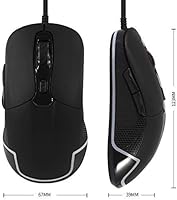
  • Dimensions: Measures 4.8 x 2.6 x 1.5 inches for a compact yet comfortable form factor.
  • Weight: Weighs 4.8 oz (136g), making it lightweight for extended use.
  • Button Life: Rated for 3 million clicks, ensuring long-lasting durability.
  • Compatibility: Compatible with Windows and Linux operating systems.
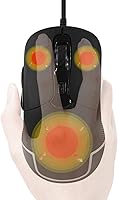
  • Grip Surface: Features a heated surface that covers the palm and fingers for added comfort.
  • Heat Activation Time: The heat function takes a few minutes to reach optimal temperature.
  • Ideal Use Case: Designed for users working in cold environments or who experience hand discomfort.
  • Operating Range: Optimal performance across a wide range of temperatures, from 99-120°F.

FAQ

This mouse features a built-in heat function with adjustable high/low/off settings that warm the surface of the mouse, providing relief during cold weather. It gradually heats to a comfortable temperature range of 99-120°F, which is ideal for users working in chilly environments.

Yes, this mouse has an ergonomic design that works well for both left and right-handed users, ensuring comfort regardless of your dominant hand. The button layout and shape allow for a natural grip for all users.

This mouse offers adjustable DPI settings at 800, 1200, 1600, and 2400. You can switch between these levels to customize cursor sensitivity, which is useful for both casual browsing and precision tasks like gaming or photo editing.

The heat function typically takes a few minutes to warm up. It gradually reaches its optimal temperature, so it's not instant, but most users find the warmth effective once it settles in.

This mouse is compatible with both desktop computers and laptops, as long as they run Windows or Linux. It connects via USB, making it a simple plug-and-play device for most setups.

The mouse features a generous 6.5-foot (180 cm) USB cable, providing plenty of flexibility for positioning the mouse on your desk or workspace. This long cord makes it easy to use without being restricted by the distance to your computer.

The ValueRays USB Optical Heated Computer Mouse is made from ABS thermoplastic polymer, which offers a good balance of durability and lightweight feel. However, some users have noted that it feels a bit less premium compared to high-end mice made of metal or more expensive materials.
While this mouse has adjustable DPI settings, which can be useful for gaming, it may not be ideal for fast-paced or competitive gaming. The DPI range (up to 2400) might not be sufficient for high-end gaming needs, but it's great for general use and light gaming.

Yes, the heat function is adjustable with a simple high/low/off switch. You can choose between a warmer setting for colder conditions or turn it off if you don't need additional heat, providing flexibility based on your preferences.

No, the mouse doesn't require special maintenance beyond standard care. To keep it in good working condition, simply clean the surface occasionally, especially around the heated area, to prevent dirt buildup. The USB cable should also be checked periodically for wear.