

Overview
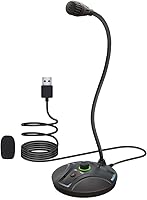
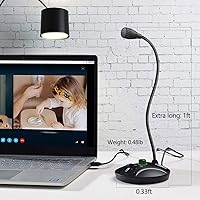
The JOUNIVO JV605 Pro arrived in early 2024 and has climbed to a top-five ranking in Amazon's Computer Microphones category — a notable achievement for a budget USB mic. It runs entirely plug-and-play, meaning your computer recognizes it the moment you connect it, with no driver installation required. Compatible with Windows 7 through 10 and macOS, it covers the vast majority of home setups. The metal gooseneck arm bends and holds its position, so getting the capsule close to your mouth takes seconds. For anyone working with a cluttered desk, the compact base footprint is a genuine practical advantage worth noting.
Features & Benefits
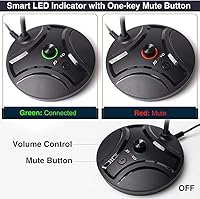
The one-touch mute button is probably what most buyers notice first in daily use — a single press kills the signal, and the built-in LED confirms your status without requiring a glance at any software. Paired with an inline volume knob, you can adjust levels physically, which sounds minor until you're mid-call and need a quick change fast. The noise-canceling circuitry handles everyday background noise like a running fan or distant keyboard clatter reasonably well, though it isn't engineered for loud or echo-heavy rooms. Power draws directly from the USB port, so there's nothing to charge, pair, or configure before use.
Best For
This gooseneck mic makes the most sense for people who need straightforward voice pickup without fussing over settings. Remote workers and students joining video calls will notice a real improvement over a built-in laptop mic. Casual streamers or YouTubers on a tight budget will find it a solid step up without overcommitting financially. It also suits voice dictation users running Dragon or Cortana, where close-range pickup matters more than stereo capture. PS4 gamers can use it for chat as well. If you're buying your first dedicated microphone, this is one of the least intimidating entry points available.
User Feedback
With over 15,800 ratings and a 4.3-star average, this desktop USB microphone has earned broad satisfaction — particularly from buyers upgrading away from built-in laptop audio for the first time. The mute LED and physical volume knob are mentioned constantly in reviews as features people genuinely rely on daily, not just appreciate on paper. On the downside, the omnidirectional capsule draws criticism in open or reverberant spaces, picking up more room noise than some buyers anticipated. A handful of reviewers flag inconsistent gooseneck stiffness between units, and the ABS base, while desk-sturdy, isn't built for repeated transport. Overall, the complaints feel proportional to the price.
Pros
- Instant plug-and-play setup works on Windows and macOS with zero driver installation required.
- The physical mute button with LED confirmation is genuinely useful during live calls and streams.
- Inline volume knob allows real-time level adjustments without touching any software.
- Metal gooseneck construction feels more durable than plastic-arm alternatives at this price.
- Clear voice pickup represents a substantial improvement over built-in laptop microphones.
- The 90 dB signal-to-noise ratio keeps background hiss low for a mic in this price range.
- Compact base footprint fits easily on crowded desks without demanding dedicated space.
- Compatible with PS4 in addition to PC and Mac, broadening its usefulness for gamers.
- Bus-powered via USB — no batteries, no external power brick, nothing extra to manage.
- Over 15,800 buyer ratings with a 4.3-star average reflects unusually broad satisfaction for a budget mic.
Cons
- Omnidirectional pattern picks up room noise freely — a real problem in louder living spaces.
- Noise canceling reduces minor hum but cannot compensate for a genuinely noisy environment.
- Gooseneck stiffness varies between units; some gradually lose their set position over time.
- The USB cable is fixed and non-replaceable, so cable damage means replacing the entire microphone.
- No USB-C connector or adapter included, which is an inconvenience for modern slim laptops.
- ABS plastic base shows wear relatively quickly if handled often or moved between locations.
- Volume knob controls output rather than input gain, which surprises buyers expecting mic level control.
- No windscreen or pop filter is included, and the mic has no built-in pop protection.
- Not officially listed as Windows 11 compatible, which may concern buyers on newer systems.
- Soft-spoken users may need to position the mic very close to avoid sounding distant on calls.
Ratings
The JOUNIVO JV605 Pro has been scored by our AI rating system after processing thousands of verified global buyer reviews, with spam, bot submissions, and incentivized feedback actively filtered out before analysis. The result is a transparent breakdown that reflects both what this desktop USB microphone genuinely does well and where real users have run into frustration. Strengths and shortcomings are weighted equally so you get a clear picture before buying.
Ease of Setup
Voice Clarity
Noise Reduction
Mute Button & LED Indicator
Volume Knob
Build Quality
Gooseneck Flexibility & Retention
Polar Pattern Versatility
Compatibility
Value for Money
Aesthetics & Desk Presence
Microphone Sensitivity
Cable & Connector Quality
Suitable for:
The JOUNIVO JV605 Pro is a strong fit for anyone who needs a reliable voice microphone without spending a lot of money or configuring anything complicated. Remote workers and students who spend hours on video calls will notice an immediate improvement over their laptop's built-in mic, and the physical mute button with LED confirmation makes managing live audio far less stressful during back-to-back meetings. Casual streamers and YouTubers who are just getting started will find it a capable first dedicated microphone that does not require an audio interface, phantom power, or any additional gear. Gamers on PC or PS4 who want a dedicated chat mic with a quick mute option will also find it fits neatly into that role. Voice dictation users running software like Dragon NaturallySpeaking will appreciate the clean close-range pickup, which tends to improve recognition accuracy compared to less sensitive alternatives. If your workspace is reasonably quiet and your goal is clear voice communication rather than music production, this gooseneck mic covers that ground well at a price that is hard to argue with.
Not suitable for:
The JOUNIVO JV605 Pro is not the right choice for buyers expecting studio-grade audio or professional recording results. The omnidirectional polar pattern, while convenient for positioning, means the mic has no ability to reject sounds coming from behind or beside it — anyone in a noisy apartment, shared household, or open-plan office will hear that limitation clearly on their recordings. Podcasters, voice-over artists, or musicians who need directional isolation, flat frequency response, or XLR connectivity should be looking at a different class of equipment entirely. The non-detachable USB cable also makes this a poor travel companion, since cable damage means replacing the whole unit rather than swapping a cord. USB-C-only laptop users will need an adapter that is not included in the box. And buyers who want a microphone that holds any position indefinitely without gradual drift should be aware that gooseneck stiffness is not entirely consistent across all units — something worth keeping in mind if precise placement is critical to your workflow.
Specifications
- Brand & Model: Manufactured by JOUNIVO under the model designation JV605 Pro, first made available in March 2024.
- Connector: Uses a standard USB-A plug, drawing power directly from the host device with no external adapter required.
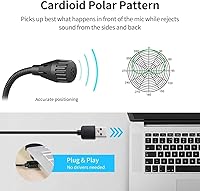
- Polar Pattern: Omnidirectional condenser capsule captures audio equally from all directions around the microphone.
- Signal-to-Noise Ratio: Rated at 90 dB, which keeps self-noise and background hiss low for a microphone in this price category.
- Channels: Mono single-channel output, suitable for voice communication, dictation, and casual content recording.
- Form Factor: Gooseneck-style desk microphone with a flexible metal neck that can be repositioned and holds its angle.
- Gooseneck Material: The adjustable neck is constructed from metal pipe, providing more rigidity and longevity than plastic gooseneck alternatives.
- Base Material: The weighted desk stand is made from heavy-duty ABS plastic designed for stable stationary desktop use.
- Power Source: Bus-powered via USB connection — no batteries, charging, or external power supply needed at any point.
- Weight: Complete unit weighs 9.1 oz, giving the base enough mass to remain stable during normal desktop positioning.
- Package Dimensions: Ships in a box measuring 5.24 x 5.12 x 2.09 inches, making it compact enough to store in a drawer when not in use.
- Compatibility: Officially compatible with Windows 7, 8, and 10, macOS, and PlayStation 4; also functions on Windows 11 in practice.
- Setup Requirements: Completely plug-and-play with no driver installation, software download, or system configuration required on supported platforms.
- Mute Control: Features a one-touch hardware mute button with a built-in LED indicator that visually confirms active or muted status.
- Volume Control: Inline hardware volume knob on the mic body allows output level adjustment without opening any software or system settings.
- Noise Canceling: Onboard noise-canceling circuitry is designed to reduce steady background sounds such as fan noise, HVAC hum, and light keyboard clatter.
- Cable Type: USB cable is permanently attached to the base unit and is not detachable or user-replaceable.
- Release Date: Product was first listed and made available for purchase on March 12, 2024.
Related Reviews

Ubiquiti UniFi Dream Machine Pro Security Gateway
DS18 PRO-DR1PK44 Compression Driver with PRO-H44/BK Horn
DS18 PRO-ZXI10MBASS 10-inch Mid-Bass Loudspeaker
Cinema Secrets Ultimate Corrector 5-In-1 Palette

Apple MacBook Pro 14-inch M1 Pro Laptop
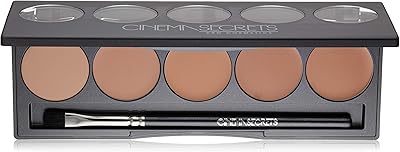
Cinema Secrets Pro Cosmetics Ultimate Foundation 5-In-1 Pro Palette 500A

HP Pro Tower 290 G9 Desktop (i5-12500, 32GB RAM, 1TB SSD)
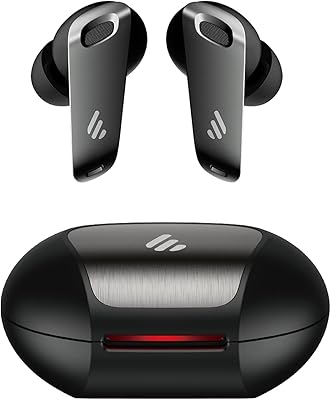
Edifier NeoBuds Pro Wireless Earbuds
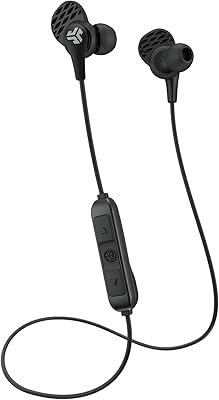
JLab JBuds Pro Bluetooth Wireless Earbuds