
Overview

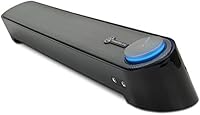
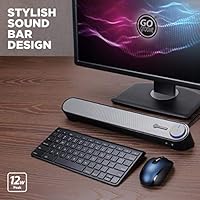
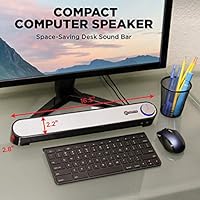
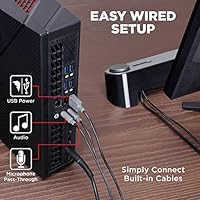
The GOgroove UBR Soundbar is a low-profile under-monitor speaker built to replace the thin, flat audio that comes standard on most monitors and laptops. Sitting just 2.2 inches tall and 16.5 inches wide, this desktop soundbar tucks neatly beneath your display without claiming its own footprint on the desk. It draws power straight from a USB port and connects audio through a standard 3.5mm AUX cable, meaning no drivers to install and no software to configure. For anyone who has put up with muddy built-in speakers longer than they should have, it offers a practical, fuss-free step up. A 3-year warranty adds reassuring long-term value at this price point.

Features & Benefits

At its core, the UBR speaker bar delivers 12W peak stereo output through angled dynamic drivers tuned to emphasize mids and highs — dialogue, vocals, and higher-frequency audio all come through clearly at reasonable volumes. Two front-accessible 3.5mm ports let you plug a headset or dedicated microphone directly into the bar, saving you from hunting behind your tower. The USB bus-powered design cuts out the wall adapter entirely, and the front-mounted volume knob with its LED glow keeps daily controls close at hand. Wired-only connectivity is a deliberate simplicity choice — no Bluetooth pairing, no dropouts, just a consistent, stable connection every time you sit down.

Best For

This under-monitor speaker is an obvious pick for home office workers tired of straining through a monitor's built-in audio on video calls. Students with tight desk setups will appreciate how it disappears under a display without demanding extra surface space. Casual gamers and streamers get genuine utility from the mic and headphone pass-through, cutting out one more USB hub or adapter from the chain. It also suits anyone who deliberately avoids wireless peripherals — no apps, no pairing, no battery levels to track. If you want a noticeable clarity upgrade without committing to a full subwoofer-and-satellite setup, this fits the brief cleanly.

User Feedback

Across nearly 3,000 ratings, this desktop soundbar holds a steady 4.0-star average, and the feedback follows a predictable pattern. Easy plug-and-play setup and clear mid-range audio — particularly for spoken content and casual music — are the most repeated compliments. Where buyers consistently temper their expectations is on bass: the compact drivers are not built for low-end punch, and most reviewers seem to know that going in. The headphone and mic ports earn genuine praise as a practical everyday convenience. On the critical side, a handful of users mention the LED being too bright for their setup, and a few find the volume knob lighter in feel than expected. Neither complaint appears to be a dealbreaker for most buyers.

Pros

  • Plug-and-play setup works instantly with no drivers, software, or restarts required.
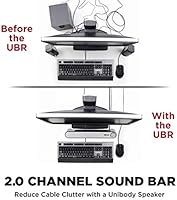
  • Sits cleanly beneath most monitors without adding bulk or clutter to the desk.
  • Voice and mid-range audio clarity is a clear, noticeable step up from built-in speakers.
  • The headphone and mic pass-through ports remove the need to reach behind your tower or monitor.
  • USB bus power means one less wall adapter taking up outlet space.
  • Wired connection stays stable and consistent — no dropouts, no pairing failures, no interference.
  • A 3-year warranty is genuinely uncommon at this price tier and adds real purchase confidence.
  • Works across desktops and laptops with no reconfiguration needed when switching between machines.
  • The front-facing volume knob keeps daily audio control within arm's reach at all times.

Cons

  • Bass response is limited enough that music listeners with genre preferences will be disappointed.
  • The volume knob feels plasticky and imprecise compared to the overall presentation of the bar.
  • The LED indicator has no brightness adjustment, which bothers users in dim or evening work environments.
  • USB-C-only laptop users need a separate adapter that does not come in the box.
  • Cable length may restrict placement flexibility, particularly for users with floor-standing tower PCs.
  • A subset of long-term owners report faint crackling from one channel after extended use.
  • High volume levels introduce some audible compression, limiting how loud you can push it cleanly.
  • The plain black-and-grey finish can look out of place in more premium or styled desk setups.

Ratings

The GOgroove UBR Soundbar scores below are generated by AI after analyzing thousands of verified global buyer reviews, with spam, bot-submitted, and incentivized feedback actively filtered out. The result is an honest, balanced snapshot of where this desktop soundbar genuinely delivers and where it falls short. Both consistent strengths and recurring pain points are reflected in every score.

Ease of Setup
96%
Buyers across the board describe the setup as genuinely painless — plug the USB for power, connect the AUX cable, and audio comes through immediately. No driver downloads, no software prompts, no restart required. For less tech-savvy users or those simply tired of complicated peripheral installs, this is a meaningful daily-use advantage.
A very small number of users with older or non-standard AUX outputs reported needing an adapter not included in the box. This is an edge case, but worth noting if your desktop or laptop uses a combined headset jack rather than a dedicated line-out port.
Sound Clarity
81%
19%
Vocals, dialogue, and mid-range frequencies come through noticeably cleaner than typical monitor or laptop speakers at similar volumes. Users on video calls, watching streaming content, or listening to vocal-heavy music tend to report a genuine, appreciable improvement over what they had before.
Clarity starts to compress slightly at higher volume levels, and some listeners find the high-end can become a touch sharp. It performs best at moderate listening volumes, which is how most desk setups are used — but push it near maximum and the limitations of the compact drivers become audible.
Bass Response
47%
53%
For spoken content, podcasts, and casual background music, the low-end is adequate enough that most everyday users do not feel actively shortchanged. The angled driver placement does extract reasonable warmth from the limited enclosure size given the constraints of a compact wired bar.
There is no subwoofer and the enclosure is small — bass response is genuinely limited, and buyers who listen to EDM, hip-hop, or any bass-heavy genre will find this bar underwhelming. This is not a fixable quibble; it is a structural constraint of the product category. Several reviewers flagged this directly after expecting more from the 12W peak rating.
Build Quality
68%
32%
The bar feels solid enough for daily desk use and sits stably under a monitor without wobbling or creaking. At its price tier the plastic construction is acceptable, and the form factor holds up well over extended use based on longer-term owner reports.
A portion of reviewers describe the chassis as feeling lighter or more hollow than expected when handled. The volume knob in particular draws criticism for a slightly loose or cheap tactile feel compared to the rest of the unit, which otherwise presents reasonably well from a distance.
Value for Money
88%
For buyers stepping up from built-in monitor speakers, the improvement in audio clarity relative to the asking price is hard to argue with. The 3-year manufacturer warranty adds a layer of purchase confidence that is uncommon at this price point and meaningfully tips the value calculation in its favor.
Buyers who compare it against slightly pricier alternatives with dedicated subwoofers or higher-wattage drivers may feel the value proposition weakens if audio quality is the primary priority. As an entry-level upgrade it earns its price; as a long-term audio investment, expectations should be managed accordingly.
Design & Footprint
83%
The low-profile dimensions — just 2.2 inches tall and 16.5 inches wide — allow it to sit cleanly beneath most standard monitors without blocking the screen or intruding on keyboard space. Users with minimal desk setups consistently praise how little visual or physical presence the bar adds to their workspace.
The black-and-grey finish is inoffensive but plain, and users with more styled or premium desk setups sometimes note it looks slightly out of place next to higher-end peripherals. The LED indicator, while a minor detail, was flagged by several night-shift or dim-room users as brighter than they would prefer with no brightness adjustment available.
Headphone & Mic Pass-Through
86%
Routing both a headphone output and a microphone input through the bar itself turns out to be one of the most practically useful features in daily use. Streamers and remote workers especially appreciate being able to manage audio connections from the front of their desk rather than reaching behind a tower or monitor.
The pass-through ports work as advertised, but audiophiles should note there can be a slight noise floor introduced depending on the system. Additionally, users with thicker headset plugs or angled connectors occasionally report a snug or awkward fit at the port location given the bar's low-profile chassis.
Volume Control
72%
28%
Having a physical knob within arm's reach on the desk is a tangible convenience over adjusting volume through software menus or keyboard shortcuts. The LED power indicator makes it immediately obvious whether the unit is active, which users appreciate during quick task-switching throughout the workday.
The knob itself draws mixed feedback — it functions reliably, but the feel is described by a noticeable share of reviewers as plasticky or imprecise, lacking the satisfying resistance of higher-quality potentiometers. A few users also reported the knob feeling slightly wobbly after extended use, though no functional failures were widely reported.
Connectivity Reliability
91%
Wired AUX and USB connections mean audio is present and stable the moment the machine boots — no re-pairing, no signal dropout mid-call, no interference from neighboring wireless devices. Users who switched from Bluetooth speakers specifically cite this predictability as a major reason they prefer this setup for work use.
Being wired-only is the right choice for reliability, but it does limit placement flexibility. The cable lengths restrict how far the bar can sit from the host machine, and users with tower PCs positioned on the floor sometimes wish the USB and AUX leads were a few inches longer than they are.
Compatibility
89%
USB power plus a standard 3.5mm AUX input means this bar works with virtually any desktop, laptop, or even a tablet with the right adapter. Buyers routinely mention switching it between a home PC and a work laptop throughout the day without any reconfiguration needed.
Computers with USB-C only ports and no 3.5mm headphone jack require adapters that are not included. This is increasingly relevant with newer thin-and-light laptops, and a handful of reviewers mention frustration that the out-of-box experience assumes legacy port availability.
LED Indicator
61%
39%
The glowing LED on the volume knob gives quick visual confirmation that the unit is powered on, which is a small but useful daily cue — especially useful when the bar is tucked under a monitor and the power state might not otherwise be obvious at a glance.
The LED brightness is fixed with no dimming option, and a meaningful cluster of reviews specifically call it out as too intense for dark or low-light environments. For users who work evenings or keep a dim desk setup, it can be a persistent minor irritation with no hardware remedy.
Long-Term Durability
73%
27%
A 3-year warranty is a genuine confidence signal, and the majority of longer-term owners report the bar continuing to function without issue after one to two years of regular use. The wired design eliminates battery degradation as a durability variable, which works in its favor over time.
A smaller share of reviewers report audio quality degrading gradually — particularly a faint crackling from one channel after extended use. It is not a dominant complaint, but it surfaces often enough across verified reviews to suggest some unit-to-unit variability in long-term component consistency.

Suitable for:

The GOgroove UBR Soundbar is a strong fit for anyone whose primary frustration is the flat, lifeless audio coming out of a monitor or laptop — and who wants that fixed without spending an afternoon setting things up. Home office workers who spend hours on video calls will notice an immediate improvement in voice clarity, and the built-in microphone pass-through means they can consolidate their headset connection right at the front of their desk. Students with compact workspaces will appreciate that it tucks under a monitor and essentially disappears, freeing up desk real estate rather than consuming it. Casual gamers and part-time streamers get a genuinely useful dual-port setup — headphones and mic routed through one accessible bar — without needing a separate audio interface or USB hub. If you value a wired, no-fuss peripheral that works the moment you plug it in and keeps working without software updates or pairing rituals, this under-monitor speaker checks that box consistently.

Not suitable for:

The GOgroove UBR Soundbar is the wrong tool if bass performance matters to you in any meaningful way — the compact enclosure and 2.0 driver configuration produce respectable mids and highs, but low-end punch simply is not in this bar's range, and no amount of EQ adjustment will change that. Music listeners who favor bass-heavy genres like hip-hop, EDM, or electronic will almost certainly feel underserved and should look at setups that include a dedicated subwoofer. Audiophiles or anyone building a higher-end listening workstation should also look elsewhere — this is a practical daily-use upgrade, not a high-fidelity audio device. Users with newer laptops that have dropped the 3.5mm headphone jack entirely will need a separate USB-C to AUX adapter, which adds a step and a potential point of failure that the plug-and-play promise does not account for. And if you prefer Bluetooth or wireless peripherals to keep your desk cable-free, this wired-only bar runs counter to that setup philosophy entirely.

Specifications

  • Dimensions: The bar measures 16.5″ wide, 2.8″ deep, and 2.2″ tall, designed to sit flat beneath a standard desktop monitor.
  • Weight: The unit weighs 1.5 pounds, making it light enough to reposition easily without anchoring it to the desk.
  • Peak Output: Total peak audio output is 12W across a 2.0 stereo channel configuration.
  • Driver Type: The bar uses dynamic drivers with an angled orientation to project audio forward and upward toward the listener.
  • Audio Channels: Stereo 2.0 configuration with no subwoofer channel; optimized for mid-range and high-frequency reproduction.
  • Power Source: Powered entirely via USB at 5V DC, drawing power directly from the host computer with no external adapter required.
  • Audio Input: Audio is delivered via a single 3.5mm AUX input cable connecting to the host device's headphone or line-out port.
  • Headphone Port: A 3.5mm headphone pass-through port on the bar allows direct connection of stereo headphones for private listening.
  • Microphone Port: A 3.5mm microphone pass-through port extends the host computer's mic input to the front of the bar for easy headset access.
  • Connectivity Type: All connections are wired only; there is no Bluetooth, Wi-Fi, or any wireless audio transmission capability.
  • Volume Control: A front-mounted rotary knob handles both power and volume, with an integrated LED indicator showing active power status.
  • Mounting Style: Tabletop mount designed for placement directly on the desk surface beneath a monitor; no wall or arm mounting hardware is included.
  • Compatible Devices: Compatible with any desktop or laptop computer that provides a USB port for power and a 3.5mm audio output for signal.
  • Color: Available in a black and grey finish with no additional color variants listed by the manufacturer.
  • Model Number: The official manufacturer model number is GGSVUBR100BKEW, also referred to internally as the UBR Speaker.
  • Warranty: GOgroove covers this unit with a 3-year limited manufacturer warranty from the date of purchase.
  • Software Required: No drivers, software installation, or operating system configuration are needed; the bar functions as a plug-and-play audio device.
  • Release Date: The product was first made available for purchase in May 2015 and has not been discontinued by the manufacturer.

Related Reviews
ZVOX SB500 Soundbar
ZVOX SB500 Soundbar
84%
91%
Dialogue Clarity
88%
Bass Quality
85%
Ease of Setup
87%
Build Quality
65%
Remote Control Responsiveness
More
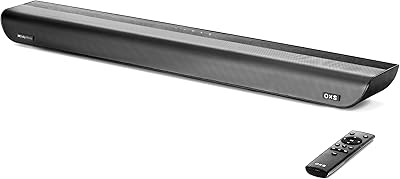
OXS S5 Soundbar
OXS S5 Soundbar
85%
88%
Sound Quality
75%
Bass Performance
93%
Ease of Setup
84%
Build Quality
90%
Connectivity Options
More
LITTOAK SE04 Soundbar
84%
85%
Sound Quality
93%
Ease of Setup
88%
Connectivity Options
68%
Bass Performance
81%
Design & Build Quality
More
Sonos Ray Soundbar
Sonos Ray Soundbar
85%
85%
Sound Quality
91%
Setup Ease
89%
Connectivity
67%
Bass Performance
80%
Build Quality
More
BlueAnt Soundblade Soundbar
86%
89%
Audio Quality
92%
Value for Money
87%
Setup & Installation
91%
Connectivity Options
84%
Build Quality
More
MZEIBO Soundbar with Subwoofer
84%
88%
Sound Quality
91%
Bass Performance
85%
Bluetooth Connectivity
84%
Design Flexibility
90%
Ease of Setup
More
Bestisan SE07 16″ Soundbar
86%
91%
Sound Clarity
88%
Bass Performance
94%
Connectivity Options
89%
Ease of Setup
85%
Build Quality
More
Sony HT-S100F Soundbar
85%
84%
Sound Quality
92%
Ease of Setup
65%
Bass Performance
90%
Voice Clarity
88%
Connectivity Options
More
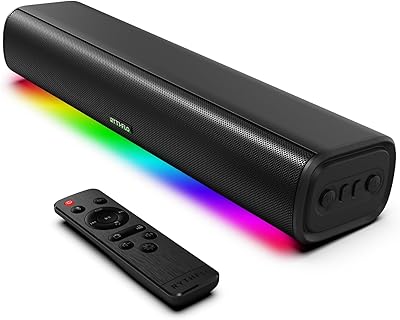
Monster S220 Bluetooth Soundbar
85%
85%
Sound Quality
75%
Bass Performance
88%
Battery Life
91%
Portability
87%
Connectivity Options
More
Rythflo SK300 Li Soundbar
85%
89%
Sound Quality
86%
Bass Performance
91%
Setup and Installation
88%
Connectivity Options
84%
LED Lighting Modes
More

FAQ

No, nothing at all. You plug the USB cable into a free port for power and connect the 3.5mm AUX cable to your headphone or line-out jack, and your computer should recognize it immediately. There are no driver downloads, no setup wizards, and no restarts needed.

It depends on the jack type. If your laptop has a single combo jack that handles both headphones and microphone, you may need a TRRS splitter adapter to separate the audio output and mic signals. The bar itself works fine — the adapter is just not included in the box, so factor that in if your laptop is configured that way.

You can, but you will need two adapters: a USB-C to USB-A adapter for power and a USB-C to 3.5mm adapter for the audio input. Neither is included. It works once you have the right cables, but the out-of-box plug-and-play experience assumes legacy ports are available.

For most people, the improvement is immediately noticeable — especially for voices, video calls, and casual music listening. The GOgroove UBR Soundbar handles mids and highs well, and dialogue comes through with noticeably more clarity and presence than flat built-in monitor drivers. Just do not go in expecting room-filling bass; that is not what this bar is built for.

Honest answer: it is limited. You will get enough low-end warmth for podcasts, YouTube videos, and lighter music genres, but if you regularly listen to bass-heavy music or want that physical low-end feel while gaming, this bar will not satisfy you. There is no subwoofer and the enclosure is small — that is a physical constraint, not a firmware fix.

Yes, and this is one of the more practical features in daily use. Both a headphone output and a microphone input are on the bar itself, so you can plug a standard 3.5mm headset directly into the front-facing ports. It is especially useful if your tower PC sits on the floor and reaching around the back to plug in headphones every time is a hassle.

The LED is always on when the unit is powered, and there is no dimming option — what you get is what you get. A fair number of users in low-light or evening work environments find it noticeably bright. If you work in a dim room and are sensitive to indicator lights, that is worth factoring in before buying.

Not natively — there is no built-in switch or input selector. That said, because the connection is just a USB cable and a 3.5mm AUX cable, some users physically swap the cables between machines when needed. If you want seamless switching, you would need an external audio switch or KVM setup alongside it.

The bar has been on the market since 2015 and is listed as not discontinued by the manufacturer. GOgroove backs it with a 3-year limited warranty, which is a meaningful support commitment for a product at this price point. The long sales history also means there is a substantial pool of real user reviews to draw from when making your decision.

Both work. Your operating system volume controls and any application-level volume settings function normally alongside the physical knob on the bar. Most users find the knob the quicker option for quick adjustments during calls or media, while software controls handle finer tuning. One thing to note is that some reviewers find the knob feel a bit loose or plasticky — it works reliably, but it does not have the premium resistance of higher-end hardware controls.