
Overview

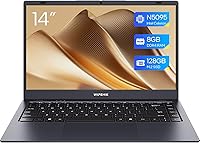
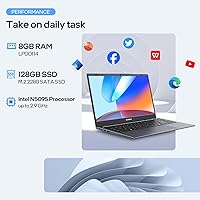
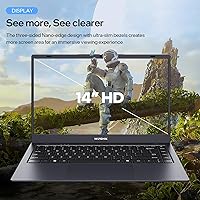
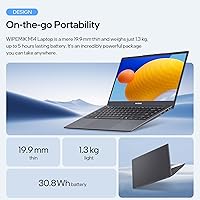
The WIPEMIK BTC511 14-Inch Laptop is a budget-tier Windows 10 machine that arrived in late 2024, primarily aimed at students, light office users, and anyone needing an inexpensive secondary device. It runs on an Intel Celeron N5095 quad-core processor alongside 8GB of LPDDR4 RAM and a 128GB SSD — a workable combination for everyday tasks. Weighing just 2.8 lbs with a slim 0.39-inch profile, portability is one of its genuine strengths. One thing buyers should know upfront: the listing references 1080p, but the actual panel resolution is 1366x768. That gap in marketing versus reality matters. WIPEMIK is also a relatively new brand with little long-term track record, which is worth factoring into your decision.

Features & Benefits

Powering the BTC511 is the quad-core N5095, which handles web browsing, spreadsheets, video calls, and Word documents without meaningful sluggishness. It is not a speed demon, but for the tasks this machine is designed for, it keeps up. The 128GB SSD is arguably the standout component — boots are quick and apps open with little waiting compared to older budget laptops still using spinning hard drives. WiFi 5 and Bluetooth 5.0 handle modern connectivity needs without issue. A small but thoughtful detail is the physical webcam cover, a privacy feature you rarely see at this price point. The 170-degree hinge and a solid port layout — USB 3.0, HDMI, Micro SD — round out a surprisingly practical feature set.

Best For

This entry-level machine makes most sense for students who spend their days in Google Docs, submitting assignments, or joining Zoom lectures. It also fits well for seniors and remote workers whose entire workload lives inside a browser and a handful of Office apps. If you are looking for a lightweight travel companion that fits easily in a bag and does not demand careful handling like a premium device might, the BTC511 fills that role reasonably well. What it is not suited for is anything demanding — no gaming, video editing, or running multiple heavy applications simultaneously. Think of it as a capable, no-fuss tool for defined everyday tasks rather than a do-everything machine.

User Feedback

Buyers who pick up this budget laptop tend to agree on a few things. Boot time and general responsiveness get consistent praise — the SSD makes a real difference at this price tier. On the flip side, battery life draws the most criticism; five hours is the rated figure, and real-world usage often falls short of that, making it less suitable for all-day use without a charger nearby. The display resolution mismatch in the marketing also frustrates buyers who expected a sharper 1080p screen. Build quality is described as acceptable but not robust, and the keyboard feels adequate for light typing. Storage fills up faster than expected once Windows 10 and basic apps are installed, leaving limited breathing room.

Pros

  • The SSD makes boot times and app launches noticeably faster than HDD-based rivals at this price.
  • At 2.8 lbs and under half an inch thick, this budget laptop is genuinely easy to carry around.
  • Eight gigabytes of RAM handles everyday multitasking — browser tabs, email, Office apps — without grinding to a halt.
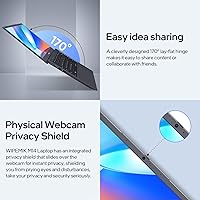
  • A physical webcam cover is a thoughtful privacy feature rarely found on entry-level machines.
  • The 170-degree hinge is useful for sharing the screen in small group or collaborative settings.
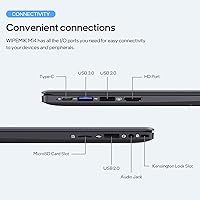
  • Port variety is solid for the price: HDMI, USB 3.0, USB 2.0, Micro SD, and a Kensington lock slot are all present.
  • Dual-band WiFi 5 and Bluetooth 5.0 cover modern connectivity needs without any additional hardware.
  • Pre-installed productivity tools mean the machine is usable right out of the box for basic work tasks.

Cons

  • The product listing advertises 1080p but the actual display panel runs at 1366x768 — a clear marketing inconsistency buyers should know about.
  • Five hours of battery life is marginal; real-world use often falls shorter, making a charger a near-constant companion.
  • Usable storage after Windows 10 installation is significantly less than the advertised 128GB, leaving limited room for files.
  • WIPEMIK has no established brand track record, meaning long-term durability and after-sale support are genuinely unknown.
  • The thin chassis contributes to a build quality that feels less robust than buyers accustomed to mid-range laptops might expect.
  • The Celeron N5095 processor, while adequate for light tasks, has no headroom for anything beyond basic workloads.
  • Only one USB 3.0 port is available; users with multiple peripherals will need a hub almost immediately.
  • The keyboard feel, while functional, is reported as shallow and underwhelming for extended typing sessions.

Ratings

The WIPEMIK BTC511 14-Inch Laptop has been evaluated by our AI rating system after processing verified global buyer reviews, with spam, bot activity, and incentivized submissions actively filtered out to ensure the scores reflect genuine ownership experiences. The results highlight both the real strengths that make this machine worth considering at its price point and the honest shortcomings that have frustrated buyers expecting more. Every score below — high or low — is grounded in patterns from actual user feedback, not manufacturer claims.

Value for Money
74%
26%
For buyers who genuinely only need a browser, email, and occasional Word document, the BTC511 delivers a functional Windows experience with an SSD at a price where most rivals still ship with sluggish hard drives. Students and households treating it as a low-stakes secondary machine generally feel the spend was justified.
Buyers who expected a more capable all-rounder feel the value proposition weakens quickly once real-world limitations surface — particularly the tight storage, modest battery, and display resolution that does not match what the listing implies. Those comparisons make the price feel less compelling in hindsight.
Performance
61%
39%
The N5095 quad-core processor handles light workloads with reasonable composure — opening a spreadsheet, loading a webpage, or running a video call does not require patience. Paired with 8GB of RAM, everyday tasks rarely produce the stalling or freezing that plagues older budget hardware.
The moment workloads step beyond the basics — more than a dozen browser tabs, background updates running alongside active use, or any creative or data-heavy application — the processor starts to show its ceiling. Users who pushed it even modestly beyond light productivity reported noticeable slowdowns and lag.
SSD Speed
83%
This is one of the BTC511's clearest wins over similarly priced competitors. Boot times are fast enough to genuinely impress users coming from older HDD-based laptops, and application launch times feel snappy for the price tier. Several buyers specifically called out startup speed as a standout positive.
While the SSD itself performs well, the 128GB capacity means its benefits are constrained by how quickly available space disappears after Windows 10 and a handful of apps are installed. Once the drive fills up, performance can degrade, and buyers who did not plan around storage limits ran into problems relatively quickly.
Display Quality
47%
53%
The 14-inch screen size is a reasonable fit for the laptop's portable form factor, and for users doing basic document work or watching standard-definition video content, it gets the job done in well-lit environments. Color rendering is acceptable for non-critical visual tasks.
The resolution discrepancy in the product listing — implying 1080p when the actual panel outputs 1366x768 — is the single most common buyer complaint. Text and images look noticeably softer than expected, which is a real disappointment for users who made their purchase partly based on display specs. Viewing angles and brightness also fall short of what buyers hoped for.
Battery Life
53%
47%
For contained, low-intensity sessions — a two-hour lecture, a morning of email, or a light work session at a cafe — the battery holds up adequately. Users who kept screen brightness moderate and avoided heavy multitasking reported reaching close to the four-hour mark without stress.
The five-hour rating is optimistic by most real-world accounts. Buyers relying on this machine for a full school day or a long work session without power access found themselves reaching for the charger earlier than expected. For any serious mobile use, the battery is a genuine limitation rather than just a footnote.
Build Quality
58%
42%
The slim profile and lightweight chassis make the BTC511 easy to slip into a bag, and the physical build does not feel overtly cheap for a first-time unboxing experience. The 170-degree hinge operates smoothly and adds a practical flexibility that buyers appreciated for group viewing.
Under regular use, the thin plastic chassis reveals its budget origins — there is noticeable flex in the keyboard deck and lid, and the overall feel lacks the solidity buyers associate with dependable daily-use hardware. Several users expressed concern about long-term durability, particularly for a machine being carried back and forth by students.
Keyboard & Typing
56%
44%
The keyboard layout is standard and familiar enough that users adapting from any Windows laptop will find it intuitive from the start. For short bursts of typing — filling out forms, writing brief emails, or taking quick notes — it functions without causing frustration.
Extended typing sessions exposed shallow key travel and a lack of tactile feedback that left frequent typists fatigued and dissatisfied. Writers and students who spend significant portions of their day at the keyboard found the experience noticeably below average, and some described it as one of the more disappointing aspects of daily use.
Portability
86%
Weighing just 2.8 lbs and measuring under half an inch thick, this entry-level machine is one of the more genuinely portable options at its price point. Commuters, students walking between classes, and travelers who just need something light in their bag responded very positively to how easy it is to carry.
The slim build that aids portability also means the laptop runs warmer under sustained use than a thicker chassis would, and the single-cell battery that fits inside the thin frame is what limits endurance. Portability gains come with real trade-offs in thermal headroom and stamina.
Connectivity & Ports
77%
23%
For a budget laptop, the port selection is genuinely practical — having HDMI, a Micro SD slot, USB 3.0, USB 2.0, and a headphone jack all present means most everyday connection needs are covered without immediately needing a hub. Buyers who plugged into external monitors via HDMI found it worked reliably.
Having only one USB 3.0 port is a limitation that surfaces quickly for users with more than one peripheral. Anyone running a mouse and a USB drive simultaneously has to choose between ports or buy a hub, which adds cost and inconvenience to what is supposed to be a simple, ready-to-use device.
Webcam Quality
63%
37%
The physical privacy cover is a genuinely thoughtful inclusion that buyers noticed and appreciated, especially those using the laptop in shared or public spaces. For standard video calls in good lighting, the camera produces an image that is acceptable for daily communication needs.
Image quality drops off quickly in low-light conditions, producing a grainy and washed-out picture that makes video calls less professional. The camera is adequate but not something users brag about, and anyone doing frequent video conferencing for work or school may wish the hardware were a step up.
Wireless Performance
73%
27%
Dual-band WiFi 5 handles typical home and office network conditions well, and Bluetooth 5.0 pairs reliably with headphones and mice without repeated reconnection issues. For the everyday internet-dependent tasks this machine is built around, the wireless performance is a non-issue for most buyers.
Users in environments with weaker or more congested WiFi signals reported more instability than expected, and the wireless hardware is not particularly competitive when stacked against mid-range laptops. It covers the basics but does not stand out as a strength.
Software & Setup
69%
31%
The machine arrives with Windows 10 pre-installed and productivity tools ready to use, which means non-technical buyers can be up and running within minutes of opening the box. Seniors and first-time laptop buyers in particular appreciated not having to configure anything significant before getting started.
Windows 10 on a 128GB drive leaves less free space than buyers anticipate, and some users reported pre-installed bloatware consuming additional storage out of the box. There is also the looming question of long-term Windows 10 support as Microsoft has been pushing users toward Windows 11, which this hardware may not officially support.
Brand Reliability
44%
56%
Some early buyers reported no hardware issues after several months of light use, which is encouraging for a new entrant. The product itself arrived functional and as described for the majority of purchasers, suggesting baseline quality control is in place at the manufacturing level.
WIPEMIK launched in mid-2024 with no established service network, no widely documented repair process, and very limited long-term ownership data to draw from. Buyers who experienced issues had mixed results getting responsive support, and the absence of brand history makes it genuinely difficult to assess how this machine will hold up over one to two years of use.

Suitable for:

The WIPEMIK BTC511 14-Inch Laptop is a genuine fit for buyers whose computing needs are straightforward and predictable. Students writing papers, attending virtual classes, or putting together presentations will find it handles those tasks without frustration. Seniors or remote workers who live inside a browser, email client, and a few Office applications will likely get everything they need from it day-to-day. It also makes practical sense as a household backup machine — something to leave in a bag permanently, pull out when needed, and not stress over. If your priority is a light, portable device that boots quickly and does not require a large financial commitment, the BTC511 checks those boxes more reliably than many HDD-based alternatives at a similar price point.

Not suitable for:

The WIPEMIK BTC511 14-Inch Laptop is not the right call for anyone with demanding or varied computing workloads. If you edit videos, work with large spreadsheets, run design software, or play modern games, this machine will struggle and frustrate you quickly. The 128GB SSD sounds adequate on paper, but once Windows 10 is installed alongside a few applications, usable storage shrinks considerably — users who work with media files or large downloads will hit that ceiling fast. The five-hour battery rating also makes it a poor fit for full-day mobile use without access to a power outlet. Beyond performance concerns, WIPEMIK is a brand-new entrant with no established repair network or long-term reliability data, so buyers who need dependable hardware for professional or academic deadlines should consider that risk carefully before committing.

Specifications

  • Processor: Intel Celeron N5095 quad-core processor runs at up to 2.9GHz, offering enough headroom for basic multitasking and everyday productivity workloads.
  • RAM: 8GB of LPDDR4 memory is installed, which handles simultaneous browser tabs, Office applications, and light multitasking without significant slowdown.
  • Storage: A 128GB SSD provides the primary storage, delivering faster boot and file access speeds compared to traditional spinning hard drives at this price tier.
  • Display Size: The screen measures 14 inches diagonally, offering a comfortable viewing area that balances portability with usable workspace.
  • Resolution: The actual display panel operates at 1366x768 pixels; the 1920x1080 figure referenced in some listing sections does not reflect the physical panel output.
  • Graphics: Intel UHD integrated graphics handle display output and light visual tasks, though they are not suited for GPU-intensive applications or gaming.
  • Operating System: Windows 10 comes pre-installed, with basic productivity tools included so the machine is usable immediately after setup.
  • Battery Life: The built-in lithium polymer battery is rated for approximately 5 hours of use under typical conditions, which covers light half-day sessions comfortably.
  • Weight: The laptop weighs 2.8 lbs, making it one of the lighter options available in the budget Windows laptop category.
  • Dimensions: Physical dimensions measure 12.7 x 8.4 x 0.39 inches, giving the chassis a slim profile that fits easily into most bags and backpacks.
  • WiFi: Dual-band 802.11ac (WiFi 5) wireless connectivity supports both 2.4GHz and 5GHz bands for stable and reasonably fast internet access.
  • Bluetooth: Bluetooth 5.0 is built in, enabling low-latency pairing with peripherals such as headphones, mice, and keyboards.
  • USB Ports: One USB 3.0 port and one USB 2.0 port are included, providing basic peripheral connectivity without requiring a hub for single-device use.
  • Other Ports: Additional connectivity includes one HDMI output, one Micro SD card slot, one 3.5mm headphone jack, and a Kensington security lock slot.
  • Webcam: A built-in webcam is included and features a physical sliding privacy cover that mechanically blocks the lens when not in use.
  • Hinge: The lid hinge opens to a full 170 degrees, allowing the display to lie nearly flat for shared viewing or flexible positioning.
  • Memory Type: System memory uses the LPDDR4 standard, which is a low-power DDR4 variant commonly found in thin and light budget laptops.
  • Color: The chassis is finished in black with a uniform matte-style appearance across the lid and base.

Related Reviews

HP 14-dq0020nr 14-Inch Laptop

69%
83%
Value for Money
58%
Performance
88%
Portability
71%
Battery Life
86%
Software & Value Bundle
More
HP 14 Celeron 14-inch Touchscreen Laptop

68%
74%
Value for Money
52%
Performance
43%
Storage Adequacy
91%
Portability
61%
Display Quality
More
Dell Inspiron 14 5440 Laptop
76%
88%
Display Quality
74%
Performance
61%
RAM & Multitasking
82%
Build Quality
67%
Battery Life
More
Dell 14 Plus Laptop DB14250-14-inch 2.5K, Intel Core Ultra 7, 16GB RAM, 1TB SSD


85%
91%
Performance
94%
Display Quality
85%
Battery Life
88%
Build Quality
86%
Keyboard Usability
More
HP 14 Inch Laptop
HP 14 Inch Laptop
83%
92%
Value for Money
89%
Portability & Weight
90%
Battery Life
80%
Performance
84%
Build Quality
More
ASUS Chromebook CM14 (CM1402CM2A-DS44)
72%
83%
Value for Money
88%
Build Quality & Durability
74%
Performance & Speed
58%
Display Quality
84%
Battery Life
More
GOLF SUPAGS 14-Inch Womens Laptop Backpack
76%
86%
Laptop Compartment & Protection
71%
Water Resistance
83%
Storage & Organization
79%
Comfort & Strap Design
74%
Build Quality & Materials
More
KYY X90A 14-inch Laptop Screen Extender
71%
58%
Setup & Installation
78%
Display Quality
72%
Build Quality
67%
Portability
74%
Ease of Daily Use
More
HP Chromebook 14a 14-inch Laptop
76%
83%
Display Quality
71%
Performance
88%
Battery Life
86%
Value for Money
54%
Storage Adequacy
More
Alecewey F2 14-inch Laptop Screen Extender
85%
85%
Portability
90%
Display Quality
88%
Ease of Use
92%
Setup Time
63%
Weight
More

FAQ

In practice, Windows 10 alone consumes roughly 20 to 30GB, so you can expect somewhere between 90 and 100GB of free space out of the box before installing any applications. If you plan to store photos, videos, or a large number of programs, you will want to keep a close eye on that space or consider an external drive or cloud storage early on.

The effective panel resolution is 1366x768, not 1080p. The listing references 1920x1080 in some places, which has caused real confusion among buyers. What you will actually see on screen is a standard HD image, which is acceptable for everyday use but noticeably less sharp than a true full HD display.

Yes, that kind of light multitasking is well within its abilities. Running a Word document alongside a Zoom or Teams call with a few browser tabs open should work without major issues. Just avoid pushing it further than that — stacking many applications simultaneously will start to show the processor's limitations.

Realistically, no — not without a charger nearby. The five-hour rating assumes light, controlled usage, and real-world results often land closer to three to four hours with screen brightness up and WiFi active. It works fine for a lecture, a library session, or a morning of work, but you will want to plan around outlets for a full day out.

There is no confirmed documentation from WIPEMIK indicating that the RAM or SSD is user-upgradeable on the BTC511. Given the ultra-thin chassis design, it is likely soldered or otherwise non-accessible without voiding any warranty. Treat the 8GB of RAM and 128GB SSD as fixed specs when making your decision.

User feedback on the keyboard is mixed. Most find it adequate for occasional typing tasks like emails or short documents, but the shallow key travel that comes with the thin chassis design means extended writing sessions are less comfortable than on a thicker laptop. If typing is a big part of your daily use, it is worth keeping that in mind.

The dual-band WiFi 5 radio generally performs well for everyday tasks like streaming, video calls, and browsing. Users have not widely reported persistent connection issues. That said, like most budget hardware, its range and signal stability will not match a premium laptop with a higher-grade wireless card.

Yes, the HDMI port lets you connect to any HDMI-equipped monitor or television. This is actually a useful workaround for the modest built-in screen resolution — pairing it with a full HD external display can meaningfully improve the experience for productivity work at a desk.

WIPEMIK is a relatively new brand that launched in mid-2024, and its after-sale support infrastructure is not yet well-documented or widely tested. Warranty terms should be confirmed at the point of purchase. If reliable long-term support and a proven repair network are important to you, the brand's limited track record is a genuine consideration.

For a child doing homework, watching educational videos, or learning to type, this entry-level machine is a reasonable and low-risk choice. The simple Windows 10 interface is familiar and easy to navigate, and the lightweight build means it is not awkward for younger users to carry. Just set up cloud storage or an external drive early to manage the limited onboard space.