Overview

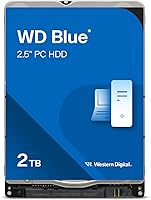
The Western Digital WD Blue 2TB Hard Drive has been around long enough to build a solid reputation among everyday PC users — and for good reason. It sits in a comfortable middle ground: not the speediest option on the shelf, but dependable, spacious, and priced for the real world. Yes, SSDs exist, and if raw speed is your priority, you already know where to look. But for buyers who need bulk storage capacity without spending a fortune, this WD Blue HDD makes a compelling case. The slim 7mm form factor is a genuine advantage for laptop owners, and the WD Blue lineup has long been known for broad hardware compatibility across both older and newer systems.

Features & Benefits

The 5400 RPM spin speed is not going to win any drag races, but it keeps the drive cool and quiet — exactly what you want in a laptop that sits on your desk all day. Pair that with a SATA 6 Gb/s interface, and you have compatibility with essentially every modern notebook and desktop out there. The 128 MB cache helps the drive handle routine file transfers and background processes without stumbling. One underappreciated detail is the thin 7mm z-height, which fits ultra-slim laptops while also working in standard 9.5mm bays with an adapter. Bundled Acronis True Image software makes migrating your existing system to this mechanical storage upgrade far less painful than it sounds.

Best For

This WD Blue HDD is a natural fit for anyone upgrading a laptop that shipped with a smaller drive and needs more room for photos, documents, and downloaded files. Students and home office workers will find 2TB more than adequate for years of everyday use. Desktop builders often drop the 2TB mobile hard drive in as a secondary volume — a reliable place to park media libraries and backups without eating into an SSD budget. If you own a slim notebook with a 7mm drive bay, options are genuinely limited, and this drive covers that niche well. It is not the right call for primary gaming rigs or workstations where sustained write speeds matter most.

User Feedback

With over 11,000 ratings and a 4.6-star average, buyer sentiment around this mechanical storage upgrade is consistently positive. Quiet operation and straightforward installation come up again and again in favorable reviews, along with praise for long-term reliability from users who have run the drive for several years without issues. Some buyers have repurposed it for light NAS and archiving setups, finding the capacity-to-cost ratio hard to beat. On the critical side, a handful of reviews mention early failures and a few flag damage on arrival — worth noting, but these appear to be outliers rather than a pattern. Nobody is complaining about speed; buyers in this category know exactly what they are signing up for.

Pros

  • Two full terabytes of storage is genuinely useful for years of photos, videos, and everyday files.
  • The slim 7mm profile opens up compatibility with thin laptops where drive options are limited.
  • Quiet operation makes this WD Blue HDD a natural fit for shared spaces like libraries or open offices.
  • Bundled Acronis True Image software takes the guesswork out of migrating from an old drive.
  • SATA 6 Gb/s interface means no compatibility headaches with modern laptops and desktops.
  • A 4.6-star average across more than 11,000 buyers reflects genuine long-term user satisfaction.
  • The 128 MB cache keeps everyday tasks — file transfers, backups, document access — running smoothly.
  • Long-term owners consistently report the drive holding up well after years of regular use.
  • WD F.I.T. Lab certification provides reassurance that the drive has been tested across a wide range of PC setups.
  • Works as a dependable and affordable secondary storage volume in desktop builds alongside an SSD.

Cons

  • Noticeably slower than any SSD, which is felt immediately during boot-up or launching applications.
  • Not a practical choice as a primary drive for gaming rigs or workstations with heavy write demands.
  • Mechanical drives are more vulnerable to shock and vibration than solid-state alternatives.
  • A handful of buyers have reported units arriving physically damaged, suggesting inconsistent shipping packaging.
  • A small number of early failures in reviews are worth noting, even if they appear to be outliers.
  • No hardware encryption support, which may matter for users handling sensitive or confidential data.
  • The 5400 RPM speed means large file transfers — say, moving a media library — take longer than expected.
  • Power consumption, while low for an HDD, is still higher than a comparable SSD in a laptop context.

Ratings

The Western Digital WD Blue 2TB Hard Drive scores below are generated by AI after analyzing thousands of verified global buyer reviews, with spam, bot activity, and incentivized feedback actively filtered out. The results reflect a balanced picture — real strengths and genuine pain points — drawn from users who bought and used this mechanical storage upgrade in everyday laptops, desktop builds, and archiving setups. Where buyers consistently agreed, the scores reflect that consensus; where opinions split, that tension is captured honestly.

Storage Value
93%
Buyers consistently highlight the cost-per-gigabyte ratio as one of the strongest arguments for this WD Blue HDD over any SSD alternative. Getting 2TB of reliable internal storage at this price point is hard to match, and users replacing aging smaller drives report feeling like they have genuinely future-proofed their machines for years of accumulated files.
A small segment of buyers feel that as SSD prices continue to drop, the value gap is narrowing, making the mechanical option feel less decisive than it once did. For users who already own an SSD boot drive and only need secondary storage, the value argument remains strong — but for anyone considering this as their only drive, the math is less clear.
Reliability
88%
Long-term owners are among the most vocal supporters, with many citing years of continuous use without a single failure or noticeable degradation. The WD Blue lineup has a deep history of dependable performance, and buyers who have used multiple units across different machines report consistent results over time.
A recurring thread in negative reviews involves early failures — a small but non-trivial number of buyers experienced drive death within weeks of installation. While this appears to be an outlier pattern rather than a systemic flaw, it is enough to warrant caution and underscores the importance of keeping backups regardless of brand reputation.
Noise & Heat
86%
Users who moved from older or louder mechanical drives are frequently surprised by how quiet this 2TB mobile hard drive operates under typical workloads. In quiet environments like home offices or libraries, the drive is barely perceptible, and heat output during normal use is reported as low and well within comfortable laptop operating ranges.
Under heavier sustained workloads — such as large batch file copies or running intensive backup jobs — some users report a noticeable increase in audible activity and warmth. This is expected behavior for a spinning drive, but buyers accustomed to the silence of SSDs may find it more intrusive than anticipated.
Installation Ease
91%
Reviewers across all experience levels — from first-time laptop openers to seasoned builders — consistently describe installation as straightforward. The standard SATA connector and familiar 2.5-inch footprint mean there are no surprises, and the bundled Acronis cloning software eliminates the most intimidating part of the swap for non-technical buyers.
A small number of users encountered compatibility issues with older laptop models where the BIOS did not immediately recognize the drive, requiring firmware updates before the system would boot. These cases are uncommon, but buyers with aging hardware should verify compatibility before committing.
Read/Write Speed
61%
39%
For the tasks this mechanical storage upgrade is actually designed for — storing documents, backing up photos, archiving video files, and acting as a secondary data volume — the throughput is more than adequate. Users who set realistic expectations report no frustration with the drive's speed in these contexts.
Anyone coming from an SSD will immediately feel the difference, particularly during boot sequences or when opening large applications stored on this drive. The 5400 RPM ceiling is a genuine constraint, and buyers who underestimated this gap have been among the most critical reviewers, often wishing they had chosen a faster solution.
Build Quality
84%
The physical construction feels solid and well-finished for a drive in this category, and the compact 7mm chassis is impressively rigid given its thin profile. Buyers who have handled multiple WD Blue units across different generations note consistent manufacturing quality with no obvious cost-cutting in the casing or connector area.
Being a mechanical device, the drive is inherently more vulnerable to physical shock than an SSD — a reality several buyers discovered after drops or rough handling. A handful of reviews also flagged units arriving with physical damage, suggesting that protective packaging during shipping could be improved.
Compatibility
89%
The SATA 6 Gb/s interface and standard 2.5-inch footprint make this WD Blue HDD compatible with a remarkably wide range of machines, and the WD F.I.T. Lab certification backs this up with real-world testing data. Users have successfully installed it in everything from budget laptops to mid-range desktop systems with no driver headaches.
Compatibility issues are rare but not unheard of — a few buyers with ultra-new motherboards or niche laptop configurations reported recognition problems that required BIOS adjustments. The 7mm-to-9.5mm adapter, while widely available, is not always included in the box, which catches some buyers off guard.
Software Bundle
77%
23%
The inclusion of Acronis True Image WD Edition is a meaningful addition that saves buyers from purchasing cloning software separately — a step that typically costs extra and adds complexity for less experienced users. Reviewers who used it for drive migration report a smooth, largely hands-off cloning experience.
Some users found the Acronis software registration process unnecessarily cumbersome, and a few reported that activation keys were not straightforward to locate after purchase. The software also requires an internet connection for activation, which frustrated buyers who wanted to complete their setup offline.
Form Factor Fit
87%
The 7mm z-height is a real differentiator for owners of thin and light laptops where space is genuinely constrained, and buyers specifically searching for a slim-compatible drive consistently praise this aspect. It removes the need for third-party spacers in most modern notebook installations.
Users with older desktops or certain 3.5-inch bay configurations found the 2.5-inch size required an additional bracket adapter that was not included. While adapters are cheap and easy to source, it adds a small but unnecessary friction point for desktop builders expecting a plug-and-play experience.
Long-Term Durability
82%
18%
Buyers who have owned this mechanical storage upgrade for two or more years are among its most enthusiastic advocates, with many reporting zero issues across continuous daily use. The WD Blue line has accumulated enough real-world history that long-term confidence in the product is well-founded for typical usage patterns.
Mechanical drives have a finite lifespan tied to physical wear, and a subset of buyers who used the drive in high-duty-cycle scenarios — frequent large writes, near-constant access — report performance degradation sooner than expected. This is not a flaw unique to this drive, but it is worth factoring in for demanding use cases.
Value vs SSD
67%
33%
For pure capacity at the lowest cost, this WD Blue HDD still wins the comparison in a straightforward way — 2TB of SSD storage costs considerably more, and for buyers whose main need is space rather than speed, the trade-off is rational and well-understood by satisfied customers.
As entry-level SSDs become cheaper, a growing number of buyers express post-purchase doubt about whether the mechanical route was the smarter long-term decision. Several reviewers who bought this drive for a laptop upgrade later wished they had stretched their budget for a smaller but faster solid-state alternative.
Packaging & Delivery
71%
29%
The majority of buyers receive the drive in good condition with no physical damage, and the product packaging is generally considered adequate for standard shipping conditions. Most units arrive ready to install with no cosmetic or functional issues noted on arrival.
A recurring thread across negative reviews involves units arriving with dents, scratches, or in a few cases, functional damage attributed to inadequate cushioning during transit. This is not a product design issue, but it is consistent enough across reviews to flag as a real risk worth considering when choosing a seller.
Cloning Experience
78%
22%
Users who completed a full drive migration using the bundled Acronis software report that the process worked as expected, preserving their OS, applications, and personal data without requiring a clean reinstall. For non-technical buyers, having guided software included removes the biggest psychological barrier to attempting a drive swap.
A segment of users encountered compatibility issues between the Acronis software and certain Windows configurations, particularly on systems running older or heavily customized installs. Tech-savvy buyers who already own disk imaging tools may find the bundled software redundant, but for newcomers it remains a net positive.

Suitable for:

The Western Digital WD Blue 2TB Hard Drive is a strong match for anyone who needs a lot of storage space without paying SSD prices. Students storing years of coursework, lecture recordings, and project files will find 2TB comfortably spacious for the long haul. Laptop owners replacing a failing or undersized drive get a particularly good deal here, especially if their notebook uses a slim 7mm bay — a form factor that narrows the field considerably. Desktop builders who already have an SSD as their boot drive often add this WD Blue HDD as a secondary volume purely for media libraries, backups, and archiving, where cost-per-gigabyte matters far more than raw throughput. Home and small office users with light daily workloads — browsing, document editing, photo storage — will barely notice the mechanical nature of the drive in practice.

Not suitable for:

The Western Digital WD Blue 2TB Hard Drive is not the right tool if speed is anywhere near the top of your priority list. Gamers who want fast level load times, video editors working with large high-resolution files, or developers running virtual machines will hit the ceiling of what a 5400 RPM spinning drive can comfortably deliver. If your laptop currently has an SSD and you are looking to replace it like-for-like, stepping down to this mechanical storage upgrade will feel like a noticeable regression in responsiveness. It is also not ideal as a primary boot drive in any performance-sensitive workflow. Users in environments with frequent vibration or rough handling should be aware that mechanical drives are inherently more fragile than solid-state alternatives, and a few buyers have reported units arriving damaged — so packaging and shipping conditions are worth factoring into the decision.

Specifications

  • Capacity: The drive offers 2TB of formatted storage capacity, suitable for large photo libraries, video collections, and years of everyday files.
  • Form Factor: It uses a 2.5-inch form factor, the standard size for laptop and compact desktop installations.
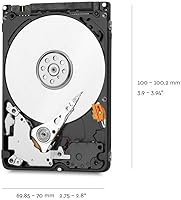
  • Height: The drive measures 7mm in height, fitting ultra-slim laptops, and is also compatible with standard 9.5mm bays using a spacer adapter.
  • Dimensions: Physical dimensions are 3.94 x 2.75 x 0.28 inches, making it compact and easy to handle during installation.
  • Weight: The drive weighs 3.2 ounces, light enough to have negligible impact on overall laptop weight.
  • Interface: It connects via a SATA 6 Gb/s interface, compatible with virtually all modern laptops and desktop motherboards.
  • Rotational Speed: The spindle operates at 5400 RPM, a speed tuned for low heat output and quiet operation in mobile environments.
  • Cache Memory: A 128 MB buffer cache helps manage read and write queues, keeping routine data operations running without noticeable stutter.
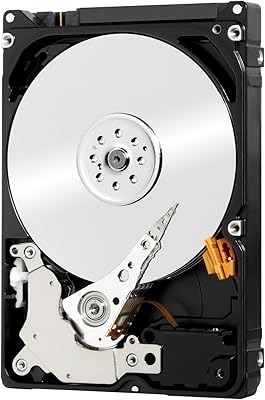
  • Drive Type: This is a traditional mechanical hard disk drive (HDD), using spinning platters and a read/write head rather than flash memory.
  • Hardware Platform: Designed for PC use, the drive is compatible with Windows-based laptops and desktops as well as most Linux systems.
  • Installation Type: The drive is intended for internal installation, mounted directly inside a laptop or desktop chassis.
  • Included Software: Acronis True Image WD Edition is bundled with the drive, enabling full disk cloning without requiring a separate purchase.
  • Certification: The drive carries WD F.I.T. Lab certification, confirming compatibility testing across a broad range of PC hardware configurations.
  • Model Number: The official model identifier is WD20SPZX, useful for verifying compatibility with specific laptop service manuals or motherboard documentation.
  • Manufacturer: Western Digital, a long-established storage manufacturer, produces and warranties this drive under its WD Blue product line.
  • Series: The WD Blue series is positioned as Western Digital's mainstream reliability tier, targeting everyday computing rather than high-performance workloads.
  • Availability Status: As of the product listing, this drive has not been discontinued by the manufacturer and remains in active production.
  • Star Rating: The drive holds a 4.6 out of 5 star rating based on over 11,197 verified buyer ratings on Amazon.
  • Market Rank: It ranks in the top 10 in the Internal Hard Drives category on Amazon, reflecting sustained buyer demand.
  • ASIN: The Amazon Standard Identification Number for this product is B079BQS5WQ, useful for locating the exact listing.

Related Reviews

Western Digital WD Blue 2TB Hard Drive

81%
88%
Long-Term Reliability
91%
Value for Money
74%
Read/Write Performance
83%
Noise & Vibration
92%
Installation Ease
More
Western Digital 6TB WD Blue PC Hard Drive
86%
88%
Reliability
84%
Performance for Everyday Use
90%
Noise Levels
89%
Power Consumption
91%
Value for Money
More
Western Digital WD Purple 2TB Internal Hard Drive
85%
93%
Surveillance Compatibility
81%
24/7 Reliability
88%
Value for Money
91%
Noise & Heat
79%
Write Performance
More
WD RE 2TB Enterprise Hard Drive
76%
74%
Long-Term Reliability
69%
Value for Money
83%
RAID Array Performance
86%
Vibration Tolerance
78%
Sequential Read/Write Speed
More
Western Digital WD Blue 1TB Hard Drive
78%
88%
Long-Term Reliability
91%
Value for Money
67%
Read & Write Speed
93%
Compatibility
58%
Noise Level
More
WD Blue 3TB Internal Hard Drive
80%
91%
Value for Money
86%
Reliability & Longevity
93%
Installation Ease
62%
Read & Write Speed
84%
Noise & Vibration
More
WD Black 2TB 3.5″ Internal Hard Drive
79%
78%
Read & Write Performance
82%
Reliability & Longevity
74%
Noise & Vibration
76%
Value for Money
89%
Installation & Compatibility
More
WD Red Plus 2TB NAS Hard Drive
80%
91%
Long-Term Reliability
88%
NAS Compatibility
86%
RAID Rebuild Performance
89%
Noise & Heat
72%
Sequential Read Speed
More
Western Digital WD Blue 1TB Hard Drive
78%
88%
Value for Money
57%
Read/Write Speed
91%
Installation Ease
74%
Reliability & Longevity
83%
Noise & Vibration
More
Western Digital WD Blue 4TB Hard Drive
79%
91%
Storage Capacity Value
83%
Noise & Acoustics
67%
Read & Write Performance
92%
Installation Ease
93%
Compatibility
More

FAQ

Yes, the 7mm height is specifically designed for thin and light laptops. As long as your laptop uses a standard 2.5-inch SATA bay, this WD Blue HDD should drop right in as a direct replacement with no adapter needed.

You can technically install your operating system on it, but day-to-day use will feel noticeably slower compared to an SSD, especially during startup and app launches. For most people, it works best as a secondary drive for files, backups, and media, paired with an SSD as the primary boot volume.

The drive itself is hardware-compatible with Macs that have a 2.5-inch SATA bay, but it ships formatted for Windows. You will need to reformat it using Disk Utility on macOS before use. Note that newer MacBooks no longer include user-accessible hard drive bays, so check your specific model before purchasing.

It lets you clone your existing drive onto this one — meaning you can copy your entire operating system, apps, and files without reinstalling anything from scratch. It is genuinely useful if you are swapping out an old drive and want to avoid a clean setup.

For most everyday tasks like browsing, document editing, streaming, and file storage, 5400 RPM is adequate. Where you will feel it is in boot times, launching large applications, and transferring big batches of files. If your workflow involves any of those regularly, an SSD would serve you better.

Some buyers do use this mechanical storage upgrade in light NAS setups, and it can handle that role for basic home file sharing or backup. That said, Western Digital makes drives specifically engineered for NAS use — like the WD Red series — which are better suited for always-on, multi-drive environments over the long run.

Yes, the drive is compatible with 9.5mm bays. You would use a simple spacer adapter to fill the extra 2.5mm of height — these are widely available and inexpensive, and some retail packages include one.

An internal installation like this 2TB mobile hard drive is generally faster, draws power directly from the laptop, and does not require a USB port. External drives are more portable and easier to share between machines, but for a permanent storage upgrade inside your laptop, internal is the cleaner solution.

The drive has a very strong track record overall, but a small number of reviews mention early failures or units arriving damaged in transit. These appear to be isolated cases rather than a widespread issue. Buying from a reputable seller with good packaging practices reduces the shipping damage risk considerably.

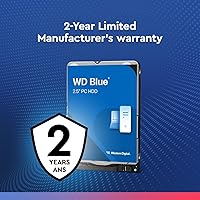
Western Digital typically backs the WD Blue line with a two-year limited warranty. It is worth registering the drive on WD's website after purchase to make any future warranty claims straightforward.

Where to Buy