Overview

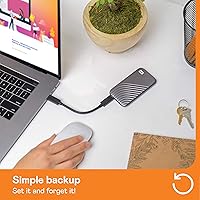
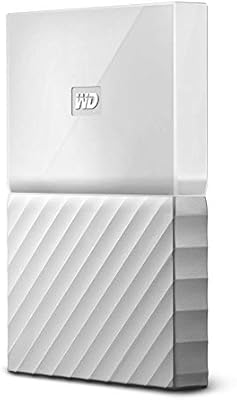
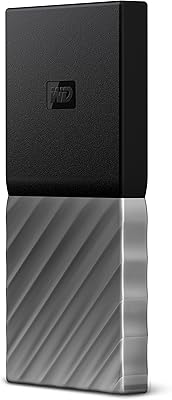
The WD My Passport 2TB Portable External SSD sits in a well-defined lane — fast portable storage for users who have genuinely outgrown spinning drives or basic USB sticks. Western Digital has built a solid reputation in consumer storage over the years, and the My Passport SSD reflects their effort to bring NVMe performance to a form factor small enough to slip into a shirt pocket. The promise is straightforward: desktop-class speeds without the bulk of a traditional enclosure setup. It's pitched at mobile professionals and power users rather than casual backup buyers, so if you're still on a portable HDD, the experience here will be noticeably different.
Features & Benefits

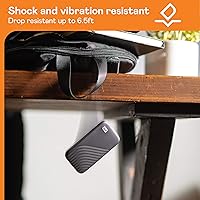
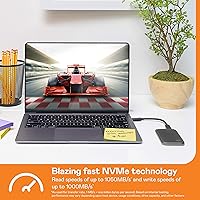
Speed is the obvious entry point: reads up to 1050MB/s and writes approaching 1000MB/s over USB 3.2 Gen 2, which in practice means moving a 10GB video project in roughly ten seconds flat. That kind of throughput is actually useful on location. The 256-bit AES hardware encryption deserves real attention — it operates at the drive level rather than through a background software process, so it stays effective even if someone pulls the drive and mounts it on another machine. Drop resistance up to 6.5 feet covers honest real-world accidents, though this is not a waterproof drive and shouldn't be treated as one. The included USB-A adapter quietly handles backward compatibility for anyone still on older ports — one less thing to pack.

Best For

This portable SSD hits its stride with creative professionals — video editors, photographers, and designers who need to move large files quickly without lugging around extra gear. It's also a strong fit for frequent travelers carrying sensitive work data, since the encryption means a lost drive doesn't automatically become a data breach. Students shuttling large project files between campus and home will appreciate both the speed and the compact size. For anyone still running a spinning portable hard drive, the My Passport SSD represents a tangible step up in both transfer speed and resilience. Just be clear: this is not a rugged outdoor drive — no water resistance — but for daily bag carry, it's well suited.

User Feedback

Across thousands of long-term buyer reviews, consistent satisfaction tends to center on two things: the drive keeps pace with its rated specs under normal use, and the physical build feels more substantial than expected. The password protection and encryption setup gets positive marks for being genuinely painless to configure. The more honest part of the picture: users transferring very large files — multi-gigabyte video exports, for instance — occasionally hit thermal throttling, where sustained write speeds dip noticeably toward the end of a long transfer. That's worth knowing if heavy continuous writes are part of your routine. The bundled WD Discovery software splits opinion; a fair number of owners skip it without any issues. Long-term users generally report no drive failures — a reassuring sign.

Pros

  • NVMe read speeds up to 1050MB/s make large file transfers feel nearly instant in everyday use.
  • Hardware-level 256-bit AES encryption protects your data even if the drive is physically stolen or lost.
  • The compact, shirt-pocket form factor makes this WD drive genuinely easy to carry every single day.
  • Both USB-C and USB-A connectivity are covered, with a USB-A adapter included right in the box.
  • Drop resistance up to 6.5 feet provides real peace of mind for everyday accidental drops.
  • Works natively with both Mac and PC, making it a flexible choice for mixed-platform households.
  • The physical build feels more premium and solid than the price point typically suggests.
  • Thousands of long-term buyers consistently report reliable performance with no drive failures over extended daily use.
  • Two terabytes of fast NVMe storage handles most creative workflows without juggling multiple drives.

Cons

  • Sustained large transfers can trigger thermal throttling, slowing write speeds noticeably before the job finishes.
  • No water resistance or dust sealing — this is not a drive for outdoor or harsh-environment use.
  • The bundled WD Discovery software receives mixed reactions; many users skip it entirely and find it adds friction.
  • The price sits noticeably above budget portable SSDs offering comparable raw storage capacity.
  • The drive runs warm during extended heavy use, which directly contributes to the throttling problem.
  • No included carrying case or pouch means scratch protection requires sourcing your own solution.
  • Reformatting may be required for optimal single-platform use, which can catch less technical buyers off guard.
  • The included USB cable is short, and finding an exact replacement is not always straightforward.

Ratings

The scores below for the WD My Passport 2TB Portable External SSD were generated by our AI system after analyzing tens of thousands of verified buyer reviews from global markets, with bot submissions, incentivized reviews, and duplicate accounts actively filtered out before scoring. Every category reflects the honest consensus of real long-term users — the genuine strengths and the recurring frustrations alike — so you can make a fully informed buying decision rather than one based on curated highlights.
Transfer Speed
88%
Reviewers who switched from portable hard drives consistently describe the speed jump as one of the most impactful hardware changes they have made in years. Offloading a full card of RAW photos or a 4K video project takes seconds rather than minutes, and that time savings compounds quickly for anyone working on location or under deadline.
The headline read speeds assume a USB 3.2 Gen 2 host port, so users on older USB-A machines will see noticeably lower real-world throughput — still fast by most standards, but a clear gap from the advertised figures. A portion of reviewers also note that peak speeds can be inconsistent depending on the host device's USB controller quality.
Build Quality
83%
Most owners describe this portable SSD as feeling more premium than its price tier typically delivers — solid in the hand, compact without feeling hollow, and noticeably more substantial than cheaper plastic-shell competitors. There is very little flex in the casing, and the finish holds up well to the daily handling of a drive that lives permanently in a bag or jacket pocket.
The shell is plastic rather than aluminum, which some buyers notice when comparing it side by side with pricier metal-bodied rivals. A recurring minor complaint is that the gray finish picks up fine scuffs with heavy daily carry, and the absence of any included pouch or case means scratch protection is entirely the owner's responsibility.
Portability
92%
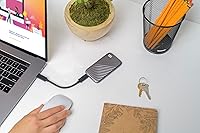
This is the category where nearly every reviewer agrees without reservation — the drive is genuinely pocketable, light enough to forget it is there, and smaller in footprint than most smartphones. Creative professionals who travel frequently cite the form factor as a primary reason they chose it over bulkier DIY NVMe enclosure setups that offer similar speeds but far worse packability.
The only notable complaint in this category relates to the included cable being quite short, which limits comfortable desk use when a port is positioned in an awkward location. The drive itself draws no real criticism at its current size, but a longer cable in the box would have made the overall portability package feel more thoughtfully complete.
Data Security
86%
Hardware-level 256-bit AES encryption earns consistently strong marks because it operates at the drive itself rather than through a software layer that can be sidestepped — a meaningful distinction for users carrying sensitive client files, financial data, or confidential work documents. Most reviewers who activate encryption describe the password setup process as straightforward and reliable once the WD Security tool is installed.
The strongest limitation is the same one inherent to serious hardware encryption: there is no password recovery mechanism, so a forgotten password means permanent data loss with no recourse. Several buyers also express frustration that encryption requires downloading a separate software tool rather than being accessible directly through the drive itself on first connection.
Sustained Performance
61%
39%
For the transfer tasks most buyers actually perform day to day — offloading a memory card, moving a project folder, copying a software installer — the drive holds its speed comfortably and the majority of users never encounter any throttling. The rated speeds are achievable and feel consistent for transfers in the range of a few gigabytes at a time.
When users push the drive with prolonged continuous writes — large-scale backups, full-drive cloning, or transferring several hundred gigabytes in one session — thermal throttling is a documented and recurring issue that causes speeds to drop noticeably before the job completes. This limitation appears repeatedly in detailed long-form reviews and is a genuine concern for anyone whose primary use case involves sustained heavy write workloads.
Value for Money
73%
27%
Buyers who genuinely need NVMe speeds and hardware encryption in a pocketable package largely view the price as justified, particularly professionals who factor in the real-world time savings over a slower drive. Long-term owners who have used the My Passport SSD for over a year tend to feel even more confident in the purchase given its durability record.
Casual users and budget-focused buyers who need basic file backup rather than top-tier speed consistently flag the price as harder to justify when slower, cheaper portable SSDs exist for lighter workloads. Comparative reviewers also note that competing portable NVMe drives at similar price points occasionally edge this WD drive on raw sequential speeds, making the value proposition less clear-cut than it once was.
Connectivity
89%
The USB-C native design paired with the included USB-A adapter resolves a real friction point that other manufacturers often leave buyers to solve on their own. Plug-and-play recognition on both Mac and Windows is consistently praised as instant and reliable, with no drivers, no configuration steps, and no delay between plugging in and having a working mounted drive.
The included cable is noticeably short, which is a recurring minor irritant for users who prefer flexibility in how they position the drive at a workstation. A handful of reviewers also note that the USB-A adapter can feel slightly imprecise in some port configurations, though this does not appear to translate into actual data transfer problems in practice.
Platform Compatibility
77%
23%
The exFAT format the drive ships in handles cross-platform file sharing between Mac and Windows without requiring any additional software, and users who regularly move files between both ecosystems describe the workflow as genuinely friction-free. For mixed-OS households or professionals working across both platforms, this out-of-the-box interoperability is a meaningful practical advantage.
Users who want to reformat for a native filesystem — APFS on Mac or NTFS on Windows — find the process unexpectedly confusing if they are less technically confident, and losing cross-platform compatibility is a real trade-off that some buyers only realize after the fact. Compatibility with iPads and Android tablets is possible but inconsistent, and several reviewers describe the mobile experience as requiring more workarounds than they anticipated.
Durability
76%
24%
Drop resistance up to 6.5 feet gives everyday users a meaningful level of confidence against the kinds of accidents that actually happen — slipping off a desk, falling from a bag, or getting knocked onto a hard floor. The solid-state internals also mean there is no spinning disk to damage from vibration or rough handling during travel or daily commutes.
The absence of any water resistance or dust sealing is a genuine limitation that disappoints buyers who assumed the rugged framing implied broader environmental protection. Users in outdoor professions, wet climates, or messy job-site environments flag this clearly — this WD drive handles physical shock well but should not be exposed to moisture or heavy dust without additional protective housing.
Software Experience
57%
43%
The drive functions perfectly as a plug-and-play storage device without WD Discovery installed at all, which means users who prefer a clean, no-bloatware setup simply never need to engage with it. Buyers who do install the software generally find the encryption and optional cloud backup features functional enough for their intended purpose.
WD Discovery draws consistent criticism across hundreds of reviews for feeling sluggish, unnecessarily intrusive, and poorly designed relative to the quality of the hardware it accompanies. Recurring complaints include unwanted update prompts, a dated interface, and the general sense that the software adds friction rather than value — particularly for users who only wanted a fast drive, not a software ecosystem.
Ease of Use
87%
Plug-and-play recognition on both Mac and Windows earns near-universal praise — the initial experience requires nothing beyond connecting the cable, and reviewers consistently describe it as one of the most straightforward peripheral setups they have encountered. Non-technical users in particular appreciate that there are zero decisions to make just to get started.
The one consistent friction point is the encryption setup, which requires locating, downloading, and installing a separate WD software tool rather than being accessible immediately on first connection. Buyers who purchased specifically for the security features sometimes feel this extra step undermines what should be a more intuitive first-run experience, especially when the hardware itself is otherwise so effortless.
Long-term Reliability
84%
Reviews from buyers who have used this portable SSD as their daily carry drive for one to three years consistently report no hardware failures, no unexpected unmounting events, and no perceptible decline in read performance over time. The solid-state design eliminates the mechanical wear patterns that progressively degrade conventional portable hard drives under the same conditions.
A small but traceable subset of reviews describes the drive becoming intermittently undetected by certain computers after extended regular use, though these cases appear to be outliers rather than a systemic failure pattern. Technically informed reviewers suggest that cumulative thermal stress from sustained use over time may be a contributing factor in these edge-case reliability concerns.
Capacity for Price
81%
19%
Two terabytes of fast NVMe storage at this price tier is competitive and genuinely sufficient for most creative professionals carrying working media libraries, active project archives, and rolling backups without needing to manage multiple drives simultaneously. Buyers who have filled the drive over time generally report satisfaction with the headroom it provides compared to the 500GB and 1TB alternatives.
Buyers who need only a fraction of 2TB may find the price-per-gigabyte calculation less favorable than stepping down to a smaller capacity drive from a competing brand at a lower entry point. Several reviewers also note anecdotally that the 2TB variant tends to run marginally warmer under sustained load than smaller capacity versions — a minor but real consideration for thermally sensitive workflows.

Suitable for:

The WD My Passport 2TB Portable External SSD is built for people who move large files regularly and simply cannot afford to wait on slow hardware. Video editors and photographers working on location will feel the speed difference immediately — offloading a 10GB shoot takes seconds rather than minutes, and that time adds up fast on a busy day. Frequent business travelers carrying confidential client files will find the hardware-level encryption genuinely reassuring, especially compared to drives that depend on software protection alone. Students and remote workers shuttling heavy project files between home, campus, or co-working spaces get a reliable, pocketable workhorse that handles the daily wear of bag life without complaint. Anyone currently running a portable spinning hard drive who wants a meaningful upgrade in both speed and physical resilience — without the complexity of a DIY NVMe enclosure — will find this WD drive hits that sweet spot cleanly.
Not suitable for:

The WD My Passport 2TB Portable External SSD is not the right call for every buyer, and it is worth being direct about where it falls short. If your workflow involves sustained, continuous large transfers — think hours of raw video ingestion or full drive-to-drive cloning sessions — the thermal throttling that some users report during prolonged writes could become a genuine frustration rather than a minor footnote. This is also not a rugged field drive: drop resistance up to 6.5 feet covers honest desk-height accidents, but there is no water resistance, no dust sealing, and no MIL-spec certification, so treating it as an outdoor or job-site workhorse is a mistake. Budget-focused buyers who primarily need basic file backup without speed-sensitive tasks will likely find the price hard to justify when slower, cheaper portable options exist. Anyone who needs a specific out-of-the-box file system for single-platform use should also verify compatibility upfront, since reformatting may be required and that step catches less technical users off guard.
Specifications

  • Capacity: The drive provides 2TB of total usable NVMe storage, suitable for large media libraries, project archives, and full system backups.
  • Drive Type: It uses NVMe solid-state technology internally, which delivers significantly higher transfer speeds than traditional SATA-based portable SSDs.
  • Interface: Data transfers via USB 3.2 Gen 2, a standard that supports theoretical bandwidth of up to 10Gbps.
  • Connector: The drive connects natively via USB-C, and a USB-A adapter is included in the box for backward compatibility with older ports.
  • Read Speed: Sequential read speeds reach up to 1050MB/s under optimal conditions with a compatible USB 3.2 Gen 2 host device.
  • Write Speed: Sequential write speeds reach up to 1000MB/s under optimal conditions, though sustained heavy writes may trigger thermal throttling.
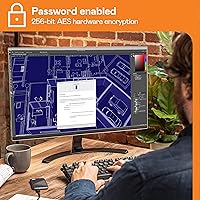
  • Encryption: Data is protected by 256-bit AES hardware encryption, activated through optional password protection via the WD Security software tool.
  • Drop Resistance: The drive is rated to withstand accidental drops from heights up to 6.5ft (1.98m) onto hard surfaces, with no water or dust resistance rating.
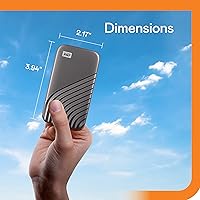
  • Dimensions: The drive measures 3.5 x 1.8 x 0.39 inches, making it smaller in footprint than most modern smartphones.
  • Weight: The listed weight is approximately 0.25 ounces, making it one of the lightest drives in its class for everyday carry.
  • Platform Support: Compatible with both Windows and macOS out of the box, though reformatting may be required to optimize for single-platform or specific filesystem use.
  • Form Factor: The 2.5-inch external SSD form factor is compact enough to fit in a shirt pocket, small pouch, or any standard laptop bag pocket.
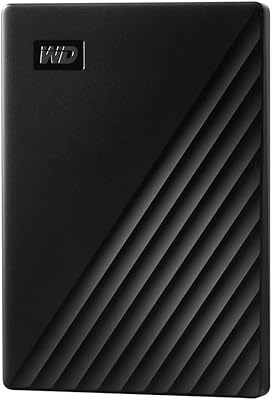
  • Color: Available in Gray, with a smooth matte finish and a slim, unibody-style plastic casing.
  • Warranty: Western Digital covers this drive with a 3-year limited warranty against manufacturing defects under normal use conditions.
  • Series: This drive belongs to Western Digital's My Passport SSD product line, positioned as their consumer-facing portable NVMe storage option.

Related Reviews

WD My Passport 2TB Portable Hard Drive
76%
93%
Portability
88%
Setup & Ease of Use
71%
Transfer Speed
67%
Build Quality & Durability
84%
Data Security
More
SanDisk Extreme 2TB Portable External SSD
81%
88%
Transfer Speed
91%
Build Quality
94%
Portability
87%
Durability & Reliability
83%
Compatibility
More
TEAMGROUP PD20 ECO 2TB Portable External SSD
86%
93%
Performance (Speed)
80%
Build Quality & Durability
88%
Portability & Design
85%
Waterproof & Dustproof Protection
89%
Compatibility (Cross-Device Use)
More
WD My Passport 6TB Portable External Hard Drive
79%
94%
Storage Value
91%
Portability
88%
Ease of Setup
86%
Data Security
61%
Transfer Speed
More
WD My Passport 1TB Portable External Hard Drive
71%
93%
Portability
91%
Ease of Setup
78%
Build Quality
61%
Transfer Speed
88%
Data Security
More
WD Elements Portable 2TB
75%
96%
Ease of Setup
88%
Reliability & Longevity
93%
Portability & Form Factor
61%
Transfer Speed
84%
Value for Money
More
WD My Passport 4TB Portable External Hard Drive
80%
93%
Storage Capacity
91%
Portability & Form Factor
61%
Transfer Speed
88%
Security & Encryption
67%
Backup Software
More
WD My Passport 3TB External Hard Drive
73%
91%
Ease of Setup
64%
Transfer Speed
88%
Portability & Size
83%
Data Security
31%
Mac Compatibility
More
WD My Passport Essential 500 GB Portable External Hard Drive
85%
88%
Performance
91%
Transfer Speed
93%
Portability & Design
85%
Ease of Use
84%
Security Features
More
Buffalo SSD-SAO2.0U3B 2TB External SSD
79%
93%
PS5 & PS4 Compatibility
78%
Storage Capacity Value
67%
Transfer & Load Speed
91%
Form Factor & Design
82%
Build Quality & Durability
More
WD My Passport 512GB SSD
87%
91%
Transfer Speed
95%
Portability & Size
89%
Security Features
86%
Build Quality
74%
Compatibility
More

FAQ

Yes, and this is something WD handled well: a USB-A adapter ships inside the box, so you don't need to buy anything separately. Just attach the adapter to the cable and plug it into any standard USB-A port. You will not get the full 1050MB/s speeds over USB-A, but it still performs significantly faster than a portable hard drive.

No installation required — plug it in and it mounts like any other drive on both Mac and Windows. Western Digital includes the WD Discovery app, but it is entirely optional. Most users skip it without any issues. The software is mainly useful if you want to activate password encryption or set up optional cloud backup features.

You set it up through the WD Security tool, which is part of the WD Discovery software suite. The process is straightforward: install the tool, create a password, and from that point on the drive will ask for it every time it is connected. The critical thing to know is that there is no password recovery option — hardware encryption does not have a backdoor by design. If you forget the password, the data on the drive is gone and you would need to reformat it to reuse it. Keep that password somewhere safe.

For typical file transfers — even large batches of RAW photos or a few big video files — speeds stay impressively close to the rated specs. Where you may notice a dip is during prolonged, continuous writes of very large amounts of data in a single session, like moving hundreds of gigabytes at once. Some users report thermal throttling in these scenarios, where the drive slows down as it heats up. For everyday creative workflows it is rarely a problem, but if non-stop bulk transfers are your main use case, that is worth knowing before you buy.

The WD My Passport 2TB Portable External SSD ships formatted in exFAT, which both macOS and Windows can read and write without any additional software. That makes cross-platform use genuinely easy out of the box. If you want to reformat it to a native filesystem — APFS for Mac or NTFS for Windows — it will perform slightly better on that platform, but you will lose the cross-compatibility. Most people who use it across both systems stick with exFAT and never have a problem.
For everyday carry it holds up well. The drive is tested to survive drops from up to 6.5 feet onto hard surfaces, which covers the realistic accidents most people encounter — slipping off a desk, a bag falling over, that kind of thing. What it is not is waterproof or dust-sealed, so do not treat it like a rugged outdoor drive. For office, travel, and daily bag use it is a solid choice; for job sites, wet environments, or adventure use you would want something with an IP rating.

No external power needed at all. The drive draws everything it requires directly through the USB connection from your laptop or desktop. This is one of the practical advantages of a portable SSD over some larger external drives — just plug it in and it works, no power brick, no second cable.

Very noticeable. A typical portable spinning hard drive reads at around 100 to 130MB/s on a good day. This WD drive can hit up to 1050MB/s — roughly eight to ten times faster in practice. A file transfer that takes four or five minutes on a portable HDD can finish in well under a minute on this drive. If you have been living with a spinning drive and you switch to this, the difference is immediately obvious.

It depends on your device. iPads with USB-C ports and a sufficiently modern version of iPadOS can work with external drives through the Files app, though you may need an adapter depending on your iPad model. Android devices with USB-C OTG support can generally connect to it as well. That said, this drive is designed and optimized for Mac and Windows computers, and the experience on mobile devices varies a lot depending on your specific hardware, OS version, and the app you use to access the files. Treat mobile compatibility as a bonus, not a core feature.

Based on long-term buyer feedback, the My Passport SSD holds up well over time — users who have carried it daily for over a year generally report no failures or significant degradation. SSDs do not have the moving parts that make traditional hard drives vulnerable to wear, so physical durability is generally strong. Western Digital also backs it with a 3-year limited warranty, which gives some added peace of mind if something does go wrong.

Where to Buy