Overview

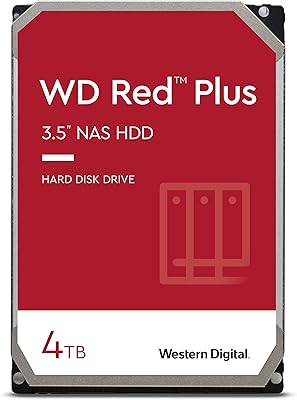
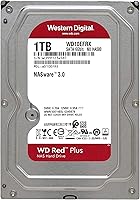
The Western Digital WD Red Plus 1TB NAS Hard Drive has been a go-to choice for NAS builders since its debut in 2012, earning a quiet but solid reputation among home enthusiasts and small business owners alike. What sets it apart from the standard WD Red is its use of CMR technology — Conventional Magnetic Recording — which delivers consistent write performance that SMR-based drives simply cannot match. At 1TB, this is the entry point in a lineup stretching all the way to 14TB. One thing worth knowing upfront: during a rebranding transition, some units ship with a WD Red label on the physical drive, but the model number WD10EFRX confirms you have the CMR version. Don't let that throw you off.
Features & Benefits

Running at 5400 RPM, this NAS drive prioritizes steady, low-heat operation over raw speed — a deliberate engineering choice that makes it far better suited to running around the clock than a standard desktop drive. It pairs a SATA 6 Gb/s interface with a 64MB cache, which keeps data moving smoothly in multi-bay RAID arrays without bottlenecking throughput. WD's NASware firmware handles the harder stuff behind the scenes: reducing drive errors, improving RAID rebuild times, and ensuring compatibility across popular NAS platforms. The drive is rated for up to 180TB per year of workload, which comfortably covers most home and small-business use cases. Backing it all up is a 3-year limited warranty.

Best For

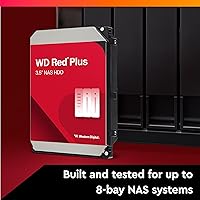
This hard drive fits best in setups where reliability over time matters more than transfer speed. If you're putting together a Synology or QNAP NAS for home backups, media streaming, or shared office storage, the WD Red Plus 1TB is a proven fit for enclosures with up to 8 bays. It particularly shines in RAID 1 mirror configurations, where CMR's predictable write behavior is essential for rebuild integrity. Anyone moving from a desktop drive to a proper NAS setup will appreciate having a drive actually engineered for that environment. It is also a solid pick for budget-conscious buyers who want something dependable without paying enterprise prices.

User Feedback

With over 7,000 ratings averaging 4.6 out of 5 stars, this NAS drive has earned its standing the hard way. Buyers consistently praise its quiet operation, stable performance in multi-drive arrays, and compatibility with major NAS brands right out of the box. The most common point of friction — and it comes up often — is the labeling issue: units arriving with a WD Red sticker instead of WD Red Plus. Western Digital addressed this directly, noting that the model number is the definitive identifier. On the critical side, some users in tightly packed enclosures report warmth under sustained load, and a handful note vibration sensitivity in certain chassis. Long-term owners, though, frequently report drives running reliably well past the warranty period.

Pros

  • CMR recording technology ensures reliable RAID rebuilds and consistent long-term write performance.
  • NASware firmware makes compatibility with major NAS brands straightforward from day one.
  • Runs quietly and stays cool enough for 24/7 operation in a home or office setting.
  • The 3-year limited warranty provides real peace of mind for a drive expected to run continuously.
  • Thousands of long-term owners report this hard drive still running reliably well beyond the warranty period.
  • At its price point, it delivers purpose-built NAS reliability without the cost of enterprise alternatives.
  • 64MB cache helps smooth out data flow in multi-drive array configurations.
  • Rated for up to 180TB per year, comfortably covering most home and small-business workloads.
  • Works across both PC and Mac NAS environments without driver or compatibility fuss.
  • A strong 4.6-star average across more than 7,000 reviews reflects consistent real-world satisfaction.

Cons

  • 1TB fills up faster than expected for users storing video, photos, or growing backup archives.
  • Some units ship with a WD Red label instead of WD Red Plus, creating unnecessary confusion at unboxing.
  • Not suitable for write-intensive workloads like database hosting or direct video editing.
  • Users in tightly packed multi-drive enclosures report noticeable warmth under sustained heavy load.
  • A handful of owners note vibration sensitivity in certain chassis designs, which can affect noise levels.
  • No hardware encryption support, which matters for compliance-sensitive small business environments.
  • 5400 RPM throughput can feel sluggish if used outside a NAS context or paired with fast network connections.
  • At 1TB, the value-per-gigabyte ratio is less competitive compared to higher-capacity models in the same line.

Ratings

The Western Digital WD Red Plus 1TB NAS Hard Drive scores below are generated by AI after rigorously analyzing thousands of verified global user reviews, with spam, bot-submitted, and incentivized feedback actively filtered out. The results reflect real-world experiences from home NAS builders, small business IT managers, and long-term owners who have run this hard drive through years of continuous operation. Both standout strengths and genuine frustrations are reflected transparently — nothing is smoothed over to make the scores look better than the evidence supports.
Long-Term Reliability
91%
Users who have run this NAS drive continuously for two, three, or even four years consistently report zero failures and stable SMART data readings. The combination of CMR technology and NASware firmware appears to contribute meaningfully to its endurance in always-on environments, which is exactly the use case it was built for.
A small but notable subset of buyers report early failures within the first year, which — while statistically uncommon — is disproportionately stressful given that NAS drives often house critical backups or shared business data. Early failure patterns are not isolated enough to ignore entirely.
NAS Compatibility
93%
Out of the box, this hard drive works reliably with Synology, QNAP, Asustor, and most other major NAS brands without any manual configuration headaches. Buyers frequently mention that their NAS recognized the drive immediately and began RAID setup or volume creation without a single driver issue.
A handful of users with older or budget-tier NAS enclosures report occasional compatibility warnings on the NAS dashboard, even when the drive itself functions correctly. This appears to be a firmware communication quirk rather than a true incompatibility, but it creates unnecessary anxiety for less experienced users.
RAID Performance
88%
In RAID 1 mirror and RAID 5 parity configurations, this NAS drive handles rebuilds far more predictably than SMR-based alternatives, which is the single most important real-world differentiator for anyone running a redundant array. Home users report rebuild times after a drive swap that feel reasonable and consistent rather than unpredictably stalled.
At 5400 RPM, RAID rebuild times are naturally longer than what a 7200 RPM drive would achieve, which can be a concern when a second drive in the array is also aging. Users running high-capacity arrays notice this more acutely, though for 1TB this is rarely a critical issue.
Noise & Vibration
83%
Most users describe this hard drive as impressively quiet during normal operation, with the 5400 RPM spin speed keeping acoustic output well below what desktop drives produce at 7200 RPM. In a home office NAS sitting on a desk nearby, the difference in ambient noise is noticeable and appreciated.
In multi-drive enclosures — particularly 4-bay and 8-bay chassis — some users report a low-frequency vibration hum that becomes audible at night or in quiet rooms. This is partially a chassis resonance issue, but buyers with vibration-sensitive setups should factor it into enclosure selection.
Heat Management
77%
23%
Under typical mixed workloads involving file transfers, scheduled backups, and media streaming, this NAS drive stays within a comfortable operating temperature range that most NAS enclosures handle without aggressive fan spin-up. Home users with well-ventilated 2-bay units rarely report any heat-related concerns.
In densely packed 6-bay or 8-bay enclosures running sustained large transfers, some users report the drive climbing into the warmer end of the acceptable temperature range. While still within spec, it is worth ensuring adequate enclosure airflow rather than relying on passive cooling alone.
Value for Money
81%
19%
For a purpose-built NAS drive with CMR technology, a 3-year warranty, and a long track record of reliability, buyers generally feel the pricing is fair and competitive within its category. The alternative — buying a cheaper SMR drive and risking RAID rebuild issues — makes the modest premium feel justified to most informed buyers.
At the 1TB capacity tier, the cost-per-gigabyte ratio is less compelling compared to stepping up to a 2TB or 4TB model in the same WD Red Plus lineup. Budget-focused buyers stretching to this price point may find that a slightly higher spend on a larger capacity delivers meaningfully better overall value.
Write Consistency
89%
CMR recording technology means writes behave predictably even during sustained sequential operations, which is a genuine advantage over SMR drives that throttle writes once the cache fills. Power users running scheduled backups or continuous surveillance write streams report steady throughput without unexpected slowdowns mid-transfer.
Write speeds are not particularly impressive in absolute terms compared to higher-RPM alternatives, and users coming from faster desktop drives may feel the gap during large initial data migrations onto the NAS. This is an expected trade-off for a drive tuned for endurance rather than peak throughput.
Read Performance
79%
21%
For typical NAS workloads — streaming media to a few users, serving files across a local network, or running incremental backups — read performance is entirely adequate and consistent. Users running Plex on a local network with standard definition or 1080p content report smooth playback without buffering under normal conditions.
Users attempting to stream multiple simultaneous 4K streams or run I/O-intensive applications directly from the NAS will find this drive a bottleneck. The 5400 RPM limitation is real at the upper edge of demanding home media server use cases.
Firmware & Software
84%
NASware firmware handles the behind-the-scenes work of reducing vibration compensation errors, managing RAID communication, and recovering gracefully from unexpected power interruptions — features that generic desktop drives simply do not include. Most users never interact with the firmware directly, which is exactly how it should work.
There is no user-accessible firmware update tool provided by WD for this drive, which means buyers have no way to patch or update the drive firmware themselves if an issue is later identified. For most users this is a non-issue, but for those managing larger NAS deployments it is a gap worth noting.
Packaging & Delivery
72%
28%
The drive typically arrives in protective anti-static packaging with adequate cushioning for standard shipping conditions. Buyers ordering multiple units for a new NAS build generally report receiving drives in good physical condition without signs of transit damage.
The WD Red versus WD Red Plus label confusion during WD's rebranding period has been a persistent source of frustration at the point of delivery, with some buyers initially convinced they received the wrong product. While the model number is the definitive identifier, WD could have managed this transition more clearly.
Setup & Installation
91%
Physical installation is as straightforward as any 3.5″ internal drive — slide it into the NAS bay, secure it with the provided screws or tool-free trays depending on the enclosure, and the NAS detects it automatically. First-time NAS builders consistently describe the process as less intimidating than expected.
The experience is almost entirely determined by the NAS enclosure software rather than the drive itself, which means users with older or less polished NAS operating systems may hit setup friction that has nothing to do with this hard drive specifically.
Durability Under Load
86%
Users running this NAS drive in small business environments with multiple simultaneous users accessing shared files around the clock report consistent performance without the degradation some cheaper drives exhibit over time. The 180TB-per-year workload rating gives businesses real headroom for moderate continuous use.
A small number of professional users pushing sustained workloads at the upper edge of the rated workload ceiling report that drive performance can become less consistent over the third year of continuous operation, suggesting the 180TB rating should be treated as a ceiling rather than a comfortable sustained target.
Warranty Experience
74%
26%
Western Digital's 3-year warranty provides genuine coverage that buyers in this category consider standard and appropriate. Users who have submitted warranty claims report that the process, while not instant, ultimately results in a replacement drive without significant resistance from WD support.
Several users report that the warranty claim process requires more documentation and back-and-forth than they expected, and processing times for replacements can stretch to two weeks or longer. For a drive holding active data in a single-drive NAS, that turnaround time is a real operational problem.

Suitable for:

The Western Digital WD Red Plus 1TB NAS Hard Drive is purpose-built for anyone setting up a home or small business NAS system who wants a dependable, always-on drive without overcomplicating the decision. It fits naturally into popular 1-to-8-bay enclosures from Synology, QNAP, and similar brands, and the NASware firmware means compatibility is rarely a headache right out of the box. RAID 1 mirror setups in particular benefit from this drive's CMR recording technology, which maintains consistent write behavior during rebuilds — something SMR drives are known to struggle with under sustained pressure. Small business owners running shared file storage, local backups, or lightweight media servers will find the 180TB-per-year workload rating more than sufficient for day-to-day demands. It also makes a smart upgrade for anyone who has been running a desktop drive inside a NAS and wants something actually engineered for that environment.
Not suitable for:

The Western Digital WD Red Plus 1TB NAS Hard Drive is not the right tool for every storage job, and being clear about that saves buyers from a frustrating mismatch. At 1TB, the capacity will feel limiting relatively quickly for anyone archiving large video libraries, running a Plex server with 4K content, or managing growing backups from multiple users — stepping up to a higher-capacity model in the same lineup is worth considering from the start. The 5400 RPM speed class, while intentional and appropriate for NAS use, means this drive is a poor fit for applications demanding fast sequential throughput, such as direct video editing workloads or high-transaction database environments. Users needing enterprise-grade endurance ratings or SAS connectivity should look at purpose-built enterprise drives instead. And if you simply need external portable storage or an internal desktop upgrade, this NAS-specific drive offers little advantage over a cheaper general-purpose option.
Specifications

  • Capacity: This drive offers 1TB of formatted storage capacity, serving as the entry point in the WD Red Plus lineup.
  • Form Factor: Built in the standard 3.5″ form factor, it fits the vast majority of desktop NAS enclosures without adapters.
  • Interface: It connects via SATA 6 Gb/s, ensuring broad compatibility with modern NAS motherboards and controllers.
  • Cache: A 64MB onboard cache buffer helps smooth out data transfers during concurrent multi-drive NAS operations.
  • Rotational Speed: The drive spins at 5400 RPM, a deliberate choice that balances power consumption, heat output, and noise for 24/7 use.
  • Recording Tech: CMR (Conventional Magnetic Recording) is used, delivering predictable and consistent write performance across sustained workloads.
  • Workload Rate: Rated for up to 180TB per year of annualized user data transfers, covering most home and small-business NAS scenarios.
  • NAS Bay Support: Designed and tested for use in NAS enclosures with up to 8 drive bays.
  • Firmware: Ships with WD NASware firmware, which optimizes RAID compatibility, error recovery, and overall NAS system stability.
  • Warranty: Backed by a 3-year limited warranty from Western Digital, providing meaningful coverage for always-on storage deployments.
  • Weight: The drive weighs 15.9 ounces, which is standard for a 3.5″ mechanical hard drive of this class.
  • Dimensions: Physical dimensions are 5.8 x 4 x 1 inches, consistent with the 3.5″ standard bay mounting specification.
  • Platform Support: Compatible with both PC and Mac-based NAS systems running supported NAS operating environments.
  • RAID Support: Fully RAID-compatible and tested for use in RAID 0, 1, 5, 6, and 10 configurations.
  • Model Number: The official model number is WD10EFRX, which is the definitive identifier for the CMR version of this drive.
  • Color: The drive features WD's signature red PCB and label design, consistent across the Red Plus product family.
  • Power-On Hours: Engineered for continuous 24/7 operation, making it suitable for always-on NAS environments rather than intermittent desktop use.
  • Availability Date: This drive was first made available in July 2012 and has remained in active production since.

Related Reviews
WD Red Plus 2TB NAS Hard Drive
80%
91%
Long-Term Reliability
88%
NAS Compatibility
86%
RAID Rebuild Performance
89%
Noise & Heat
72%
Sequential Read Speed
More
WD Red Plus 3TB NAS Hard Drive
78%
91%
Long-Term Reliability
93%
NAS Compatibility
87%
RAID Performance
67%
Sequential Read/Write Speed
48%
Random I/O Performance
More
WD Red Plus 8TB NAS Hard Drive
82%
88%
Long-Term Reliability
93%
NAS Compatibility
91%
CMR Recording Technology
83%
Value for Money
86%
Noise & Vibration
More
WD Red Plus 10TB NAS Hard Drive
80%
91%
Reliability & Endurance
93%
CMR Recording Integrity
84%
Read & Write Performance
88%
NAS Compatibility
74%
Noise & Vibration
More
Western Digital 4TB WD Red Plus NAS Internal Hard Drive
89%
91%
Performance
94%
Reliability
88%
Energy Efficiency
85%
Noise Levels
89%
Workload Handling
More
WD Red Plus 14TB NAS Hard Drive
82%
83%
Reliability & Longevity
91%
RAID Compatibility
67%
Value for Money
84%
Write Performance
93%
NAS Compatibility
More
Western Digital WD Red 10TB NAS Hard Drive
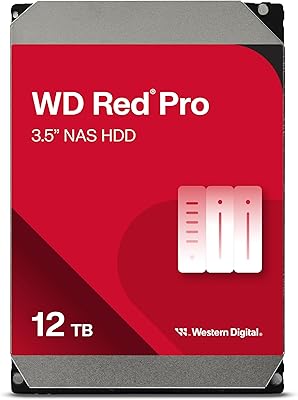
83%
88%
Long-Term Reliability
91%
Noise & Acoustics
86%
Heat Management
89%
RAID Compatibility
67%
Sequential Read Speed
More
Western Digital 14TB WD Red Pro NAS Hard Drive
88%
92%
Performance
89%
Reliability
88%
Workload Handling (300TB/yr)
85%
Ease of Installation
90%
Build Quality
More
Western Digital WD Red Pro 10TB NAS Hard Drive
86%
92%
Performance
90%
Reliability in RAID Environments
88%
Data Transfer Speed
85%
Long-Term Durability
87%
Shock Resistance
More
Western Digital 12TB WD Red Pro NAS Hard Drive
86%
92%
Performance in RAID Environments
89%
Data Transfer Speed
94%
Reliability for 24/7 Operation
88%
Workload Capacity (550TB/year)
70%
Temperature Management
More

FAQ

It matters quite a bit for RAID users. The standard WD Red uses SMR (Shingled Magnetic Recording), which can slow down significantly during sustained writes and RAID rebuilds. The WD Red Plus uses CMR (Conventional Magnetic Recording), which delivers consistent write performance. If you are running RAID 1 or any parity-based RAID, you really want the CMR version.

This is a known and common issue during WD's rebranding transition period. The physical label is not always updated immediately, but the model number on the label is what counts. If the model number reads WD10EFRX, you have the CMR version — the correct drive — regardless of what the label branding says.

Yes, this hard drive is widely tested and confirmed compatible with most Synology and QNAP enclosures. Both of those brands maintain online compatibility lists you can check with the exact model number WD10EFRX, but in practice it works reliably with their popular 2-bay, 4-bay, and larger units.

That really depends on what you plan to store. For basic document backups, a music library, or a modest photo collection, 1TB is workable. If you are storing large video files, running a Plex media server, or backing up multiple computers, you will likely outgrow 1TB faster than you expect. It is worth planning ahead.

Technically, yes — it will work as a standard internal drive. But it is not optimized for that use case. Desktop workloads and the NASware firmware are not a natural match, and you would be paying a small premium for NAS-specific features you won't use. A standard WD Blue would be a more practical choice for a desktop.

Most users find it very quiet in everyday use. The 5400 RPM spin speed inherently generates less vibration and noise than faster 7200 RPM drives. In a multi-drive enclosure, the chassis and fan noise typically drown out any drive-specific sound entirely.

Under normal mixed workloads, heat is not a significant concern. Some users running heavy sustained transfers in tightly packed 4-bay or 8-bay enclosures report the drive running warm, which is expected. Good enclosure airflow matters more than the drive itself in those situations.

Western Digital handles warranty claims directly. You register the drive on their support site, and if it fails within the warranty period, they will process a replacement. Keep your purchase receipt as proof of purchase date — it matters if the drive changes hands or if the registration date is unclear.

Yes, and the CMR technology is a key reason why. RAID 5 and RAID 6 involve frequent parity writes and occasional full rebuilds, which are exactly the conditions where SMR drives can stall. CMR handles those operations predictably, which is why purpose-built NAS drives like this one use it.

Think of it this way: 180TB per year works out to roughly 500GB of data written per day on average. For a home NAS doing nightly backups, media streaming, and occasional file transfers, you are nowhere near that ceiling. Small offices with heavier shared file activity will still have plenty of headroom in most cases.