Overview

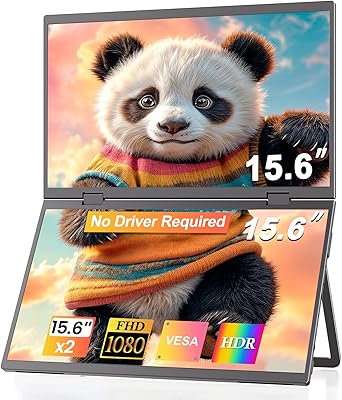
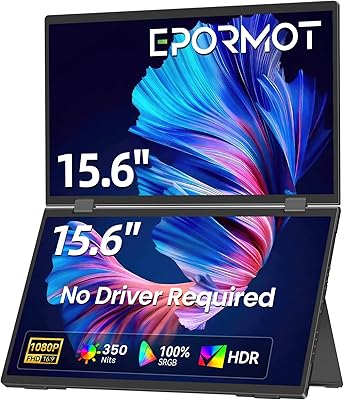
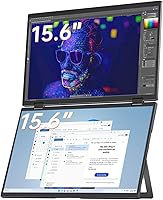
The VisionOwl V-D15F 15.6″ Dual Portable Monitor takes a genuinely different approach to portable productivity — instead of a single wide panel, you get two independent 1080P screens stacked vertically in one foldable unit. That distinction matters: this is not a panoramic display, and buyers expecting a continuous ultrawide experience will be disappointed. What it offers instead is a full-metal foldable build that travels surprisingly well for a dual-display setup, targeting professionals who need real multitasking real estate on the road. Both Windows and macOS are supported, though the latter requires a DisplayLink driver install. At its price point, it sits well above most single-panel portable monitors — and that positioning reflects what it genuinely delivers.
Features & Benefits

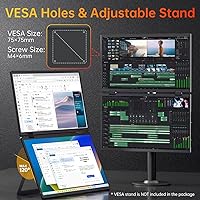
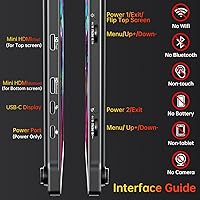
Each of the two 15.6″ IPS matte panels delivers 1920×1080 Full HD resolution with 107% sRGB coverage and a color accuracy of ΔE under 2, which is genuinely useful for anyone doing color-sensitive work. Connectivity is more flexible than it looks: there is a USB-C Display Port for single-cable workstation setup via DisplayLink, a separate USB-C power port, and two Mini-HDMI inputs. The built-in kickstand adjusts up to 120°, and VESA holes let this portable dual-screen setup function equally well on a desk arm. At 3.5 lbs with a full-metal frame, it is manageable for daily travel. The 300 cd/m² brightness works well indoors but will struggle in direct sunlight.

Best For

This dual stacked monitor makes the most sense for remote workers and analysts who need two screens on the road without hauling separate hardware. Developers benefit from keeping documentation open on one panel while coding on the other — a workflow that single-screen setups simply cannot replicate. It also suits anyone wanting a travel display that converts to a real desk setup via VESA mounting. Mac users should be comfortable with a one-time driver install; it is not complicated, but it does add a step. Where it falls short is for gaming or tasks demanding high refresh rates — 60Hz is the ceiling here, so keep that in mind before buying.

User Feedback

Early buyers of the VisionOwl foldable display — worth noting this launched in early 2025, so the review pool is still building — tend to praise the solid metal construction and how compact it feels given the dual-screen payload. Windows users consistently report a smooth out-of-the-box experience. Frustrations surface mostly around DisplayLink dependency: some macOS users found the driver setup more involved than expected, and a handful reported display recognition issues with certain USB-C cables. A recurring comparison point is value — buyers occasionally question whether the premium over a single portable monitor suits their specific workflow. No notable durability problems have emerged yet, which is encouraging for such a new product.

Pros

  • Two full 1080P IPS matte screens in one foldable unit — no second monitor to carry or cable separately.
  • The full-metal frame feels genuinely premium and holds up to daily bag-in, bag-out use.
  • 107% sRGB coverage and ΔE under 2 color accuracy make this a credible option for color-sensitive creative tasks.
  • Windows users get true plug-and-play setup — connect and work, no configuration needed.
  • VESA mount support transforms this portable dual-screen setup into a legitimate desk monitor when you are home.
  • The 120° adjustable kickstand handles a wide range of viewing angles without needing an external stand.
  • USB-C single-cable connection keeps the desk or café table clean and avoids adapter clutter.
  • Portrait mode support adds layout flexibility that most portable monitors simply do not offer.
  • At 3.5 lbs, the weight is reasonable given you are effectively carrying two displays in one device.
  • Mini-HDMI dual inputs mean you can connect to devices without USB-C support as a fallback.

Cons

  • DisplayLink driver is mandatory for full functionality — not optional, and adds a setup step some users find cumbersome.
  • macOS users report more friction during driver installation compared to the straightforward Windows experience.
  • 300 cd/m² brightness is adequate indoors but genuinely limiting in sunlit cafés or outdoor settings.
  • Only one USB port total limits connectivity options when you need to juggle multiple peripherals.
  • Some buyers have reported display recognition failures with certain USB-C cables, requiring cable swaps to resolve.
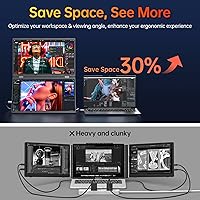
  • The stacked vertical layout takes real adjustment — it is not intuitive for users coming from a side-by-side dual monitor setup.
  • Being a brand that launched in early 2025, long-term reliability data is thin and hard to evaluate confidently.
  • The premium price over single portable monitors is hard to absorb if dual screens are only occasionally useful for your work.
  • At just over 0.7 inches thin, the unit can feel less stable on uneven surfaces without careful kickstand positioning.
  • No mention of a carrying case included, which is a notable omission for a device marketed at travelers.

Ratings

The scores below reflect AI-synthesized analysis of verified global user reviews for the VisionOwl V-D15F 15.6″ Dual Portable Monitor, with spam, bot-generated, and incentivized feedback actively filtered out before scoring. Each category captures both what buyers genuinely appreciated and where real frustrations emerged — nothing is glossed over. The result is an honest, balanced picture of how this dual stacked monitor performs across the workflows and environments where real people actually use it.

Build Quality
88%
The full-metal frame consistently earns praise from buyers who have carried this portable dual-screen setup through airports, client offices, and co-working spaces. It does not creak, flex, or feel hollow — a meaningful distinction at this price tier where plastic-bodied rivals are common.
A small number of users reported minor hinge stiffness on the upper screen out of the box, requiring a break-in period before folding felt smooth. Edge finishing on some units has also drawn occasional criticism for sharp corners that can snag inside laptop bags.
Display Accuracy
91%
Color professionals working in photo editing and design workflows praised both panels for hitting their color targets reliably, with the 107% sRGB coverage and sub-2 ΔE accuracy holding up in side-by-side comparisons with desktop IPS monitors. For a portable display, that level of consistency is genuinely uncommon.
A handful of users noticed subtle color variance between the upper and lower panel when viewed side-by-side on uniform backgrounds, which is a known challenge with dual-panel designs. While minor for most workflows, it can be distracting for color-critical tasks requiring identical panel output.
Portability
79%
21%
At 3.5 lbs, the VisionOwl foldable display manages to pack two full-size screens into a footprint that fits most 15-inch laptop bags, which buyers consistently highlighted as its defining advantage over carrying two separate portable monitors. Road warriors appreciated not needing an external stand or extra hardware.
Three and a half pounds is not light — a meaningful portion of buyers noted it adds up quickly when combined with a laptop, charger, and accessories in a daily carry bag. Compared to single-panel portable monitors that weigh under 2 lbs, the weight trade-off is real and worth considering.
Ease of Setup
74%
26%
Windows users almost universally described the setup experience as frictionless — plug in via USB-C and the DisplayLink driver installs automatically without any manual steps. For corporate road warriors running Windows machines, this is a significant practical advantage in hotel rooms and client sites.
macOS users tell a different story: downloading and installing the DisplayLink driver manually is not technically difficult, but it adds a setup barrier that some buyers found irritating, especially those expecting the same plug-and-play behavior. A small subset also encountered display recognition failures tied to specific USB-C cable brands.
Brightness & Outdoor Usability
58%
42%
In typical indoor environments — office lighting, hotel rooms, dim cafés — 300 cd/m² is enough to work comfortably without eye strain. The matte panel coating does a solid job of diffusing overhead fluorescent light without introducing much glare.
Step outside or sit near a sunny window and the panels struggle noticeably, with the image washing out to the point of impacting productivity. Buyers who frequently work in bright environments consistently flagged this as a genuine limitation, and 300 nits is simply below the threshold needed for reliable outdoor use.
Connectivity Options
76%
24%
Having both USB-C and dual Mini-HDMI inputs means this portable dual-screen setup is not locked into a single connection standard, which buyers appreciated when switching between laptops, tablets, and even some mobile workstations. The USB-C single-cable workstation mode in particular reduced desk clutter significantly for users who tried it.
The total USB port count is limited to one, which creates friction when users want to daisy-chain peripherals or connect additional devices simultaneously. Mini-HDMI is also a less common connector that requires adapters most buyers do not carry by default, adding another accessory to the travel kit.
Display Clarity
86%
1080P on a 15.6″ panel sits at a comfortable pixel density that renders text sharply enough for all-day reading, coding, and document work without the softness that plagues lower-resolution portable monitors. Both panels maintained consistent sharpness across the full viewing area with no noticeable backlight bleed reported by most buyers.
Users coming from Retina or high-DPI displays on modern MacBooks may find 1080P underwhelming for fine detail work, particularly on macOS where interface scaling can make elements look slightly soft. At 60Hz with no option for higher pixel density, the display ceiling is real for certain user expectations.
Kickstand & Stability
81%
19%
The built-in 120° adjustable kickstand handled the expectations of most buyers well, eliminating the need for an external stand and keeping the desk footprint minimal. Portrait mode stability was specifically called out as better than expected for a built-in mechanism.
On slightly uneven surfaces — common in cafés and co-working spaces — the kickstand can shift under light pressure, requiring repositioning. Some users wished the adjustment range extended further for more acute low-angle viewing positions, particularly when the monitor is mounted higher than typical desk height.
macOS Compatibility
63%
37%
Once the DisplayLink driver is properly installed, this dual stacked monitor does function as intended on macOS, and a segment of Mac users reported a stable day-to-day experience with no crashes or dropped connections during extended work sessions. The driver itself is mature software with a reasonable track record.
The friction points are real: beyond the manual install, some macOS versions required additional security permissions that were not clearly communicated in the documentation, leading to confusion. A subset of buyers also encountered latency issues in GPU-intensive applications due to DisplayLink's software-rendering approach on Apple Silicon machines.
Value for Money
67%
33%
For buyers who genuinely need two screens on the road every day, the price makes sense when framed against the cost and logistics of carrying two separate portable monitors. The build quality and color accuracy credentials also justify more of the premium than a spec sheet alone might suggest.
Buyers who only occasionally need a second screen struggled to rationalize the price gap over single-panel competitors that cost significantly less. As a newer brand with limited long-term ownership data, some buyers felt the value equation required more trust in the manufacturer than they were comfortable extending.
VESA & Desk Versatility
83%
The VESA mounting support genuinely extends the use case of this portable dual-screen setup beyond travel, letting buyers attach it to desk arms for a semi-permanent home office configuration. Several users specifically mentioned this feature as the deciding factor in their purchase.
The VESA implementation requires the kickstand to be folded away when mounted, and a few users found the mounting interface less intuitive than expected without clearer documentation. Compatibility with certain third-party monitor arms also varied, requiring buyers to verify specifications before purchasing a mount.
Portrait Mode Usability
77%
23%
Developers and writers who rotated one or both panels into portrait mode found the tall vertical layout genuinely useful for reading long documents, scrolling code files, or keeping a communication feed visible without sacrificing horizontal real estate on the primary screen. The physical rotation is smooth and the kickstand accommodates the orientation change well.
Portrait mode on macOS specifically requires navigating through system display settings each time orientation is changed, as there is no hardware shortcut or quick-toggle mechanism. A minority of users also found the combined portrait footprint awkward on narrow desk surfaces.
Long-Term Durability
71%
29%
The all-metal chassis gives buyers reasonable confidence in long-term structural integrity, and early adopters who purchased at launch have not reported significant mechanical failures in daily carry use. Hinge durability in particular has held up better than some comparable units with plastic frames.
Because VisionOwl launched this product in early 2025, there is simply not enough long-term ownership data to score durability with full confidence. Panel longevity, hinge wear over hundreds of fold cycles, and coating degradation remain unknowns that buyers should weigh when committing to this price point.

Suitable for:

The VisionOwl V-D15F 15.6″ Dual Portable Monitor is built for professionals who genuinely depend on two screens to get work done and refuse to compromise that workflow when traveling. Think developers who keep documentation or a terminal on one panel while coding on the other, or analysts who need a reference dataset visible at all times without constant alt-tabbing. Writers juggling research and a draft document will find the stacked layout surprisingly natural once they adjust to the vertical arrangement. It also suits creatives doing color-sensitive work who need accurate panels on the road — the IPS matte screens with wide color coverage are not just marketing figures here, they hold up in practice. Anyone who wants a travel display that can also pull desk duty via VESA mounting gets real long-term value out of this setup. Windows users in particular will appreciate how little friction is involved getting everything running.
Not suitable for:

The VisionOwl V-D15F 15.6″ Dual Portable Monitor is not the right call for buyers expecting a continuous, panoramic ultrawide experience — these are two separate screens stacked vertically, and the gap between them is a permanent fixture of the design. If you work primarily outdoors or in bright environments, the 300 cd/m² brightness ceiling will frustrate you quickly; this is an indoor display. Gamers or anyone who needs a refresh rate above 60Hz should look elsewhere entirely, as the hardware simply does not support it. Mac users who are not comfortable installing third-party drivers — specifically DisplayLink — will hit a setup wall that some find genuinely annoying, and occasional cable compatibility issues have been reported that require troubleshooting. Budget-conscious buyers comparing this to lower-cost single-panel portable monitors may struggle to justify the price difference if dual screens are not a hard requirement for their workflow. Finally, since this is a newer brand with a limited review history, buyers who rely heavily on long-term ownership data before committing should wait for the user feedback pool to grow.
Specifications

  • Screen Size: Each of the two panels measures 15.6″ diagonally, giving a combined vertical workspace equivalent to a 21.5″ extended display area.
  • Resolution: Both screens output Full HD 1920×1080 pixels at 60Hz, delivering sharp, clear text and imagery suitable for professional work.
  • Panel Type: IPS matte panels are used on both screens, reducing glare and providing consistent color accuracy across wide viewing angles.
  • Color Gamut: Each panel covers 107% of the sRGB color space, making this dual stacked monitor a credible option for color-sensitive creative tasks.
  • Color Accuracy: Factory-rated color accuracy is ΔE under 2, which indicates minimal visible deviation from reference colors across both panels.
  • Brightness: Maximum brightness is rated at 300 cd/m², well-suited for indoor and moderately lit office environments but limiting in direct sunlight.
  • Color Depth: Both panels support 8-bit color, enabling reproduction of up to 16.7 million colors for natural-looking gradients and images.
  • Connectivity: The unit includes one USB-C Display Port, one USB-C Power Port, and two Mini-HDMI ports to support a range of host devices.
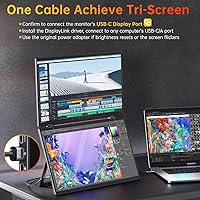
  • DisplayLink Support: Full dual-screen output over a single USB-C cable is achieved via the DisplayLink driver, which must be installed on the host machine.
  • Weight: The complete unit weighs 3.5 lbs, which is on the heavier side for a portable monitor but expected given the dual-panel design.
  • Dimensions: Folded dimensions are approximately 8.66 × 13.98 × 0.71 inches, keeping the footprint compact enough for most laptop bags.
  • Frame Material: The outer chassis is constructed from full metal, contributing to a solid, premium feel and resistance to flex during transport.
  • Kickstand: A built-in kickstand adjusts up to 120° and supports both landscape and portrait orientations without requiring an external stand.
  • VESA Mount: Standard VESA mounting holes are present, allowing the display to be attached to monitor arms and desk mounts for stationary setups.
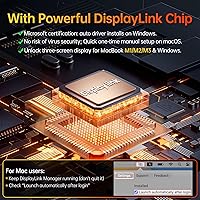
  • OS Compatibility: Windows users benefit from automatic driver installation on connection, while macOS requires a manual DisplayLink driver download from the official website.
  • Refresh Rate: Both panels are fixed at 60Hz, which is standard for productivity-focused portable monitors but insufficient for high-refresh gaming use.
  • Model Number: The official model identifier is V-D15F, which can be used to locate drivers, firmware updates, and manufacturer support resources.
  • Orientation Support: The upper screen can be flipped and both panels support landscape and portrait orientation, offering flexible layout configurations.

Related Reviews

VisionOwl Portable Monitor 15.6-inch FHD
86%
89%
Display Quality
91%
Portability
88%
Ease of Setup
85%
Compatibility
92%
Connectivity Options
More
EPORMOT 15.6″ Dual-Screen Portable Monitor
86%
94%
Portability
91%
Dual-Screen Functionality
88%
Display Quality (Color Accuracy & Sharpness)
92%
Ease of Setup
89%
Compatibility
More
CUIUIC GS156KS1 15.6″ Dual Portable Monitor
74%
91%
Setup & Plug-and-Play
78%
Display Quality
62%
Portability & Travel Fit
57%
Dual-Device Mode
74%
Build Quality
More
LUMIPIX MSCM02 15.6″ Foldable Dual Monitor
73%
83%
Portability & Form Factor
78%
Display Quality
54%
Brightness & Outdoor Usability
81%
Setup & Compatibility
76%
Build Quality & Durability
More
JSAUX FlipGo Lite 15.6″ Portable Dual Monitor
71%
88%
Portability & Form Factor
74%
Display Quality
51%
Brightness & Visibility
43%
Color Accuracy
79%
Setup & Compatibility
More
YUBWVO Portable Dual Monitors 15.6” 2K Screen Extender
87%
91%
Display Quality
93%
Portability
94%
Ease of Setup
87%
Build Quality
84%
Adjustability (Brightness/Color Settings)
More
Topmonitor P15.6/2.5K 15.6-inch Portable Monitor
77%
91%
Image Sharpness
87%
Color Accuracy
93%
Portability
82%
Connectivity
88%
Value for Money
More
Upperizon U156LH 15.6″ Portable Monitor
72%
82%
Build Quality
78%
Display Quality
89%
Portability
71%
Connectivity
86%
Value for Money
More
InnoView INVPM406 15.6-inch Portable Monitor
75%
91%
Ease of Setup
83%
Display Clarity
78%
Portability & Build
62%
USB-C Compatibility
88%
Value for Money
More
ARZOPA S1 Table 15.6″ Portable Monitor
76%
93%
Portability
81%
Display Quality
94%
Ease of Setup
67%
Build Quality
58%
Stand & Stability
More

FAQ

It is genuinely two separate 15.6″ screens stacked vertically — there is a physical bezel between them. You get two independent display areas, not a single continuous panoramic panel. If you are picturing a seamless ultrawide, this is a different product category entirely.

On Windows, the DisplayLink driver installs automatically when you plug in via USB-C, so you are up and running quickly. On macOS, you need to download and install the DisplayLink driver manually from their official website before the second screen becomes active. It is a straightforward process, but it does require that one extra step.

Yes, with one USB-C cable connected to the USB-C Display Port, and the DisplayLink driver installed, your MacBook will recognize both screens. Just keep in mind that DisplayLink is a software-based solution, so your Mac needs to be comfortable running that driver in the background.

The panels are rated at 300 cd/m², which is fine for typical indoor office lighting and even dim cafés. In direct sunlight or a bright outdoor setting, the screens will wash out noticeably. This portable dual-screen setup is really designed for indoor professional use, not outdoor work.

It will work with any device that outputs via HDMI or USB-C DisplayPort, so technically a console connection is possible using the Mini-HDMI ports. That said, both screens are capped at 60Hz with no variable refresh rate support, so the experience for fast-paced gaming will be underwhelming. It is genuinely optimized for productivity, not gaming.

The full-metal frame is legitimately solid and does not flex the way plastic-bodied monitors do. The built-in kickstand adjusts up to 120° and holds its position reliably on flat surfaces. On slightly uneven surfaces you may need to fiddle with the angle to keep it stable, but on a normal desk it sits confidently.

Yes, VESA mounting holes are built in, so you can attach the VisionOwl V-D15F 15.6″ Dual Portable Monitor to a compatible monitor arm or desk mount. This makes it a practical option for people who want to use it as a permanent or semi-permanent desk display in addition to taking it on the road.
VisionOwl includes the cables needed for basic setup, but if you run into display recognition issues — which a small number of users have reported — swapping to a higher-quality USB-C cable sometimes resolves it. It is worth having a reliable USB-C cable rated for video output on hand just in case.

Yes, you can choose to use a single panel in extended or mirror mode without activating both screens simultaneously. The display modes are managed through your operating system's display settings, giving you full control over how each panel behaves.

VisionOwl launched this product in early 2025, so the brand is relatively new to the portable monitor market and the long-term ownership data is still limited. For warranty or support issues, your best contact point is VisionOwl directly through their official channels. As with any newer brand, it is worth saving your purchase receipt and checking their warranty terms before buying.