Verbatim 14-inch Full HD Portable Monitor

Verbatim 14-inch Full HD Portable Monitor — image 1
Verbatim 14-inch Full HD Portable Monitor — image 2
Verbatim 14-inch Full HD Portable Monitor — image 3
Verbatim 14-inch Full HD Portable Monitor — image 4

Verbatim 14-inch Full HD Portable Monitor — image 5

Verbatim 14-inch Full HD Portable Monitor — image 6
Verbatim 14-inch Full HD Portable Monitor — image 7
74%
26%

Overview

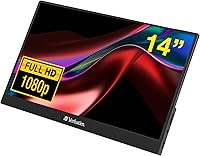
The Verbatim 14-inch Full HD Portable Monitor arrived in late 2023 as a straightforward answer to a common problem: needing a reliable second screen without a significant outlay. It sits in the budget-friendly tier of the portable monitor market, competing against established names like Asus and Lepow — yet Verbatim carries real brand credibility from decades in data storage and accessories. Weighing just 1.19 lbs and bundled with a neoprene sleeve, the design clearly prioritizes portability. Dual connectivity via USB-C and HDMI broadens its appeal across laptops, phones, and gaming consoles, making it a genuinely versatile pick for people who work or play away from their desks.

Features & Benefits

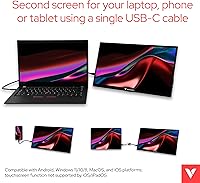
The IPS panel is the standout spec here. At this price tier, many portable monitors still use TN displays, which suffer from color shifts the moment you move off-axis. With IPS, viewing angles are noticeably wider and color reproduction is more stable — not professional-grade accurate, but genuinely comfortable for spreadsheets, documents, or casual video. The 1920x1080 resolution on a 14-inch screen keeps text sharp and images clean. A single USB-C cable handles both power and video on compatible devices, which is convenient when you are working from a café table or a cramped airplane seat. The HDMI port covers older hardware, and the built-in kickstand means you rarely need to improvise a prop.

Best For

This travel-friendly display hits a genuine sweet spot for a few specific types of users. Remote workers and hybrid employees who bounce between home, office, and coffee shops will appreciate how easily it slides into a bag. Students who want extra screen space in a dorm or library setting get real productivity gains without a large desk footprint. It also works well as a gaming console display — users with a Nintendo Switch or Steam Deck can get a much larger picture without hauling a TV. iPhone users should note that a Lightning adapter is not included and must be purchased separately, which is a genuine extra cost to factor in.

User Feedback

Across roughly 200 ratings, the Verbatim 14-inch monitor earns a solid 4.0 out of 5. Most buyers are satisfied, with setup simplicity and image quality for the price drawing the most consistent praise. The lightweight build gets mentioned often as a genuine strength. On the critical side, the glossy panel is a recurring pain point — in bright rooms or near windows, reflections can become distracting enough to affect usability. A handful of reviewers also question long-term durability, particularly around kickstand stability after extended use. Build quality feels appropriate for the price point, but buyers expecting premium rigidity may need to adjust expectations. Overall, the sentiment skews positive for those who go in with realistic expectations.

Pros

  • IPS panel provides noticeably better viewing angles than TN displays common at this price point.
  • Full HD resolution on a 14-inch screen keeps text sharp and images clear for everyday productivity.
  • Single USB-C cable handles both power and video on compatible devices, cutting cable clutter significantly.
  • HDMI port ensures compatibility with older laptops, desktops, and gaming consoles that lack USB-C.
  • At just 1.19 lbs, this portable screen is light enough to forget it is in your bag.
  • The included neoprene sleeve adds genuine protection without requiring a separate case purchase.
  • Built-in kickstand eliminates the need for improvised props or a separate monitor stand while traveling.
  • 3.5mm audio jack supports headphones or speakers directly, which is a convenient touch for an affordable portable display.
  • Broad OS compatibility covers Android, Windows, macOS, and iOS, making it versatile across most households.
  • Two-year limited warranty offers more peace of mind than many budget competitors in this category.

Cons

  • Glossy screen surface causes distracting reflections in bright rooms or near windows.
  • Kickstand stability has been flagged by multiple buyers as less reliable after extended daily use.
  • No Lightning adapter included, creating an unexpected extra cost for iPhone and older iPad users.
  • Color accuracy is adequate for general use but unsuitable for any color-sensitive creative work.
  • Build materials feel noticeably lightweight in ways that raise questions about long-term durability.
  • No touchscreen capability, which some competing portable monitors in the same price range offer.
  • Brightness levels may struggle in very well-lit environments, compounding the glossy panel issue.
  • USB-C power delivery requirements may not be met by all older laptops, limiting single-cable convenience.

Ratings

The scores below reflect our AI-driven analysis of verified global buyer reviews for the Verbatim 14-inch Full HD Portable Monitor, with spam, bot-generated, and incentivized feedback actively filtered out to ensure accuracy. Ratings are calibrated to surface both the genuine strengths that make this portable screen a smart pick for certain buyers and the honest pain points that have frustrated others. Nothing is glossed over — the numbers reflect what real users consistently experienced across hundreds of reviews.

Portability
91%
At under 1.2 lbs and thinner than most hardcover books, this travel-friendly display slides into a laptop bag without adding noticeable weight or bulk. Buyers who regularly work from cafés, airports, or client offices consistently call out the lightweight form factor as one of the strongest reasons they chose it.
A small number of users noted that the slim chassis, while great for portability, contributes to a plasticky feel that does not inspire confidence when tossed into a bag repeatedly without the sleeve. The neoprene cover helps, but the overall rigidity is not on par with premium rivals.
Display Clarity
83%
The 1920x1080 resolution on a 14-inch panel produces a pixel density that keeps spreadsheet text crisp and video content genuinely enjoyable. Buyers frequently mention being surprised by how sharp images look given the price point, especially when using it as a second productivity screen next to a laptop.
While clarity is solid, the glossy surface introduces reflections that can wash out fine detail in brighter environments. A few reviewers also noted that the panel lacks the luminance headroom to fully compensate, making outdoor or window-adjacent use noticeably less comfortable.
Color Reproduction
74%
26%
The IPS panel delivers a clear step up from TN displays that still dominate at this price tier, with more stable colors across different viewing angles. For general productivity tasks, video streaming, and casual gaming, the color rendering looks natural and consistent enough to satisfy most everyday users.
Color accuracy is not calibrated to any professional standard, and anyone doing photo editing or graphic design work will quickly notice the limitations. Saturation can feel slightly punchy rather than true-to-life, and there is no option to adjust color profiles or apply ICC calibration.
Ease of Setup
89%
Most buyers report being up and running within a minute of unboxing — plug in the USB-C cable on a compatible laptop and the display is recognized immediately, with no driver installation or configuration required. This plug-and-play simplicity is one of the most consistently praised aspects across reviews from Windows, macOS, and Android users alike.
The experience is less frictionless for users with older hardware, where the HDMI route requires sourcing a separate power supply since HDMI carries no power signal. iPhone users face an additional hurdle, as the required Lightning adapter is absent from the box and must be purchased separately before the monitor is even usable with Apple mobile devices.
Build Quality
61%
39%
The chassis is slim and the overall assembly feels reasonably well put-together straight out of the box, with no obvious flex or panel wobble during light desktop use. For occasional travelers who handle their gear carefully, the build holds up adequately under normal conditions.
Longer-term reliability is a recurring concern in lower-star reviews, with several buyers noting creaking joints and loosening hinges after months of regular travel use. The materials feel noticeably cost-engineered compared to monitors from Asus or Lepow at higher price points, and that gap becomes apparent once the novelty wears off.
Kickstand Stability
58%
42%
The integrated kickstand is a genuine convenience for travelers who do not want to carry a separate stand, and it covers a reasonable range of tilt angles for desk use or lap use on a flat surface. For light, static setups on a stable table, it does its job without complaint.
Stability becomes a real issue on uneven surfaces like beds, fabric sofas, or textured conference tables, where the kickstand tends to shift or collapse under light contact. A noticeable subset of reviews specifically mention the kickstand degrading in firmness over time, suggesting the hinge mechanism is not built for heavy daily cycling.
Connectivity
86%
Having both USB-C and HDMI on a budget portable monitor is genuinely useful and covers the vast majority of modern devices without requiring adapters. The single-cable USB-C setup that handles power and video simultaneously is a practical feature that keeps the workspace tidy and reduces what travelers need to pack.
There is only one of each port, so daisy-chaining or multi-device switching requires manually swapping cables. The absence of a mini DisplayPort or Thunderbolt option also means users with older docking stations may need a separate adapter to get the best connection quality.
Glare & Reflectivity
51%
49%
In controlled indoor lighting with overhead illumination rather than direct light sources, the glossy panel produces vivid, punchy visuals that look more vibrant than equivalent matte displays. Users who primarily work in dim hotel rooms or basement offices rarely flag glare as a concern.
In any environment with natural light — open-plan offices, cafés near windows, or outdoor patios — the reflections are persistent and difficult to manage without repositioning the entire setup. This is the single most cited frustration across negative reviews, and it is a structural limitation of the glossy coating rather than a defect that can be fixed.
Audio
67%
33%
The inclusion of a 3.5mm audio jack is a welcome practical touch that lets users connect their own headphones or a compact speaker without needing a USB audio adapter. For a monitor in this category and price tier, having any dedicated audio output at all puts it ahead of several competitors.
There are no built-in speakers, which means the audio jack is only useful if you have headphones or an external speaker on hand. Users expecting to leave a headset at home and still get audio from the monitor will be disappointed, as there is no onboard sound whatsoever.
Compatibility
79%
21%
Broad OS support across Android, Windows 10 and 11, macOS, and iOS means this portable screen works reliably with the majority of devices most buyers already own. Android users in particular report clean plug-and-play experiences with recent Samsung and Google devices over USB-C.
iOS compatibility via Lightning requires a separately purchased adapter that Verbatim does not include, which is an easy detail to miss before purchasing. There are also occasional reports of USB-C compatibility issues with certain older laptop models that do not fully support video-over-USB-C, requiring a fallback to HDMI.
Value for Money
84%
For buyers who need a functional IPS second screen on a tight budget, this portable screen delivers a compelling feature set — 1080p IPS panel, dual connectivity, kickstand, sleeve, and a two-year warranty — at a price that significantly undercuts competing brands. Most satisfied reviewers explicitly frame their 4- and 5-star ratings around the value equation rather than comparing it to premium alternatives.
Buyers who stretch their expectations toward premium performance because of the IPS label tend to come away underwhelmed by the build and screen uniformity. The value case holds firmly when expectations are calibrated to the price tier, but it weakens if you need durability or display quality that lasts years of hard use.
Warranty & Support
72%
28%
A two-year limited warranty is meaningfully better than the one-year coverage most competitors offer at this price point, and it signals that Verbatim stands behind the product with more than the bare minimum. Buyers who have contacted Verbatim Americas LLC with hardware issues generally report straightforward resolution processes.
The warranty is limited in scope, and some buyers have noted ambiguity around what physical damage or kickstand wear is covered. Customer support responsiveness is described as adequate rather than exceptional, and the process for warranty claims requires more paperwork than the more streamlined systems offered by larger monitor brands.
Packaging & Accessories
69%
31%
The neoprene protective sleeve is a practical inclusion that feels like a genuine value-add rather than filler packaging, and it provides enough protection for most bag scenarios during transit. The unboxing experience is clean and straightforward, with no excessive plastic waste or confusing component sorting.
The accessory bundle is otherwise minimal — no USB-C to USB-A adapter, no Lightning adapter for iOS users, and no cleaning cloth for the glossy panel. For a product positioned around travel convenience, the omission of a cable or adapter that covers more device types feels like a missed opportunity.

Suitable for:

The Verbatim 14-inch Full HD Portable Monitor is a strong fit for anyone whose work or lifestyle regularly takes them away from a fixed desk setup. Remote professionals who split time between home, co-working spaces, and client sites will find the single-cable USB-C connection and sub-1.2-lb weight genuinely useful rather than a novelty. Students cramming in a library or dorm room get a meaningful boost in screen real estate without spending a lot or sacrificing bag space. Frequent travelers who are tired of squinting at laptop screens in hotel rooms will appreciate having a proper second display that sets up in under a minute. It also makes a solid companion display for Nintendo Switch or Steam Deck users who want a larger picture without committing to a full TV setup. If your primary need is a lightweight, plug-and-play second screen for productivity or casual entertainment on the move, this portable screen delivers that without unnecessary complexity.

Not suitable for:

The Verbatim 14-inch Full HD Portable Monitor is not the right tool for buyers who need precise, calibrated color output. Graphic designers, photo editors, or anyone doing color-critical work will find the IPS panel at this price tier lacks the accuracy and coverage that professional workflows demand. The glossy screen surface is also a real limitation for anyone who frequently works near windows or in bright, open environments — reflections are persistent and not easily managed. Users hoping for a rock-solid kickstand that holds firm under repeated daily adjustments may find the build quality underwhelming over time. iPhone users should know upfront that the necessary Lightning adapter is not in the box, adding an extra purchase and potential frustration. Anyone expecting the rigidity or fit-and-finish of a premium portable monitor from brands like Asus or Lepow at twice the price will likely come away disappointed with the plastics and overall construction.

Specifications

  • Screen Size: The display measures 14 inches diagonally, offering a practical balance between portability and usable screen real estate.
  • Resolution: Native resolution is 1920x1080 Full HD, delivering a pixel density that keeps text sharp and images clear for everyday productivity use.
  • Panel Type: An IPS (In-Plane Switching) panel is used, providing wider viewing angles and more consistent color reproduction than TN-based alternatives.
  • Aspect Ratio: The screen uses a standard 16:9 widescreen aspect ratio, compatible with the vast majority of video content and productivity layouts.
  • Screen Surface: The panel has a glossy finish, which enhances color vibrancy but can produce noticeable reflections in brightly lit environments.
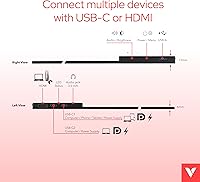
  • Connectivity: The monitor connects via a USB-C port (supporting single-cable power and video on compatible devices) and a full-size HDMI port for broader device compatibility.
  • Dimensions: Physical dimensions are 12.68 x 8.07 x 0.02 inches (L x W x H), making it slim enough to slide into most laptop bags without added bulk.
  • Weight: The unit weighs 1.19 lbs, positioning it among the lighter options in the 14-inch portable monitor category.
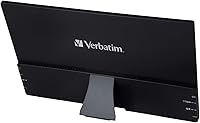
  • Kickstand: A built-in adjustable kickstand is integrated into the rear of the monitor, allowing for tilt adjustments without requiring a separate stand or accessory.
  • Audio Output: A 3.5mm headphone jack is included, enabling direct connection to headphones or powered external speakers without an additional audio adapter.
  • OS Compatibility: The monitor is compatible with Android, Windows 10, Windows 11, macOS, and iOS operating systems, covering most modern consumer devices.
  • Included Accessories: The package includes a neoprene protective sleeve designed to shield the screen during transport inside a bag or backpack.
  • Warranty: Verbatim provides a 2-year limited warranty on this monitor, which is above average coverage for the budget portable monitor segment.
  • Manufacturer: The monitor is manufactured and distributed by Verbatim Americas LLC, a brand with a long-established history in data storage and accessories.
  • Model Number: The official model number is 49590, which can be used to verify compatibility documentation or contact Verbatim support directly.
  • Input Voltage: The monitor operates at 20 volts, supplied via the USB-C connection from a compatible host device or USB-C power adapter.

Related Reviews
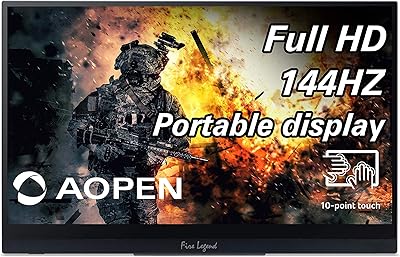
AOPEN 16PG7QT 15.6-inch Portable Touch Monitor

71%
91%
Portability
84%
Display Quality
88%
Refresh Rate Performance
78%
Touchscreen Responsiveness
71%
Connectivity & Compatibility
More
Dell P1424H 14-inch Portable Monitor

79%
93%
Portability
91%
Setup & Ease of Use
88%
Display Clarity
61%
Brightness & Visibility
58%
Stand & Adjustability
More
Lrtzcbi 14-inch Portable Touchscreen Monitor
74%
88%
Value for Money
79%
Image Quality
72%
Touch Responsiveness
91%
Portability
58%
Kickstand Stability
More
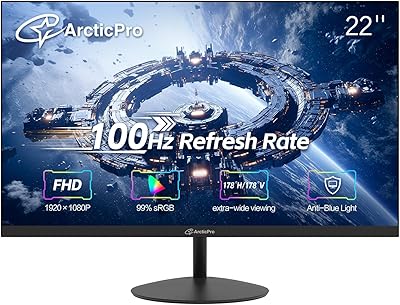
ArcticPro AD22ZFA 22-inch FHD Monitor
72%
91%
Value for Money
86%
Picture Quality
78%
Refresh Rate & Motion Smoothness
74%
Build Quality & Design
61%
Ergonomics & Adjustability
More
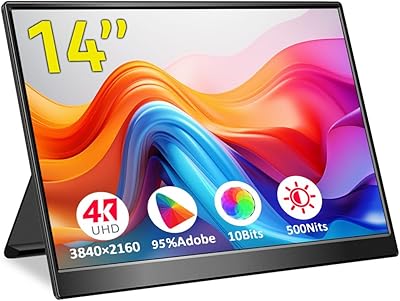
KEEPTIME P142 14-inch Portable Monitor
75%
88%
Display Sharpness
83%
Color Accuracy
93%
Portability
86%
Connectivity
61%
Brightness & Glare
More
Magedok 14-Inch 4K Portable Monitor
85%
93%
Display Quality
88%
Portability
90%
Ease of Setup
91%
Color Accuracy
58%
Sound Quality
More
Philips 241V8LB 24-inch Full HD Monitor
78%
93%
Value for Money
86%
Image Clarity & Sharpness
88%
Contrast & Panel Performance
79%
Refresh Rate & Motion Smoothness
84%
Eye Comfort & Fatigue Reduction
More
Philips 221V8LB3 22-Inch Full HD Monitor
82%
88%
Performance
92%
Display Quality
87%
Value for Money
81%
Ease of Setup
85%
Gaming Performance
More
Yasoca 7-inch Portable HD 1080P Monitor
82%
87%
Display Quality
93%
Portability
85%
Ease of Use
82%
Input Connectivity
80%
Build Quality
More
HP 27h 27-inch Full HD Monitor
76%
83%
Image Quality
81%
Build Quality
88%
Ergonomics & Adjustability
74%
Refresh Rate & Smoothness
58%
Built-in Speakers
More

FAQ

Yes, if your MacBook supports USB-C video output (which most modern MacBook Air and MacBook Pro models do), a single USB-C cable handles both power delivery and video signal simultaneously. No separate power brick is needed in that scenario, which is genuinely convenient on a desk or at a café.

It can work with iPhones, but you will need a Lightning-to-HDMI or Lightning-to-USB-C adapter, which is not included in the box. That is worth budgeting for separately before you buy, since Apple adapters are not cheap and the omission catches some buyers off guard.

Yes, the Nintendo Switch works well with this display when docked, using the HDMI port. It is a popular use case — you get a much larger picture than the Switch screen without needing a TV nearby. Just make sure you have a standard HDMI cable handy.

In a dim room or indoors away from windows, the glossy surface is a non-issue and the image looks punchy and vivid. In a bright open office or near a window, reflections can become genuinely distracting. If your primary workspace is well-lit, that is worth factoring into your decision.

It works well for occasional and travel use, but a handful of buyers have noted that it feels less secure after repeated daily adjustments. For use on a stable desk surface it holds fine, but do not expect the same solidity you would get from a dedicated monitor arm or a premium portable display.

This portable screen does not have an internal battery. It draws power directly through the USB-C connection from your laptop, tablet, or a USB-C power adapter. That keeps the weight down but means your laptop battery is doing the work for both devices.

For casual video watching, streaming, and general entertainment it looks quite good. The IPS panel handles color noticeably better than cheaper TN screens at this price. That said, it is not designed for color-critical work like photo or video editing — the accuracy is not at that level.

You get the monitor itself, a neoprene protective sleeve, and connection cables. A Lightning adapter for Apple devices is not included. It is worth double-checking the current package contents on the product listing, as accessory bundles can vary slightly across fulfillment batches.

Yes, as long as your laptop or desktop can output video to multiple external displays simultaneously, you can use this travel-friendly display as a third screen. Compatibility depends entirely on your host device's graphics capabilities and available ports, not on the monitor itself.

At a higher price point, those brands typically offer better build quality, more refined kickstands, and in some cases touch functionality or higher brightness. This monitor makes sense if you want a functional IPS portable screen at a lower entry cost and can live with the trade-offs in build finish and kickstand robustness. If you need something you will use hard every day for years, stepping up in budget is probably worth it.