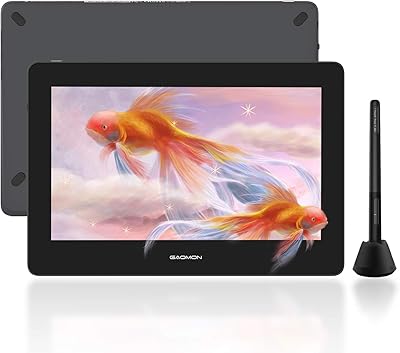
VEIKK Studio 16 15.6-inch Pen Display
Overview
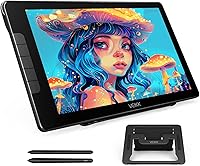
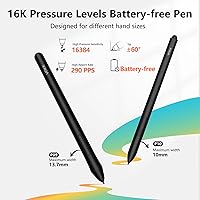
The VEIKK Studio 16 15.6-inch Pen Display sits in a sweet spot that screenless tablets simply cannot occupy — you draw directly on what you see, and that changes the experience considerably. VEIKK has carved out a reputation as a credible alternative to pricier brands like Wacom and Huion, and this drawing monitor reflects that ambition without pretending to be something it is not. At this price tier, getting two battery-free pens in the box — one slim, one thicker — is a genuine differentiator. The build quality is solid rather than exceptional, so if you can accept that trade-off, the feature set here is hard to argue with.
Features & Benefits
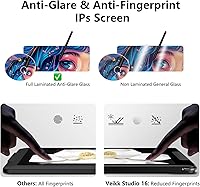
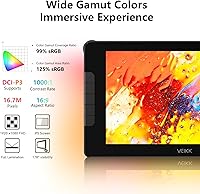
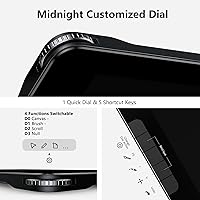
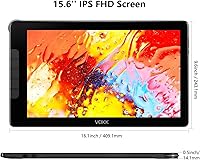
The full-laminated IPS screen is what makes this drawing monitor worth taking seriously. Lamination closes the gap between the glass surface and the display panel, so your pen tip feels visually connected to your stroke rather than floating above it. The anti-glare coating handles bright environments well without muddying colors, and the 125% sRGB coverage means you are working with genuinely vibrant hues — strong for illustration and competent for photo work, though not the final word in print-accurate color. The 16,384 pressure levels and 60-degree tilt recognition respond fluidly in Clip Studio Paint and Krita, and the Quick Dial plus five shortcut keys keep your hands on the canvas instead of hunting through menus.
Best For
This pen display is a natural fit for artists making their first move from a screenless tablet to something they can actually draw on directly. Design students, hobbyist illustrators, and photo editors who want real color fidelity without a four-figure investment will find it well-suited to their workflows. It handles Windows, macOS, and Linux without issue, and Clip Studio Paint and Krita users in particular tend to report a smooth out-of-the-box experience. The adjustable stand and single-cable setup also make it practical for smaller desks. One thing worth knowing upfront: the Studio 16 needs a connected computer to function — it is not a standalone device.
User Feedback
With over 1,100 ratings averaging 4.4 stars, the Studio 16 earns its standing. Buyers consistently praise the pen responsiveness and accurate out-of-the-box color, and the dual-pen inclusion gets called out regularly as a welcome surprise at this price. That said, the experience is not friction-free for everyone. Driver installation trips up a meaningful number of users, particularly on macOS, and the stand has been flagged as slightly wobbly at its steepest angle. A smaller subset report cursor offset near screen edges — a known quirk in laminated displays at this price class. VEIKK customer support earns mixed but generally favorable marks for responsiveness when issues arise.
Pros
- Full lamination dramatically reduces the gap between pen tip and cursor, making strokes feel accurate and direct.
- 125% sRGB color gamut delivers vibrant, true-to-life color for illustration and photo editing at this price level.
- Two battery-free pens included in the box — one slim, one thicker — is a rare bonus that accommodates different grip preferences.
- 16,384 pressure levels and 60-degree tilt recognition provide nuanced brushstroke control across major drawing apps.
- The Quick Dial and five shortcut keys keep common actions within reach without breaking creative flow.
- Anti-glare glass handles bright room lighting well without noticeably degrading color accuracy.
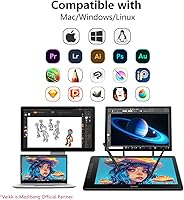
- Compatible with Windows, macOS, and Linux, covering the vast majority of creative setups.
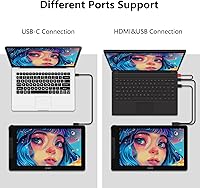
- Single 3-in-1 USB-C cable keeps the desk tidy and simplifies connection to a wide range of laptops and desktops.
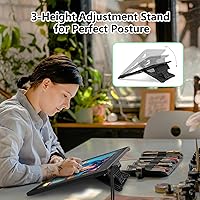
- Adjustable stand with three height settings adds meaningful ergonomic flexibility for extended work sessions.
- At this price point, the overall feature-to-cost ratio is competitive with better-known brands in the same class.
Cons
- Driver installation can be a frustrating process, especially for macOS users encountering compatibility issues.
- Cursor offset near screen edges has been reported by several buyers — a known limitation in laminated displays at this price class.
- The stand feels noticeably less stable at its steepest angle, which may bother artists who prefer a more upright working position.
- Build materials feel more utilitarian than premium, which may be a concern for buyers expecting a polished hardware finish.
- VEIKK has a smaller driver support ecosystem than Wacom, meaning third-party app integrations can occasionally require manual workarounds.
- Not usable as a standalone device — requires a connected computer at all times, which catches some buyers off guard.
- Color accuracy, while strong for this tier, falls short of professional print-calibration standards and should not be used as a final press reference.
- Customer support quality appears inconsistent based on user reports, with some buyers resolving issues quickly and others experiencing delays.
Ratings
Our AI has analyzed thousands of verified global reviews for the VEIKK Studio 16 15.6-inch Pen Display, actively filtering out incentivized, bot-generated, and duplicate submissions to surface what real buyers actually experience day-to-day. The scores below reflect a transparent synthesis of both the strongest praise and the most persistent frustrations reported across multiple platforms and user types. No score has been inflated to flatter — what you see here is an honest representation of where this drawing monitor excels and where it falls short.
Display Quality
Color Accuracy
Pen Performance
Parallax & Lamination
Driver & Software Setup
Build Quality
Stand & Ergonomics
Shortcut Keys & Dial
Connectivity
Value for Money
Multi-App Compatibility
Anti-Glare Performance
Customer Support
Dual Pen Inclusion
Suitable for:
The VEIKK Studio 16 15.6-inch Pen Display is well-matched to artists who have outgrown a screenless tablet and want the immediacy of drawing directly on a display without spending professional-grade money to get there. Design students balancing tight budgets will find the screen size, color performance, and included accessories genuinely competitive with options that cost significantly more. Hobbyist illustrators working in Clip Studio Paint, Krita, or MediBang get reliable pressure sensitivity and tilt response that holds up across long drawing sessions. Photo editors who need reasonably accurate color reproduction for web and social output will also find the 125% sRGB coverage more than adequate for that purpose. The single-cable connection and compact adjustable stand make this drawing monitor a practical fit for smaller home workspaces where a cluttered desk is a real concern.
Not suitable for:
The VEIKK Studio 16 15.6-inch Pen Display is not a strong choice for professionals whose work demands print-accurate color validation — the display performs well at this tier, but it should not be the final reference screen for press-ready or color-critical commercial projects. Anyone who needs a tablet they can use independently, without a connected laptop or desktop, should know this device simply does not work that way — it is entirely dependent on a host computer. Users who are less comfortable troubleshooting software on their own may find the driver installation process frustrating, particularly on macOS, where compatibility hiccups have been reported by a meaningful number of buyers. The stand, while functional, has received criticism for feeling unstable at its steepest angle, which could be a concern for artists who prefer a near-vertical drawing position. If you are comparing options at a similar price point from Huion or XP-Pen and prioritizing long-term brand support infrastructure, it is worth doing that research before committing.
Specifications
- Screen Size: The active display area measures 15.6 inches diagonally, providing a comfortable working canvas for illustration and design work.
- Display Type: IPS panel with full lamination, which eliminates the air gap between the glass surface and the display for reduced parallax.
- Color Gamut: Covers 125% of the sRGB color space, delivering vibrant and accurate colors suitable for digital illustration and photo editing.
- Anti-Glare Coating: The glass surface features an anti-glare and anti-fingerprint coating that reduces reflections in well-lit environments.
- Pressure Levels: The included pens support 16,384 levels of pressure sensitivity for highly nuanced control over line weight and brush opacity.
- Tilt Recognition: Both pens support up to 60 degrees of tilt recognition, enabling natural shading and brushstroke variation consistent with traditional media.
- Pen Technology: Battery-free electromagnetic resonance technology powers both pens, eliminating the need for charging or battery replacement.
- Pens Included: Two pens are included in the box — one slim-profile pen and one thicker-grip pen — to accommodate different hand sizes and grip styles.
- Shortcut Keys: Five fully customizable shortcut keys are built into the tablet body for quick access to frequently used tools and actions.
- Quick Dial: One rotary Quick Dial wheel allows rapid adjustment of brush size, zoom level, canvas rotation, or any other assigned function.
- Adjustable Stand: The included S100 stand offers three fixed height and angle positions to support ergonomic positioning during extended drawing sessions.
- Connectivity: A 3-in-1 USB-C cable is included, supporting connection via USB-C to USB-C or via an adapter to devices with HDMI and USB-A ports.
- OS Compatibility: Compatible with Windows 7 and later, macOS 10.12 and above, and Linux distributions with appropriate driver installation.
- Dimensions: The unit measures 16.1 x 9.57 x 0.04 inches, making it compact enough for most standard desks without dominating the workspace.
- Weight: The drawing monitor weighs 3.12 pounds, light enough to reposition easily but substantial enough to stay stable during use.
- Model Number: The official model designation is VK1600, which can be used to locate the correct driver package on VEIKK's support site.
- Warranty: VEIKK provides a one-year limited hardware warranty along with free driver updates for the lifetime of the product.
- Software Support: Verified compatible with Photoshop, Clip Studio Paint, Krita, MediBang Paint, and other pressure-sensitive drawing applications.
Related Reviews
XP-Pen Innovator 16 15.6″ Pen Display

ASUS ProArt Display PA169CDV 15.6” 4K Pen Display
FMC 15.6-Inch Wireless Portable Monitor
XP-Pen Artist 16 2nd Gen Pen Display

Topmonitor P15.6/2.5K 15.6-inch Portable Monitor

HP 15.6-inch Laptop 15-ef0021nr, Ryzen 3 3200U, 8GB RAM, 256GB SSD

Dell Inspiron 3593 15.6-inch Laptop

Westinghouse 15.6 Inch Portable Monitor
Feihe FH-15.6 15.6-Inch Portable TV