
Overview

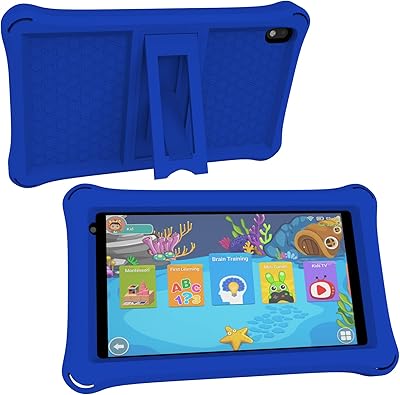
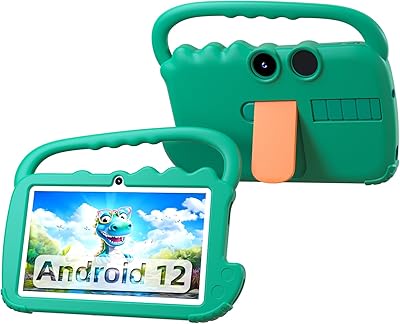
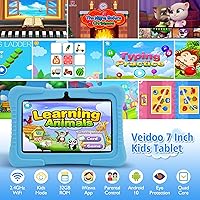
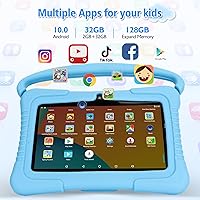
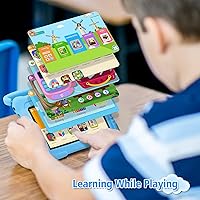
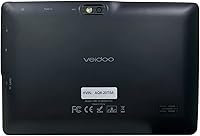
The Veidoo V88 7″ Kids Android Tablet is Veidoo's answer to a question a lot of parents ask: is there a genuinely usable kids tablet that won't break the bank? Aimed at children roughly ages 3 to 10, this kids tablet ships with a blue silicone case already in the box — a small but practical touch. Powering it is an Allwinner quad-core chip at 1.6GHz, backed by 2GB of RAM and 32GB of built-in storage. It runs Android with the iWawa kids platform pre-loaded, so a child can pick it up and start using it almost immediately.

Features & Benefits

The standout feature of this kids tablet is its iWawa parental controls, which let parents filter content, cap screen time, and lock the screen with a single tap — no need to dig through Android system settings. Child profiles are customizable, which is useful if more than one kid will be sharing the device. The 7-inch display runs at 1024x600 with an eye-protection mode that softens brightness during longer sessions. Storage is expandable up to 64GB with a microSD card, handy once educational apps start accumulating. One important note: the tablet only supports 2.4GHz Wi-Fi, and adjusting network settings requires exiting the iWawa interface first.

Best For

This children's Android tablet makes the most sense as a first dedicated device for young kids who don't yet need the performance of a mainstream tablet. It suits parents who want meaningful control over screen time and content without juggling settings across a shared family phone. Gift-givers will appreciate that it arrives nearly ready to hand over — case included, kids app pre-installed. It holds up well for light daily use: educational games, drawing apps, and video streaming. Families expecting more demanding tasks or longer screen sessions, however, may run into the hardware's limits fairly quickly.

User Feedback

Parents who use the Veidoo V88 consistently highlight the parental controls as the strongest point — setup is reportedly quick, and the app's interface is approachable even for less tech-savvy caregivers. The main frustration is battery life: at around three hours, the tablet needs charging daily, which can catch families off guard. Build quality earns mixed reactions — the silicone case provides decent drop protection, but the overall construction feels budget-grade up close. The iWawa content library works well for younger kids but can feel limited for older ones. Camera quality is modest, as expected at this price tier, and rarely comes up as a selling point.

Pros

  • The iWawa parental control app is easy to set up and gives parents real, practical oversight from the start.
  • Content filtering, screen time caps, and one-tap lock cover the core safety needs most parents care about.
  • A protective silicone case is included in the box — no need to buy one separately.
  • At this price point, getting a tablet with a dedicated kids platform pre-installed is genuinely convenient.
  • The 7-inch screen size is comfortable for small hands and the eye-protection mode is a thoughtful addition.
  • Storage can be expanded via microSD card, which extends the device's usefulness as the app library grows.
  • The tablet is lightweight at just over a pound, making it easy for young kids to hold independently.
  • Wi-Fi, Bluetooth, and GPS are all supported, covering the connectivity basics for a kids device.

Cons

  • Battery life of around three hours is short — daily charging is a near-certainty for active young users.
  • Exiting the iWawa interface just to adjust Wi-Fi settings is an awkward extra step that adds unnecessary friction.
  • Build quality feels budget-grade; the silicone case helps, but the underlying construction is not particularly robust.
  • The iWawa content library can feel thin, especially for kids on the older end of the target age range.
  • The 2MP rear camera is underwhelming even by kids-tablet standards and is unlikely to impress older children.
  • Only 2.4GHz Wi-Fi is supported, which can mean slower speeds in crowded or dual-band home networks.
  • 2GB of RAM leads to noticeable slowdowns when switching between apps or running anything resource-intensive.
  • The display resolution is modest; it is acceptable for younger kids but looks soft compared to mid-range alternatives.

Ratings

The scores below for the Veidoo V88 7″ Kids Android Tablet were generated by our AI rating engine after processing verified purchase reviews from buyers worldwide, with spam, incentivized, and bot-generated feedback actively filtered out. Each category reflects a genuine cross-section of real parent and caregiver experiences — the wins and the frustrations both. Where this kids tablet earns strong marks, the scores show it; where it falls short, we do not soften that either.

Parental Controls
83%
Parents consistently describe the iWawa setup process as one of the least frustrating they have encountered on a budget kids tablet. Content filtering, screen time caps, and profile customization all work as advertised, and the one-tap lock feature gets mentioned frequently as something caregivers actually use daily.
The inability to adjust Wi-Fi settings from inside the iWawa interface is a recurring source of frustration — parents have to fully exit child mode just to switch networks, which breaks the flow. A small number of users also report that the app's content library feels thin once kids move past the toddler stage.
Value for Money
78%
22%
For a tablet that arrives with a protective case already in the box and a functional parental control platform pre-installed, buyers generally feel they are getting a fair deal. Most parents frame it as a sensible starter device rather than expecting it to compete with higher-priced alternatives.
Some buyers feel the performance ceiling becomes apparent within the first few months, especially as kids discover more demanding apps. A handful of reviewers note that spending slightly more would have bought meaningfully better hardware longevity, making the value equation less clear over a two-year window.
Battery Life
41%
59%
For very short supervised sessions — a 30-minute car ride or a quiet period after school — the battery holds up adequately. Parents who manage usage actively and keep the tablet plugged in during longer sessions report fewer complaints overall.
Three hours of active use is the real-world ceiling, and many reviewers say it falls short even of that during video streaming or gaming. Daily charging is essentially non-negotiable, and several parents mention the battery limitation as the single biggest disappointment with this children's Android tablet compared to their expectations.
Ease of Setup
81%
19%
Most caregivers report having the tablet ready for a child to use within 20 to 30 minutes of unboxing, which is notably quick for an Android-based kids device. The iWawa app walks parents through account creation and profile customization in a logical sequence that does not require any technical background.
A minority of users struggle with the Google account requirement for full Android functionality outside iWawa, which can confuse less tech-savvy buyers. The Wi-Fi settings lock-out inside child mode also catches some parents off guard during the initial setup phase.
Build Quality
57%
43%
The included silicone case does a reasonable job absorbing everyday bumps and minor drops, and several parents say it has survived the kind of handling a 4- or 5-year-old dishes out. The slim profile at 0.43 inches also means it slips easily into a school bag without adding bulk.
Without the case, the tablet itself feels noticeably light and plasticky in a way that signals budget construction. A portion of reviewers mention cosmetic wear appearing earlier than expected, and a few report screen or button issues within the first year of regular child use.
Display Quality
66%
34%
At 7 inches with a 1024x600 resolution, the screen is perfectly adequate for the educational apps, drawing tools, and cartoon streaming that young children gravitate toward. The eye-protection mode is a genuine plus for parents concerned about prolonged screen exposure in dim rooms.
Compared to mid-range kids tablets in the next price tier, the display looks noticeably soft, and color reproduction is average at best. Older children who have used better screens elsewhere tend to notice the difference, and outdoor visibility in bright light is limited.
Performance & Speed
54%
46%
For simple tasks — opening a drawing app, watching a pre-loaded video, or running a basic phonics game — the Allwinner quad-core chip handles the workload without much drama. Young children using age-appropriate apps are unlikely to push the hardware hard enough to feel the limitations daily.
App switching, loading larger games, or running anything moderately resource-intensive produces noticeable lag that parents mention with some regularity. The 2GB of RAM means the device struggles to keep multiple apps active simultaneously, and performance tends to degrade over time as more apps are installed.
Camera Quality
38%
62%
The front camera is functional enough for occasional video calls with family members, and young kids who are not yet discerning about photo quality tend to enjoy snapping pictures without any complaints. Having dual cameras at this price point is at least better than single-camera alternatives.
The 2MP rear camera produces soft, grainy images that look dated even by budget standards, and low-light performance is poor. Most parent reviewers explicitly say they do not consider the camera a usable feature, and it rarely factors into their satisfaction with the device overall.
Content Library
62%
38%
The iWawa platform curates a reasonable selection of educational games, art tools, and learning activities that align well with the 3-to-7 age range. Parents of toddlers and preschoolers tend to find enough content to keep young kids engaged through their first several months of ownership.
Parents of kids aged 8 and older frequently describe the iWawa content selection as feeling limited, with fewer challenging or varied options for children who have moved past early-learning stages. The library does not grow as quickly as children do, which shortens the useful lifespan of the platform for older kids.
Wi-Fi Connectivity
59%
41%
In households with a strong 2.4GHz signal, most parents report stable connectivity for streaming and app downloads without frequent drop-outs. The inclusion of Bluetooth and GPS alongside Wi-Fi adds more connectivity flexibility than some competing budget tablets offer.
The 2.4GHz-only limitation causes real issues in homes where the router prioritizes 5GHz or uses band steering, and several buyers describe spending time troubleshooting connection problems they did not expect. The in-app Wi-Fi lockout — requiring a full exit from child mode to reconnect — compounds what should be a simple fix.
Portability
74%
26%
At just over a pound and with a footprint compact enough for small hands, the Veidoo V88 travels well in a backpack or tote bag. The 7-inch form factor hits a sweet spot between screen real estate and physical manageability for kids in the 4-to-8 range.
The short battery life undercuts the portability story significantly — a tablet you need to charge every three hours is less useful on longer journeys than the size alone would suggest. Parents who travel frequently report needing to pack a charging cable as a constant companion.
Storage Capacity
69%
31%
32GB covers the basics comfortably for a first-time kids tablet user, and the microSD expansion slot means parents can add up to 64GB more without replacing the device. Most families find the base storage enough to get started without immediately needing an upgrade.
Heavier app libraries, offline video downloads, and accumulated photos can fill 32GB faster than parents expect, particularly over a year or more of active use. The microSD workaround is practical, but it does add a small ongoing cost that some buyers feel should not be necessary at purchase.
Packaging & Unboxing
72%
28%
The tablet arriving with its silicone case already included is a detail that buyers consistently appreciate — it removes one of the typical post-purchase headaches of finding a compatible case separately. The out-of-box experience feels complete enough for a budget device.
Some buyers describe the packaging itself as minimal, and a few note that accessories beyond the case and charging cable are sparse. There is no screen protector included, which feels like an oversight given that the primary users are young children.
Durability Over Time
51%
49%
With the silicone case in place, the tablet holds up reasonably well against the daily wear a young child inflicts — minor drops, fingerprint smearing, and general rough handling. Parents who supervise usage carefully report fewer long-term issues than those who give kids unsupervised access.
A meaningful number of reviewers describe functional problems emerging in the first year — unresponsive buttons, screen issues, or software instability — at a rate higher than expected even for a budget device. Long-term reliability is the category where this kids tablet draws the most skeptical feedback.

Suitable for:

The Veidoo V88 7″ Kids Android Tablet is a practical choice for parents who want to give a young child their own dedicated device without spending a lot. It works best for kids in the 3-to-8 age range who will use it primarily for light educational apps, simple games, and occasional video watching. The built-in iWawa platform means parents can get meaningful control over content and screen time from day one, without needing to configure complex system settings. Families who want a completely separate device — keeping their own phones and tablets free — will find this kids tablet fits that role well. It also makes a reasonable gift for birthdays or holidays when a ready-to-use, age-appropriate option is the priority.

Not suitable for:

The Veidoo V88 7″ Kids Android Tablet is not the right fit for parents expecting flagship-level performance or durability. The Allwinner processor and 2GB of RAM are firmly entry-level, meaning demanding apps, multitasking, or graphic-heavy games will expose the hardware's ceiling quickly. The roughly three-hour battery life is a genuine daily inconvenience — kids who use the tablet for extended stretches will need it near a charger, which limits portability. Older children, say ages 9 and up, will likely outgrow the iWawa ecosystem fast and find the content library restrictive. Parents who rely heavily on 5GHz Wi-Fi networks should also note that this children's Android tablet only connects on the 2.4GHz band, which may cause friction in some home network setups.

Specifications

  • Screen Size: The display measures 7 inches diagonally, offering a comfortable viewing area sized well for small hands and young users.
  • Resolution: The screen runs at a native resolution of 1024x600 pixels, which is adequate for educational apps, videos, and light games at this size.
  • Processor: An Allwinner quad-core CPU clocked at 1.6GHz handles the device's processing tasks, representing a budget-tier performance level.
  • RAM: The tablet includes 2GB of RAM, which supports basic multitasking and standard children's app usage without heavy loads.
  • Internal Storage: 32GB of built-in flash storage comes standard, providing enough room for a starter library of apps, photos, and downloaded videos.
  • Expandable Storage: A microSD card slot supports additional storage up to 64GB, useful for families who plan to load extra media or apps over time.
  • Rear Camera: A 2MP rear-facing camera is included, suitable for basic snapshots and simple video recording at a beginner level.
  • Battery Life: The manufacturer rates battery life at approximately 3 hours of active use, which means daily charging is typically required.
  • Operating System: The device runs the Android operating system with the iWawa kids platform pre-installed as the primary interface for child users.
  • Wireless: Wi-Fi connectivity is limited to the 2.4GHz band only; Bluetooth and GPS are also supported onboard.
  • Graphics: A Mali-T7xx series GPU handles graphics rendering, which is capable of running standard 2D children's apps and casual games.
  • Dimensions: The tablet measures 7.13 x 4.76 x 0.43 inches, keeping it slim and easy for a child to hold or carry in a bag.
  • Weight: At 1.21 pounds, this children's Android tablet is light enough for younger kids to use comfortably during extended sessions.
  • Included Case: A blue silicone protective case is included in the box, offering basic drop and scratch protection without any additional purchase.
  • Parental Controls: The pre-installed iWawa app provides content filtering, screen time scheduling, remote lock, and customizable child profile management.
  • Chipset Brand: The processor is manufactured by Allwinner Technology, a common supplier for budget-tier Android tablets and media devices.
  • Connectivity Ports: The tablet supports microSD card expansion and includes a charging port; standard connectivity expected at this product tier.
  • Camera Count: The device features dual cameras — a rear 2MP shooter and a front-facing camera supporting basic video calls and selfies.

Related Reviews
PEICHENG PCQ8 7-Inch Kids Android Tablet
68%
83%
Value for Money
78%
Parental Controls
67%
Display Quality
62%
Performance & Speed
71%
Build & Durability
More
qunyiCO Y7 7-inch Kids Android Tablet
69%
83%
Value for Money
88%
Ease of Setup
54%
Performance & Speed
81%
Parental Controls
72%
Display Quality
More
Contixo V8 7″ Kids Android Tablet
72%
83%
Value for Money
88%
Pre-loaded Content
81%
Parental Controls
74%
Build Quality & Durability
61%
Performance & Speed
More
NEWISION K7 7-inch Kids Tablet 32GB
84%
88%
Build Quality & Durability
94%
Parental Controls
90%
Educational Value
63%
Battery Life
80%
Display Quality
More
ATOZEE Q2 8-Inch Kids Android Tablet
65%
83%
Value for Money
81%
Parental Controls
58%
Display Quality
62%
Performance & Speed
74%
Build Quality & Durability
More
ATOZEE Q8K 7-inch 32GB Kids Tablet
71%
88%
Value for Money
91%
Ease of Setup
57%
Display Quality
83%
Parental Controls
74%
Build Quality & Durability
More
ZZB ZZBAT70K Kids Tablet 7-inch, 32GB
84%
90%
Value for Money
88%
Durability
93%
Parental Controls
85%
Display Quality
80%
Battery Life
More
YosaToo KIDS712 Kids Tablet 7-inch 32GB
84%
89%
Value for Money
85%
Battery Life
92%
Parental Controls
88%
Build Quality/Durability
75%
Display Quality
More
YosaToo ZIDS701 7-inch Kids Tablet
67%
83%
Value for Money
86%
Parental Controls
74%
Durability
51%
Display Quality
62%
Performance & Speed
More
CUPEISI AT11K 10-inch Android 14 Kids Tablet
67%
81%
Value for Money
78%
Parental Controls
74%
Battery Life
58%
Performance & Speed
72%
Display Quality
More

FAQ

The Veidoo V88 7″ Kids Android Tablet is generally aimed at children between about 3 and 10 years old. Younger toddlers will enjoy the simple iWawa interface, while kids in early elementary school will get the most out of the educational apps and games. Beyond age 9 or 10, most kids tend to outgrow the platform fairly quickly.

It is genuinely straightforward. Once you power on the tablet and open the iWawa app, you create a parent account with a password and then customize your child's profile from there. You can set daily screen time limits, approve specific apps, and lock the screen remotely. Most parents report getting everything configured within 15 to 20 minutes.

Yes. Because the tablet runs Android, you can exit the iWawa child interface using the parent password and access the broader Android system to install apps from outside the kids platform. Just keep in mind that the iWawa parental controls only apply within its own interface, so anything installed outside that environment is less restricted.

No, this kids tablet only supports 2.4GHz Wi-Fi. If your router is set to 5GHz only, the device will not connect. Most modern routers broadcast both bands simultaneously, so switching to or enabling the 2.4GHz band on your router should resolve any connection issues.

This is a known quirk of the iWawa interface — the app locks access to Android system settings, including Wi-Fi, while the child mode is active. To change Wi-Fi networks or troubleshoot the connection, you need to exit the iWawa interface with your parent password first, adjust the settings in Android, and then re-enter the kids mode.

It offers reasonable everyday protection — the silicone grips surfaces well and absorbs minor bumps and drops better than a bare tablet would. That said, it is a basic case and not ruggedized. For particularly rough-and-tumble kids, you might consider an additional foam-edge case for extra corner protection.

The spec sheet says about 3 hours, and real-world use tends to confirm that figure. For lighter tasks like reading or drawing apps, you might squeeze a bit more time out of it, but video streaming and gaming will drain it faster. Plan on charging it overnight or before any longer trip where you need it to last.

Since the Veidoo V88 runs Android and has passed GMS certification, it can support Google Play apps. You can install YouTube Kids or Netflix through the Play Store after exiting the iWawa interface. Keep in mind that streaming apps will consume battery fairly quickly given the 3-hour battery limit.

The iWawa app is designed so children interact only within their profile, and the parent password is the only way to make administrative changes. If you forget the parent password, you would typically need to reset the app or the device, so it is worth storing that password somewhere accessible to you but not your child.

For most young children starting out, 32GB is enough to get going — a solid collection of educational apps, some downloaded videos, and photos will fit comfortably. If you plan to download a lot of offline content or your child accumulates many apps over time, adding a microSD card (up to 64GB) is an easy and inexpensive upgrade worth considering early on.