

Overview

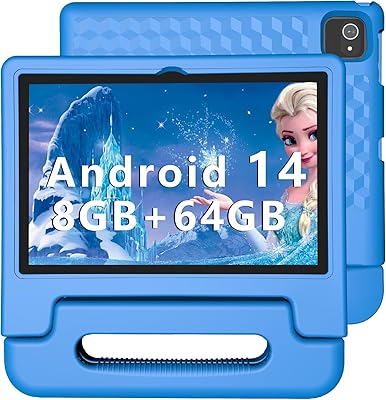
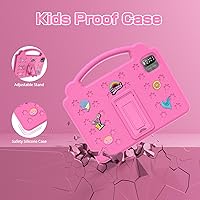
The VASOUN B10 10-inch 64GB Kids Tablet enters a crowded market where Amazon and LeapFrog have long dominated, but it brings something genuinely different: a full, unrestricted Android 12 experience that lets kids access Google Play, YouTube, and Netflix right out of the box. VASOUN isn't a household name, and that honesty matters here. This is a budget-tier Android tablet from a lesser-known brand, so expectations need to be calibrated. For families who want a proper 10-inch screen without paying premium prices or accepting a locked-down ecosystem, the value is real. It targets children aged 3 and up and arrives in a gift-ready pink finish.

Features & Benefits

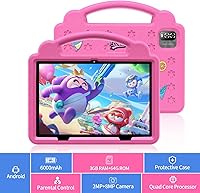
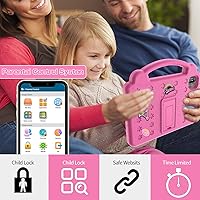
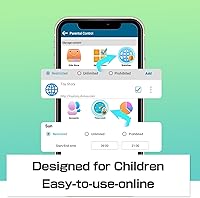
The VASOUN B10's parental controls cover the basics well — content filtering, screen time scheduling, and age-based app restrictions give parents meaningful oversight without requiring a tech degree to configure. The display is a 10-inch IPS LCD at 1280x800, which is more than adequate for kids watching cartoons or playing games; colors look bright and readable in normal lighting. Under the hood, an ARM A133 chip with 3GB of RAM keeps things moving at a reasonable pace for light use, and 64GB of storage means plenty of room for apps, photos, and downloaded videos. The 6000mAh battery genuinely holds up across a full day of use, which matters on road trips. Cameras are functional but unremarkable — don't expect sharp results.

Best For

This kids tablet hits a specific sweet spot that not every family needs, but for the right household it makes a lot of sense. If you are already in the Google ecosystem and want your child to have real Play Store access — rather than the curated, sometimes frustrating Amazon Appstore — this budget Android tablet is worth a serious look. It suits kids roughly in the 4 to 10 age range who are past the pure toddler stage and ready for independent app use, light gaming, and streaming. Families who want a full-size 10-inch screen without stretching to a name-brand device will also find it appealing. Gift buyers, particularly those shopping for young girls, will appreciate the pink finish.

User Feedback

Buyers who have used the VASOUN B10 tend to land in one of two camps. Those happy with it consistently mention screen size and value — getting a 10-inch display at this price point genuinely impresses parents who expected something smaller or cheaper-feeling. On the flip side, a noticeable number of reviewers flag the weight: at just over 2.4 pounds, younger children can struggle to hold it for extended periods. Build quality draws mixed opinions, with some units reportedly showing flex or soft-feeling buttons. The parental controls work in principle, but a few parents find the initial setup less intuitive than expected. Customer service experiences with VASOUN appear inconsistent, which is a real consideration when buying from a newer brand. Camera quality, predictably, disappoints those expecting sharp images.

Pros

  • Full Google Play Store access gives kids a much wider app selection than Amazon-only alternatives.
  • The 10-inch IPS display is genuinely large and bright for the price range.
  • 64GB of built-in storage means parents rarely need to worry about running out of space.
  • Android 12 keeps the software experience current and familiar for most households.
  • The 6000mAh battery holds up through a full day of typical kid use.
  • Parental controls cover the essentials: content filtering, screen time limits, and age-based restrictions.
  • At this price, getting a full-size tablet rather than a smaller budget screen is a notable value advantage.
  • The pink finish and overall presentation make it an easy, gift-ready purchase for young children.

Cons

  • VASOUN is a little-known brand with limited customer service history, which adds some risk to the purchase.
  • At 2.46 pounds, the tablet is noticeably heavy for young or small children to hold comfortably.
  • The 802.11g Wi-Fi standard is outdated and may result in slower or less stable wireless connections.
  • The front camera at 2MP produces mediocre video call quality compared to even mid-range alternatives.
  • Build quality feedback from real buyers is mixed, with some reporting flex and soft buttons over time.
  • The parental control setup process has a learning curve that some parents find frustrating initially.
  • DDR3 RAM is older memory technology, which may contribute to occasional slowdowns under heavier app loads.
  • After-sales warranty support from VASOUN appears inconsistent based on available buyer experiences.

Ratings

The scores below for the VASOUN B10 10-inch 64GB Kids Tablet were generated by our AI system after analyzing verified global user reviews, with spam, bot submissions, and incentivized feedback actively filtered out. The results reflect an honest cross-section of real parent experiences — the genuine highs and the recurring frustrations are both represented without sugarcoating.

Value for Money
81%
19%
Parents consistently feel they are getting more screen real estate and functionality than the price would suggest. The combination of a full 10-inch display, 64GB storage, and an open Android OS at this budget tier genuinely surprises buyers who expected something cheaper-feeling.
A few buyers note that when factoring in the cost of a protective case and occasional software quirks, the real-world value gap over name-brand alternatives narrows. Those who have dealt with hardware issues early on feel the savings were not worth the hassle.
Parental Controls
67%
33%
The built-in tools — screen time scheduling, content filtering, and age-based restrictions — cover what most parents need for day-to-day management. Parents of children aged 5 to 9 found the time limit feature particularly useful during homework hours and bedtime routines.
Setup is not intuitive, and several parents report spending significant time figuring out the configuration before feeling confident. Compared to Amazon Kids or Google Family Link with a dedicated dashboard, the experience feels less polished and harder to adjust on the fly.
Display Quality
74%
26%
The 10-inch IPS screen looks noticeably bright and colorful for the price point, which matters when kids are watching cartoons or using visually rich educational apps. Viewing angles hold up well, so the picture stays consistent whether the tablet is propped on a pillow or held at an angle.
At 1280x800, the resolution is fine but not sharp by modern standards — text and images show visible pixelation on close inspection. Outdoor visibility is limited, and maximum brightness is not strong enough to comfortably use the tablet in direct sunlight.
Performance & Speed
63%
37%
For the core use cases — YouTube, Netflix, Khan Academy, and lighter Android games — the VASOUN B10 handles things without embarrassing lag under normal conditions. Kids switching between a few apps at once generally do not run into major problems during typical daily use.
The A133 processor and DDR3 RAM show their age when multiple demanding apps run simultaneously or when the device has been in use for a while without a restart. Occasional stuttering and app load delays are a recurring complaint, particularly as the device ages past the first year.
Battery Life
78%
22%
The 6000mAh battery earns consistent praise from parents who use the tablet for travel or long school days. Most users report getting through a full day of mixed streaming and app use on a single charge, which is a meaningful practical advantage at this price.
Heavy video streaming at higher brightness settings drains the battery noticeably faster than the rated 8 hours. A few buyers also report that battery capacity seemed to diminish after several months of daily use, which is a concern for long-term ownership.
Build Quality
54%
46%
The tablet feels reasonably solid during initial unboxing, and the slim 0.31-inch profile gives it a more premium appearance than some competitors at the same price. The matte finish resists fingerprints better than glossy alternatives, which parents appreciate with messy little hands involved.
Longer-term durability is a clear weak point — multiple reviewers describe a flex in the chassis, soft-feeling buttons that lose responsiveness over time, and bezels that creak under normal handling pressure. A child dropping it from even a modest height without a case raises real concerns.
Camera Quality
41%
59%
The rear camera is functional enough for kids who enjoy taking photos during play, and AR-based apps that use the camera work adequately. Video calls via the front camera are usable for quick chats with relatives, which is the primary use case most parents care about.
The 8MP rear camera underperforms significantly compared to what that number implies — images are soft, colors wash out in anything but good lighting, and low-light shots are nearly unusable. The 2MP front camera produces noticeably grainy video call quality that disappoints parents expecting clearer results.
Ease of Setup
69%
31%
The initial device setup follows standard Android conventions, so parents familiar with Android phones can get through it without consulting a manual. Linking a Google account and downloading apps from the Play Store is quick and straightforward for most users.
Configuring the parental controls to a level parents feel comfortable with is a separate, more involved process that many found confusing. Parents with less tech confidence report feeling uncertain whether all restrictions were properly active after setup.
App Ecosystem
83%
Having the full Google Play Store is a genuine advantage that parents who have used Amazon Fire tablets immediately appreciate. Kids can access the same apps their school recommends, including Google Classroom, and popular entertainment apps like YouTube and Netflix work without workarounds.
The open ecosystem is a double-edged situation — without careful parental control configuration, children can access content that is not age-appropriate. Parents who want a curated, locked-down experience will need to invest time in setup that more specialized kids tablets handle automatically.
Weight & Portability
52%
48%
The slim profile makes the tablet easy to slip into a backpack, and for older children aged 7 and up, the size is manageable. Parents who use it mainly as a home device positioned on a surface or stand report no significant issues with the weight.
At 2.46 pounds, the device is noticeably heavy for children under 6 to hold unsupported for more than a few minutes. Multiple reviewers specifically mention wrist fatigue and children propping the tablet against cushions rather than holding it, which limits the truly portable experience.
Screen Time Management
71%
29%
The screen time limit function works reliably once correctly configured, and parents appreciate being able to set different daily allowances for weekdays and weekends. The automatic lockout when limits are reached gives parents a reliable enforcement mechanism without arguments.
The scheduling interface is not particularly user-friendly, and adjusting limits on short notice — like extending time during a long car trip — requires navigating menus that are not always intuitive. Some parents report limits occasionally resetting after a system update.
Sound Quality
58%
42%
The built-in speaker is loud enough for kids to watch videos in a moderately noisy environment like a kitchen, and the audio stays reasonably clear at mid-volume levels. The headphone jack is a practical addition for situations where parents need quiet.
At maximum volume, the speaker distorts noticeably, and the mono output lacks any bass or depth that makes media more immersive. Parents using the tablet for music or more audio-focused apps will find the speaker experience underwhelming compared to even entry-level dedicated speakers.
Brand Reliability
46%
54%
Some buyers report smooth, issue-free experiences with their units over several months, suggesting quality control is not universally poor. Buyers who received functioning units right out of the box and had no hardware issues tend to rate the purchase positively overall.
VASOUN's limited brand history and inconsistent customer service track record are legitimate concerns for parents considering a device their child will rely on daily. Reports of slow responses to warranty claims and difficulty obtaining replacements for defective units appear with enough frequency to warrant caution.
Educational Content
72%
28%
Access to the full Play Store means a wide library of genuinely useful educational apps is available, from reading platforms to math games, giving parents flexibility to build a customized learning environment. Pre-installed educational games give younger kids something to engage with immediately after unboxing.
There is no curated educational content library bundled with the device, meaning parents must do their own research to find quality apps rather than relying on a pre-vetted selection. The quality gap between strong educational apps and low-quality ad-heavy games on the Play Store is something parents need to actively manage.

Suitable for:

The VASOUN B10 10-inch 64GB Kids Tablet is a genuinely practical pick for budget-conscious families who want a full Android experience without the restrictions of Amazon's Kids ecosystem. It suits households already invested in Google accounts, since setup is straightforward and the Play Store gives kids access to the same apps their friends are using. Children roughly between the ages of 4 and 10 get the most out of it — old enough to navigate the interface independently but young enough that the parental controls still matter. The 10-inch screen is a real advantage for kids who use the tablet primarily for streaming YouTube, watching Netflix, or working through educational apps. It also makes a strong gift option, particularly for parents who want to hand a child something that looks and functions like a real tablet rather than a toy.

Not suitable for:

The VASOUN B10 10-inch 64GB Kids Tablet is not the right choice for parents who prioritize a tightly controlled, curated content environment over openness. Families who prefer the peace of mind that comes with Amazon Kids Plus, with its dedicated content library and robust parental dashboard, will likely find the VASOUN's parental controls functional but comparatively basic. At just over 2.4 pounds, the device is on the heavy side for toddlers and very young children, making it awkward to hold for long stretches without a stand or surface. Buyers who expect sharp camera output will be disappointed — this is a budget device, and the cameras perform accordingly. Anyone who has had poor experiences with lesser-known electronics brands and values reliable after-sales support should also approach with caution, as VASOUN's customer service track record is not well established.

Specifications

  • Screen Size: The display measures 10 inches diagonally, providing a comfortable viewing area for children watching videos or using educational apps.
  • Display Type: An IPS LCD panel delivers consistent color and brightness across wider viewing angles compared to standard TN displays.
  • Resolution: The screen renders at 1280x800 pixels, which is adequate for HD video playback and sharp text at this screen size.
  • Processor: An ARM A133 chip clocked at 1.2GHz handles everyday tasks like streaming, app use, and light gaming without significant lag.
  • RAM: 3GB of DDR3 RAM allows the tablet to run multiple apps without frequent slowdowns during typical child-focused use.
  • Storage: 64GB of built-in flash storage provides ample room for apps, downloaded videos, photos, and games.
  • Operating System: The tablet ships with Android 12, offering access to the full Google Play Store and standard Android parental control tools.
  • Battery: A 6000mAh lithium-ion battery delivers approximately 8 hours of use on a single charge under normal conditions.
  • Front Camera: A 2MP front-facing camera supports video calls and selfies at a basic functional level suitable for children.
  • Rear Camera: An 8MP rear camera handles everyday photography and AR-based app experiences, though image quality reflects the budget tier.
  • Wi-Fi: Wireless connectivity runs on the 802.11g standard, which supports standard home network use but is older than current 802.11ac or Wi-Fi 6 standards.
  • Dimensions: The tablet measures 9.6 x 6.8 x 0.31 inches, making it a slim full-size device that fits in most backpacks.
  • Weight: At 2.46 pounds, the tablet is on the heavier side for young children to hold unsupported for extended periods.
  • Color Options: The pink variant is reviewed here; the tablet is also available in additional colors suited for different preferences.
  • Parental Controls: Built-in controls allow parents to filter web content, set daily screen time limits, and apply age-based app restrictions.
  • Connectivity: The tablet includes a standard micro-USB or USB-C charging port, a headphone jack, and Wi-Fi as its primary connectivity options.
  • Memory Type: The system uses DDR3 SDRAM, an older memory standard that performs adequately for this device's intended workload.
  • Power Source: The tablet is powered entirely by its internal rechargeable lithium-ion battery with no replaceable battery option.

Related Reviews
YYSWIE 10.1-inch Kids Tablet 64GB
85%
91%
Value for Money
88%
Durability
94%
Battery Life
85%
Parental Controls
89%
Ease of Use
More
Jeazans KT1016 10-inch Kids Tablet
70%
83%
Value for Money
77%
Build Quality
62%
Performance
66%
Battery Life
74%
Display Quality
More
niuniutab K102 Kids Tablet 10-inch, 64GB
86%
92%
Value for Money
89%
Build Quality & Durability
84%
Battery Life
90%
Parental Controls
78%
Display Quality
More
YINOCHE F11 10-inch Kids Tablet
67%
81%
Value for Money
76%
Parental Controls
78%
Battery Life
83%
Ease of Setup
74%
App Ecosystem
More
EDDBNi EVAP-C20 Kids Tablet 10-inch 64GB
86%
89%
Value for Money
91%
Battery Life
93%
Parental Controls
88%
Build Quality / Durability
85%
Display Quality
More
Trayoo K12 Kids Tablet 10.1-inch 64GB
85%
88%
Build Quality & Durability
92%
Battery Life
91%
Parental Controls
79%
Performance
85%
Display Quality
More
ITDULCET J10 Plus Kids Tablet 10.1-inch 64GB
87%
85%
Performance
92%
Battery Life
88%
Display Quality
90%
Build Quality & Durability
91%
Parental Controls
More
YACXBTK J10 10.1-inch Kids Tablet
70%
84%
Battery Life
81%
Value for Money
78%
Parental Controls
62%
Performance
67%
Display Quality
More
WXUNJA X-C30 10.1-inch Kids Tablet
72%
83%
Value for Money
86%
Parental Controls
81%
Battery Life
78%
Parental App & Setup
63%
Display Quality
More
ZOFYWNAS 10-Inch Android 14 Kids Tablet
70%
83%
Value for Money
61%
Performance
67%
Display Quality
74%
Build Quality
77%
Parental Controls
More

FAQ

It depends on how thoroughly you configure the parental controls before handing it over. The built-in tools let you filter websites, restrict apps by age, and set screen time limits. That said, this is a fully open Android device, so it takes more initial setup than something like an Amazon Kids tablet where restrictions are on by default. Worth spending 20 minutes in the settings before your child uses it.

Yes, and that is actually one of the main reasons parents choose this over Amazon Fire Kids tablets. The full Google Play Store is available right out of the box, so popular apps like YouTube Kids, Khan Academy Kids, and Netflix are all accessible. Just make sure you set up parental approval for purchases if you hand it to younger kids.

The 6000mAh battery is rated for around 8 hours, and most parents find that figure reasonably accurate during a mix of streaming and app use. Heavy video at full brightness will drain it faster, but for a road trip or school day, a single charge holds up well.

Honestly, for kids under 5, the 2.46-pound weight can be a bit much to hold in the air for a full cartoon episode. Most younger children end up propping it against a pillow or using it flat on a surface. A basic stand or case with a kickstand helps a lot and is worth the small extra cost.

No, the standard package does not include a protective case. Given that it is intended for children, buying a shockproof or drop-resistant case separately is strongly recommended. There are plenty of affordable options designed for 10-inch tablets that will significantly extend its lifespan.

Yes, the 2MP front camera supports video calling apps like Google Meet, WhatsApp, and Facebook Messenger. The quality is basic — expect a serviceable picture rather than a crisp one — but it works fine for chatting with grandparents or joining a school call.

The tablet includes a microSD card slot, which means you can expand storage beyond the built-in 64GB if your child downloads a lot of large apps or offline videos. A 64GB or 128GB microSD card is an inexpensive way to future-proof the device.

They cover the basics — web filtering, screen time scheduling, and app restrictions — but they require more manual configuration than Amazon's polished Kids dashboard. If you are comfortable spending some time in the Android settings, they work well. If you want a fully managed experience out of the box, Amazon Kids is more streamlined, though it also costs more and restricts the app ecosystem.

VASOUN is a smaller brand without the established support network of Samsung or Amazon. That is the honest truth. Some buyers report smooth warranty experiences, while others find it harder to get timely help. It is worth keeping proof of purchase and checking the specific warranty terms at the time of buying. For a budget device, the risk is relatively low, but it is a factor to weigh.

The sweet spot is roughly 4 to 10 years old. Toddlers under 3 will struggle with the weight and the complexity of a full Android interface. Older kids above 10 tend to outgrow its processing power and may want a more capable device. For that middle childhood window, it handles educational apps, streaming, and light gaming without much trouble.