Overview

The YYSWIE CT1001 10.1-inch 64GB Kids Tablet enters a crowded budget category dominated by Amazon's Fire HD Kids line, and it makes a reasonable case for itself by bundling the tablet, a protective case, and a stylus into one affordable package. YYSWIE is not a household name — that is worth stating plainly — so buyers should calibrate expectations around long-term support and warranty coverage accordingly. What you get is a dual-mode Android 13 device: parents retain full system access, while children land in a KIDOZ-curated environment designed for ages 3 to 12, covering everything from toddler play to early coding concepts.

Features & Benefits

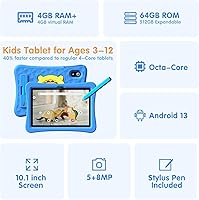
Powering this kids tablet is an Allwinner octa-core chip at 2GHz with 3GB of physical RAM, plus an advertised 5GB of virtual RAM expansion — essentially swap memory borrowed from storage, so manage expectations accordingly. Basic apps and YouTube Kids run fine; intensive 3D games may stutter. The KIDOZ kid mode layers on top of Android 13, offering curated STEM and art content with built-in ad filtering — no extra subscription required. The 7000mAh battery holds up for a solid full day of use. Storage starts at 64GB with microSD support up to 512GB. The bundled case and stylus feel appropriately rugged. One thing to flag: Amazon's own listing cites two conflicting screen resolutions, 1024x600 and 1280x800, which is an inconsistency worth knowing before you buy.

Best For

This Android tablet for children makes most sense as a first tablet for younger kids — think ages 3 to 8 primarily, though older children who mainly use lighter apps will get along fine too. It suits parents who want the full Google Play ecosystem rather than Amazon's more restricted Kids+ store, along with the flexibility to sideload apps or set up school accounts. The included stylus opens practical use cases for drawing apps, early handwriting practice, and creative tools. Families who travel often will appreciate the microSD slot for loading offline content. If you want robust parental controls without paying for a monthly service, KIDOZ handles that reasonably well out of the box.

User Feedback

Buyers who have left reviews tend to praise the overall value for money — getting a protective case and stylus bundled in at this price point is something many note as a genuine plus. Parental setup through KIDOZ gets positive marks for being straightforward, even for less tech-savvy parents. On the downside, a recurring theme is lag when running graphics-heavy apps, and several users mention screen brightness falling short in well-lit rooms. Battery life reviews are mixed — some report hitting the full 10 hours under light use, others find it falls shorter with video streaming. The silicone stylus draws skepticism around sensitivity and longevity. Brand trust is a legitimate concern with an unknown manufacturer, and feedback on after-sales support is sparse at best.

Pros

  • Tablet, protective case, and stylus are all included, offering genuine bundle value at this price point.
  • Full Android 13 access means parents are not locked into a closed ecosystem and can install any Google Play app.
  • KIDOZ kid mode provides curated educational content — STEM, art, coding — without requiring a paid subscription.
  • The 7000mAh battery comfortably covers a full day of light-to-moderate use for most young children.
  • MicroSD expansion up to 512GB gives plenty of room to grow, especially for offline content on trips.
  • The EVA protective case feels appropriately sturdy and the 360-degree kickstand is a practical touch for propping up during videos.
  • Parental controls are built in and straightforward to configure, even for parents who are not particularly tech-savvy.
  • GMS certification means kids get access to legitimate Google apps and security standards, not a sideloaded workaround.
  • Blue light reduction mode is a thoughtful addition for younger children who use the tablet in the evenings.
  • At this price tier, getting a 10.1-inch screen size gives kids noticeably more viewing room than cheaper 7-inch alternatives.

Cons

  • The Allwinner processor struggles with graphics-heavy apps and games, causing noticeable lag in more demanding titles.
  • YYSWIE is a largely unknown brand with minimal customer support infrastructure, making warranty claims uncertain.
  • The product listing cites two conflicting screen resolutions, which raises legitimate questions about listing accuracy and quality control.
  • Virtual RAM expansion uses device storage as swap memory — real-world performance gains are modest and should not be taken at face value.
  • Screen brightness is a common complaint, making outdoor or brightly lit room use noticeably harder on the eyes.
  • The included silicone stylus is passive and basic — precision and sensitivity are limited compared to active stylus alternatives.
  • Long-term software update support is unclear, which could leave the device on an aging Android version within a year or two.
  • The rear camera at 8MP sounds decent on paper but camera quality at this price tier is typically mediocre in real conditions.
  • Heavier app installations or large game files can eat into usable storage faster than the 64GB headline figure suggests.
  • User reviews on after-sales responsiveness from YYSWIE are sparse, making it hard to gauge what happens if something goes wrong.

Ratings

The scores below for the YYSWIE CT1001 10.1-inch 64GB Kids Tablet were generated by our AI system after analyzing verified global user reviews, actively filtering out incentivized, duplicate, and bot-generated feedback to surface what real parents and buyers actually experienced. Ratings reflect both the genuine strengths that won buyers over and the recurring frustrations that tempered enthusiasm — nothing has been smoothed over.
Value for Money
83%
Parents consistently point out that getting a tablet, a proper protective case, and a stylus in one box at this price feels like a genuine deal rather than a marketing trick. For households buying a first device for a young child, that bundled approach removes a lot of the usual add-on cost.
A few buyers feel the value proposition weakens once they factor in the unknown brand and uncertain long-term support — if the device fails outside a return window, replacement costs can erase the initial savings quickly.
Performance & Speed
58%
42%
For everyday tasks like running KIDOZ, browsing YouTube Kids, or using basic educational apps, the octa-core processor handles things without embarrassing itself. Light multitasking is manageable, and app launches for simpler titles feel responsive enough for a young child who does not know the difference.
Heavier apps and 3D games expose the Allwinner chip's ceiling quickly — parents report stuttering, frame drops, and occasional app crashes during more demanding sessions. The virtual RAM expansion helps prevent total lock-ups but does not meaningfully raise the performance ceiling.
Battery Life
76%
24%
The 7000mAh capacity is one of the stronger selling points at this price tier, and many parents confirm the tablet comfortably survives a full school day of mixed use without needing a midday charge. Road trips and long flights have been cited as scenarios where the battery genuinely holds its own.
The advertised 10-hour figure assumes light, low-brightness usage — real-world streaming or gaming sessions with brightness turned up bring that closer to 6 or 7 hours for many users, which is still decent but worth calibrating expectations around.
Parental Controls
81%
19%
Parents who have tried competing kid-focused tablets appreciate that KIDOZ delivers a genuinely functional control suite — screen time scheduling, per-child profiles, and ad blocking — without locking them into a monthly subscription fee. Setup is described as straightforward even by parents who are not particularly tech-comfortable.
The KIDOZ free tier, while solid, has a content library that some parents find limited compared to Amazon Kids Unlimited after extended use. A small number of users also report occasional inconsistencies in how quickly the screen lock engages remotely.
Display Quality
61%
39%
The IPS panel produces reasonably accurate colors for basic educational content and video, and the blue light reduction mode is a genuinely useful feature for parents concerned about evening screen time. Text and images look acceptable for the age group this device targets.
Screen brightness is the most commonly cited disappointment — outdoor use or bright rooms make the display noticeably washed out. The conflicting resolution figures in the product listing (1024x600 versus 1280x800) also create justified skepticism about what buyers are actually getting.
Build Quality
69%
31%
The included EVA case adds meaningful drop protection for the everyday tumbles a young child will inevitably cause, and multiple reviewers confirm the tablet survived falls from table height without damage. The rotating kickstand holds position reliably for video watching.
The tablet chassis itself feels plasticky and lightweight in a way that does not inspire long-term confidence, and a handful of users report button wobble or port looseness after several months of regular use. Build quality is adequate for the price but not reassuring.
Stylus Usability
52%
48%
Young children using basic coloring and tracing apps find the passive silicone stylus functional enough for casual creative play, and the built-in case slot keeping it secure is a thoughtful practical touch. For toddler-level drawing, it gets the job done.
Parents with older kids or those hoping for any level of drawing precision will find the stylus frustrating — passive silicone tips cannot replicate active stylus accuracy, and tip wear becomes noticeable within a few weeks of daily use. Sensitivity is inconsistent across apps.
Educational Content
78%
22%
KIDOZ covers a solid range of subject areas — STEM activities, early coding concepts, art, and reading — that align well with what parents look for in a learning-oriented device for ages 3 to 8. Content is age-gated and curated, which reduces the need for parents to manually vet individual apps.
The free KIDOZ library, while usable, is narrower than what Amazon Kids+ or subscription-based platforms offer, and some of the available educational apps feel dated or less polished than what children encounter on school devices.
Storage & Expandability
84%
The combination of 64GB built-in storage and microSD support up to 512GB is genuinely practical for families who want to pre-load offline videos for travel or maintain a large library of apps across multiple child profiles. This flexibility stands out compared to some competitors that lock storage.
The virtual RAM feature draws from onboard storage, which can quietly eat into usable space over time — particularly relevant if buyers add a large app library and also have virtual RAM enabled simultaneously.
Screen Size & Portability
74%
26%
The 10.1-inch display gives children a noticeably more comfortable viewing experience for videos and learning apps compared to cheaper 7-inch alternatives in the same price range. Parents report that older kids in the 7 to 10 age range find the screen size particularly well-suited for longer reading or drawing sessions.
At 1.19 pounds with the protective case attached, the tablet is on the heavier and bulkier side for younger children to hold unsupported for extended periods. Toddlers specifically may find it unwieldy without propping it up.
Setup & Ease of Use
79%
21%
Initial setup, including configuring KIDOZ and Google account access, is described as manageable even by reviewers who consider themselves non-technical. Switching between parent and child modes is quick, and the interface is clean enough that children aged 4 and up can navigate it independently.
A small but consistent group of buyers report confusion during first-time Google account linking or unexpected prompts during Android 13 setup that are not well-explained in the included documentation. Customer support to resolve these issues has been inconsistent.
Camera Quality
44%
56%
The rear camera covers basic photo needs for young children — taking snapshots, simple video calls, or using augmented reality educational apps that require a camera input. At this age group and price point, having any camera at all is seen as a positive addition.
Real-world image quality is noticeably below what the 8MP specification suggests — photos appear soft, colors are often inaccurate, and low-light performance is poor. Parents buying this device for a photography-curious child will need to manage expectations firmly.
Brand Reliability
47%
53%
The hardware arriving functional and as described earns some goodwill from buyers, and a portion of reviewers report no issues over several months of use. First impressions of the device out of the box are generally positive.
YYSWIE's minimal brand presence creates genuine uncertainty around warranty claims and long-term software support — there is little evidence of consistent Android update delivery or responsive direct customer service outside of the Amazon return window. This is a legitimate risk for a device intended to last multiple years.
Wi-Fi Connectivity
73%
27%
Support for Wi-Fi 6 (802.11ax) alongside older standards means the tablet connects reliably to a wide range of home routers, and most parents report stable streaming and app downloads without notable dropout issues under normal household conditions.
A subset of users report weaker-than-expected signal at greater distances from a router, suggesting the antenna implementation is modest — a consideration for households where the tablet will be used in a bedroom far from the main router.
After-Sales Support
39%
61%
Buyers who resolve issues within Amazon's standard return window generally report a smooth experience, and the marketplace itself provides a meaningful safety net for straightforward defect claims in the early ownership period.
Direct manufacturer support from YYSWIE is effectively an unknown quantity — documented experiences with post-return-window hardware failures or software issues go largely unresolved, and the brand lacks the support infrastructure of established names like Amazon, Lenovo, or Samsung.

Suitable for:

The YYSWIE CT1001 10.1-inch 64GB Kids Tablet is a solid pick for parents who want a capable first tablet for a young child without spending heavily on a premium brand. It works best for households with kids roughly between ages 3 and 8, where lighter apps, educational content, and creative play are the primary use cases. Families who specifically want Google Play access — rather than being locked into Amazon's Kids+ ecosystem — will appreciate the full Android 13 base with the KIDOZ layer on top. The included case and stylus make it a practical bundle for parents who do not want to source accessories separately, and the no-subscription parental controls are a genuine plus for budget-conscious buyers. If your child travels frequently, the microSD expansion slot for offline content and the large battery capacity make this a reasonable road-trip companion.

Not suitable for:

Buyers expecting performance on par with an iPad or even a mid-range Samsung tablet will be disappointed — the YYSWIE CT1001 10.1-inch 64GB Kids Tablet is firmly a budget device, and the Allwinner processor shows its limits when running graphics-heavy games or multiple apps simultaneously. Older kids aged 10 and up who want to use demanding creative software, stream in high quality, or game seriously will likely outgrow this hardware quickly. The unresolved screen resolution discrepancy in the product listing — two different figures are cited — is the kind of quality-control detail that should give pause to anyone who values transparency from a manufacturer. YYSWIE has minimal brand presence outside of marketplace listings, which makes after-sales support an unknown quantity; buyers who need reliable warranty coverage or responsive customer service should look toward more established brands. The stylus, while a nice addition, is a basic silicone passive stylus — it will not satisfy any child expecting precision drawing or note-taking accuracy.

Specifications

  • Screen Size: The IPS display measures 10.1 inches diagonally, providing a comfortable viewing area for children during learning sessions and media playback.
  • Resolution: The panel's maximum resolution is listed as 1280x800 pixels, though the product listing also references 1024x600 — buyers should note this inconsistency exists in the manufacturer's own documentation.
  • Processor: An Allwinner octa-core chip clocked at 2GHz handles all processing tasks, which is adequate for light to moderate app use at this price tier.
  • RAM: The tablet includes 3GB of physical RAM alongside a 5GB virtual RAM expansion that borrows from onboard storage to assist with multitasking.
  • Storage: Built-in storage is 64GB, and the microSD card slot supports expansion cards up to 512GB for additional apps, games, and offline media.
  • Battery: A 7000mAh lithium polymer battery powers the device, with the manufacturer rating average use at approximately 10 hours per charge.
  • Operating System: The tablet ships with Android 13, giving parents full access to the Google Play Store and standard Android system settings.
  • Rear Camera: A rear-facing 8MP camera is included, suitable for basic photo capture and simple video, though real-world image quality is typical of budget-tier hardware.
  • Wireless: Wi-Fi connectivity supports 802.11a/b/g/n/ac/ax standards, covering both common home networks and newer Wi-Fi 6 access points.
  • Dimensions: The tablet body measures 9.4 x 6.3 x 0.4 inches and weighs 1.19 pounds, making it manageable for older children to hold but slightly large for toddlers unassisted.
  • Protective Case: An EVA shock-absorbing case is included in the box and features a 360-degree rotatable kickstand for propping the tablet in landscape or portrait orientation.
  • Stylus: A passive silicone stylus is included and slots into the case for storage, though it does not support pressure sensitivity or active digitizer functions.
  • Kid Mode: KIDOZ Kid Mode provides a curated child-friendly environment with age-appropriate content spanning STEM, art, and coding, plus built-in ad blocking and content filtering.
  • Blue Light Filter: A software-based blue light reduction mode is available in display settings to reduce eye strain during extended use, particularly in evening hours.
  • Certification: The tablet carries Google Mobile Services (GMS) certification, confirming it meets Google's requirements for running official Google apps and Play Store access.
  • Color Option: The primary available color variant is blue, which corresponds to the EVA protective case rather than the tablet chassis itself.
  • Parental Controls: Built-in parental controls allow screen time scheduling, content filtering, custom child profiles, and instant screen locking without any additional subscription or app required.
  • Charging: The device charges via a standard port consistent with Android tablet conventions; no wireless charging is supported at this price tier.

Related Reviews

Trayoo K12 10.1-inch 64GB Kids Tablet
68%
83%
Value for Money
77%
Build Quality & Durability
71%
Battery Life
58%
Performance & Speed
74%
Screen Quality
More
ITDULCET J10 Plus 10-inch Kids Android Tablet
73%
78%
Value for Money
83%
Battery Life
86%
Parental Controls
84%
Software & OS
59%
Warranty & Support
More
YACXBTK J10 10.1-inch Kids Tablet
70%
84%
Battery Life
81%
Value for Money
78%
Parental Controls
62%
Performance
67%
Display Quality
More
WXUNJA X-C30 10.1-inch Kids Tablet
72%
83%
Value for Money
86%
Parental Controls
81%
Battery Life
78%
Parental App & Setup
63%
Display Quality
More
YATIOM SS-35 10-inch Kids Tablet
70%
84%
Value for Money
61%
Performance & Speed
73%
Build Quality & Durability
78%
Parental Controls
69%
Battery Life
More
ITMEIPC T-10 10.1-inch Android Tablet
69%
83%
Value for Money
67%
Display Quality
62%
Performance
71%
Battery Life
58%
Build Quality
More
niuniutab K102 10-inch Kids Android Tablet
70%
78%
Value for Money
74%
Display Quality
67%
Build & Durability
61%
Parental Controls
72%
Performance & Speed
More
Jeazans KT1016 10-inch Kids Tablet
70%
83%
Value for Money
77%
Build Quality
62%
Performance
66%
Battery Life
74%
Display Quality
More
YINOCHE F11 10-inch Kids Tablet
67%
81%
Value for Money
76%
Parental Controls
78%
Battery Life
83%
Ease of Setup
74%
App Ecosystem
More
YINOCHE Y101 10-inch 32GB Kids Tablet
72%
88%
Value for Money
83%
Parental Controls
79%
Build Quality & Durability
74%
Display Quality
61%
Performance & Speed
More

FAQ

The YYSWIE CT1001 10.1-inch 64GB Kids Tablet is technically designed for ages 3 to 12, but realistically the hardware and screen size are a better fit for kids 5 and up using it independently. A 3-year-old can certainly use it with supervision, especially in KIDOZ mode, but the tablet is on the larger and heavier side for very small hands. The protective case does help with grip and drop protection for younger users.

KIDOZ is pre-installed and comes with a free tier that already provides access to a solid library of educational games, videos, and apps. There is a premium KIDOZ subscription available if you want to unlock additional content, but the free version alone offers enough for most families and does not feel artificially limited.

Yes, the YYSWIE tablet runs full Android 13 and is GMS certified, which means the Google Play Store is pre-installed and fully functional. Parents can install any compatible app available on the store. KIDOZ mode is a separate layer — you switch between the child-facing and parent-facing interfaces rather than being locked out of the broader Android system.

Virtual RAM expansion is a software feature that uses a portion of the internal storage to supplement physical RAM when the system is under load. In practice, it can help prevent apps from crashing when several are open simultaneously, but it is not the same as having more real RAM. You may notice some slowdown or delay when switching between apps compared to a device with more physical memory.

Under typical mixed use — some YouTube Kids, educational apps, and light gaming — most users find the battery lasts somewhere between 7 and 10 hours. The 10-hour figure is achievable under light conditions like reading or simple games at moderate brightness, but video streaming or brighter screen settings will shorten that noticeably. It is still one of the stronger points of this device compared to similar budget tablets.

This is a genuine inconsistency in the product listing, which shows both 1024x600 and 1280x800 in different sections. The IPS panel most likely outputs at 1280x800, which is the higher of the two figures and more consistent with a 10.1-inch display at this price point. That said, the conflicting specs are worth knowing about because they reflect a level of listing quality that buyers should factor into their overall assessment of the brand.

The EVA foam case provides decent shock absorption for everyday drops from table or couch height — the kind of accidents that happen with young children regularly. It is not military-grade protection, but it is a meaningful improvement over using the tablet bare. The 360-degree kickstand is also a practical addition that holds up reasonably well for propping the tablet during video playback.

The included stylus is a basic passive silicone tip design, meaning it works by mimicking a fingertip on the touchscreen rather than using any active digitizer technology. It is fine for simple drawing apps, coloring, or younger kids practicing tracing letters, but do not expect precision or pressure sensitivity. The tip can also wear down with heavy use. For casual creative play it is a nice bonus, but serious drawing enthusiasts will want a higher-quality active stylus separately.

This is a fair concern to raise. YYSWIE is a smaller, lesser-known brand without a large established support network, and buyer experiences with after-sales service are mixed based on available feedback. If you run into a hardware defect, your best first step is going through the Amazon return and claim process within the standard return window rather than relying on direct manufacturer support. Keeping your purchase documentation is strongly recommended.

Yes, KIDOZ supports creating custom profiles for individual children, which lets you set different content permissions, app access, and screen time limits per child. This is handy if you have siblings of different ages sharing the same device. The parent account stays separate and accessible with a PIN, so children cannot easily access adult settings or bypass the controls.