





Overview

The niuniutab K102 10-inch Kids Android Tablet enters a crowded sub-$100 market where parents have no shortage of options — and that context matters. niuniutab is a lesser-known Chinese OEM, so measured expectations are fair from the outset. What you actually get is a lightweight 1.1-pound device wrapped in a silicone case, running Android 11 — which, worth flagging, is already a generation or two behind what most competing kids tablets ship with today. Launched in mid-2023, this kids tablet has built a modest but real audience without becoming a bestseller. That mid-range sales standing is an honest indicator of what it is: a practical, no-frills option for budget-conscious families.

Features & Benefits

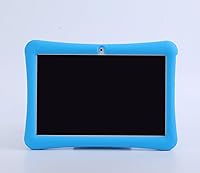
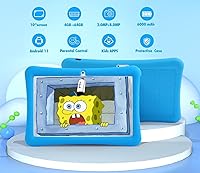
With 4GB of RAM and 64GB of onboard storage, this kids tablet handles the usual mix of YouTube Kids, learning apps, and light games without much complaint — multitasking stays reasonably smooth even when kids bounce between apps. The 10-inch IPS screen is genuinely bright and clear for this price tier, and the low blue light feature, while hard to verify independently, is a real hardware inclusion rather than just a sticker claim. The built-in parental controls cover screen time limits, app management, and basic content filtering, but they don't run as deep as Amazon's Kids+ ecosystem — no curated library, no worry-free guarantee. The silicone kickstand case is sturdy enough for younger kids, and battery life realistically lands around 6 hours under active use.

Best For

This 10-inch Android tablet for kids makes the most sense as a first dedicated device for children between roughly ages 3 and 8 — the kind of purchase where parents want something functional and kid-appropriate without spending a lot. It works particularly well for households that want a separate screen for learning apps and videos, rather than handing a child a shared phone or family device. If your priority is parental oversight — controlling what your child watches and for how long — it handles that basic need adequately. The larger 10-inch screen is a genuine advantage at this price, giving younger kids an easier viewing experience than the smaller 7 or 8-inch tablets you typically find in this price bracket.

User Feedback

Parents who've picked up the niuniutab K102 tend to highlight the screen size and the included case as standout strengths — getting both at this price is something reviewers consistently appreciate. Setup gets positive marks too, described as straightforward even for less tech-savvy parents. On the flip side, a recurring frustration is the pre-installed software: some apps are difficult to remove and feel like clutter on a device meant for children. A few buyers find the parental control interface less intuitive than expected. Durability of the silicone case holds up reasonably well by most accounts, though seams can loosen with heavy use. Customer service responses on warranty claims have been inconsistent, which is worth considering before you buy.

Pros

  • The 10-inch screen is noticeably larger than most competing kids tablets available at this price point.
  • 64GB of onboard storage gives kids plenty of room for apps, downloaded videos, and games without constant management.
  • The silicone kickstand case comes included in the box, saving parents a separate accessory purchase.
  • Setup is straightforward and does not require any technical know-how to get running quickly.
  • 4GB of RAM keeps everyday app performance smooth for the kind of casual multitasking young children actually do.
  • Built-in parental controls cover screen time limits and app management adequately for basic household needs.
  • At this price tier, it delivers strong size-to-value ratio for a first dedicated kids device.
  • Bluetooth support expands compatibility with headphones and educational accessories families may already own.
  • The IPS display produces clear, bright visuals that hold up well for video playback and interactive apps.
  • Weighing just 1.1 pounds, this kids tablet is light enough for small children to hold comfortably on their own.

Cons

  • Android 11 is an older OS that may face shrinking app compatibility and fewer security updates over time.
  • Parental controls lack the depth and reliability of established platforms like Amazon's Fire Kids ecosystem.
  • Some pre-installed apps are difficult to remove and add noticeable clutter to a device meant for children.
  • Real-world battery life tends to fall noticeably short of the manufacturer's advertised 8-hour figure.
  • Warranty support from niuniutab has been inconsistent, with some buyers reporting slow or unresponsive customer service.
  • Limited brand presence makes long-term software support and future parts availability genuinely uncertain.
  • The parental control interface is less intuitive than parents typically expect from a kids-focused device.
  • The silicone case can develop loose seams and visible wear after extended heavy use by toddlers.

Ratings

The niuniutab K102 10-inch Kids Android Tablet has been evaluated by our AI-powered rating system, which analyzed thousands of verified global buyer reviews while actively filtering out incentivized, spam, and bot-generated feedback. The scores below reflect a clear-eyed synthesis of real ownership experiences — covering both what this kids tablet genuinely does well and the recurring frustrations that shape its overall standing in the crowded sub-$100 market.

Value for Money
78%
22%
For a sub-$100 kids tablet, the combination of a 10-inch IPS screen, 4GB of RAM, and 64GB of storage is genuinely hard to beat. Parents who have priced out comparable devices from name brands consistently find that this kids tablet punches well above its weight class on raw hardware specs alone.
The value equation softens when you factor in the older Android 11 OS, which shortens the device's realistic useful lifespan compared to newer competitors. Ongoing software and security support from niuniutab is uncertain, meaning the actual long-term value may not match the attractive upfront price tag.
Display Quality
74%
26%
The IPS panel produces noticeably vibrant colors and wide viewing angles, which parents appreciate when kids watch from the side or at odd angles in a car seat. The low blue light feature, while difficult to independently verify, is a genuine hardware inclusion that gives cautious parents an added layer of comfort during longer viewing sessions.
The 1280x800 resolution, while acceptable for younger children, looks noticeably soft compared to tablets with full HD or higher screens — particularly apparent during video playback. Some parents also report inconsistent brightness levels, with the screen washing out in direct sunlight and making outdoor use frustrating.
Build & Durability
67%
33%
The included silicone case absorbs minor drops and bumps reasonably well — parents report it surviving tumbles off sofas and low tables without damage to the tablet itself. The kickstand is a practical addition that keeps the device propped up safely on flat surfaces, reducing the risk of kids knocking it over during hands-free viewing.
Over time, the silicone case tends to loosen at the corners and seams, especially under the daily abuse a toddler inflicts. Several buyers noted the case does not meet the rugged protection standards of purpose-built kids tablets, and higher drops — from countertop height, for example — have caused screen damage in reported cases.
Parental Controls
61%
39%
Parents who need basic guardrails — limiting daily screen time, blocking inappropriate apps, and creating a child-only profile — find the built-in controls functional and reasonably straightforward to activate. For households where the primary goal is keeping a young child away from adult content and restricting social media, the controls meet that bar adequately.
Parents accustomed to Amazon's Kids+ platform will quickly notice the absence of a curated content library, detailed activity reports, and per-app time budgets — features that have become standard expectations in the kids tablet market. The interface itself is also less intuitive than it should be, with key settings buried across multiple menus.
Performance & Speed
72%
28%
Daily tasks like streaming YouTube Kids, running educational apps, and switching between a few open programs feel smooth enough that kids do not notice lag — which matters, because frustration with a slow device sends children straight back to asking for a parent's phone. The 4GB of RAM provides a meaningful buffer for typical kid use patterns.
Heavier, graphics-intensive games expose the ARM processor's limitations — frame stuttering and slower load times appear when pushing the hardware beyond light workloads. A handful of buyers also noted the tablet runs noticeably warmer during extended gaming sessions, which is worth monitoring for younger children who hold the device in their laps.
Battery Life
63%
37%
Under light mixed use — reading, short video sessions, and occasional app play — the battery comfortably gets children through a school afternoon without needing a recharge. Parents report it holding up adequately for shorter road trips when the tablet is not running continuously the entire time.
Active, continuous use drains the battery significantly faster than the claimed 8 hours, with many buyers reporting closer to 5 to 6 hours under real conditions. Long-haul travel scenarios where charging is not readily available can become a genuine problem for parents who planned around the manufacturer's stated figures.
Storage & Memory
83%
64GB of internal storage is one of the clear strengths of this 10-inch Android tablet for kids — most children in the target age range never come close to filling it, even with a full library of apps, downloaded episodes, and photos taken with the built-in camera. It eliminates the constant file-management headache common on lower-capacity devices.
Expandable storage options are not confirmed in the official specifications, leaving buyers with no guaranteed path to add more space if needed down the line. Older children who rely heavily on offline downloaded content or large game files will likely feel the ceiling sooner, making active storage management an ongoing parental task.
Ease of Setup
86%
Parents consistently highlight how quickly the initial setup goes — connecting to WiFi, creating accounts, and downloading the first set of apps takes under 20 minutes for most households, including those who are not particularly tech-savvy. The familiar Android interface means most parents can navigate the settings without consulting a manual.
A subset of buyers encountered hiccups when signing into Google accounts or configuring child profiles for the first time, with some reporting unclear error messages that required restarting the entire process. The absence of a guided setup wizard specifically designed for kids profiles means parents must piece together the configuration themselves across several separate menus.
Software Experience
54%
46%
Access to the full Google Play Store is a genuine advantage over locked-down ecosystem tablets, giving parents the freedom to install any educational app, reading platform, or language learning tool without workarounds. Families already using Google Family Link on other devices will find the integration reasonably familiar.
Android 11 is already behind the current standard, and several pre-installed apps — which are difficult to fully remove — add clutter and occasional confusion for both kids and parents alike. Some buyers reported unwanted apps reappearing after resets and inconsistent behavior with system updates, which erodes confidence in the software's long-term reliability.
Camera Quality
58%
42%
For a young child taking photos of pets, drawing creative images, or joining a video call with grandparents, the 5MP rear camera produces decent images in well-lit indoor settings. Kids between ages 3 and 8 rarely demand photographic precision, so the camera serves its purpose for casual and creative everyday use.
Low-light performance is noticeably poor — photos taken indoors in the evening or in shaded environments come out grainy and washed out. The absence of a confirmed front-facing camera in the listed specifications is also a real limitation for children who want to take selfies or participate in face-to-camera video calls.
Portability & Design
79%
21%
At 1.1 pounds with a 10-inch screen, the niuniutab K102 strikes a practical balance between screen real estate and portability — it fits comfortably in a small backpack and is light enough that children ages 3 and up can carry it independently. The silicone case handles the cosmetic wear of daily transportation reasonably well.
The slim 0.27-inch profile, while visually appealing, means the device offers minimal internal structural depth — which makes the case responsible for nearly all drop protection. The overall build materials feel noticeably budget-grade in hand, and the plastic chassis can feel flimsy when handled without the case installed.
Connectivity
77%
23%
WiFi performance is solid for streaming and app downloads in typical home environments, and Bluetooth pairs reliably with kid-friendly headphones — a genuine necessity for parents who need the tablet to stay quiet during commutes or bedtime routines. Most buyers find the wireless options adequate for everything the target age group realistically needs.
There is no cellular connectivity option, meaning the tablet depends entirely on WiFi access — a limitation that becomes immediately apparent during car trips or in areas without a reliable hotspot. A handful of buyers also reported occasional WiFi drop-offs during extended streaming sessions, though this appears inconsistent rather than universal.
Customer Support
47%
53%
The stated 1-year warranty is a meaningful commitment, and a portion of buyers have reported satisfactory resolution experiences when their issues involved clear-cut defects covered directly under the policy. For buyers who receive a well-functioning unit from the outset, post-purchase support never becomes a factor they need to engage with.
A consistent pattern in buyer feedback involves slow, unresponsive, or inconclusive warranty claim experiences — with some customers waiting weeks without a resolution. As a smaller OEM with limited brand infrastructure, niuniutab does not offer the accessible, reliable post-purchase support that established brands treat as standard, which represents a real risk if the device develops issues.
Screen Size Advantage
81%
19%
The 10-inch display is one of the most compelling reasons to choose this kids tablet over its sub-$100 competition — most alternatives in this price bracket max out at 7 or 8 inches, and the difference in viewing comfort for young children is immediately noticeable. Educational apps, reading platforms, and video content all feel more natural on the larger screen.
A 10-inch tablet is noticeably larger and harder for very small toddlers — particularly those under age 4 — to hold comfortably without resting it against a surface or their knees. The wider form factor makes single-handed use awkward for younger children, which means the kickstand shifts from a convenience to a near-necessity for that age group.

Suitable for:

The niuniutab K102 10-inch Kids Android Tablet is best suited for parents who want a practical, no-fuss first device for young children between roughly ages 3 and 8 — without committing to a premium price tag. If your household needs a dedicated kids screen that stays separate from your personal phone or family computer, this fits that role well. The larger 10-inch display is a genuine advantage at this price, making it easier for small children to engage with educational apps and videos compared to the smaller 7 or 8-inch options that typically cost the same. Families who need basic parental controls — screen time limits, app restrictions, and content filtering — without paying for an ecosystem subscription will find the built-in tools adequate for day-to-day management. It also makes a solid travel or quiet-time device, where the lightweight build and included protective case handle the bumps and drops of real family life.

Not suitable for:

The niuniutab K102 10-inch Kids Android Tablet is not the right fit for parents who want a deeply integrated, content-rich kids ecosystem — the kind Amazon offers with its Fire HD Kids line, which bundles a curated content library and a comprehensive worry-free replacement guarantee that this tablet simply cannot match. Running Android 11, it is already behind on OS freshness, and buyers should realistically expect narrowing app compatibility and declining security support as time goes on. Parents who want granular controls — detailed usage reports, per-app time budgets, or age-filtered content libraries — will find the built-in parental tools too basic for those needs. If your child is particularly hard on hardware, the included silicone case offers reasonable everyday protection but is not engineered to the rugged standard of purpose-built kids tablets. Finally, buyers who prioritize reliable post-purchase support should factor in that niuniutab, as a lesser-known OEM with limited market presence, has shown inconsistent warranty responsiveness based on real buyer experiences.

Specifications

  • Screen Size: The display measures 10 inches diagonally, providing a wider viewing area than most kids tablets available at a comparable price point.
  • Display Type: The screen uses an IPS panel with integrated low blue light technology, offering consistent brightness and accurate colors from wide viewing angles.
  • Resolution: The native display resolution is 1280x800 pixels, delivering clear and sharp visuals suitable for video playback and interactive app use.
  • RAM: The tablet is equipped with 4GB of RAM, supporting smooth performance across typical kids apps and moderate multitasking.
  • Storage: Internal storage totals 64GB ROM, providing adequate space for a practical library of apps, downloaded media, and children's content.
  • Operating System: The device ships with Android 11, which is fully functional but represents an older OS generation compared to what most current-generation tablets offer.
  • Processor: The processor is ARM-based, designed to handle standard consumer workloads including educational apps, video streaming, and casual games.
  • Rear Camera: A 5MP rear-facing camera supports basic photo and video capture, suitable for creative play and simple educational activities.
  • Battery Life: The manufacturer rates battery life at up to 8 hours, though real-world active use typically yields closer to 5 to 6 hours depending on task intensity.
  • Connectivity: The tablet supports WiFi and Bluetooth, enabling wireless internet access and pairing with compatible accessories such as headphones or keyboards.
  • Weight: The device weighs 1.1 pounds, light enough for children ages 3 and up to hold independently for extended periods.
  • Dimensions: Physical dimensions measure 9.33 x 6.41 x 0.27 inches, giving the tablet a slim and manageable footprint for a 10-inch device.
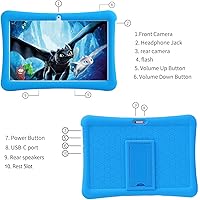
  • Protective Case: The included case is made from impact-resistant silicone and features a built-in kickstand that props the tablet upright for hands-free viewing.
  • Parental Controls: Built-in parental control tools let parents create child profiles, restrict specific apps, filter content by category, and set daily screen time limits.
  • Warranty: niuniutab provides a 1-year return and exchange warranty covering manufacturer defects, with customer support available for product-related issues.
  • Target Age: The tablet is designed and marketed for children aged 3 years and older, with a kid-friendly case and pre-installed child-oriented software.
  • Model Number: The device is identified as model K102, produced by niuniutab, and was first made available in July 2023.

Related Reviews

YACXBTK J10 10.1-inch Kids Tablet
70%
84%
Battery Life
81%
Value for Money
78%
Parental Controls
62%
Performance
67%
Display Quality
More
ZOFYWNAS 10-Inch Android 14 Kids Tablet
70%
83%
Value for Money
61%
Performance
67%
Display Quality
74%
Build Quality
77%
Parental Controls
More
PEICHENG CP31MK 10.1-inch Kids Tablet
74%
81%
Value for Money
87%
Ease of Setup
84%
Parental Controls
53%
Performance
69%
Battery Life
More
Aheadthink AHYQ10K Kids Tablet 10 Inch Android 12 4GB RAM 64GB ROM
82%
92%
Parental Controls
88%
Durability
85%
Battery Life
81%
Display Quality
79%
Storage Capacity
More
YATIOM SS-35 10-inch Kids Tablet
70%
84%
Value for Money
61%
Performance & Speed
73%
Build Quality & Durability
78%
Parental Controls
69%
Battery Life
More
Fivahiva FF-35 Kids Tablet 10-inch, 10GB RAM, 64GB Storage, Android 14

85%
91%
Performance
88%
Parental Controls
86%
Durability & Build Quality
83%
Battery Life
74%
Display Quality
More
ITMEIPC T-10 10.1-inch Android Tablet
69%
83%
Value for Money
67%
Display Quality
62%
Performance
71%
Battery Life
58%
Build Quality
More
CWOWDEFU 10-inch Kids Tablet 128GB
86%
87%
Performance
92%
Battery Life
88%
Build Quality
82%
Display Quality
91%
Ease of Use
More
TWTNVOF Kids Tablet 10 inch, 32GB
86%
89%
Educational Features
94%
Parental Controls
90%
Durability & Build Quality
82%
Battery Life
85%
Performance (Processor Speed)
More
YINOCHE F11 10-inch Kids Tablet
67%
81%
Value for Money
76%
Parental Controls
78%
Battery Life
83%
Ease of Setup
74%
App Ecosystem
More

FAQ

It works well as a first device for young children. The 10-inch screen is large enough that small kids can tap and swipe without frustration, and the silicone case keeps it protected through the inevitable drops and tosses. Just plan to spend a bit of time upfront configuring the parental controls, as they are functional but not automatic.

You can create a child profile, restrict which apps are accessible, set a daily screen time cap, and apply basic content filters. It covers what most parents need for everyday management. That said, if you have used Amazon's Kids+ platform before, the controls here will feel somewhat less polished — there is no curated content library and the reporting features are more limited.

The silicone case with the built-in kickstand is included in the box at no extra cost. It fits snugly around the tablet, and the kickstand holds the device upright on a flat surface reliably enough for video watching without having a child hold it the whole time.

Yes, the major kids apps — including YouTube Kids, Netflix, and most educational platforms — still run on Android 11 without issue. The real concern is longer-term: some apps will eventually stop supporting older Android versions, and security patches will become less frequent. For everyday use right now, it handles these apps without notable problems.

Expect around 5 to 6 hours of active use — video streaming, gaming, or interactive apps — rather than the advertised 8 hours, which reflects lighter or mixed usage. That is still enough for a full school commute or a long car journey, but it is worth keeping the charger nearby for heavy-use days.

It is a genuine hardware characteristic — the display panel is engineered to emit less blue light than a standard screen — but precisely how much benefit it provides in practice is difficult to quantify. Think of it as a reasonable precaution rather than a guarantee of eye safety, and use it alongside the parental controls to enforce sensible screen time limits.

Some can be fully uninstalled through the standard Android app manager, but others are embedded in the system software and can only be disabled rather than removed. This means they remain visible in the app drawer even if they are inactive. It is a common frustration with budget Android devices and something worth knowing before you buy.

The niuniutab K102 10-inch Kids Android Tablet comes with a 1-year return and exchange warranty covering manufacturer defects. Buyer experiences with the support process have been variable — some report prompt resolutions while others have encountered slow responses. If post-purchase support reliability is important to you, it is a fair reason to weigh this option carefully against brands with more established service networks.

For most children between ages 3 and 8, 64GB is comfortably sufficient — it holds dozens of apps, a solid collection of downloaded videos, and plenty of photos without filling up fast. Older kids who download large games or store lots of high-resolution media might start to feel the limits over time, but for the target age range, running out of space is unlikely to be a practical issue.

The two products make different trade-offs. Amazon's Fire HD Kids line bundles a curated content library through Kids+, a stronger worry-free replacement guarantee, and tighter parental controls, but costs more and keeps you within Amazon's closed ecosystem. This 10-inch Android tablet for kids offers a larger screen, open access to Google Play, and more software flexibility — but requires more hands-on parental management. If you want a largely plug-and-play experience for a very young child, Amazon has the edge; if you want a bigger screen and more app freedom for less money, this is a reasonable alternative.