Overview

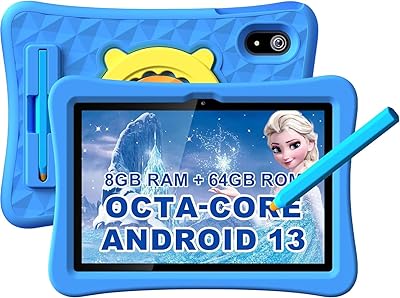
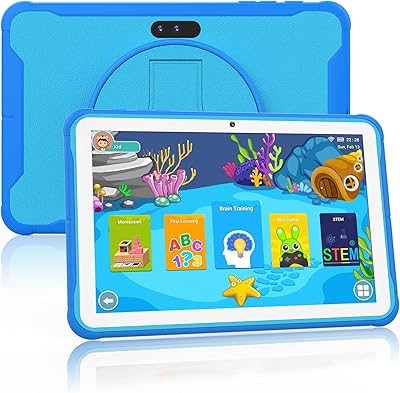
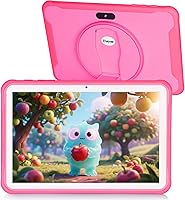
The Trayoo K12 10.1-inch 64GB Kids Tablet is Trayoo's entry into a crowded market, arriving in early 2025 as a budget-conscious option for families with kids aged 3 to 7. Running Android 11 on an Allwinner quad-core processor, it covers the basics without pretending to punch above its weight. What stands out right away is that the childproof case ships in the box — no separate purchase needed — alongside a low-blue-light IPS screen that parents will appreciate during long viewing sessions. Trayoo is a newer brand with no long track record to draw from, so expectations should be calibrated accordingly: this is an entry-level device, priced for families watching their budget.
Features & Benefits

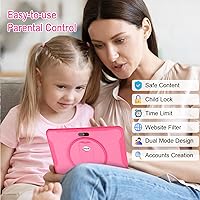
Storage is rarely a dealbreaker at this price range, but 64GB of built-in space — expandable to 516GB via microSD — means you can load up offline videos and apps before a long trip without worrying about running out of room. The 5000mAh battery is rated for up to 14 hours; realistically, many parents report getting through a full travel day without needing a recharge. The pre-installed Yubabe app acts as the content hub — worth clarifying that it is a separate curated platform from YouTube Kids or ABCmouse, offering games, art activities, and karaoke aimed at younger children. Parental controls cover screen time limits, per-child profiles, and app blocking, which is a solid toolkit for everyday household use.

Best For

This children's tablet makes the most sense as a first tablet for young children between 3 and 7 — kids just beginning to navigate touchscreens rather than older ones chasing high-performance apps or games. The included rugged case means you are not constantly bracing for the moment a toddler sends it skidding across a hardwood floor. It is a practical fit for families who travel regularly, since offline content access and a long battery life take the pressure off spotty airplane WiFi or car hotspots. If you want basic parental controls without spending hours configuring a complex system, and you are not expecting flagship tablet performance, this is a sensible, affordable starting point.

User Feedback

Buyers frequently highlight how quick setup is — most say the Trayoo K12 was ready for their child within minutes of unboxing, which matters a lot when a three-year-old is watching impatiently. The case quality also earns consistent praise: it feels robust, not cheap. On the downside, a recurring theme is occasional lag and crashes, particularly when running content-heavy apps — not surprising given the 2GB RAM. Some parents find the parental control layout a bit confusing at first, though most adapt without needing to contact support. Battery life reports are split: lighter users hit the 14-hour claim, while others land closer to 8 or 9 hours during heavier video sessions.

Pros

  • Childproof case is included in the box — no extra purchase needed right away.
  • 64GB of storage is generous at this price tier, with room to expand via microSD.
  • The 10.1-inch screen is genuinely large enough for young kids to navigate comfortably.
  • Pre-installed Yubabe app gives children immediate access to age-appropriate content without extra downloads.
  • Parental controls cover the essentials: screen time limits, app blocking, and per-child profiles.
  • Low-blue-light IPS display is a thoughtful touch for children who use the tablet before bed.
  • Battery life holds up well for travel, with many parents getting through a full day on a single charge.
  • Setup is quick and straightforward — most parents report kids are using it within minutes of unboxing.
  • MicroSD expansion up to 516GB means offline content storage is practically unlimited for family road trips.
  • At its price point, the overall feature set offers strong value for a dedicated first kids device.

Cons

  • 2GB of RAM causes noticeable lag when running heavier or multiple apps simultaneously.
  • The 802.11b WiFi standard is outdated and can result in slower or less stable streaming connections.
  • App crashes and occasional software instability have been flagged by a meaningful number of buyers.
  • Trayoo is a newer brand with a limited track record, making long-term reliability harder to assess.
  • Real-world battery life varies widely — heavier usage sessions can fall well short of the 14-hour claim.
  • Parental control interface has a learning curve and is not as polished as those on premium competing devices.
  • Camera quality on both front and rear is basic at best — fine for video calls, not much else.
  • Customer support experience appears inconsistent based on user reports, despite the 12-month warranty.
  • The Yubabe app, while preloaded, is a separate ecosystem from popular platforms like YouTube Kids or ABCmouse.
  • Android 11 is already behind current OS versions, which could limit future app compatibility over time.

Ratings

Our editorial team used AI to analyze thousands of verified global purchases of the Trayoo K12 10.1-inch 64GB Kids Tablet, actively filtering out incentivized reviews, duplicate submissions, and bot-generated feedback to surface what real parents actually experienced. The scores below reflect an honest composite of genuine praise and recurring frustrations — nothing is glossed over. Where this children's tablet earns high marks, it genuinely delivers; where it falls short, those pain points are reflected just as transparently.

Value for Money
83%
For budget-conscious families, the overall package is hard to argue with — a 10-inch screen, 64GB of storage, a protective case, and pre-loaded content all bundled together at an entry-level price point. Parents consistently describe it as getting more than they expected for what they paid.
A handful of buyers felt the hardware limitations became apparent quickly, particularly around app performance and WiFi speed, which made the value proposition feel shakier after a few weeks of regular use.
Build Quality & Durability
77%
23%
The included childproof case does real work — parents report the tablet surviving drops off sofas, coffee tables, and even the occasional tumble down stairs without cracking or losing function. The case feels substantial rather than flimsy.
The tablet body itself, without the case, feels noticeably lightweight and plasticky to adult hands. Some buyers noted the case fit is slightly loose on certain units, which reduced confidence in drop protection at the edges.
Battery Life
71%
29%
For lighter usage — offline videos, drawing apps, or simple games — many parents comfortably make it through a full travel day without reaching for the charger, which is genuinely useful on long car trips or flights.
The 14-hour claim does not hold up under real-world conditions involving WiFi streaming or graphics-heavy apps, where several parents reported battery depletion closer to 7 or 8 hours. Variance between units was also noted.
Performance & Speed
58%
42%
For the core use cases this tablet targets — basic games, drawing, video playback, and simple educational apps — the quad-core processor handles things adequately. Young children using age-appropriate apps rarely pushed it hard enough to notice slowdowns.
Two gigabytes of RAM is a real bottleneck. Switching between apps, loading heavier content, or running anything moderately demanding produces lag that parents find frustrating even if kids remain oblivious. Occasional app crashes were a recurring complaint.
Screen Quality
74%
26%
The 10.1-inch IPS display is large enough for young children to comfortably navigate, and the low-blue-light technology is a feature parents genuinely appreciate — especially for households where the tablet gets used in the evening before bedtime.
At 1280x800 resolution, the screen is serviceable but not impressive by current standards. Outdoors or in bright rooms, glare becomes a real issue, and colors look a bit washed out compared to tablets in higher price brackets.
Parental Controls
66%
34%
The built-in control suite covers the most important bases — screen time limits, app blocking, and per-child profiles — which is enough for most parents to feel reasonably in control of what their young child accesses throughout the day.
The interface is not particularly intuitive, and first-time setup can take longer than expected. Several parents noted that the controls feel less polished compared to dedicated parental platforms, and some settings were not immediately obvious without trial and error.
Pre-Installed Content
69%
31%
The Yubabe app provides a ready-made environment of games, Montessori-style learning, art tools, and kids TV that younger children can engage with right away — a genuine convenience that reduces the need for parents to source and install content from scratch.
The Yubabe ecosystem is separate from mainstream platforms parents already know, which creates some confusion. The content library, while functional, is narrower than what kids are used to from YouTube Kids or dedicated educational apps, and novelty can wear off quickly.
WiFi Connectivity
47%
53%
For basic browsing, downloading apps, and connecting to home networks, the WiFi does the job in everyday situations where the router is nearby and signal strength is strong.
The 802.11b standard is genuinely outdated, and it shows. Streaming HD video — especially over busier home networks — results in noticeable buffering and slower downloads. In homes with modern routers optimized for newer protocols, this tablet consistently underperforms expectations.
Ease of Setup
88%
One of the most consistently praised aspects across buyer feedback is how quickly the tablet is ready to use. Most parents report having it configured and handed to their child within 10 to 15 minutes of opening the box, which makes for a stress-free first experience.
A small number of buyers encountered initial software glitches during setup — particularly with Google account sign-in or app store access — that required a restart or factory reset before proceeding, which is frustrating on a brand-new device.
Camera Quality
51%
49%
Having both front and rear cameras is a nice inclusion at this price tier, and for video calls with grandparents or casual photo-taking by young children, the cameras are functional enough to get the job done.
Image quality is noticeably low — photos come out grainy in anything less than bright lighting, and the front camera struggles with definition during video calls. Parents expecting decent photo output from either lens will likely be disappointed.
Storage Capacity
84%
64GB of onboard storage is genuinely practical for a children's tablet in this category — enough to hold a large library of apps, offline videos, and games without constantly managing space. The microSD expansion slot adds real flexibility for travel-heavy families.
There are no meaningful complaints about storage capacity at this level. The only minor gripe from a few buyers was that the microSD card itself is not included in the box, requiring a separate purchase to unlock expansion capability.
Audio Quality
62%
38%
Volume levels are sufficient for a child watching videos or playing games in a quiet room, and the speaker handles kids content — voices, simple music, game audio — without distortion at moderate volumes.
The mono speaker setup lacks depth and gets tinny at higher volume levels, which becomes noticeable during karaoke or music-heavy content. Parents watching alongside their children tend to find the audio quality underwhelming compared to even mid-range competing devices.
Brand & Warranty Support
54%
46%
Trayoo does provide a 12-month warranty, and many buyers who proactively contacted the support team report receiving a response and some form of resolution, which is a reasonable baseline for a newer brand at this price.
Trayoo's limited track record means there is genuine uncertainty around long-term support. Response times from the support team vary considerably between buyers, and the lack of an established service infrastructure makes some parents hesitant to rely on the warranty as a meaningful safety net.
Portability & Ergonomics
76%
24%
At 1.85 pounds with the case attached, the Trayoo K12 sits in a comfortable range for young children to carry around the house or handle during a car journey. The 10.4-inch footprint fits in most standard backpack tablet pockets.
With the childproof case on, the tablet becomes noticeably bulkier and harder for smaller toddler hands to grip independently for extended periods. A few parents noted their youngest children needed help holding it steady during video viewing.
App Compatibility
63%
37%
Running Android 11 with access to the Google Play Store means popular kids apps — ABCmouse, Netflix, and similar titles — can be downloaded and run without major compatibility hurdles in most cases.
Android 11 is already behind current OS versions, and some newer app updates have begun showing compatibility warnings. The 2GB RAM ceiling also means certain apps that run smoothly on competing devices will stutter or refuse to load properly on this children's tablet.

Suitable for:

The Trayoo K12 10.1-inch 64GB Kids Tablet is a practical pick for parents who want to hand a young child their first device without spending a lot or stressing about damage. If your kids are between 3 and 7, the combination of a large-enough screen, pre-loaded age-appropriate content, and a rugged case that ships in the box makes the out-of-box experience genuinely low-friction. It is especially well-suited to travel — long car rides or flights where offline access to videos, games, and educational apps matters far more than raw processing speed. Families who want basic but functional parental controls, without navigating an overly complex app ecosystem, will find the built-in tools sufficient for daily use. Budget-conscious households who simply need a dedicated kids device — one they would not feel too bad about if it gets dropped or scuffed — will likely get solid value here.

Not suitable for:

The Trayoo K12 10.1-inch 64GB Kids Tablet is not the right fit for parents expecting tablet performance comparable to established brands at higher price points. With only 2GB of RAM and an older 802.11b WiFi standard, this children's tablet can struggle with heavier apps and may deliver noticeably slower streaming speeds compared to devices with modern wireless support. Kids aged 8 and up who want to run demanding games, creative software, or multiple apps simultaneously will quickly run into frustrating lag. Parents who prioritize long-term brand reliability, an established customer support track record, or a proven software update history should temper their expectations, since Trayoo is a newer entrant without years of public performance data behind it. If your child is already comfortable with a more capable device, stepping down to this level of hardware will likely feel like a regression.
Specifications

  • Screen Size: The tablet features a 10.1-inch IPS touchscreen display suitable for young children to navigate comfortably.
  • Resolution: The display renders at 1280x800 pixels, providing clear visuals for videos, games, and reading apps.
  • Processor: An Allwinner quad-core CPU clocked at 1.6GHz handles everyday tasks, app launches, and media playback.
  • RAM: 2GB of RAM supports basic multitasking, though performance may slow with more demanding applications.
  • Internal Storage: 64GB of onboard flash storage provides ample space for apps, downloaded videos, photos, and music.
  • Storage Expansion: A microSD card slot supports expansion cards up to 516GB for additional offline content storage.
  • Battery: The 5000mAh battery is rated for up to 14 hours of use, with real-world endurance varying by usage intensity.
  • Operating System: The device ships with Android 11, providing access to the Google Play Store and standard Android app ecosystem.
  • WiFi: Wireless connectivity runs on the 802.11b standard, which is an older protocol and may limit streaming speeds.
  • Bluetooth: Bluetooth is included, enabling wireless pairing with headphones, speakers, and other compatible accessories.
  • Cameras: Dual cameras are built in — one front-facing for video calls and one rear-facing for basic photography.
  • Dimensions: The tablet body measures 10.4 x 6.8 x 0.47 inches, making it manageable for small hands with the case attached.
  • Weight: The device weighs approximately 1.85 pounds, which is within a comfortable range for children to hold during use.
  • Protective Case: A childproof silicone case is included in the box, designed to absorb impact from drops and protect against everyday wear.
  • Blue Light Filter: The LCD panel incorporates low-blue-light technology intended to reduce eye strain during extended viewing sessions.
  • Parental Controls: Built-in parental controls allow caregivers to set screen time limits, create per-child profiles, block apps, and filter content.
  • Preloaded Content: The Yubabe app comes pre-installed, offering curated age-appropriate games, art activities, karaoke, and educational content for children.
  • Warranty: Trayoo provides a 12-month warranty covering manufacturer defects, with support accessible through their customer service team.
  • Age Recommendation: The tablet is designed for children aged 3 to 7, and is not recommended for use by children under 3 due to small parts.
  • Power: The device requires one included rechargeable battery and charges via the included cable.

Related Reviews

YYSWIE CT1001 10.1-inch 64GB Kids Tablet
67%
83%
Value for Money
58%
Performance & Speed
76%
Battery Life
81%
Parental Controls
61%
Display Quality
More
okulaku K12 10.1-inch Kids Tablet
66%
81%
Value for Money
74%
Display Quality
53%
Performance
58%
Battery Life
77%
Parental Controls
More
ITDULCET J10 Plus 10-inch Kids Android Tablet
73%
78%
Value for Money
83%
Battery Life
86%
Parental Controls
84%
Software & OS
59%
Warranty & Support
More
WXUNJA X-C30 10.1-inch Kids Tablet
72%
83%
Value for Money
86%
Parental Controls
81%
Battery Life
78%
Parental App & Setup
63%
Display Quality
More
YACXBTK J10 10.1-inch Kids Tablet
70%
84%
Battery Life
81%
Value for Money
78%
Parental Controls
62%
Performance
67%
Display Quality
More
YATIOM SS-35 10-inch Kids Tablet
70%
84%
Value for Money
61%
Performance & Speed
73%
Build Quality & Durability
78%
Parental Controls
69%
Battery Life
More
ITMEIPC T-10 10.1-inch Android Tablet
69%
83%
Value for Money
67%
Display Quality
62%
Performance
71%
Battery Life
58%
Build Quality
More
YINOCHE F11 10-inch Kids Tablet
67%
81%
Value for Money
76%
Parental Controls
78%
Battery Life
83%
Ease of Setup
74%
App Ecosystem
More
niuniutab K102 10-inch Kids Android Tablet
70%
78%
Value for Money
74%
Display Quality
67%
Build & Durability
61%
Parental Controls
72%
Performance & Speed
More
Jeazans KT1016 10-inch Kids Tablet
70%
83%
Value for Money
77%
Build Quality
62%
Performance
66%
Battery Life
74%
Display Quality
More

FAQ

The case comes right in the box — no separate purchase needed. It is a silicone childproof shell designed to protect the tablet from drops, bumps, and scratches, which is one of the more practical things about this package for parents of young kids.

Yes, but it is not pre-installed. The tablet comes with the Yubabe app already loaded, which is a separate curated content platform for young children. YouTube Kids is available to download from the Google Play Store separately, and parents can then manage access to it through the built-in parental controls.

The controls are built into the tablet and cover the main bases: screen time scheduling, per-child profiles, app blocking, and content filtering. Most parents find the initial setup manageable, though a few have noted the interface is not quite as polished or intuitive as what you would find on more established brands. Budget about 15 to 20 minutes on first setup to get things configured the way you want.

It depends on how your child uses it. For lighter use — reading, drawing apps, or offline video at moderate brightness — many parents do get close to the 14-hour claim. With heavier usage like streaming over WiFi or playing graphics-intensive games, real-world battery life tends to land somewhere in the 8 to 10 hour range. Either way, it is solid enough for a full travel day without needing a recharge.

The Trayoo K12 10.1-inch 64GB Kids Tablet is specifically designed with ages 3 to 7 in mind. The large screen, simple navigation, and pre-loaded content make it accessible even for younger toddlers, though children under 3 should not use it due to small parts. For a child right around 3, it works well as a simple media and learning device with a parent nearby at first.

You can download apps directly from the Google Play Store, since the tablet runs standard Android 11. Parents can use the parental controls to restrict which apps children can access after installation, giving you flexibility to add things like ABCmouse or Netflix Kids while still keeping younger kids within a curated experience.

This is worth being aware of: the Trayoo K12 uses the older 802.11b WiFi standard, which is slower than the 802.11n or 802.11ac connections most modern routers prioritize. It will still connect and stream, but you may notice slower load times or occasional buffering on high-definition content compared to a more modern tablet. For offline use, this is not an issue at all.

Yubabe is a children's content platform that comes pre-installed on this kids tablet. It includes a range of free age-appropriate content like educational games, Montessori-style activities, art tools, karaoke, and kids TV. Think of it as the tablet's built-in content hub — it is not the same as YouTube Kids or ABCmouse, but it provides a reasonable starting library without any additional subscription required.

Trayoo backs the device with a 12-month warranty and asks buyers to contact their support team directly before pursuing other options. The brand is relatively new, so the support experience is not as uniformly established as what you would get from a major manufacturer. Most buyers report that reaching out to Trayoo directly does get a response, but response times can vary. Keeping your purchase receipt and order information handy is a good idea.

For most families with young children, 64GB is more than enough for a healthy library of apps, downloaded episodes, photos, and games. If your child tends to hoard offline content or you travel frequently and download a lot before trips, the microSD slot lets you add up to 516GB of additional storage. In practice, you would need to be downloading a very large volume of content to outgrow 64GB with a young child's typical usage.