
Overview

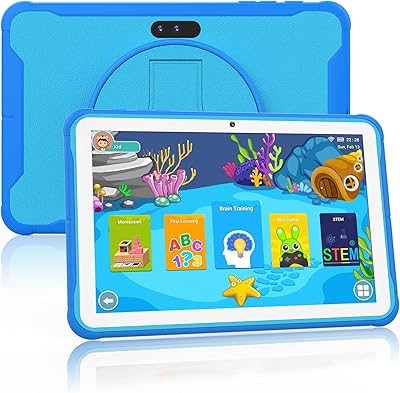
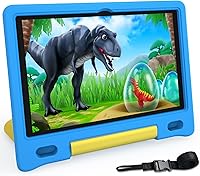
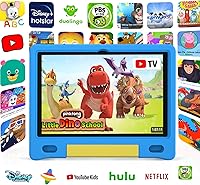
The YACXBTK J10 10.1-inch Kids Tablet is one of the newer entries in the budget Android kids tablet space, arriving in late 2024 with Android 14 on board — a fresher OS than most competitors at this price tier are currently shipping. YACXBTK isn't a household name, and that's worth acknowledging upfront. You're not getting Amazon's ecosystem polish or Lenovo's build reputation. What you are getting is a full Google Play experience, a bundled kid-proof case that doubles as a stand, and an Allwinner Octa-Core processor that handles everyday tasks without pretending to be anything more than entry-level. For parents who want open Android access without paying mid-range prices, it's a credible option.

Features & Benefits

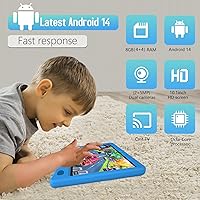
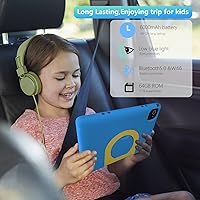
Android 14 means this kids tablet ships with access to Google Kids Space, YouTube Kids, Netflix, and Disney+ right away — no sideloading, no workarounds. The 6000mAh battery is genuinely impressive for the category; expect a solid 10 to 12 hours of video streaming before you need to find an outlet, which holds up reasonably well in real use. WiFi 6 support is something you rarely find at this price point and makes a noticeable difference in homes with congested networks. Storage starts at 64GB, which fills faster than you'd expect with apps and offline videos, but the microSD slot accepts cards up to 1TB. The 8GB RAM figure deserves an honest note: only 4GB is physical; the rest is virtual extended RAM, which helps with light multitasking but isn't the same as true 8GB.

Best For

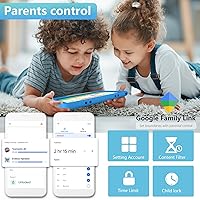
This Android 14 tablet for children makes most sense for parents who specifically want the open Google ecosystem — access to any app on the Play Store, managed through Google Family Link — rather than a locked-down kids platform. The integration is a real advantage for households already using Family Link on phones, since everything stays in one dashboard. Age-wise, the sweet spot is roughly 4 to 10; younger toddlers may find the 10.1-inch size a bit unwieldy, while older kids often outgrow the hardware within a year or two. It's also a strong pick for family travel: the battery life, included stand-case, and lightweight footprint make it practical for long car rides or flights without needing to buy anything extra.

User Feedback

Parents generally respond positively to how much comes out of the box — the included case with handle and fold-out stand is consistently praised, and most report that battery life holds close to the advertised range under regular streaming conditions. Screen brightness gets a more mixed reception; it performs fine indoors but can struggle in direct sunlight. The warranty is worth understanding correctly: it's a 2-year replacement policy, meaning YACXBTK will swap out a broken unit, but it isn't a traditional repair or parts warranty. A handful of buyers note the Allwinner processor shows its limits with heavier apps. On balance, the YACXBTK J10 punches above its weight for everyday kids' use, though anyone expecting flagship-level responsiveness may be disappointed.

Pros

  • Full Google Play access means no hunting for sideload workarounds to install popular apps.
  • WiFi 6 support delivers noticeably faster, more stable connections than most rivals at this price.
  • The 6000mAh battery genuinely holds up through a full day of kids' streaming and gaming.
  • Google Family Link integration makes parental controls straightforward for Android-familiar parents.
  • MicroSD expansion up to 1TB means running out of storage is unlikely to ever be a real problem.
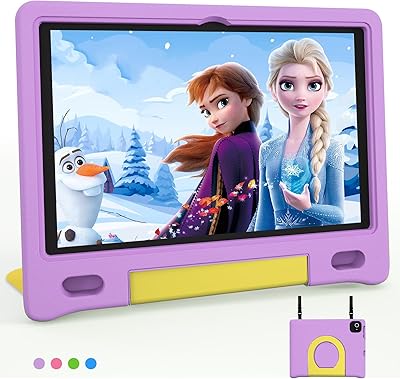
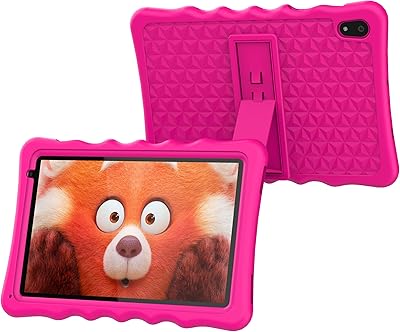
  • The bundled kid-proof case with handle and fold-out stand adds practical value right out of the box.
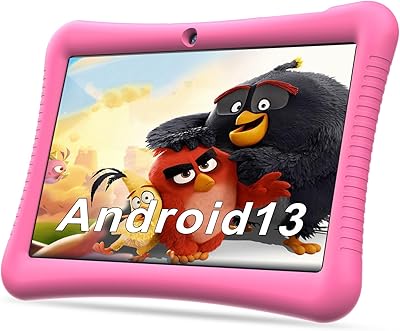
  • Android 14 is a fresher OS than most competing tablets in this budget segment currently ship with.
  • Low-blue-light display technology is a reassuring feature for parents mindful of long screen sessions.
  • The 2-year replacement policy provides a meaningful safety net that budget tablet brands rarely offer.

Cons

  • Only 4GB of the advertised RAM is physical; the rest is virtual, which underperforms under sustained use.
  • The Allwinner processor shows its limits when running heavier apps or multiple processes at once.
  • Screen brightness is adequate indoors but genuinely struggles in bright outdoor environments.
  • At 2.44 pounds, younger children in the 3 to 4 age range may find it awkward to hold for long periods.
  • YACXBTK is a little-known brand with limited long-term reliability data compared to established names.
  • The base 64GB storage fills up quickly with offline videos and game installs, requiring a microSD card sooner than expected.
  • The 2-year warranty is a swap-out replacement policy, not a traditional repair service — a distinction that matters if partial damage occurs.
  • The 1280x800 resolution looks acceptable for casual use but is noticeably soft when compared to higher-end kids tablets.
  • Customer service responsiveness for a lesser-known brand can be inconsistent, based on available buyer reports.

Ratings

The scores below reflect our AI-driven analysis of verified buyer reviews for the YACXBTK J10 10.1-inch Kids Tablet, sourced globally and filtered to remove incentivized, bot-generated, and duplicate submissions. We weighed both enthusiastic praise and recurring frustrations equally, so what you see here is an honest picture of how real parents and caregivers rate this device after daily use — not a manufacturer summary.

Battery Life
84%
Parents consistently report getting through a full day of mixed use — streaming cartoons in the car, a few game sessions, some YouTube Kids — without reaching for a charger. For travel days especially, the 6000mAh capacity earns genuine praise as one of the tablet's clearest practical advantages.
Continuous heavy gaming pushes the real-world figure noticeably below the rated 12 hours, landing closer to 8 or 9 in those conditions. A small number of buyers also noted that charge times are on the slower side compared to devices with faster charging support.
Value for Money
81%
19%
At this price tier, getting Android 14, WiFi 6, expandable storage, and an included protective case in a single bundle strikes most buyers as genuinely good value. Parents who compared it against similarly priced options frequently cited the bundled case and the open Google Play access as tipping factors.
A portion of buyers felt the value proposition weakens once you factor in the entry-level processor and the misleading RAM labeling — paying for something marketed as 8GB and receiving 4GB physical feels like a bait for less informed shoppers. Long-term durability uncertainty with an unknown brand also tempers the value score.
Parental Controls
78%
22%
Families already embedded in the Google ecosystem find the Family Link integration refreshingly straightforward — screen time scheduling, app approval, and content filtering all live in the same app parents already use for their phones. The ability to pause the tablet remotely is a frequently praised feature for managing bedtime routines.
Parents who are not Google account users face a steeper learning curve, and a few reviewers noted that Family Link occasionally requires re-authentication after software updates, which temporarily disrupts their set schedules. It also lacks the more granular content library curation found in purpose-built kids platforms.
Performance
62%
38%
For the core tasks this tablet is designed for — streaming video, browsing educational apps, and casual games — the Allwinner Octa-Core chip handles the workload without constant stuttering or freezing. Kids who use it primarily for YouTube Kids or Netflix rarely encounter issues during normal sessions.
Step outside that comfort zone and the limitations show quickly. Heavier games, multiple apps running simultaneously, or switching between a video call and another app can produce noticeable lag. Parents who compared it against an Amazon Fire HD 10 or a Lenovo Tab M10 found those devices meaningfully snappier in day-to-day transitions.
Display Quality
67%
33%
Indoors, the 1280x800 screen looks perfectly acceptable for a child watching cartoons or working through a reading app — colors are reasonably vivid and text is clear enough for kids' content at normal viewing distances. The low-blue-light feature is a thoughtful inclusion that parents of younger children appreciate.
Outdoor visibility is a real weakness; direct sunlight renders the screen difficult to see, which frustrates families who expected to use it at parks or on outdoor trips. At this resolution, the display also looks noticeably soft compared to the higher-resolution panels now common on mid-range competing tablets.
Build Quality
71%
29%
The bundled case absorbs the kind of drops and bumps that are simply unavoidable with young users, and multiple parents described it surviving concrete drops without cracking the tablet itself. The handle design is a practical touch that makes it easier for smaller kids to carry without gripping the device directly.
The tablet body underneath the case feels plasticky and light in a way that raises durability questions for some buyers. A handful of reviews noted corner and edge wear appearing sooner than expected, and the case hinge mechanism showed loosening after several months of repeated folding.
Setup & Ease of Use
76%
24%
Most parents reported getting the tablet out of the box, connected to WiFi, and configured with a child's Google account in under 20 minutes. Android 14's interface is familiar enough for anyone who has used an Android phone, which significantly lowers the barrier to initial setup.
Setting up Google Family Link for the first time can be confusing for parents who are not regular Android users, with several steps requiring confirmation across two devices simultaneously. A few buyers noted the pre-installed apps included some they considered low-quality, requiring a cleanup pass before handing the tablet to their child.
RAM & Multitasking
54%
46%
For straightforward single-app use, the combination of physical and virtual RAM keeps things moving adequately — a child watching a video or working through a single educational app will generally not notice memory constraints during normal sessions.
The 8GB marketing claim is the most consistently criticized aspect in buyer reviews once parents understand only 4GB is physical. Virtual extended RAM helps marginally with light task-switching but degrades noticeably under sustained use, and several technically minded reviewers flagged this as misleading product representation.
WiFi Connectivity
83%
WiFi 6 support is one of the most unexpectedly strong specifications at this price, and buyers in households with busy networks — multiple smart devices, several streaming sessions running at once — noticed a tangible improvement in streaming stability compared to older WiFi 5 kids tablets.
A small subset of buyers noted occasional connection drops when the tablet was used at the far edge of their home WiFi range, though this appears to be a minority experience. The advantage of WiFi 6 is also moot for families whose routers do not support the standard.
Storage & Expandability
74%
26%
The microSD expansion slot supporting up to 1TB is a practical long-term solution that most parents find reassuring, particularly for families who download content for offline trips. Several buyers appreciated that they could buy a large card separately rather than paying more upfront for a higher base storage tier.
The 64GB base fills up more quickly than most parents anticipate, especially once offline Netflix and Disney+ downloads enter the picture. The tablet does not come with a microSD card included, meaning additional cost is essentially mandatory for heavy media users.
Screen Size & Portability
72%
28%
The 10.1-inch screen is genuinely comfortable for kids watching shows or following along with educational content — large enough to feel immersive without dominating a child's lap or a seat-back pocket. Parents praised it as a good size for shared sibling viewing during car trips.
At 2.44 pounds with the case, it is on the heavier side for children under 5 to hold independently for extended periods. The physical dimensions also make it too large for most standard car seat tablet holders, which surprised a number of travel-focused buyers.
App Ecosystem
82%
18%
Access to the full Google Play Store is a meaningful differentiator for parents who want freedom to install any app without workarounds. YouTube Kids, Google Kids Space, Netflix, and Disney+ all install and run without configuration issues, which covers the majority of what kids in the target age range actually use.
Without a curated kids content subscription bundled in — like Amazon Kids Plus — parents are more responsible for managing what their child encounters. Some buyers found the unfiltered Google Play environment required more active monitoring than they initially expected, particularly for younger children.
Warranty & Support
66%
34%
A 2-year replacement policy from a budget brand is more coverage than many comparable tablets offer, and parents who have successfully used it describe the process as reasonably painless when the device clearly stopped working. For buyers primarily concerned about accidental breakage, this is a meaningful safety net.
Customer service responsiveness has been inconsistent in buyer reports, with some describing long response times or unclear replacement timelines. The policy is also a swap-out program rather than a traditional repair warranty, meaning partial damage scenarios — a cracked screen on an otherwise functional device — may not qualify cleanly.
Audio Quality
58%
42%
Volume output is adequate for a child's bedroom or backseat use, and most kids in the target age range do not have strong opinions about speaker fidelity. Parents using it for audiobooks or simple educational apps report the sound is clear enough for those purposes.
The speakers are thin and tinny by most accounts, with very little bass or spatial quality — a common compromise at this price point but still noticeable when watching anything with a musical soundtrack. Pairing with a Bluetooth speaker or headphones makes a significant difference, suggesting the built-in audio is a genuine weak point.
Camera
47%
53%
The camera is functional enough for basic video calls with grandparents or for kids experimenting with simple photos and creative apps. Its presence means parents do not need to hand over a phone for those occasional video chat moments.
Image quality is noticeably low, with soft focus, mediocre low-light performance, and limited color accuracy that most parents describe as barely acceptable. For any family planning to use the camera meaningfully — for schoolwork, creative projects, or consistent video calling — the camera will be a regular source of disappointment.

Suitable for:

The YACXBTK J10 10.1-inch Kids Tablet is a practical choice for parents who want their child to have access to the full Google Play ecosystem rather than a restricted, proprietary app store. If your household already manages screen time through Google Family Link on phones or other Android devices, this tablet slots right into that existing setup without any extra configuration headaches. It works particularly well for kids aged 4 to 10 who mostly watch streaming content, work through educational apps, or play casual games — activities that don't push the hardware anywhere near its limits. The generous battery capacity makes it a reliable travel companion; parents who regularly deal with long car rides or flights will appreciate not needing to pack a charger for every outing. Gift buyers also get good value here since the protective case with a built-in stand ships in the box, meaning there's nothing additional to purchase before handing it over to a child.

Not suitable for:

The YACXBTK J10 10.1-inch Kids Tablet is not the right call for parents expecting performance on par with established mid-range brands like Amazon's Fire HD 10 Kids or Lenovo's Tab M10. The Allwinner Octa-Core processor is entry-level, and anyone who has used a more powerful tablet will notice the difference in app load times and responsiveness when running anything demanding. The 8GB RAM claim also deserves scrutiny — only 4GB is physical memory, with the rest being software-extended virtual RAM, which behaves differently under sustained workloads. Buyers who primarily use their devices outdoors should know the screen can struggle with direct sunlight. If your child is over 10 and starting to use productivity apps, creative tools, or more graphically intensive games, this tablet will feel limiting sooner than you'd like. Finally, parents who want a curated, fully locked-down kids platform with dedicated content libraries — like Amazon Kids Plus — won't find that kind of integrated experience here.

Specifications

  • Screen Size: The display measures 10.1 inches diagonally, offering a comfortable viewing area for children watching videos or working through educational apps.
  • Resolution: The screen renders at 1280 x 800 pixels, which is adequate for standard-definition streaming and everyday app use at this size.
  • Operating System: The tablet ships with Android 14, one of the more recent Android versions available on budget kids tablets as of late 2024.
  • Processor: An Allwinner Octa-Core chip clocked at 2GHz handles the processing, suitable for casual use but positioned firmly at the entry-level end of the market.
  • RAM: The device offers 4GB of physical RAM supplemented by 4GB of software-extended virtual RAM, which aids light multitasking but differs from true 8GB hardware memory.
  • Internal Storage: Built-in storage is 64GB, which covers a reasonable number of apps and downloaded videos before expansion becomes necessary.
  • Expandable Storage: A microSD card slot supports cards up to 1TB, providing substantial room to grow as a child's media library and app collection increases.
  • Battery Capacity: The 6000mAh lithium-ion battery is rated for up to 12 hours of use on a single charge under typical conditions.
  • WiFi Standard: The tablet supports 802.11ax, commonly known as WiFi 6, delivering faster throughput and better performance on congested home networks than older WiFi standards.
  • Display Feature: The screen incorporates low-blue-light technology intended to reduce eye strain during extended viewing sessions.
  • Parental Controls: Google Family Link is the primary parental control system, allowing parents to set screen time limits, filter content, and approve app downloads remotely.
  • Included Accessory: Every unit ships with a kid-proof protective case featuring a soft handle for carrying and a foldable section that props the tablet upright as a stand.
  • Dimensions: The tablet measures 11.02 x 10.82 x 1.85 inches, making it a full-sized 10-inch class device rather than a compact model.
  • Weight: The device weighs 2.44 pounds including the protective case, which is manageable for older children but may feel heavy for toddlers.
  • Warranty: YACXBTK offers a 2-year replacement policy, covering defective or broken units with a swap-out rather than a traditional repair service.
  • Target Age Range: The manufacturer recommends this tablet for children aged 3 and up, with the feature set and case design most practical for the 4 to 10 age range.
  • Connectivity: Wireless connectivity is handled entirely via WiFi 6; there is no cellular or SIM card option on this model.
  • App Ecosystem: The full Google Play Store is available, with immediate compatibility for YouTube Kids, Netflix, Disney+, and Google Kids Space without additional configuration.

Related Reviews
ITDULCET J10 Plus Kids Tablet 10.1-inch 64GB
87%
85%
Performance
92%
Battery Life
88%
Display Quality
90%
Build Quality & Durability
91%
Parental Controls
More
YYSWIE 10.1-inch Kids Tablet 64GB
85%
91%
Value for Money
88%
Durability
94%
Battery Life
85%
Parental Controls
89%
Ease of Use
More
Trayoo K12 Kids Tablet 10.1-inch 64GB
85%
88%
Build Quality & Durability
92%
Battery Life
91%
Parental Controls
79%
Performance
85%
Display Quality
More
okulaku K12 10.1-inch Kids Tablet

66%
81%
Value for Money
74%
Display Quality
53%
Performance
58%
Battery Life
77%
Parental Controls
More
JREN JR-J10 Kids Tablet 10.1″ 64GB
84%
85%
Overall Performance
90%
Durability & Build Quality
92%
Parental Controls
88%
Battery Life
70%
Display Quality
More
YINOCHE Y101 10-inch 32GB Kids Tablet
72%
88%
Value for Money
83%
Parental Controls
79%
Build Quality & Durability
74%
Display Quality
61%
Performance & Speed
More
Fivahiva FF10A-R Kids Tablet 10.1-inch, 32GB
83%
91%
Value for Money
88%
Build Quality & Durability
85%
Battery Life
78%
Performance
83%
Display Quality
More
KYASTER KPad U4 Kids Tablet 10.1-inch 32GB
84%
90%
Battery Life
88%
Parental Controls
91%
Build Quality / Durability
82%
Display Quality
85%
Ease of Setup
More
WXUNJA X-C30 10.1-inch Kids Tablet
72%
83%
Value for Money
86%
Parental Controls
81%
Battery Life
78%
Parental App & Setup
63%
Display Quality
More
BYYBUO A70W 10.1-inch Kids Tablet
73%
88%
Value for Money
76%
Build Quality
58%
Performance
71%
Display Quality
79%
Battery Life
More

FAQ

The case comes in the box — no separate purchase needed. It has a soft handle on the back for kids to grip and folds out into a stand for hands-free viewing, which is a genuinely useful combination at this price point.

It's worth understanding what you're actually getting here. The YACXBTK J10 10.1-inch Kids Tablet has 4GB of physical RAM; the other 4GB is virtual extended RAM, which is a software feature that uses storage space to simulate additional memory. It helps with light multitasking, but it's not the same as a device with a true 8GB hardware chip. For kids' apps and streaming it works fine, but don't expect it to perform like a tablet with genuine 8GB RAM.

Yes, and it's actually one of this tablet's strengths. It uses Google Family Link, which is free and works through your existing Google account. You can cap screen time, approve or block app downloads, and monitor usage — all from your phone. If you already manage other Android devices in your household through Family Link, this slots right in.

In real-world use with continuous video streaming, most parents report getting somewhere between 9 and 11 hours, which is close to the rated 12 hours. That's enough for most long-haul trips without needing to pack a portable charger. Heavier usage like gaming will drain it faster.

Yes, both apps are available through the Google Play Store and install without any workarounds. Since this runs full Android 14 with certified Google Play access, streaming apps behave the same way they would on any standard Android device.

64GB is a reasonable starting point, but kids' app libraries and offline video downloads tend to fill storage faster than you'd expect. If your child regularly downloads shows for offline watching or plays multiple games, buying a microSD card sooner rather than later is a smart move. The good news is the slot supports cards up to 1TB, so you have plenty of headroom.

It's a replacement policy rather than a traditional warranty, which is an important distinction. If the tablet breaks within two years, YACXBTK will swap it for a replacement unit. What it doesn't cover is repair of a partially damaged device — so if a screen cracks but the tablet still powers on, your situation may be less clear-cut. That said, a 2-year swap policy is still better protection than many brands at this price offer.

The main practical difference is the app ecosystem. Amazon's Fire tablet locks you into the Amazon Appstore, which has fewer apps and requires workarounds to get Google Play running. This kids tablet runs full Android 14 with Google Play natively, which is a real advantage if you want unrestricted app access. The trade-off is that Amazon's Kids Plus subscription service and its curated content library don't come with this device. Performance-wise, they're in a similar tier, though Amazon has a longer track record for build quality and customer support.

Indoors, the display is perfectly adequate for everyday use. Outdoors in direct sunlight, it can wash out noticeably, which is a common limitation across most budget tablets in this category. If outdoor use is a priority, it's worth tempering expectations — this isn't an issue unique to this device, but it is a real limitation.

Practically speaking, the sweet spot is around 4 to 10 years old. At 2.44 pounds with the case on, it's a bit bulky for very young toddlers to comfortably hold. For kids over 10, the entry-level processor and lower-resolution screen may start to feel limiting, especially if they're moving toward more demanding apps or schoolwork. For that middle range of school-aged kids using it primarily for entertainment and light learning, it fits well.