Overview

The UPERFECT 2K 144Hz 17.3-inch Portable Monitor sits in an interesting spot: it's one of the few portable displays that pairs a 2K QHD resolution with a 144Hz refresh rate without pushing into premium pricing territory. At 17.3 inches, it leans toward the larger end of what most people would call portable — closer to a secondary laptop screen than a compact travel accessory. The slim 0.39-inch profile looks good on paper, but at 4.29 pounds, you'll feel it in a backpack on a long commute. That weight trade-off is worth understanding upfront: this travel monitor rewards people who prioritize screen quality over sheer packability.
Features & Benefits

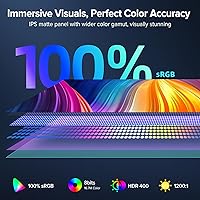
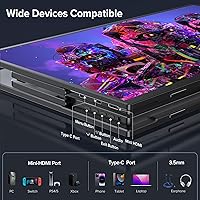
The IPS panel delivers genuinely rich color — the 100% DCI-P3 coverage is a legitimate highlight, though anyone using this portable gaming monitor for serious photo editing should run a calibration pass before trusting it out of the box, since factory accuracy on monitors at this tier varies. At 400 nits, brightness holds up reasonably well indoors and in moderately lit environments. The 144Hz refresh rate with FreeSync does reduce tearing in fast-paced games, and input lag feels responsive rather than sluggish. Connectivity is practical: dual USB-C ports plus HDMI cover most devices, but single-cable convenience only works if your laptop or phone supports DisplayPort Alt Mode — worth checking before you buy.

Best For

This portable gaming monitor is a strong match for Steam Deck owners and console gamers who want a proper-sized screen in a hotel room or dorm without hauling a full desktop display. Remote workers and students who regularly hot-desk will appreciate the single USB-C setup, assuming their hardware supports it. Photographers and video editors who work on location will find the wide color gamut genuinely useful. That said, if your bag space is precious or you're already straining under a heavy laptop, 4.29 pounds adds up fast. Anyone who just needs a basic second screen for spreadsheets and email would likely be better served by something lighter and cheaper.

User Feedback

Buyers who purchase the UPERFECT 17.3-inch display generally come away impressed by the image sharpness and color depth relative to the price — the visual step up from standard 1080p portable monitors is the most consistently praised aspect. The kickstand stability draws more criticism; on soft surfaces like beds or fabric-covered tables, it shifts and tips, which is frustrating during longer sessions. USB-C compatibility issues surface occasionally — a number of users found that not all cables or host devices unlocked full resolution and refresh rate. Quality control appears mostly consistent, though isolated reports of dead pixels and minor backlight bleed do appear. Overall sentiment leans positive, with the display quality doing most of the heavy lifting.

Pros

  • 2K QHD resolution is a genuine step up from 1080p, with noticeably sharper text and image detail.
  • 144Hz refresh rate with FreeSync meaningfully reduces screen tearing during fast-paced gaming.
  • 100% DCI-P3 color coverage makes this portable gaming monitor a viable tool for on-location creative work.
  • Dual full-featured USB-C ports plus HDMI give real flexibility for connecting laptops, consoles, and phones.
  • Single USB-C cable handles both power and display when the host device supports it, cutting cable clutter.
  • Matte anti-glare coating reduces reflections during outdoor or brightly lit indoor use.
  • 400-nit brightness holds up well in typical office and hotel room lighting conditions.
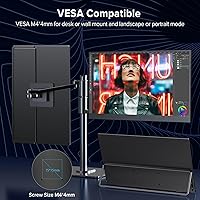
  • VESA 75x75 mount support allows the display to work with arms and wall mounts, not just the built-in kickstand.
  • No driver installation required — connect and it works on most modern operating systems immediately.
  • Blue light filter and flicker-free panel reduce eye fatigue during extended work or gaming sessions.

Cons

  • At 4.29 pounds, this travel monitor is heavy enough to be a genuine consideration in any packed bag.
  • Kickstand stability is inconsistent on soft surfaces, limiting practical use on beds or fabric-covered tables.
  • USB-C full functionality requires DisplayPort Alt Mode support on the host device — not universal across phones and older laptops.
  • Factory color calibration may need user adjustment before the DCI-P3 claims hold up for professional editing work.
  • No included carrying case or sleeve, which is a notable omission given the portable use case.
  • Built-in speakers are functional for system sounds but lack the output quality for serious media consumption.
  • At 17.3 inches, the screen footprint can feel oversized and awkward in tight spaces like economy airplane tray tables.
  • Some buyers report inconsistent quality control, with occasional dead pixels or minor backlight bleed out of the box.
  • Certain USB-C cables bundled or assumed by users do not deliver the full feature set — a quality cable is essential.
  • HDR performance at 400 nits is modest; do not expect the dramatic HDR contrast of a dedicated desktop panel.

Ratings

The scores below for the UPERFECT 2K 144Hz 17.3-inch Portable Monitor were generated by our AI after analyzing thousands of verified global buyer reviews, with spam, bot activity, and incentivized submissions actively filtered out. Each category reflects the honest spread of real user experiences — the genuine strengths that keep buyers satisfied and the recurring pain points they flag after weeks of actual use. Nothing has been smoothed over; both the highs and the frustrations are transparently captured in every score.

Display Clarity
91%
The jump from 1080p to 2560x1440 is immediately obvious to most buyers, particularly when using this portable gaming monitor alongside a laptop for productivity work or gaming. Text rendering is sharp, image detail holds up well for photo review sessions, and the IPS panel keeps colors consistent when viewing from slightly off-center angles.
A small number of users noticed minor uniformity issues — slight brightness variation toward screen edges — which becomes more visible on solid-color backgrounds or dark scenes. This is an IPS characteristic rather than a defect, but it can be distracting for users coming from premium desktop panels.
Color Accuracy
83%
The wide DCI-P3 color gamut genuinely sets this travel monitor apart from cheaper portable options, and photographers working on location report that on-screen color representation is close enough to their calibrated desktop reference for confident client presentations. Saturation and vibrancy consistently draw praise, especially for video and media consumption.
Factory calibration varies between units, and buyers who tested with a colorimeter found Delta-E scores that need a custom ICC profile before trusting the output for print-critical work. Out of the box, colors can skew slightly warm, and users doing precision color grading should budget time for proper calibration.
Refresh Rate & Gaming
88%
Gamers using this display with a Steam Deck, laptop, or console report a tangible reduction in screen tearing compared to 60Hz portable alternatives, and FreeSync integration makes fast-paced titles noticeably smoother without visible artifacts. Input lag is described as responsive rather than sluggish, which matters in competitive or action-heavy gaming sessions.
Achieving the full 144Hz at 2K resolution requires a capable source device and the right cable — buyers connecting via HDMI from older consoles or budget laptops often end up capped at lower refresh rates without realizing why. The setup dependency means the gaming experience is excellent when configured correctly but inconsistent for less technical users.
Portability & Weight
62%
38%
The 0.39-inch slim profile is genuinely compact for a 17.3-inch display, and buyers who use this travel monitor as a semi-permanent hotel room or co-working setup find the form factor very practical. The relatively thin build also makes it easier to slide into a padded laptop sleeve when commuting between fixed locations.
At 4.29 pounds, this is one of the heavier portable monitors on the market at this screen size, and users who carry it daily alongside a 15-inch laptop and accessories report noticeable shoulder fatigue. Several buyers explicitly stated they underestimated the weight before purchasing, and a few returned it specifically because of how it affected their bag load.
USB-C Connectivity
74%
26%
When used with a laptop or phone that supports DisplayPort Alt Mode, the single USB-C cable setup works cleanly and eliminates the cable management headache common with older portable monitors. Buyers who travel frequently with a modern MacBook or a USB4-equipped Windows laptop consistently praise the plug-and-play convenience.
Compatibility issues are the single most recurring complaint across reviews — a meaningful portion of buyers found that their device either did not support Alt Mode or required a specific cable standard that was not included. The monitor does not provide any on-screen indication of why a connection is underperforming, leaving less technical users confused about whether they have a defective unit or a cable issue.
Kickstand & Stand Stability
58%
42%
The adjustable kickstand covers a useful range of tilt angles and works reliably on a hard desk surface, which satisfies the majority of buyers who use this display in hotel rooms or at a fixed secondary workstation. VESA compatibility gives more demanding users the option to bypass the stand entirely with a monitor arm.
On fabric surfaces — a bed, a couch cushion, or a tablecloth — the kickstand feet sink or shift, and the display tips forward with even minor vibration. This is the most consistently flagged physical complaint in the review pool, and it limits the monitor's usability in casual lounging scenarios that many portable-display buyers specifically want.
Build Quality
77%
23%
The overall chassis feels solid for the price tier — there is no significant flex along the panel back, and the bezels are slim enough to look contemporary next to a modern laptop. Most buyers describe a build quality that exceeds their expectations given the mid-range positioning.
The plastic casing picks up micro-scratches relatively quickly without a sleeve, and a few users noted that the hinge mechanism on the kickstand loosens slightly with repeated adjustment over several months. It does not feel fragile, but it also does not approach the premium rigidity of a branded laptop display.
Brightness & Glare Handling
79%
21%
The 400-nit output is comfortably bright for indoor office environments, conference rooms, and hotel rooms, and the matte anti-glare coating does a solid job of cutting reflections under overhead lighting. Remote workers consistently note that the screen stays readable without cranking brightness to maximum.
Outdoors or near a bright window, the display starts to wash out, and buyers who hoped to use it on a sunlit cafe terrace or commuter train seat facing a window will be disappointed. The coating also softens perceived sharpness very slightly compared to a glossy surface, which some buyers notice on fine text.
Eye Comfort
84%
The combination of flicker-free backlight and a hardware blue light filter makes extended sessions noticeably less fatiguing than many competing portable monitors, and buyers who work 8-hour days on this display report far less eye strain than they experienced with cheaper TN-based alternatives. The matte coating also reduces the harsh reflection that contributes to fatigue in brighter rooms.
Enabling the blue light filter shifts the white point visibly warm, which is fine for productivity but disqualifying for color-accurate work. Buyers doing both creative and office tasks find themselves toggling the setting frequently, and the on-screen menu navigation needed to do that is not particularly quick or intuitive.
On-Screen Menu (OSD)
54%
46%
The OSD covers all the necessary adjustments — brightness, color temperature, input selection, and refresh rate confirmation — and once a preferred setup is dialed in, most users rarely need to navigate it again. The menu layout is logically organized for basic configuration tasks.
Button feel and menu responsiveness draw consistent criticism; the physical controls are small, close together, and require multiple presses to navigate between sub-menus, which becomes tedious when switching between input sources. Several buyers described the experience as the weakest part of an otherwise solid product.
Audio
51%
49%
The built-in dual speakers handle video calls and system notification sounds adequately, and for buyers who occasionally forget their headphones, having any audio output at all on a portable display is appreciated as a convenience. The 3.5mm jack works reliably with wired headphones.
Volume ceiling is low and bass is essentially absent, making any content that relies on audio quality — music, cinematic video, or even immersive gaming — sound thin and unsatisfying. Buyers should treat the speakers strictly as a backup option rather than part of the product's core value proposition.
Value for Money
86%
The combination of 2K resolution and 144Hz in a portable form factor at this price tier is difficult to match from established monitor brands, and the majority of buyers feel the display delivers more visual performance per dollar than comparable options they researched. For gaming-focused users especially, the feature-to-price ratio stands out clearly.
The value equation weakens slightly when factoring in the cost of a quality USB-C cable (if not included or unsuitable), a carrying case (sold separately), and potential calibration software for creative users. The out-of-box experience does not always match the spec sheet without some additional investment.
Setup & Ease of Use
82%
18%
No driver installation is required, and most buyers report being up and running within minutes of unboxing when connecting to a compatible device. The plug-and-play behavior works reliably across Windows, macOS, and Android, and the input auto-detection generally selects the correct source without manual intervention.
Users who run into USB-C compatibility issues have no clear in-monitor diagnostic to guide them, and the manual provides limited troubleshooting support. For non-technical buyers, diagnosing whether a problem is cable-related, device-related, or monitor-related can turn a simple setup into a frustrating multi-step process.
Quality Control Consistency
69%
31%
The majority of buyers receive units that perform as advertised with no notable defects, and the UPERFECT 17.3-inch display earns broadly positive first-impression remarks regarding panel uniformity and operational reliability in the first weeks of use. Most QC-related concerns appear to be isolated rather than systemic.
A recurring minority of reviews document dead pixels, stuck pixels, or backlight bleed that was present immediately upon unboxing, suggesting batch-level inconsistency that is more common than premium brands typically exhibit. Buyers ordering this display for professional or time-sensitive work should unbox and test it thoroughly well within the return window.

Suitable for:

The UPERFECT 2K 144Hz 17.3-inch Portable Monitor makes the most sense for people who genuinely need desktop-grade display performance away from a fixed workstation. Steam Deck and console gamers will get real value from the 144Hz refresh rate and QHD resolution, turning a cramped hotel room setup into something close to a proper gaming station. Remote workers and students who live out of a single bag-but still depend on a dual-screen workflow-will appreciate that one USB-C cable handles both power and video, provided their laptop supports DisplayPort Alt Mode. Photographers and video editors working on location benefit from the wide color gamut, which is meaningfully better than what most 1080p portable monitors offer at a similar price. If your work or play demands visual clarity and you can absorb a bit of extra bag weight, this travel monitor punches above its tier.

Not suitable for:

Anyone prioritizing true portability should think carefully before buying this display, because at 4.29 pounds it is closer in heft to a small laptop than a lightweight travel accessory. The UPERFECT 2K 144Hz 17.3-inch Portable Monitor is not a good fit for ultra-light commuters, frequent flyers with strict carry-on limits, or anyone who already carries a heavy workstation laptop. Users who only need a basic secondary screen for email, documents, or video calls will find the feature set and size more than they need, and could get the job done for less money with a smaller, lighter panel. The kickstand, while adjustable, has reported stability issues on soft or uneven surfaces, making it unreliable for couch or bed use. Buyers expecting plug-and-play USB-C compatibility with every device will also hit friction — not all phones, tablets, or older laptops support the Alt Mode required to run the display at full resolution and refresh rate over a single cable.

Specifications

  • Screen Size: The display measures 17.3 inches diagonally, placing it at the larger end of the portable monitor category.
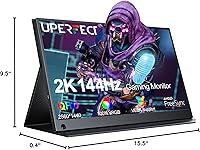
  • Resolution: Native resolution is 2560x1440 (2K QHD), delivering noticeably sharper detail than a standard 1080p panel.
  • Panel Type: Uses an IPS panel, which provides wide viewing angles and more consistent color reproduction compared to TN alternatives.
  • Refresh Rate: Supports a true 144Hz refresh rate, with AMD FreeSync enabled to reduce screen tearing during gaming.
  • Color Gamut: Covers 100% of the DCI-P3 color space, making it well-suited for color-sensitive work such as photo editing and video grading.
  • Brightness: Peak brightness is rated at 400 nits, sufficient for indoor and moderately lit environments but not ideal for direct sunlight.
  • HDR Support: HDR mode is supported, though the 400-nit ceiling means contrast improvements are modest compared to dedicated HDR desktop panels.
  • Connectivity: Equipped with two full-featured USB-C ports and one HDMI port, supporting single-cable power-and-display via DisplayPort Alt Mode where the host device allows.
  • Audio: Includes dual built-in speakers and a 3.5mm headphone jack; speakers are functional for system audio but not intended as a primary listening setup.
  • VESA Mount: Features a standard 75x75mm VESA pattern with M4 screw holes, compatible with most monitor arms and wall-mount brackets.
  • Stand: An adjustable rear kickstand is included and supports both landscape and portrait orientations on flat, stable surfaces.
  • Dimensions: The monitor body measures 15.35 x 9.45 x 0.39 inches, keeping the profile slim despite the larger screen size.
  • Weight: Weighs 4.29 pounds without accessories, which is on the heavier side for a portable display and should be factored into travel planning.
  • Eye Care: Incorporates a blue light filter, flicker-free backlight, and an anti-glare matte coating to reduce eye fatigue during extended use.
  • Screen Coating: The matte anti-glare surface minimizes reflections and fingerprint visibility in typical office and travel lighting conditions.
  • Driver Requirement: No additional drivers or software installation are required; the display is recognized as plug-and-play on most modern operating systems.
  • Aspect Ratio: Standard 16:9 widescreen aspect ratio, consistent with most laptops and gaming consoles for a native-fit picture.
  • USB-C Standard: Both USB-C ports are full-featured, meaning they can carry video signal, power delivery, and data simultaneously when the connected device supports it.

Related Reviews
UPERFECT 17.3-inch 4K Portable Monitor
86%
94%
Display Quality
88%
Portability
90%
Gaming Performance
93%
Color Accuracy
85%
Ease of Setup
More
CAPERAVE CF17H 17.3″ Portable Gaming Monitor
73%
88%
Portability
79%
Display Quality
63%
Refresh Rate Performance
86%
Connectivity
77%
Build Quality
More
ALOGL 17.3-inch Portable Monitor FHD 1080P 144Hz
84%
89%
Display Quality
92%
Performance (Gaming)
95%
Portability
88%
Compatibility
85%
Build Quality
More
Yodoit PTM17 17.3″ Portable Monitor
75%
91%
Screen Size & Usability
76%
Image & Color Quality
62%
Brightness & Glare
54%
HDR Performance
83%
Connectivity & Compatibility
More
UPERFECT M180J03 18″ 2K Portable Monitor
77%
91%
Display Color Accuracy
88%
Brightness & Glare Resistance
86%
Refresh Rate & Gaming Performance
83%
Portability & Form Factor
74%
Built-in Stand
More
CAPERAVE 17.3-inch 4K Portable Monitor
87%
92%
Display Quality
89%
Portability
88%
Ease of Setup
91%
Color Accuracy
85%
Compatibility with Devices
More
MagicRaven 17.3″ 2.5K 144Hz Portable Gaming Monitor
72%
91%
Image Sharpness
88%
Refresh Rate Performance
84%
Color Accuracy
61%
Brightness & Glare Handling
73%
Connectivity & Compatibility
More
Eyoyo EM12-2K 12-inch 2K Portable Monitor
75%
88%
Image Sharpness
79%
Color Accuracy
83%
Build Quality
91%
Portability
67%
Stand & Mounting Versatility
More
Kenowa HD-133 13.3-inch Portable Monitor
68%
91%
Setup & Ease of Use
47%
Display Resolution
83%
Portability & Form Factor
76%
Connectivity & Compatibility
68%
Brightness & Visibility
More
UPERFECT 1602K 16″ 2K Portable Gaming Monitor
79%
91%
Display Clarity
88%
Gaming Performance
93%
Portability & Form Factor
84%
Connectivity
67%
Stand & Cover
More

FAQ

It does run at a true 144Hz, but getting there depends on your setup. Over HDMI 1.4 you may be capped at a lower refresh rate or resolution, so for the full 2K at 144Hz experience you will want to connect via USB-C from a device that supports DisplayPort Alt Mode, or use an HDMI 2.0 source.

Most modern MacBooks with Thunderbolt or USB-C ports that support DisplayPort Alt Mode will work fine with a single cable for both video and power. Older MacBooks or those with limited USB-C implementations may require a separate power source or an adapter. It is worth checking your specific model's USB-C specification before assuming single-cable convenience.

Yes, this is one of the more popular use cases for the UPERFECT 2K 144Hz 17.3-inch Portable Monitor. The Steam Deck's USB-C port supports DisplayPort Alt Mode, so a single quality USB-C cable should handle both video output and power delivery to the deck simultaneously. Just make sure you are using a cable rated for full-featured USB-C, not a basic charging cable.

On a hard, flat surface like a desk or table it holds steady without much issue. The problems tend to show up on softer surfaces — a bed, a fabric ottoman, or an uneven surface — where the feet can sink or shift and cause the whole display to tilt forward. If you plan to use it primarily on a desk, you should be fine; if you want couch or bed use, consider propping it against something or picking up a small stand.

The 100% DCI-P3 coverage is a genuine spec, but like most monitors at this price tier, factory calibration can vary between units. If you need publication-level accuracy right out of the box, you may want to run a calibration profile. For most practical on-location editing or client reviews, the color output is noticeably better than a standard 1080p sRGB portable display.

Yes, the kickstand supports portrait orientation and the VESA mount allows portrait positioning when using an arm. You will need to rotate the display output in your operating system settings, which is straightforward on both Windows and macOS.

They are audible enough for video calls or casual YouTube watching in a quiet room, but do not expect impressive bass or volume. Think of them as a backup option for when you do not have headphones handy, not as a genuine audio setup. The 3.5mm jack is the better route for anything where sound quality matters.

Use a full-featured USB-C cable rated for USB 3.1 Gen 2 or Thunderbolt 3 and above — these carry video, data, and power simultaneously. Standard USB-C charging cables often lack the data pins needed for DisplayPort Alt Mode, which is a common reason buyers report not getting the expected resolution or refresh rate. The cable included in the box works in most cases, but a third-party certified cable is a worthwhile backup.

It depends on your setup. If you are already carrying a 15-inch laptop, a charger, and a bag full of other gear, adding over four pounds for this travel monitor is meaningful — you will feel it on a long walk or in a packed airport bag. If you primarily move it between a hotel room and a conference table or use it as a semi-portable second screen rather than an everyday commuter accessory, the weight becomes far less of a concern.

Document the issue with photos or a short video as soon as you unbox it, and contact the seller or UPERFECT support promptly. Most reputable sellers will replace a unit with a confirmed dead pixel or significant backlight bleed within the return window. Mild backlight bleed in the corners is fairly common on IPS panels at this price point and is generally visible only on dark content in a dim room, so assess whether it is actually affecting your daily use before initiating a return.