UGEE UE12 11.6-inch Pen Display Tablet
Overview
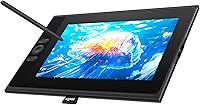
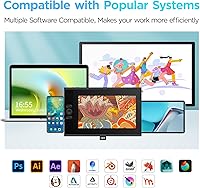
The UGEE UE12 11.6-inch Pen Display Tablet sits in an interesting spot — it's not trying to match Wacom's professional-grade lineup, but it's clearly built for more than casual doodlers. UGEE is a challenger brand that doesn't yet carry the name recognition of XP-Pen or Wacom, yet the hardware tells a more confident story than you might expect at this tier. The full-laminated FHD screen is genuinely the centerpiece, and the dual Type-C ports are a small but welcome touch for artists who swap between a laptop and a phone. This is a strong mid-range pick with real trade-offs compared to flagship displays — worth knowing upfront.
Features & Benefits
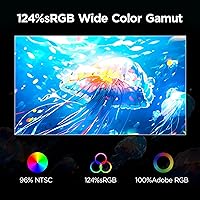
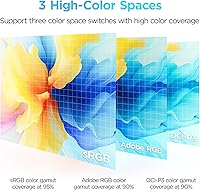
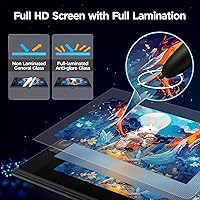
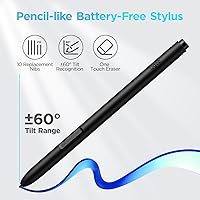
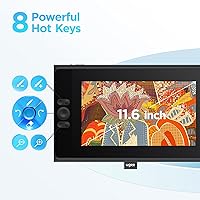
What separates the UE12 from a basic screenless tablet is that the display actually closes the gap between where your pen lands and where the cursor responds. Full lamination removes the frustrating offset that plagues cheaper pen displays, so lines appear right beneath the nib. The color coverage is genuinely impressive for this tier — 124% sRGB with switchable Adobe RGB and DCI-P3 modes means colorwork isn't a guessing game, though personal calibration may still help. The battery-free stylus handles 16,384 pressure levels and 60-degree tilt, translating naturally to expressive strokes. Eight shortcut keys with a raised tactile texture let you hit undo or swap brushes without glancing away from the canvas.
Best For
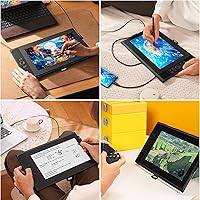
This pen display makes the most sense for artists stepping up from a screenless tablet who want to see their work directly under the stylus without flagship-level spending. Students working in Clip Studio or Photoshop on a laptop will appreciate the straightforward plug-in setup, and the Android compatibility opens up useful possibilities for on-the-go sketching. Manga artists and illustrators who rely on pressure variation for expressive linework will find the pen responsive enough for serious sessions. It doubles reasonably well as a compact travel display — light enough to toss in a bag. As a first pen display, it punches well above its category; as a primary pro setup, it has limits.
User Feedback
Among buyers who've spent real time with UGEE's 11.6-inch tablet, consistent praise lands on screen quality and how the stylus feels in hand. Setup gets positive mentions too — most users were drawing within minutes. Where things grow more nuanced: a handful of Windows users ran into driver hiccups requiring a manual reinstall to fully resolve, so going in prepared makes a difference. The shortcut key remapping software has a learning curve that occasionally frustrates newcomers. A few longer-term reviewers noted the build holds up well daily but wished a stand were included in the box. The 4.4-star average reflects a device that delivers on its promise, with rough edges that are manageable rather than deal-breaking.
Pros
- Full lamination eliminates the parallax gap, so lines land exactly where the nib touches.
- The 124% sRGB color gamut is genuinely above average for a mid-range pen display.
- Switchable color space modes — sRGB, Adobe RGB, and DCI-P3 — add real versatility for different projects.
- The battery-free stylus is light and well-balanced, reducing hand fatigue during extended drawing sessions.
- 16,384 pressure levels deliver smooth, responsive line variation that holds up in serious illustration work.
- Eight tactile shortcut keys are easy to hit without looking, keeping workflow uninterrupted.
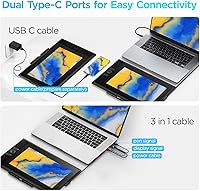
- Dual Type-C ports make cable management flexible and blind plug-in genuinely convenient.
- Android compatibility broadens the use case well beyond desktop-only setups.
- Eight replacement nibs included in the box is a generous extra that saves an early accessory purchase.
- Setup is straightforward for most users, with broad compatibility across major operating systems and software.
Cons
- Driver installation on certain Windows versions has caused repeated headaches for a notable share of buyers.
- No stand is included in the box, which is a frustrating omission at this price tier.
- The shortcut key remapping software has a learning curve that feels steeper than it should.
- At 3.84 pounds, the UE12 is portable but not as featherlight as some competing displays in this size class.
- Color accuracy out of the box may require manual calibration for anyone doing color-critical work.
- The 11.6-inch active area can feel restrictive for complex compositions or multi-panel work.
- UGEE's long-term driver and firmware support history is harder to evaluate than more established brands.
- No bundled stand or adjustable arm means additional desk setup costs that buyers should plan for upfront.
Ratings
The scores below for the UGEE UE12 11.6-inch Pen Display Tablet were generated by our AI review engine after analyzing verified buyer feedback from global markets, with spam, incentivized, and bot-flagged submissions actively filtered out. Each category reflects the honest distribution of real user experiences — the genuine strengths and the friction points that show up repeatedly across independent reviews. Nothing has been smoothed over to make the product look better than it is.
Display Quality
Stylus Performance
Color Accuracy
Value for Money
Driver & Software
Screen Lamination
Pressure & Tilt Response
Build Quality
Portability
Shortcut Keys & Workflow
Setup Experience
Compatibility
Suitable for:
The UGEE UE12 11.6-inch Pen Display Tablet is a natural fit for hobbyists and intermediate digital artists who are ready to move beyond a screenless tablet but aren't prepared to invest in a professional-tier display. Students taking illustration, animation, or graphic design courses will find it handles Photoshop, Clip Studio, and Illustrator without complaint, and the ability to connect directly to an Android device makes it genuinely flexible for artists who work across multiple setups. The full-laminated screen is a real upgrade over entry-level pen displays — drawing directly on what you see, rather than a few millimeters beside it, makes a noticeable difference to accuracy and comfort over long sessions. Manga artists and linework-focused illustrators will appreciate the pressure sensitivity range, which is wide enough to reward deliberate stylus control. If you need a compact secondary display for travel or a tight desk space, this pen display covers that role surprisingly well too.
Not suitable for:
Professional illustrators or colorists who depend on verified, print-accurate color output will likely find the UGEE UE12 11.6-inch Pen Display Tablet falls short of their standards without significant manual calibration effort. The 11.6-inch screen, while portable, is genuinely small for complex multi-layer work in concept art or detailed character design — anyone accustomed to a 16-inch or larger workspace may feel cramped quickly. Users who are not comfortable troubleshooting drivers on Windows should also be cautious; a portion of buyers have encountered installation friction that requires more than a simple plug-and-play fix. This pen display does not include a stand in the box, which is an added purchase many buyers don't anticipate. Finally, anyone seeking the brand assurance and long-term software support ecosystem of an established market leader will find UGEE's track record harder to evaluate, given the brand's smaller presence in professional creative communities.
Specifications
- Screen Size: The active display area measures 11.6 inches diagonally, offering a workable canvas for illustration and design tasks.
- Resolution: The screen runs at 1920x1080 (Full HD), delivering sharp, detailed visuals suitable for professional-level digital artwork.
- Screen Type: A full-laminated, anti-glare panel is used, eliminating the air gap between the glass and display layer to reduce parallax and reflections.
- Color Gamut: The display covers 124% of the sRGB color space, producing vibrant, saturated colors that exceed standard sRGB monitors at this tier.
- Color Spaces: Three switchable color space modes are supported — sRGB, Adobe RGB, and DCI-P3 — allowing artists to match their output to specific project or print requirements.
- Pressure Levels: The included stylus detects 16,384 discrete pressure levels, enabling fine gradations from the lightest feather stroke to a full-pressure mark.
- Tilt Recognition: The pen supports up to 60 degrees of tilt recognition, allowing shading and brush angle techniques that mimic traditional media.
- Stylus Design: The battery-free stylus features a slim, pencil-like body with two programmable side buttons, requiring no charging or battery replacement.
- Replacement Nibs: Eight replacement stylus nibs are included in the package, providing ample spares without requiring an immediate separate purchase.
- Shortcut Keys: Eight fully customizable shortcut keys are built into the tablet body, featuring a concave-convex texture designed to distinguish them by touch alone.
- Connectivity: Dual Type-C ports are provided alongside a 3-in-1 cable, supporting single-cable connection to computers, laptops, and compatible Android devices.
- OS Support: Compatible operating systems include Windows 7 and later, macOS 10.10 and later, Android 10.1 and later, and Chrome OS 88 and later.
- Software Support: The tablet works with major creative applications including Adobe Photoshop, Illustrator, Clip Studio Paint, CorelPainter, and Manga Studio, among others.
- Dimensions: The unit measures 11.6 x 10.09 x 0.04 inches, giving it a slim, low-profile footprint that fits easily on a standard desk or in a travel bag.
- Weight: At 3.84 pounds, the tablet is light enough for portable use while maintaining a solid, stable feel during extended drawing sessions.
Related Reviews
GAOMON PD1220 11.6-inch Pen Display
UGEE M808 10x6 Inch Drawing Tablet
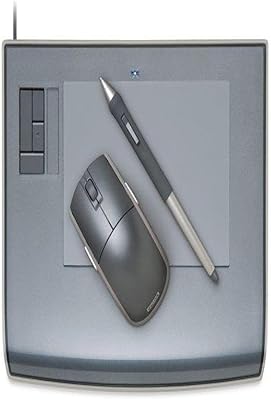
Wacom Intuos3 PTZ431W Wide Format Pen Tablet
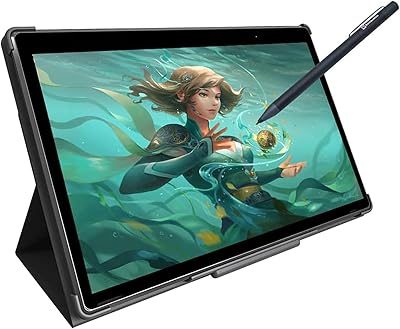
Simbans PicassoTab XL Standalone Drawing Tablet
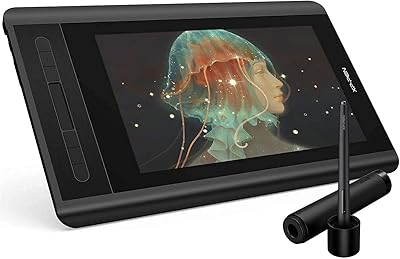
XP-Pen Artist 12 11.6-inch Pen Display
TUOHAITIME K10 11-inch Android Tablet
XP-Pen Star G960S Graphics Drawing Tablet

ASUS ProArt Display PA169CDV 15.6” 4K Pen Display
DOOGEE T30S 11-inch Android Tablet