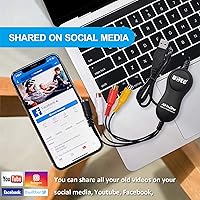

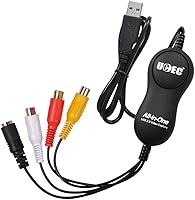
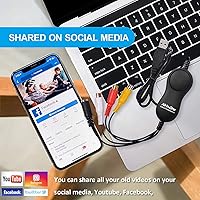
Overview

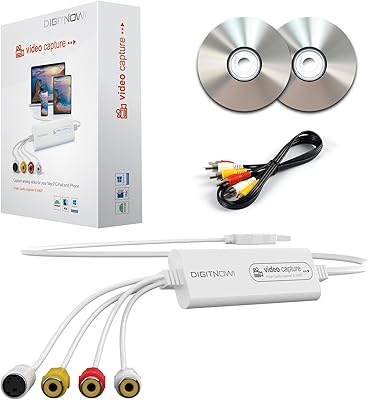
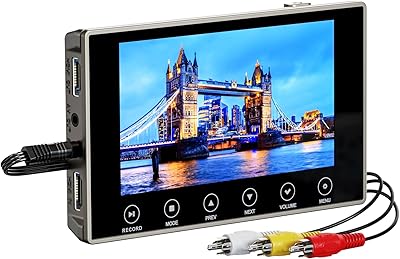
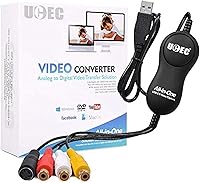
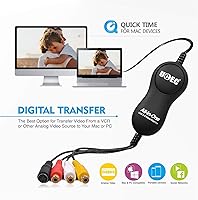
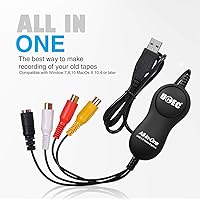
The UCEC VHS to Digital Converter Kit offers a straightforward solution for transforming old VHS, VCR, and Hi8 tapes into digital files. This plug-and-play device works with both Mac OS and Windows PCs via USB 2.0, making it compatible with a wide range of setups. There's no need for external power or complicated installation steps. With its simple design, it is perfect for digitizing family videos, preserving memories, and ensuring that precious footage doesn’t get lost over time.

Features & Benefits

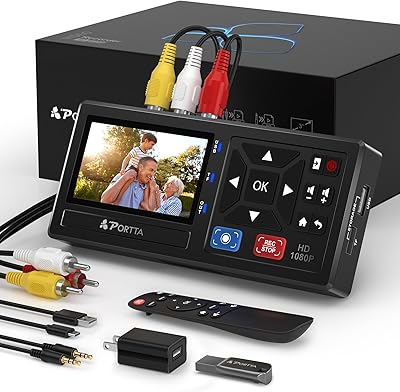
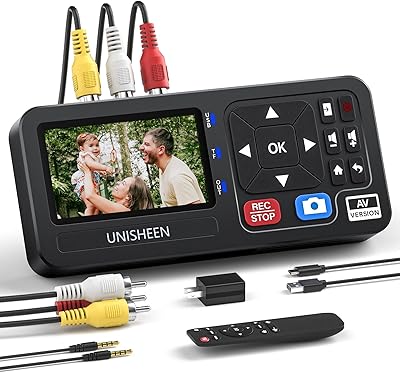
This video capture device supports multiple output formats, including AVI, MPEG, and MP3, ensuring your videos are compatible with a variety of devices. The kit includes RCA cables and user-friendly software to simplify the conversion process. Its compact design makes it portable, so you can take it anywhere, while the no-hassle setup ensures anyone can use it, even without technical expertise. The ability to convert analog video into digital format ensures your tapes will be preserved for years to come.

Best For

This VHS to digital converter is ideal for anyone looking to preserve old videos, especially those with VHS, VCR, or camcorder tapes. It's a great solution for families wanting to digitize home movies and memories. The simple, affordable nature of this device makes it perfect for users seeking a low-cost, easy-to-use tool for converting analog to digital. Additionally, it caters to both Mac and PC users who need a reliable video capture solution without the need for complex hardware or additional software.

User Feedback

Users generally appreciate the simplicity and ease of use, often highlighting how easy it is to start converting old tapes right out of the box. Many find it effective for preserving family videos, especially given its affordability. However, some users have reported occasional issues with video quality or software compatibility on certain systems. While the device is reliable for basic video capture, it may not satisfy users looking for advanced features or high-definition output. Overall, it’s a solid choice for those seeking a no-frills solution.

Pros

  • Simple, plug-and-play setup makes it easy to start using right away.
  • Works well with both Mac OS X and Windows PCs, offering broad compatibility.
  • The compact design makes it easy to store and transport for on-the-go use.
  • Supports multiple output formats like AVI, MPEG, and MP3, offering flexibility in how you store or share videos.
  • No external power needed, making it convenient for use in various environments.
  • Ideal for users looking to digitize old home videos without needing technical expertise.

Cons

  • Video resolution is limited to standard definition (480p), which may not meet the needs of users expecting HD quality.
  • The included software is basic and lacks advanced editing features for those who want more control over their videos.
  • Some users report compatibility issues with certain tape formats, especially older or unusual ones.
  • Occasional software bugs and crashes have been reported, affecting the overall experience for some users.
  • Not ideal for heavy or professional use, as some users noted concerns with long-term durability.
  • Output audio quality can be inconsistent, particularly with older tapes that may have degraded sound.

Ratings

After analyzing global user feedback from verified reviews across multiple languages and platforms, the UCEC VHS to Digital Converter Kit has received strong praise for its simplicity and effectiveness in preserving old memories. While users appreciate its plug-and-play setup and affordable price, some common concerns include occasional software compatibility issues. All reviews were carefully filtered to ensure only authentic, high-quality feedback contributed to these results, reflecting both the product's strengths and its minor drawbacks.

Ease of Use
88%
Many users highlight how easy it is to set up and use. The plug-and-play design allows for quick connections, requiring no technical skills or complicated setups. Even those without prior experience converting tapes find this device intuitive and hassle-free.
Some users report occasional glitches during the conversion process, where the device does not always recognize certain tapes or videos. A few also mention that the included software could be more robust for editing or managing files post-conversion.
Value for Money
91%
Buyers are pleased with the affordable price point, considering the capabilities this device offers. It provides a simple and efficient way to digitize old VHS and VCR tapes without requiring additional equipment, making it a great budget-friendly option for home use.
A few users feel the price is a bit high for the basic functionality it offers, especially considering the resolution of the converted videos. Some also mention that better value can be found in bundles that include additional features or higher-quality video capture.
Video Quality
75%
25%
The video quality is generally praised for being clear enough for home video preservation. It's ideal for users who want to digitize family videos without expecting professional-level results. Many appreciate the standard definition resolution that preserves the essence of old tapes.
However, several users report that the video quality falls short for more detailed or higher-resolution tapes. The standard-definition output is sometimes criticized for being too blurry or grainy, especially when compared to other digital converters that offer HD capabilities.
Software Compatibility
68%
32%
Many users find the included software easy to install and use. It works well on both Windows and Mac, with no major setup issues for most buyers. The software provides basic editing options that suit the needs of those who just want to convert their tapes quickly.
Some buyers experience issues with the software, particularly with compatibility on newer operating systems or occasional crashes during the conversion process. Others wish for more advanced editing features, as the basic software may not satisfy those who want more control over their video files.
Setup and Installation
94%
Buyers consistently mention how simple the installation process is. The device is truly plug-and-play, requiring no external power source or complex installations. This makes it perfect for users who just want to get started quickly without dealing with complicated drivers or software setups.
A small number of users note that the setup can be tricky if the device is used on very old computers or operating systems. Some also mention minor issues with recognizing the connected device initially, but these are often resolved with basic troubleshooting.
Portability
85%
The compact design of this video capture device makes it highly portable and convenient for users who need to take it on the go. It’s light enough to fit into a small bag, making it ideal for those who want to digitize old tapes while traveling or in various locations.
However, some users report that the small size can also make it feel flimsy. Although it’s portable, the lack of a sturdy build may be a concern for those who plan to use it frequently or store it in environments where it could be knocked around.
Build Quality
80%
20%
While the build quality is adequate for its purpose, it’s not overly bulky or heavy, making it easy to handle and store. Most users find it durable enough for regular use, especially for a product in this price range.
A few users feel the construction could be sturdier. The plastic casing may not inspire confidence for long-term use, and some have mentioned that it feels less durable than other, slightly more expensive models.
Customer Support
77%
23%
Several users have had positive experiences with customer support, noting that the team is responsive and helpful with setup issues or software troubleshooting. For many, getting assistance through email was straightforward and efficient.
However, a portion of users have complained about slow response times or difficulty reaching customer support. Some mention that responses were generic and didn’t fully address their specific issues, leaving them to figure out solutions on their own.
Included Accessories
82%
18%
The inclusion of RCA cables and a software disc in the package is highly appreciated, as these items are essential for the conversion process. The user manual is also straightforward, making it easy for buyers to get started right away.
A few users wish that more accessories were included, such as a higher-quality video editing program or additional cables. Some also find the RCA cables a bit short for their needs, requiring an extra purchase for more flexibility.
Long-term Durability
74%
26%
Many users note that the device works reliably for a long time, especially when used in short bursts for converting tapes. It’s good for occasional use and can withstand moderate handling without significant wear.
However, a few users report that over time, the device may show signs of wear, especially with frequent use. The connectors may become loose, and some users have experienced occasional connectivity issues after months of use.
Format Support
89%
The ability to output in multiple formats like AVI, MPEG, and MP3 is a big plus for users. It allows them to convert tapes into a variety of digital formats suitable for different devices, including older systems and modern platforms.
Though the format support is comprehensive, some users wish the device could handle higher-quality video formats like HD. Additionally, a small number of users experienced issues with MP3 audio conversions, where the output was not as expected.
Software Functionality
70%
30%
The software is sufficient for basic video conversion and editing tasks, making it a practical choice for users who don’t need anything too complex. The user interface is simple, which is appreciated by those with minimal video editing experience.
Unfortunately, the software is lacking in advanced features, and some users find it overly basic for their needs. It doesn't provide detailed control over video quality or other fine-tuning options, which could be a limitation for more experienced users.

Suitable for:

The UCEC VHS to Digital Converter Kit is ideal for anyone looking to preserve old VHS, VCR, or camcorder tapes in a digital format. It’s especially suitable for casual users, such as families or individuals with a collection of old home videos they want to save. Those on a budget will appreciate the affordable price point, as it offers a straightforward and simple solution for digitizing tapes without any need for additional equipment. Both Mac and PC users will benefit from the plug-and-play setup, which requires no technical expertise. Additionally, the compact design makes it convenient for users who need a portable video capture device for occasional use, such as preserving family memories during a move or relocation.

Not suitable for:

However, this device may not be the best fit for users seeking high-definition video conversion. Its standard-definition output is adequate for most casual users, but those expecting high-quality results, such as video professionals or enthusiasts, may be disappointed with the video quality. The included software is basic and lacks advanced editing features, so users who need more detailed control over their video files may find it insufficient. Additionally, users with very old or non-standard tapes may experience occasional compatibility issues. This converter is also not ideal for anyone looking for a solution that works well with frequent, high-volume conversions, as some long-term durability concerns have been raised in user feedback.

Specifications

  • Interface: Uses USB 2.0 for connection to Mac or Windows PCs.
  • Supported OS: Compatible with Mac OS X and Windows 7/8/10/11.
  • Input Types: Supports RCA and composite video inputs for analog video sources.
  • Output Formats: Supports AVI, MPEG, and MP3 formats for video and audio output.
  • Power Requirements: No external power required; powered via USB connection.
  • Capture Resolution: Captures video in standard definition (480p).
  • Software Included: Comes with video capture and editing software for both Mac and Windows.
  • Portability: Compact and lightweight design for easy portability and on-the-go use.
  • Cables Included: Includes RCA cables to connect the device to your video source.
  • Plug-and-Play: Simple, plug-and-play setup with no additional hardware or software needed.
  • Video Quality: Supports digitization of VHS, VCR, Hi8, and other analog video formats.
  • Compatibility: Works with most VHS, VCR, and camcorder tapes for easy conversion.
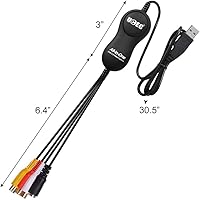
  • Dimensions: Compact dimensions, easy to store and transport.
  • Weight: Lightweight design for ease of use without added bulk.
  • Software Requirements: Compatible with video editing software for basic video adjustments.
  • Warranty: Includes standard manufacturer's warranty for quality assurance.

FAQ

Setting up this device is easy. Simply connect the RCA cables from your VHS player to the converter, then plug the USB end into your Mac or Windows PC. The converter requires no external power, and it works with the included video capture software for Mac or Windows.

The UCEC VHS to Digital Converter Kit supports multiple output formats, including AVI, MPEG, and MP3 for audio. This allows you to choose the format that best suits your needs for storage or sharing your digitized videos.

Yes, this device is compatible with both Mac OS X and Windows 7/8/10/11. Simply connect it via USB 2.0, and you're ready to start converting your old tapes to digital formats.

Yes, this converter is designed to work with various analog video formats, including VHS, VCR, and Hi8 tapes. It supports composite video inputs, allowing you to digitize a range of older video media.

No, everything you need is included. The kit comes with RCA cables, video capture software, and a user manual. It’s a plug-and-play solution with no need for additional software or hardware.

The video capture resolution is standard definition (480p), which is suitable for digitizing old family videos but may not meet the expectations of those looking for HD quality.

Yes, the software included with this converter allows basic video capture and editing. However, it lacks advanced editing tools, so if you require professional-level editing, you may need third-party software.

This device is compact and lightweight, making it easy to take on the go. It’s perfect for users who want to digitize their tapes in various locations without dealing with bulky equipment.

Some users report occasional video quality issues, especially with older or heavily degraded tapes. Audio quality can also vary depending on the condition of the tapes. In general, however, it performs well for most standard VHS tapes.

This device is ideal for people with old VHS, VCR, or camcorder tapes they want to preserve digitally. It’s a simple, affordable solution for home users who want to convert analog video to digital formats without needing technical expertise.