


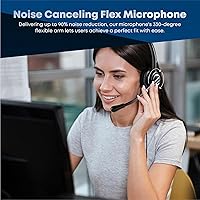
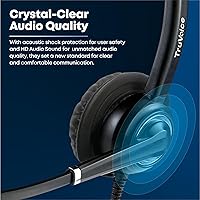

Overview

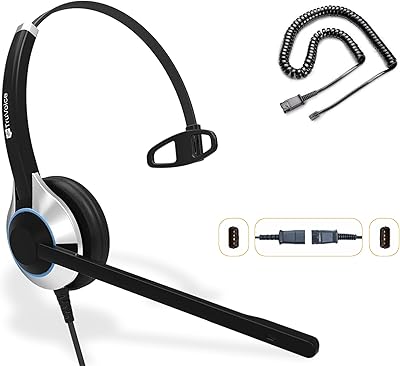
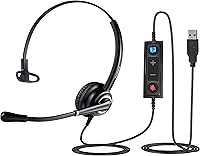
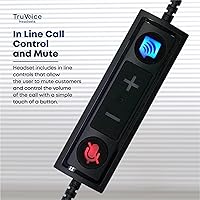
The TruVoice VoicePro 10 USB Monaural Headset occupies a practical sweet spot for professionals who spend their days on calls but still need to stay aware of what’s happening around them. The single-ear design is a deliberate choice here, not a compromise — it keeps one ear free so you catch a coworker walking in or a doorbell mid-meeting. Plug it into any USB port and Windows recognizes it almost instantly, with no drivers to wrestle with. The build is light enough that you genuinely forget you’re wearing it, and the in-line call controls for volume and mute are close enough to reach without breaking your flow.

Features & Benefits

The microphone sits on a 330-degree flexible boom, which makes it easy to position precisely in front of your mouth rather than vaguely near it — a small thing that makes a real difference in call clarity. The noise-canceling element filters out a reasonable amount of background noise, so your voice comes through cleanly even in a busy home environment. Acoustic shock protection in the speaker is worth mentioning specifically for call center users, since it guards your hearing if a caller’s line suddenly spikes loud. The leatherette cushion stays comfortable across long shifts, and the wired USB connection means no battery anxiety mid-call and virtually zero audio lag.

Best For

This USB headset makes the most sense for remote workers who genuinely need situational awareness — parents working from home, small office environments, or anyone who simply prefers not to feel cut off. Call center agents running Avaya, Cisco, or similar softphone platforms will find it connects and works without configuration headaches. It also handles Dragon NaturallySpeaking well, making it a reliable pick for dictation-heavy workflows. If you’ve been suffering through built-in laptop mic quality on Zoom or Teams calls, this monaural headset is a straightforward, no-fuss upgrade that doesn’t require a significant investment to notice the difference.

User Feedback

Buyers consistently highlight microphone voice clarity as the standout strength, with many noting their call quality improved noticeably after switching from laptop mics. Comfort over long sessions earns solid marks too, though a small number of users with larger heads mention the headband feels slightly tight after several hours. The in-line mute button gets praised for being easy to hit without looking, which matters when you’re mid-conversation. On the downside, a few users report occasional plug-and-play hiccups on certain Windows configurations, requiring a manual input switch in sound settings. Long-term durability appears reasonable, though some note the plastic components show wear after heavy daily use over many months.

Pros

  • Microphone clarity is noticeably better than built-in laptop mics, making a real difference on calls.
  • The single-ear design lets you stay aware of your environment without removing the headset mid-call.
  • Plug-and-play USB setup works without driver installation on most Windows systems.
  • Acoustic shock protection guards your hearing against sudden audio spikes, a practical feature for call center use.
  • At just 5.6 ounces, this USB headset is light enough to wear through a full workday without fatigue.
  • In-line mute and volume controls are easy to reach and operate during live conversations.
  • The flexible 330-degree mic boom allows precise positioning for cleaner voice pickup.
  • Compatible with a wide range of UC platforms including Teams, Zoom, Avaya, Cisco, and Dragon NaturallySpeaking.
  • No battery to charge or manage, so you never face a dead headset five minutes before an important call.
  • Leatherette ear cushion maintains comfort even during extended call center shifts.

Cons

  • Some users with larger heads report the headband feels uncomfortably tight after several hours of wear.
  • Occasional plug-and-play issues on certain Windows configurations require a manual sound settings adjustment.
  • The plastic construction shows visible wear with heavy daily use over many months.
  • Wired-only design limits movement and can feel restrictive if you need to step away during a call.
  • Not suitable for Mac users or non-standard operating environments without additional compatibility checks.
  • Sound isolation is limited by the single-ear format, which may be an issue in very loud environments.
  • The headset does not include a carrying case despite the product listing referencing one as a material.
  • Build quality feels functional but not premium, which may disappoint buyers expecting a more robust feel.

Ratings

Our AI rating system analyzed thousands of verified global user reviews for the TruVoice VoicePro 10 USB Monaural Headset, actively filtering out incentivized, bot-generated, and spam submissions to surface what real buyers genuinely experienced. The scores below reflect both the consistent strengths and the honest frustrations that emerged across a broad range of users, from home office workers to full-time call center agents. You will find the highs and the trade-offs represented transparently, so you can make a confident and informed buying decision.

Microphone Clarity
88%
Users consistently praised how clearly their voice came through on calls, with colleagues and clients frequently commenting on the improvement compared to built-in laptop mics. The noise-canceling boom mic earns particular respect from Dragon NaturallySpeaking users, who reported noticeably better dictation accuracy after switching to this USB headset.
In very loud environments, such as open-plan offices or households with young children, the noise cancellation has limits and some background sound still bleeds through. A handful of users noted occasional pickup of keyboard clatter when the boom is positioned too close to the desk surface.
Comfort & Fit
76%
24%
For average head sizes, the lightweight design genuinely holds up across a full eight-hour shift without causing the ear fatigue or headband pressure that heavier headsets produce. The leatherette cushion stays soft enough throughout the day that most users forget the headset is on during back-to-back calls.
Users with larger heads are a consistent exception, reporting noticeable headband tension after three to four hours that ranges from mildly annoying to genuinely uncomfortable. A few buyers with smaller heads also noted the headband sits loosely enough to shift position during movement, requiring occasional readjustment.
Call Audio Quality
84%
Incoming audio on calls sounds crisp and clear, with the HD speaker delivering enough fidelity for natural conversation without any of the tinny or muffled quality that cheaper headsets produce. The acoustic shock protection quietly does its job in call center environments, preventing the jarring audio spikes that come with difficult or noisy caller connections.
This is a communication-focused headset, not a multimedia one, and the audio profile reflects that — music or video content through the speaker sounds flat and lacks depth. Users who expected richer audio for casual listening alongside their calls came away disappointed by the narrow sound profile.
Setup & Compatibility
86%
The vast majority of Windows users reported a genuinely effortless plug-and-play experience with Teams, Zoom, Avaya, and Cisco softphones, getting on their first call within minutes of opening the box. The broad UC platform support means most professionals can connect it to their existing workflow without any IT involvement.
A meaningful minority of users encountered a frustrating quirk where Windows defaulted to the wrong audio device after plugging in, requiring a manual switch in sound settings. While the fix is simple, it catches new users off guard and can cause confusion right before an important call if they have not been forewarned.
Build Quality
68%
32%
The metal reinforcement in the headband gives the VoicePro 10 more structural integrity than fully plastic headsets in the same price range, and the overall assembly feels solid enough for daily professional use. Most users found it survived the routine bumps and drops of an active desk environment without any immediate damage.
After several months of heavy daily use, plastic components around the adjustment slider and cable connection points show visible wear that undermines confidence in long-term durability. Some users described a loosening of the headband adjustment mechanism over time, which affects fit consistency and feels out of proportion to the relatively short period of use.
In-Line Controls
81%
19%
The placement and size of the mute button hit a practical sweet spot — easy to find by touch during a live conversation without needing to look away from the screen. Volume adjustment via the inline wheel is smooth and responsive, making it simple to dial down a particularly loud caller without fumbling around.
The absence of any LED mute indicator means you cannot confirm your mute status at a glance, which creates occasional anxious moments during meetings. Users coming from headsets with hardware mute lights found this omission noticeable, and relying solely on the software indicator inside Teams or Zoom adds a small but real cognitive burden.
Single-Ear Design
79%
21%
For the target audience of remote workers and call center agents, the open-ear format is a practical and well-executed design decision rather than a limitation — it lets you catch a manager walking over, hear a child in the next room, or stay aware of an office environment without removing the headset between calls.
Buyers who did not fully understand the monaural format before purchasing expressed frustration that audio only plays from one side, which feels disorienting if you are used to stereo headsets. In genuinely noisy environments, the open ear can actually work against you by letting in enough competing sound to make concentration difficult.
Value for Money
83%
Relative to the performance it delivers — particularly the microphone quality and UC platform compatibility — the price positions this monaural headset as one of the more honest options in the mid-range category. Users upgrading from sub-ten-dollar headsets described the jump in call quality as disproportionate to the cost increase.
Buyers comparing it directly against slightly pricier options with better build materials, stereo audio, or wireless connectivity may feel the value proposition weakens when those alternatives are on the table. Durability concerns over an extended period also erode the perceived value for users who expect a headset to last two or more years under daily use.
Mic Boom Flexibility
82%
18%
The 330-degree rotation range gives users genuine freedom to position the microphone exactly where it captures voice best, whether that is slightly to the side, angled downward, or directly in front of the mouth. Call center agents in particular appreciated being able to fine-tune positioning once and leave it reliably in place throughout the day.
The boom does not lock into position with a click mechanism, so over repeated adjustments it can drift slightly from its intended angle if bumped or brushed during use. This is a minor inconvenience for most, but users who need the microphone in a very specific position for Dragon software accuracy found it mildly frustrating to re-set.
Durability Over Time
63%
37%
For users who treat the headset with reasonable care and are not in a high-wear call center environment, the build holds together adequately across the first six to twelve months of regular use. The included spare ear cushion is a practical inclusion that extends the usable life of the headset without requiring a separate purchase.
Reports of wear-related issues start appearing in buyer feedback around the six-month mark, with the most common complaints focusing on the ear cushion surface beginning to peel and the headband adjustment becoming less secure over time. Users in demanding call center environments where headsets are in use for eight or more hours daily tend to see degradation sooner than home office users.
Noise Isolation
61%
39%
The leatherette cushion provides enough passive isolation on the covered ear to keep call audio audible in moderately noisy settings, and users in standard home office environments rarely found external noise competing with incoming call audio at reasonable volume levels.
Single-ear headsets inherently offer limited noise isolation compared to closed-back stereo models, and in open-plan offices or noisy households this becomes a real productivity issue. Several users noted they had to raise volume to uncomfortable levels in louder settings, which partially defeats the purpose of the acoustic shock protection.
Cable Quality
71%
29%
The cable length is practical for a desktop setup, giving enough reach from a tower PC or laptop without creating excess slack that tangles across the desk. The USB connector feels secure in the port and does not wobble or disconnect with normal desk movement.
The cable lacks a braided or reinforced outer sheath, which means it is susceptible to kinking and tangling near the USB connector with repeated coiling and uncoiling. A few long-term users noted fraying near the in-line control module after extended daily use, suggesting the cable junction points are the weakest link in the overall construction.
Platform Software Integration
77%
23%
The headset registers cleanly across Teams, Zoom, Skype, and the major Avaya and Cisco softphone clients, and basic call functions work without needing to configure anything inside those applications. Dragon NaturallySpeaking users reported reliable and consistent recognition with minimal setup required beyond selecting the headset as the input device.
The in-line controls do not integrate at a hardware level with UC platform call functions like answer, reject, or hold — those actions still require interaction with the software. Users expecting a fully UC-integrated experience with Teams or Zoom at a hardware button level will need to adjust their expectations or invest in a certified UC headset.

Suitable for:

The TruVoice VoicePro 10 USB Monaural Headset was clearly designed with a specific type of worker in mind, and it delivers best when matched to the right person. If you work from home and need to stay aware of your surroundings — whether that means hearing kids, a doorbell, or a colleague in the next room — the single-ear format genuinely solves a real problem rather than creating one. Call center agents who spend six or more hours daily on softphone platforms like Avaya or Cisco will appreciate how light it feels after a full shift and how reliably it connects without fussing with drivers. It also suits professionals who rely on Dragon NaturallySpeaking for dictation, since the noise-canceling boom mic gives the software a clean, consistent audio signal to work with. Anyone currently struggling with the audio quality of a built-in laptop microphone on Teams or Zoom calls will notice an immediate and meaningful improvement.

Not suitable for:

The TruVoice VoicePro 10 USB Monaural Headset is not the right tool for everyone, and being upfront about that saves frustration. If you need stereo sound for music listening, video editing, or immersive media consumption, a monaural headset will feel limiting by design — this is a communication tool, not an entertainment device. Users who move between a laptop and multiple workstations, or who prefer wireless freedom to roam during calls, will find the wired USB connection restrictive. The plastic construction, while adequate for typical office use, may not satisfy buyers expecting the premium feel of higher-end professional headsets in a higher price bracket. People with larger heads have noted the headband can feel snug over extended wear, so fit comfort is worth considering if that applies to you. Mac users or those on older or unusual operating systems should also verify compatibility before committing, as the platform support is primarily Windows-oriented.

Specifications

  • Headset Type: Monaural (single-ear) wired USB headset designed for voice communication in office and call center environments.
  • Connectivity: Wired USB connection requiring no drivers or additional software for basic plug-and-play operation on Windows.
  • Microphone Type: Noise-canceling microphone mounted on a flexible 330-degree rotational boom arm for precise positioning.
  • Speaker Type: Dynamic driver HD audio speaker with built-in acoustic shock protection against sudden loud audio spikes.
  • Ear Cushion: Leatherette ear cushion designed to maintain comfort during extended multi-hour wearing sessions.
  • Headband: Adjustable lightweight headband constructed from metal and plastic to balance durability with all-day wearability.
  • In-Line Controls: In-line control unit provides dedicated volume adjustment and a mute button without requiring access to the PC.
  • Impedance: Speaker impedance is rated at 150 Ohm, optimized for USB-connected voice communication applications.
  • Weight: The complete headset weighs 5.6 ounces, keeping it light enough for continuous wear throughout a full workday.
  • Form Factor: Single-sided over-ear form factor that covers one ear while leaving the other fully open to the surrounding environment.
  • Materials: Headset body is constructed from a combination of metal, plastic, and rubber components.
  • Compatible Platforms: Works with Microsoft Teams, Zoom, Skype, Avaya, Cisco softphones, and Dragon NaturallySpeaking without additional configuration.
  • Noise Control: Active noise cancellation is applied at the microphone level to reduce ambient background noise during calls.
  • Package Contents: Box includes the headset, replacement ear cushions, headband, and a printed user manual.
  • Package Dimensions: Retail packaging measures 7.44 x 5.98 x 1.69 inches for reference when assessing storage or shipping requirements.
  • Model Number: Official model designation is VoicePro 10, part of TruVoice’s VoicePro headset range.
  • Availability: This headset has been available on the market since April 2020 and holds a Best Sellers Rank of #515 in Telephone Headsets.

Related Reviews
Andrea NC-181VM USB
Andrea NC-181VM USB
76%
88%
Microphone Clarity
93%
Ease of Setup
71%
Comfort During Extended Use
74%
Build Quality
69%
Noise Cancellation Effectiveness
More
MAIRDI M805DUC USB Headset
84%
88%
Microphone Clarity
79%
Noise Cancellation
82%
Comfort & Wearability
86%
Build Quality
77%
Audio Playback Quality
More
Callez C500U2 USB Headset
79%
84%
Microphone Clarity
88%
Wearing Comfort
63%
Build Quality & Durability
71%
Audio Playback Quality
54%
Noise Cancellation (Listener Side)
More
TruVoice HD-500 Wired Office Headset
80%
88%
Call Audio Clarity
83%
Noise-Canceling Microphone
81%
Comfort During Extended Wear
79%
Quick-Disconnect Functionality
74%
Build Quality & Durability
More
Yealink UH37
Yealink UH37
79%
86%
Microphone Clarity
63%
Noise Cancellation
74%
Comfort for Extended Use
81%
Build Quality
91%
USB Compatibility
More
KEMEILE KML02DUSB USB Headset
85%
88%
Audio Quality
91%
Comfort for Long Use
85%
Noise-Cancelling Performance
84%
Microphone Clarity
72%
Build Quality
More
Logitech H570e Mono USB Headset
74%
79%
Microphone Quality
63%
Audio Clarity
76%
Comfort & Fit
61%
Build Quality
93%
Ease of Setup
More
Logitech H390 USB Computer Headset
83%
86%
Microphone Voice Clarity
93%
Value for Money
97%
Ease of Setup
68%
Long-Term Comfort
82%
In-Line Control Tactility
More
Logitech H540
Logitech H540
78%
83%
Microphone Clarity
78%
Comfort & Fit
74%
Audio Quality
61%
Build Quality & Durability
94%
Plug-and-Play Convenience
More
Yealink UH35 USB Headset
80%
83%
Microphone Clarity
88%
Wearing Comfort
79%
Build Quality
63%
Ear Pad Durability
93%
Plug-and-Play Setup
More

FAQ

For most Windows users it is genuinely plug-and-play — plug it in, and Windows recognizes it within seconds. That said, a small number of users find that their system defaults to the wrong audio output after connecting, so if you hear nothing on a call, go into your sound settings and manually switch the input and output to the headset. It takes about thirty seconds to fix and you only have to do it once.

It works with both Teams and Zoom without any certification requirements for basic call audio. You can manage mute and volume from the in-line control on the cable. The one thing to note is that the in-line button is not a Teams-native call-answer button, so you will still answer calls through the app itself rather than the headset.

Yes, this is actually one of the better use cases for this monaural headset. The noise-canceling boom mic gives Dragon a clean, consistent voice signal, which directly improves recognition accuracy. Position the boom so it sits just off to the side of your mouth rather than directly in front, and you should get reliable results.

Acoustic shock happens when a sudden, unexpected loud noise — like a caller slamming a phone or a feedback spike — blasts through the speaker at high volume. Over time, repeated exposure can cause real hearing fatigue or discomfort. The protection built into this headset limits those peak spikes automatically, which is especially relevant for call center agents who are on the phone all day with unpredictable callers.

The headband is adjustable and accommodates most head sizes comfortably, but a notable portion of buyers with larger heads have mentioned it feels snug after three or four hours. It is not painful for most people, but if you know your head size runs large, it is worth being aware of before buying. Smaller-headed users generally find the fit secure without any pressure issues.

The TruVoice VoicePro 10 USB Monaural Headset is primarily designed and marketed for Windows environments, and the documentation focuses on Windows compatibility. Many USB audio devices do work on Mac at a basic level since macOS supports generic USB audio, but TruVoice does not officially list Mac as a supported platform, so compatibility cannot be guaranteed and technical support may be limited if issues arise.

No, this headset uses a USB connection, which means it only works with devices that have a USB port — primarily computers and laptops. Standard desk phones use either a 2.5mm or RJ9 headset jack, which is a completely different connection type. If you need something for a desk phone specifically, you would need a different model designed for that purpose.

The mute button sits on the in-line control module on the cable, which is easy to reach without looking. However, there is no LED mute indicator on this headset, so you cannot visually confirm your mute status at a glance the way some higher-end models allow. Most users rely on the visual mute indicator within their calling app, such as Teams or Zoom, to confirm status.

For moderate to heavy daily use, the headset holds up reasonably well in the short to medium term. The metal and plastic construction is functional rather than premium, and some users note that the plastic components show visible wear after many months of continuous daily use. It is not a headset built to last five years of heavy abuse, but for its price point it offers solid value through a typical replacement cycle.

The leatherette ear cushion can be wiped down with a lightly dampened cloth or a gentle disinfectant wipe. Avoid soaking the cushion or using alcohol-based cleaners directly on the leatherette surface repeatedly, as this can dry out and crack the material over time. The package does include a spare ear cushion, which is a helpful addition if the original shows wear or needs replacing.